ISP Monitoring Explained: How to Measure, Manage, and Improve Internet Performance
Key Takeaways
- Modern internet performance monitoring goes beyond uptime. Visibility across availability, latency, throughput, and packet loss helps teams identify issues before they impact users or AI-driven workloads.
- Distributed architectures demand distributed visibility. With hybrid cloud environments, SaaS tools, and remote users everywhere, real-time, end-to-end monitoring is the only way to ensure consistent digital experience.
- AI and automation amplify both the stakes and solutions. LLM-powered applications depend on reliable, low-latency connectivity, and AI-driven monitoring can predict or remediate issues before they cause downtime.
Reliable internet connectivity isn’t a convenience. It’s mission-critical infrastructure for modern organizations.
Every organization today depends on high-speed, reliable internet access for daily operations—from cloud collaboration and data transfer to streaming, remote work, and customer engagement.
As digital transformation accelerates, the rise of AI, large language models (LLMs), IoT, and device sprawl has massively increased bandwidth demand and network complexity. Maintaining quality connectivity — where quality is a function of availability, capacity, security, and continuity — is now essential to business performance.
Yet gaining visibility into the internet outside your own network remains difficult. The link between your router and your internet service provider (ISP) is only one part of a vast, global infrastructure where user demand, routing policies, and upstream outages can all affect performance.
Why ISP Monitoring Matters
Even short internet outages can ripple through entire industries — grounding airlines, disrupting online banking, or halting remote operations. Imagine the damage to healthcare providers and hospitals. In 2024 alone, there were 225 major internet disruptions, mainly caused by cable cuts, power outages, and government-directed shutdowns.
Even if it’s only a minor outage, what is the cost of this damage? The Uptime Institute’s Annual Outage Analysis 2025 found that over half of organizations report downtime costs exceeding $100,000 per incident.
With internet performance so directly tied to productivity, customer experience, and revenue, monitoring your ISP connection has become a critical part of operational resilience. It helps teams detect degradation early, verify SLA compliance, and mitigate downtime risks.
What is ISP/internet monitoring?
ISP internet monitoring involves the use of specialized tools to check the status of connectivity between one’s internal network and the internet service from your provider of choice.
Monitoring is crucial in identifying potential service issues such as lags or drops, or verifying that you are actually getting the quality of service as per service level agreement (SLA).
How ISP monitoring works
ISP monitoring typically follows a simple flow: data is collected from routers, endpoints, and network devices, then analyzed to measure latency, bandwidth, and uptime across connections.
Monitoring tools aggregate this data into dashboards that visualize service quality and trigger alerts when performance dips below expected thresholds. Some providers and enterprises also use deep packet inspection (DPI) to gain visibility into traffic patterns and troubleshoot issues at the packet level.
ISP monitoring metrics
Key ISP/internet monitoring metrics to track include:
Uptime
This popular measure is a result of the delta of ISP-agreed availability and actual, experienced downtime. It is usually computed as a percentage of the agreed availability i.e.
Uptime =(Agreed Availability-Downtime)/Agreed Availability
Other ways uptime may be measured include:
- The frequency of downtimes in a given period, e.g. month. This is MTBF: mean time between failures.
- The average time it takes for the ISP to restore service after a downtime This is MTRS: mean time to restore service.
High uptime ensures business operations, websites, and customer-facing apps remain continuously available.
(Related reading: uptime monitoring & availability management.)
Speed
Speed relates to the actual data transfer rate versus the allocated rate (bandwidth) that the ISP has assigned to your connection. This measure is usually reported as megabytes or gigabytes per second (Mbps/Gbps) and is in two dimensions:
- Upload speed for transfers from your network to the ISP and beyond
- Download speed for transfers in the opposite direction
Faster upload and download speeds improve productivity and reduce delays in cloud-based workflows.
While ISPs assign you a specific bandwidth based on your price point, they would usually give a caveat that speed is relative to usage where a shared connection has been deployed. During a peak period where other users are hogging the same ISP network in your locality, the speeds may be slower that usual.
Latency
Closely related to speed, latency is the measure of the actual round-trip time that data takes to get across your ISP connection (commonly referred to as ping). Latency is usually computed in milliseconds.
High latency (that is, poor latency) results in delays or lags that are especially disruptive when using time sensitive applications. High latency can impact video calls, customer support platforms, and SaaS performance — especially for distributed teams.
Packet loss
With packet loss, the data transfer is incomplete as some of the data packets from your ISP to your device get dropped along the way. (Data packets are fundamental data units in the protocols involved in transferring data across applications.) Packet loss is a quality measure that is usually represented as a percentage.
Packet loss disrupts data integrity, which can cause issues. Packet loss can be caused by configuration issues or misbehaving network equipment, resulting in poor internet experience such as buffering, errors, and disconnections.
Jitter
Closely related to packet loss is jitter. Jitter refers to variation in the time data packets arrive to your network when transported across the different routes used by your ISP. If packets fail to reach in the correct sequence because of congestion or connection issues, the end result is buffering as the application spends more time reassembling the packets.
Jitter is usually measured in milliseconds, and any amount above 30ms is deemed unbearably high. High jitter leads to inconsistent performance in real-time applications like conferencing and gaming.
Approaches to ISP monitoring
To monitor the quality of ISP internet services, there are several approaches you can consider:
Web browser tools
Browser extensions can be used to monitor and test connectivity, including measuring latency by pinging your ISP’s public addresses.
Computer tools
The command line interface (CLI) allows users to enter commands to diagnose and troubleshoot network-related issues. Examples of such commands include:
pingto check connectivity and latencytracertto track the path between your local network and the ISPipconfigto check network configurations
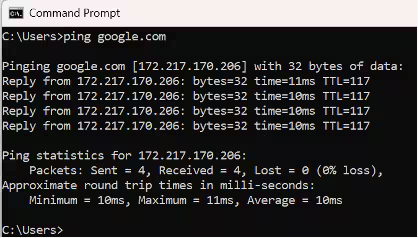
Ping command example
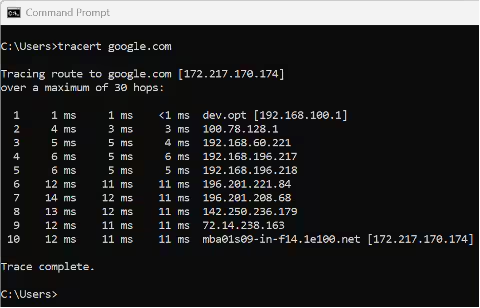
Trace route command example
Network monitoring tools
Network monitoring tools like Splunk Observability Cloud are open-source or proprietary software solutions that leverage the network commands and other capabilities, such as installed sensors, to interrogate status of ISP network elements, visualize connectivity and metrics, display issues, and generate alerts.
ISP monitoring portals
On their websites or account management portals, ISPs may provide visibility into their own network monitoring tools. This are available for clients to check whether there are issues. Usually these portals display only high-level information like a status indicator (think traffic light symbols) and a summary of any current issues being experienced. Details on configurations, for example, are rarely shared.
Third party monitoring services
Third-party monitoring services are companies who monitor global internet connections. Examples include Netblocks, Ookla, and Downdetector.
Typically, these third-party services use a combination of their own network monitoring tools (such as software agents installed in major internet hubs) and other information sources. Together, this provides information on metrics like connectivity status, up/download speeds, outages, and traffic patterns on a local or grand scale.
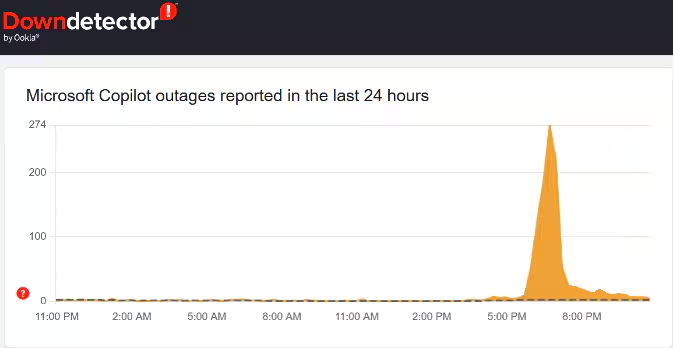
Sample problem report from Downdetector
Social media trends
Instead of using tools, you can always crowdsource information! Checking social media sites and forums like Reddit is an easy, often speedy way to on find out if your local ISP is having outages or performance issues. Here you will find complaints and insights from customers, influencers, and other interested parties who will share on their experiences with internet services.
Keep in mind that checking social for this info is not foolproof: the issues being reported may not necessarily be related to the state of your own ISP connection.
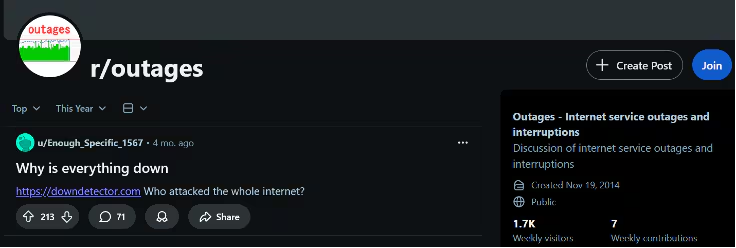
Subreddit on Internet Outages (r/outages)
Note that no single approach can comprehensively give you visibility on the status of your ISP’s services, so it is prudent to combine multiple approaches to get a holistic picture.
Best practices for monitoring internet service providers
These best practices help ensure your monitoring strategy delivers reliable insights, measurable improvements, and ultimately greater resilience.
- Define key performance metrics early. Prioritize what matters most — uptime, latency, throughput — based on business and SLA requirements.
- Use multiple data sources. Combine flow data, telemetry, and synthetic monitoring for a complete picture.
- Set intelligent alert thresholds. Focus on anomalies that impact users instead of flooding teams with noise.
- Correlate network and application data. Understand whether performance drops stem from ISP issues or internal systems.
- Continuously benchmark provider performance. Compare ISP SLAs over time to detect degradation and support vendor accountability.
Following these practices helps ensure your monitoring efforts translate into measurable reliability and better digital experiences.
Final thoughts
For most organizations, normal operations and generating revenue depends heavily on internet connectivity. Monitoring ISP performance helps protect against productivity loss, ensure SLA compliance, and maintain business continuity.
By monitoring the quality of ISP internet services, you get a good grasp on the state of connectivity — putting you in a better position to share reliable data with support staff for faster troubleshooting. This visibility offers an earlier return to normal, which contributes to keeping productivity and customer satisfaction levels high.
Monitoring is also key in ascertaining whether the received quality matches agreed service levels, which can allow for service credits in case your ISP does not meet the expected standards. The right combination of metrics and approaches can go a long way in ensuring value for money for the organization from their investment in ISP internet services.
FAQs about ISP Monitoring
Related Articles

How to Use LLMs for Log File Analysis: Examples, Workflows, and Best Practices

Beyond Deepfakes: Why Digital Provenance is Critical Now

The Best IT/Tech Conferences & Events of 2026

The Best Artificial Intelligence Conferences & Events of 2026

The Best Blockchain & Crypto Conferences in 2026

Log Analytics: How To Turn Log Data into Actionable Insights

The Best Security Conferences & Events 2026

Top Ransomware Attack Types in 2026 and How to Defend