Using Splunk to Detect Abuse of AWS Permanent and Temporary Credentials

- They are short termed. They are valid from 15 minutes to up to 36 hours. Once they expire, API programmatic access is denied.
- These credentials are not stored and are created on the go when requested by the user. The user can always request new credentials as long as it is authorized to do so.
Users signed with federation, cross account role, or service account role can work with IAM Service and request or create temporary credentials.
AWS Security Token Service is a global service with a single endpoint sts.amazon.com. This single endpoint however can respond to all regions and be adjusted per specific region conditions or requirements.
Advantages of AWS STS Credentials
- Great for use and discard or expire scenarios such as providing temporary access without creating an identity within the IAM AWS environment.
- No need to risk embedding long term credentials in an application environment.
- Since they are set to expire, there is no need to revoke or rotate. These credentials can be set up to be valid for specific periods of time.
It is also important to understand that at times the abuse of temporary tokens may lead to the creation of permanent keys as well. Let’s start by looking at several scenarios involving permanent keys and temporary credentials.
1. Permanent Key
A permanent key is used to make programmatic calls to AWS or to use the AWS Command Line Interface or AWS Tools for Powershell. * This key can be created through the GUI web IAM management interface. This key is also issued with a secret access key which allows users to make API calls. Once the permanent key, usually starting with the letters “AKIA” is issued, users can download them. These keys can last pretty much as long as needed and they are prime targets for attackers, as they usually can potentially open the doors and provide full access to the organization's account.
An AWS IAM user is limited to two permanent keys. It is not usual for an user to create or change permanent keys unless indicated by policy, attackers can potentially create an additional key to establish persistence or even escalation of privileges by using created key and subsequently target other roles. So the creation of a permanent key is in itself an event that must be monitored.
Temporary Credentials
Unfortunately temporary credentials can be abused as researched by Jenko Hwong from Netskope. There are some scenarios where these credentials can be abused and provide attackers with further privileges and access in AWS environments. These scenarios can also be difficult to spot. Here are 2 scenarios where these temporary credentials via AWS STS can be abused. They all have one prerequisite which is that an attacker must get a permanent key or be able to obtain access and abuse on a temporary session via exploitation or by other means such as phishing or for example API keys leaked on the internet.
2. Temporary Token (sts:AssumeRole)
AWS Security Token Service (AWS STS) is a service for providing trusted users with temporary security credentials that can control access to your AWS resources.* These credentials work almost exactly like long-term credentials. However they are different based on two aspects. A.) Temporary security credentials are short termed (15m to 36h). B.) These temporary security credentials are generated dynamically and provided by request. Attackers can take advantage of this service by assuming roles or creating temporary tokens which can allow them to move laterally or escalate privileges.
3. Temporary Token Print (sts:GetSessionToken)
The sts:GetSessionToken string is part of the temporary token service and it provides temporary credential information for an specific AWS account or IAM user. GetSessionToken is used to protect programmatic calls to specific AWS API operations. MFA enabled IAM users would execute GetSessionToken calls and submit a MFA code. These calls may vary if users are logging in from identity single sign on providers like Okta. Duration of GetSessionToken obtained credentials are also short term (15 minutes, up to 36 hours). According to AWS, temporary security credentials created by GetSessionToken can be used to make API calls to any AWS service with two exceptions.
- Cannot call any IAM API operation unless MFA authentication information is included in the request (This can vary for example if the user has authenticated via a SSO identity provider, user may not need to provide MFA info in such calls). This scenario makes it easier for attackers to abuse it as long as they are within the SSO session and GetSessionToken temporary credentials duration. In other scenarios the user has to provide things such as SerialNumber associated with a hardware device or tokencode which can be produced via a TOTP (Time based One Time Password) framework.
- Cannot call any STS API except AssumeRole or GetCallerIdentity.
These constraints however may not really prevent attackers that are able to obtain these temporary tokens as there is an extensive number of services that respond to AssumeRole API programmatic calls. Also the creation of these tokens cannot be prevented.
Here is a scenario based on abuse of Permanent Keys & AWS STS tokens (Reference - Netskope Securing AWS Temporary Tokens)
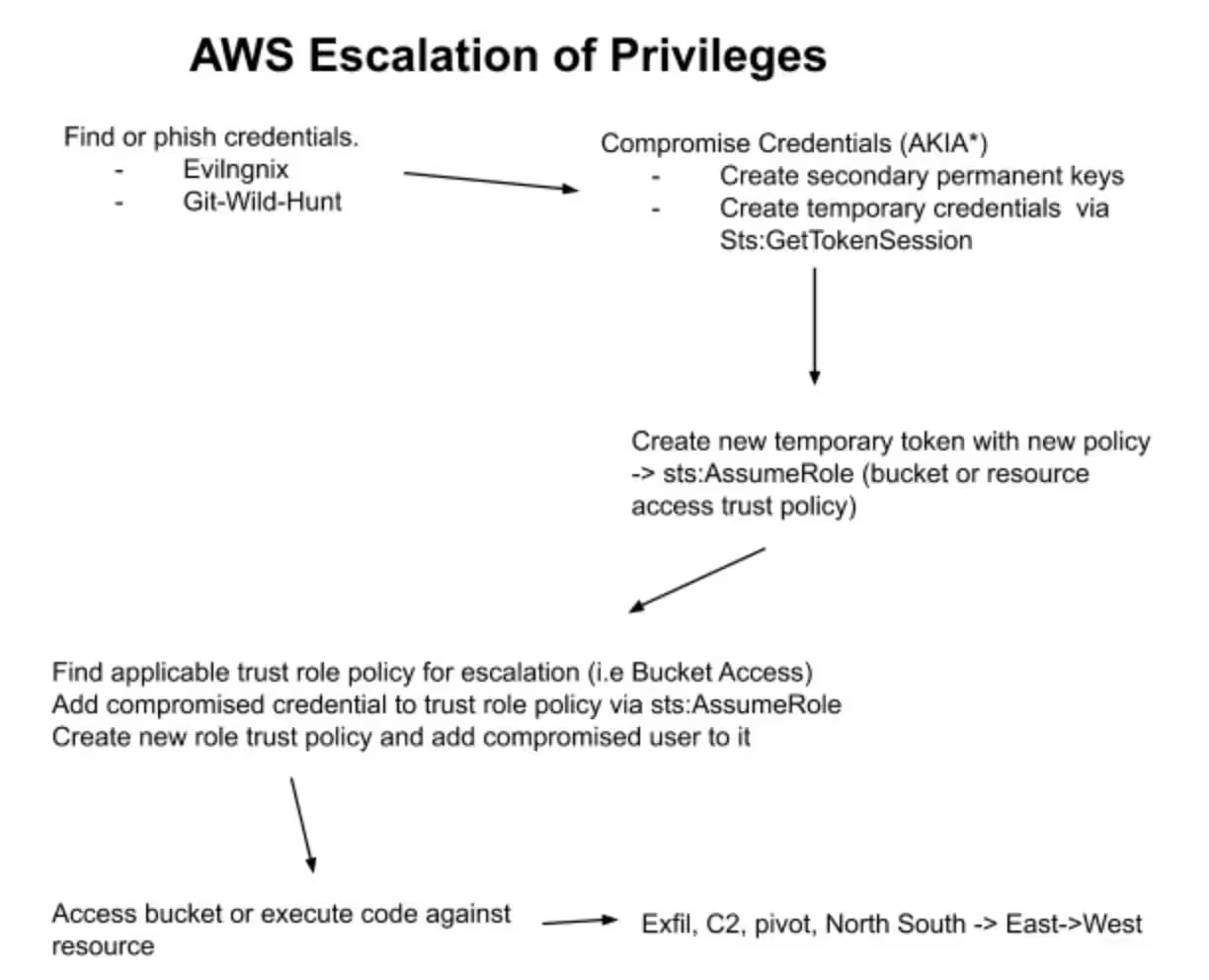
Detection Via Splunk
Based on the above scenarios we can come up with some initial detections for 3 scenarios related to AWS permanent and AWS STS temporary token abuse.
First Scenario: Permanent Keys
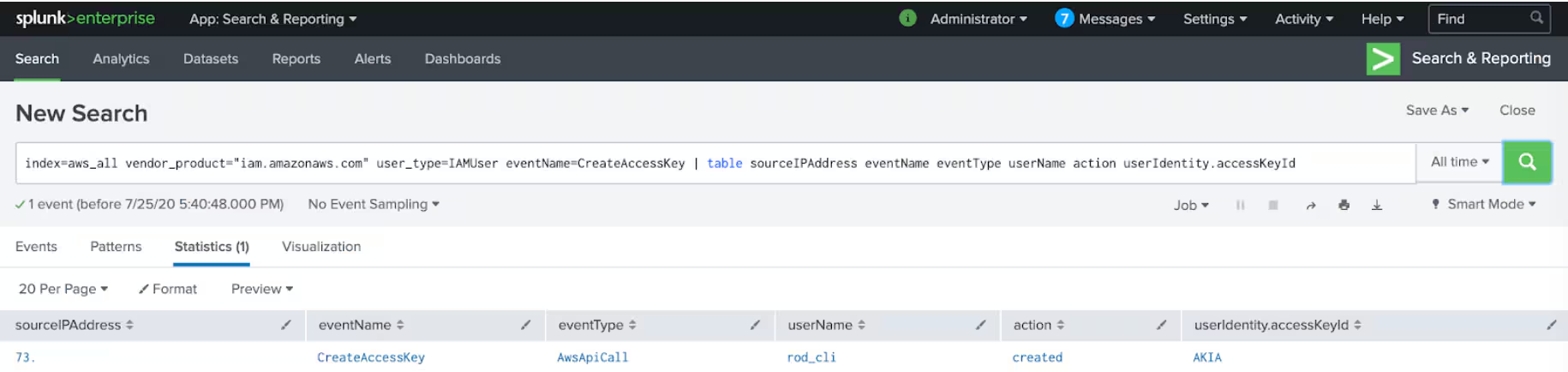
As explained above the creation of permanent keys in AWS. They should not be created by default and only created for programmatic access via API. AWS Permanent API access keys which usually start with AKIA* should be monitored. We can take advantage of Cloudtrail logs via AWS add-on and AWS App for AWS and create detections for the above scenarios. The next graph shows detection of creation of permanent key in an AWS IAM organization’s framework.
This first search will detect users creating permanent keys and will provide the type of event, source IP address and action.
The second search provides a more detailed picture of who is creating the keys, where this action is coming from and what possible tools are being- used while accessing AWS API.
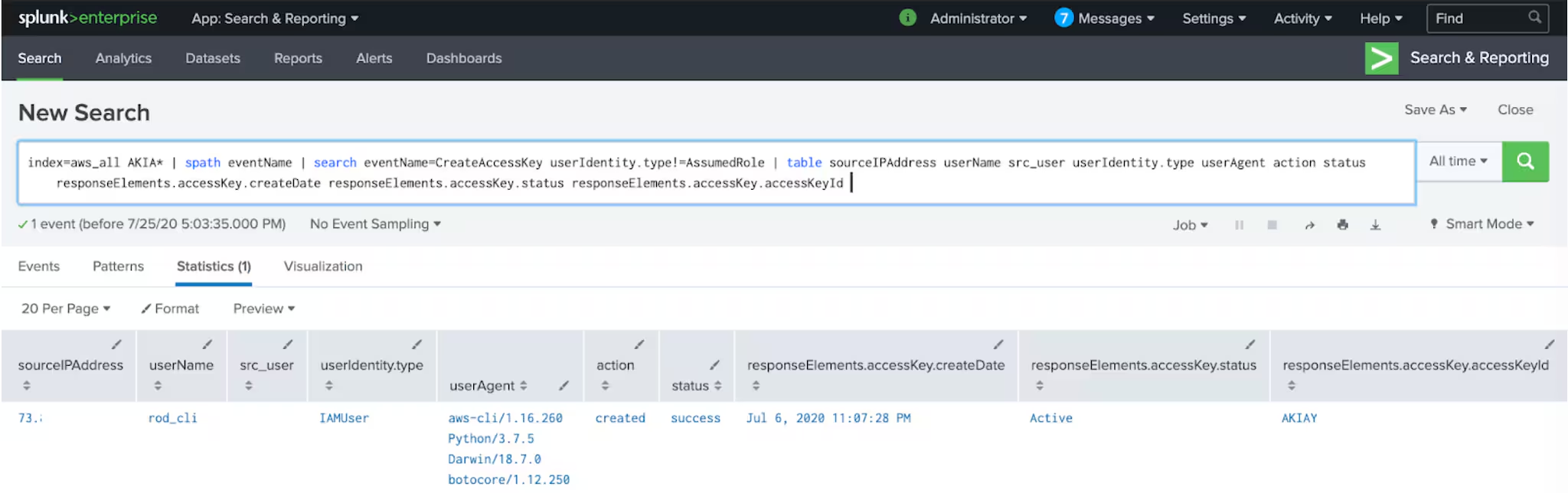
Notice that we are excluding userIdentity.type!=AssumedRole which relates to temporary credentials so we can find specifically what user from IAM is creating permanent keys. Also notice we are getting a user agent which gives clues about operating system type and software frameworks. We also get when the keys were created, the actual key and the status of such keys.
Second Scenario: Temporary Tokens
Attackers can create temporary tokens by abusing trust relationships which are represented in the form of Roles within AWS IAM service. As a feature of AWS IAM, AWS STS service provides the AssumeRole in which allows users to temporarily access resources they may not have access to. Depending on policy context, an attacker can abuse this by using role inherited privileges from a compromised account or they can add themselves to a targeted role trust policy. By doing so the attacker is able to expand access and possibly privileges depending on the ability to target a role trust policy or even create one that allows them further access. These keys always start with ASIA*. We can craft a detection search that gives us what IP address requested sts:Assume, the identity ARN, user agent (from AWS console or CLI), access key, action, what role was requested and what role was given in response, or if it was created successfully. The detection search below should provide enough information to craft alerts and further investigation.
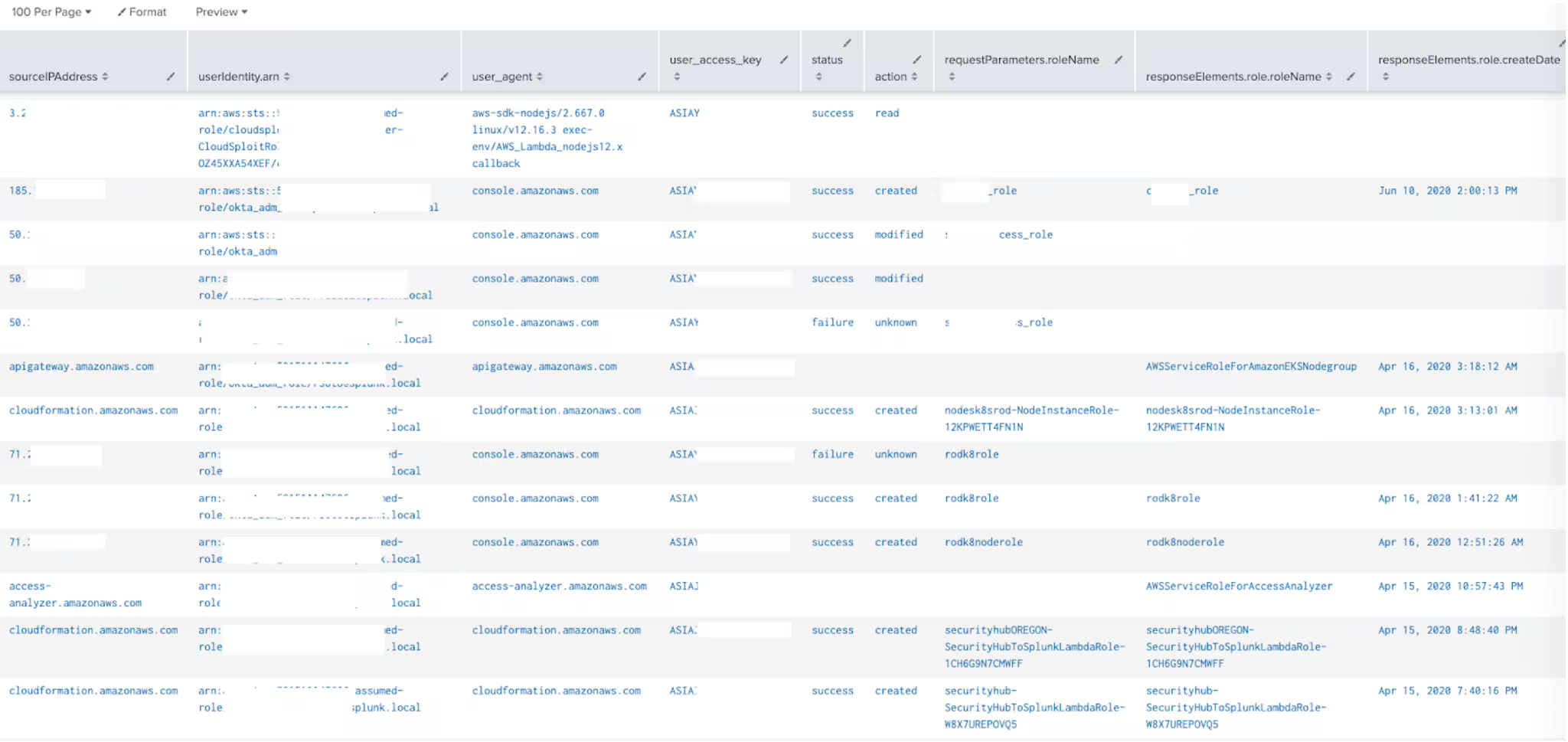
The above search can be further refined by specifying values in the syntax fields, for example specifying only user agents from CLI or failure status, or IP lookups from allow deny list or security groups. When dealing with Sts:Assume role it is possible to get large number of false positives so it is important to understand that this search will likely need to be refined depending on the environment.
Third Scenario: Temporary Token Print (sts:GetSessionToken)
The sts:GetSessionToken string is part of the temporary token service and it provides temporary credential information for an specific AWS account or IAM user. GetSessionToken is used to protect programmatic calls to specific AWS API operations. MFA enabled IAM users would execute GetSessionToken calls and submit MFA code. These calls may vary if users are login from identity single sign on providers like Okta. Duration of GetSessionToken obtained credentials are also short term (15 minutes, 36 hours). According to AWS, temporary security credentials created by GetSessionToken can be used to make API calls to any AWS service with two exceptions.
- Cannot call any IAM API operation unless MFA authentication information is included in the request (This can vary for example if the user has authenticated via a SSO identity provider, user may not need to provide MFA info in such calls). This scenario makes it easier for attackers to abuse it as long as they are within the SSO session and GetSessionToken temporary credentials duration.
- Cannot call any STS API except AssumeRole or GetCallerIdentity
The above however still leaves a number of AWS services which can interact with a potentially compromised temporary token via sts:GetSessionToken.

This search can be adjusted by modifying the values of the fields (i.e status=failure). Also adding further fields to the syntax such as requestParameters.serialNumber which is used for devices authenticating via this method.
What If An Attacker Creates a New Role?
We can also look at users creating new roles as we will see in the next two screen captions.
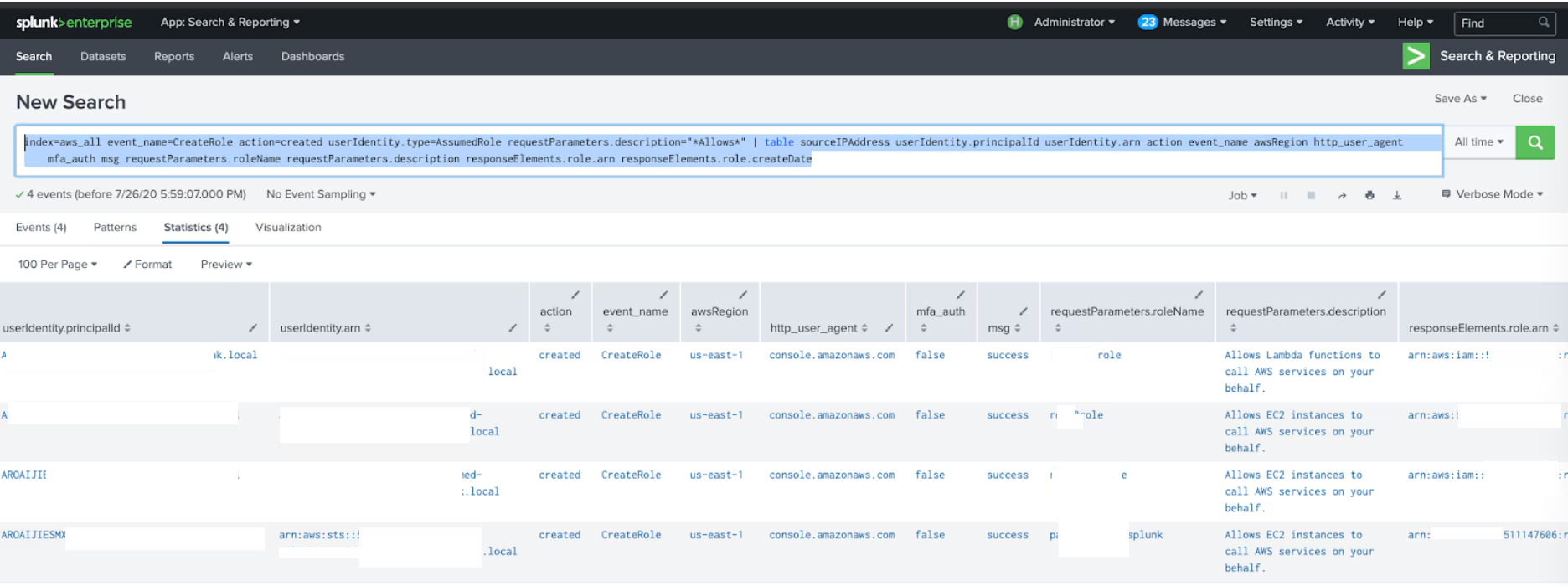
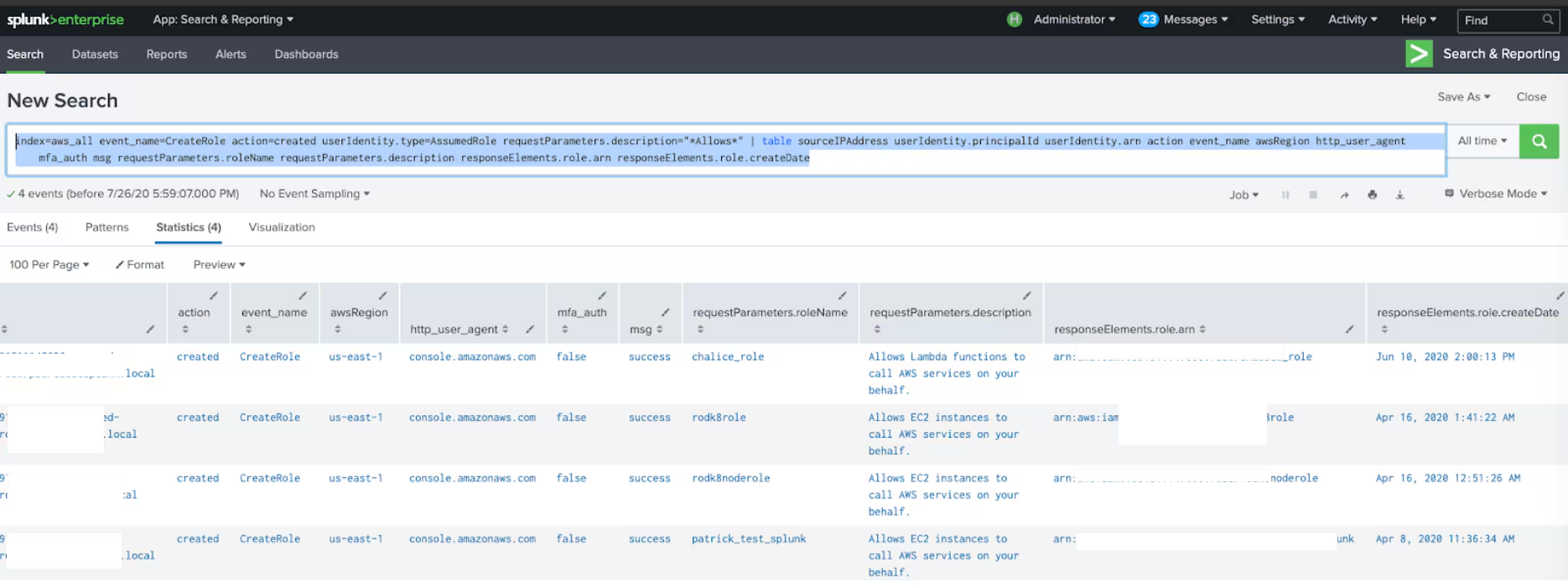
As seen in the above screenshots we can get pretty specific details of who created a role when was created, what ARN was given and from what place it was created( I.E user agent)
What If The Attacker Attaches to a Different Role?
We can also monitor and detect users trying to attach themselves to other trust policies, and see if they were successful and what specific role policy they requested to be attached to, the source IP address, region and date of the event. In this case we focused on status=failure but it can be changed to success for example. An attacker could give himself away by trying to attach his compromised account to different roles and failing.
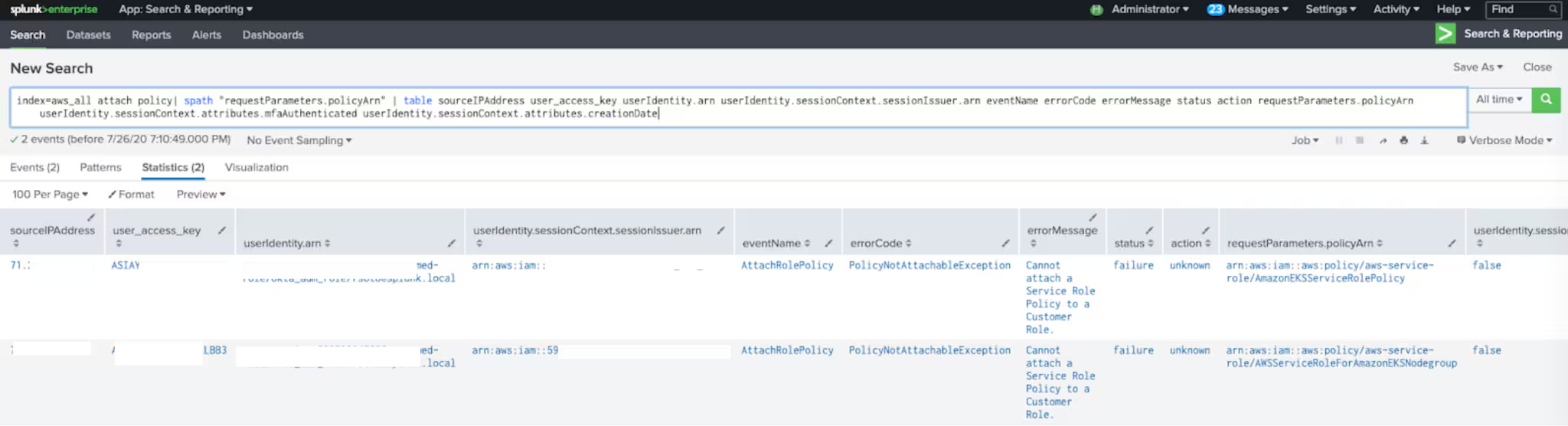
As seen in the above examples it is possible to monitor and detect, actions likely related to Key compromise. We have a number of searches that will work against the outlined scenarios provided the customer has enabled and implemented cloudtrail logs.
How to Mitigate Credential Exposure
- Do not provide permanent access keys. Only if needed for programmatic access.
- Rotate permanent keys.
- Create AWS policies that restrict sts:Assume role execution.
- Enforce Multi factor authentication.
- Implement monitoring/detection tactics as outlined in this blog.
- Keys may actually be deleted once detected but keep in mind the alternative scenarios such as creating other keys, roles or attaching themselves to other policies.
- Security groups will limit significant access from only specified IP addresses which may limit damage in case of credential exposure. Similarly IP Allow/Deny lists can be enforced as IAM policies for users.
About Splunk Security Research Team The Security Research Team is devoted to delivering actionable intelligence to Splunk's customers, in an unceasing effort to safeguard them against modern enterprise risks. Composed of elite researchers, engineers, and consultants who have served in both public and private sector organizations, this innovative team of digital defenders monitors emerging cybercrime trends and techniques, then translates them into practical analytics that Splunk users can operationalize within their environments. Download Splunk Enterprise Security Content Update in Splunkbase to learn more.
Related Articles

Predicting Cyber Fraud Through Real-World Events: Insights from Domain Registration Trends

When Your Fraud Detection Tool Doubles as a Wellness Check: The Unexpected Intersection of Security and HR

Splunk Security Content for Threat Detection & Response: November Recap

Security Staff Picks To Read This Month, Handpicked by Splunk Experts

Behind the Walls: Techniques and Tactics in Castle RAT Client Malware

AI for Humans: A Beginner’s Field Guide

Splunk Security Content for Threat Detection & Response: November 2025 Update

Operation Defend the North: What High-Pressure Cyber Exercises Teach Us About Resilience and How OneCisco Elevates It
