User Behavior Monitoring with M-21-31
With M-21-31’s Advanced EL3 requirements now past due, many US Federal Civilian agencies are still looking to close gaps in their Enterprise Logging capabilities. As part of the EL3 requirements, agencies must be finished implementing user behavioral analytics (UBA) that enables:
- Monitoring
- Early detection of malicious behavior
For many organizations that leverage machine learning (ML) to detect anomalous behavior across the network, UBA solutions have become a critical piece of the enterprise security and insider threat puzzle.
As of this article’s publication, agencies are expected to be complete with EL3 — that means having user behavior detections fully implemented. While that might not be the case for every agency, there are things we can do today to help us move in the right direction. Let’s take a look.
(This article is co-authored by Shawn Halpin and Tyler Rodichok.)
What is User Behavior Monitoring & User Behavior Analytics?
A key requirement in M-21-31 is the need for “user behavior monitoring”. This term overlaps significantly with user (and entity) behavior analytics (UBA), a critical technology that realizes the requirements of this mandate.
UBA is a machine learning-driven solution that helps you find hidden threats and anomalous behavior across users, devices and applications. UBA produces actionable results with risk ratings and supporting evidence, augmenting SOC analysts' existing techniques.
Federal civilian agencies will need to focus their efforts on effectively onboarding the required data — but that alone is not enough. You’ll also need to implement a UBA solution capable of meeting the detection requirements.
Challenges with user behavior monitoring
The requirement from M-21-31, ultimately, is that we need to detect behavior patterns that are anomalies.
But there’s a problem with that: User behavior monitoring implies that you already know the patterns to look for. (And that you will take action when an alert is set up to detect when a given pattern is triggered.)
You can certainly create rules for some use cases that have straightforward patterns. But other use cases might require risk-based alerting or the use of artificial intelligence. And that’s where analytics, specifically user behavior analytics, comes in.
You might be wondering, “Can’t we use machine learning for that?” Yes, we can, but there are caveats:
- We can use supervised machine learning to find certain things — the things we already know to look for.
- However, to find unpredictable or unknown patterns, we must use unsupervised machine learning.
Splunk is fully capable of helping federal agencies achieve M 21-31 maturity. Take a product tour of Splunk User Behavior Analytics or get in touch to learn exactly how we can help you.
Comply with M-21-31: Learn how
Define your use cases
To begin this user behavior journey, you first need well-defined use cases. Fortunately, M-21-31 defines the list of detections that are required to meet the EL3 requirements. At a minimum, the User Behavior Monitoring solution should be configured to detect and alert on:
- Compromised user credentials
- Privileged-user compromise
- Improper asset access
- Compromised system/host/device
- Lateral movement of threat actor
(See all three logging tier requirements: EL1, EL2 and EL3.)
Finding The Known vs. The Unknown
Insider Threat teams often have long lists of bad indicators — known TTPs — that they are looking out for. Maybe they investigate logs for data exfiltration or privilege escalation.
But what about the behaviors or patterns we cannot know, or that we cannot write a search for? It is important to tackle User Behavior Analytics from two angles:
- We need to look out for what we know could be due to bad behavior.
- We need also to leverage Machine Learning to help us identify anomalies we might not know (or be able) to search for.
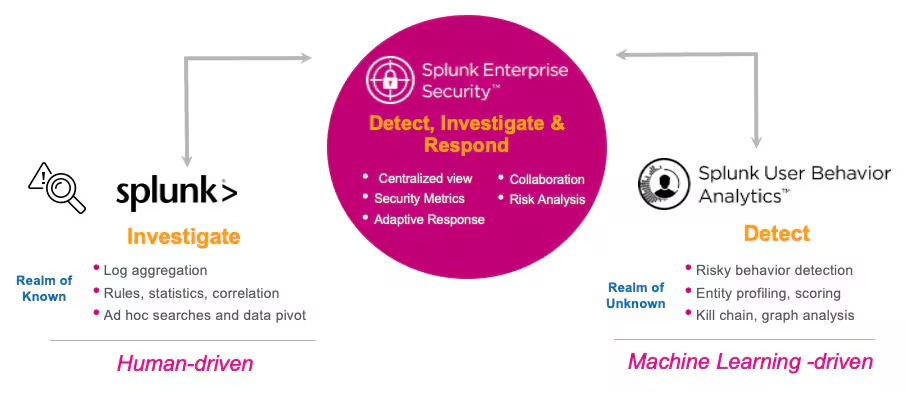
It's very hard to search across data sources to determine what normal behavior looks like for a member of our staff. Everyone has different routines and baseline behavior, which is fantastic. But how do we set a search threshold to alert on such diverse behavioral norms?
This is where Machine Learning can bring a level of detection beyond simply investing in things we know to look out for.
How Splunk User Behavior Analytics works
Splunk UBA has a similar dynamic to anyone familiar with Risk-Based Alerting. The input is the data we normally use in Splunk for…
- Network data like Firewall, DNS, DHCP, VPN
- Windows Security Logs
- Identity data of users, contextual information, and their authentication activity
- Asset information
- User audit logs from applications
- Endpoint data
- …and much more!
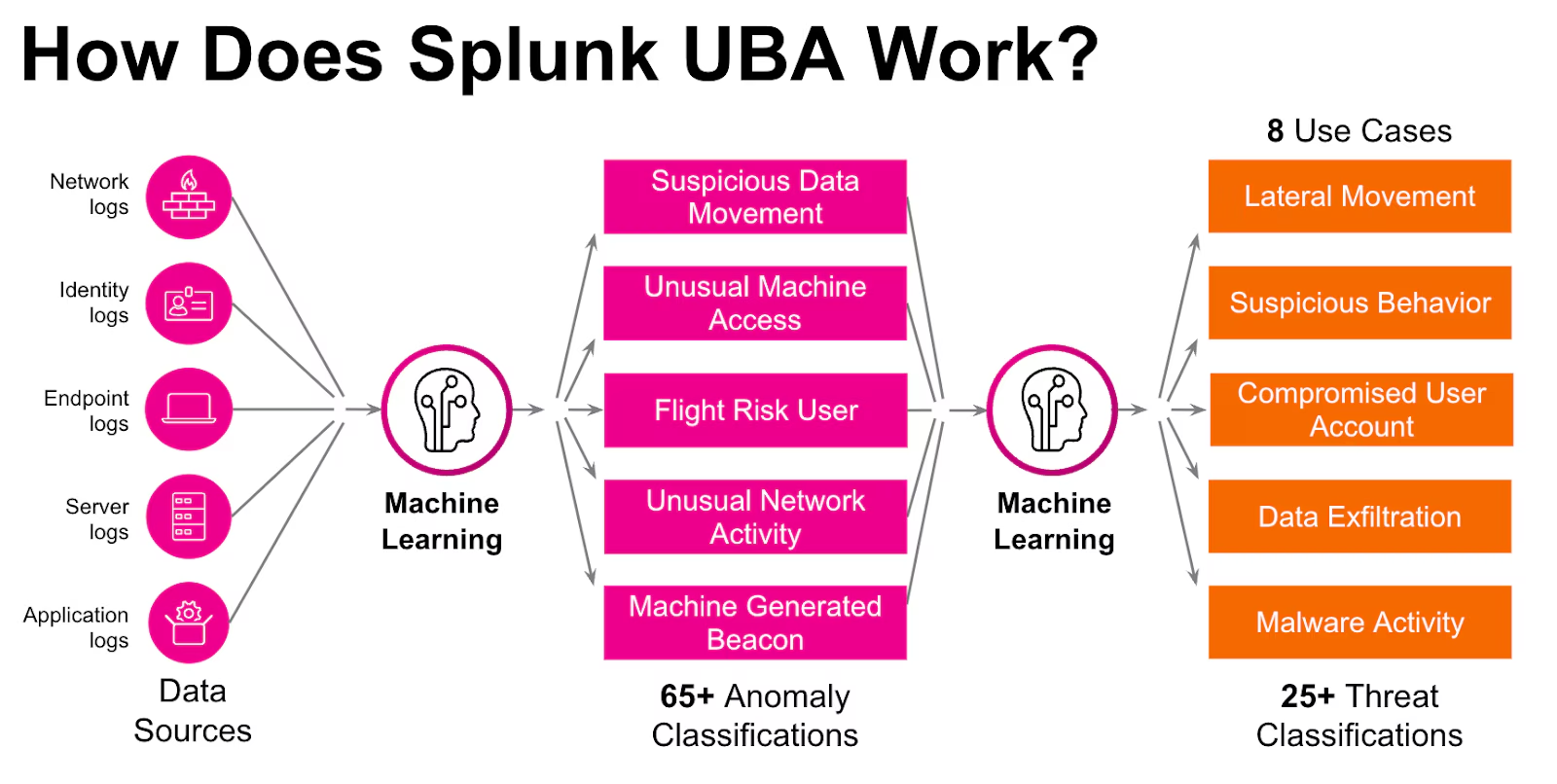
After some time, this data is processed in order to:
- Establish a baseline for myriad activities.
- Create a foundation of dynamic thresholds and associations.
Then, we can identify any activity that falls outside of these thresholds by a significant amount as an anomaly of that type of activity. In RBA-speak, this is similar to risk events that would be generated.
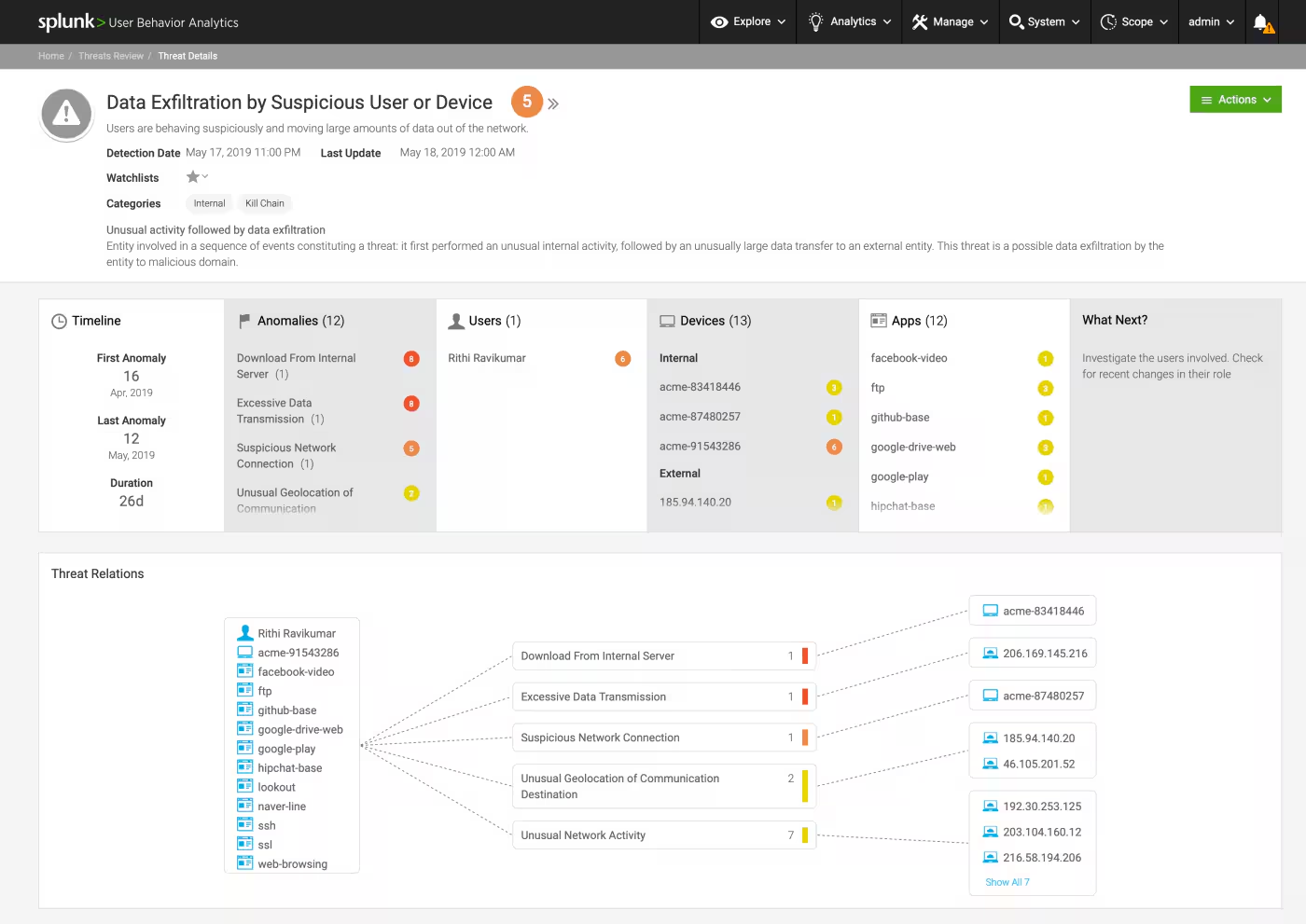
When multiple anomalies occur that correlate with certain users and hosts over specific timeframes, these “chained” events are then correlated and escalated to a Threat in Splunk UBA.
- This is when you see targeted alerts such as Lateral Movement and Data Exfiltration.
- In RBA Land, the equivalent would be the Notable Event in Splunk Enterprise Security that shows the breadcrumbs of events that ultimately led to the generation of that Notable Event.
Prioritize critical user behavior data
M-21-31 requires proper monitoring of user behavior regardless of the account used, so we need to start by:
- Collecting some information about our organization's accounts, including how they correlate with the human beings within.
- Establishing that many-to-one relationship between accounts and human beings.
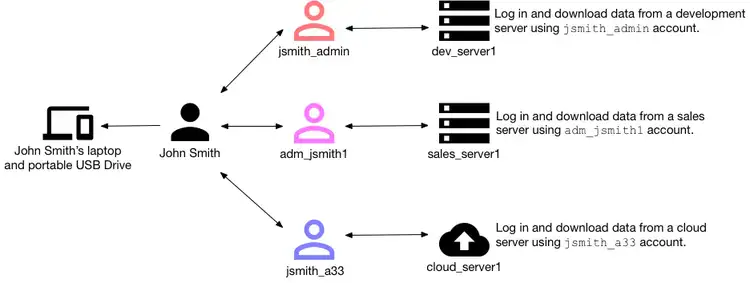
HRData: UBA’s entity list
A central source of record for accounts provides valuable contextual information, like Active Directory (AD), but we can go a step further. An HR System provides a layer of enrichment that a standard account system usually doesn't, especially when tying multiple accounts to one human being (entity).
Therefore, in UBA, we manage that via an HRData list that will consolidate valuable details about our active users and where they sit within the organization. This could include…:
- Accounts with elevated privileges
- Normal accounts for day-to-day operations
- Service accounts for testing
- Key integrations for IT operations
- All of the above
An HR System can also provide the dimension of enrichment that a standard account system might not. For example:
- The number of unique employees compared to the number of accounts
- Whether someone is on leave or has been terminated
- The unique ID of that employee
- The determination between a contractor or full-time employee
Leveraging asset information
Having a user behavior solution is a start, but you’ll also need asset data. Asset data is required by M-21-31 to:
- Track the behavior of assets in your system.
- Display additional metadata for known entities.
- Allow denylisting of devices that should not be associated with users.
Asset Data in UBA determines the scope of devices that are monitored. In addition, we also utilize the Assets List to identify points of central activity, such as proxies, authentication servers, and domain controllers. Earmarking these assets to omit user identity resolution in Splunk UBA will reduce the creation of false positives by acknowledging the authentication events and avoiding associating connections of all users to these specific locations.
Splunk UBA is capable of ingesting asset data from:
- Splunk Enterprise
- Active Directory (AD)
- Your configuration management database (CMDB).
Required network-based data sources
Understanding how users move within the network will be key to meeting many of M-21-31 detection requirements.
According to MITRE ATT&CK, adversaries may use alternate authentication material — such as password hashes, Kerberos tickets, and application access tokens — to move laterally within an environment and bypass normal system access controls.
When utilizing an advanced Machine Learning solution, we must provide the proper data for Splunk UBA to understand this day-to-day dynamic from the network layer. From a Minimal Viable Product perspective, these are the required data sources:
Splunk UBA can utilize the info-rich logging from Windows Security Logs to understand:
- Event Code(s) and its meaning
- User Account
- Hostnames
- Windows Specific IDs
Allows visibility into:
- IP to Hostname
- IP to User Account
- Hostname to User Account
Allows Identity Resolution with:
- IP Assignment to Hostname
- Lease Duration
Allows visibility into activity around:
- IP to Hostname
- IP to User Account
- Hostname to User Account
Windows Security Events also provide a myriad of data due to the content of the logs. This data from workstations, servers, domain controllers, and Active Directory servers provide insight into system activity.
For Splunk UBA to generate the proper anomalies and threats required by M-21-31, focus on the events listed in this table.
Tuning & reducing noise
Splunk UBA has multiple tools to configure and reduce noise. If there are a series of vulnerability scanners, network discovery devices, or other scanner-like tools within the enterprise, providing a list of scanners can reduce the false positives.
In addition, you can also create Anomaly Action Rules to action on anomalies based on specific criteria to delete or alter the severity of the anomalies.
M-21-31 requires user behavior monitoring & UBA
User Behavior Monitoring is a critical piece of M-21-31. While setting it up can take some time, we hope the above guidance will help you avoid unnecessary heartache as you begin the UBA journey. And Splunk is here to help.
Related Articles

Predicting Cyber Fraud Through Real-World Events: Insights from Domain Registration Trends

When Your Fraud Detection Tool Doubles as a Wellness Check: The Unexpected Intersection of Security and HR

Splunk Security Content for Threat Detection & Response: November Recap

Security Staff Picks To Read This Month, Handpicked by Splunk Experts

Behind the Walls: Techniques and Tactics in Castle RAT Client Malware

AI for Humans: A Beginner’s Field Guide

Splunk Security Content for Threat Detection & Response: November 2025 Update

Operation Defend the North: What High-Pressure Cyber Exercises Teach Us About Resilience and How OneCisco Elevates It
