SNARE: The Hunters Guide to Documentation
Table of Contents
Threat Hunting Success
Success in threat hunting is vastly different from incident response. Incident responders can measure success in criteria like ticket volume, mean time to close, or escalations.
For threat hunting, the number of hunts vs. incidents is not comparable because hunts take longer, and the average time to complete a hunt can vary wildly. More importantly, most hunts will not result in incidents. We can’t use the same metrics! Our critical metrics of success are our outputs/deliverables and documentation.
Check out the following blogs for more information:
Outputs
Outputs are submissions to other teams like new or improved detection use cases, escalated incidents, etc. Each hunt is unique and can result in very different outputs.
Documentation
Documentation is considered both:
- The active recording of information during an investigation.
- The distillation of that information into a Knowledgebase Article.
In cybersecurity, how to document is less obvious, not often discussed, and difficult to standardize. If it’s not in the ticket, it didn’t happen.
Introducing SNARE
We hope to address the challenge of documentation with our newly developed framework called SNARE. SNARE stands for:
- S napshot
- N arrative
- A ction
- R easoning
- E vidence
The most crucial aspect of SNARE is applying the concepts with intention. Less crucial are your preferences in recording the information. SNARE is a guide, not a standard operating procedure, and should be experimented with and iterated upon for individual and organizational needs.
Let's look at each concept in SNARE.
Snapshot
Where was I? Where am I?
What
Snapshot is the principle of recording search queries/syntax. Ideally, you should record the searches that progress your investigation. This includes searches that may not return results, but lead you to the answer.
Be specific with your queries! If you miss a few queries, leverage the `history` command in Splunk to return your searches. Don’t forget you can include comments surrounded by tick marks ``` in your searches for additional context.
- Are you not getting the results you expected? Check your time range!
- Did you lose your browser tabs and forget where you are? Copy/Paste from your search!
Why
When repeated, Snapshot enables the hunter to retrace how they arrived at any point in the investigation, and the added benefit of Reproducibility.
If you escalate to the incident response team, they likely want to validate. You can copy/paste the queries that lead you to your conclusion! Or maybe several months in the future you need to remember what you did or how you came to a conclusion.
Example
Tip: Start using the “earliest” and “latest” modifiers, example below, to further improve reproducibility! The time selector in the Splunk UI is great, but the modifiers make it faster!
Snapshot questions
-
What data source are you searching?
- Index
- Sourcetype
- Fields
-
What time range are you searching?
- earliest / latest
-
What are the key fields?
- Asset Names / Hostnames / Fully-Qualified Domain-Name
- Username / Fullname / Email Address / Employee ID
- Network Addresses / MACs / IPs
- Identifiers - useragents, guids, uuids, tokens, etc
-
How many events were returned?
Narrative
Do you want to build a story?
What
Narrative is the principle of assigning meaning to your documentation. This should apply to any and all recorded information, like screen captures, tables, and logs.
Why
When you narrate what is happening, your documentation becomes less subjective to the person consuming it. For some users, significant effort may be needed to understand, even for those with technical backgrounds.
Examples
- “Asset X123 launched a malicious executable but was stopped by the EDR tool”
- “User connecting from a suspicious IP address, based in country Y. Over the last several days, the IP they authenticated from has steadily moved to this country, suggesting they may be on a vacation or work trip.”
Actions
What things are you doing?
What
Actions is the principle of recording the specific steps taken to analyze data. This applies to:
- Search execution, like applying analytic techniques like stack counting, time charting, trendlining
- Pivoting to a different data source or task
- Creating outputs, like detection use cases
- Informal outreach/requests for information
Why
Stating your actions adds context to the Narrative, and can reinforce hunting technique selection. Mentally reframing your analytical process from “spray and pray” queries to “which technique?” can increase the speed at which you think, and ultimately improve hunt efficiency.
Examples
- “Created timechart to identify anomalies in process execution events”
- “Submitted risk ticket for visibility gaps in AWS events”
- “Messaged Detection Engineering team member Hunter Vibes for assistance on...”
What actions could you document?
- Searches
- Search techniques
- Output submissions (Incidents, detection ideas, security gaps/risks, etc.)
- Informal outreach/requests like direct messages, email
- Pivots
Reasoning
Why did you do that thing?
What
Reasoning is the principle of recording the explanations for your actions, including actions taken and avoided.
You reason throughout your daily life; the same applies to threat hunting! However, reasoning is not a bullet-point action item you check off your threat hunt to-do list. In threat hunting, we want to illustrate the reasoning behind your taking that particular action(s).
Why
Stating your reasoning allows you to revisit your thought process. This will allow you to identify areas of improvement and allow others to understand your approach (to potentially augment their own).
In the worst case scenario, if you miss evidence of an intrusion, you have justification for actions not taken.
Examples
- Pivoting to Endpoint logs [Reasoning] to determine cause of Outbound Connections over Port 1337
- Not investigating log type X further [Reasoning] as it does not appear to contain any meaningful information
- Reaching out to Hunter Vibes [Reasoning] for help with deciphering detection logic
Evidence
Screenshots, tables, raw logs, and highlights
What
Evidence is the principle of documenting the artifacts that support your investigation, which provides the foundation for your conclusions. This can include the basics like logs, tables, charts, and screen captures, up to system images and snapshots.
You could export and attach your search results as a .csv to your document. You could also create a dashboard to display the results of your searches at a single location, for knowledge sharing or incident escalation!
Why
Evidence strengthens investigative decisions by ensuring that actions are not only explained but also supported by factual data. Evidence combined with reasoning creates a clear and justified investigative process, and is the foundation for all Outputs.
- New detection use cases need evidence that the search query will identify the correct behavior.
- Escalated security incidents need evidence that malicious behavior is occurring.
Evidence provides the "what” and Reasoning provides the "why.” With regards to legal proceedings, your documentation may BE the evidence in court.
Example
Tables and screenshots are considered evidence for the hunter’s statement.
This table highlights authentications by IP address 8.8.8.8
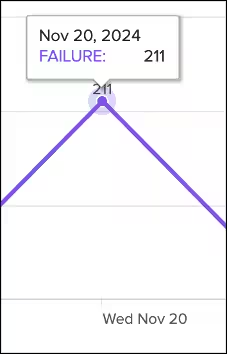
This screenshot highlights authentication failures increasing.
Putting it all together
It’s important to recognize that each SNARE principle is intertwined. After recording your search query (Snapshot), you may state the query type (Action) and the results you expect to receive (Reasoning). After the search is complete, you may capture a screenshot or create a table of the results (Evidence), and then explain what the data means to you (Narrative).
Or you may receive 0 results (Evidence), and then brainstorm the root cause (Narrative, Reasoning). You pivot and contact the subject matter expert over chat (Action) and they explain the data is no longer stored in that index (Evidence).
See the example below which contains real threat documentation, scrubbed of identifiable information.
(Narrative, Action)
Initial review shows X has a high volume of logs
Timechart search over (default) 30 minutes
(Snapshot)
index=X
| timechart count by index
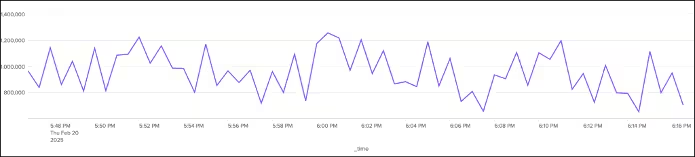
57,292,322 events (2/20/25 5:47:00.000 PM to 2/20/25 6:17:00.000 PM)
(Evidence)
(Narrative, Action, Reasoning)
Results show a high volume of logs returned over 30 minutes
Keeping search within this time range to avoid impacting search performance
Specifying the time range in earliest/latest
earliest=02/20/2025:17:47:00
latest=02/20/2025:18:17:00
(Action, Reasoning)
Pivot to fieldsummary to observe field values
(Snapshot)
earliest=02/20/2025:17:47:00 latest=02/20/2025:18:17:00
index=X
| fieldsummary maxvals=5
| where count > 0
| table field count values
| makemv delim="{" values
(Narrative)
Fieldsummary shows ~ 3,400 unique fields
Unsure of the best approach for identifying key fields
(Action)
Search below attempts to separate high count fields of a similar name into bins using loadjob to improve speed created field ‘prefix’, capturing the 1st - 7th character of field name used bin on count field displaying prefixes by bucketized count
(Snapshot)
| loadjob 1740076815.162909
| eval prefix=substr(field, 1, 7)
| stats count by prefix
| bin count bins=10
| stats values(prefix) as prefix, by count
| sort -count
Key takeaways
As you can see, SNARE is a powerful guide for ensuring that your documentation is clear, comprehensive, and trustworthy. We hope it becomes a valuable tool for our fellow threat hunters. Experiment, iterate, and make SNARE work for you!
In summary, here are the key takeaways:
- Documentation is crucial for successful threat hunting and not a one-size fits all.
- Recording your search queries can help you identify what has been investigated and where to go next.
- Create a narrative, tell the story of your investigation to help others understand.
- Recording your actions and reasoning can help you identify areas of improvement and create a guide for others to augment their own.
- Evidence is the foundation for all outputs and justifies the investigative process.
Related Articles

Predicting Cyber Fraud Through Real-World Events: Insights from Domain Registration Trends

When Your Fraud Detection Tool Doubles as a Wellness Check: The Unexpected Intersection of Security and HR

Splunk Security Content for Threat Detection & Response: November Recap

Security Staff Picks To Read This Month, Handpicked by Splunk Experts

Behind the Walls: Techniques and Tactics in Castle RAT Client Malware

AI for Humans: A Beginner’s Field Guide

Splunk Security Content for Threat Detection & Response: November 2025 Update

Operation Defend the North: What High-Pressure Cyber Exercises Teach Us About Resilience and How OneCisco Elevates It
