Splunk SOAR Playbooks: Conducting an Azure New User Census
Splunk is committed to using inclusive and unbiased language. This blog post might contain terminology that we no longer use. For more information on our updated terminology and our stance on biased language, please visit our blog post. We appreciate your understanding as we work towards making our community more inclusive for everyone.

To get started with an account monitoring use case, our newest community playbook initiates a scheduled review of new accounts created in Azure Active Directory each week. The generated report shows some basic information about each of the new users and provides their user IDs for further investigation.
Once this playbook has been in use for a few weeks, the security team should have a good understanding of the frequency and common attributes of newly created accounts. After that, if a new account shows up with an irregular field such as a creation time in the middle of the night or an organizational unit that doesn’t make sense, then further investigation would be warranted.
The Playbook: Azure New User Census
This playbook checks in every week with a list of new users created in Azure Active Directory:
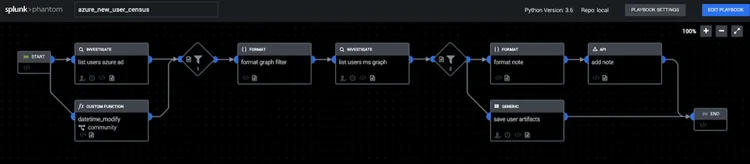
The playbook starts by listing all users, then filters down to those with the createdDateTime within the last seven days. That lookback window can be adjusted using the datetime_modify function in the bottom left. Next, the playbook queries the Microsoft Graph API to cross-reference the new accounts and make sure that Phantom has access to investigation and containment actions in Office 365. At the end, the results are saved to artifacts, one for each user, and presented in an analyst note on the investigation page.
See It In Action
Deploying the Playbook
Here are the steps to get this playbook and use it:
-
If you don’t already have Phantom, you can sign up and download the free community version.
-
Configure the Azure AD Graph app on Phantom by following the Authentication instructions:
-
Similarly, configure the Microsoft Graph Office 365 app on Phantom with these Authentication instructions:
-
Configure a new Timer with a new label, such as azure_new_user_census
- As an example, set the schedule to once per week.
- If a different schedule is needed, be sure to change the datetime_modify block in the playbook to look back the correct number of hours, days, or months.
-
Configure and activate the playbook:
- Navigate to Home > Playbooks and search for “azure_new_user_census.” If it’s not there, use the Update from Source Control button and select community to download new community playbooks.
- Click on the playbook name to open it.
- Resolve the playbook import wizard by selecting the newly created apps.
- Set the label to azure_new_user_census (or whichever name was chosen above).
- Set the playbook to Active.
- Save the playbook.
Taking It Further

You can tune and extend this playbook with many variations of logic depending on how you’ve configured your Active Directory deployment and how your organization onboards new users. An allowlist could use the presence or value of any Active Directory attribute to filter out new users matching any criteria or automatically disable accounts not matching the necessary criteria. This playbook would also be a good candidate to interface with a ticketing system, messaging platform or email to notify the correct team members or validate information with someone who knows more about the activity.
Doing a simple hygiene check like this may also be a good first step towards more advanced Active Directory monitoring in Splunk Enterprise Security. If you are using Splunk tools for authentication activity, it might make sense to run a Splunk query from this playbook to check the login history of each account. Azure also provides a number of security services such as Azure Active Directory Identity Protection and Azure Privileged Identity Management, which can report on other suspicious user activity. However, try not to let a future plan for a more advanced monitoring solution get in the way of implementing something simple like this Azure New User Census. If nothing else, it will provide a baseline of new user activity that you can refer to later if something triggers a closer look.
This blog is part of a series called “SOAR in Seconds” where our distinguished Splunk Phantom experts guide you through how to use out-of-the-box playbooks and other features to automate repetitive tasks.
----------------------------------------------------
Thanks!
Philip Royer
Related Articles

Predicting Cyber Fraud Through Real-World Events: Insights from Domain Registration Trends

When Your Fraud Detection Tool Doubles as a Wellness Check: The Unexpected Intersection of Security and HR

Splunk Security Content for Threat Detection & Response: November Recap

Security Staff Picks To Read This Month, Handpicked by Splunk Experts

Behind the Walls: Techniques and Tactics in Castle RAT Client Malware

AI for Humans: A Beginner’s Field Guide

Splunk Security Content for Threat Detection & Response: November 2025 Update

Operation Defend the North: What High-Pressure Cyber Exercises Teach Us About Resilience and How OneCisco Elevates It
