Splunking Isovalent Data - Initial Setup and Overview
Modern cloud-native applications are increasingly built on Kubernetes, but its distributed and dynamic nature introduces significant visibility and security challenges. Traditional monitoring tools often struggle to keep up, they can tell you what happened, but rarely why or how it happened across ephemeral workloads, containers, and microservices. As a result, security and operations teams are often left piecing together partial signals without the contextual depth needed for fast, confident response.
By integrating Cisco Isovalent’s stack—built on Cilium and Tetragon—with analytics platforms like Splunk, organizations can finally bridge this gap between network visibility and security observability. Cisco Isovalent brings eBPF-powered insights directly from the Linux kernel, providing a unified, context-rich view of both network and runtime behavior inside Kubernetes clusters. This approach ties together workload identity, process activity, and network flow data into one coherent telemetry stream.
Given the breadth and depth of data Tetragon produces, this blog series will be divided into two parts to make exploration more practical and focused. In Part 1, the Splunk Threat Research Team (STRT) will walk through the lab setup, Splunk data ingestion, and initial exploration of Tetragon logs to establish our foundation. Then, in Part 2, STRT dives into attack simulations and detections, demonstrating how to operationalize this rich telemetry for threat hunting and incident response.
What is Tetragon?
Cilium Tetragon by Isovalent is a flexible, Kubernetes-aware security tool, with real-time observability and enforcement. Leveraging the power of eBPF, Tetragon offers a low-overhead, in-kernel solution that enhances security posture by monitoring system behaviors such as process executions, system call activities, and both network and file access events. Tetragon builds on the Kubernetes-native design of Cilium and extends beyond traditional observability tools by understanding workload identities like namespaces and pods metadata.
It observes kernel-level events and surfaces structured telemetry such as process execution, network connection attempts, or file access, to downstream tools like Splunk Enterprise Security (ES).
Features
- Process Execution Monitoring: Detects every process that starts within a container, including command line arguments.
- Network Connection Tracking: Captures socket creation, DNS queries, and outbound connections initiated by containers or processes. This helps detect command-and-control (C2) activity, data exfiltration, or anomalous service-to-service communication.
- File and System Call Tracking: Tracks file reads/writes, privilege escalations, and key syscalls like mount, clone, or setns, which are often leveraged in container escape attempts.
- Near Real-Time Detection and Response: Tetragon applies user-defined or pre-built rules to trigger alerts in real time, for example, when a pod launches a shell (sh, bash) long after initialization, or when a privileged container attempts to modify the host filesystem.
Experiment: Building a Mini Kubernetes Security Lab
We decided to spin up our own intentionally vulnerable Kubernetes lab and test how Tetragon (Isovalent’s eBPF-based runtime security tool) runtime observability tool behaves and theb explore the various activity logs created in this Kubernetes cluster.
For this, we used Kubernetes Goat, a brilliant project by Madhu Akula that’s designed as a purposely insecure Kubernetes environment for hands-on security learning. If you haven’t checked it out yet, please do. It’s like Metasploit for Kubernetes, perfect for playing, breaking, and learning.
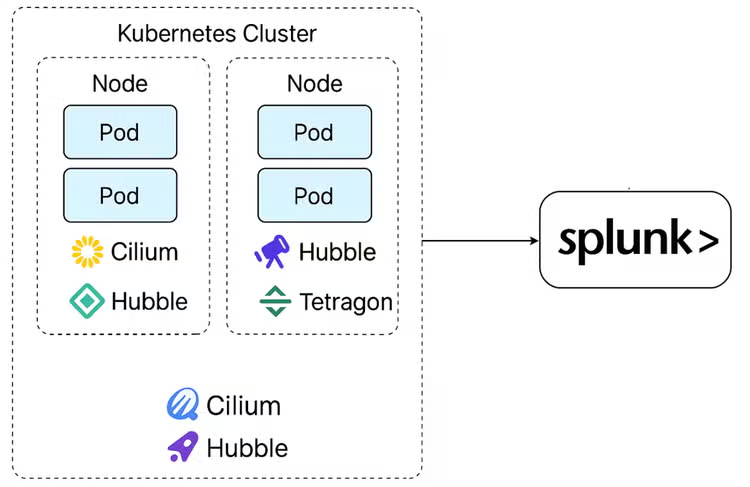
Here’s how we set it up:
Step 1: Set Up the Kubernetes Goat Lab
First, clone the repo and deploy it to a cluster (you can use Minikube, KIND, or EKS). We used EKS because it’s fast to spin up and feels more “real world.” This repository has all the steps described to get this environment up and running.
Once it’s up, you’ll have a bunch of intentionally misconfigured pods and services, and all the fun stuff like exposed dashboards, privileged containers, default creds, etc.
That’s your playground for the rest of this experiment.
Step 2: Add the Isovalent Helm Repository
Next, we’ll add the Helm repo for Isovalent, which gives us access to Tetragon.
helm repo add isovalent https://helm.isovalent.com
helm repo update
This registers the Isovalent chart repository in your Helm config so you can pull and install Tetragon directly. Think of it as adding a new app store to your Kubernetes package manager.
Step 3: Create the Tetragon Configuration File
Before deploying, we’ll create a configuration file to customize how Tetragon behaves.
Here’s an example called tetragon-values.yaml:
tetragon:
clusterName: isovalent-2
exportDenyList: " "
enableBPFDNSParser: false
enableApplicationModel: false
applicationModelExportInterval: "60s"
exportFileMaxSizeMB: "100"
exportDirectory: "/var/run/cilium/tetragon"
exportFilename: "tetragon.log"
layer3:
udp:
enabled: true
tcp:
enabled: true
dns:
enabled: true
alerts:
enabled: true
exportDirectory: "/var/run/cilium/tetragon/alerts/"
integratedGrafana:
enabled: true
Before deploying, define how Tetragon collects and exports telemetry by creating a configuration file (for example, tetragon-values.yaml). This file controls what events are captured, how they’re filtered, and where logs are stored.
Tetragon’s default behavior is highly verbose—ideal for testing, but in production you’ll want to narrow what’s exported to reduce noise and focus on security-relevant activity.
Key Considerations:
-
Security focus: Capture only what matters—process executions (PROCESS_EXEC), network connections (PROCESS_CONNECT, PROCESS_ACCEPT), and file events (PROCESS_FILE) reveal most attack and lateral movement activity.
-
Noise control: Drop repetitive system noise from kube-probes, system pods (kube-system), and sidecars (Envoy/Istio). Use exportDenyList to exclude them.
-
Visibility tuning: Start broad for testing (exportDenyList: ""), then add filters gradually once baseline activity is understood.
-
Deny vs. Allow:
- exportDenyList removes unwanted events.
- exportAllowList explicitly limits what’s captured—useful for production.
-
Best practice: Use both—allow key event sets, deny known benign patterns.
Step 4: Install Tetragon in Your Cluster
helm upgrade --install -n tetragon --create-namespace tetragon \
-f tetragon-values.yaml \
oci://quay.io/isovalent-charts-dev/tetragon --version 1.17.0-rc.2
This installs or upgrades Tetragon in your cluster under the tetragon namespace using Helm. It automatically creates the namespace if it doesn’t exist, applies your custom settings from tetragon-values.yaml, and pulls the specified chart version (1.17.0-rc.2) directly from Isovalent’s OCI registry, ensuring you’re deploying that exact build of Tetragon with your chosen configuration.
Step 5: Ship the logs to Splunk
First, install the Cisco Security Cloud App in your Splunk environment and follow the in UI steps to set up the Isovalent Runtime Security Product.
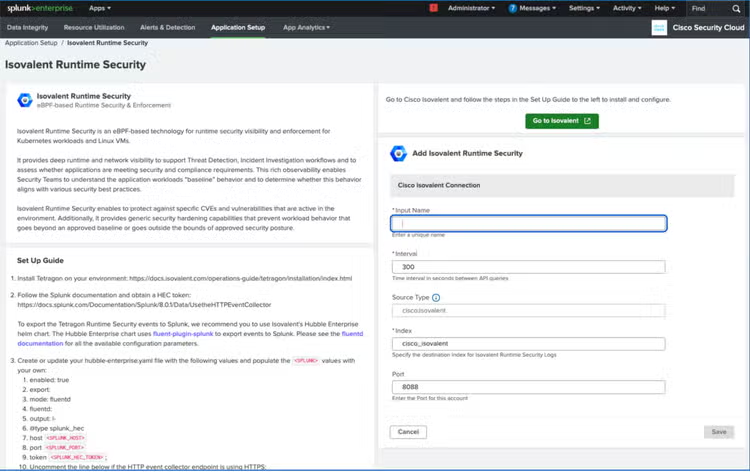
Next, add a Splunk HEC token and any other additional required values from the above UI to output settings to hubble-enterprise-values.yaml.
enabled: true
exportDirectory: "/var/run/cilium/tetragon"
export:
mode: fluentd
fluentd:
output: |-
@type splunk_hec
host <splunk_host_address>
port 8088
token <splunk-hec-token>
default_index <splunk-index>
use_ssl false
Now, it’s time to deploy Hubble Enterprise for Cluster Visibility.
The command below, installs Hubble Enterprise—Isovalent’s runtime security platform—into your kube-system namespace using Helm. It applies your custom settings from hubble-enterprise-values.yaml, waits for all components to come up, and ensures you’re deploying the exact version 1.12.22 for consistent network flow and security visibility.
kubectl rollout restart -n kube-system ds/hubble-enterprise
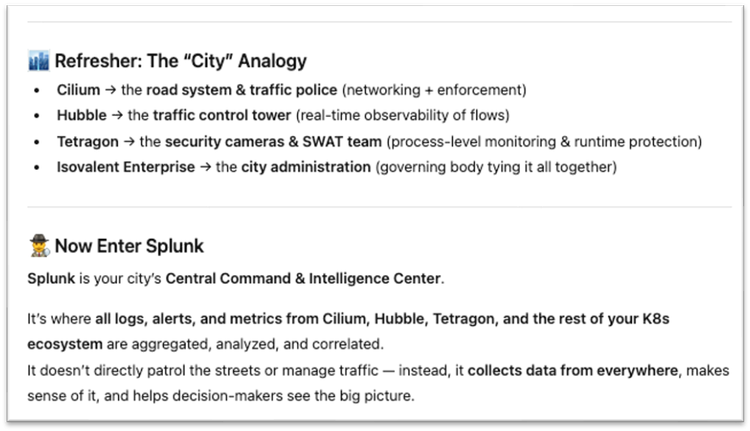
Here’s my favorite part: while researching this topic for the first time, I asked one of the AI tools to give an analogy to best explain this relatively new and complex technology, and this is what it produced. AMAZING?!
Data Exploration in Splunk
Now that we’ve set up our Kubernetes lab and verified that data is flowing into Splunk through Tetragon, let’s take a closer look at the data getting ingested.
Splunk starts receiving a rich stream of runtime security events directly from the kernel. These events are automatically parsed and normalized by the TA, making it easy for us to search, visualize, and build detections.
Event Types Overview
Tetragon generates several categories of events, each representing a specific kind of kernel-level activity. Some of the most interesting ones for detection use cases include:
-
Process Exec Events:
These are generated every time a new process is executed inside the cluster. They give us deep visibility into command execution across containers, pods, and namespaces. With this, we can spot suspicious binaries, privilege escalation attempts, or unexpected scripts running in production. For example, we might build detections for commands like curl or wget being used in restricted pods.center 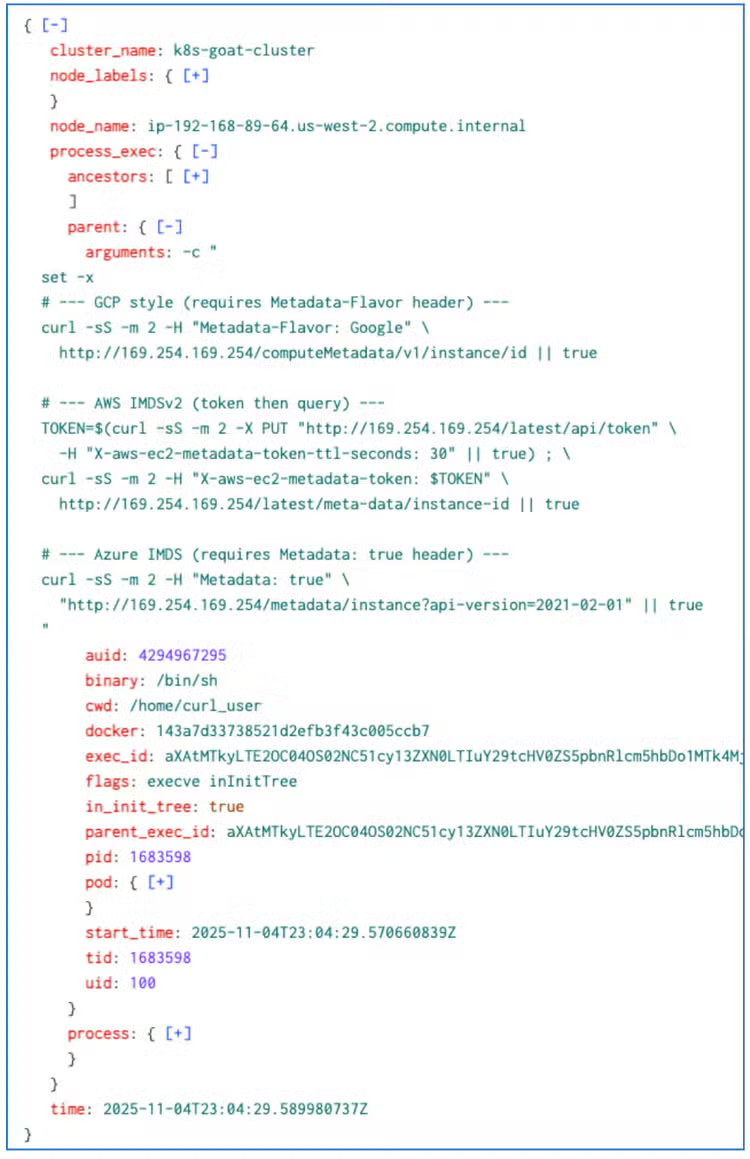
The Cisco Security Cloud App in your Splunk extracts several important key fields from this event and alias them into simple names such as cluster_name, process, parent_process, pod_name, etc for easier search writing like the following :
-
Process Connect Events:
These capture outbound network connections initiated by processes. By correlating this with process metadata, we can identify unusual communication patterns, like a container suddenly reaching out to an external IP or a process connecting to an internal service it never touched before.center 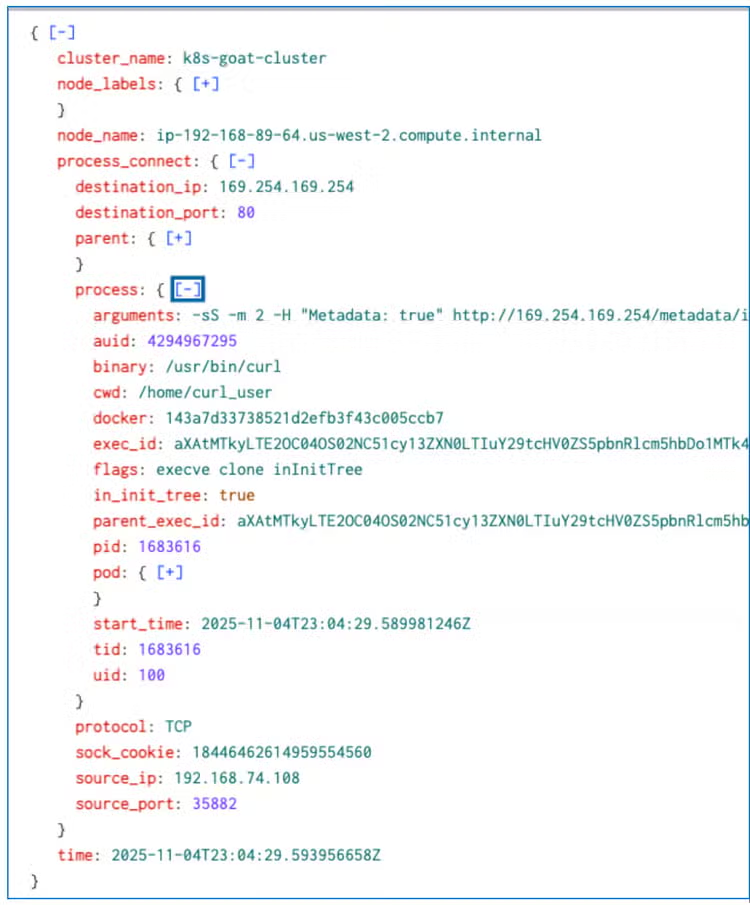
-
Process kprobe and Other Kernel Events:
center 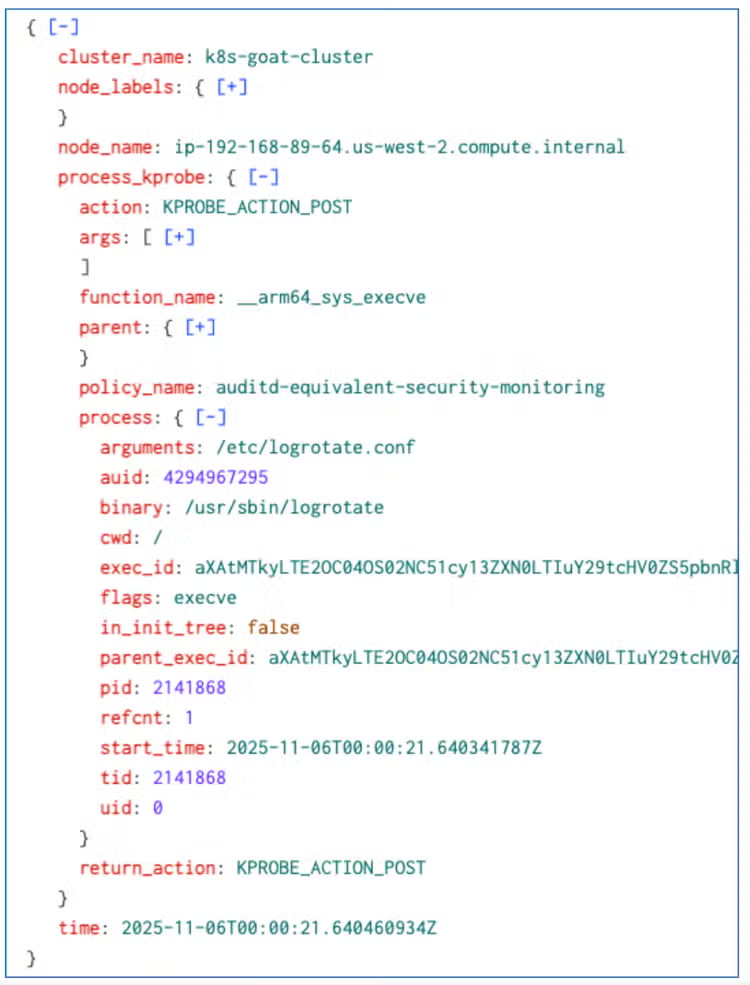
In the Linux kernel, a kprobe is a mechanism that allows you to dynamically attach (via eBPF or other tracing tools) to almost any kernel function at its entry or return point. This lets us observe the execution of internal kernel functions.
For example, you can attach a kprobe to __x64_sys_write() to observe when the write() system call is executed, or to an internal function like tcp_connect() to trace when the TCP stack initiates a connection as part of a connect() syscall.
Tetragon’s kprobe hooks let us observe these low-level kernel calls that standard monitoring tools miss.
These events provide insight into file access, system calls, and privilege use. These allow us to write advanced behavioral detections, such as detecting file tampering or unauthorized module loads.
Next Steps
We’ve now completed the foundational work by setting up the lab, integrating Isovalent data into Splunk, and exploring parts of the telemetry to understand what’s available. This baseline visibility is critical before diving into active defense and detection.
In the next part of this blog, we’ll shift gears to focus on attack simulations and detections, using the same environment to showcase how Splunk can help uncover and visualize malicious activity derived from Isovalent’s deep process and network data.
Learn More
This blog helps security analysts, blue teamers, and Splunk users identify suspicious activity in Kubernetes environments enabling the community to discover related tactics, techniques, and procedures used by threat actors and adversaries. You can implement the detections in this blog using the Enterprise Security Content Updates app or the Splunk Security Essentials app. To view the Splunk Threat Research Team's complete security content repository, visit research.splunk.com.
Feedback
Any feedback or requests? Feel free to put in an issue on Github and we’ll follow up. Alternatively, join us on the Slack channel #security-research. Follow these instructions If you need an invitation to our Splunk user groups on Slack.
Contributors
We would like to thank Bhavin Patel for authoring this post and the entire Splunk Threat Research Team for their contributions: Nasreddine Bencherchali,AJ King, Jose Hernandez,Michael Haag, Lou Stella,Rod Soto, Eric McGinnis, Patrick Bareiss, Teoderick Contreras, and Raven Tait.
Related Articles

Splunking Isovalent Data - Initial Setup and Overview

Delivering the Ultimate SOC Analyst Experience: Ending Fatigue with Splunk Enterprise Security

Splunk Security Content for Threat Detection & Response: December Recap

Predicting Cyber Fraud Through Real-World Events: Insights from Domain Registration Trends

When Your Fraud Detection Tool Doubles as a Wellness Check: The Unexpected Intersection of Security and HR

Splunk Security Content for Threat Detection & Response: November Recap

Security Staff Picks To Read This Month, Handpicked by Splunk Experts

Behind the Walls: Techniques and Tactics in Castle RAT Client Malware
