Using RegEx for Threat Hunting (It’s Not Gibberish, We Promise!)
Security Tamara Chacon
Known as RegEx (or gibberish for the uninitiated), Regular Expressions is a compact language that allows security analysts to define a pattern in text. When working with ASCII data and trying to find something buried in a log, regex is invaluable.
But writing regular expressions can be hard. There are lots of resources to assist you:
- A favorite regex test web site is https://regex101.com. Here you can test your regex statements quickly and easily.
- If you’re new to regular expressions, this site is the best place to learn, and also a good reference: https://www.regular-expressions.info/
“But stop,” you say, “Splunk uses fields! Why should I spend time learning Regular Expressions?”
That's true. With Splunk, all logs are indexed and stored in their complete form (compared to some *ahem* lesser data platforms that only store certain fields). Additionally, Splunk can pull out the most interesting fields for any given data source at search time. However, on occasion, some valuable nuggets of information are not assigned to a field by default — as an analyst, you’ll want to hunt for these treasures.
So, let’s look at a few ways to add regular expressions to your threat hunting toolbelt.
(Part of our Threat Hunting with Splunk series, this article was originally written by Steve Brant. We’ve updated it recently to maximize your value.)
Use Regular Expression with two commands in Splunk
Splunk offers two commands — rex and regex — in SPL. These commands allow Splunk analysts to utilize regular expressions in order to assign values to new fields or narrow results on the fly as part of their search. Let’s take a look at each command in action.
The rex command
rex [field=<field>] (<regex-expression> [max_match=<int>] [offset_field=<string>]) | (mode=sed <sed-expression>)
The rex command allows you to substitute characters in a field (which is good for data anonymization) and extract values to assign them to a new field. As a threat hunter, you’ll want to focus on the extraction capability.
As an example, you may hypothesize that there are unencrypted passwords being sent across the wire — you want to identify and extract that information for analysis. As you start your analysis, you may start by hunting in wire data for http traffic and come across a field in your web log data called form_data.

In this one event you can see an unencrypted password—something you never want to see in your web logs!
In order to find out how widespread this unencrypted password leakage is, you’ll need to create a search using the rex command. This will create a “pass” field that you can then search for unencrypted passwords in its value. Take a peek at the example below.

Notice that we use the rex command against the form_data field and then create a NEW field called pass? The “gibberish” in the middle is our regular expression —or “regex”—that pulls that data from the “form_field”. Cool, huh? Now when I look at the results...lo and behold, I have a new field called “pass”!
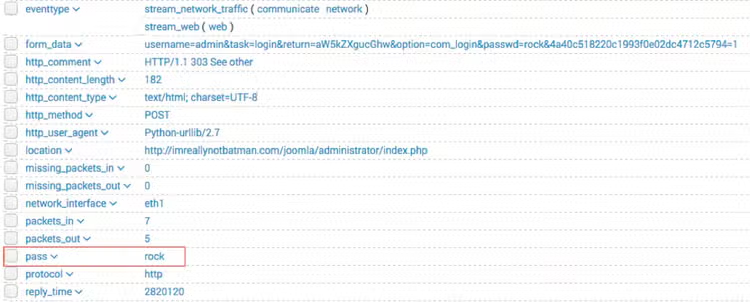
So how did that happen? How did this new field appear, you ask? Let's break this down...
In the code below, I show the value of the form_data field. I have highlighted a couple of items of interest to work with.
username=admin&task=login&return=aW5kZXgucGhw&option=com_login&passwd=rock&4a40c518220c1993f0e02dc4712c5794=1
The passwd= string is a literal string, and I want to find exactly that pattern every time. The value immediately after that is the password value that I want to extract for my analysis.
Here is my regular expression to extract the password:
passwd=(?<pass>[^&]+)
- ?<pass> specifies the name of the field that the captured value will be assigned to. In this case, the field name is "pass". This snippet in the regular expression matches anything that is not an ampersand.
- The square brackets [^&]+ signify a class, meaning anything within them will be matched; the carat symbol (in the context of a class) means negation. So, we're matching any single character that is not an ampersand.
- The plus sign extends that single character to one or more matches; this ensures that the expression stops when it gets to an ampersand, which would denote another value in the form_data.
- The parenthesis () signifies a capture group, while the value captured inside is assigned to the field name.
Good stuff! Now let’s look at regex.
The regex command
The regex command uses regular expressions to filter events.
regex (<field>=<regex-expression> | <field>!=<regex-expression> | <regex-expression>)
When used, it shows results that match the pattern specified. Conversely, it can also show the results that do NOT match the pattern if the regular expression is negated. In contrast to the rex command, the regex command does not create new fields.
I might narrow my hunt down to a single network range (192.168.224.0 – 192.168.225.255) in suricata. I could use the eval function called cidrmatch, but I can use regex to do the same thing and by mastering regex, I can use it in many other scenarios.
The search may look like the following:

Without the regex command, the search results on the same dataset include values that we don't want, such as 8.8.8.8 and 192.168.229.225. With regex, results are focused within the IP range of interest.
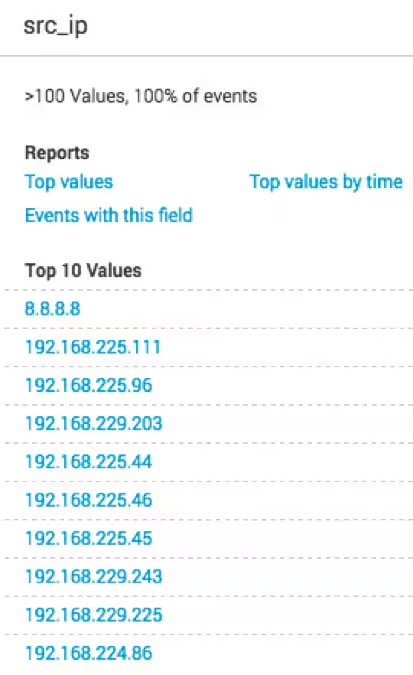
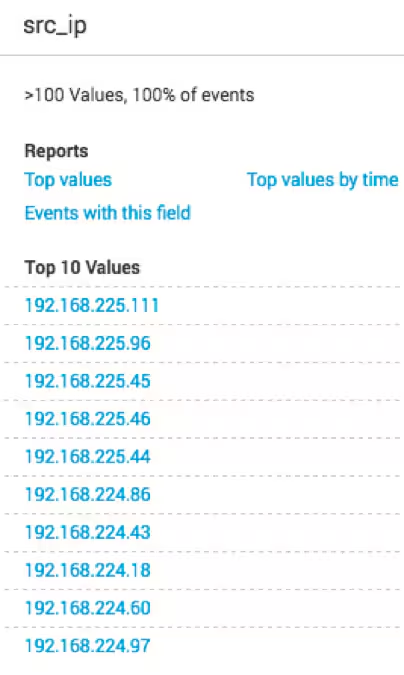
Let me show you what I did.
Here are sample values in the src_ip field:
- 192.168.225.60 - a match, will be displayed
- 192.168.229.237 - NOT a match, will not be displayed
- 192.168.224.3 - a match, will be displayed
And here is our regular expression:
192\.168\.(224|225)\.\d{1,3}
- Values in yellow—192 and 168—are literal strings to be matched.
- Because the "." character is reserved in the regular expression language, to match a literal ".", you must escape it with a backslash . in your pattern definition.
- The 3rd octet needs to match either "224" or "225" and regex allows that with the "|" character. The OR pattern is bound in parentheses (). If there are more than two selections, | can be used to separate additional values: (224|225|230).
- The "\d" represents a single digit (0-9). In the rex command example, above, I used a "+" to represent one or more of the preceding pattern. In this case, I am going to be more specific. Placing "1,3" in curly braces {1,3}, represents between 1 and 3 digits, since it was preceded by a "\d".
See, RegEx is not gibberish
Are regular expressions gibberish? No, but you'll never be able to convince some people. As you hunt, be a hero finding patterns in your logs by learning the regular expression language.
Happy Hunting!
Related Articles

Elevating Security: The Growing Importance of Open Cybersecurity Schema Framework (OCSF)

Splunk Integrates with Amazon Security Lake to Deliver Analytics Using the Open Cybersecurity Schema Framework