Using Workflow Actions & OSINT for Threat Hunting in Splunk
Picture yourself, a threat hunter using Splunk, and the words "workflow action" are uttered by your helpful security Splunker...
Workflow actions make you a faster and more effective security analyst. They allow you to skip the laborious steps of logging into various websites to do your job and just get straight to business.
Stick with me and I will provide some examples of how to use workflow actions and — as a bonus — give you some great hunting resources that you should be using, if you aren’t already. Let’s start with open-source intelligence.
(This article is part of our Threat Hunting with Splunk series. We’ve updated it recently to maximize your value.)
What is OSINT?
If you look up the word OSINT, you will see multiple definitions — all of them agree that OSINT, or open-source intelligence, is a collection of publicly gathered data from multiple sources with the intention to create actionable intelligence.
Using OSINT for threat hunting
You might be asking, how does this help with threat hunting?
Well, the great thing about using open-source intelligence is that you have groups working together to create a methodology for processes, tools and integration of data and techniques that allow security professionals to…
- Answer intelligence questions.
- Map out a known threat.
- Take action.
It’s not just security professionals who use OSINT, however. Threat actors also use it to identify vulnerabilities and potential victims.
There are multiple reasons to use OSINT while threat hunting. There are many sources of information to pull from, and we’re often told it’s best to get as much information on something as possible. (There is a caveat to mention; just because you have information, that does not always mean it is intelligent information. You should always remember to find a few different sources that say something similar.)
(Know the difference between threat hunting & threat detecting.)
OSINT hunting example
Let me give you an example of how OSINT can help your hunting. Let's say you see something in a log file that looks strange. So, you start creeping around different social media sites. You see multiple people in the InfoSec community talking about a possible vulnerability being actively exploited in the wild. Bam, that’s the strange line you saw.
Now you are hopefully able to take quick action and deal with the threat. This is a very simple example of using OSINT to help you hunt.
Good spots for OSINT analysis
In the table below, I provide a sample of sites that I often visit for analysis. At the bottom of this blog is a sample workflow_actions.conf that has workflow actions for most of the resources below — use what you feel is helpful to you.
I’ve even added some sites that I haven’t figured out how to make into a workflow action, but would still be worth looking at.
Shared Domains on IP Address
Workflow actions in Splunk
OK, so we know where to get some great intel. Now, what are workflow actions? Workflow actions are knowledge objects in Splunk that provide you the ability to take fields within Splunk and do things with them…
- Within Splunk
- Externally with web sites, scripts or applications
For me, that usually means taking a field of interest in Splunk and searching for open source intelligence on that field/indicator. This could be everything from a MD5 hash to an IP address. My thought is, I'm going to take this step anyway so I may as well make my life easier, right?
(Learn more about workflow actions in Splunk Enterprise.)
Creating workflow actions for threat hunting
With this backdrop, how do we create workflow actions? I’m glad you asked. Select Settings – Fields – Workflow actions and click New.
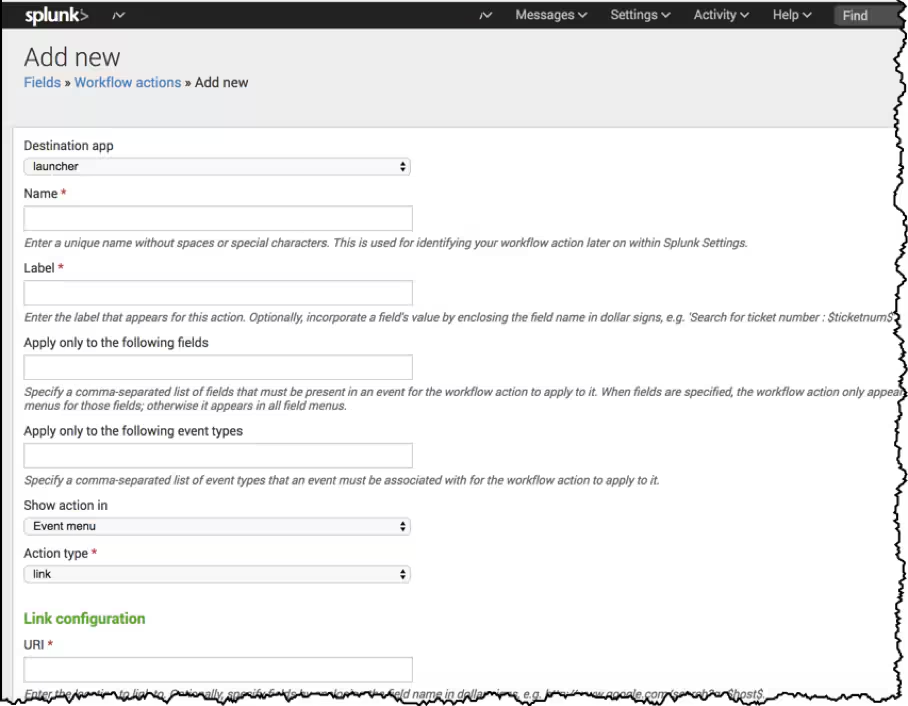
This is where we make magic happen. Let’s use www.robtex.com as an example. Robtex is one of the best websites for open source intelligence of IP addresses and websites. I use it daily. If it's used EVERY day, I should probably automate it, shouldn’t I?
There are a couple of important values that need to be completed. The hints below each box are pretty self-explanatory, but make sure you place dollar signs ($) around the value that you are passing into a URI so it gets treated as a token.
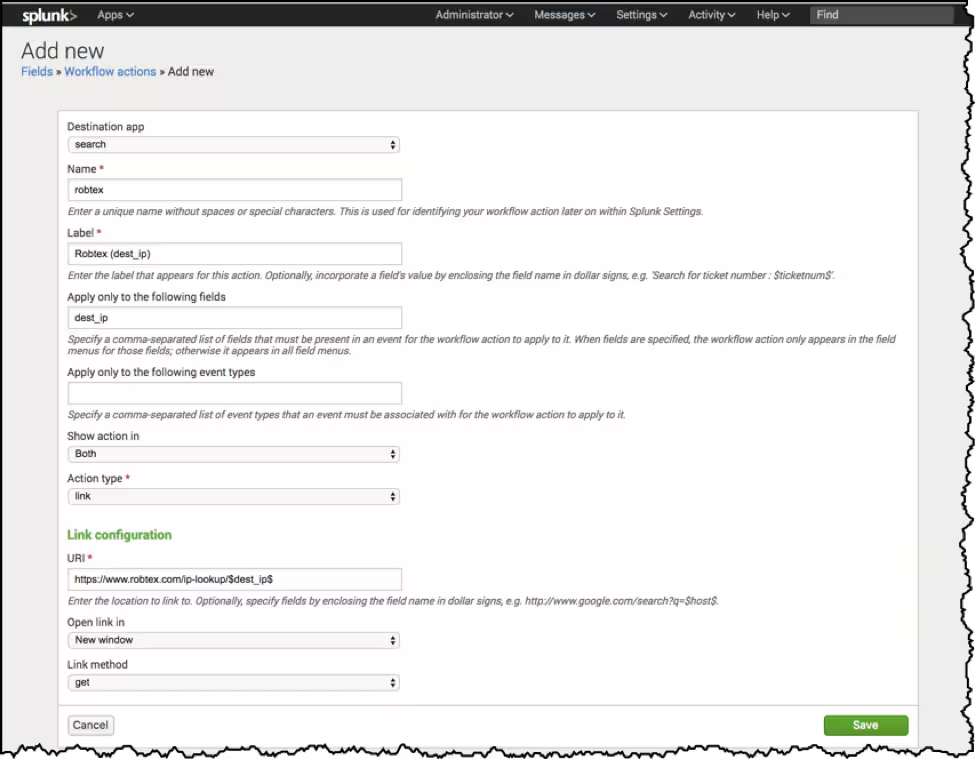
Now that we have a workflow action, I can quickly pivot and look for results from robtex.com!
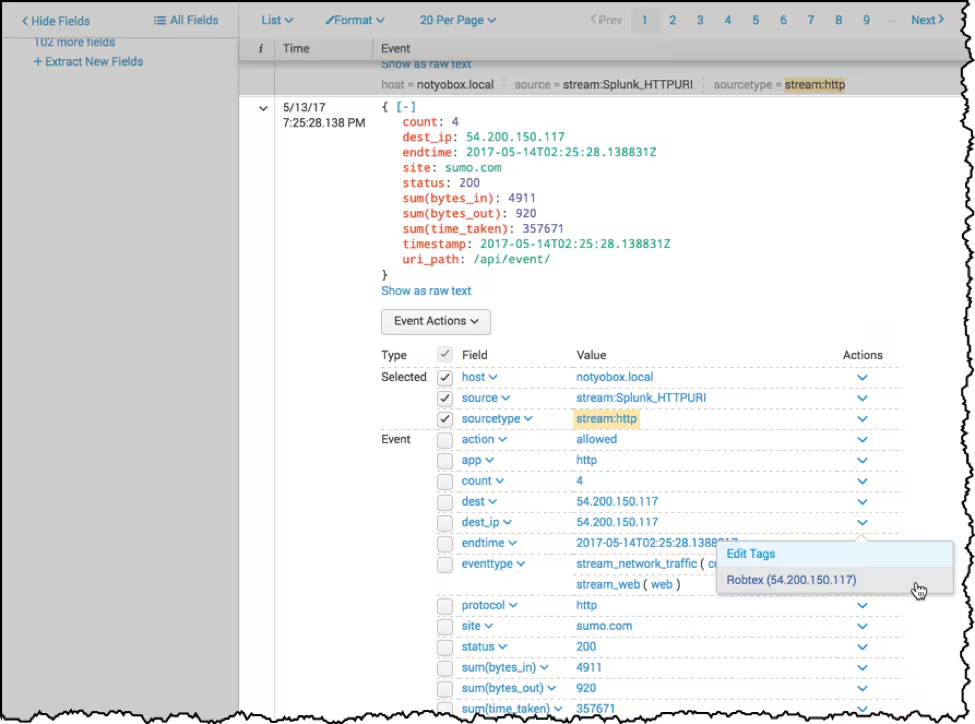
Notice how I have my results, click on the action next to dest_ip and see Robtex as an option to pivot to.
But wait, there’s more!
Sites performing OSINT pivots
Let’s go over a whole passel of different sites that are worth performing open source intelligence pivots to.
The screenshot below shows you how the workflow_actions.conf file looks after you create it via the GUI. In the example below, I added several new fields that are available for lookup and a special variable $@field_value$ which allows me to pass any of the available fields to Robtex. Which just goes to show… CLI>GUI :-)
With that in mind, take a look at the link.method field, here:
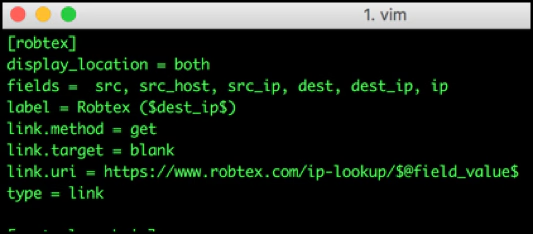
For many websites, that is going to be a GET since I am pulling information from the site. However, when submitting an IOC to a website, you are sending information and will need to make that a POST instead. Sometimes, sites will require a POST to get data. Crazy, huh?
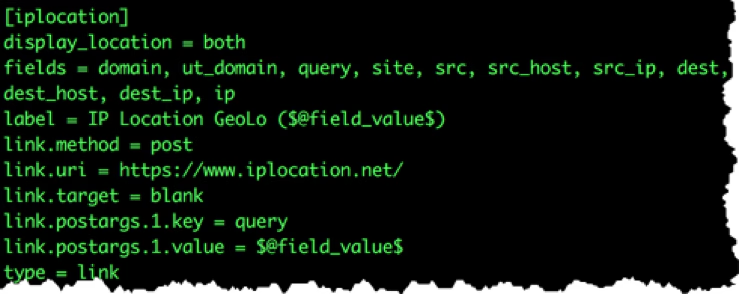
Here is an example for the website iplocation.net. For those not familiar with iplocation.net, it provides the geolocation information of a domain or IP address.
To get geolocation data from the site, you will need to POST to the site. Notice that the link.method = post is defined and link.postargs.1.key and link.postargs.1.value are set for sending those values to the iplocation.net website.
Download workflow_action.conf sample
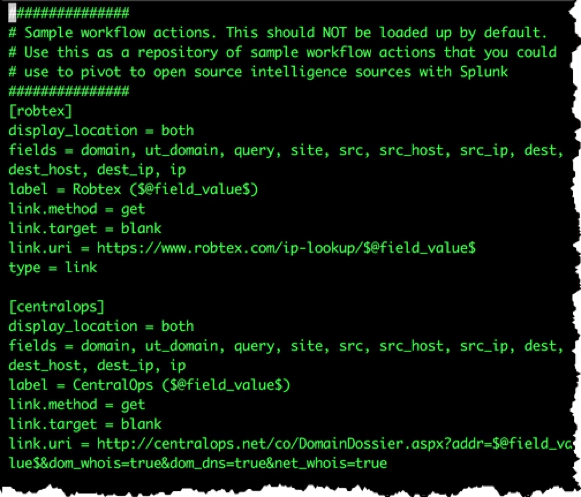
Here is the screenshot of my workflow_action.conf sample that includes many of the sources listed above. If you would like to play with it, you can download it from https://github.com/rkovar/splunk-hunting-helpers.
Thanks for visiting and happy hunting!
Related Articles

Predicting Cyber Fraud Through Real-World Events: Insights from Domain Registration Trends

When Your Fraud Detection Tool Doubles as a Wellness Check: The Unexpected Intersection of Security and HR

Splunk Security Content for Threat Detection & Response: November Recap

Security Staff Picks To Read This Month, Handpicked by Splunk Experts

Behind the Walls: Techniques and Tactics in Castle RAT Client Malware

AI for Humans: A Beginner’s Field Guide

Splunk Security Content for Threat Detection & Response: November 2025 Update

Operation Defend the North: What High-Pressure Cyber Exercises Teach Us About Resilience and How OneCisco Elevates It
