Meduza Stealer Analysis: A Closer Look at its Techniques and Attack Vector
Meduza Stealer is an emerging malware threat known for its ability to harvest sensitive data from infected systems. First identified in 2023, it targets a wide array of personal and financial information, including login credentials, payment data, and cryptocurrency wallets. Meduza Stealer is distributed through phishing campaigns, malicious downloads, or exploits, employing evasion techniques to bypass antivirus and sandbox systems.
In this blog, the Splunk Threat Research Team analyzes multiple variants of the Meduza Stealer malware to identify its MITRE ATT&CK® tactics, techniques, and procedures (TTPs). This analysis provides valuable insights for enhancing Splunk detections and expanding security coverage, empowering organizations to better identify and mitigate threats associated with this information-stealing malware.
Meduza tactics and techniques
In this section, the Splunk Threat Research Team delves into the various stages of Meduza Stealer's operation, focusing on how it avoids detection and delivers its malicious payload.
Meduza stealer loader
Virtualization/sandbox evasion (T1497)
The loader of this information-stealing malware incorporates anti-virtual machine (anti-VM) and anti-sandbox features to evade reverse engineering and prevent the detonation of its payload for analysis and detection. These capabilities are designed to hinder security researchers and automated analysis environments, further complicating efforts to understand and mitigate the threat.
Figure 1 shows a screenshot of the pseudocode for a Meduza Stealer function used to check if it is running in a virtual machine (VM). The function utilizes the CPUID instruction with RAX set to 1, which returns the 31st bit indicating whether the code is executing within a VM environment. This technique enables the malware to identify and potentially evade virtualized analysis setups.
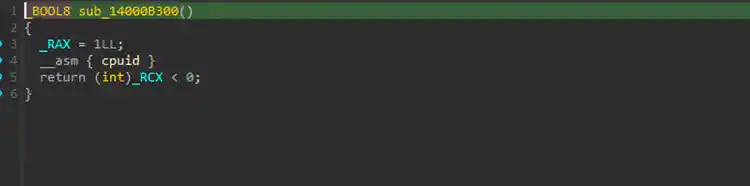
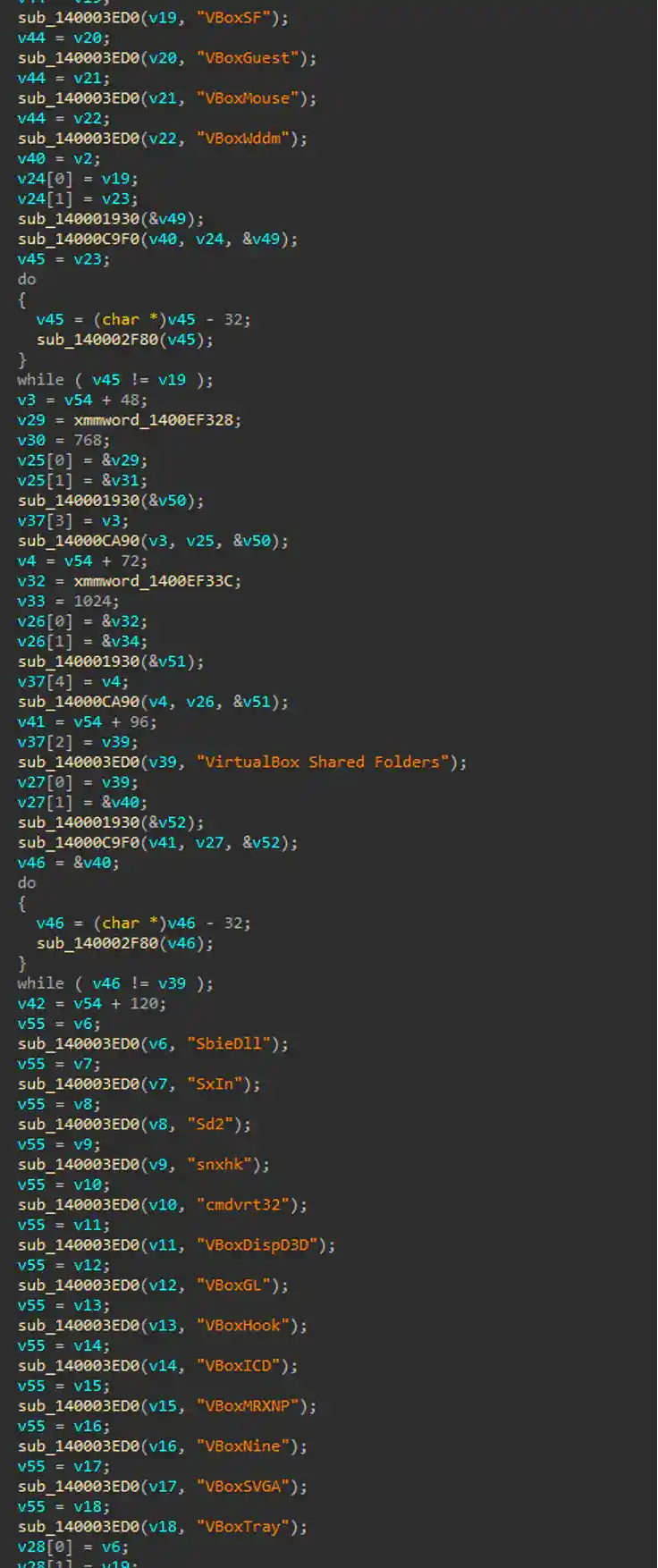
Figure 2 displays screenshots of the Meduza Stealer code, which initializes checks for known virtual machine and sandbox components. These components are commonly targeted by threat actors to determine if their malware is running in a virtualized environment. If any of these components are detected, Meduza Stealer will terminate its execution to avoid analysis or detection.
Encrypted/encoded file (T1027.013)
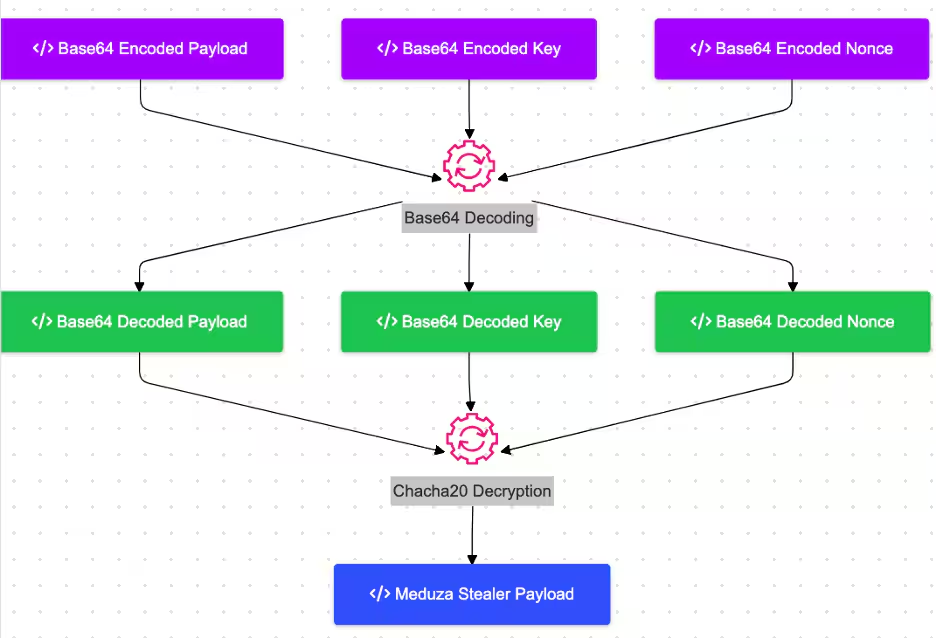
The Meduza Stealer loader employs both encoding and encryption to protect its payload. The payload is encrypted using the ChaCha20 algorithm, with both the decryption key and nonce securely handled. Additionally, the payload itself is encoded in Base64, adding another layer of obfuscation. These measures make it more challenging to analyze and detect the malware during its execution.
Figure 3 illustrates a simplified diagram of how the Meduza Stealer loader decodes and decrypts the actual payload.
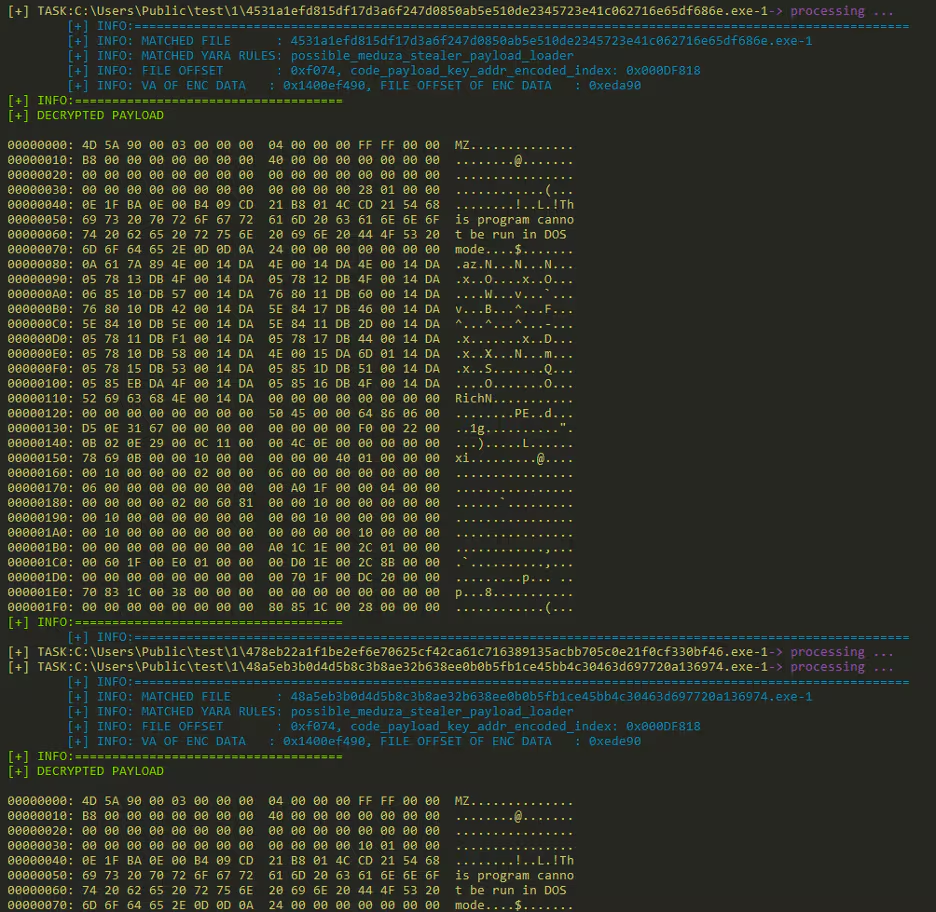
After analyzing the decryption routine of the loader, the Splunk Threat Research Team was able to implement this into a Python script to attempt decrypting all possible variants that utilize this decryption algorithm.

Meduza stealer malware
System location discovery (T1614)
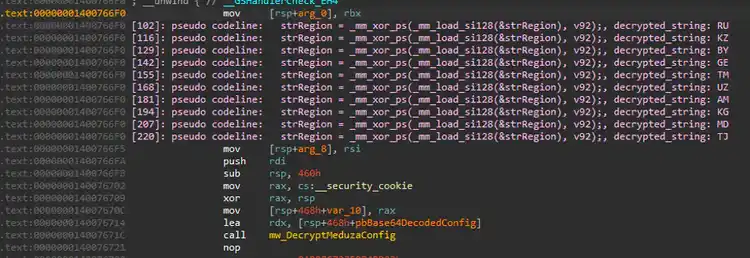
Meduza Stealer incorporates geo-restriction checks to avoid targeting systems in specific regions. Before executing its malicious payload, the malware checks the system’s geographical location using the GeoID or related system settings. If the detected GeoID matches one from a predefined list—RU (Russia), KZ (Kazakhstan), BY (Belarus), GE (Georgia), TM (Turkmenistan), UZ (Uzbekistan), AM (Armenia), KG (Kyrgyzstan), MD (Moldova), or TJ (Tajikistan)—the malware will terminate itself or skip further execution.
Testing GeoID
Want to test which GeoID your system is similar to, just like Meduza Stealer does before executing its payload? You can do so by running this PowerShell command:
$geoIdsToCheck = @('RU', 'KZ', 'BY', 'GE', 'TM', 'UZ', 'AM', 'KG', 'MD', 'TJ')
$currentGeoId = [System.Globalization.RegionInfo]::CurrentRegion.TwoLetterISORegionName
if ($geoIdsToCheck -contains $currentGeoId) {
  Write-Output "GeoID '$currentGeoId' is on the restricted list. Malware execution is terminated."
} else {
  Write-Output "GeoID '$currentGeoId' is not restricted. Malware would proceed with execution."
}

Query registry (T1012)
Meduza Stealer queries specific system registry keys related to installed and uninstalled software, such as [HKLM/HKCU]\Software\Microsoft\Windows\CurrentVersion\Uninstall and SOFTWARE\WOW6432Node\Microsoft\Windows\CurrentVersion\Install registry.
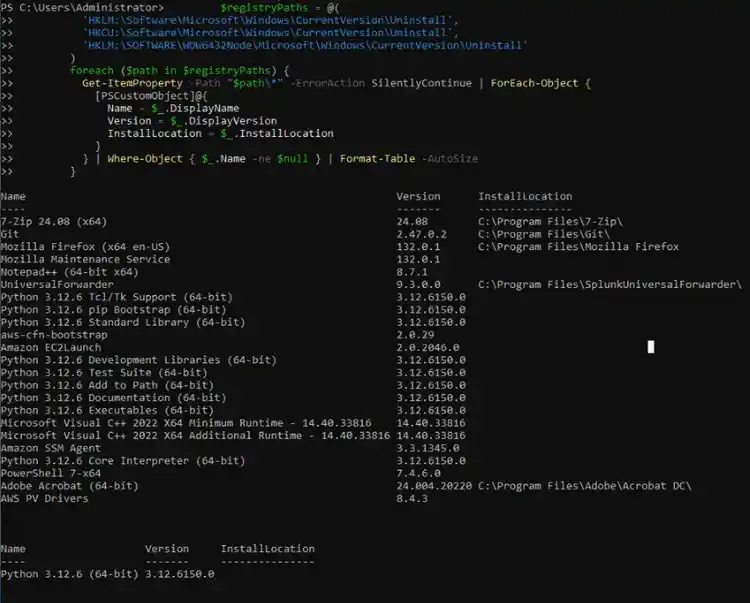
By accessing these registry locations, Meduza Stealer retrieves a list of installed applications, including details like software names, versions, and installation paths. This data allows attackers to profile the system, identify high-value targets like security tools or cryptocurrency wallets, and potentially exploit vulnerabilities in outdated software.
Want to see how an information stealer profiles your system for installed software, similar to Meduza Stealer? You can do so by running this PowerShell command to query installed software from registry keys:
$registryPaths = @(
  'HKLM:\Software\Microsoft\Windows\CurrentVersion\Uninstall',
  'HKCU:\Software\Microsoft\Windows\CurrentVersion\Uninstall',
  'HKLM:\SOFTWARE\WOW6432Node\Microsoft\Windows\CurrentVersion\Uninstall'
)
foreach ($path in $registryPaths) {
  Get-ItemProperty -Path "$path\*" -ErrorAction SilentlyContinue | ForEach-Object {
    [PSCustomObject]@{
      Name = $_.DisplayName
      Version = $_.DisplayVersion
      InstallLocation = $_.InstallLocation
    }
  } | Where-Object { $_.Name -ne $null } | Format-Table -AutoSize
}
Access token manipulation (T1134)
Meduza Stealer checks whether its malware is running with elevated privileges, such as administrator rights. If the malware process is not running with administrative privileges, it attempts to gain elevated access by executing a COM object or by modifying the process token of its running instance using the SeDebugPrivilege. This enables the malware to bypass privilege restrictions and maintain control over the compromised system.

Figure 9: Adjust Process Token Privilege
Windows credential manager (T1555.004)
This malware uses the CredEnumerateA() API to steal sensitive information. In this example, the malware is specifically targeting credentials stored on the victim's system. The CredEnumerateA() function is part of the Windows API and allows applications to enumerate the credentials stored in the Windows Credential Manager. These credentials may include usernames, passwords, and other sensitive data used for authentication by various applications and services.
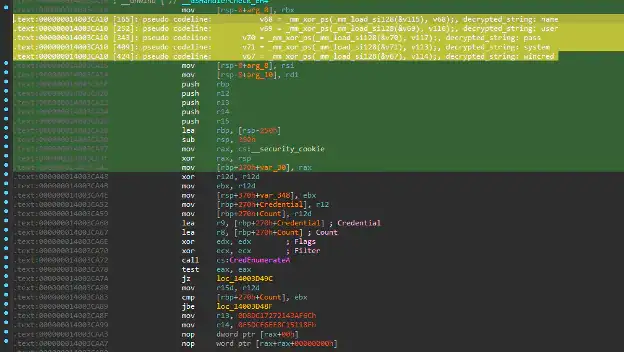
Figure 10: Enumerate Credential from Password Store
In addition, this malware leverages the VaultCli.dll module to steal sensitive information, specifically targeting credentials stored within the Windows Vault. The Windows Vault is a secure storage system that holds passwords, credentials, and other sensitive data, such as those used for web services, applications, and network resources. VaultCli.dll can be used to enumerate, retrieve, and decrypt these stored credentials, allowing Meduza Stealer to exfiltrate them.
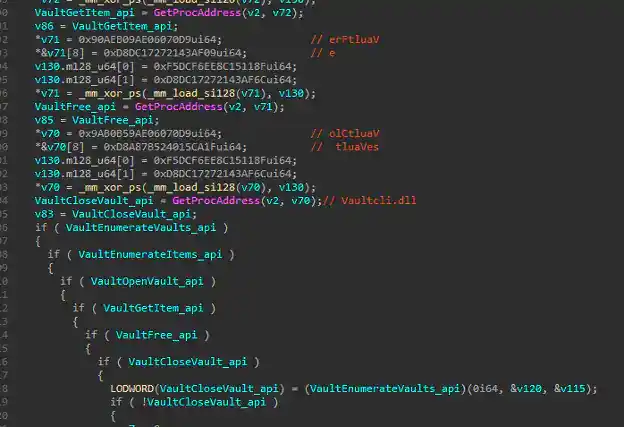
Figure 11: Enumerate Credential from Password Store - vaultcli.dll
Credentials from web browsers (T1555.003)
Meduza Stealer also extracts sensitive information from a wide range of web browsers. It targets popular browsers like Chrome, Firefox, Edge, and others by exploiting their data storage mechanisms. The malware accesses saved credentials, browsing history, autofill data, cookies, and even credit card details stored in encrypted formats. By bypassing security measures, Meduza decrypts this information and sends it to remote servers controlled by attackers. This technique has been observed in various Trojan Stealers, as previously described by the Splunk Threat Research Team in our analysis of the Amadey Trojan Stealer.
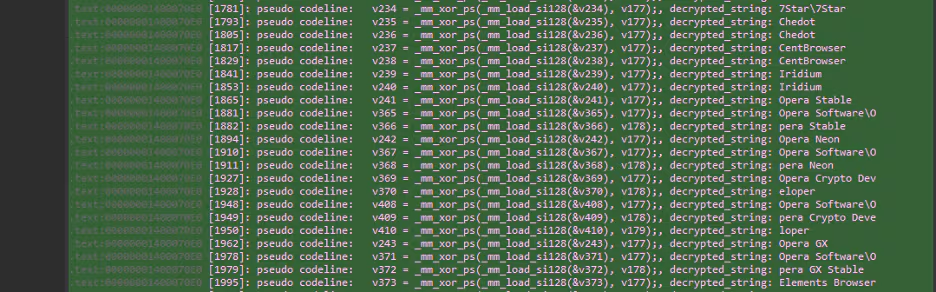
Figure 12: Snippet of Browser List
Below is a comprehensive list of web browsers targeted by Meduza Stealer for credential theft.
Browser extensions (T1176)
Meduza Stealer extends its reach to browser extensions by taking advantage of weak encryption and insecure storage mechanisms to access sensitive data. It targets files such as IndexedDB in local storage, allowing threat actors to locate and extract wallet credentials, private keys, and transaction history. This enables attackers to compromise accounts, steal assets, and potentially escalate their attacks further. Such capabilities make Meduza Stealer particularly dangerous for users relying on extensions for secure operations.
Below is a table listing the extensions that Meduza Stealer targets in order to extract sensitive information.
Below are lists of additional applications targeted by Meduza Stealer in its attempt to steal credentials and sensitive information:
- Messenger: Discord, 64Gram, DiscordCanary, DiscordPTB, Lightcord, Telegram, Steam, Pidgin, Kotatogram
- VPN: OpenVPN
- CryptoWallet: Coinomi, DashCore, Dash, LitecoinCore, Litecoin, BitcoinCore, Bitcoin, DogecoinCore, Dogecoin, QtumCore, Qtum, Armory, bytecoin, MultiBit, Jaxx Liberty, Exodus, Ethereum, Electrum, fig, Electrum-LTC, atomic, Guarda, WalletWasabi, ElectronCash, Sparrow, IOCoin, PPCoin, BBQCoin, Mincoin, devcoin, YACoin, Franko, FreiCoin, InfiniteCoin, GoldCoin, Binance, Terracoin, Daedalus Mainnet, MyMonero, MyCrypto, AtomicDEX, Bisq
Credentials in registry (T1552.002)
Meduza Stealer queries the Windows Registry to extract credentials and related information from Microsoft Outlook user profiles. Outlook stores configuration and user data, including usernames, passwords, and profile details, in specific registry keys. Meduza Stealer targets these keys to gather sensitive information.
As seen in the table below, during our analysis we observed Meduza Stealer targeting Outlook versions 12.0, 14.0, 15.0, and 16.0.
System network configuration discovery (T1016)
This malware uses api[.]ipify[.]org as part of its operation. This API is a public service designed to provide the external (public) IP address of the device making the request. Meduza Stealer uses it to obtain the victim's IP address, which can help attackers gather information about the user's network, location, or ISP.
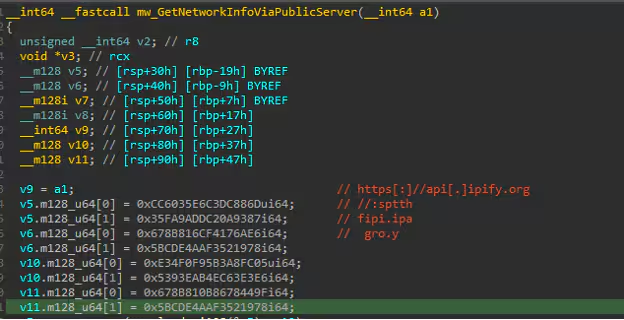
Figure 13: Network Discovery
Time-based evasion (T1497.003)
Like other malware that often leverages common batch commands, Meduza Stealer uses the ping timeout (sleep) technique to control the flow of execution and evade detection. The ping command, typically used for network diagnostics, can serve as a makeshift delay mechanism. By pinging a non-existent or benign IP address (e.g., ping 1.1.1.1 -n X), the malware introduces a time delay equivalent to the number of echo requests sent. This method is a stealthy way to implement pauses without directly using more suspicious commands or APIs.
Figure 14 shows a screenshot of the Meduza Stealer code that initialized the ping sleep batch script:
CMD.EXE /C ping 1.1.1.1 -n 1 -w 3000 > Nul & Del /f /q *
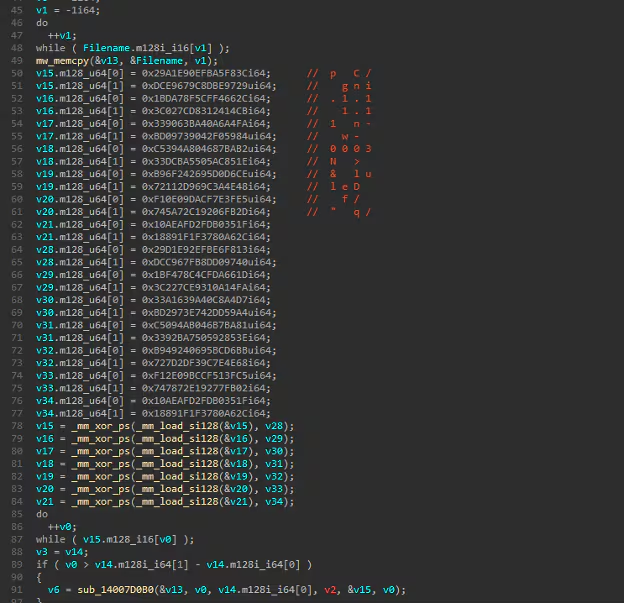
Figure 14: Ping Sleep
Encrypted channel (T1573)
Meduza Stealer uses an encrypted configuration file to store essential details required for its operation. This configuration typically includes the malware’s command and control (C2) server addresses, targeted application paths, file types for data extraction, and other operational parameters. The configuration is encrypted to evade detection and analysis by security tools. Upon execution, the malware decrypts this file in memory, allowing it to dynamically adjust its behavior, such as tailoring its data theft operations to specific targets or updating its C2 endpoints. This approach enhances its flexibility and resilience against static analysis. The decryption process for the configuration file uses the same algorithm employed to decrypt the actual Meduza payload from the loader. Figure 15 illustrates an example of a decrypted configuration file, obtained by simulating the decryption routine using a Python script.
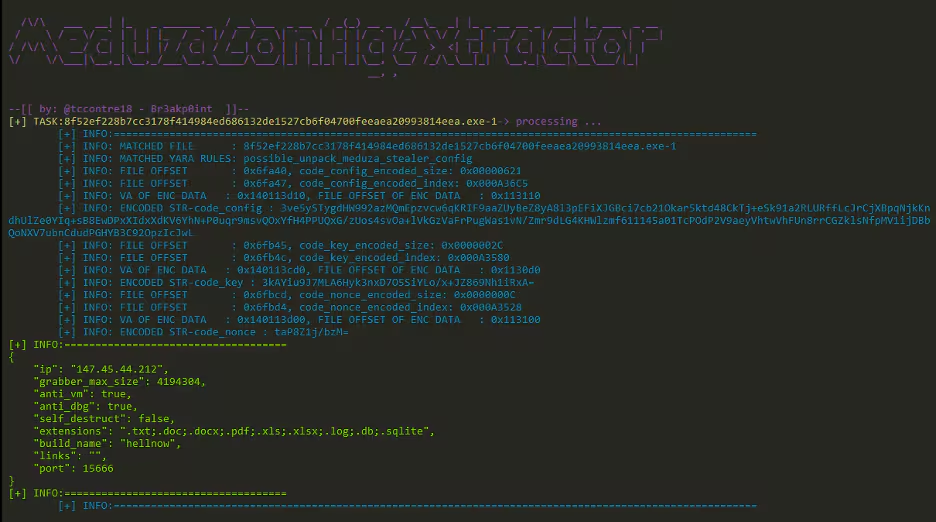
Exfiltration over C2 channel (T1041)
After completing data collection on the compromised host, Meduza Stealer exfiltrates the stolen information to its C2 server using data encoding techniques. The collected data is encoded, typically in Base64, to obfuscate its content during transmission. Figure 16 provides a screenshot of a large chunk of Base64-encoded data being sent to the C2 server over the TCP protocol.
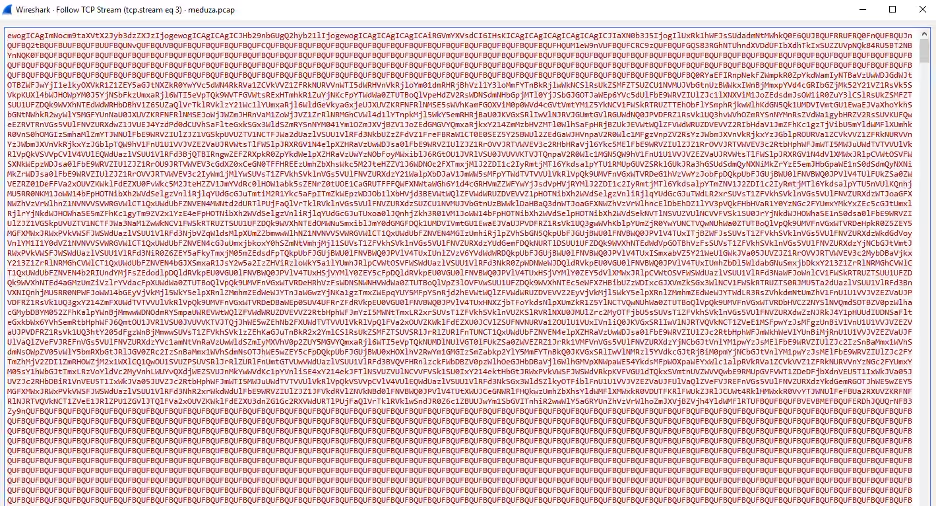
Upon extracting and decoding the packet, the contents reveal data in JSON file format, with Base64-encoded values representing the information collected by Meduza Stealer from the compromised host. The specific data captured may vary based on the malware’s configuration, as outlined earlier.
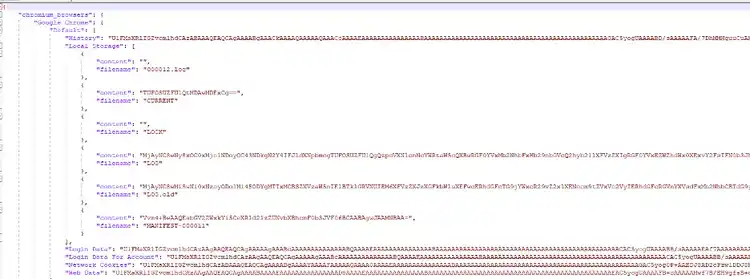
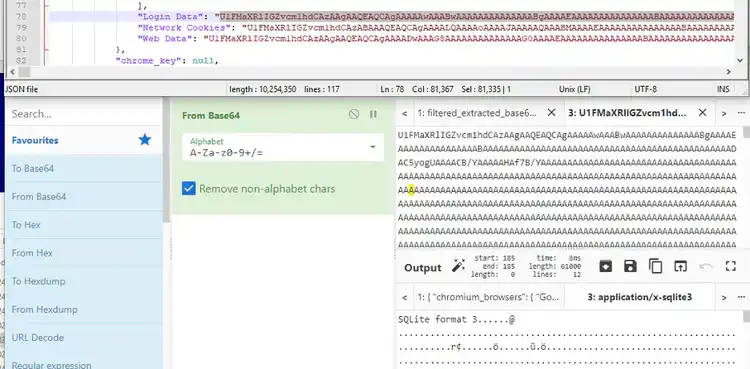
Figure 18, on the other hand, displays a screenshot of the decoded SQLite database file sent by this information stealer to its C2 server as part of its data exfiltration process.
Splunk security detections
The Splunk Threat Research Team has developed a set of detections to help Splunk customers identify potential indicators of the Meduza Stealer malware. These detections, detailed in the section below, have been incorporated into the new Meduza Stealer analytic story alongside other relevant detections.
Windows credentials from password stores chrome extension access
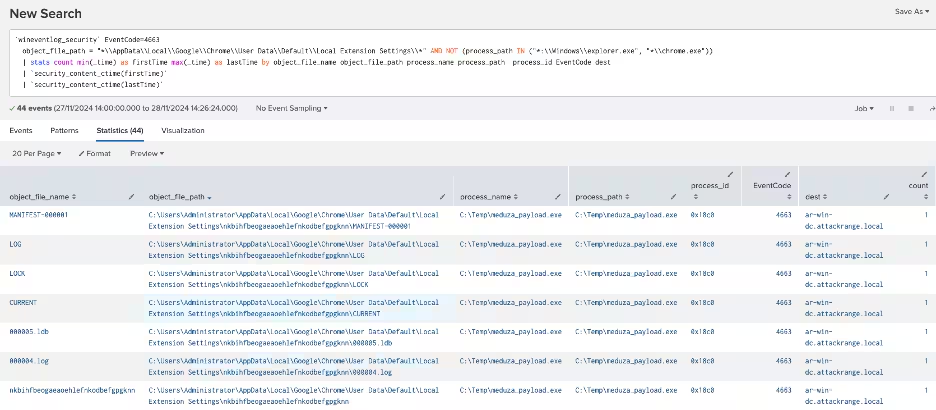
The following analytic detects non-Chrome processes attempting to access the Chrome extensions file. It leverages Windows Security Event logs, specifically event code 4663, to identify this behavior. This activity is significant because adversaries may exploit this file to extract sensitive information from the Chrome browser, posing a security risk.
`wineventlog_security` EventCode=4663
  object_file_path="*\\AppData\\Local\\Google\\Chrome\\User Data\\Default\\Local Extension Settings\\*"
  AND NOT (process_path IN ("*:\\Windows\\explorer.exe", "*\\chrome.exe"))
  | stats count min(_time) as firstTime max(_time) as lastTime by object_file_name object_file_path process_name process_path process_id EventCode dest
  | `security_content_ctime(firstTime)`
  | `security_content_ctime(lastTime)`
Windows credentials from password stores chrome login data access
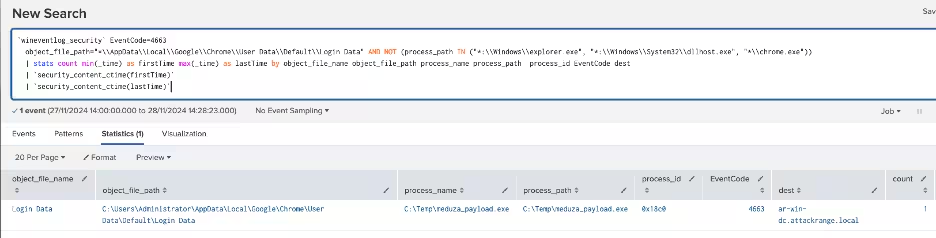
The following analytic identifies non-Chrome processes accessing the Chrome user data file "login data." This file is an SQLite database containing sensitive information, including saved passwords. The detection leverages Windows Security Event logs, specifically event code 4663, to monitor access attempts.
`wineventlog_security` EventCode=4663
  object_file_path="*\\AppData\\Local\\Google\\Chrome\\User Data\\Default\\Login Data"
  AND NOT (process_path IN ("*:\\Windows\\explorer.exe", "*:\\Windows\\System32\\dllhost.exe", "*\\chrome.exe"))
  | stats count min(_time) as firstTime max(_time) as lastTime by object_file_name object_file_path process_name process_path process_id EventCode dest
  | `security_content_ctime(firstTime)`
  | `security_content_ctime(lastTime)`
Windows gather victim network info through IP check web services
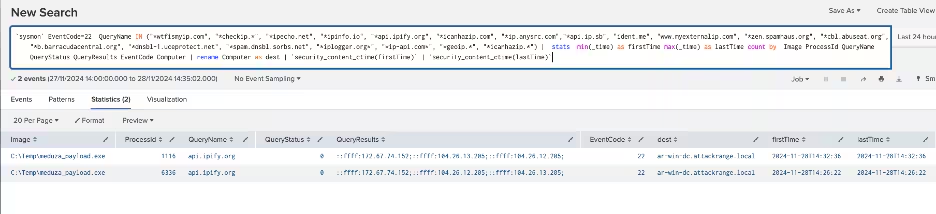
The following analytic detects processes attempting to connect to known IP check web services. This behavior is identified using Sysmon Event Code 22 logs, specifically monitoring DNS queries to services like "wtfismyip.com" and "ipinfo.io" for reconnaissance to determine the infected machine's IP address.
`sysmon` EventCode=22 QueryName IN ("*wtfismyip.com", "*checkip.*", "*ipecho.net", "*ipinfo.io", "*api.ipify.org", "*icanhazip.com", "*ip.anysrc.com","*api.ip.sb", "ident.me", "www.myexternalip.com", "*zen.spamhaus.org", "*cbl.abuseat.org", "*b.barracudacentral.org", "*dnsbl-1.uceprotect.net", "*spam.dnsbl.sorbs.net", "*iplogger.org*", "*ip-api.com*", "*geoip.*", "*icanhazip.*")
| stats min(_time) as firstTime max(_time) as lastTime count by Image ProcessId QueryName QueryStatus QueryResults EventCode Computer
| rename Computer as dest
| `security_content_ctime(firstTime)`
| `security_content_ctime(lastTime)`
Suspicious process file path
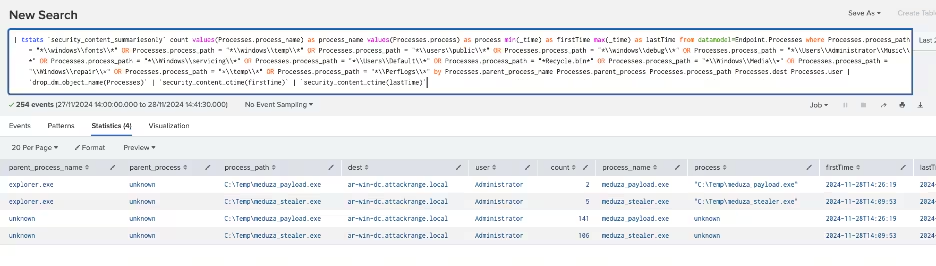
The following analytic identifies processes running from file paths not typically associated with legitimate software. It leverages data from Endpoint Detection and Response (EDR) agents, focusing on specific process paths within the endpoint data model. This activity is significant because adversaries often use unconventional file paths to execute malicious code without requiring administrative privileges.
| tstats `security_content_summariesonly` count values(Processes.process_name) as process_name values(Processes.process) as process min(_time) as firstTime max(_time) as lastTime
from datamodel=Endpoint.Processes
where Processes.process_path = "*\\windows\\fonts\\*" OR Processes.process_path = "*\\windows\\temp\\*" OR Processes.process_path = "*\\users\\public\\*" OR Processes.process_path = "*\\windows\\debug\\*" OR Processes.process_path = "*\\Users\\Administrator\\Music\\*" OR Processes.process_path = "*\\Windows\\servicing\\*" OR Processes.process_path = "*\\Users\\Default\\*" OR Processes.process_path = "*Recycle.bin*" OR Processes.process_path = "*\\Windows\\Media\\*" OR Processes.process_path = "\\Windows\\repair\\*" OR Processes.process_path = "*\\temp\\*" OR Processes.process_path = "*\\PerfLogs\\*"
by Processes.parent_process_name Processes.parent_process Processes.process_path Processes.dest Processes.user
| `drop_dm_object_name(Processes)`
| `security_content_ctime(firstTime)`
| `security_content_ctime(lastTime)`
Windows credentials access via VaultCli module
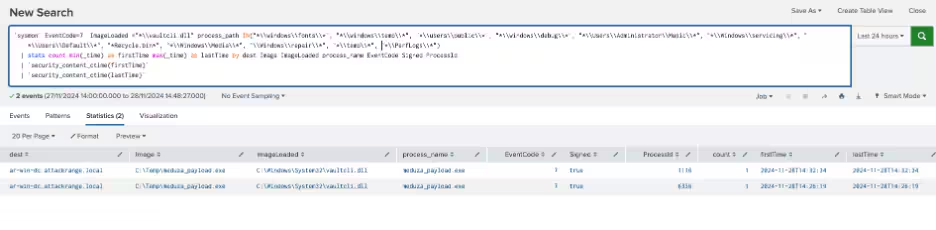
The following analytic detects the presence of information-stealing malware that exploits the VaultCLI.dll module to extract credentials from the Windows Credential Vault. It identifies abnormal interactions with VaultCLI.dll, particularly those initiated by processes located in publicly writable Windows folder paths.
`sysmon` EventCode=7
ImageLoaded ="*\\vaultcli.dll"
process_path IN("*\\windows\\fonts\\*", "*\\windows\\temp\\*", "*\\users\\public\\*", "*\\windows\\debug\\*", "*\\Users\\Administrator\\Music\\*", "*\\Windows\\servicing\\*", "*\\Users\\Default\\*", "*Recycle.bin*", "*\\Windows\\Media\\*", "\\Windows\\repair\\*", "*\\temp\\*", "*\\PerfLogs\\*")

| stats count min(_time) as firstTime max(_time) as lastTime by dest Image ImageLoaded process_name EventCode Signed ProcessId

| `security_content_ctime(firstTime)`

| `security_content_ctime(lastTime)`
Overall, the Meduza Stealer analytic story introduces 14 detections across MITRE ATT&CK techniques.
IOCs
48a5eb3b0d4d5b8c3b8ae32b638ee0b0b5fb1ce45bb4c30463d697720a136974
5c6985e002a60d821fd7b029b2c5d04c3ee16bb619999202f6dbdf432d229989
93626f2a12a4ab1fbe7e284af0a3368c4041e58428f18429acc64d3f09067a29
a39cb2c31b6724eaa78f60fe29ced83e50ffad7e39efd604a7debdac63a2a80e
cc332b2b190d6bed3bfccf6f7b878a2065cf70babd1cc79a65b7adeadf130323
d61985407f31d1fbba3aaf4e6d1e79c5fc79fa333879fd478a0ffb4d9476a04f
1c123f8cd194d826aaa48e97fa67b9db9faa1a5a1ada139f367d56904f6e0c04
322608e24d59934b175fe0f128fc70112b69ac82ed25deb794c98f19af3204f4
545dce672f9a6cad9aa56f689a50403bebd68ca99c2a6b8806b28025f8b3b0a0
5c7f4086a64f90787ea13a00c4dc217d8ec6188abc24e4f2e841f7c805a8cca5
85d96a1ba8fa7426e48bcf430d305c6e4764db53fb86abbe53d9b80c5e474e72
8f52ef228b7cc3178f414984ed686132de1527cb6f04700feeaea20993814eea
9c57d9431e5a3b8206bceadad97108bb59bd08e0e90a4946c41ca268a2093412
a681393f417174f96a6f0814677b28d81884fb836b501de132eb0003e4782eac
b056dd707d21bd57b256767dc3e13cd8c824cf059ca70f13e2cda9f96b101012
b174f3ba74f08dab33a60a99b4c6a1fa7d021a20b68283a15d82c84367c2c28d
d510497588fe468e45119bf8a094b1be3a9eb2e78e26ddfdc1466911bab8b629
d82fe3ed607a8d4827f6b8f007bae911b7201e9af927ffb7442d571347903ab8
f3cb381e29fe29872b86838500dc6ee2f810865bf5a0b1cd4718b0036c3d51a5
edd39f9eff63770ff224f000a73c5703a7b7225bddc329ef4467ee986be40744
940d413dd95bc28d5c724d814f2cd1ecca005d2cb58ed28788d9c07d962d829b
f3cb381e29fe29872b86838500dc6ee2f810865bf5a0b1cd4718b0036c3d51a5
f862bb143150aa9ee9601ab102264d127caae7f9562dc085030d3429cf89586e
a681393f417174f96a6f0814677b28d81884fb836b501de132eb0003e4782eac
c4199805b4245bdc6667e46cf4ab639b1e661b422b7a4f6372733ac6ca367c83
1420f60f053c3ea5605239ee431e5f487245108b1c01be75d16b5246156fa178
Learn more
This blog helps security analysts, blue teamers, and Splunk customers identify Meduza Stealer malware by enabling the community to discover related TTPs used by threat actors and adversaries. You can implement the detections in this blog using the Enterprise Security Content Updates app or the Splunk Security Essentials app. To view the Splunk Threat Research Team's complete security content repository, visit research.splunk.com.
Feedback
Any feedback or requests? Feel free to put in an issue on GitHub, and we’ll follow up. Alternatively, join us on the Slack channel #security-research. Follow these instructions if you need an invitation to our Splunk user groups on Slack.
Contributors
We would like to thank Teoderick Contreras for authoring this post and the entire Splunk Threat Research Team for their contributions: Michael Haag, Jose Hernandez, Lou Stella, Bhavin Patel, Rod Soto, Eric McGinnis, Patrick Bareiss, Nasreddine Bencherchali, and Tucker Favreau.
Related Articles

Predicting Cyber Fraud Through Real-World Events: Insights from Domain Registration Trends

When Your Fraud Detection Tool Doubles as a Wellness Check: The Unexpected Intersection of Security and HR

Splunk Security Content for Threat Detection & Response: November Recap

Security Staff Picks To Read This Month, Handpicked by Splunk Experts

Behind the Walls: Techniques and Tactics in Castle RAT Client Malware

AI for Humans: A Beginner’s Field Guide

Splunk Security Content for Threat Detection & Response: November 2025 Update

Operation Defend the North: What High-Pressure Cyber Exercises Teach Us About Resilience and How OneCisco Elevates It
