When Installers Turn Evil: The Pascal Script Behind Inno Setup Malware Campaign
Software installer packages are a cornerstone of user-friendly software distribution. Tools like Inno Setup, NSIS (Nullsoft Scriptable Install System), and InstallShield help developers bundle their applications into a single, streamlined installer that users can run with just a few clicks. These installers often include everything needed to set up a program, files, configurations, and even system dependencies, making software installation seamless and accessible.
But what happens when this convenience is turned against us?
For several years, cybercriminals have increasingly exploited these legitimate installer frameworks as delivery vehicles for malware. Among them, Inno Setup has emerged as a common tool of abuse. Originally designed to simplify software deployment on Windows, it's now being abused by threat actors to disguise malicious payloads inside trusted-looking installation packages.
By wrapping malware inside a seemingly normal installer, attackers bypass many users' suspicions and even evade some antivirus detections. This tactic allows malicious software to spread through phishing campaigns, cracked software downloads, and even poisoned updates—all under the guise of legitimate software.
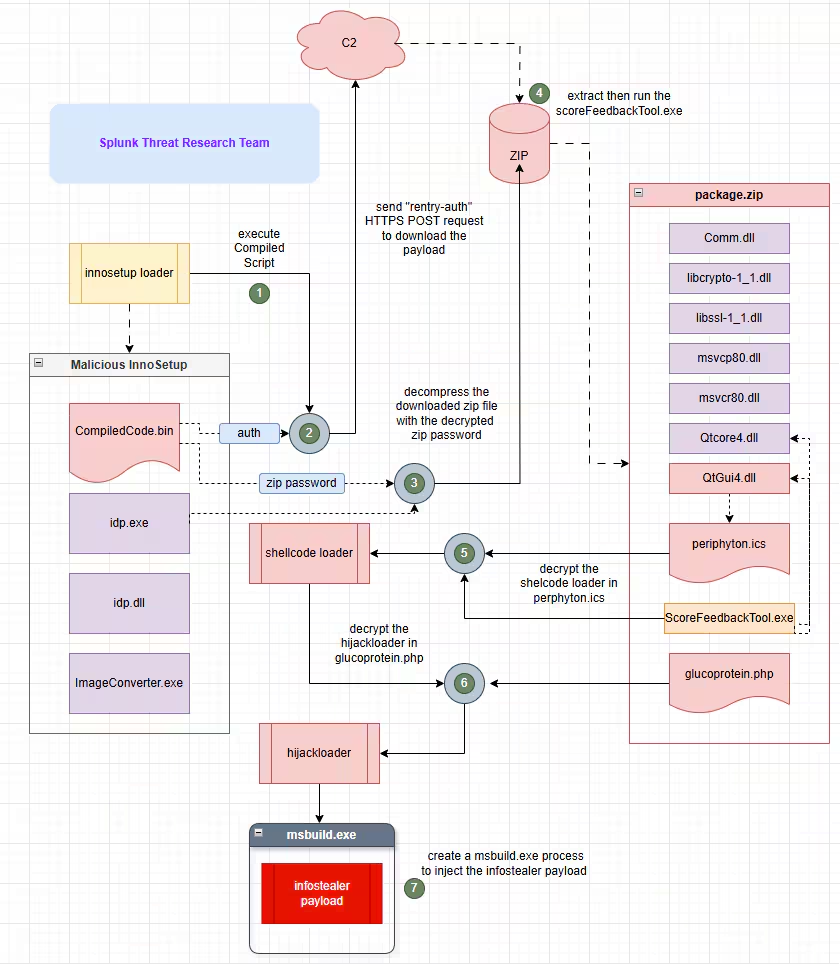
In this blog, the Splunk Threat Research Team (STRT) analyzes a malicious Inno Setup installer that leverages Inno Setup's Pascal scripting capabilities to retrieve and execute the next-stage payload in a compromised or targeted host. This campaign ultimately leads to the execution of shellcode and the use of HijackLoader, a known loader used to evade detection and deliver the final payload in this case, RedLine Stealer, a widely distributed information-stealing malware.
Figure 01 illustrates a straightforward diagram outlining how this campaign delivers an information-stealing malware.
Inno Setup Malicious Loader
In recent years, several malicious loaders have been disguised as legitimate software installers using Inno Setup. These loaders take advantage of Inno Setup’s Pascal scripting capabilities to either load or download malicious payloads onto targeted or compromised systems. This technique closely resembles the approach used by a well-known malicious Inno Setup loader called D3fackLoader, which follows a similar infection pattern.
Upon extracting the malicious Inno Setup installer, the STRT observed a consistent pattern of components across the samples analyzed.
However, the actual malicious component of this loader resides in the Pascal script embedded within the Inno Setup installer.
Debugger Evasion (T1622)
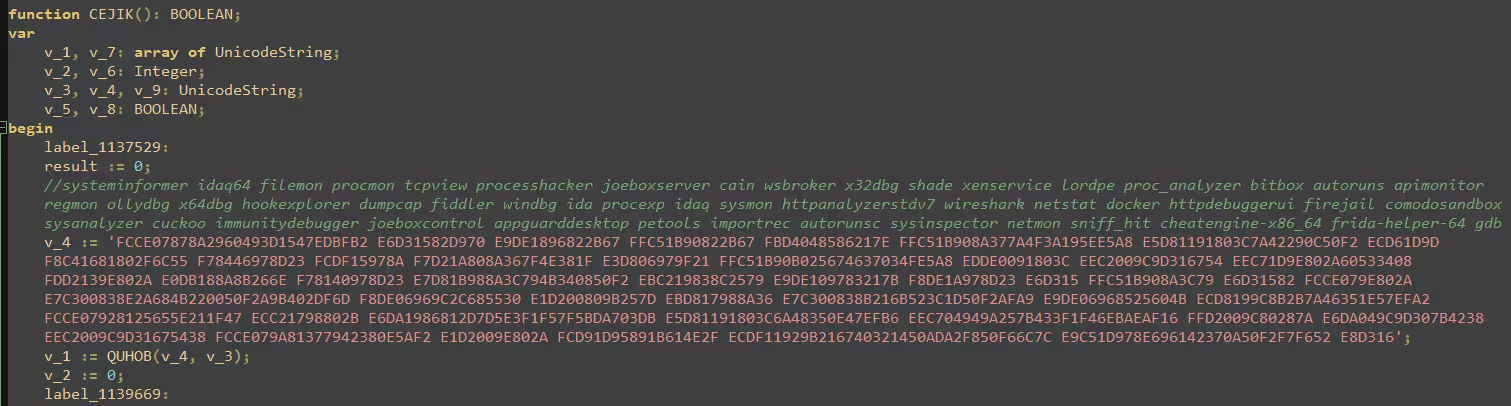
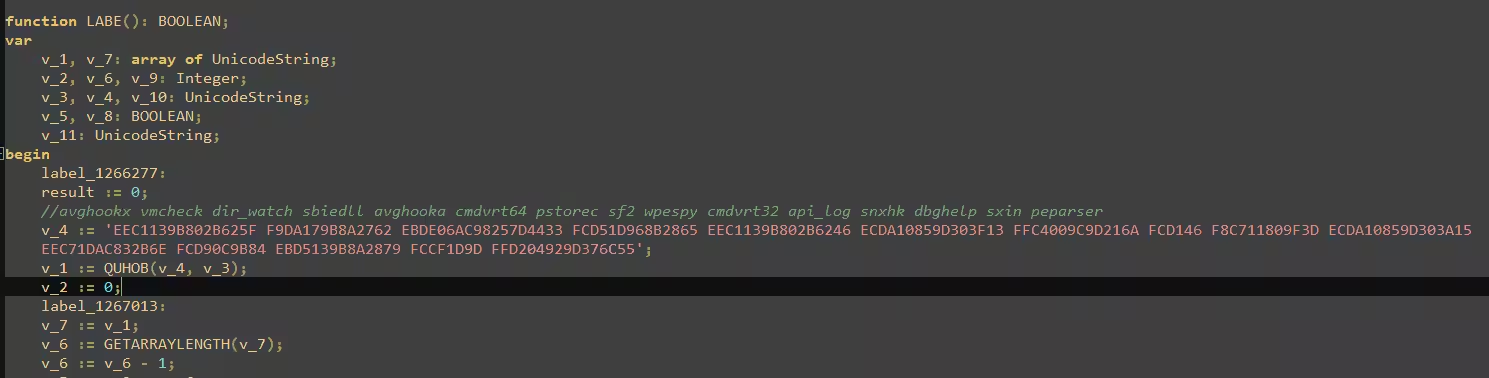
The malicious Pascal script uses simple XOR encryption to obfuscate key strings and commands. Once decrypted, the script executes a Windows Management Instrumentation (WMI) query ”Select * From Win32_Process where Name=” to check for processes associated with malware analysis tools. If any are found, the script immediately terminates the installer to avoid detection.
Figure 02 shows a screenshot of the decrypted process name strings commonly associated with malware analysis and behavior monitoring tools.
Sandbox Evasion (T1497)
Aside from using debugger evasion techniques, this malicious loader also checks the installer’s file name for specific patterns. For example, one variant looks for the substring “application_stable_release.” If found, it proceeds with additional defense evasion checks and attempts to download a payload archive from its command-and-control (C2) server. This behavior serves as an anti-sandbox or anti-automation technique, ensuring the malware only activates under specific conditions to avoid detection during automated analysis.
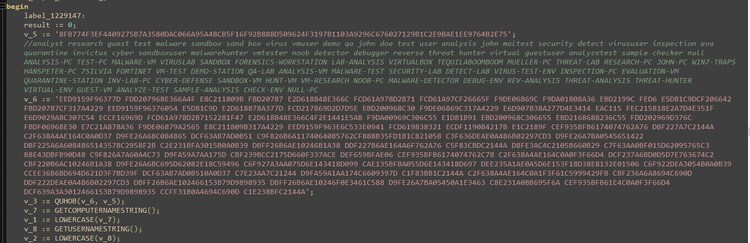
The script also decrypts several strings linked to common computer names and usernames often found in sandbox or malware analysis environments. To further detect if it's running in a controlled setup, it uses WMI queries such as "SELECT * FROM Win32_Processor" and "SELECT * FROM Win32_ComputerSystem" to gather system information. Additionally, it decrypts specific module names and System Model identifiers to help determine whether the compromised host is a virtual machine.

Web Protocols (T1071.001)
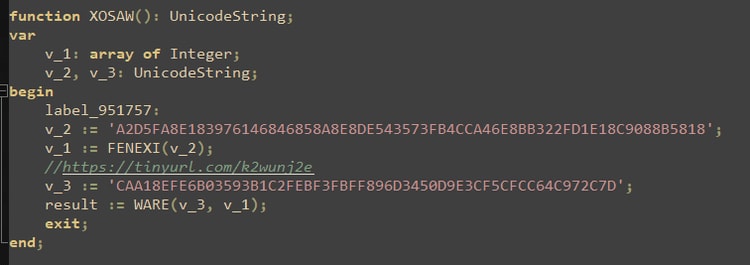
Figure 6: Is a screenshot of the decrypted URL used to download the next-stage payload on the compromised host. The malware uses a TinyURL link to obscure the actual destination URL. By shortening the link, attackers make it harder for defenders and automated systems to quickly identify or block the true location of the malicious payload.
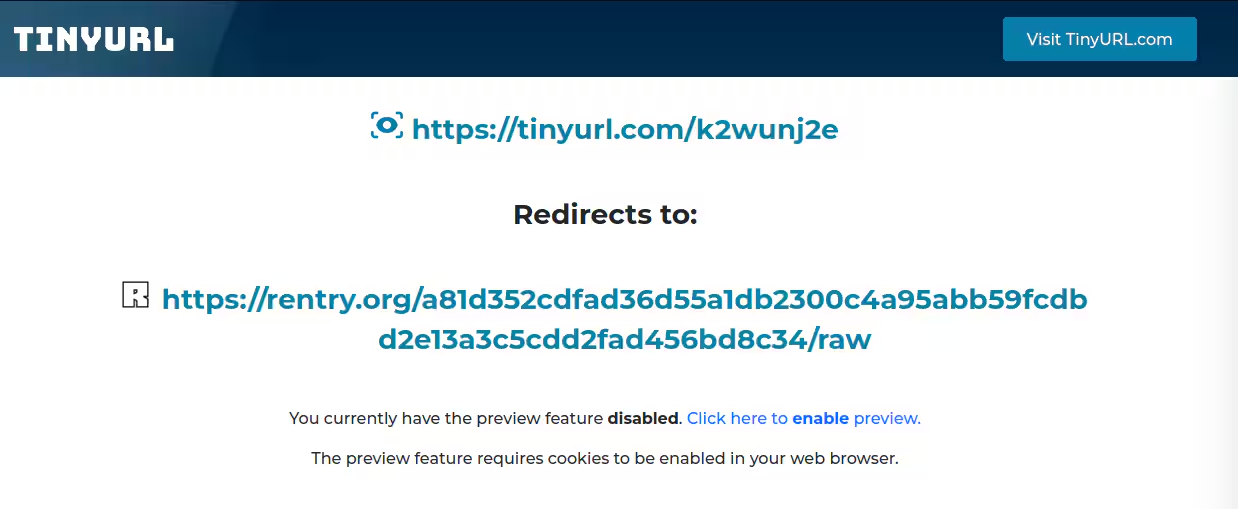
By using TinyURL's preview feature, we can observe in Figure 7 that the shortened link redirects to rentry[.]org, a web-based text and paste service that allows users to share plain-text documents through short, easily distributable URLs.
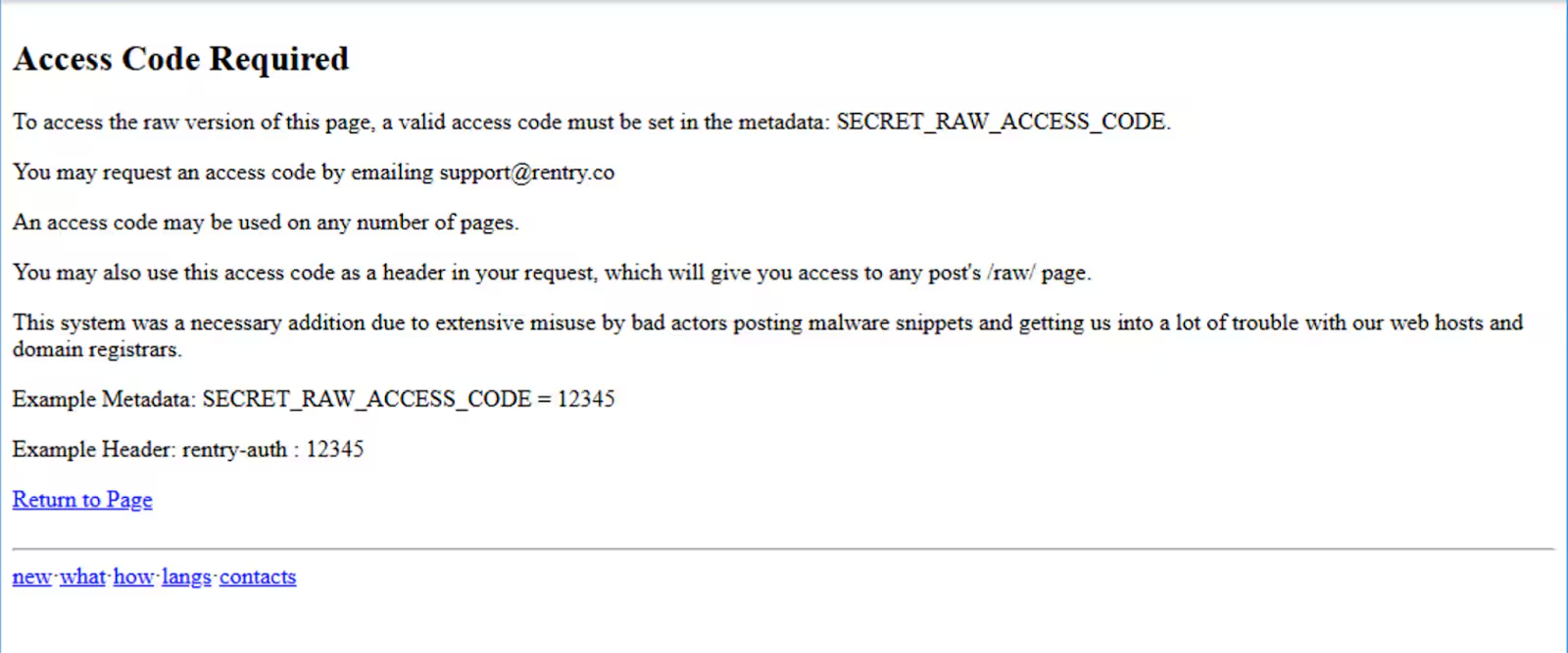
When accessed directly, the URL leads to an "ACCESS CODE REQUIRED" page, as shown in Figure 8. This mechanism is used to restrict access and prevent casual browsing. To bypass this, the malicious loader includes a specific rentry-auth header in the HTTPS request, in this case, the value is e9700e0e5dfc56e362dbe75f. This header acts as an access token, allowing the loader to retrieve the hidden content or next-stage payload while preventing unauthorized users or security tools from accessing the same URL.
Compression (T1027.015)
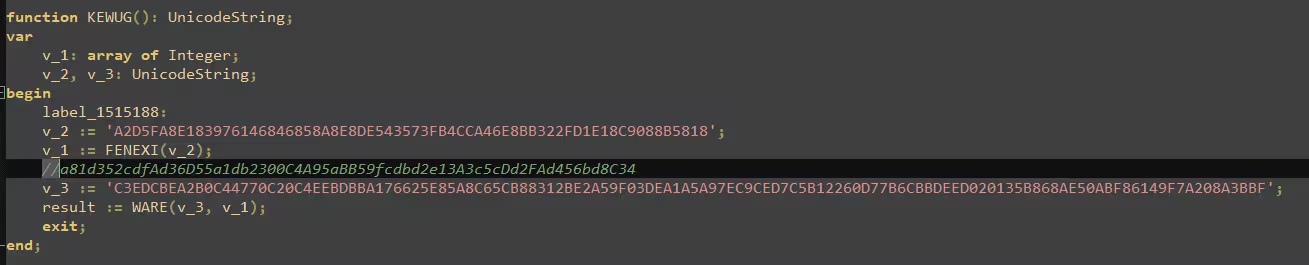
A successful request to the download URL using the correct rentry-auth header, reveals the next stage of the infection chain, which is another URL: hxxp[:]//aptechludhiana[.]com/temp/package[.]zip. After downloading this compressed payload, the malicious installer uses the idp.exe component, a renamed version of 7za.exe, the standalone 7-Zip utility to extract the contents. The extraction command line is shown below, along with the specific password, which has been decrypted and is included as a comment in Figure 9.
idp.exe x <package.zip> -o<output path> -y -p<password>
Scheduled task/job (T1053)
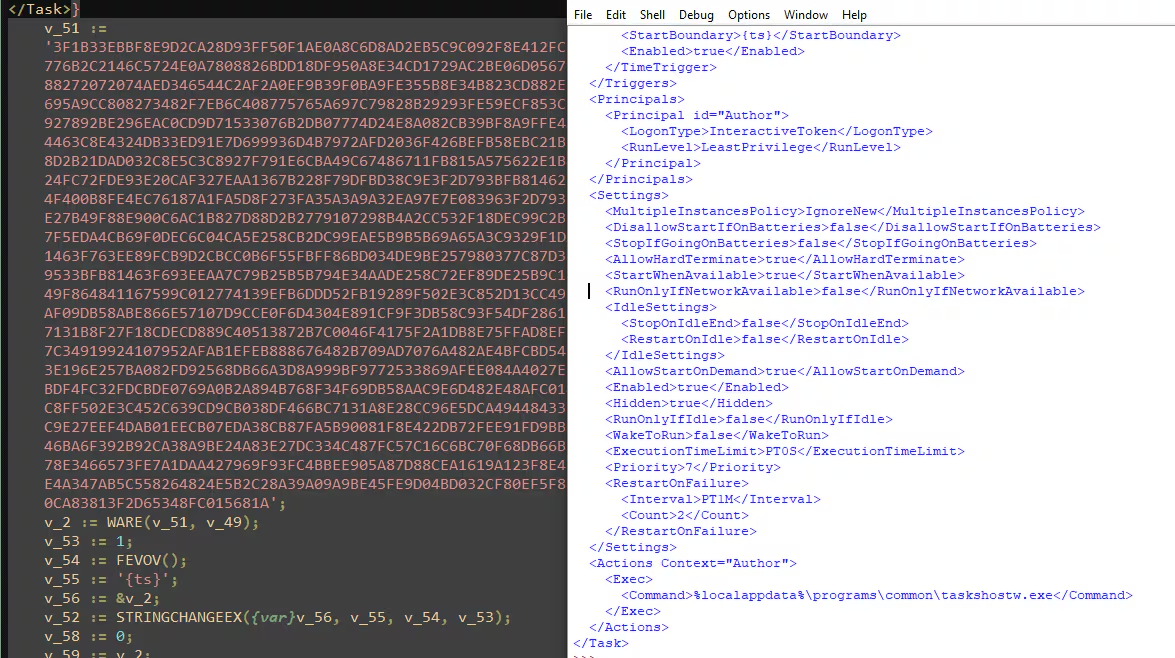
In addition to executing the downloaded payload, This malicious Inno Setup loader creates a scheduled task that launches a renamed copy of the executable (taskshostw.exe) extracted from the downloaded archive. The file is assigned hidden attributes to evade detection and placed in the %localappdata%\Programs\Common directory. This scheduled task acts as a persistence mechanism, ensuring the malware is automatically executed upon system reboot. In some cases, it may also assist with privilege escalation by running with elevated permissions.
Figure 10 shows the decrypted XML-formatted scheduled task dropped in the temporary folder under the filename "lang". This task is then registered on the compromised host using the schtasks.exe command-line utility.
Payload.zip : ShellcodeLoader
Hijack Execution Flow: DLL Sideloading (T1574.001)
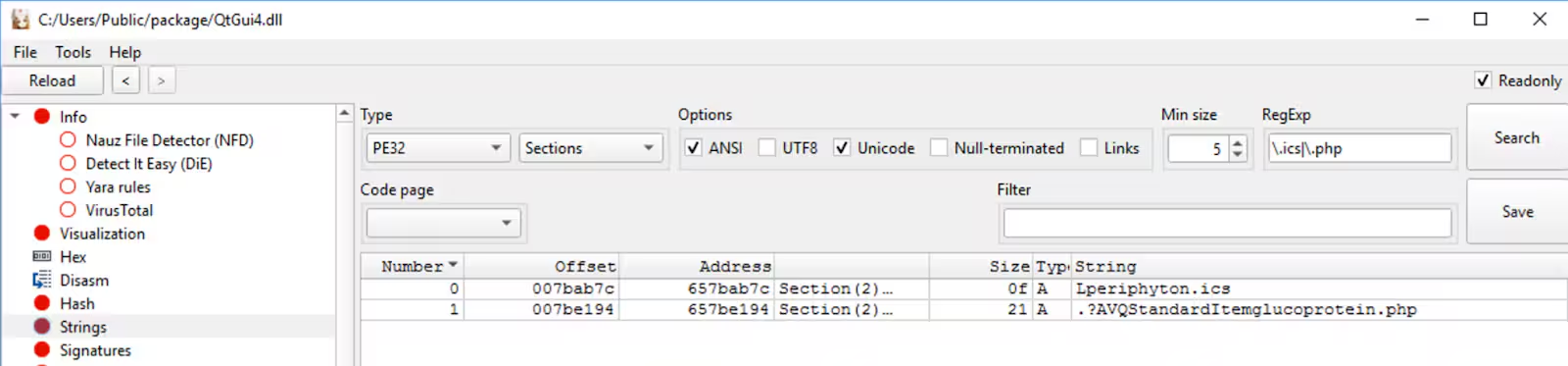
When payload.zip is extracted, its contents are copied to the %APPDATA%\Roaming\controlExplore\ folder. Figure 1 shows the list of files inside the ZIP archive. Next, ScoreFeedbackTool.exe a legitimate application is executed. This app automatically loads a trojanized QtGuid4.dll, which decrypts a seemingly random file like periphyton.ics, in reality, an encrypted shellcode. Figure 11 illustrates the strings within the malicious Qtguid4.dll related to the two encrypted loader components of this campaign.
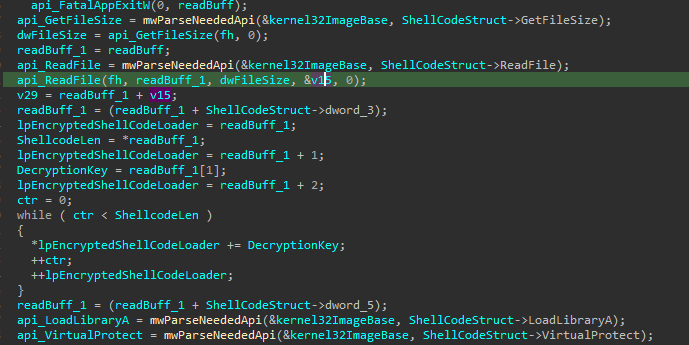
The QtGuid4.dll file uses a simple addition decryption routine with a hardcoded DWORD key to decrypt the shellcode loader in periphyton.ics. Figure 12 shows the code snippet of the decryption routine of the malicious QtGuid4.dll to decrypt the shellcode loader..
The decrypted shellcode simply reads the next-stage encrypted loader stored in glucoprotein.php. The encrypted data contains the HijackLoader component, which is responsible for decrypting and executing the final payload in the compromised host.
Payload.zip : HijackLoader
HijackLoader is a modular malware loader first observed in 2023, known for its evolving evasion techniques and use in delivering various malicious payloads such as Amadey, Lumma Stealer, Racoon Stealer v2, Redline Stealer and Remcos RAT.
One of HijackLoader's notable techniques involves concealing its next or final stage payload within PNG image files. The malware either embeds a PNG image within its binary or downloads it from a remote server.This PNG file contains encrypted modules hidden in specific sections, such as the IDAT chunk.
Obfuscated Files or Information(T1027)
In this campaign, glucoprotein.php is not a valid PNG file, but it follows an algorithm nearly identical that was seen in previous campaigns discovered in the wild. The process begins with a shellcode loader, decrypted from periphyton.ics, which searches for the first IDAT header. This routine helps the shellcode locate the structural header of the encrypted HijackLoader.
Figure 13 illustrates the structure and a simplified execution flow for decrypting the HijackLoader and delivering the final payload. The overall process unfolds as follows:
- After identifying the first IDAT header, the loader parses the initial encrypted block. This includes the block size, a DWORD XOR key, the starting address of the encrypted block, and both the compressed and uncompressed buffer sizes required for decompression.
- It then scans for subsequent IDAT headers to locate all encrypted blocks embedded throughout glucoprotein.php.
- Each discovered block is copied into a newly allocated memory region and decrypted using the XOR key obtained earlier.
- Once decrypted, the data compressed using LZNT1 is decompressed using the Windows API function RtlDecompressBuffer(), leveraging the previously parsed buffer sizes.
- The resulting decompressed output is the HijackLoader, which employs a range of evasion techniques—including Heaven’s Gate, Call Stack Spoofing, and Process Hollowing—to stealthily load the final payload.
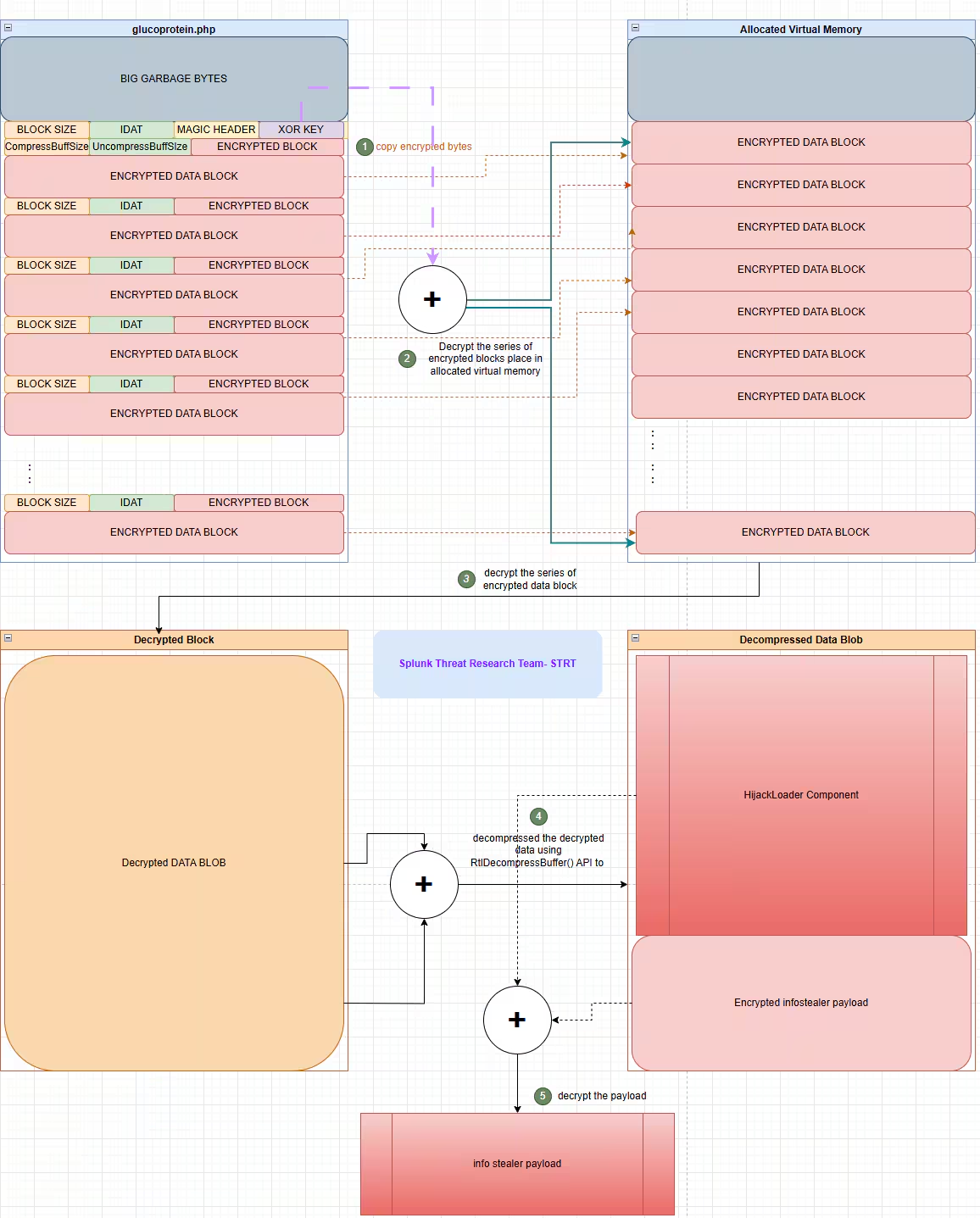
Figure 13: HijackLoader and FinalPayload Decryption Routine
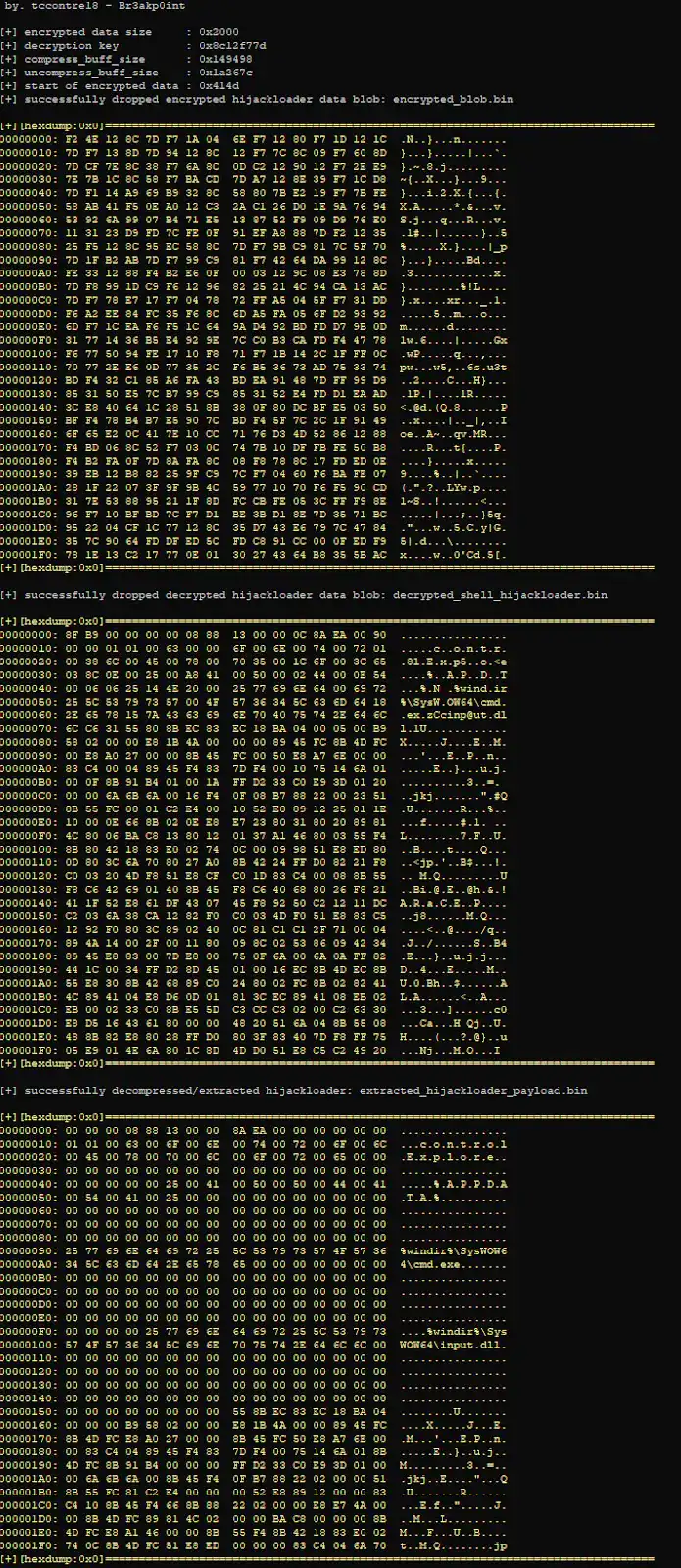
Figure 14 shows the output of a script developed by STRT to extract the HijackLoader from glucoprotein.php. This output highlights the specific structural values required to fully decrypt the malicious component.
MSBuild (T1127.001)
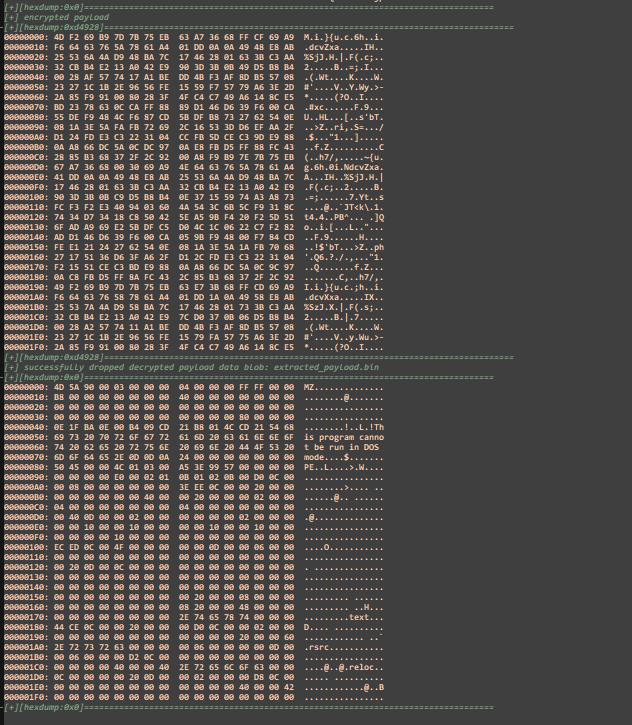
Once the HijackLoader is decrypted, it attempts to load several modular components by targeting legitimate DLL modules already running on the compromised host, such as dbghelp.dll, msi.dll, input.dll, and others. It does this by modifying the virtual memory protection of the .text section or specific functions within the targeted DLLs, then patching them dynamically in memory with malicious code intended for execution.
One of the HijackLoader’s modules is responsible for decrypting the final payload in this case, a RedLine Stealer. The decrypted payload is then injected into a newly spawned MSBuild.exe process, which acts as a proxy to execute the malicious code. This technique is used to evade detection and obscure the payload’s execution from both the user and security tools.

RedLine Stealer Final Payload
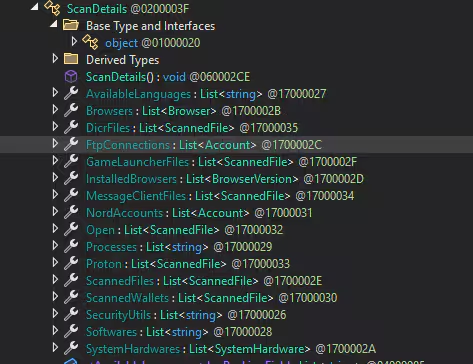
Figure 17 shows a screenshot of the methods within the .NET-compiled RedLine Stealer, providing insight into its objectives and the types of data it attempts to exfiltrate from the compromised host. The STRT has already developed multiple detections and published a blog aimed at identifying activity related to this threat.
Command Obfuscation (T1027.010)
This variant of RedLine Stealer employs a noteworthy obfuscation technique known as the "constant unfolding" obfuscation. Instead of passing values directly, parameters, especially those related to string decryption and critical commands are constructed dynamically at runtime. This involves breaking the original value into smaller, seemingly unrelated segments that are later pieced together through a series of intermediate operations or function calls. This unfolding approach not only complicates static analysis but also helps evade signature-based detection by concealing the true purpose of the code until execution.
Figure 18 provides a clear example of the "constant unfolding" obfuscation technique. In this figure, we can see two calls to the “<Module>.c” function, which is responsible for decrypting data from the encrypted configuration stored in the resource metadata. The first call to “<Module>.c” shows that the function takes three parameters (num, num2, num4). In the second call, each of these parameters is generated through a series of operations and conditional logic, making the function's behavior harder to analyze.

Additionally, each data string passed to the decryption method uses a different one-byte decryption key. Because of this variation, the STRT analyzed the structure of the encrypted configuration data and attempted to decrypt it using a brute-force key approach. The goal was to extract all possible TTPs (tactics, techniques, and procedures) that this RedLine variant might try to execute.
Browser Sandbox Evasion (T1497)
This RedLine variant tries to launch a Chrome browser with two suspicious flags: --no-sandbox and --user-data-dir. The --no-sandbox option disables Chrome's security features, making it easier for the malware to run harmful actions. The --user-data-dir flag lets it use a custom browser profile, helping it avoid detection and bypass user-specific settings. Together, these tricks are used to evade security and hide the malware's activity.
Disable or Modify Tools (T1562.001)
This malware variant also attempts to launch an instance of Internet Explorer (iexplore.exe) with the --extoff parameter, which disables all browser extensions during runtime. This can be used to open malicious websites or download additional payloads without interference from security or ad-blocking extensions, helping the malware evade detection and ensure a cleaner execution environment.
Windows Management Instrumentation (T1047)
This info-stealing malware variant uses Windows Management Instrumentation (WMI) to gather system information, likely to profile the infected machine and tailor its behavior or avoid detection. The table below shows the list of WMI commands that this malware tries to execute.
Credentials from Web Browsers (T1555.003)
RedLine Stealer targets browser user data to extract sensitive information. It focuses on retrieving saved login credentials from the browser's encrypted Login Data database. In addition to credentials, it also attempts to steal cookies, browsing history, autofill information, financial data such as credit card details, and more. The table below lists the browsers commonly targeted by this technique.
%USERPROFILE%\AppData\Local\Chromium\User Data
%USERPROFILE%\AppData\Local\Google\Chrome\User Data
%USERPROFILE%\AppData\Local\Google(x86)\Chrome\User Data
%USERPROFILE%\AppData\Local\MapleStudio\ChromePlus\User Data
%USERPROFILE%\AppData\Local\Iridium\User Data
%USERPROFILE%\AppData\Local\7Star\7Star\User Data
%USERPROFILE%\AppData\Local\CentBrowser\User Data
%USERPROFILE%\AppData\Local\Chedot\User Data
%USERPROFILE%\AppData\Local\Vivaldi\User Data
%USERPROFILE%\AppData\Local\Kometa\User Data
%USERPROFILE%\AppData\Local\Elements Browser\User Data
%USERPROFILE%\AppData\Local\Epic Privacy Browser\User Data
%USERPROFILE%\AppData\Local\uCozMedia\Uran\User Data
%USERPROFILE%\AppData\Local\CatalinaGroup\Citrio\User Data
%USERPROFILE%\AppData\Local\Coowon\Coowon\User Data
%USERPROFILE%\AppData\Local\liebao\User Data
%USERPROFILE%\AppData\Local\BraveSoftware\Brave-Browser\User Data
%USERPROFILE%\AppData\Local\Microsoft\Edge\User Data
%USERPROFILE%\AppData\Local\QIP Surf\User Data
%USERPROFILE%\AppData\Local\Orbitum\User Data
%USERPROFILE%\AppData\Local\Comodo\Dragon\User Data
%USERPROFILE%\AppData\Local\Amigo\User\User Data
%USERPROFILE%\AppData\Local\Torch\User Data
%USERPROFILE%\AppData\Local\Yandex\YandexBrowser\User Data
%USERPROFILE%\AppData\Local\Comodo\User Data
%USERPROFILE%\AppData\Local\360Browser\Browser\User Data
%USERPROFILE%\AppData\Local\Maxthon3\User Data
%USERPROFILE%\AppData\Local\K-Melon\User Data
%USERPROFILE%\AppData\Local\Sputnik\Sputnik\User Data
%USERPROFILE%\AppData\Local\Nichrome\User Data
%USERPROFILE%\AppData\Local\CocCoc\Browser\User Data
%USERPROFILE%\AppData\Local\Uran\User Data
%USERPROFILE%\AppData\Local\Chromodo\User Data
%USERPROFILE%\AppData\Local\Mail.Ru\Atom\User Data
%USERPROFILE%\AppData\Local\CryptoTab Browser\User Data
In addition to targeting browser-stored credentials, RedLine Stealer also focuses on browser extensions associated with cryptocurrency wallets—including MetaMask, Binance Chain Wallet, and TRONLink Wallet. It scans their local storage directories to extract sensitive information to steal or hijack access to users’ cryptocurrency assets.


Splunk Security Detections
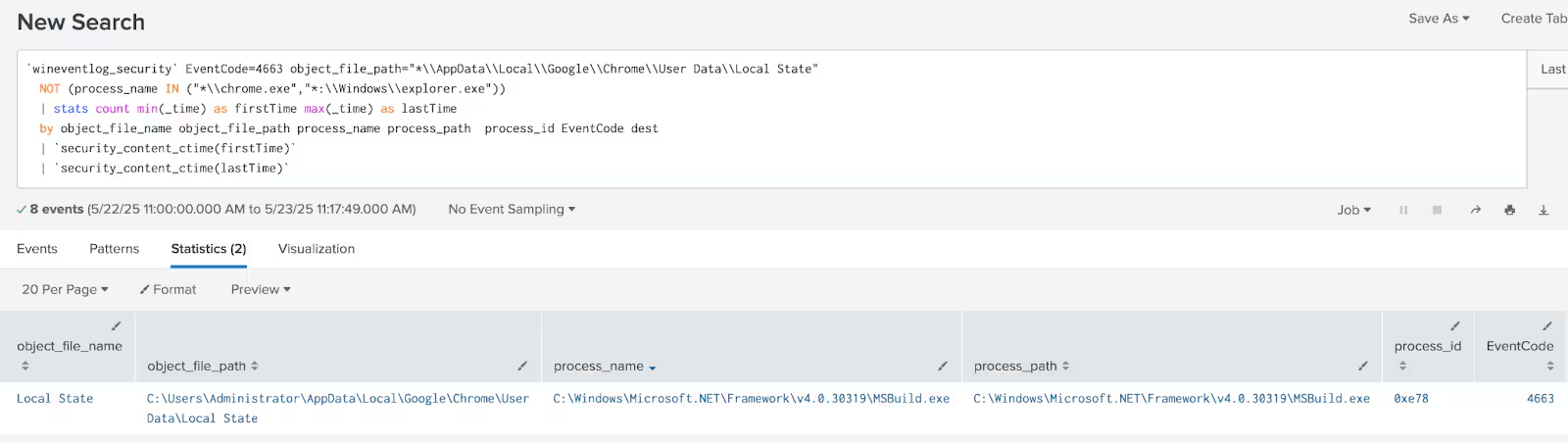
Windows credentials from password stores Chrome LocalState Access
The following analytic detects non-Chrome processes accessing the Chrome "Local State" file, which contains critical settings and information.
`wineventlog_security` EventCode=4663 object_file_path="*\\AppData\\Local\\Google\\Chrome\\User
  Data\\Local State" NOT (process_name IN ("*\\chrome.exe","*:\\Windows\\explorer.exe"))
  | stats count min(_time) as firstTime max(_time) as lastTime by object_file_name
  object_file_path process_name process_path  process_id EventCode dest | `security_content_ctime(firstTime)`
  | `security_content_ctime(lastTime)` | `windows_credentials_from_password_stores_chrome_localstate_access_filter`
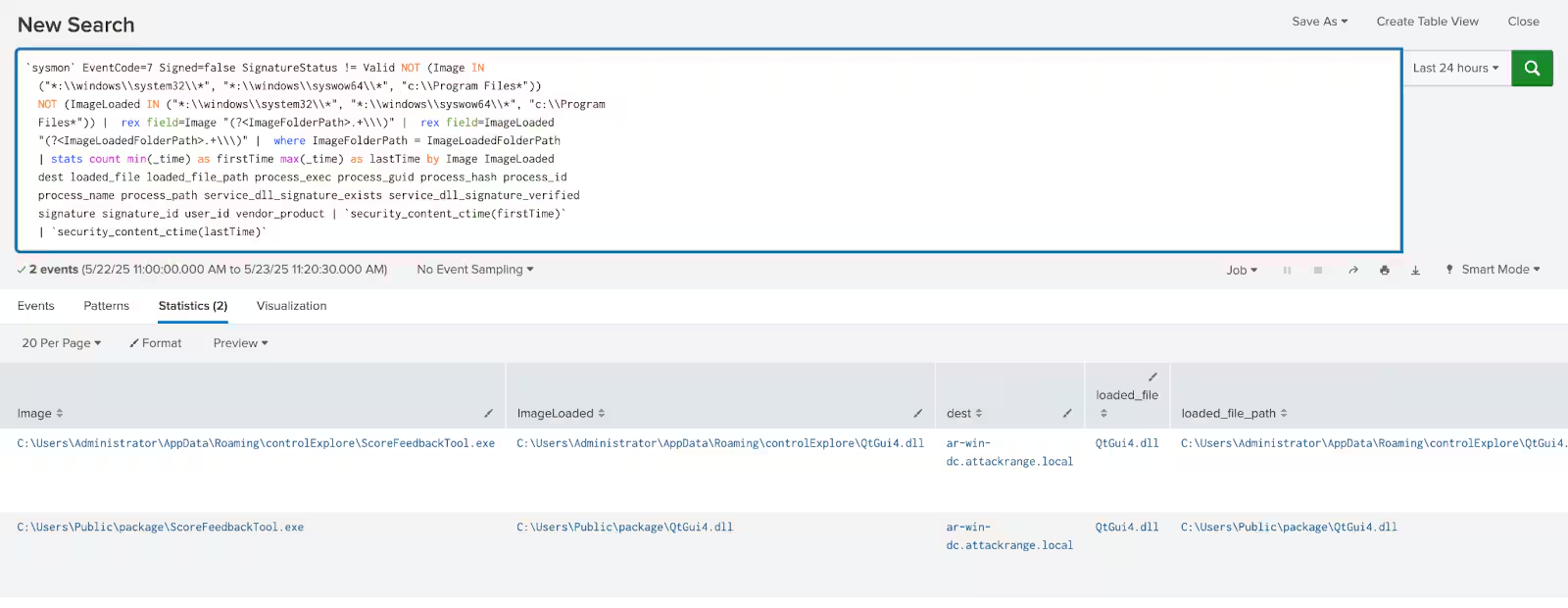
Windows unsigned DLL side-loading in same process path
This detection identifies unsigned DLLs loaded through DLL side-loading with the same file path with the process loaded the DLL, a technique observed in several malware and malicious loader like PlugX and HijackLoader.
`sysmon` EventCode=7 Signed=false SignatureStatus != Valid NOT (Image IN
  ("*:\\windows\\system32\\*", "*:\\windows\\syswow64\\*", "c:\\Program Files*"))
  NOT (ImageLoaded IN ("*:\\windows\\system32\\*", "*:\\windows\\syswow64\\*", "c:\\Program
  Files*")) |  rex field=Image "(?<ImageFolderPath>.+\\\)" |  rex field=ImageLoaded
  "(?<ImageLoadedFolderPath>.+\\\)" |  where ImageFolderPath = ImageLoadedFolderPath
  | stats count min(_time) as firstTime max(_time) as lastTime by Image ImageLoaded
  dest loaded_file loaded_file_path process_exec process_guid process_hash process_id
  process_name process_path service_dll_signature_exists service_dll_signature_verified
  signature signature_id user_id vendor_product | `security_content_ctime(firstTime)`
  | `security_content_ctime(lastTime)` | `windows_unsigned_dll_side_loading_in_same_process_path_filter`
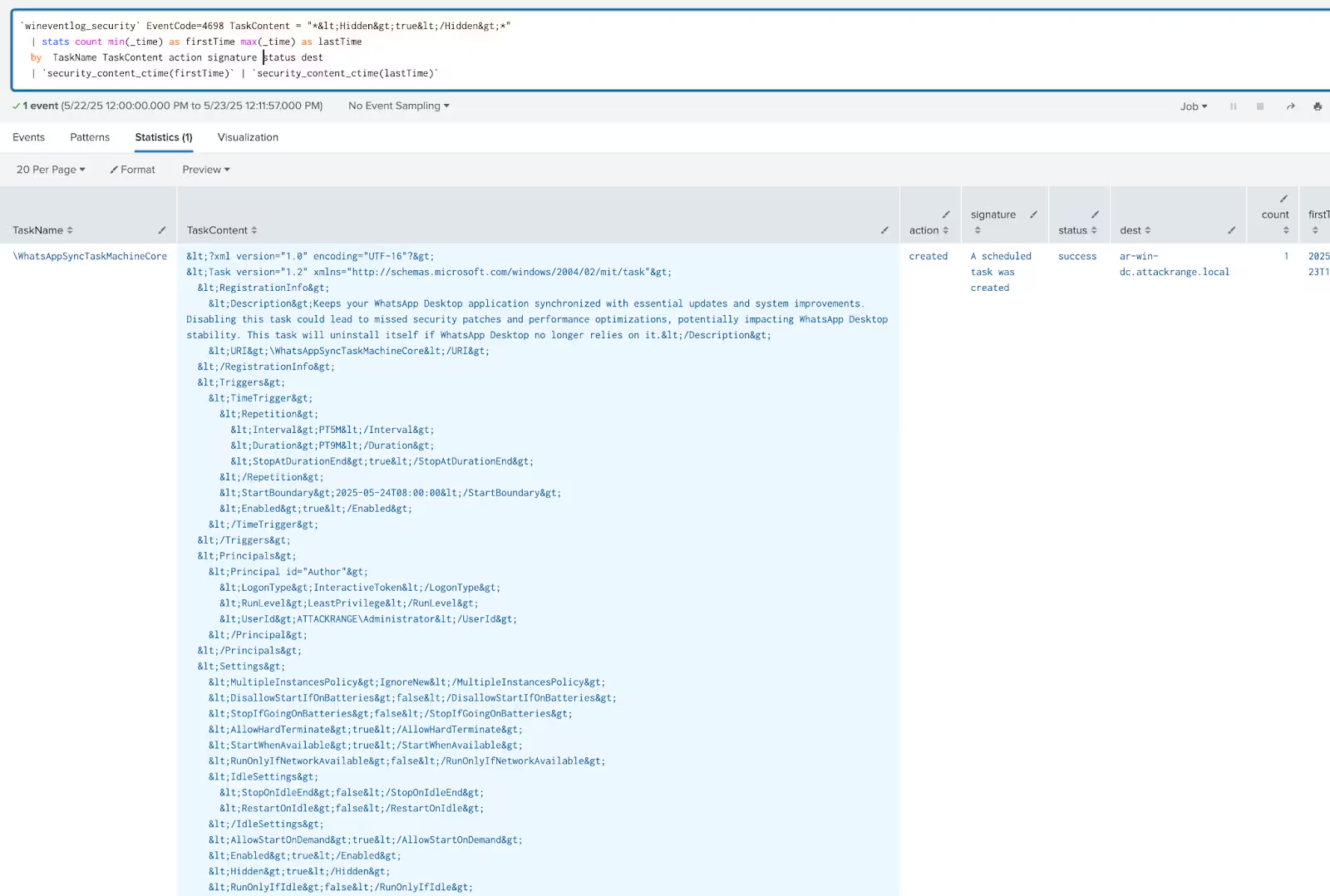
Windows hidden schedule task settings
The following analytic detects the creation of hidden scheduled tasks on Windows systems, which are not visible in the UI.
`wineventlog_security` EventCode=4698 TaskContent = "*<Hidden>true</Hidden>*"
  | stats count min(_time) as firstTime max(_time) as lastTime  by  TaskName TaskContent action signature status dest
  | `security_content_ctime(firstTime)`
  | `security_content_ctime(lastTime)`
  | `windows_hidden_schedule_task_settings_filter`
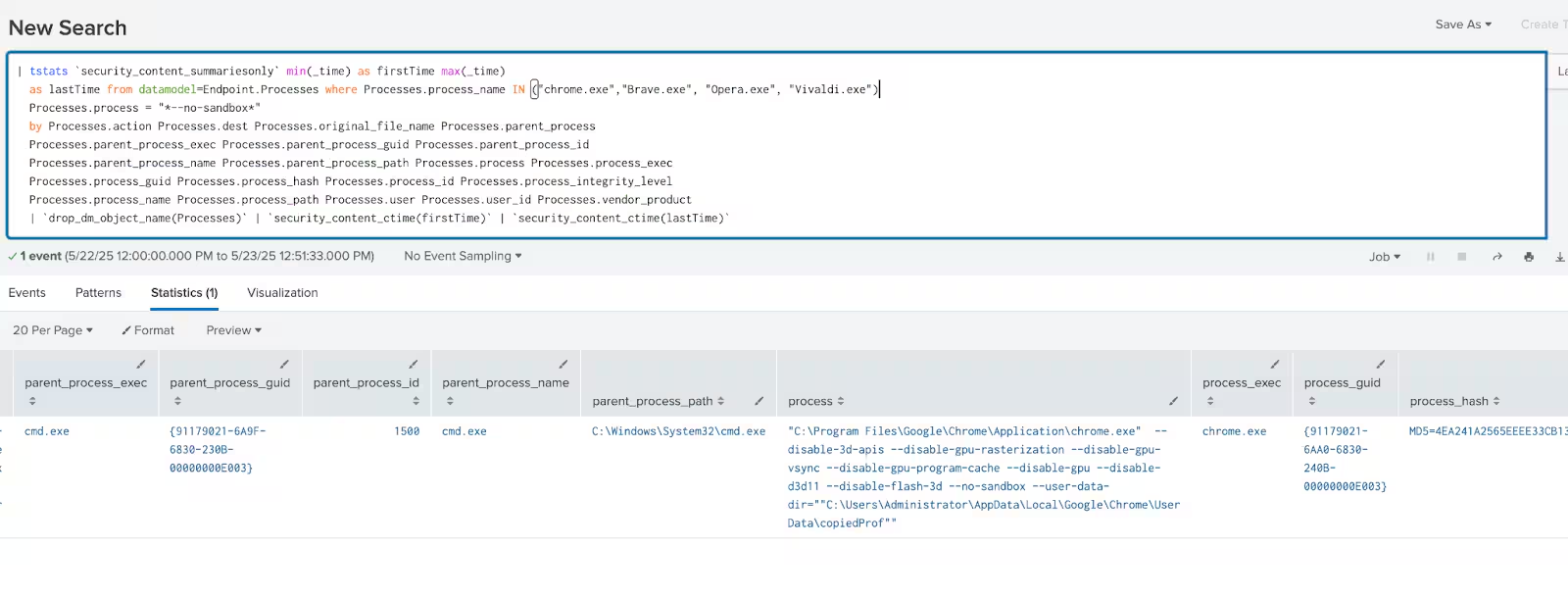
Windows Chromium browser no security sandbox process
The following analytic detects instances where a Chrome or Chromium-based browser is launched with the --no-sandbox flag, a known indicator of potentially malicious or suspicious behavior.Threat actors often abuse this setting to disable Chrome’s built-in security sandbox, making it easier to execute malicious code or escape browser isolation.
| tstats `security_content_summariesonly` min(_time) as firstTime max(_time)
  as lastTime from datamodel=Endpoint.Processes where Processes.process_name IN ("chrome.exe","Brave.exe", "Opera.exe", "Vivaldi.exe")
  Processes.process = "*--no-sandbox*"
  by Processes.action Processes.dest Processes.original_file_name Processes.parent_process
  Processes.parent_process_exec Processes.parent_process_guid Processes.parent_process_id
  Processes.parent_process_name Processes.parent_process_path Processes.process Processes.process_exec
  Processes.process_guid Processes.process_hash Processes.process_id Processes.process_integrity_level
  Processes.process_name Processes.process_path Processes.user Processes.user_id Processes.vendor_product
  | `drop_dm_object_name(Processes)`
  | `security_content_ctime(firstTime)`
  | `security_content_ctime(lastTime)`
  | `windows_chromium_browser_no_security_sandbox_process_filter`
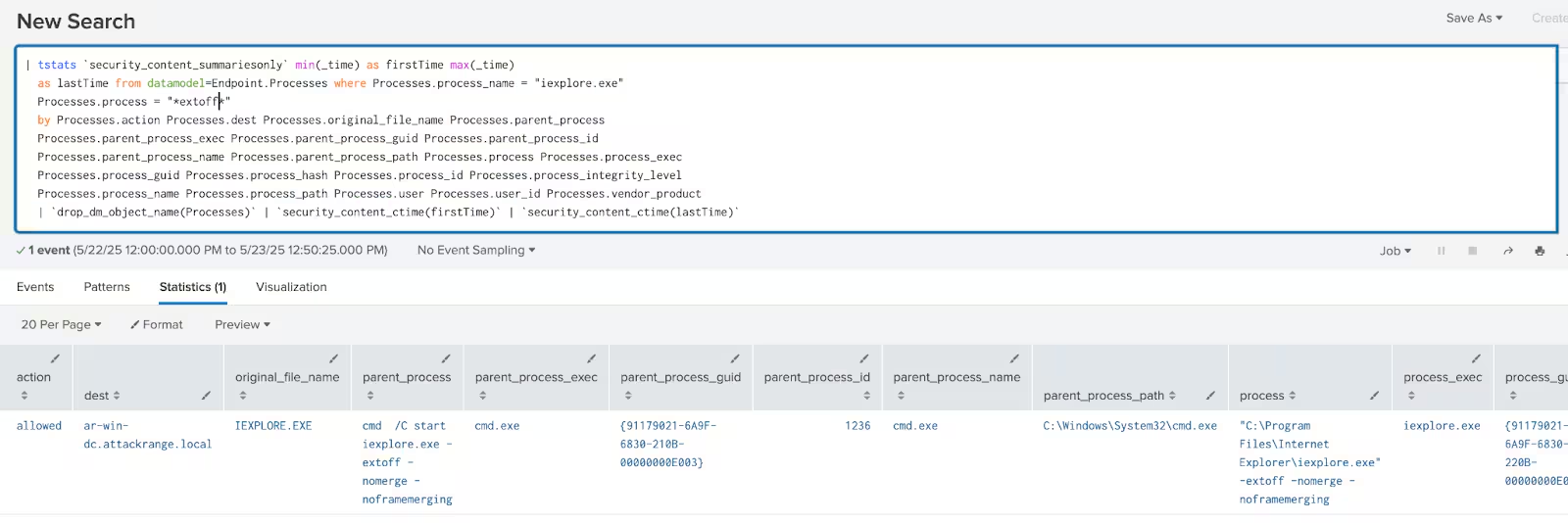
Windows disable internet explorer addons
The following analytic detects the execution of iexplore.exe (Internet Explorer) with the -extoff command-line flag, which disables all browser extensions. Malicious documents or scripts may leverage iexplore.exe -extoff to open phishing pages, command-and-control interfaces, or download additional payloads in an environment free from security monitoring plugins.
| tstats `security_content_summariesonly` min(_time) as firstTime max(_time)
  as lastTime from datamodel=Endpoint.Processes where Processes.process_name = "iexplore.exe"
  Processes.process = "*-extoff*"
  by Processes.action Processes.dest Processes.original_file_name Processes.parent_process
  Processes.parent_process_exec Processes.parent_process_guid Processes.parent_process_id
  Processes.parent_process_name Processes.parent_process_path Processes.process Processes.process_exec
  Processes.process_guid Processes.process_hash Processes.process_id Processes.process_integrity_level
  Processes.process_name Processes.process_path Processes.user Processes.user_id Processes.vendor_product
  | `drop_dm_object_name(Processes)`
  | `security_content_ctime(firstTime)`
  | `security_content_ctime(lastTime)`
  | `windows_disable_browser_extensions_filter`
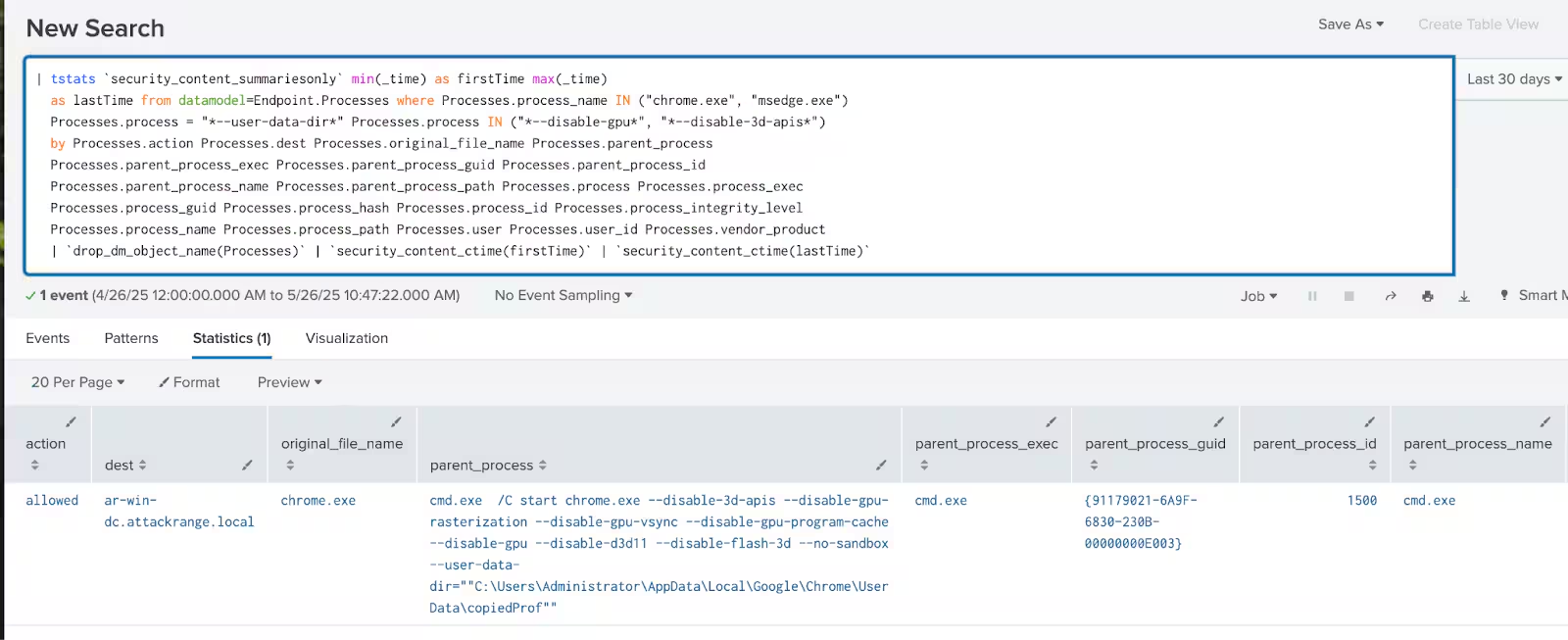
Windows Chromium browser with custom user data directory
The following analytic detects instances where the Chromium-based browser (e.g., Google Chrome, Microsoft Edge) is launched with the --user-data-dir command-line argument. It is frequently leveraged by malware and adversaries to run Chrome in an isolated environment for stealth operations, credential harvesting, phishing delivery, or evasion of user session artifacts.
| tstats `security_content_summariesonly` min(_time) as firstTime max(_time)
  as lastTime from datamodel=Endpoint.Processes where Processes.process_name IN ("chrome.exe", "msedge.exe", "brave.exe")
  Processes.process = "*--user-data-dir*" Processes.process IN ("*--disable-gpu*", "*--disable-3d-apis*")
  by Processes.action Processes.dest Processes.original_file_name Processes.parent_process
  Processes.parent_process_exec Processes.parent_process_guid Processes.parent_process_id
  Processes.parent_process_name Processes.parent_process_path Processes.process Processes.process_exec
  Processes.process_guid Processes.process_hash Processes.process_id Processes.process_integrity_level
  Processes.process_name Processes.process_path Processes.user Processes.user_id Processes.vendor_product
  | `drop_dm_object_name(Processes)`
  | `security_content_ctime(firstTime)`
  | `security_content_ctime(lastTime)`
  | `windows_chromium_browser_with_custom_user_data_directory_filter`
Overall Malicious Inno Setup Loader Analytic Story consists of 26 detections to identify this threat.
IOC
Learn More
This blog is designed to assist security analysts, blue teamers, and Splunk customers in identifying malicious inno-setup installers including its stager,loader components and final payload. It empowers the community to uncover related Tactics, Techniques, and Procedures (TTPs) employed by threat actors and adversaries. You can implement the detections in this blog using the Enterprise Security Content Updates app or the Splunk Security Essentials app. To view the STRT's complete security content repository, visit research.splunk.com.
Feedback
Any feedback or requests? Feel free to put in an issue on Github and we’ll follow up. Alternatively, join us on the Slack channel #security-research. Follow these instructions If you need an invitation to our Splunk user groups on Slack.
Contributors
We would like to thank Teoderick Contreras for authoring this post and the entire Splunk Threat Research Team for their contributions: Nasreddine Bencherchali, Michael Haag, Jose Hernandez, Lou Stella, Bhavin Patel, Rod Soto, Eric McGinnis, and Patrick Bareiss.
Related Articles

Predicting Cyber Fraud Through Real-World Events: Insights from Domain Registration Trends

When Your Fraud Detection Tool Doubles as a Wellness Check: The Unexpected Intersection of Security and HR

Splunk Security Content for Threat Detection & Response: November Recap

Security Staff Picks To Read This Month, Handpicked by Splunk Experts

Behind the Walls: Techniques and Tactics in Castle RAT Client Malware

AI for Humans: A Beginner’s Field Guide

Splunk Security Content for Threat Detection & Response: November 2025 Update

Operation Defend the North: What High-Pressure Cyber Exercises Teach Us About Resilience and How OneCisco Elevates It
