CI/CD Detection Engineering: Dockerizing for Scale, Part 4
Who Are You Again?
Splunk builds innovative tools which enable users, their teams, and their customers to gather millions of data points per second from an ever-growing number of sources. Together, Splunk helps users leverage that data to deliver, monitor, improve, and secure systems, networks, data, products, and customers with industry-leading solutions and expertise.
The Splunk Threat Research Team (STRT) is responsible for identifying, researching, understanding, and detecting threats — from the Critical Vulnerabilities that dropped on Twitter to those suspicious Powershell scripts that just ran on the Domain Controller — and building detections customers can run today on their Splunk Enterprise Servers. The STRT believes in the power of community contributions, the power of transparency, and the value of “showing your work.” That’s why the STRT makes all of their detections and nightly testing framework freely available to anyone at research.splunk.com and through the Enterprise Security Content Update App on Splunkbase. Today, the STRT builds on that transparency in the culmination of the Detection Testing Blog Series.
How Did STRT Get Here?
Readers following the series have watched our progress towards building a more complete tool to aid in the generation of attack datasets and the development and validation of threat detections. The team’s basic goal is simple — a flexible, scalable, automated detection testing pipeline:
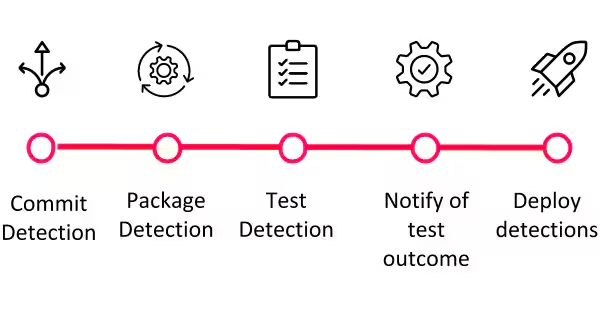
In pursuing that goal, STRT built a set of tools and documented them in a series of blog posts. They’re all worth the read, but in summary:
- CI/CD Detection Engineering: Splunk's Security Content - Designed the format of a detection file, set up the Security Content Repo on GitHub, and built tools to lint detections and generate the ES Content Update App on Splunkbase.
- CI/CD Detection Engineering: Splunk's Attack Range - Built and released the Attack Range to easily simulate attacks on real targets, generate data, ingest that data into a Splunk Server, and test detections (or develop new ones).
- CI/CD Detection Engineering: Failing - Explored the unintended consequences STRT encountered when trying to scale up the detection testing framework. While there were a number of issues, the most glaring was time - each individual detection required about 30 minutes to fully test. With hundreds of detections, that’s weeks of continuous testing!

In the EC2 workflow, testing could get stuck, take days, or the environment could be in an indeterminate state - Courtesy https://eol.jsc.nasa.gov/SearchPhotos/photo.pl?mission=ISS064&roll=E&frame=48480, by NASA, Public Domain (with edits)
Jump to Summer 2021. The STRT team had grown and so had the number of detections being written and updated. At that time, the STRT actively maintained over 600 Splunk Analytics under Splunk Security Content. In response to this growth, a few changes were made to speed up the testing and development workflow. Most notably, instead of regenerating data every time a test was run, raw data was generated once, captured, and stored for replay in the Attack Data repo. The team released and presented the initial idea for Attack Data during Splunk .conf20; this repo has become a powerful tool for STRT testing and a great resource for customers, too! It catalogs gigabytes of freely-available, organized, curated attack data that can be used for learning, testing, and writing novel detections for running on Splunk or other tools. While this change cut detection testing time from 30 minutes per detection to several minutes per detection, there was still room for improvement:
- If multiple team members were working at once, test jobs would queue. This could have been solved by adding more Splunk Servers in EC2, but at a significant cost.
- If a detection failed, there was no way to easily debug that failure. At best, developers would receive a descriptive error, make changes locally, and repeat the process. At worst, the test would hang, timing out with no result after four hours.
- Because the server was shared, its exact state (for example, Splunk Version, installed Splunkbase Apps and their versions) was sometimes unclear. Testing against different application baselines or configurations was challenging.
- Testing hundreds of tests at a time was functionally impossible - it would still cause CI jobs to time out.
- Validating existing detections against updates to Splunk and updates to Apps/Technology-Addons was extremely difficult and time-consuming.
With a fresh look at the strengths and weaknesses of the current system, the STRT decided to iterate one more time!
A Call to Action(s)
The first “aha!” moment occurred during migration from STRT’s legacy CI/CD Solution, CircleCI, to Github Actions. GitHub Actions is powerful, flexible, and free (for public repositories). GitHub Actions can be configured to run when almost anything happens in a repo: pushes, pull requests, comments, issues, and even scheduled events. When an Action runs, it receives full control of a fresh VM called a Runner that exists for the duration of the Action. This is critical for a number of reasons:
- Jobs are free to break things! If something doesn’t work (or worse), don’t worry - that Runner will be destroyed when the test completes.
- The architecture of GitHub Actions makes it possible to safely compile, run, and test PRs from External Forks before merging. External PRs run in their own environment without any access to the target repository’s secrets or other non-public data, reducing exposure of private API Keys.
- It allows STRT to treat testing infrastructure as code, rebuilding the entire environment from scratch on each test.
- A Whale of a Good Time
- For years, Splunk has published a simple-to-use Splunk Enterprise Docker Container suitable for testing and production environments. Most configuration options, including downloading and installing Splunkbase Apps, can be passed via command line arguments. The detailed documentation for this container can be found here. A fully configured Splunk Container will start in minutes on a local machine or in GitHub Actions.

Breaches are for whales, not your data. Start validating security detections today with Splunk Docker Containers - Courtesy https://unsplash.com/photos/JRsl_wfC-9A, by Mike Doherty (with edits)
Running the Show
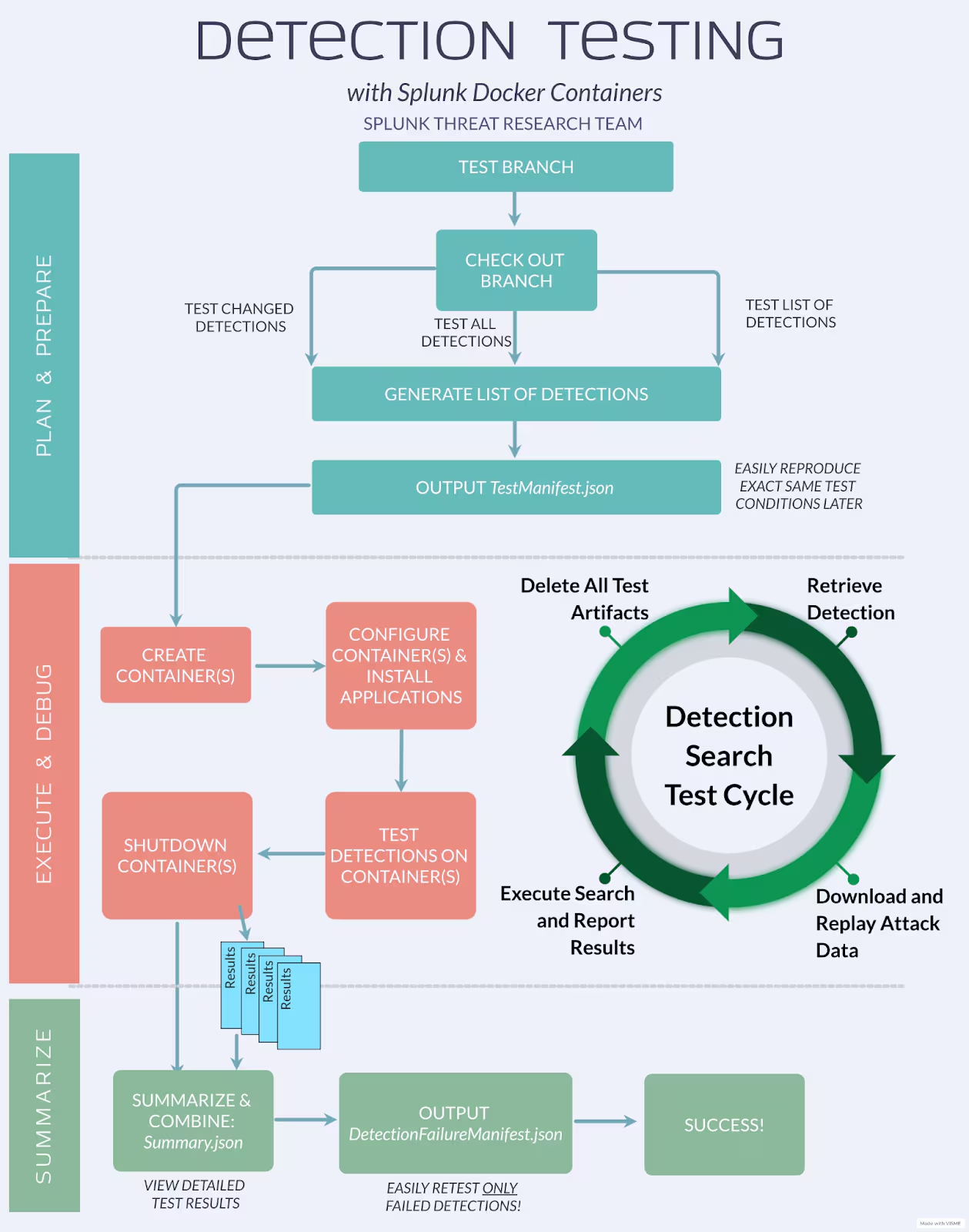
Splunk Docker provides the ability to easily start, configure, and destroy Splunk Enterprise servers on-demand, but to tie together the docker-detection-tester.py tool was built. Specifically, this tool does the following:
- ESCU package generation
- Container setup
- Attack data replay
- Detection search execution
Since each test runs independently and all the heavy lifting occurs inside of the containers themselves, the attack data replays and detection searches on different containers never interfere with one another! The diagram provides a logical walkthrough of how the tool runs a test.
True Portability
By eliminating AWS (Batch) and moving from EC2 VMs to Docker containers for testing, true detection testing portability was achieved. The options for running testing can be customized to meet any needs. For example, with minimal setup, tests can run on:
- A local machine - This method of testing allows the user to run with the greatest interactivity. By default, if a detection test fails, the test will pause so that the user can log into the Splunk Server and debug the detection search (and data!) to find the root cause of failure in minutes instead of hours.
- A CI/CD pipeline - STRT run testing on GitHub Actions, but users can easily start containers inside of other CI/CD pipelines, such as Gitlab.
Parallelizing GitHub Actions Jobs
While the ability to test in GitHub Actions was perfect for a small number of detections, it was still impossible to test a very large number of detections. Currently Splunk Security Content has over 600 detections. Even if each one takes just 60 seconds to test, the GitHub Actions maximum job execution time is only 6 hours (or about 360 detections). The STRT determined a better, faster way to scale testing using the GitHub Actions Matrix Configuration. This feature is primarily used to test builds against multiple configurations, like different application or operating system versions. For example, a developer may want to test a Python library against Python 2.7, 3.9, and 3.10 on Ubuntu 20.04, Windows Server 2022, and macOS Big Sur. This feature can start up to 256 Runners in parallel.

The GitHub Actions Matrix makes it possible to scale the testing framework by increasing the number of tests executing in parallel. For example, dynamically splitting 600 detections into 10 parallel detection test jobs means just 60 detections per job. This lets detection testing complete in 1/10th of the time and avoids the 6-hour maximum job execution time limit.

10 GitHub Actions Runners means 1/10th the time
To enable parallel testing for scalability, the Github Actions Workflow was broken down into three parts:
- Distribute the Detections - The first step enumerates the detections that have been added or modified and generates an ESCU Package containing all of the latest detections and the material to support them. Then, 10 Test Manifests are created, distributing the detections evenly among them. Finally, these 10 Test Manifests and the ESCU Package are uploaded as artifacts in GitHub Actions(artifacts can be accessed by the user and by subsequent GitHub Actions).
- Run the Tests - The second step uses the GitHub Actions Matrix functionality to start 10 Runners. The values in the matrix are the filenames of the Test Manifests generated in step 1. Each Runner downloads the Manifest and ESCU Package artifacts generated in step 1 and executes its assigned tests. The results of these tests are written to a file which is also uploaded as an artifact.
- Merge the Results - Finally, the results artifacts generated by all 10 Matrix Runners are downloaded and merged into a single file called Summary.json. This file has detailed information about all the tests that were run as well as the configuration of the Splunk server (including the version of the server and the installed Apps/TAs). The Summary.json file is uploaded as an artifact. If all the tests pass, then the workflow is marked as successful. If one or more tests fail, then the workflow fails, generating an additional file which is uploaded as an artifact called DetectionFailureManifest.json. This Manifest file contains only failed detection searches. Users can download this file and run it locally, making it easy to interactively debug any failures!
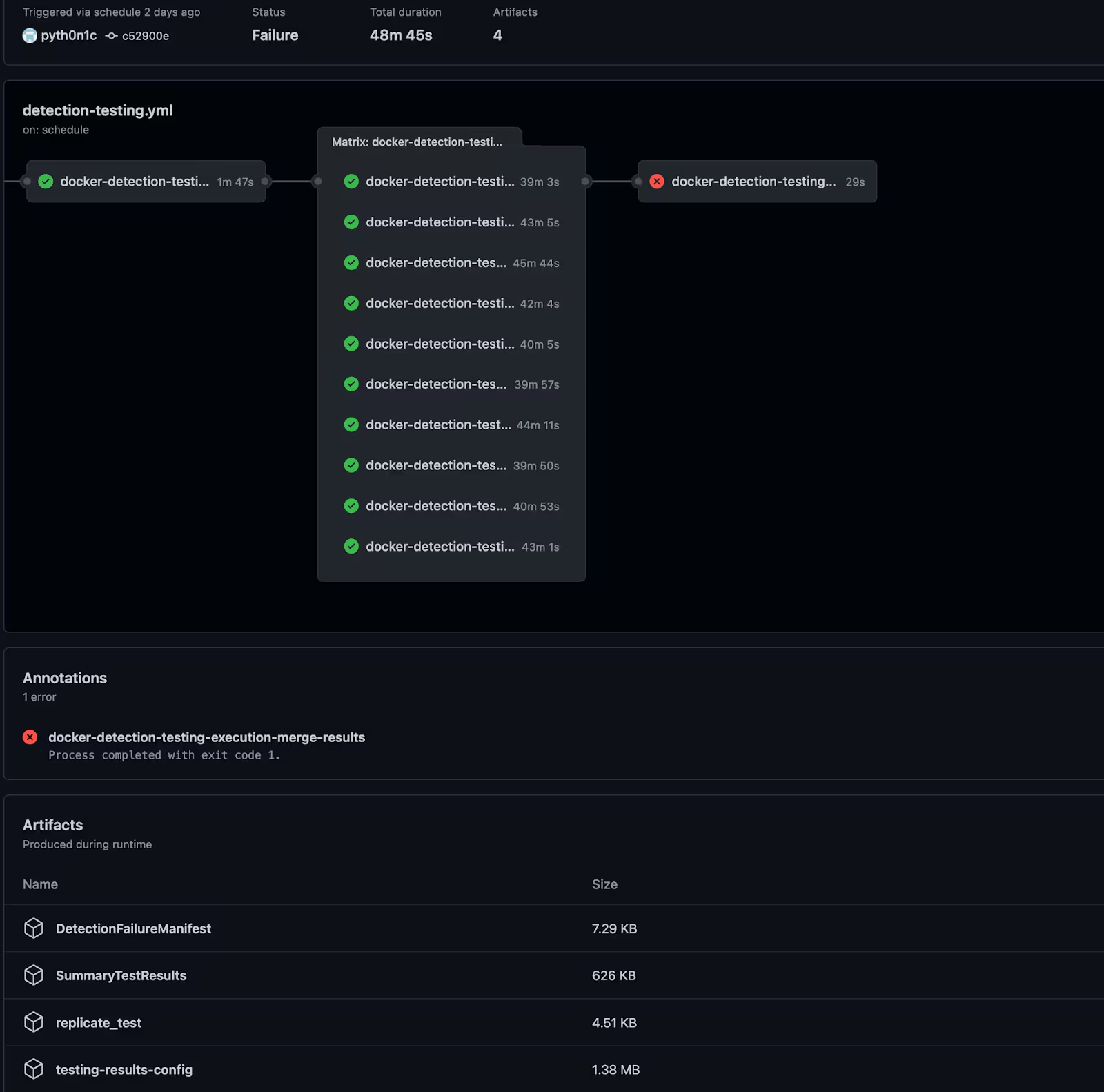
The final GitHub Actions Workflow - 619 detections in under 50 minutes! Notice the presence of the SummaryTestResults and DetectionFailureManifest files
Final Results
Below is a table summarizing the results of the CI/CD testing system iterations. It includes how long each system took to start, test 1 detection, test 600 detections, and the system’s cost.
Free
(for public repos)**
Free
(for public repos)**
Free
(plus electricity)
$5.44 per hour
(on-demand)*
* https://calculator.aws/#/
** https://docs.github.com/en/billing/managing-billing-for-github-actions/about-billing-for-github-actions
What’s Next?
The STRT is proud of the progress towards ensuring detections are easy to use and work as expected. Using the new testing framework, STRT has already improved a large number of detections and gained further confidence in the Splunk Security Content is delivered to customers. STRT will continue to improve its quality assurance work by:
- Publishing a SystemBaseline with Each ESCU Release - STRT relies on the functionality of over a dozen Splunkbase Apps and TAs to process attack data from a variety of sources. During the initial deployment of the Docker-based GitHub Actions testing pipelines, STRT discovered that a number of these tools had updated their output formats in recent versions. These updates caused a subset of detections to fail. While the affected detections have been updated, STRT has begun publishing a system baseline so that users can properly configure their own systems.
- Assisting with the Maintenance of the Splunkbase Apps ESCU Uses - STRT has generated gigabytes of data and uses over a dozen Splunkbase Apps to power ESCU detections. In some cases, the datasets and detection tests have been able to detect unintended behavior introduced in application updates via failed tests. These anomalies can be shared with the developer through a DetectionFailureManifest.json file, allowing the failures to be easily reproduced on the developer’s local machines. STRT hopes that docker-detection-tester.py will aid other App maintainers in developing, testing, and releasing high-quality updates.
- Indicate Whether Each Detection is Passing or Failing - https://research.splunk.com is a helpful way to browse or search Splunk detections and much easier than reading through YAMLs. To increase STRT’s accountability and confidence in production detection searches, STRT will include a link to the most recent test result for each detection search indicating if it is passing or failing.
- Track and Publish High-Level Test Metrics - STRT’s mission is to ship high-quality searches that work in users’ environments. One of STRT’s goals this year is to see 100% of detections passing CI/CD testing. With better insight into which detection searches are failing, STRT is working to update these detection searches, generate better datasets, collaborate with App/TA developers to address issues, and deprecate searches which are no longer useful. A visit to the Security Content GitHub Repo shows 95% pass rate across all detections at the time of writing.

Related Articles

Predicting Cyber Fraud Through Real-World Events: Insights from Domain Registration Trends

When Your Fraud Detection Tool Doubles as a Wellness Check: The Unexpected Intersection of Security and HR

Splunk Security Content for Threat Detection & Response: November Recap

Security Staff Picks To Read This Month, Handpicked by Splunk Experts

Behind the Walls: Techniques and Tactics in Castle RAT Client Malware

AI for Humans: A Beginner’s Field Guide

Splunk Security Content for Threat Detection & Response: November 2025 Update

Operation Defend the North: What High-Pressure Cyber Exercises Teach Us About Resilience and How OneCisco Elevates It
