Beyond Logs: Navigating Entity Behavior in Splunk Platform
Identifying bad actors within your organization often feels like a complicated game of hide and seek. A common comparison is that it's akin to finding a needle in a haystack. So, if the bad actor represents the 'needle' and your organization the 'haystack,' how would you uncover these bad actors? Perhaps the quickest way to find the needle is by burning the haystack. Alternatively, dumping the hay into a pool of water and waiting for the needle to sink to the bottom could also work.
However, we're not actually discussing needles and haystacks here. The solution I propose involves anomaly detection using the Splunk Platform (i.e., Splunk Cloud Platform or Splunk Enterprise)! We will harness the capabilities of lookups, averages, and standard deviations to accurately calculate baselines and construct comprehensive behavior profiles.
Anomaly detection involves analyzing your data to identify data points that deviate from the normal behavior of the entity. User and entity behavior analytics (UEBA) relies on anomaly detection to pinpoint outliers within your organization across users and entities like IP addresses, hosts, applications, and more.
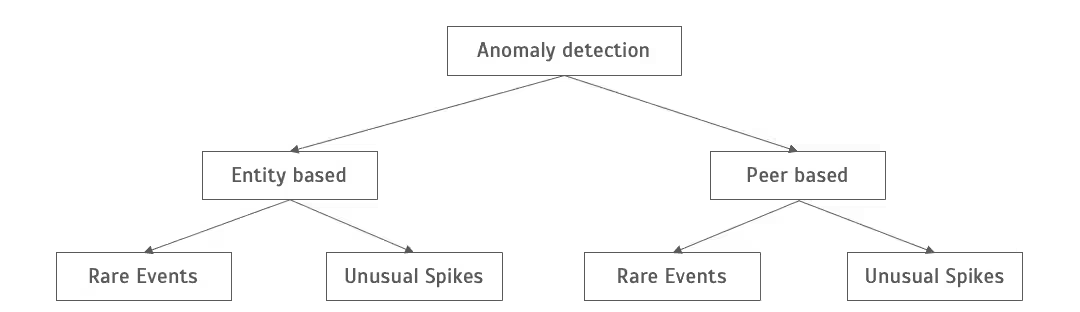
Anomaly detection comprises entity-based anomaly detection and peer-based anomaly detection. Entity-based anomaly detection involves identifying entities displaying behavior that deviates from their typical patterns (e.g., time), technically termed as a deviation from the entity's baseline. Peer-based anomaly detection operates on a similar principle but establishes a baseline for the peer group to which the entity belongs. Entities involved in comparable job functions or activities are grouped together, with an entity possibly belonging to multiple peer groups. For instance, users reporting to the same manager might form one peer group, while servers hosting specific applications could comprise another. Anomaly detection creates baselines for both individual entities and peer groups, identifying uncommon occurrences or unusual surges in comparison to their established historical behavior or baseline. These baselines, crafted from historical data spanning usually between 30 to 365 days, serve as the foundation for anomaly detection.
Examples of entity-based rare events include users authenticating from new locations, while a developer accessing a database server unprecedentedly within their peer group constitutes a peer-based rare event.
Commonly, we download files from organization cloud storage and collaboration platforms like Google Drive, averaging around 30MB per day. If a user suddenly downloads 5TB of data from Google Drive in a day, it signifies an entity-based unusual spike.
UEBA tools offer native machine learning and anomaly detection capabilities to address this scenario. Although the method I'm demonstrating within Splunk Platform using SPL and lookups offers some UEBA-like capabilities, it's important to clarify that it is not a native UEBA solution like Splunk UBA and similar tools. In this blog, our focus will revolve around entity-based anomaly detection, reserving the exploration of peer-based anomaly detection for a future discussion.
Entity-Based Anomaly Detection - Rare Events
The primary method for behavior-based anomaly detection involves identifying rare or first-seen events. In this case, our focus is on detecting instances where users authenticate from a geolocation they have never accessed before. To initiate this process, we will construct a behavior profile for employees using the following Splunk search. The search's output will be stored in a lookup file named 'aws_cloudtrail_user_geolocation_profile.csv'. For optimal profiling, this search can be scheduled to run daily, capturing data from the last 90 days. However, adjusting the time frame further back can provide a broader historical profile.
Start by manually executing the Splunk search to create the foundational behavior profile, then set up a schedule for the search to automate subsequent updates to the profile.
sourcetype="cloudtrail_json" eventName=ConsoleLogin
| iplocation   sourceIPAddress
``` Aggregate the username and country for profiling```
| stats count by userIdentity.userName, Country
| eval user='userIdentity.userName'
| eval country_name=Country
| fields user, country_name
```Write the updated profile to a lookup```
| outputlookup aws_cloudtrail_consolelogin_user_geolocation_profile.csv
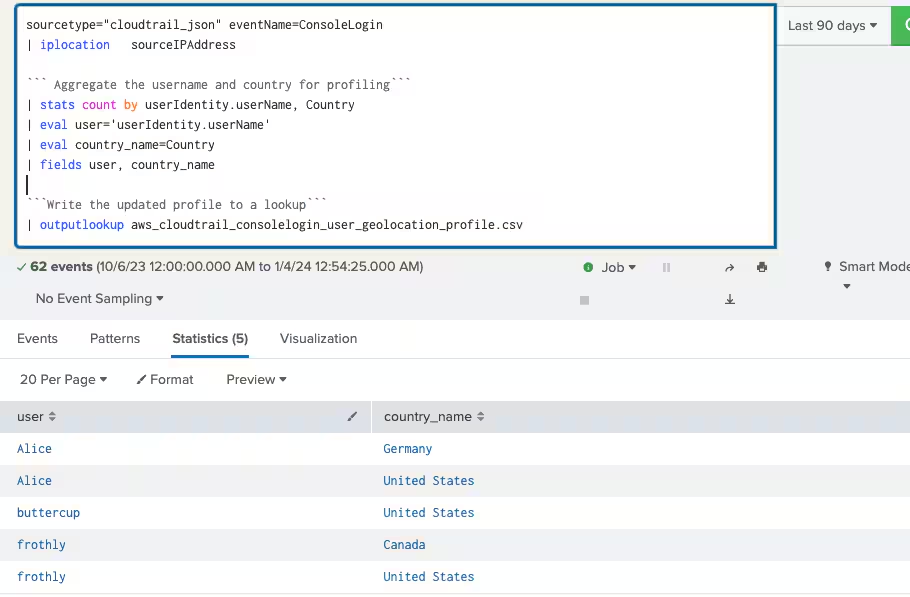
Following the Splunk search execution to generate the behavior profile, the subsequent step involves setting up an alert system to continuously monitor incoming data. This alert will trigger whenever a user authenticates from a country not listed in their established profile. To facilitate this, you can schedule the search to update the lookup file at your preferred frequency. With the behavior profile in place, the alert system serves as a proactive measure, promptly identifying any user authentication from an unlisted country.
sourcetype="_json_blogl" eventName=ConsoleLogin
| iplocation   sourceIPAddress
``` Lookup historical behavior in the lookup ```
| lookup aws_cloudtrail_consolelogin_user_geolocation_profile.csv user as  userIdentity.userName , country_name
as Country OUTPUTNEW user, country_name
``` Identify first seen values ```|
 where isnull(user)
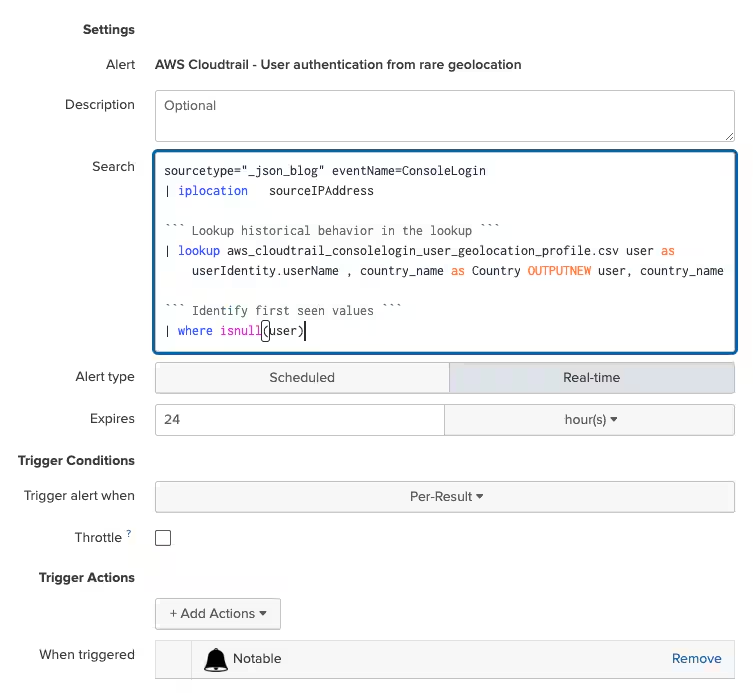
The Splunk search can be scheduled to run either in real-time or at a specified frequency according to your preferences.
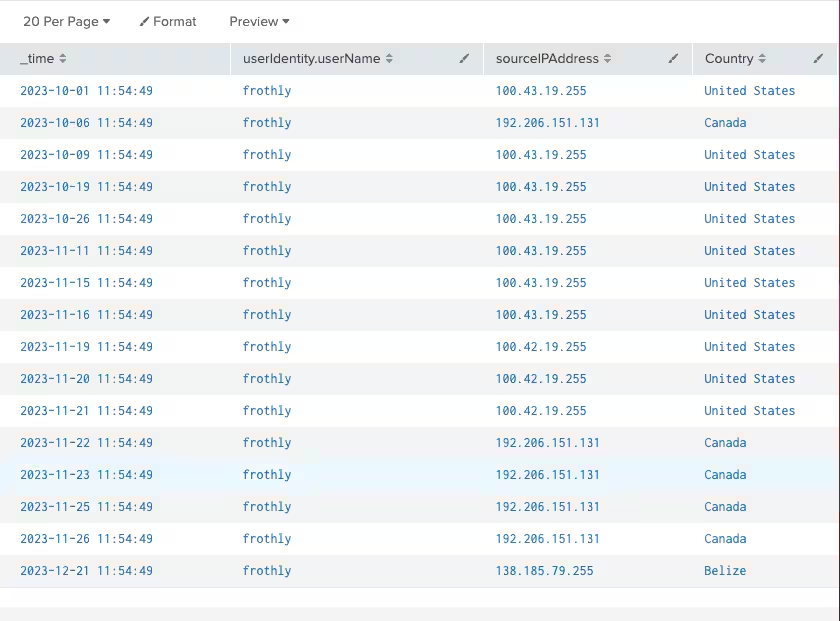
With the implemented alert for detecting users authenticating from uncommon geolocations, consider an example: the user 'frothly' typically authenticates from the United States and Canada. However, on December 21st, an authentication attempt was made from Belize, constituting an anomaly when compared to the user's established profile.
Entity-Based Anomaly Detection - Unusual Spikes
This technique of behavior-based anomaly detection serves to identify outliers, particularly sudden spikes in activity that may signify suspicious behavior. While a sudden drop in activity proves valuable for operational cases like detecting network outages, our focus on security threats centers around identifying spikes that significantly deviate from an entity's established baseline. Consider the example of Excessive Failed Logins. Building a rule based on a preset threshold, such as detecting more than 5 failed logins within a span of 10 minutes, can often result in false positives. To mitigate this, our approach involves constructing a baseline for users, taking into account their historical frequency of failed logins.
sourcetype="XmlWinEventLog" EventID=4625
``` Use span operator to aggregate on a 24 hour timeframe```
| bin _time as "timeslice" span=24h
| stats count as total_failed_logins by user,timeslice
```Calculate baseline```
| eventstats avg("total_failed_logins") as avg stdev("total_failed_logins") as stdev  by user
| eval baseline=(avg+stdev*exact(4)) ```Change multiplier to tune your results```
| stats count by user, baseline
```Requires atleast 3 datapoints to form baseline```
| where count>2
|outputlookup aws_cloudtrail_consolelogin_failed_logins_baseline.csv
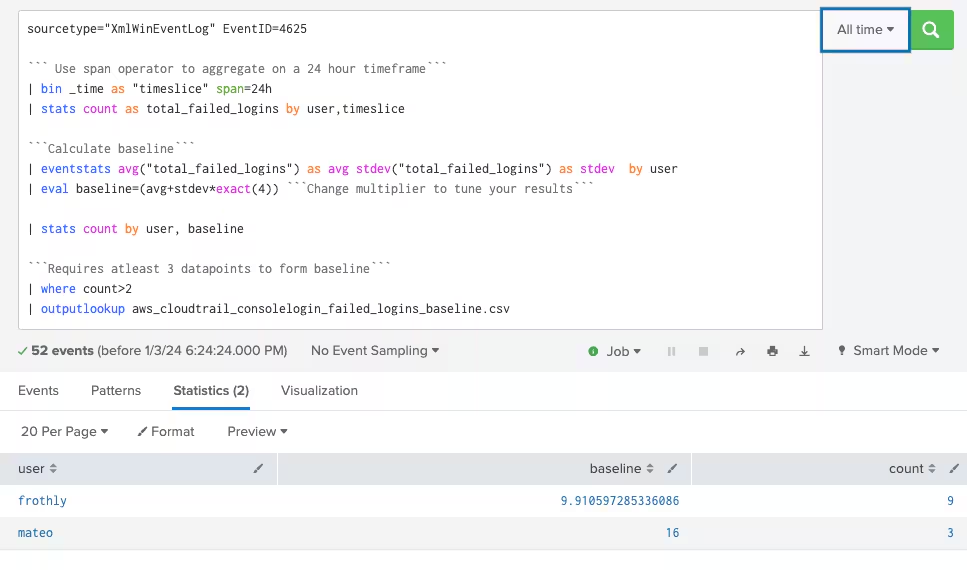
The Splunk search provided above serves the purpose of computing and storing baselines. It utilizes the 'span' command to group data points within the defined time frame (e.g., 24 hours in this instance), adaptable to suit your specific use case. To address any issues with false positives or negatives, the multiplier within the 'eval' statement can be adjusted. A higher multiplier increases alert fidelity.
For baseline computation, a minimum of 3 data points is essential. Any entity with fewer than 3 data points will not be factored into the baseline calculation.
The calculated baselines are stored in a CSV lookup file. I recommend running the baseline calculation routine daily, considering data from the past 90 days. In the provided screenshot, only 2 users have 3 or more data points, and consequently, their baselines have been calculated.
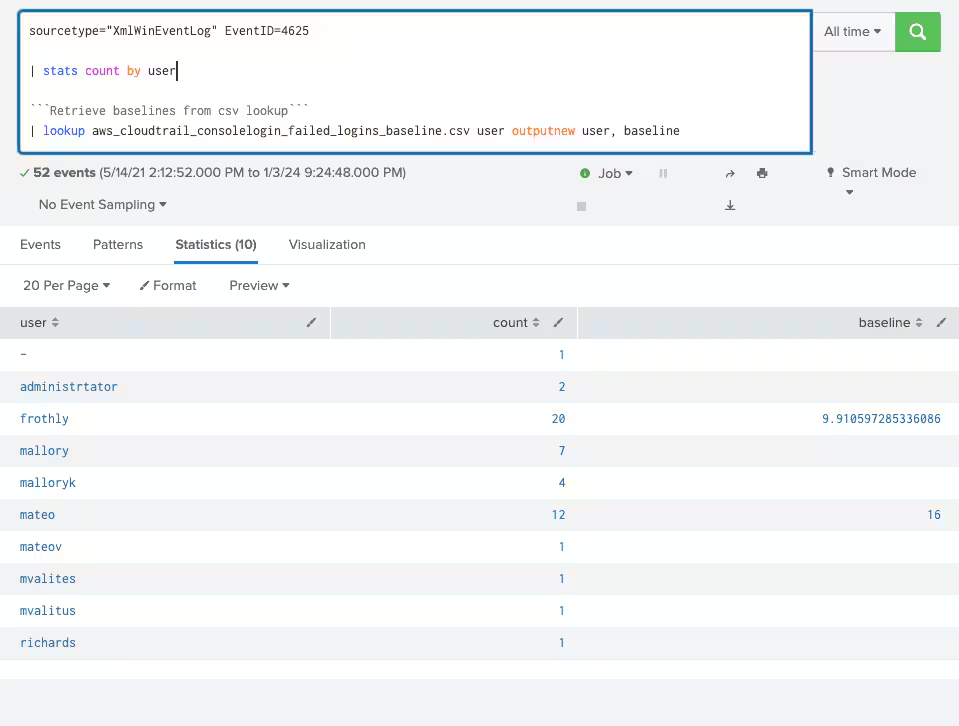
The following step entails creating a correlation search that triggers a notable event, or an event generated by a correlation search as an alert, when the number of failed logins exceeds the predefined baseline for the entity, signaling a deviation based on a specified multiplier. This search will track failed logins by users within the past 24 hours and compare the present count with the established baseline.
To set this up, you have the option to schedule the correlation search to run hourly, analyzing the preceding 24 hours of data. Feel at liberty to modify the frequency and time span to suit your particular needs. The Splunk search below forms the basis for crafting this alert.
sourcetype="XmlWinEventLog" EventID=4625
| stats count as total_failed_logins by user
```Retrieve baselines from csv lookup```
| lookup aws_cloudtrail_consolelogin_failed_logins_baseline.csv user outputnew user, baseline
```Condition to trigger alert```|
 where total_failed_logins > baseline
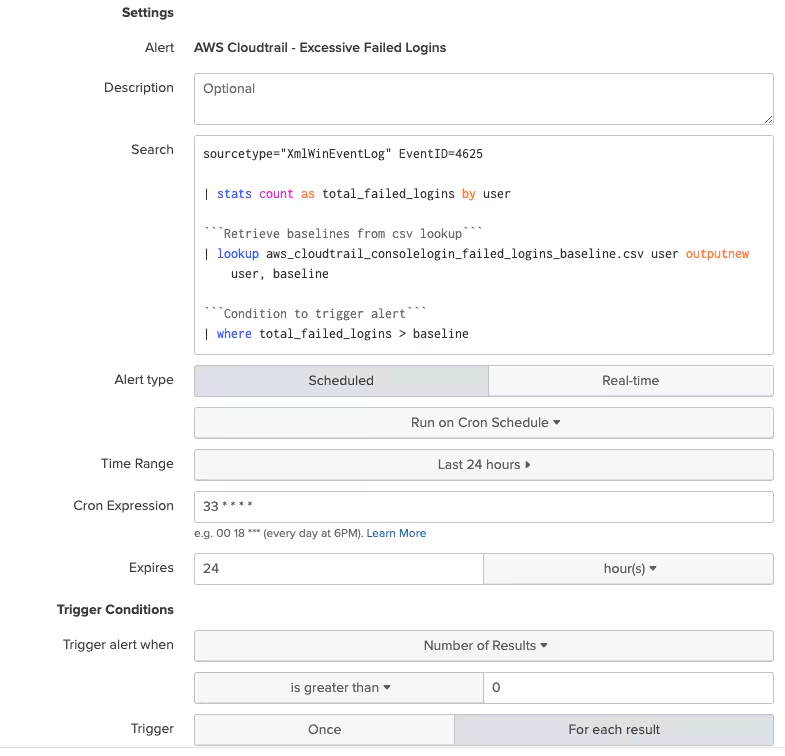
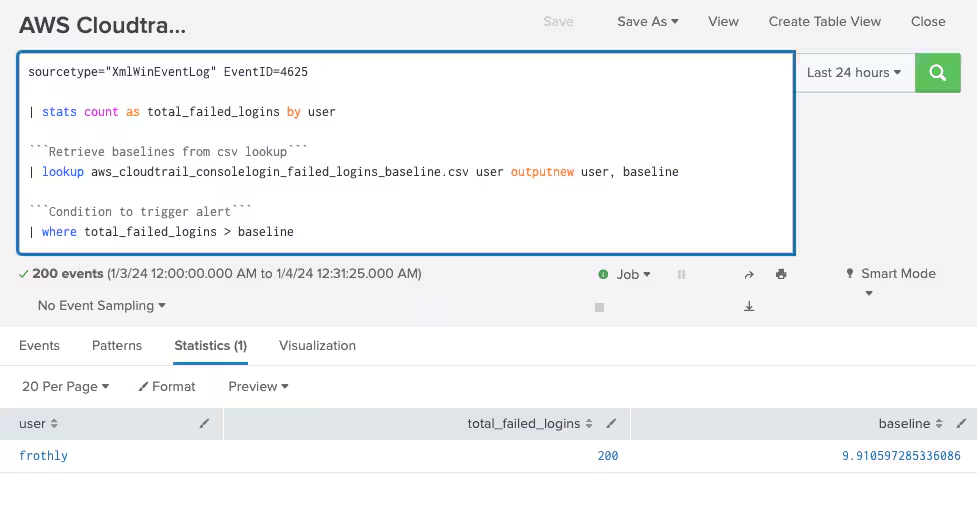
In the presented example, the user 'frothy' encountered 200 failed login attempts, surpassing the calculated baseline of 9.91. This deviation from the baseline triggers the generation of a notable event.
Best Practices
- Utilize keywords and filters within your Splunk search scope to minimize outcomes, thus enhancing search performance.
- A 90-day data span suffices for constructing behavior patterns and baselines; anything beyond may retain outdated information in the entity's behavior profile.
- Implement alert suppression! When running hourly searches over the past 24 hours, utilize Splunk's throttling feature to prevent duplicate alerts.
- Maintain consistency in search and CSV lookup names by adopting an easily trackable naming convention for you and others involved.
- Refine your baselines and searches! Recognize that a universal solution doesn't exist; invest effort in tuning multipliers for optimal outcomes.
In conclusion, mastering user and entity behavior analytics (UEBA) within the Splunk Platform opens the door to a deeper understanding of user actions and system behaviors. By leveraging the power of data and insightful analysis, individuals and organizations can proactively identify anomalies, enhance security measures, and optimize operational efficiency. Remember, the key lies not just in the tools at our disposal but in the strategic implementation and continuous refinement of these analytics. Empower yourself to harness the full potential of Splunk Platform’s capabilities, and embark on a journey of informed decision-making and fortified cyber resilience.
If this workaround approach doesn't meet your requirements, Splunk UBA is available as an offering that provides anomaly detection across users and entities (user accounts, devices, applications, and more). Splunk UBA leverages sophisticated machine learning and behavioral analytics as its native capabilities. Its core strength lies in autonomously establishing baseline user behavior and swiftly identifying deviations that could indicate potential security threats or internal risks. Continuously adapting to evolving patterns, Splunk UBA refines its precision in anomaly detection. Its seamless integration within the Splunk ecosystem enables correlation of data from diverse sources, empowering security teams with prioritized threat alerts based on risk assessment. If you've found this blog intriguing, stay tuned for the upcoming sequel where we'll delve into peer-based anomaly detection within Splunk Platform!
Related Articles

Predicting Cyber Fraud Through Real-World Events: Insights from Domain Registration Trends

When Your Fraud Detection Tool Doubles as a Wellness Check: The Unexpected Intersection of Security and HR

Splunk Security Content for Threat Detection & Response: November Recap

Security Staff Picks To Read This Month, Handpicked by Splunk Experts

Behind the Walls: Techniques and Tactics in Castle RAT Client Malware

AI for Humans: A Beginner’s Field Guide

Splunk Security Content for Threat Detection & Response: November 2025 Update

Operation Defend the North: What High-Pressure Cyber Exercises Teach Us About Resilience and How OneCisco Elevates It
