Add to Chrome? - Part 2: How We Did Our Research
Analyzing the content and security implications of browser extensions is a complex task! It's almost like trying to piece together a complex jigsaw puzzle (thanks JavaScript). Automation is a key way to reduce this complexity without adding to the workload of security staff. With so many extensions to inspect (we analyzed more than 140,000 of them), automating small portions of that analysis provided a big impact. In part one of this blog series, we looked at the world of browser extensions, some examples of risky extensions, and expanded on our objectives for this project.
In this blog, we’ll explore our analysis pipeline in more detail and dig into the two main phases of this research – how we collected the data and then how we analyzed it.
Collection Pipeline
There are two places to find extensions to inspect: the Chrome Web Store (CWS) and third-party lists. If we found an extension that was removed from the CWS, one of the open-source repositories of packages like Extpose.com often provided download links to these extensions to aid in our analysis.
Our primary source of extensions was the CWS. After asking permission from Google (always ask permission kids 🙂), they helpfully provided a site map, which gave us an index of extensions to target.
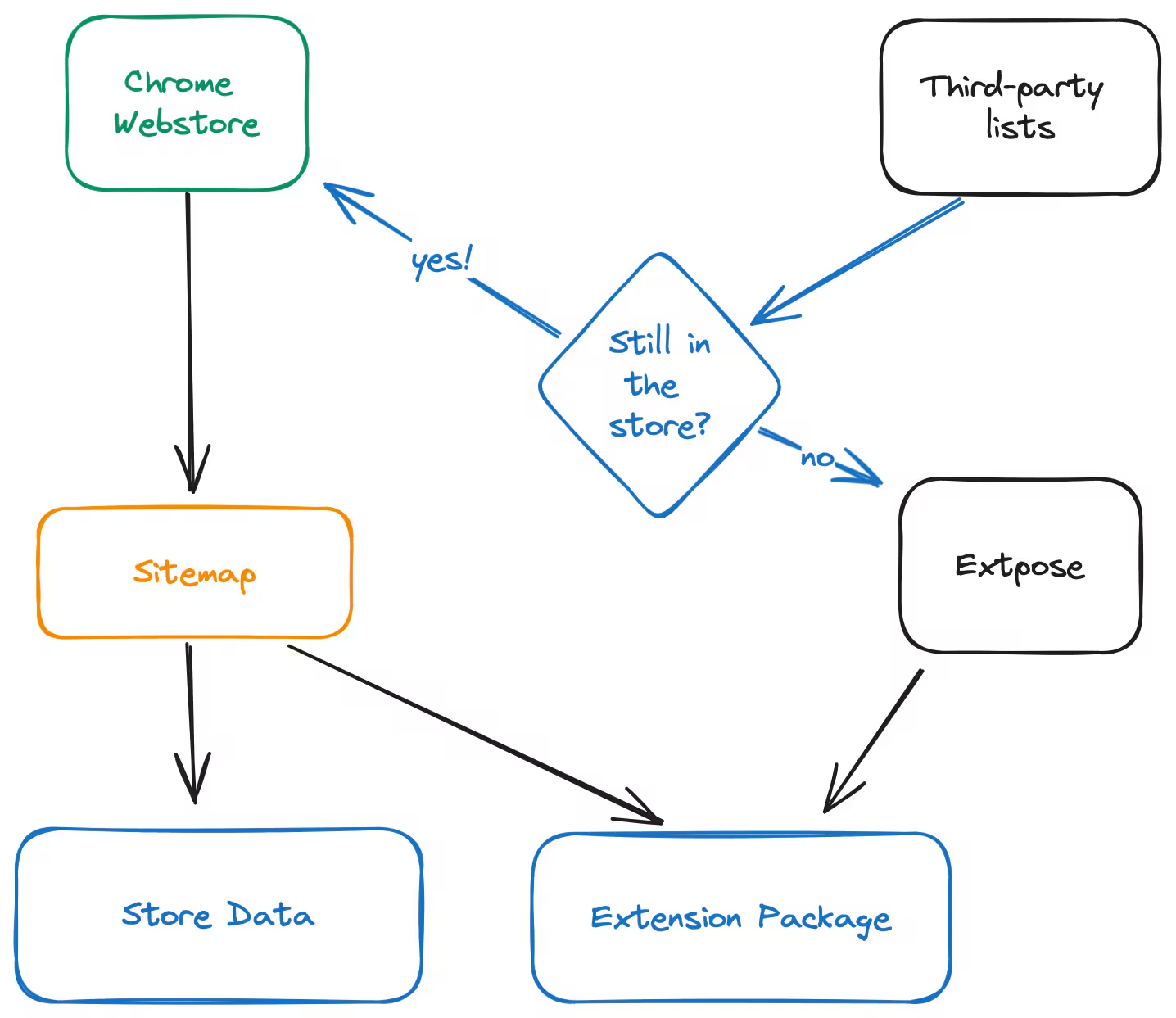
High-level pipeline flow chart
From there, we queried the individual store page to send the following data directly into Splunk:
- Downloads
- Ratings
- Homepage and Privacy Policy URLs
- Last update date
- Name and Description
We also downloaded the extension package for later analysis and stored them in Amazon Simple Storage Service (S3) because nobody wants that much data on a local disk if they don’t need it!
Analysis Pipeline
The extension file is essentially a .zip file with some signing certificates and encoded metadata, in a format commonly referred to as “CRX3” (because it’s version 3). We hashed the certificates, extracted the files, then passed them into the pipeline for analysis.
All data was annotated with the pipeline version and the extension ID so that we could compare like-for-like and correlate elements across the various datasets. The pipeline version was handy for when we changed calculations or the format in order to find data that we needed to reprocess down the line.
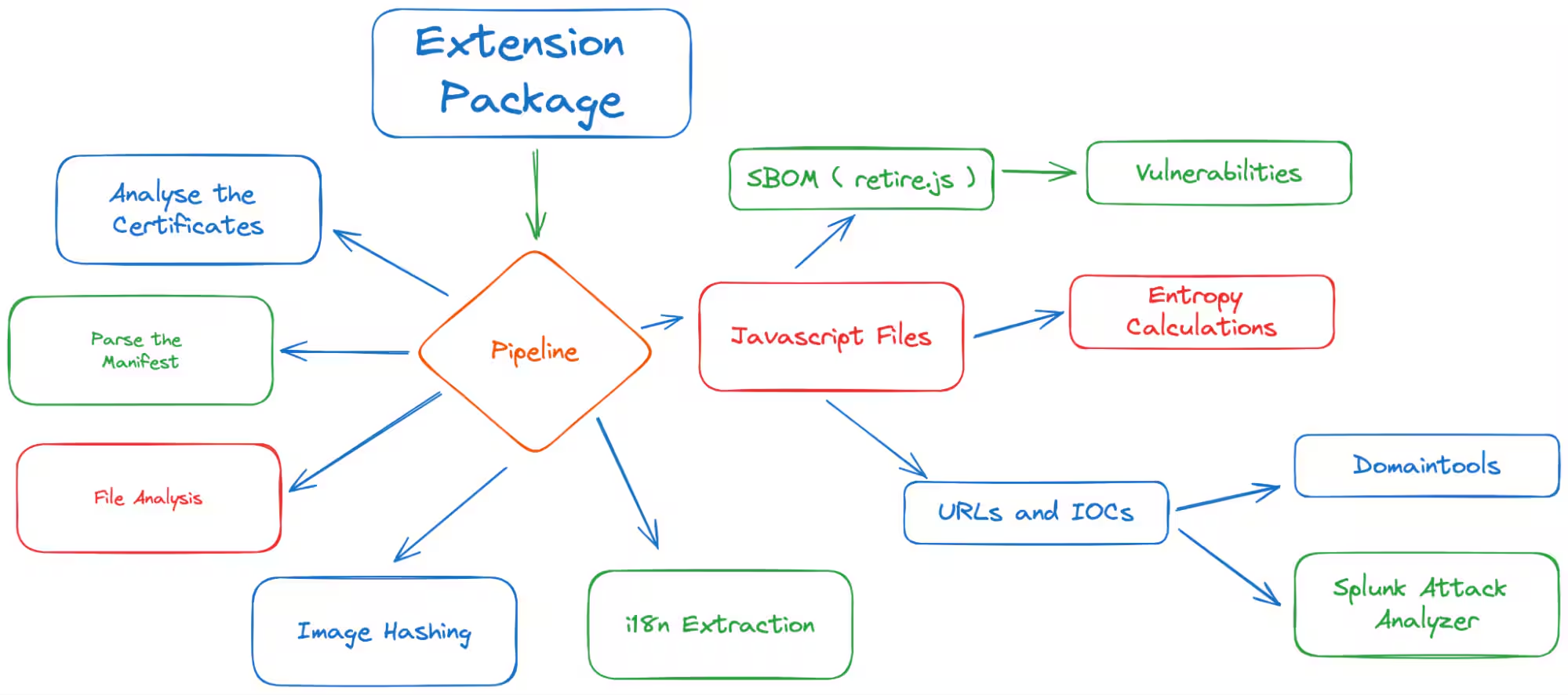
In-depth pipeline flow chart
The pipeline was written in Python, a common language that many IT security people use and that both Shannon and I understand well. The original pipeline and risk-scoring algorithm was built in concert with ChatGPT 4, as this allowed us to explore some ideas quickly and build out the basic code.
Once we realized the scale of the problem, with approximately 140,000 extensions to process, we spent much more time making sure the code ran reliably and within a reasonable timeframe.
Certificates
Extension packages are signed during the publishing process with a key unique to the developer and one from Google. This allows endpoints to validate the package's source and threat hunters to compare packages against their sources. A slight tweak to the crx3-utils tools allowed us to extract and hash these keys with ease.
Manifest Parsing
Browser extensions require a manifest.json file, which contains metadata about the package. The browser uses this to define security scopes, including (but not limited to) Content Security Policies, Permissions, OAuth2 Scopes, and the files within.
For the most part, we collected the data in its raw format, but some multi-value fields are expanded into their own source types for easier analysis with Splunk.
Permissions and OAuth2 Scopes
We used Mandiant’s excellent Permhash algorithm to hash permissions, request scopes, and capture them individually for comparison.
Content Security Policies
They’re relatively safe by design, but the Content Security Policy options available to developers still allow for significant scope to access content.
The carve-out for Web Assembly allows extensive code execution capabilities, including other programming languages runtimes. We found examples of Python, Ruby, and other runtimes included in extensions, raising some concerns about the effectiveness of sandboxing and permissions.
File Hashing and Metadata
We stored a SHA256 hash for every file with an extension. We also identified the file type based on magic bytes or, if that failed, by checking the file extension.
Image Hashing
For every image file that we could find, two hash values were calculated - a “color moment” hash and a “perceptual” hash. These were noted as highly resistant to rotation and slight modifications, which is helpful when images and icons are re-compressed or slightly modified but still maintain the same visible content.
i18n Extraction
Internationalization is key to accessibility, but it can also lead to difficulties in analysis and the ability for actors to hide in the metadata. We extracted the messages and developed a method for automatically translating the data before and after ingestion into Splunk to compare URLs and package information when different languages were configured in the browser.
Software Bill of Materials (SBOM)
One tool that was incredibly helpful during the analysis is called retire.js. It's a scanner designed to identify the contents of common JavaScript packages, their versions, and the vulnerabilities that they may contain. The tool can also provide output in common SBOM formats and we were able to take the data and integrate it into our pipeline in short order.
Analyzing Javascript Is Hard
Initially, we found a project called DoubleX developed by another researcher, which had shown promising results in identifying chains of activity in JavaScript. We’d hoped to be able to filter the results to include potentially threatening activity like external transmissions or unnecessary encryption. After trying to get the project working, we found that support for “modern” JavaScript via one of the supporting parsing packages wasn’t there, and we had to move on.

Creator of rabbit holes
After working with some community members to look for alternative approaches, I tried to build our own syntax tree parser using Rust and the SWC toolkit. We made progress, but due to the complexity of the language, there were far too many edge cases and rabbit holes to build a low-noise approach that could interpret code and find even simple examples of maliciousness.
Sometimes, simple approaches are the most effective! We turned to using regular expressions to extract domain names, IP addresses, and some other indicators. After some testing and tweaking, this was found to be very effective in identifying the target features that we were searching for. In an ecosystem where everyone’s using minification and pre-processing, hunting for actual calls to external services was deemed to be out of scope as dynamic analysis would be the only way to identify these.
URLs and IOCs
One of the things we always collect when conducting these kinds of analyses are Indicators of Compromise (IOCs) because who doesn’t love climbing the Pyramid of Pain?
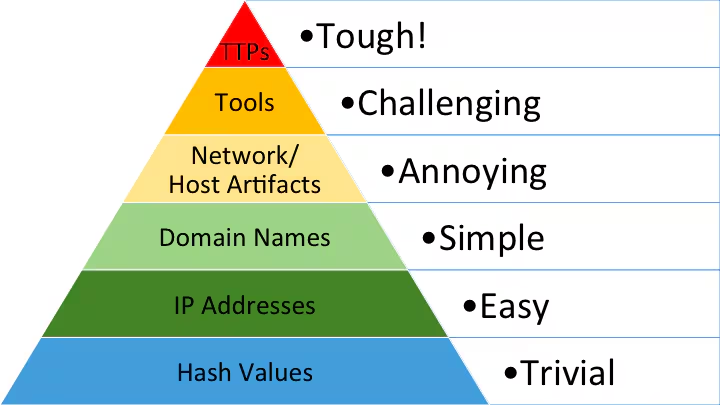
Ye olde Pyramid of Pain
As noted above, regular expressions and some preprocessing found quite a few things, including approximately six million possible domains (thanks JavaScript, for looking very domain-y).
We compared them against the database from our friends at DomainTools, who nicely provided us access. We also extracted as many URLs as possible, which we fed through Splunk Attack Analyser. There were some great insights from both sides, with some very new domains and some old sites linking through to things of a dubious nature.
Wrap Up
As you can see, there’s a lot to look at in every Chrome Extension package and a lot of data to collect, but with a bit of automation and some help from your friends, you can get into the fun part of analyzing the data and making sense of it all. In part three of this blog series, we will take a look at the findings of our analysis along with our general recommendations.
As always, security at Splunk is a family business. Credit to authors and collaborators: Shannon Davis, James Hodgkinson
Related Articles

Predicting Cyber Fraud Through Real-World Events: Insights from Domain Registration Trends

When Your Fraud Detection Tool Doubles as a Wellness Check: The Unexpected Intersection of Security and HR

Splunk Security Content for Threat Detection & Response: November Recap

Security Staff Picks To Read This Month, Handpicked by Splunk Experts

Behind the Walls: Techniques and Tactics in Castle RAT Client Malware

AI for Humans: A Beginner’s Field Guide

Splunk Security Content for Threat Detection & Response: November 2025 Update

Operation Defend the North: What High-Pressure Cyber Exercises Teach Us About Resilience and How OneCisco Elevates It
