Synthetic Testing Examples: User Flow Testing, APIs Validation, Custom Metrics, Log Ingestion, and More
Synthetic Testing? Where Do I Start?
Starting from scratch with synthetic testing of your web properties and APIs can be difficult. Questions like “what should we be testing?” will very quickly become exercises in figuring out “how can we actually do that?” which may involve sifting through various elements of the DOM or JSON responses. But there are shortcuts to synthetic testing mastery! Along with our docs, Lantern Articles, blogs, and videos, we’re now also providing a location for sharing synthetic test configurations as code in the integration-examples directory in our open source repository for Observability Content Contributions on GitHub!
What sort of tests are we talking about? What can you learn or leverage from these examples? By using synthetic runners as your bot friends in the cloud, if there is a piece of data out there you can probably scrape and validate it! Included in this batch of examples are a number of API and Real Browser tests to provide working templates of some common patterns for scraping and leveraging data from arbitrary web pages and APIs.
The included API tests provide examples for performing various interactions including GETs, transformation of data received as JSON, and POSTs sending that data on to further steps of the API test. But really, the use of JavaScript in these tests to parse and construct JSON payloads is the primary focus. The Real Browser tests included will help provide examples of using selectors and JavaScript to navigate pages, click elements, and even emulate a user checkout flow. Want to know more? Read on!
API Tests: Automating and Validating API Flows
Monitoring the ongoing health of your APIs is important. Your end users and backend services both depend on APIs being stable and available. Running API tests helps to proactively identify latency issues, misconfigurations, or unexpected response changes before they impact users.
But often there is also data in API responses that are useful to pass on as observability telemetry in the form of custom metrics or logs. Sending that data along to your monitoring or logging tools from your API tests can enable deeper observability and more actionable alerting. If the data you need is available from an API endpoint (3rd party or internal) you can use API tests to scrape and report on it! Used in this way API tests can track critical factors like token expiration, service availability, the status of 3rd party dependencies, or really anything else in an API response or headers. This makes them a more versatile component of your observability tooling than they might appear at first glance.
Three of the included API tests focus on querying APIs, parsing the received JSON, and formatting specific response data into appropriate JSON for sending to the next API endpoint. In this case though our final API endpoint is ingestion into the Splunk Platform or Splunk Observability Cloud:
- Query organization endpoint and ingest token expiration metrics: An example which queries the Splunk Observability /organization API and ingests any tokens expiring in 7 days and/or 30 days as a metric in Splunk Observability Cloud. That’s right! This test is Observability Cloud observing Observability Cloud for better observability of Observability Cloud!
- Shameless Plug: A Python script which provides more detailed token monitoring in Splunk Observability Cloud is available from the Observability Content Contrib on GitHub
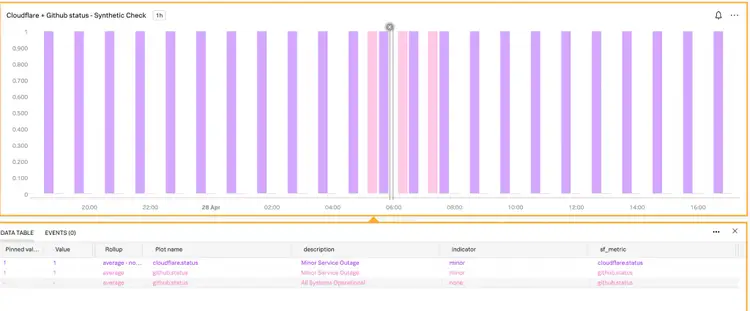
- Query status endpoint for 3rd party dependencies and ingest as metrics: An example to query both CloudFlare and GitHub’s status pages and use JavaScript to parse response then report high level outage metrics into Splunk Observability Cloud as metrics and attributes to help establish when outages may impact customers or deployment processes.
- Query status endpoint for 3rd party dependency and ingest as logs: This example queries the OpenAI status endpoint and uses JavaScript to craft and send an appropriate JSON payload to a Splunk HEC endpoint for log ingestion. This helps provide data points for any outages or communication issues that may be impacting LLM usage.
A further API test specifically for GraphQL provides an example of crafting requests to, and validating the appropriate output of, GraphQL responses. The GraphQL example is specifically useful as a demonstration of crafting request payloads and validating response structure.
These API tests utilize Global Variables to store secrets securely for any credentials used. This also enables test configurations to reference the variable names for easier portability and configuration as code. It also means that if the credentials change, you only need to update one place instead of updating every test.
Browser Tests: Simulating User Flows
Validating end-to-end user flows within a web property is one of the more common uses for browser tests and a primary target for quick observability wins. Starting with your most important flows often means validating user actions like login, navigation, form filling, and so on. These tests can help detect front-end issues such as broken elements, slow rendering, or incorrect data display. But where to start? Below are a couple of examples to get started with:
- Test complete order placement with HipsterShop: This example uses a common microservices e-commerce shop demo to demonstrate using JavaScript to select a product, using XPath selectors within the page to add to cart, place order, and validate that an order confirmation was received. This can be a good conceptual starting point to work from when setting up a test for common user workflows.
- Validate login, navigation, and APM page rendering: This example uses the Splunk Observability UI to demonstrate logging into to a webpage with a username and password (stored in Global Variables for safety) and using various selectors to click login, navigate to the APM page, and validate that the APM page is rendering data as expected. This example can be helpful when trying to use more varied and complex selectors
- Shameless Plug: There’s additional information on Splunk Synthetics selectors in this excellent Splunk Lantern article.
Browser tests can also be created with the Google Chrome Recorder (video) and in cases where complex recorded workflows are being used to configure tests some basic examples like these can provide a foundation for better understanding what the Chrome Recorder has spit out.
Better Observability? Yes, Please!
Combining API and browser tests can up level the observability of your organization in a multitude of ways. API tests ensure your backend services are reliable, validate endpoint data, and even ingest useful data about 3rd party endpoints. Browser tests on the other hand will walk user flows and validate that users of your web properties are receiving the expected experience. Together, they can help you catch issues at every layer—whether it’s a problem in your software, in your tools, in a 3rd party dependency, or even a broken navigation impacting users. All that’s left is to fix any issues between the keyboard and the chair!
You can sign up for a free trial of Splunk Observability Cloud and start running synthetic tests right now! All of these examples from the Observability Content Contrib repo are provided as Terraform files for easy deployment and management as code along with your other Splunk Observability resources. Start building synthetic tests for your most important endpoints and user flows today!
Related Articles
What the North Pole Can Teach Us About Digital Resilience

The Next Step in your Metric Data Optimization Starts Now

How to Manage Planned Downtime the Right Way, with Synthetics

Smart Alerting for Reliable Synthetics: Tune for Signal, Not Noise

How To Choose the Best Synthetic Test Locations
Advanced Network Traffic Analysis with Splunk and Isovalent

Conquer Complexity, Accelerate Resolution with the AI Troubleshooting Agent in Splunk Observability Cloud

Instrument OpenTelemetry for Non-Kubernetes Environments in One Simple Step