SAST vs. DAST vs. RASP: Comparing Application Security Testing Methods
Learn Shanika WickramasingheGlobal spending on information security is set to reach $212 billion by 2025. This represents a growth of 15% from 2024. According to Gartner, the rise of generative AI and cloud adoption are key reasons for this rapid increase. The analyst firm further predicts that GenAI will play a part in 17% of all cyberattacks by 2027.
Businesses need advanced security strategies that go beyond traditional methods to counter these growing threats. This is why business owners need to be aware of security solutions like SAST, DAST, and RASP, as they offer multi-layered protection for applications.
(Related reading: application security explained & common software testing methods.)
What is SAST?
Static Application Security Testing (SAST) is a white-box security testing method. SAST uses an application’s static source code or binaries to identify vulnerabilities. This means SAST tools operate on the application's code when the application is not running.
Developers use SAST to detect various security risks, such as: cross-site scripting (XSS), insecure deserialization, buffer overflows, and other OWASP vulnerabilities in the code. Since SAST alone cannot identify run-time-specific vulnerabilities, developers have to often combine SAST with other testing methods to achieve comprehensive security.
SAST is a major component of the software development lifecycle because it detects vulnerabilities early. The earlier you catch them, the least costly they are to fix. As SAST tools can be executed during the development phase, developers are now able to write code and test it even a thousand times (!!) before releasing the product to the market.
SAST can be integrated into the CI/CD pipeline, and when done so, it is referred to as “Secure DevOps” or “DevSecOps.” SAST is widely scalable through automation. The ability to Implement automated tests covering SAST techniques makes it an efficient solution for addressing code-level risks quickly.
What is DAST?
Dynamic Application Security Testing is a black-box testing method. The term "Dynamic" in DAST suggests that this method evaluates the security of an application while the application is running. Unlike SAST, DAST does not require access to the application’s source code. Instead, it :
- Simulates the actions of an external attacker.
- Tests the application from the outside to identify vulnerabilities that only emerge during runtime.
DAST has the capability to identify various security flaws like denial-of-service (DoS) vulnerabilities and insecure server configurations. By mimicking real-world attack scenarios, DAST tools assess how the application responds to these simulated threats. With this approach, developers can identify weaknesses that static testing methods like SAST might miss.
Typically, developers perform DAST during the later stages of the software development lifecycle, often just before deployment. By testing applications in their live environments, DAST provides a clear overview of runtime security and supports better-performing applications that can withstand potential attacks.
How does SAST work?
Developers use SAST tools to apply predefined rules and other detection methods — such as pattern matching and data flow analysis — to identify coding errors and other vulnerabilities. They integrate these tools into their IDEs or CI/CD pipelines to automate scans during the coding and testing phases.
Common SAST methods
Here are some methods used in SAST.
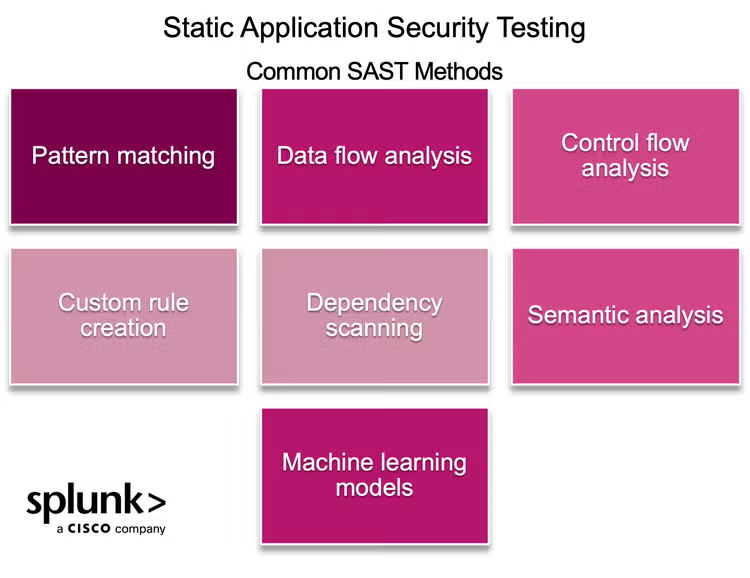
Pattern matching scans the codebase for known patterns of insecure coding practices. For example, the use of weak cryptographic algorithms or insecure API calls.
Data flow C tracks how data flows through the application. This can identify vulnerabilities like SQL injection or buffer overflows by tracing untrusted input paths to sensitive operations.
Control flow analysis can analyze the application's control structures. For example, loops and conditionals to uncover logical flaws or potential vulnerabilities like race conditions.
Custom rule creation. Many tools allow developers to create custom rules to have coding best practices. Here are some examples of these custom rules:
- Flag any use of unsanitized input in SQL queries.
- Identify code that outputs user-provided data to the browser without proper escaping.
- Highlight the use of vulnerable or deprecated functions, such as
eval()in JavaScript orstrcpy()in C. - Detect occurrences of hardcoded API keys and passwords in the source code and mark any instance where input validation is missing for user-provided data.
Dependency scanning. Some SAST tools analyze third-party libraries and frameworks used in the application to identify vulnerabilities in dependencies.
Semantic analysis. By interpreting the meaning of the code rather than just its structure, SAST tools can detect insecure configurations or misuse of APIs.
Machine learning models: Advanced SAST tools incorporate machine learning algorithms to recognize previously unknown vulnerabilities by analyzing patterns across large datasets.
Performance considerations when using SAST tools
SAST tools often require significant CPU and memory resources. This can be a major issue when analyzing large codebases. A full scan of a million lines of code might consume several gigabytes of RAM.
The time required for SAST scans can vary dramatically based on the size of the codebase, ranging from a few minutes for small projects to several hours for enterprise applications. This can impact:
- Build pipeline timelines
- Developer productivity
Consider using modern SAST tools that support incremental scanning, allowing you to analyze only the changed code instead of the entire codebase.
Additionally, performance tuning through rule selection and scope definition is crucial. Poorly configured SAST tools can unnecessarily analyze non-critical code paths, wasting time and resources without providing security benefits.
How does DAST work?
DAST tools simulate real-world attacks — for example, sending various forms of malicious data into input fields to see how the application processes it — to identify vulnerabilities and weaknesses in the application’s behavior and responses.
Steps in DAST
The process typically involves the following steps.
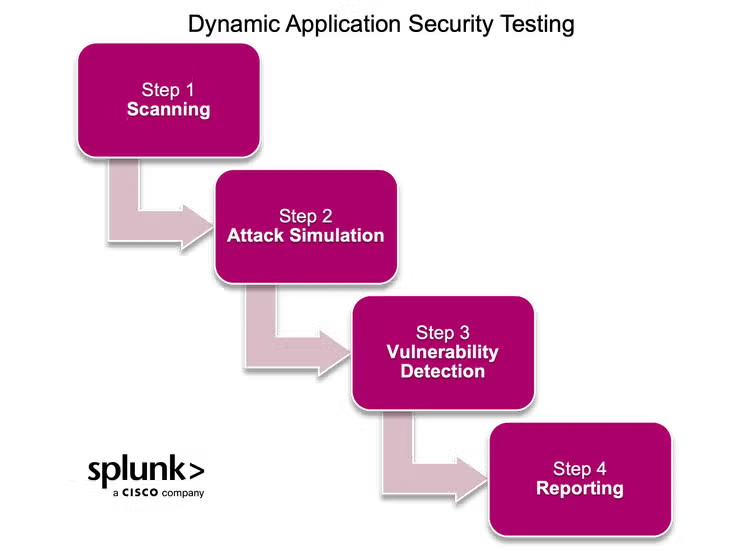
Step 1: Scanning. Scan the web application to discover entry points (such as URLs, forms, and APIs). This step maps out the application’s structure and identifies potential attack surfaces.
Step 2: Attack simulation. Simulate malicious activities by sending crafted requests to the application. These requests test for vulnerabilities like cross-site scripting and cross-site request forgery by attempting to exploit the entry points.
Step 3: Vulnerability detection. Analyze the application’s responses to identify security weaknesses. It evaluates whether the application behaves as expected under attack. For example, malicious data can be injected to detect an SQL injection flaw.
Step 4: Reporting. Generate reports with detected vulnerabilities and recommendations for remediation. Developers can use the results in the reports to fix the identified issues.
Modern DAST solutions can incorporate advanced features such as AI-driven analysis and real-time data integration. They automatically create test sets. Dynamically adapt to the application’s structure and minimize false positives using machine learning algorithms.
Performance considerations when using DAST tools
Here are certain performance bottlenecks when using DAST tools that you need to keep in mind.
- DAST tools actively interact with the running application, temporarily increasing CPU and memory usage on both the application and web servers.
- The high volume of concurrent requests generated during DAST scanning can consume significant network bandwidth.
- DAST scanners often bypass or invalidate application caches by generating unique requests, reducing the effectiveness of caching mechanisms.
- The creation and management of multiple test sessions by DAST tools can increase memory usage on application servers.
To avoid such issues or reduce their impact as much as possible, follow the practices below.
- Schedule DAST scans during off-peak hours when application usage is minimal.
- Conduct scans in a staging or pre-production environment that mirrors the production setup.
- Use throttling features in DAST tools to control the number of simultaneous requests.
- Increase application server thread pools during scanning periods.
- Configure separate caching policies for DAST scanner IPs.
- Implement automatic scan suspension if performance thresholds are exceeded.
SAST vs. DAST: key differences
This table summarizes the difference between SAST and DAST.
Pros and cons of SAST and DAST
Pros of SAST
- Identifies security vulnerabilities early in the software development life cycle.
- Analyzes the codebase, including basic functions and complex branches.
- Operates directly on the source code without requiring the application to run.
- Provides real-time feedback with comprehensive insights, such as the exact location of vulnerabilities.
- Generates exportable reports that can be tracked using dashboards.
- Supports automation so that it is faster and more efficient than manual code reviews.
Cons of SAST
- Often generates a large number of false positives. Therefore, it may require manual reviews.
- Cannot identify runtime or environment-specific vulnerabilities, such as configuration errors.
- Requires tools specific to each programming language so that maintenance is complex.
- Struggles with understanding external libraries, APIs, and REST endpoints.
Pros of DAST
- Identifies vulnerabilities that only appear during application execution.
- Operates externally and no access to source code is required. This is effective for testing third-party applications or compiled code.
- Simulates actual attack scenarios and identifies risks missed by SAST.
- Works independently of the application's programming language.
- Evaluates the entire application and system. This includes memory consumption, resource usage, and third-party interfaces.
Cons of DAST
- Focus only on the outer layers of the application, which may miss vulnerabilities in deeper layers.
- Applied later in the SDLC so that fixes are more expensive and time-consuming.
- Miss certain vulnerabilities that SAST tools can identify through source code analysis. As an example, consider a web application that uses an insecure random number generator (e.g.,
Math.random()in JavaScript) to create session tokens. DAST may miss this flaw because it only tests runtime behavior. (But SAST can detect it.) - Require custom infrastructure for large projects and multiple instances of the application to run in parallel and therefore resource intensive.
When should I use SAST vs. DAST?
SAST and DAST play complementary roles in securing SDLC. Understanding when to use each helps to have comprehensive security coverage.
When to use SAST
During early development phases. Developers use SAST to identify vulnerabilities like SQL injection and hardcoded credentials early in the SDLC. By catching these issues before deployment, they reduce the cost and complexity of fixing them.
Eg:- A SAST tool scans Python code and flags a vulnerability where hardcoded API keys are embedded in the source code. Developers refactor the code to use environment variables to securely store and retrieve the keys.
For code reviews. SAST integrates into version control systems. Allows developers to scan their code before committing it. This makes sure that only secure code enters the repository.
Example: A SAST tool can detect a vulnerability where a file path is constructed directly from user input without validation, exposing the application to path traversal attacks. Developers fix the issue by sanitizing the input and using secure library functions to handle file paths.
In continuous integration/continuous deployment pipelines. SAST runs automated scans during the CI/CD process. It offers real-time feedback to developers.
When to use DAST
Pre-production testing. Developers use DAST to identify runtime vulnerabilities (eg:- insecure configurations, authentication flaws, insufficient access controls) in a staging or QA environment.
Example: A DAST tool can detect a database misconfiguration that exposes sensitive data. Then developers can secure the configuration before deployment.
In post-deployment monitoring. DAST tools continue to scan deployed applications for vulnerabilities caused by changes in the environment or emerging threats. This guarantees that the application remains secure over time.
Testing third-party integrations. DAST can mimic an external attacker's perspective to identify vulnerabilities in third-party APIs or interconnected systems.
For example: A DAST tool tests a web application and discovers a vulnerability in a third-party payment API where credit card details are being transmitted over an unencrypted HTTP connection. Developers resolve the issue by enforcing HTTPS for all API communications.
Which is more effective: SAST or DAST?
The effectiveness of SAST or DAST depends on:
- The SDLC stage
- The type of vulnerabilities being addressed
SAST works best in early development, primarily to identify vulnerabilities in the source code, reduce costs, and promote secure coding practices. In contrast, DAST focuses on runtime vulnerabilities in pre-production or deployed applications. It offers insights into issues like misconfigurations and insecure integrations.
Take a hybrid approach
Instead of choosing one over the other, combining SAST and DAST creates a multi-layered security strategy that addresses vulnerabilities in both static code and runtime environments. SAST can be integrated into early development stages to detect and fix code-level issues before the application is compiled. Once the application is running in a test environment, DAST can identify runtime vulnerabilities and evaluate the application’s behavior under attack conditions.
Automating both SAST and DAST scans within a CI/CD pipeline provides continuous feedback and accelerates the development process without compromising security.
For agile or DevOps environments, adding tools like IAST or RASP can further enhance security. By correlating results from both SAST and DAST, organizations can achieve more comprehensive and effective vulnerability management.
Use RASP as an alternative to SAST and DAST
Runtime Application Self-Protection (RASP) is an advanced security solution installed directly on the server where the application runs.
RASP embeds itself into the application's runtime environment. This integration allows RASP to analyze the app's logic and data. While analyzing, it can:
- Detect abnormal behaviors as they happen.
- Block malicious activities instantly.
A key difference is that RASP doesn't just alert on potential issues — it actively prevents attacks by isolating and resolving threats without relying on external tools.
RASP offers a dynamic alternative to SAST and DAST. Unlike SAST, which analyzes static code, and DAST, which simulates external attacks, RASP operates in real time. It monitors the application’s behavior during execution and responds to live threats by terminating sessions or alerting defenders.
RASP is particularly effective in protecting applications against vulnerabilities that bypass network defenses or are missed during development.
However, overconfidence in RASP can lead organizations to neglect secure coding practices. Also, RASP may impact application performance because it operates directly within the application's runtime environment. RASP cannot replace the need to fix underlying flaws, but it provides continuous protection while remediation is underway.
As one RASP user comments:
The future is AppSec testing with SAST, DAST, and RASP
The future of application testing lies in combining SAST, DAST, and RASP to create a comprehensive security strategy. As security challenges grow, integrating these tools into CI/CD pipelines and automating their processes will become essential.
Advances in AI and machine learning will make testing more efficient as it helps to reduce false positives and improve threat detection.
Financial and FinServ industries
In the financial sector, AI-powered tools will transform how vulnerabilities are detected and mitigated. SAST and DAST will continue to identify coding flaws and runtime issues during development and pre-production.
But you won’t stop there: RASP will take it further by using AI to monitor live transactions. For instance, RASP could detect unusual patterns (Eg:- an attacker attempts to exploit a vulnerability in real time) and block these activities while notifying the security team.
IoT, edge, and connected devices
When it comes to IoT, the combination of these tools will play an important role in securing connected devices. Here’s how:
- SAST can confirm that the firmware is free from vulnerabilities during development.
- DAST can test the security of communication protocols between devices.
- RASP, meanwhile, monitors deployed devices and detects and prevents unauthorized access attempts or data leaks caused by emerging threats.
Likewise, using multiple methods will help IoT ecosystems remain resilient. As explained in our many examples, SAST, DAST, and RASP together promise a future where applications are built and deployed with stronger, more proactive security measures.
Resilient security starts with proactive testing
Combining SAST, DAST, and RASP together can provide robust security that covers the entire software development lifecycle.
By integrating these methods into CI/CD pipelines and using advances in AI, organizations can respond proactively to emerging threats. Together, these methods offer a holistic approach to secure modern applications from security vulnerabilities.
Related Articles

Data Center Cooling & Energy Optimization: The Ultimate Guide

Product Manager Role Explained: Responsibilities, Skills, and Salaries