How to Troubleshoot Kubernetes Environments with Observability
Learn Greg LefflerKey Takeaways
- Troubleshooting Kubernetes is fundamentally different from traditional systems. Its distributed, ephemeral nature demands observability to surface root causes across nodes, pods, and services extremely quickly.
- A structured, step-by-step workflow accelerates resolution. Starting broad with cluster health and narrowing down through node metrics, workload filtering, correlation, and AI ensures faster, more reliable troubleshooting.
- Observability enables proactive stability, not just firefighting. By detecting noisy neighbors, tuning scaling, analyzing historical trends, and automating repeatable fixes, teams can prevent incidents before they impact users.
Kubernetes has revolutionized application deployment and scaling, but troubleshooting in these environments is notoriously difficult. The dynamic, distributed, and ephemeral nature of Kubernetes means that identifying and resolving issues requires more than traditional logging or ad-hoc debugging.
Observability offers a powerful approach to manage this complexity. By correlating metrics, logs, and traces across the stack, teams can detect issues earlier, pinpoint root causes faster, and keep clusters healthy.
In this guide, we’ll look at a step-by-step workflow for troubleshooting Kubernetes with observability, plus advanced strategies to move from reactive firefighting to proactive stability management.
Why troubleshooting Kubernetes is different (and harder)
Traditional troubleshooting often involves checking a few logs and running basic commands. In Kubernetes, however, this approach doesn’t work, due to:
- Distributed architecture: Workloads span multiple nodes and clusters, each with distinct components and networking.
- Ephemeral workloads: Pods and containers are often short-lived, demanding always-on tooling that can respond quickly to capture diagnostic data.
- Complex interdependencies: Issues in one component (e.g., networking, scheduling) can cascade, producing misleading symptoms across the system.
For example, a slow downstream database might manifest as retries, timeouts, or CPU spikes in unrelated Kubernetes services. Without a unified observability view, the true root cause can be missed.
What is observability in Kubernetes troubleshooting?
Observability is the practice of instrumenting systems to expose detailed telemetry, revealing not just what went wrong, but why. Three common pillars of observability are:
- Metrics: Numeric data points quantifying system performance (e.g., CPU usage, latency, error rates).
- Logs: Time-stamped records of events and application activity, often containing detailed error messages.
- Traces: End-to-end records of requests as they traverse multiple services and components.
Correlating these data types helps teams move beyond surface-level symptoms. For instance, a frontend API latency spike can be matched with traces showing a database query slowdown, linked to a backend workload running on a node under heavy CPU contention.
Observability within a Kubernetes environment enables:
- Real-time problem detection
- Correlation across layers (nodes, pods, control plane, workloads)
- Early identification of unusual patterns, such as security incidents, performance regressions, etc.
Common challenges in Kubernetes troubleshooting (even with observability)
Even with observability tools, Kubernetes troubleshooting presents challenges:
- Siloed data sources: Metrics, logs, and events are often stored separately, hindering holistic analysis.
- Manual correlation: Without automation, connecting disparate events is slow and error prone.
- Dynamic environments: IP addresses, pod names, and resource allocations change constantly, complicating diagnostics.
- Volume of telemetry: High-velocity data streams can overwhelm teams lacking effective filtering and alerting.
Frequent context switching between tools (e.g., matching logs with metrics) significantly slows down mean time to resolution (MTTR).
Step-by-step workflow: How to troubleshoot Kubernetes with observability
Effective troubleshooting in Kubernetes starts broad and progressively narrows down. By following a structured workflow, teams can avoid chasing misleading symptoms and instead move systematically from cluster-wide health to node-level diagnostics, workload filtering, data correlation, and finally AI-driven analysis.
Step 1. Monitor cluster and control plane health
Always begin troubleshooting at the cluster and control plane level. If the overall system is unhealthy, downstream issues will cascade into workloads and create misleading signals.
- Quick checks: Look at basic cluster health metrics such as API server request latency, scheduler queue length, and pod crash loops. These provide an early sense of whether control plane bottlenecks are affecting workloads.
- Deeper diagnostics: Go beyond surface metrics and evaluate etcd performance, controller manager logs, and kubelet status. For example, etcd latency can slow the entire cluster, while issues in the scheduler or controller manager may manifest as delayed pod scheduling or missed scaling events. Monitoring specific control plane components in parallel with workload indicators reveals how control plane problems, like a slow scheduler or a failing node, can cause cascading workload instability
By starting here, you ensure that later troubleshooting is grounded in a reliable picture of cluster health. While it may not often be the fault of application issues, the cluster simply must be healthy for anything that runs on it to operate reliably.
Step 2. Drill into node and pod performance
If the cluster and control plane appear healthy, the next layer of troubleshooting focuses on individual nodes and pods. This is where resource contention, misconfiguration, or localized failures often surface.
- Quick checks: Review node-level CPU, memory, disk I/O, and network utilization. Look for pods in crash loops (status
CrashLoopBackOff), out-of-memory errors, or failed probes. These provide clear signals of resource exhaustion or misconfiguration. - Deeper diagnostics: Evaluate subtler issues such as excessive garbage collection caused by too-low memory limits, kube-proxy errors, or misconfigured service mesh policies. These may not trigger obvious alerts but can still degrade pod or service performance significantly.
This deep observability helps you distinguish between true infrastructure bottlenecks and issues that only appear as workload instability.
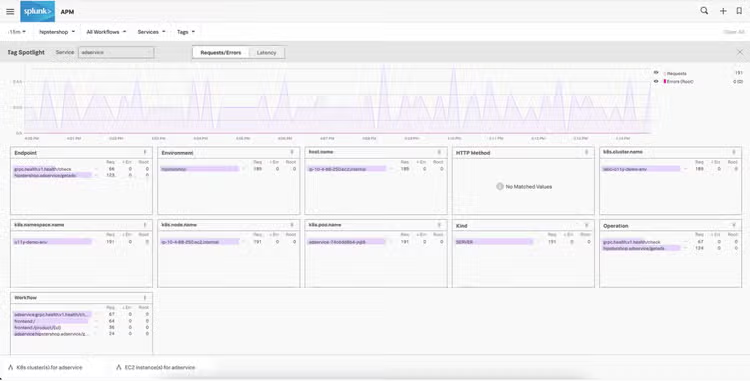
Step 3. Use labels and metadata to filter telemetry
In a dynamic Kubernetes environment, sheer telemetry volume can overwhelm teams. Labels and annotations are critical for narrowing the scope of analysis and quickly finding the workloads that matter.
- Quick checks: Use standard labels such as
env=productionorapp=checkout-serviceto filter dashboards and logs. This helps isolate whether problems are limited to one environment or service, rather than affecting the entire cluster. (A good source for standard labels are the OpenTelemetry semantic conventions.) - Deeper diagnostics: Leverage rich metadata and annotations to pivot quickly between related workloads during incidents. For example, filtering by namespace, deployment, or release version allows teams to pinpoint when and where an issue was introduced, even in highly dynamic clusters.
Clear, well-defined labeling is essential for more than just organization: it’s a prerequisite for efficient, observability-driven troubleshooting. Some tools leverage these labels to filter error rates or latency, making it easy to isolate problems to specific customers, software versions, or regions.
Step 4. Correlate metrics, logs, and traces for root cause analysis
Observability becomes most powerful when telemetry types are not viewed in isolation. Correlating metrics, logs, and traces reveals how system-wide symptoms relate to root causes.
Correlating metrics, logs, and traces
Example workflow: A sudden latency spike (metric) may correspond with new code being exercised in an application (logs), which is found to be caused by a slow database query (traces).
This cross-linking transforms a vague performance issue like “latency is high” into a precise root cause diagnosis: “the new backend code release contains an unoptimized database query”.
Modern observability platforms, like Splunk Observability Cloud, streamline this process by allowing seamless pivoting. For instance, teams can jump from a pod crash to its kubelet logs, or from a service latency spike directly into relevant spans.
Without correlation, teams are forced to manually reconcile disparate signals across tools, delaying root cause analysis and increasing MTTR.
Step 5. Apply AI and automation to accelerate resolution
The final layer of observability-driven troubleshooting leverages AI and automation to accelerate both detection and resolution.
- Quick checks: AI can automatically surface anomalies across metrics, logs, and traces, flagging issues that human operators might overlook. For example, it might detect a correlation between pod restarts and sudden increases in disk write activity.
- Deeper diagnostics: Advanced machine learning models can suggest likely root causes and even recommend remediation steps based on past incidents. Combined with automated runbooks or Kubernetes operators, this enables teams to not only diagnose faster but also resolve recurring problems with minimal manual intervention.
By incorporating AI and automation, teams move from reactive troubleshooting to proactive incident prevention and faster recovery.
Advanced strategies: Using observability for proactive Kubernetes troubleshooting
Once you’ve mastered the core troubleshooting workflow, observability can also help teams move beyond firefighting and into proactive stability management. Advanced observability practices allow engineers to prevent incidents before they escalate, shorten MTTR, and reduce the operational overhead of recurring problems.
Detect and resolve “noisy neighbor” issues
A “noisy neighbor” occurs when one workload monopolizes cluster resources, starving other services and causing widespread instability.
Problem: A single pod consuming excessive memory or CPU can trigger evictions, throttling, and degraded performance across unrelated workloads. These failures often appear as cascading issues elsewhere in the cluster, masking the true culprit.
How observability helps: Node-level metrics reveal memory and CPU pressure (often caused by a failure to set resource limits), container telemetry pinpoints the offending pod, and eviction logs confirm excessive consumption. Logs can also highlight application misbehavior, such as runaway processes or unbounded logging.
Proactive measures:
- Apply resource requests and limits to prevent workloads from consuming beyond their share.
- Monitor eviction events, pod restart counts, and throttling metrics as early warning signals.
- Visualize resource consumption by namespace, deployment, or label to catch noisy neighbors before they disrupt critical services.
Diagnose Kubernetes scaling and performance bottlenecks
Kubernetes scaling is powerful, but when poorly tuned it often causes delays, wasted resources, or unexpected failures.
Problem: Misconfigured Horizontal Pod Autoscalers (HPA) or Vertical Pod Autoscalers (VPA), cold starts, or under-requested CPU/memory can lead to throttling, OOM kills, or delayed responses during demand spikes. These scaling inefficiencies ripple through microservices, APIs, and databases, degrading user experience.
How observability helps: Compare desired vs. actual replicas, monitor pod restarts, and track Cluster Autoscaler events to identify where scaling delays or resource contention occur. Observability also reveals cold start patterns, helping teams understand which workloads are slow to scale up.
Proactive measures:
- Baseline resource usage and correlate scaling events with workload performance.
- Track RED metrics (rate, errors, duration) or LETS metrics (latency, errors, traffic, saturation) to understand user impact. <
- Use historical trends to fine-tune autoscaling thresholds and forecast demand.
Observability ensures scaling adjustments are grounded in actual usage, not guesswork.
Combine real-time and historical telemetry for better insight
Kubernetes issues don’t all appear the same way: some are sudden and disruptive, while others build slowly over time. Observability helps teams connect both views.
Problem: Real-time failures like pod crash loops or sudden network errors require immediate response, while creeping issues such as memory leaks, throttling, or gradual latency growth are easy to miss without historical baselines.
How observability helps: Real-time telemetry provides the immediate signals needed to triage live issues, while historical data highlights recurring or slow-burn patterns. Observability platforms that auto-compare current vs. baseline behavior can surface anomalies faster than manual inspection.
Proactive measures: Use real-time metrics and alerts for acute failures, but pair them with trend analysis to identify systemic problems. For example, if memory usage grows steadily across deployments, historical analysis can predict OOM kills before they occur. This dual view ensures both immediate stability and long-term resilience.
Automate responses to recurring Kubernetes problems
Many Kubernetes incidents follow repeatable patterns, from certificate expirations to disk pressure to recurring pod evictions. Rather than manually resolving these each time, teams can automate consistent, reliable fixes.
Problem: Common failures often consume disproportionate engineering time because they:
- Recur frequently
- Are sometimes resolved inconsistently by different team members
How observability helps: By surfacing recurring telemetry patterns, observability highlights where repeatable incidents occur and which fixes have been effective. Teams can standardize these into playbooks and automation.
Proactive measures: Document proven remediation steps as runbooks, then automate execution with Kubernetes Operators, controllers, or scripts. Over time, refine automation based on new incident data. The result is faster recovery, reduced toil, and improved consistency across teams.
Best practices for observability-driven troubleshooting
To maximize your observability strategy's effectiveness within your Kubernetes environments, here are the best tips to put into practice:
- Instrument early and consistently: Use open standards like OpenTelemetry to instrument all components.
- Automate discovery: Leverage service auto-discovery for new workloads.
- Set actionable alerts: Tie alerts to specific remediation steps or runbooks; avoid alert fatigue.
- Retain sufficient history: Keep telemetry long enough to analyze trends leading to incidents (hours to days).
- Integrate security monitoring: Include security telemetry as part of your troubleshooting toolkit, as some performance issues can stem from malicious activity.
Tools for observability-driven troubleshooting
You can build a custom observability stack or leverage integrated platforms.
Open-source tools like Prometheus and Grafana, combined with logging and tracing frameworks, form powerful custom stacks. However, this approach requires significant operational effort and expertise and can become unwieldy in larger environments.
Integrated platforms like Splunk Observability Cloud unify telemetry collection, AI analytics, and deep linking in a single interface. The Splunk distribution of the OpenTelemetry Collector captures metrics, logs, and traces across Kubernetes environments, enabling faster correlation and resolution. Deep linking from metrics to logs accelerates diagnosis, and optional accelerators simplify onboarding. Configuration can be as simple as applying a Helm chart to get observability across your entire K8s footprint.
The bottom line: Moving from reactive to proactive Kubernetes troubleshooting
Troubleshooting Kubernetes environments is inherently complex, but with observability, that complexity translates into clarity, making it manageable. By layering metrics, logs, and traces, enriching telemetry with metadata, and applying automation and AI, teams can cut MTTR, reduce downtime, and prevent incidents before they escalate. The result is:
- Faster diagnosis of complex issues
- Improved customer experience
- A more resilient Kubernetes environment ready for growth
For a deeper dive into advanced troubleshooting patterns, metrics to monitor, and real-world scenarios, download the free ebook Troubleshooting Kubernetes Environments with Observability.
FAQs: Troubleshooting Kubernetes with observability
Related Articles

The Role of Behavioral Analytics in Cybersecurity

SOC 2 Compliance Checklist: How to Pass the Audit (Checklist Inside)