The API Testing Guide: Top Tools for Testing APIs
Learn Shanika WickramasingheBy 2026, it’s estimated that 80% of enterprises will use Generative AI APIs by 2026. Moreover, APIs supporting AI tools and large language models will account for more than 30% of the surge in API demand.
These trends emphasize the growing importance of API testing. Therefore, if you’re not prioritizing API testing, you risk compromising performance, security, and the overall reliability of your systems.
(Using Splunk Synthetic Monitoring? Check out this documentation for API testing for endpoints.)
What is API testing?
Short for “application programming interface,” APIs are the mechanism that enables two software components to communicate to achieve some task or activity.
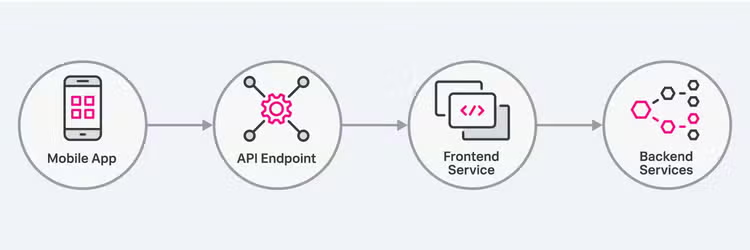
Just like any other software application, APIs require testing to identify issues and fix them before deployment to a live environment. So, why do they need a separate name from other software testing types? API testing differs from regular web application testing in several ways:
Unlike web applications, which are designed for end-users, APIs are built to be consumed by software applications. APIs do not have a user interface. They return data in formats such as JSON or XML. Because of these reasons, API testing requires a different process, knowledge, and tools to efficiently test APIs.
Why is API testing important?
Without proper testing, issues in APIs can lead to system failures and poor user experiences. And APIs are everywhere, as this image indicates. Therefore, every software development company should prioritize API testing.
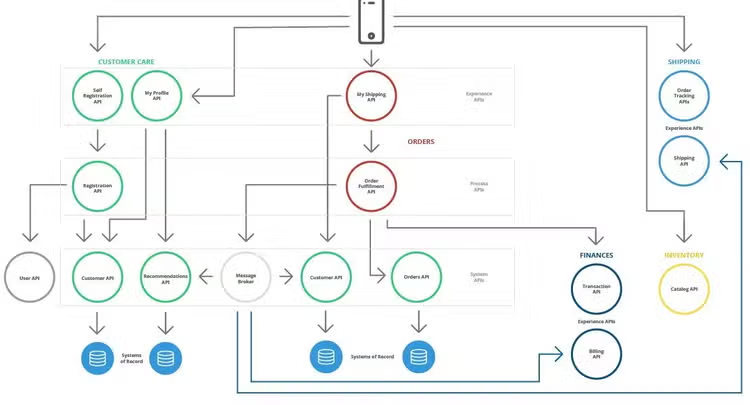
A simple example of many APIs in use across ordering, shipping, inventory, finance, and customer care operations.
Here are a few reasons why API testing is mandatory:
- To verify functionality: Verify that the API operates as intended by checking its responses to various inputs and scenarios.
- To identify issues early: Helps to detect defects at the earliest stages of software development (SDLC) so that developers can address issues before they grow into larger problems.
- To support agile development: In Agile software development, work is completed in multiple iterations. Therefore, it is important to carry out testing in iterations. Unlike other testing methods, such as GUI testing, which is resource-intensive and time-consuming, API testing is faster and easier to adapt to changes. Thus, API testing is more suitable for Agile practices.
- To validate performance and scalability: API testing evaluates whether APIs can handle high volumes of requests and maintain performance under stress. Also, it's important to test the API scalability to make sure that systems remain stable and responsive, even during traffic spikes.
Testing different types of APIs
The way you do API testing can vary depending on the type of API being tested. There are different types of APIs, such as REST, SOAP, and GraphQL.
- SOAP APIs use the Simple Object Access Protocol, which relies on XML-based messaging for communication.
- REST APIs, on the other hand, are built on the REST architectural style, using HTTP methods and being stateless.
When you test SOAP APIs, you have to focus on XML structure validation and strict protocol rules. But, when you test REST APIs, you focus on HTTP methods, response status codes, and JSON or XML response validation.
Today, REST APIs are the most popular type in use, so knowing specifically about REST APIs and how to test them will be important for every API developer and tester.
Types of API Testing
API testing is an umbrella term for different types of testing that evaluate various aspects of an API’s functionality and performance. These tests all contribute to thoroughly testing an API:
- Unit testing
- Integration testing
- Security testing
- Load testing
- Stress testing
- Regression testing
- Penetration testing
For example, testing individual API endpoints falls under unit testing.
In microservice architecture, APIs often integrate with other APIs. For example, imagine a scenario where you test an e-commerce API where the Order API integrates with the Payment API. Testing these scenarios is called integration testing.
Similarly, sending multiple simultaneous requests to test whether an API breaks under traffic surges falls under load testing and stress testing.
API testing requires security testing to ensure the API is secure against unauthorized access and data breaches. Regression testing is also part of API testing because whenever changes are made to an API, you must do regression testing to ensure its functionality hasn't been affected.
The gist is that API testing encompasses many skills and knowledge, and having the ability to perform the above testing types is essential for API testing.
API testing comparisons
Now, let’s clarify some important terms in the API testing practice.
Manual vs. automated API testing
One of the key decisions a company must make when conducting API testing is whether to perform it manually or automate the process. The correct choice depends on several factors.
- Manual testing is suitable if the API is small or has unique or complex scenarios that are difficult to validate through programming.
- Automated testing, on the other hand, is ideal if the API is very large and has many endpoints, making it difficult to test manually. Another reason could be if your platform requires frequent regression tests, frequent deployments, or repetitive tasks — automated testing is the way to go.
As expected, manual testing is slower and more time-consuming, while automated testing is faster. Automated testing can also be integrated into a CI/CD pipeline to run tests immediately whenever a new code is deployed.
There are some caveats to automation here, though:
- Writing automated tests requires highly technical skills and programming experience.
- Automated testing cannot completely replace manual testing. Every application will require at least some manual testing to complement automated testing effectively.
API testing vs. API monitoring
API testing and API monitoring both provide API reliability but serve distinct purposes at different stages of the API lifecycle.
- API testing occurs during development and focuses on identifying and resolving issues before the API reaches production.
- API monitoring takes place after deployment. It tracks API performance and availability in real-world environments. It identifies live issues like downtime or latency spikes. API monitoring often uses telemetry data to detect trends and provide insights into long-term API health.
While testing verifies functionality, monitoring ensures reliability over time. Together, they provide end-to-end API quality assurance, from validation to ongoing performance oversight.
(Related reading: API monitoring vs. API testing, differences explained.)
With the context we have, we can now dive into the practical side of API testing. Let’s look at the what, when, and how’s of any successful API practice.
What should be tested during an API test?
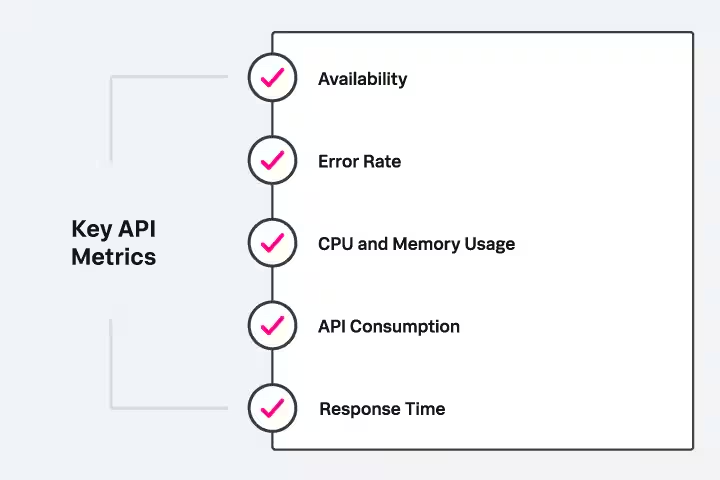
To create a proper API testing strategy, you need to decide which components and aspects to test. A thorough API testing should test all of the following areas:
- Endpoint functionality: Verify that the API executes the intended operations for all endpoints and API methods, such as GET, POST, PUT, and DELETE.
- Data validation: Check the accuracy and consistency of data returned by the API across various inputs.
- Security: Assess the API's authentication, authorization mechanisms, and vulnerability protection.
- Rate and request limits: Test how the API handles throttling and request caps when exceeding defined limits.
- Performance and latency: Measure response times, throughput, and latency under varying conditions and traffic loads.
- Error and exception handling: Validate that the API returns meaningful error messages and appropriate HTTP status codes when requests fail.
- Load and scalability: Simulate high traffic and concurrent users to evaluate how the API performs under stress.
- Session management: Check how the API manages user sessions, such as timeouts and token expiration.
- Compatibility across platforms: Test the API on different operating systems and devices to verify consistent functionality.
- Caching mechanisms: Test how the API implements caching to improve response times and minimize unnecessary server load.
How to design an API test?
API testing starts with deciding two things:
- Which endpoints to test.
- Whether to focus on functional requirements, non-functional requirements, or both.
The ideal process is to provide the API tester with an API specification document (“specs”) that includes all the endpoints, the HTTP methods for each endpoint, and the expected responses for each method. This will reduce the communication between testers and developers, which will make the testing process faster and less prone to errors.
Here is an overview of the steps involved in API testing.
Step 1: Define the scope and purpose of the API test. This should include the endpoints planned to cover and expected behaviors.
Step 2: Create test cases for various scenarios. Specify input data, expected outputs, and validation criteria.
Step 3: Set up the test environment by configuring the API, tools, and necessary dependencies.
Step 4: Execute tests manually or via automation. Run the test cases and validate the API’s responses against expected outcomes.
Step 5: Report findings by documenting the test results, highlight successes and failures, and share them with stakeholders.
Step 6: Maintain tests by Updating test cases and environments to accommodate API updates or new features.
When should you perform API testing?
Traditionally, organizations performed API testing at the end of the development cycle to validate functionality just before deployment. However, with the rise of Agile methodologies, API testing now happens much earlier in the lifecycle — in parallel with development.
Agile practices prioritize continuous integration and delivery, making "shift-left testing" the most suitable approach. With this approach, QA engineers and developers can test APIs as soon as the integration phase begins, so that they can catch issues early and maintain faster iterations.
Best practices for testing APIs
- Test APIs with valid, invalid, empty, and boundary inputs.
- Verify correct HTTP status codes and accurate data in the response body.
- Automate tests to run continuously during development, especially in CI/CD pipelines.
- Test authentication, authorization, and encryption to ensure proper security.
- Conduct load testing to evaluate performance under heavy traffic.
- Test all API endpoints to guarantee proper functionality and data flow.
- Write assertions to confirm expected outputs, response times, and data structures.
- Validate API usability for design and user-friendliness.
- Check compatibility across platforms, browsers, and devices.
- Perform regression testing after updates or fixes to ensure no new issues arise.
- Monitor test results and update test cases as the API evolves.
Challenges of API testing
It’s always good to know when and where certain challenges may arise. API testing can be particularly challenging in the following scenarios:
- When the API lacks complete and up-to-date documentation.
- When it has many unexpected edge cases.
- When testing for interoperability issues during data transmission between different systems.
- When complex data formats are used in the API.
- With unstable APIs. New APIs, in particular, may frequently change (this is often a result of Agile development practices). As a result, the tester has to interact with developers and spend additional time in testing.
Popular API testing tools
There are many testing tools for APIs you can use. Here are some well-known ones.
Postman
Postman supports API testing with features like JavaScript-based test scripts. It provides support for REST, GraphQL, SOAP, and gRPC, and a Collection Runner for end-to-end workflows. It integrates with CI/CD pipelines via Newman and provides debugging through its console.Postman also supports automated test executions and facilitates dedicated testing environments.
SoapUI
SoapUI supports functional, security, and performance testing for both REST and SOAP APIs. It provides automation with Groovy scripting and includes tools for load and security testing.While its features are great for handling complex projects, the interface can be tricky for beginners, and the free version doesn't include advanced analytics.
Katalon Studio
Katalon Studio is a versatile platform for web, mobile, desktop, and API testing. It’s beginner-friendly with its codeless testing option but also supports advanced users with scripting. The tool works with CI/CD platforms and includes built-in analytics and reporting. However, advanced features like parallel execution are only available in the paid version.
Apache JMeter
JMeter is an open-source tool well-known for performance and load testing. A less common use case, is using Apache JMeter for functional API testing.It is highly customizable with plugins and can be used in large-scale testing scenarios.
Rest Assured
Rest Assured is a Java-based library specifically designed for REST API testing. Its simple syntax allows developers to write automated tests quickly and integrate with Java projects. It supports JSON, XML, and BDD testing using Cucumber. However, it requires Java knowledge and focuses exclusively on REST APIs, with no support for SOAP or a graphical interface.
Summarizing API testing
API testing plays an important role throughout the development lifecycle, from validating early-stage APIs to maintaining performance and reliability in production. By combining robust API testing practices, organizations can deliver stable, high-performing applications that meet user expectations.
Related Articles

Failure Metrics & KPIs for IT Systems

Advanced Persistent Threats (APTs): What They Are and How to Defend Against Them