Use Investigation Workbench to Reduce Time to Contain and Time to Remediate
Security SplunkSecurity teams continue to see the attack surface grow as mobile communication, cloud computing, the Internet of Things (IoT) and transportation continue to evolve with digital transformation. To help address this growing variety of attacks and attack surfaces, security buyers are shifting towards solutions that accelerate Advanced Threat Detection, Incident Investigation and Response.[1]
Whether it’s the Advanced Threat Detection or Incident Response use case, knowing the attack vectors and data attackers used provides SecOps teams with the insights to respond to the incident. Having timely access to all security-relevant data helps identify what to monitor, analyze and how to respond to incidents.[2] Having the right data reduces the time to compromise to detection (often called dwell time) and the time from detection to remediation.
Reducing the time to detect and contain, and the time between containment and remediation is where Investigation Workbench—the new Splunk Enterprise Security capability—comes in.
Introducing Investigation Workbench
The latest version of Splunk ES v 5.0 introduces Investigation Workbench, which streamlines investigations and accelerates incident response.
Streamlined Incident Investigations
Investigation Workbench makes it possible to centralize an investigation augmented by detailed context from endpoint, network and all other security data that is relevant to an incident. It helps analysts focus on investigating incidents and potential mitigation by eliminating the need to switch to other dashboards and panels to get details on an incident.
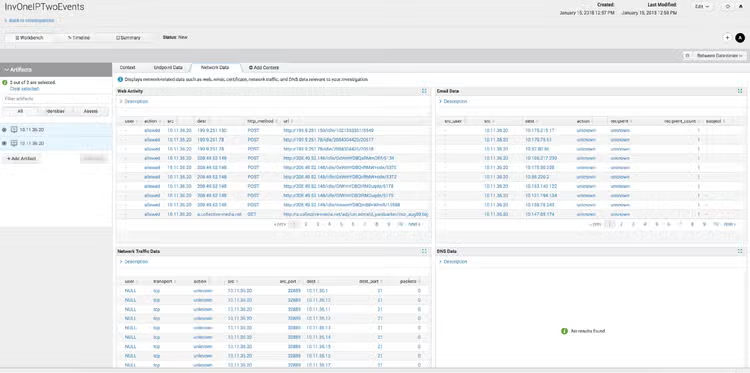
Analysts and investigators can now investigate the activities of potential threat actors within the SIEM workflow by using detailed context on Assets and Identities. They can gain full extent of an incident under investigation using endpoint, network (web, email, DNS, traffic, etc.), vulnerabilities, IDS, etc.
Accelerate Incident Response
With Investigation Workbench, analysts can investigate one or more notable events and events that may represent a potential security incident. The Asset and Identity data associated with those notable events are automatically extracted for further analysis and to determine the best response.
Investigation Workbench is flexible. Analysts can adjust the time range that is suited to the incident under investigation to determine the scope of activities and respond.
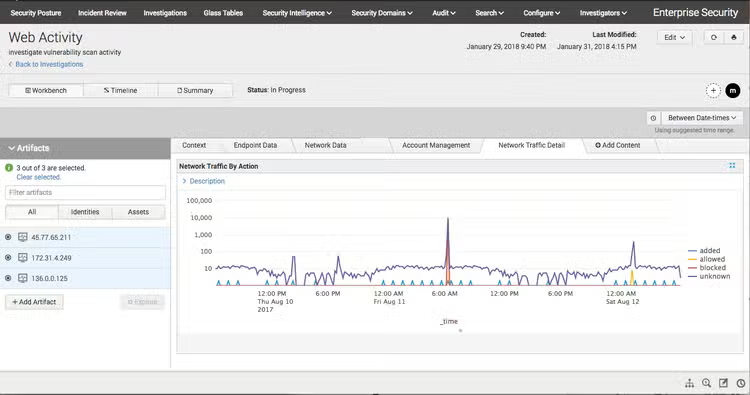
Investigation Workbench extends existing Incident Review capabilities—such as Investigation Timeline—for better collaboration and tracking of the investigation.
Leverage With Your Existing Use Cases, Content and Analytic Stories
Investigation Workbench can be used to solve Incident Investigation and Incident Response use cases by leveraging third party contextual data. For example, an analyst can use human curated threat intelligence from Booz Allen Cyber4Sight for Splunk as part of the investigation cycle.
For SaaS use cases, analysts can use the Investigation Workbench (Splunk Enterprise Security) with their SaaS apps to gain visibility and insight from SaaS as an attack vector.
Analytic Stories from Splunk ES Content Update can be directly used with Investigation Workbench, which helps extend security team’s Vulnerability, Compliance, Threat Detection and Response use cases.
The Time Is Now
If you are an existing Splunk Enterprise Security customer, you can download the latest version in Splunkbase.
If you are not familiar with Splunk Enterprise Security, use the free seven-day cloud Splunk Enterprise Security Sandbox to get started in minutes.
Contact us to find out how you can benefit from Splunk Security Solutions.
Girish Bhat
Director, Security Product Marketing
Splunk
@girishb
[1] Source: 2017 Gartner SIEM Magic Quadrant
[2] Source: 2017 SANS Incident Response survey
----------------------------------------------------
Thanks!
Girish Bhat
Related Articles

Threat Update: Industroyer2
CosmicSting: A Critical XXE Vulnerability in Adobe Commerce and Magento (CVE-2024-34102)