TOTAL-REPLAY: The Bridge to Replay Attacks Using the Security Content Metadata
Security Splunk Threat Research Team , Teoderick ContrerasBuilding and validating detections shouldn’t require standing up a full attack lab every time you want to test a new analytic. Yet for many security teams, that’s exactly what detection testing feels like time-consuming, complex, and difficult to repeat.
TOTAL-REPLAY helps reduce these challenges.
TOTAL-REPLAY is a lightweight tool from the Splunk Attack Data project that lets security analysts and blue teams replay Splunk Attack Data logs directly into Splunk. This makes it easier to test, tune, and validate detections using realistic adversary behavior, simulation, and detection chains. Instead of guessing whether a detection works, you can replay known attack telemetry logs mapped to MITRE ATT&CK techniques and see exactly how your analytics perform.
Whether you’re developing new detections, validating content from the Splunk Threat Research Team (STRT), or demonstrating detection coverage, TOTAL-REPLAY enables fast, repeatable testing using curated attack datasets without the overhead of building and executing live attacks.
In this blog, we’ll explore how TOTAL-REPLAY works, how it integrates with Splunk security content metadata to replay or simulate attack data logs.
The Power of Context: Splunk Security Content Metadata
Splunk Security Content is a comprehensive library of security detections, analytic stories, and hunts created and maintained by the STRT. Each detection is defined in a YAML file and enriched with a wide range of structured metadata that provides context, classification, and operational guidance. This metadata includes fields such as detection names, MITRE ATT&CK technique IDs, GUIDs, analytic stories, data sources, confidence levels, severity, and more.
This rich metadata is essential for detection testing and development. TOTAL-REPLAY leverages a specific subset of this metadata namely the detection name, MITRE ATT&CK technique ID, Security Content YML GUID, and analytic story to associate detections with relevant attack datasets from the Splunk Attack Data repository. By aligning detections using these shared attributes, TOTAL-REPLAY can identify and replay multiple related data logs scenarios that represent different implementations or variations of the same adversary behavior.
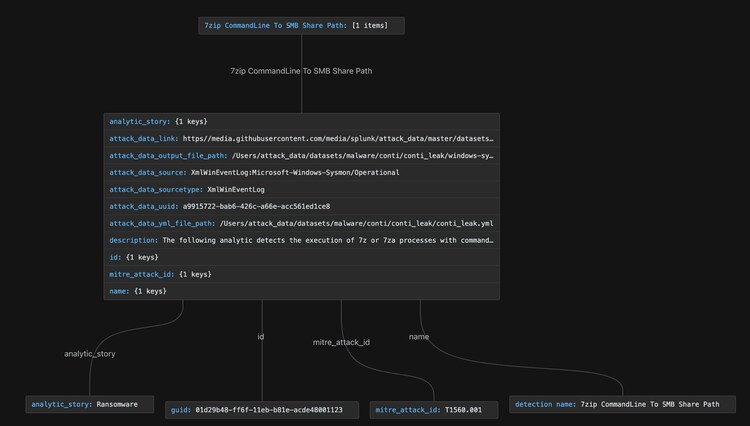
Figure 1: Splunk Security Content Metadata
Figure 1 shows a simple diagram illustrating how to maximize field metadata in a Splunk Security Content detection .yml file to replay attack log data. By using these metadata in this way, analysts can replay multiple attack data logs, validate and tune existing detections, and develop new analytics without manually executing attacks. This enables faster iteration, broader coverage, and greater confidence in detection effectiveness.
Total Replay: Your Metadata to Attack Simulation
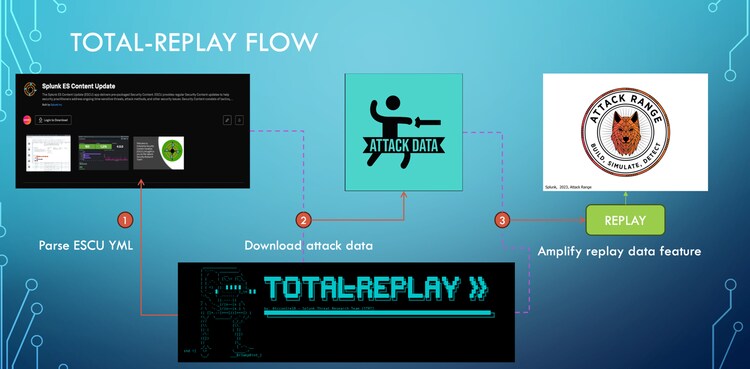
Figure 2: Total-Replay Flow
Figure 2 shows a simple flow diagram of how TOTAL-REPLAY acts as a bridge for replaying attack data logs. It starts by parsing the selected Security Content detections and identifying the needed metadata fields that will be served as filters during execution.
Next, TOTAL-REPLAY finds the corresponding Splunk Attack Data associated with those detections.
Finally, it sends the attack data logs to a chosen Splunk environment such as Attack Range where the data can be replayed for detection testing, tuning, or even developing new detections.
Installation:
Getting started with TOTAL-REPLAY is straightforward after cloning the Splunk Attack Data and Splunk Security Content GitHub repositories. The TOTAL-REPLAY README.md provides clear, step-by-step installation instructions to guide you through the setup process.
Example Usage:
TOTAL-REPLAY can replay Splunk attack data into a Splunk server relative to the following Security Content metadata:
These input options give security analysts, detection engineers, and blue teamers the flexibility to replay attack data in a way that matches their specific detection goals.
Attack Data Replay: Metadata Input List
For example, providing a list of detection names or GUIDs allows teams to focus on validating or tuning individual detections without replaying unnecessary data. Selecting MITRE ATT&CK technique IDs makes it easy to evaluate detection coverage for specific adversary techniques and confirm that analytics trigger as expected.
Analytic stories are especially useful when testing broader attack scenarios. By selecting an analytic story tied to a specific threat or campaign, TOTAL-REPLAY can automatically gather and replay all related attack data. This helps populate the Splunk environment with realistic telemetry that reflects an end-to-end attack chain, making it easier to validate an entire set of related detections.
In the video Demo 01 below, STRT walks through several examples of how TOTAL-REPLAY can be used to replay attack data based on different selection criteria:
- A list of ESCU detection names
- A list of analytic stories
- A list of detection GUIDs
- A list of MITRE ATT&CK technique IDs
Demo 1:
Attack Data Replay: Text File Input
TOTAL-REPLAY can also accept a text file containing various metadata inputs used to replay Splunk attack data. This feature allows users to automate the ingestion or replay of attack data logs into a Splunk server.
The short Demo 2 and Demo 3 below shows how you can replay specific options defined in the input text file or use a “greedy” mode that replays all available options in the file.
Demo 2:
Demo 3:
In addition to these features, TOTAL-REPLAY generates a local cache YAML file in the output folder. This cache allows users to replay existing or previous TOTAL-REPLAY queries without re-downloading or re-parsing the Security Content. The short demo below shows a simple example of this feature.
Demo 4:
Overall, TOTAL-REPLAY streamlines the process of setting up a Splunk environment with relevant attack data, enabling faster detection testing, validation, and development-without the manual effort of sourcing and replaying individual datasets.
Learn More
This blog helps security analysts, blue teamers, and Splunk users simulate or replay attack data for detection testing, tuning, and development. It focuses on using curated log datasets and tools from the Splunk Attack Data repository such as TOTAL-REPLAY to replay relevant event logs into your Splunk instance for validating detections and analytic logic.
The Splunk Attack Data project is a curated collection of realistic attack datasets mapped to MITRE ATT&CK techniques and designed to help defenders test and develop detection content without having to build and execute full attack environments from scratch.
In addition to the tools discussed in this blog, you can further enhance and operationalize detections by using the Enterprise Security Content Updates app or the Splunk Security Essentials app. To view the Splunk Threat Research Team's complete security content repository, visit research.splunk.com.
Feedback
Any feedback or requests? Feel free to put in an issue on GitHub and we’ll follow up. Alternatively, join us on the Slack channel #security-research.
Contributors
We would like to thank Teoderick Contreras for authoring this post and the entire Splunk Threat Research Team for their contributions: Michael Haag, Bhavin Patel, Rod Soto, Patrick Bareiss, Raven Tait, AJ King, Nasreddine Bencherchali and Jose Hernandez.
Related Articles
Deploy, Test, Monitor: Mastering Microsoft AppLocker, Part 1

I Scream, You Scream, We All Scream For BOTS!