Threat Update DoubleZero Destructor
The Splunk Threat Research Team is actively monitoring the emergence of new threats in the cyber domain of ongoing geopolitical events. As we have shown previously in several releases, including HermeticWiper and CaddyWiper, actors in this campaign are deploying, updating, and modifying stealthier malicious payloads. On March 17th, 2022, the Ukraine CERT discovered a new malicious payload named DoubleZero Destructor (CERT-UA #4243). This new malicious payload has the following features:
- Enumerates Domain Controllers and executes killswitch if detected. An automated friend or foe, like targeting function that avoids destroying Domain Controllers so attackers can maintain access or perform further elevation tasks (i.e GPOs) on compromised networks.
- The above feature also aims to help footprinting and identification of potential targets non-targets.
- Overwrites files with zero blocks of 4096 bytes. It may alternatively use API calls such as NtFileOpen, NtFSControlFile for the same purpose.
- Lists system files and then proceeds to destroy them.
- Deletes registry hives: HKCU (currently logged user), HKLM (configuration of currently installed software), HKU (information of all active users in the system), HKLM \BCD (Boot configuration data needed for UEFI, Legacy BIOS systems). Then shuts down the computer.
- An added layering of obfuscation via junk code to obfuscate and impair forensic analysis.
Analysis
Preparing Targeted File path
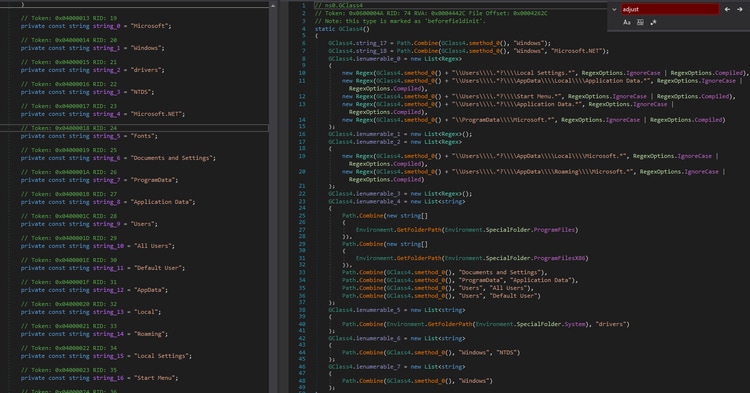
This malware is a .net compiled binary that has a customized obfuscation and a large amount of junk code that makes analysis harder to accomplish. Before performing its destructive functions it will list several directory names and paths where it will look for files it will wipe.
Domain Controller Kill Switch
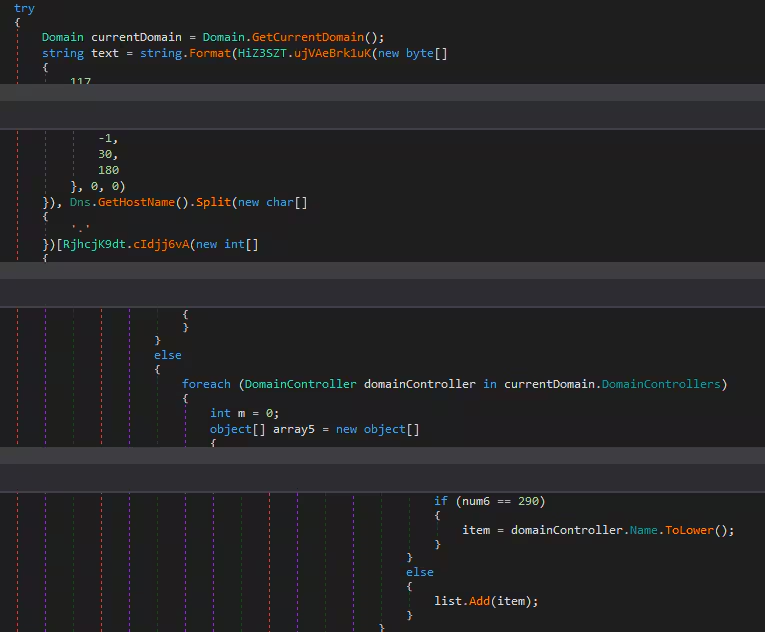
It also has a function that will enumerate the list of domain controllers connected to the compromised host. This function was used to skip or as a kill switch if the compromised host is the domain controller machine. Below is the code snippet of how it enumerates all the domain controllers that are spread across the code because of the inserted junk code.
Wiping Files
Aside from the directory names it lists, shown earlier in its code, this malware will enumerate all the drives mounted to the machine to look for more files to wipe. The code below shows how it gets the drive’s information within the compromised host machine.

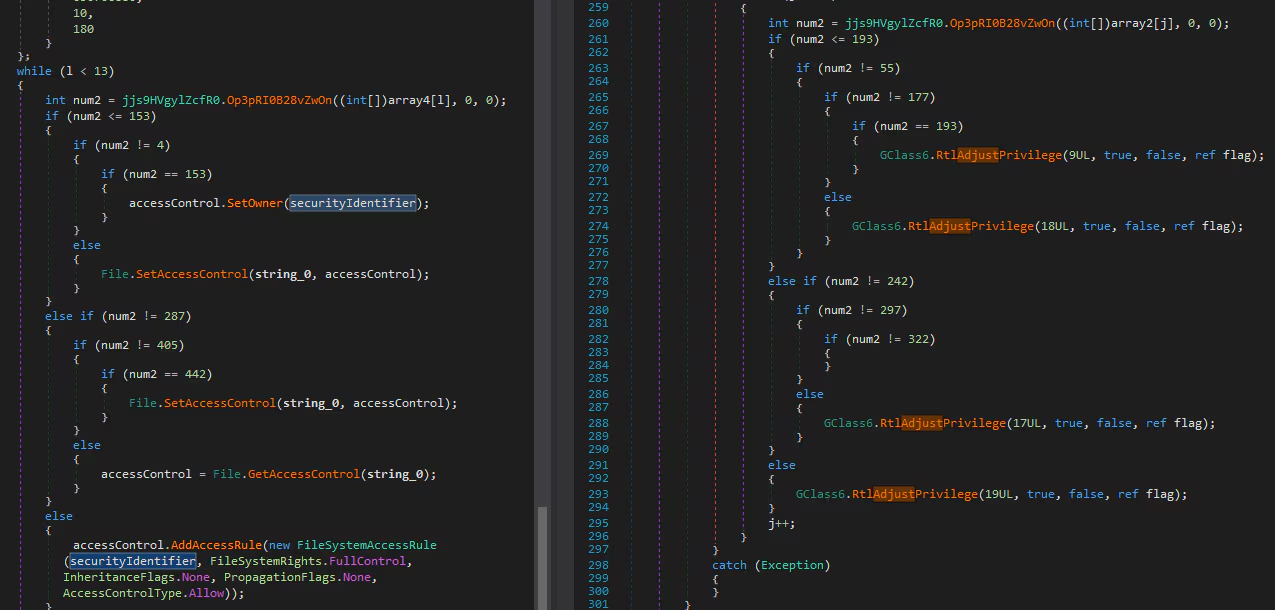
Then it will adjust the token privilege and the securityIdentifier of its process to have “full control” file system rights to avoid error or access denied while wiping the normal or system files it found in the compromised host. Below is the code, how it adjusts the privilege, and how it sets the access control for files with full control and allow control type.
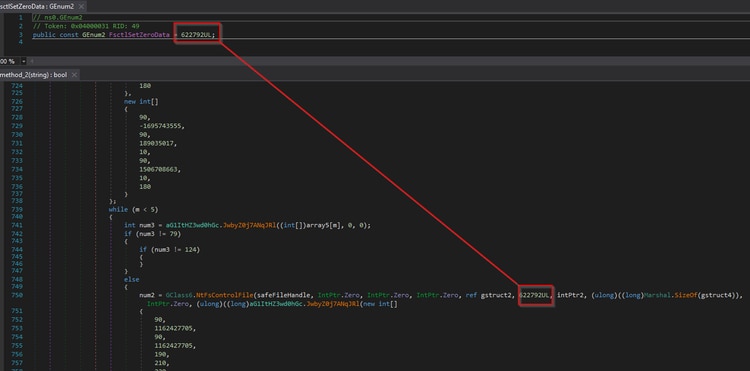
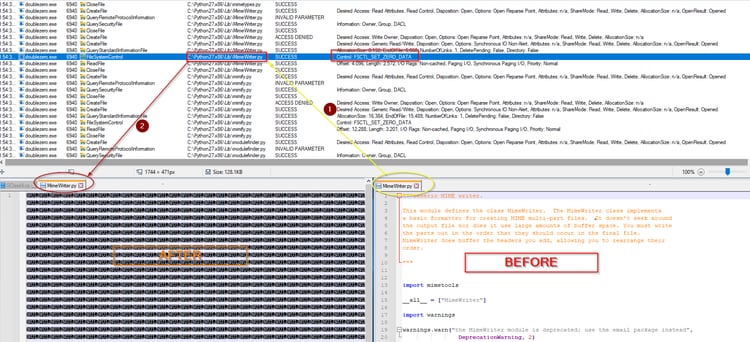
Then It will open the target file using NtOpenFile() native API to zero or wipe it using a native API NtFsControlFile() that sends an IOCTL control code FSCTL_SET_ZERO_DATA directly to a specified file system. The wiper can wipe system files that make the compromised host unbootable after the restart. Below is the code screenshot of how this API was used in this wiper to do its destructive function.
Below is an example of the event that happened to the compromised test lab while it wipes the file. We can see how the “MimeWriter.py” file was wiped with zero bytes after calling the IOCTL code FSCTL_SET_ZERO_DATA.
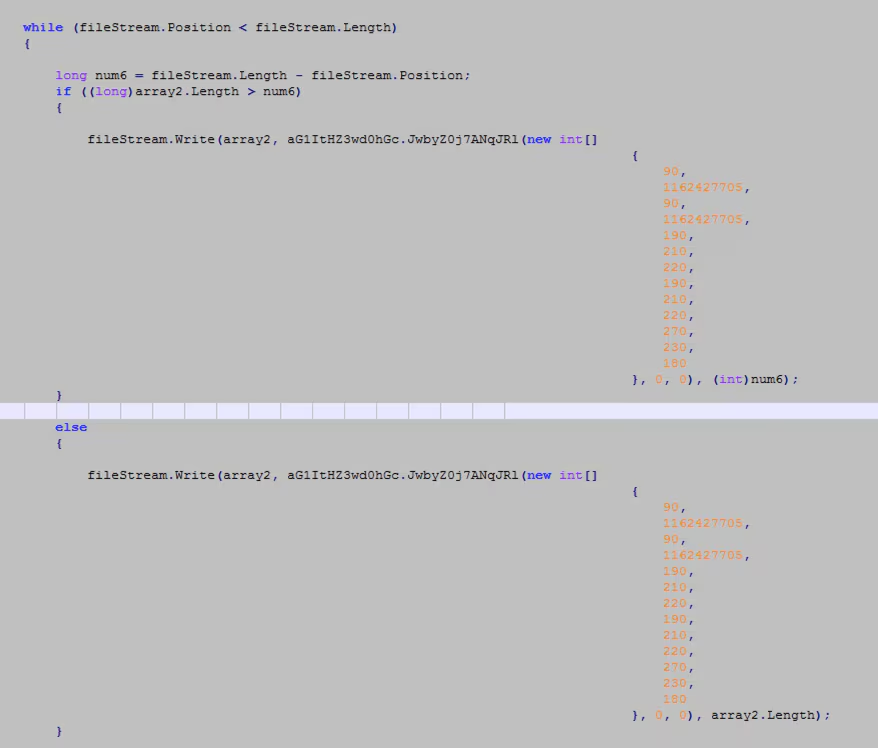
We also identified another wiping function. This additional function works by writing a zeroed buffer to the target file using filestream.write .net function. Below is the screenshot of its code after removing some of its junk code.
Deleting Registry Subkey
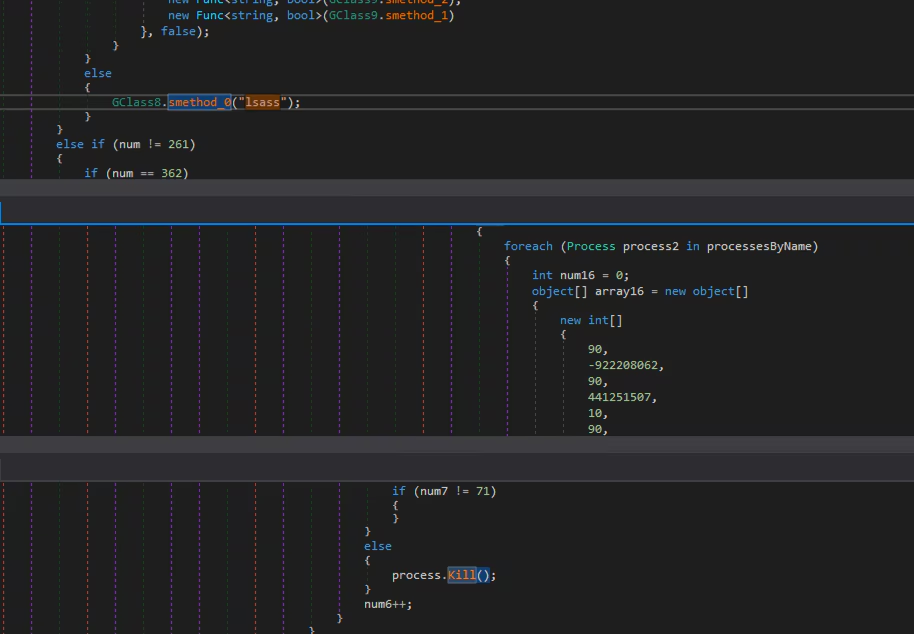
This wiper will also wipe known registry hives as part of its destructive payload. First, it will kill the enumerated process to look for a process with the name “lsass” and kill it. Below is the code screenshot of how it enumerates all processes and executes process.Kill() function if the “lsass” process was found.
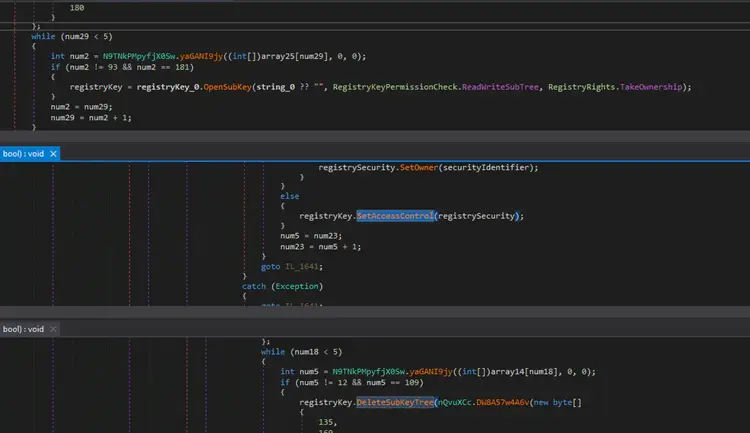
Then it will change the ownership of the registry to the current logo user and change the access control to full access to delete each of the subkeys in each HKLM, HKCU, HKU registry hive. Below is the code snippet spread out in one of its classes that modifies the owner and access control to the registry to delete all of its registry subkeys.
Detections:
The Splunk Threat Research Team (STRT) has developed the following detections specifically targeting this payload and produced several Analytic Stories (WhisperGate, HermeticWiper, CaddyWiper) targeting destructive software. These previous Analytic Stories can also help in the detection of this payload.
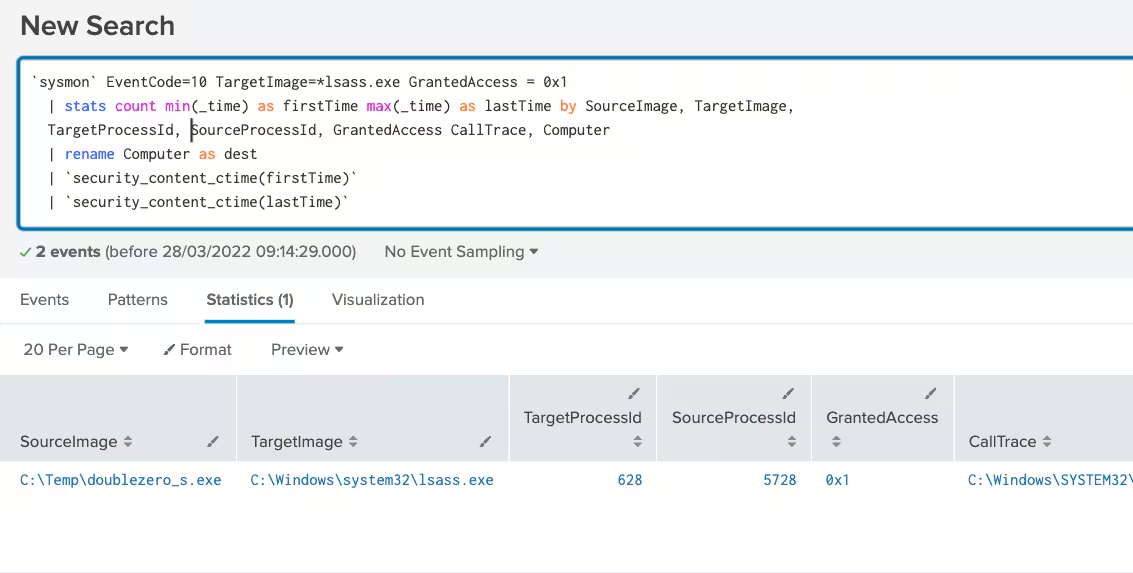
Windows Terminating Lsass Process
This analytic is to detect a suspicious process terminating Lsass process. Lsass process is known to be a critical process that is responsible for enforcing security policy. This technique was seen in double zero malware that tries to wipe files and registry in compromised hosts.
`sysmon` EventCode=10 TargetImage=*lsass.exe GrantedAccess = 0x1
  | stats count min(_time) as firstTime max(_time) as lastTime by SourceImage, TargetImage,
  TargetProcessId, SourceProcessId, GrantedAccess CallTrace, Computer
  | rename Computer as dest
  | `security_content_ctime(firstTime)`
  | `security_content_ctime(lastTime)`
Windows Deleted Registry by a Non-Critical Process File Path
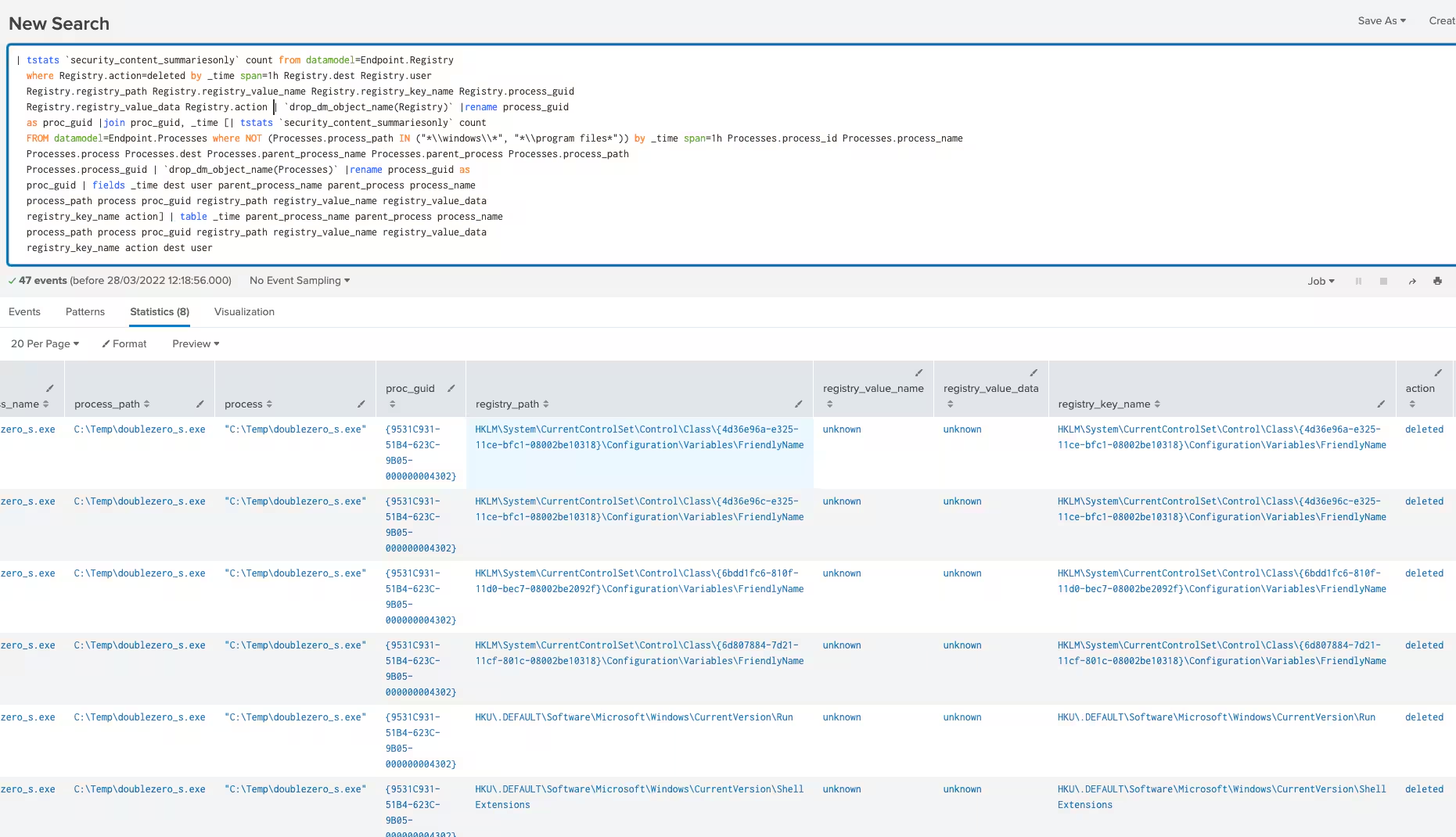
This analytic is to detect the deletion of a registry with a suspicious process file path. This technique was seen in Double Zero wiper malware where it will delete all the subkeys in the HKLM, HKCU, and HKU registry hive as part of its destructive payload to the targeted hosts.
| tstats `security_content_summariesonly` count from datamodel=Endpoint.Registry
  where Registry.action=deleted by _time span=1h Registry.dest Registry.user
  Registry.registry_path Registry.registry_value_name Registry.registry_key_name
Registry.process_guid
  Registry.registry_value_data Registry.action | `drop_dm_object_name(Registry)`
|rename process_guid
  as proc_guid |join proc_guid, _time [| tstats `security_content_summariesonly` count
  FROM datamodel=Endpoint.Processes where NOT (Processes.process_path IN
("*\\windows\\*", "*\\program files*")) by _time span=1h Processes.process_id
Processes.process_name
  Processes.process Processes.dest Processes.parent_process_name
Processes.parent_process Processes.process_path
  Processes.process_guid | `drop_dm_object_name(Processes)` |rename process_guid as
  proc_guid | fields _time dest user parent_process_name parent_process process_name
  process_path process proc_guid registry_path registry_value_name registry_value_data
  registry_key_name action] | table _time parent_process_name parent_process
process_name
  process_path process proc_guid registry_path registry_value_name registry_value_data
  registry_key_name action dest user
  | `windows_deleted_registry_by_a_non_critical_process_file_path_filter`
Learn More
You can find the latest content about security analytic stories on research.splunk.com. For a full list of security content, check out the release notes on Splunk Docs.
Contributors
We would like to thank the following for their contributions to this post.
- Teoderick Contreras
- Rod Soto
- Jose Hernandez
- Patrick Barreiss
- Lou Stella
- Mauricio Velazco
- Michael Haag
- Bhavin Patel
- Eric McGinnis
Related Articles

Predicting Cyber Fraud Through Real-World Events: Insights from Domain Registration Trends

When Your Fraud Detection Tool Doubles as a Wellness Check: The Unexpected Intersection of Security and HR

Splunk Security Content for Threat Detection & Response: November Recap

Security Staff Picks To Read This Month, Handpicked by Splunk Experts

Behind the Walls: Techniques and Tactics in Castle RAT Client Malware

AI for Humans: A Beginner’s Field Guide

Splunk Security Content for Threat Detection & Response: November 2025 Update

Operation Defend the North: What High-Pressure Cyber Exercises Teach Us About Resilience and How OneCisco Elevates It
