Hunting for Threats in VPCFlows
This article will look at native AWS network telemetry — VPCFlows. We’ll explore what it is, how you can ingest it, and what value it provides from a security perspective.
(This article is part of our Threat Hunting with Splunk series. We’ve updated it recently to maximize your value.)
What is a flow?
Per RFC 3954, a flow is defined as a unidirectional sequence of packets that share common properties and pass through a network device. These flows don’t capture packet payloads but instead provide rich metadata like:
- Source and destination IP addresses
- Packet and byte counts
- Timestamps
- Source and destination ports
- Protocols
- Network interface IDs
A common analogy compares flow data to a phone bill: it doesn’t tell you what was said, but it does tell you:
- Who communicated with whom
- When the communication occurred
- How long it lasted
- How much data was exchanged
What are VPC Flow Logs?
VPC Flow Logs are AWS’s implementation of flow-level network telemetry. They offer visibility into IP traffic flowing through your AWS environment and can be enabled at various levels of granularity:
- Elastic Network Interface (ENI)
- Subnet (includes all ENIs within the subnet)
- VPC (includes all subnets and interfaces)
If you're already comfortable with NetFlow or IPFIX, great! Just note that while VPC Flow Logs offer similar metadata, they have some key differences and limitations—especially in terms of what traffic is logged and how fields are represented. We'll dig into those nuances shortly.
Getting VPCFlows into Splunk
VPCFlow logs can, of course, be ingested into Splunk, and there are two primary options based on the destination of the logs in AWS:
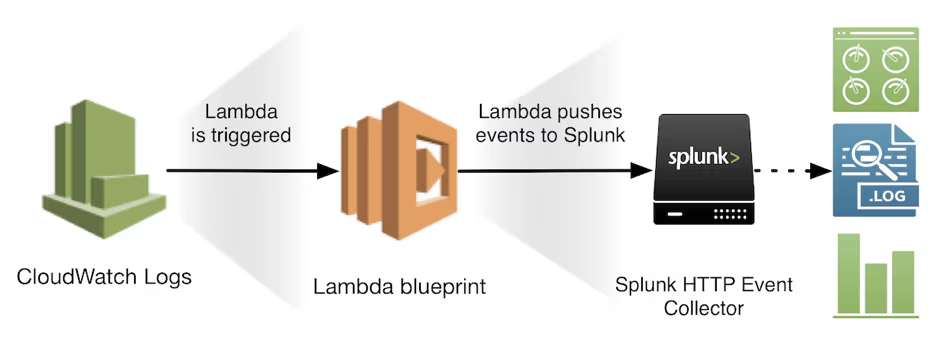
Option 1: Ingest via CloudWatch Logs
This option is straightforward and leverages the native integration between CloudWatch and Splunk.
- Configure VPC Flow Logs to send data to Amazon CloudWatch Logs.
- Use the Splunk Add-on for AWS to pull the logs from CloudWatch into Splunk.
Follow the official documentation here >
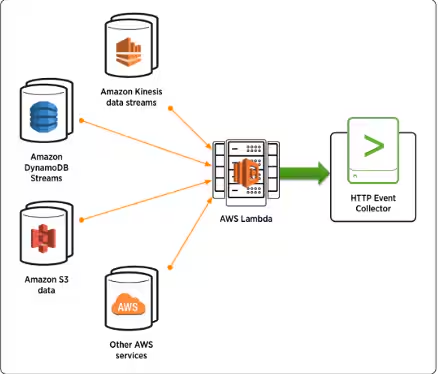
Option 2: Ingest via Amazon S3
This option is suitable if you prefer to store logs in S3 for archival or cost management purposes.
- Configure VPC Flow Logs to send data to an Amazon S3 bucket.
- Use the Splunk Add-on for AWS to ingest logs directly from S3.
Follow the hands-on tutorial here >
Both options allow you to parse and analyze VPC Flow Logs in Splunk, with the add-on handling field extractions and providing compatibility with the Common Information Model (CIM).
What does a VPCFlow look like?
A raw VPCFlow record looks like the following, including field definitions:
<version> <account-id> <interface-id> <srcaddr> <dstaddr> <srcport> <dstport> <protocol> <packets> <bytes> <start> <end> <action> <log-status>2 622676721278 eni-0536faba73134a9b7 13.125.33.130 172.16.0.127 40396 11211 17 1 50 1534778806 1534778866 ACCEPT OK
Let’s take a look at that data in Splunk and break it down a bit further. Looking at this event, we are quickly able to see the following:
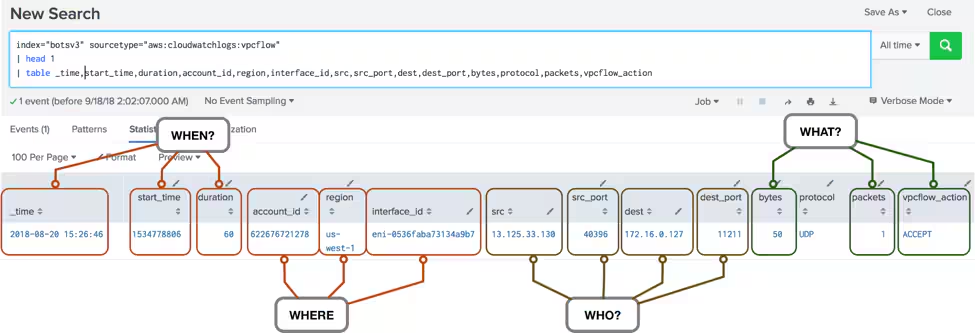
- Who: Network communication happened between source host 13.125.33.130 on port 40396 and destination host 172.16.0.127 on port 11211.
- What: 50 bytes were successfully transferred over a single packet.
- Where: The communication happened on an interface in the us-west-1 region in account 622676721278.
- When: The event occurred on 2018-08-20 at 15:26:46 (UTC).
There are 14 fields total in the VPCFlows, and the majority of them are useful from a security perspective and for threat hunting.
Note that a flow does not equate to a network session. A flow is unidirectional, meaning that a single flow represents a portion of a network session. Requests and responses will appear as separate flow entries.
AWS imposes certain limitations on VPCFlows. The full list of caveats can be found on the VPC user guide. Some of the more pertinent limitations include:
- If your network interface has multiple IPv4 addresses and traffic is sent to a secondary private IPv4 address, the flow log displays the primary private IPv4 address in the destination IP address field.
- Flow IP addresses may not represent the IP address in the network packet. We’ll look at one way this issue manifests itself later.
- Some traffic generated by instances when they contact the Amazon DNS server or DHCP traffic do not generate flow records.
- Traffic generated by a Windows instance for Amazon Windows license activation does not generate flow records.
- Traffic to and from 169.254.169.254 for instance metadata or to 169.254.169.123 for the Amazon Time Sync Service do not generate flow records.
Can we use VPCFlows for security detection and investigation?
Yes, you can certainly use high-level network flow telemetry for security detection and investigation. From a monitoring perspective, there are some straightforward use-cases including:
- Detecting traffic to never-before-seen IPs or ports
- Detecting large volume transfers
A slightly more clever use is to detect service amplification abuse, often used in Denial of Service (DoS) attacks. In summary, the attack relies on an Internet-exposed unsecured UDP service that allows an attacker to send a small amount of data and generate a larger request (hence the ‘amplification') to a spoofed victim.
Real-world example
Back in 2018, Memcached amplification attacks briefly dominated headlines, with attackers leveraging amplification factors as high as 51,000x. That meant a single 1 MB spoofed request could result in up to 51 GB of attack traffic — a massive force multiplier. While these types of attacks have become less common due to mitigations by cloud providers and ISPs, they still serve as a textbook example of how misconfigured services can be weaponized in DDoS campaigns.
To understand how this happens, it’s important to know how Memcached works. According to its documentation, Memcached is an in-memory key-value store designed to accelerate dynamic web applications by caching data from databases, APIs, or page renders. It’s fast, lightweight, and wasn’t originally built with internet exposure or strong security in mind — which made it an ideal target when attackers discovered that some instances were publicly accessible over UDP.
At a high level, Memcached operates like this:
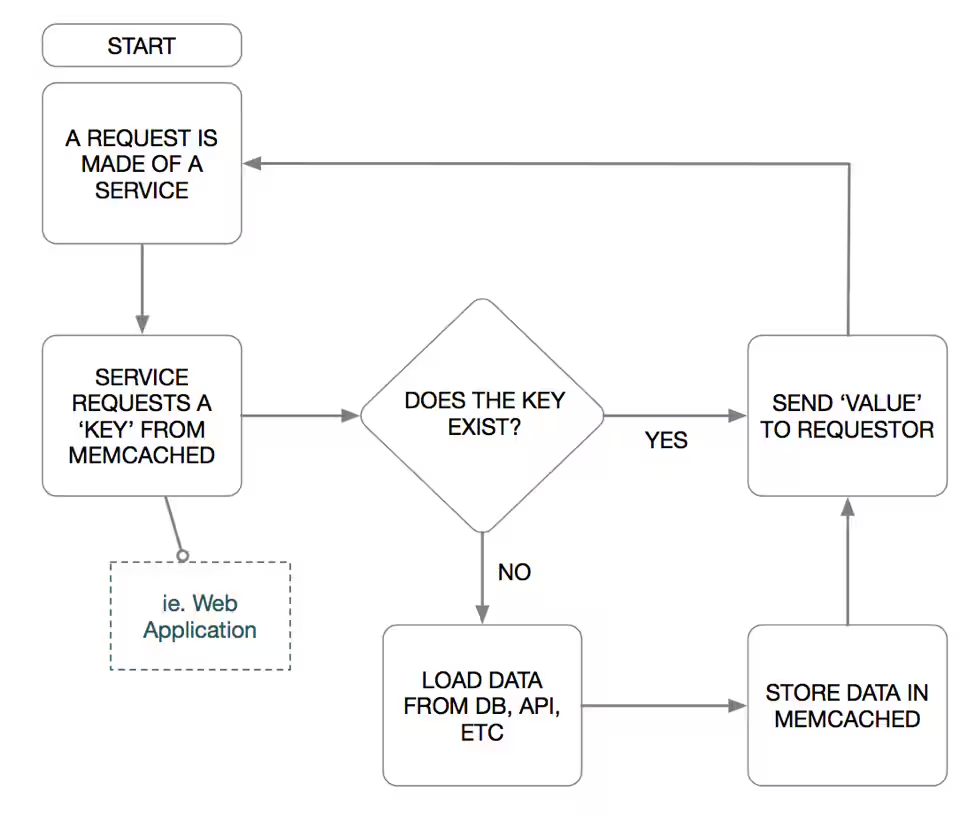
Memcached’s default configuration is inherently weak — it does not utilize authentication or authorization for successful use. Like many UDP protocols susceptible to amplification attacks Memcached was not intended to be exposed to the Internet. However, if you build it, they will come. Once exposed, attackers can test for the presence of a Memcached server (often using the stat command) and circumvent the intended frontend service, seeding the cache with their key (i.e., payload) before the request the payload be sent to a spoofed victim.
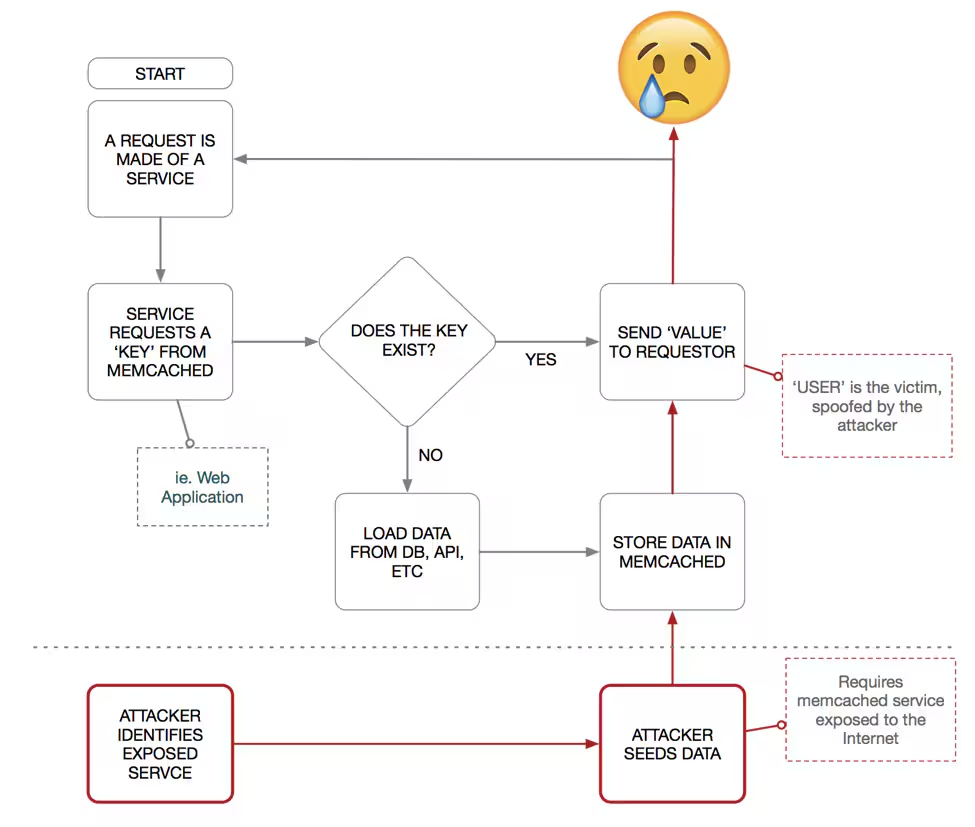
Understanding the above, how can we use VPCFlow data to help detect amplification attacks? Let’s look at flows for one bidirectional communication between a client and Memcached server:
sourcetype=aws:cloudwatchlogs:vpcflow (src_port=11211 OR dest_port11211)
 | head 4
 | table  _time, duration, account_id, region, interface_id, src, src_port, dest, dest_port, bytes, protocol, packets, vpcflow_action
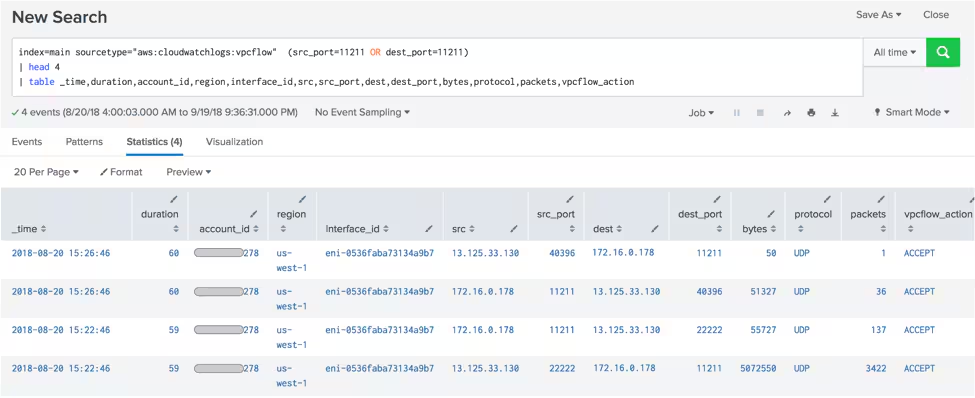
Screenshot from Splunk shows four flows between an external host 13.125.33.130 and internal RFC1918 host 172.16.0.178 running Memcached.
Here we can see four flows between an external host 13.125.33.130 and internal RFC1918 host 172.16.0.178 running Memcached. As we mentioned earlier in the post, flow IP addresses do not necessarily reflect the address in the network packet. There is no way for an external host to communicate with an AWS-hosted RFC1918 address, so the actual network communications must have come through a public IP address such as a load balancer.
Starting from the bottom of the table, the first connection is from 13.125.33.130 over UDP from port 22222 to the default memcached service port of 11211. The connection lasted 59 seconds over which 5072550 bytes were sent in 3422 packets. In response, host 172.16.0.178 sent 513727 bytes in 137 packets back to host 13.125.33.130.
Four seconds later, we see another connection between the same two hosts between the memcached service port and UDP port 40396. This time 50 bytes are sent from the external host over 1 packet, with the internal host responding with 51,327 over 36 packets.
What’s going on here? To help explain these flows, we’ll pull in the corresponding wire data from Splunk Stream:
sourcetype=stream:udp (src_port=40396 OR src_port=11211 OR src_port=22222)
| head 2
| eval short_src_content=substr(src_content,1,75)
| eval short_dest_content=substr(dest_content,1,75)
| table _time, bytes_in, bytes_out, src, src_port, dest, dest_port, short_src_content, short_dest_content
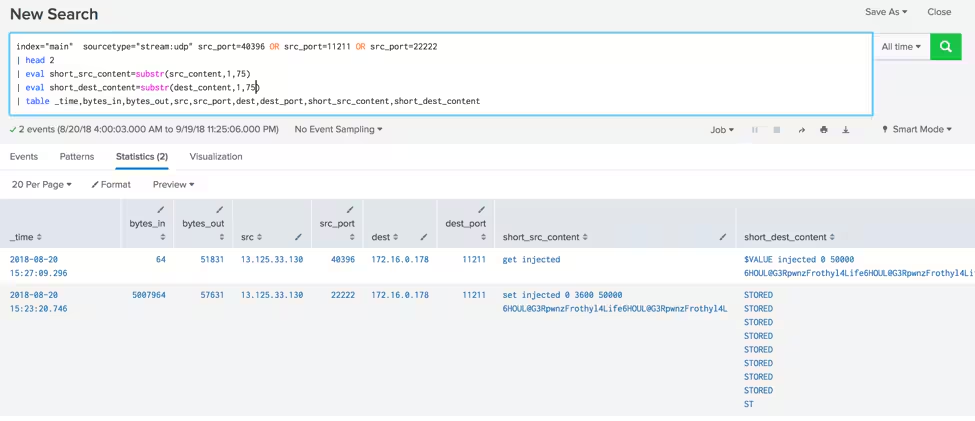
Whereas flows are a collection of unidirectional packets, Stream shows the complete network connection. That difference manifests itself with two events in Stream as opposed to the four events from VPCflows:
- The source, destination, ports, and timestamps correspond directly to the flow events.
- The bytes values in both data sources are close but vary slightly due to IP overhead such as packet options.
The additional telemetry that we see in the Stream data is the source and destination content. The first event shows:
- ‘set’ - a Memcached command
- ‘Injected’ - a key pointing to the cached data
- ‘0’ - disable flags
- ‘3600’ - expiration time for the key in seconds
- ‘50000' - the size of data to be cached
- ‘6HOUL@G3RpwnzFrothyl4Life…’ - cached data (in this case the attacker’s payload)
The Memcached server returns a value of ‘STORED’ indicating the data has been successfully cached. This single event shows an attacker loading the exposed Memcached server with a payload.
The second Stream event gets the same key that was just cached. In an actual attack, this source address of the get command would be spoofed to the value of the victim's IP. Since the requestor address is identical in both events, the activity is likely an attacker testing capabilities before launching an actual attack.
How to detect UDP amplification
To detect UDP amplification, what we're most interested in is the bytes. Looking at the flow records corresponding to the attack command (i.e. ‘get injected') in Stream, we see 50 bytes sent, and 51327 bytes received, equating to an amplification factor of nearly 1027! In this example, the attacker limited the cached payload to 50,000 bytes. Imagine what would have happened were the limit to be doubled or even tripled?
This shows how abusing a misconfigured UDP service such as Memcached can be a highly efficient means of an attacker sending a small amount of data but generating a relatively large amount of attack traffic.
VPCFlows support detection and investigation
The above example shows how VPCflows can be used to investigate network activity, but it's equally effective at detecting this type of activity. Were this an actual investigation, we could use the knowledge gained to set up proactive monitoring via saved searches to detect future signs of UDP Amplification attacks, such as:
- External communications to vulnerable UDP amplification service ports (Memcached, NTP, echo, etc.)
- Packet size disparities between source and destination
- Packed count disparities between source and destination
Thank you and happy hunting!
Related Articles

Predicting Cyber Fraud Through Real-World Events: Insights from Domain Registration Trends

When Your Fraud Detection Tool Doubles as a Wellness Check: The Unexpected Intersection of Security and HR

Splunk Security Content for Threat Detection & Response: November Recap

Security Staff Picks To Read This Month, Handpicked by Splunk Experts

Behind the Walls: Techniques and Tactics in Castle RAT Client Malware

AI for Humans: A Beginner’s Field Guide

Splunk Security Content for Threat Detection & Response: November 2025 Update

Operation Defend the North: What High-Pressure Cyber Exercises Teach Us About Resilience and How OneCisco Elevates It
