Machine Learning in Splunk Enterprise Security: Unleashing Hidden Detection Power
Many Splunk Enterprise Security users are benefiting from machine learning (ML) without even realizing it. Splunk Enterprise Security quietly uses ML-driven anomaly detection to spot unusual patterns or outliers in your security data that static rules or thresholds might miss. It works by learning a baseline of “normal” behavior for your environment — for example, typical login volumes, network traffic levels, or user activity patterns — and then automatically flagging events that deviate far from that norm. In essence, Splunk Enterprise Security is constantly asking: “What looks weird or rare compared to historical behavior?” and surfacing those anomalies for your security team. This powerful capability operates behind the scenes, enhancing threat detection by finding the subtle “needle in the haystack” events that could indicate stealthy attacks.
One of the best parts is that you don’t need a data science degree or complex setup to leverage this. The heavy mathematical lifting is done under the hood by Splunk's Machine Learning Toolkit (MLTK). Splunk Enterprise Security comes with pre-built ML models and detection rules out-of-the-box - such as anomaly rules for excessive failed logins or unusual data transfers — so you can start catching outliers from day one. The system continuously updates its understanding of normal behavior and adapts thresholds accordingly, without you having to manually tweak numbers. In simple terms, “Splunk learns what normal looks like for your organization and alerts you when something is way off.” It’s like having a smart security watchdog that knows the usual routine and barks when it sees something out of the ordinary.
Crucially, this ML-powered approach helps security teams discover the “unknown unknowns.” Traditional security tools rely on known signatures or fixed thresholds, which are important for catching known threats but can overlook novel or low-and-slow attacks. Splunk’s anomaly detection fills that gap by baselining behavior and highlighting anything that stands out as unusual. For example, if an attacker is slowly exfiltrating data in a way that doesn’t trigger any signature-based alerts, a behavior anomaly (like a user sending out data at volumes never seen before for that account) can raise a red flag. All of this happens dynamically, in real time, and often without administrators needing to configure anything beyond making sure MLTK is installed and enabling the Splunk Enterprise Security content. It’s a powerful hidden ally in your SIEM that tirelessly looks for odd patterns, helping you catch threats that others might miss.
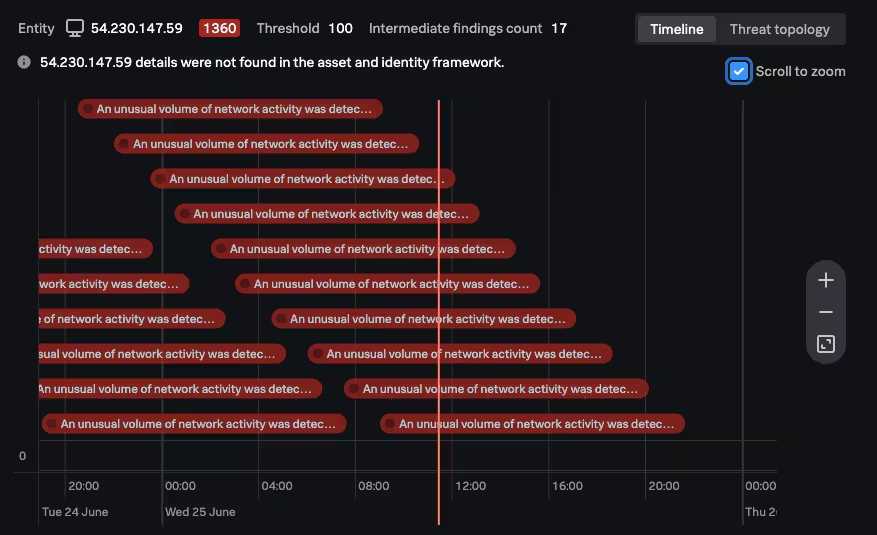
Real-World Use Cases for Anomaly Detection in Splunk Enterprise Security
Machine learning in Splunk Enterprise Security translates to very practical security wins. By monitoring baselines and flagging outliers, it can detect a range of use cases that would be difficult to catch with static rules alone. Here are a few scenarios where Splunk’s ML-driven anomaly detection shines:
- Brute-force Attack Detection: Failed Login Spike. Instead of using a one-size-fits-all threshold for failed login attempts, Splunk Enterprise Security learns each user’s normal login failure rate. If a particular account usually sees ~5 failed logins a day and suddenly has 50+ in an hour, that’s an anomaly. Splunk Enterprise Security will flag this “excessive failed logins” event, which could indicate a brute-force password attack in progress — even if your generic rules might not have caught it because the absolute number of failures wasn’t high in a global sense. It’s abnormal for that user, and that’s what matters.
- Insider Threat or Compromised Account: Out-of-Pattern Access. Splunk Enterprise Security can baseline a user’s typical activity (systems accessed, data volume downloaded, login times, etc.). If an insider suddenly accesses a resource they never touched before, or downloads significantly more data than usual, Splunk will notice. For example, imagine an employee who normally downloads ~30 MB from SharePoint daily suddenly pulls 5 TB of data in one day — a massive spike well outside their norm. Splunk’s anomaly detection would flag this immediately. This could be a sign of a compromised account or malicious insider, triggering investigation.
- Network Exfiltration or Malware Activity: Unusual Network Traffic. Baselines can be set per host or network segment. If a server typically sends 1 GB of outbound traffic a day and one night spikes to 50 GB, Splunk Enterprise Security will mark that as an extreme anomaly. This might reveal data exfiltration by malware or an unauthorized transfer that wasn’t caught by traditional DLP rules. Similarly, if an endpoint suddenly starts communicating on ports or to destinations it rarely uses, that deviation from its normal profile can generate an alert for investigation.
- Rare Events and “Needle in Haystack” Finds: Not all anomalies are high-volume spikes. Sometimes it’s about a rare event occurrence. Splunk Enterprise Security can identify things like a first-time event (e.g., a user logging in from a country they’ve never logged in from before) by comparing against historical records. These one-off unusual events might slip past rule-based detection but are worth examining. They could uncover new attack vectors or policy violations (for instance, an admin account performing an action it never did before).
What’s important to note is that anomalies flagged by ML are contextual. The system understands normal patterns per entity (per user, per host, per application, etc.) and often even per peer group. This means a behavior that is normal for one entity can be simultaneously recognized as abnormal for another. For example, 100 database queries in an hour might be normal for a database admin user but would be highly unusual for a regular office worker. Splunk’s ML will treat those situations differently by learning each profile. This entity-specific baseline approach drastically reduces false positives because the alerts are tailored to what’s abnormal for that entity, not just abnormal in general.
By deploying these use cases out-of-the-box, Splunk Enterprise Security helps security teams catch both glaring and subtle threats. In practice, customers have used Splunk Enterprise Security’s ML detections to discover things like: previously unknown malware beaconing (due to odd network timing patterns), misconfigured services flooding the network (anomalous traffic bursts), or even policy violations (like employees accessing data in anomalous ways). The key benefit is speed and coverage — you get alerted to suspicious behavior quickly, focusing analyst attention on potential incidents that would otherwise require painstaking manual hunting to find.
Beyond Logs: Navigating Entity Behavior in Splunk Platform

Evolving from Extreme Search to the Machine Learning Toolkit
If you’ve been using Splunk Enterprise Security for a while, you might recall a feature called Extreme Search (XS) in older versions. XS was an early approach to dynamic thresholding and anomaly detection in Splunk. It provided special search commands and “context” models to find outliers (for example, commands like xswhere would check if values were above a “high” or “extreme” threshold). However, Splunk’s machine learning capabilities have significantly evolved in recent releases. Starting with Splunk Enterprise 8.x and beyond, the legacy Extreme Search framework is entirely replaced by the Splunk Machine Learning Toolkit (MLTK) as the engine for anomaly detection. This change represents a major upgrade under the hood — improving performance, scalability, and flexibility for ML in Splunk Enterprise Security.
Why the switch? The Machine Learning Toolkit is a more modern, robust foundation. Whereas XS had a custom syntax and was somewhat limited, MLTK brings a whole library of proven ML algorithms and uses standard Splunk Search Processing Language (SPL) commands for model training and detection. By moving to MLTK, Splunk Enterprise Security was able to handle larger data volumes and more complex models without breaking a sweat. In practical terms, this means Splunk Enterprise Security can baseline and analyze massive datasets to find anomalies (think months of logs across thousands of entities) and still return results quickly. The anomaly detections scale with your Splunk deployment, so as your environment grows, the ML models and searches can keep up. Splunk’s own tests and updates showed that the new MLTK-based approach detects more abnormal events at larger volumes than XS could handle, all while using computing resources more efficiently.
Another big improvement is simplicity and transparency. Extreme Search’s custom commands (like xsCreateDDContext, xsUpdateDDContext, xsWhere, etc.) required learning a Splunk-specific mini-language for ML. MLTK replaces those with two straightforward SPL commands: fit (to train a model) and apply (to use the model for detection). All the out-of-the-box correlation searches in Splunk Enterprise Security that previously used XS have been updated to use these new commands behind the scenes. For example, an old XS search that learned a baseline context is now a “Model Generation” search using | fit ... into model_name, and an XS correlation search that checked for outliers is now using | apply model_name (often via a macro) to do the same job. This not only makes the logic easier to understand if you peek under the hood, but it’s also aligned with how the rest of Splunk’s ML works in other apps and use cases. In short, everything XS did can now be done with MLTK – just faster and with simpler syntax.
From a user perspective, the transition was designed to be smooth. Splunk Enterprise Security content was updated so that, upon upgrade, all the built-in anomaly detection just continued working (only better). The XS commands are no longer present in Splunk Enterprise Security 8.0+; if you had any custom detections using them, those would need to be converted to the new MLTK approach. Splunk provided guides to help map XS concepts to MLTK equivalents, but for many, the default content covers most needs. The bottom line is that this evolution allows Splunk Enterprise Security to use the latest and greatest ML techniques without complicating the user experience. You benefit from improved scalability (models that refresh efficiently, rather than balloon in size) and maintainability (standard commands, well-documented). The SIEM’s brain got a big upgrade, ensuring it can catch subtle anomalies in today’s data tsunami just as effectively as it did on smaller datasets in the past — if not more so.
Machine Learning Toolkit Overview in Splunk Enterprise Security
Simplified and User-Friendly ML Features
One of the goals of integrating the Machine Learning Toolkit into Splunk Enterprise Security was to make advanced analytics as easy and accessible as possible. Splunk often says “no data science expertise required,” and that really holds true. The anomaly detection features in Splunk Enterprise Security are designed so that any analyst or admin can use and trust them, even if they don’t know the first thing about statistical modeling. Here’s how Splunk has simplified ML for Splunk Enterprise Security users:
- Straightforward Commands: As mentioned, the core ML actions boil down to simple search commands (
fitandapply). You don’t have to write complex algorithms – you just call these commands within SPL searches. For example, a model training search might look like... | fit DensityFunction value by <entity> into <model_name>(learn the baseline), and the detection search would be... | apply <model_name>(find outliers). These commands read almost like plain English. Underneath, they execute complex math, but from the user’s view it’s just another Splunk search pipeline. This means if you’re comfortable writing Splunk queries, you can understand and even adjust the ML logic easily – it’s not a black box. Want to see what threshold is being used for “anomalous”? You can inspect the model or the macro and find that it’s using, say, the top 5% cutoff by default. You could even change it to 1% for higher sensitivity. Everything is transparent and in your control if you need it to be. - Adaptive Thresholds, No Hard Coding: Traditional alert thresholds often require guessing a number (e.g., “alert if more than 100 events”). With ML, Splunk eliminates that guesswork by using adaptive thresholds derived from your data distribution. In practical terms, this means the threshold moves with your environment. If Mondays are normally high traffic, the model’s threshold for “high” on Mondays will naturally be higher than for a quiet Sunday, because it learns from historical Monday data. These are often called probabilistic or statistical thresholds – for example, Splunk might set the “high” threshold at a value that only 5% of past data points ever exceeded. Anything above that is statistically rare and thus flagged. This adaptive approach greatly reduces false positives, because the system isn’t using one static limit for all scenarios. Each user, host, or metric gets a threshold that fits its normal range, and only significant deviations trigger alerts. As an analyst, you get relevant alerts (“this is unusual for this entity”) rather than noise (“this generic threshold tripped for a bunch of things that are actually normal in context”).
- Pre-Built Content and Templates: Splunk Enterprise Security includes a lot of ready-to-use ML content. There are preconfigured model generation searches that run on a schedule to train models (for example, learning 30 days of data for failed login counts per user), and corresponding correlation searches that apply those models to new data to catch anomalies. You don’t have to create these from scratch – you just enable the ones that make sense for your environment. Splunk’s security content library (ESCU) also delivers updates and new anomaly use-case searches over time. And if you do want to create custom anomaly detections, you can copy an existing one as a template and modify it. Because the logic is standardized (fit/apply), it’s not hard to plug in a different field or change a time window. The learning curve is minimal: most users find it far easier to tweak an ML search than to hand-craft a complex correlation rule that tries to account for all normal variations.
- No Maintenance Headaches: The switch to MLTK also simplified model management. In the old approach, models would incrementally grow and you might worry about things like “when do I reset the model?” or “is my model stale?”. Now, model training searches typically rebuild the model fresh each time (say daily), using a rolling window of data. The system automatically retrains to stay up-to-date with recent trends (for example, if your company’s workforce doubled this quarter, the login baselines will adjust accordingly when the model retrains on the latest data). As a user, you don’t really need to do anything – just let the scheduled searches run. The models replace older data with newer data by design, keeping the “memory” of the system relevant. This also means less worry about storage bloat or model drift over long periods. Essentially, Splunk Enterprise Security’s ML features are “set it and forget it” – you turn them on, and they continue to learn and detect, with minimal ongoing tuning required.
In summary, Splunk has made powerful machine learning approachable. The interface for it is just the familiar Splunk search bar and the content management screens. You’re not writing Python code or tuning dozens of algorithm parameters – that complexity is abstracted away. What you get are easy knobs for the things that matter (like how far outside normal constitutes an alert) and otherwise a lot of automation. This lets even novice users leverage advanced anomaly detection, and it frees up experienced analysts to focus on investigating the findings rather than managing the tools. Splunk Enterprise Security basically embeds a smart analytics brain into your SOC operations, but it feels like a natural extension of the platform you already know.
How It Works Under the Hood (And Best Practices)
So, what exactly is Splunk’s ML doing behind the scenes to find anomalies? Understanding this at a high level can help you trust the results and tweak the system if needed. Let’s break down the mechanics in simple terms:
Baseline Modeling with fit: Splunk Enterprise Security uses scheduled searches (often called “model generation” searches) to train models on historical data. When a | fit command runs, it’s essentially calculating a statistical summary of your data. The most common algorithm used is called DensityFunction, which models the distribution of a numeric metric. For example, suppose we want to baseline daily failed login counts per user. The fit DensityFunction failures by user will take, say, the last 30 days of failure counts for each user and compute a probability distribution for each user’s data. In plain English, it figures out the typical range for that user and where the “rare” values begin. Often this assumes a normal distribution (“bell curve”) by default, which can be described just by the mean (average failures) and standard deviation (how much it varies day-to-day) for that user. From this, the model derives adaptive thresholds: for instance, it might determine the cutoff for the top 5% of values (the “high” threshold) and the top 1% of values (the “extreme” threshold) for each user. These thresholds are saved as part of the model (along with other stats). The beauty is that each entity (each user in this case) gets its own personalized baseline. A user who normally has 50 failures/day might get a “high” alert threshold of around, say, 70, whereas a user who usually has 5 failures/day might have a threshold of 12 – all calculated automatically from their data.

Real-time Detection with apply: Once the models are in place, Splunk Enterprise Security uses them in its correlation searches to flag anomalies. The | apply<model_name> command takes incoming data (e.g. the failure counts for each user for the latest day or hour) and compares it against the learned baseline model. If a value exceeds what the model considers “normal” (above that high or extreme threshold), the apply command will mark it as an outlier. For example, if user Alice’s model says more than 70 failures in a day is rare, and today Alice has 95 failures, the apply step will output that event as an anomaly (above “extreme” for Alice). Under the hood, apply adds an indicator (like isOutlier=1 or a qualitative label) to the events that are outliers. Splunk Enterprise Security searches often use macros to make this even easier – for instance, a macro might automatically filter the results to only those where isOutlier=1, so the correlation search directly returns only anomalous events and creates a notable alert for each. The result is a finding (notable event before 8.0) in Splunk Enterprise Security Incident Review saying something like “User Alice – Failed Login Count is at an Extreme level compared to baseline,” with details of the value vs. expected range.
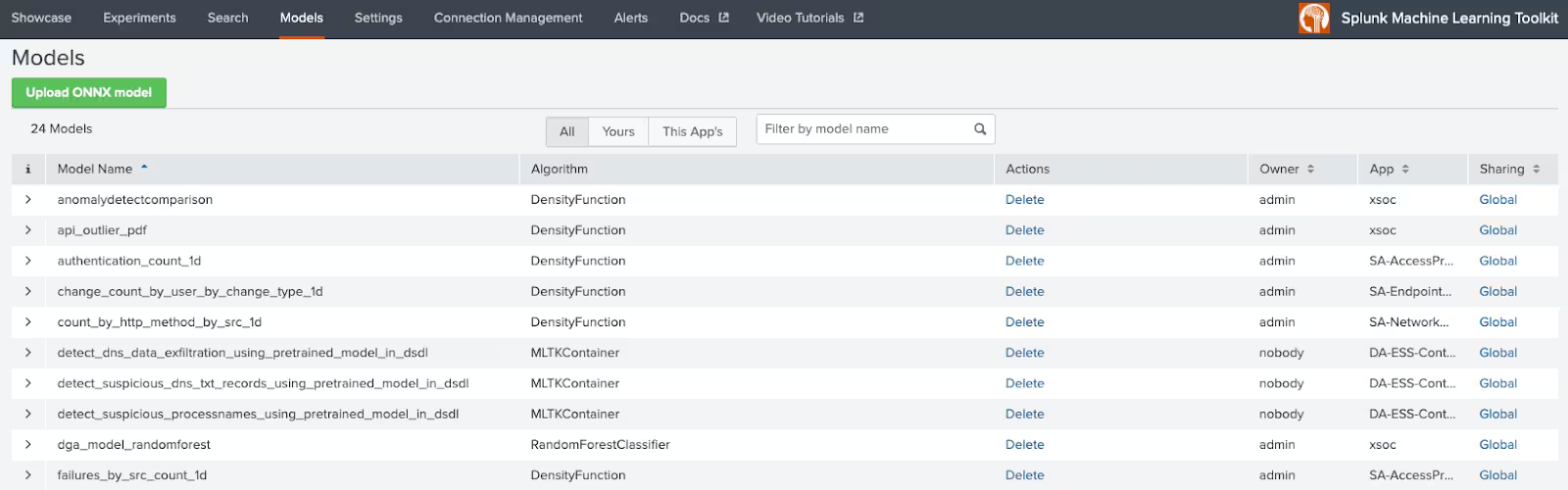
Why the Probability Distribution Approach? Using statistical distributions (like normal or exponential curves) allows Splunk to set adaptive thresholds based on probability rather than fixed numbers. By default, Splunk Enterprise Security’s anomaly models use thresholds corresponding to qualitative labels: “high” = top ~5% probability tail, “extreme” = top ~1% tail. This means roughly that if an event falls in the range that only 1 out of 100 events would statistically fall into (very rare), it’s marked “extreme”. This method is very flexible — it works whether your data is fairly consistent or highly variable. If the data doesn’t fit a perfect bell curve, the algorithm can use other distribution types or even an automatic mode to find the right shape. But you don’t need to manually choose that in most cases; Splunk’s default (normal distribution) works for many metrics, and the “auto” option can handle others. The outcome is that the system focuses on percentage of rarity, which is intuitive. You can explain an anomaly by saying, “This event is so high, it would only happen less than 1% of the time normally” — hence it’s flagged. And importantly, anomalies are not always bad — they are simply events that merit attention. Think of it like a smoke alarm: it rings when something is unusual (smoke detected), but it’s up to you to determine if it’s a real fire or just burnt toast. Splunk Enterprise Security’s ML will raise the alarm on the unusual stuff, helping guide your eyes, but you combine that with context and expertise to decide if it’s malicious or benign.
Best Practices: To get the most out of ML in Splunk Enterprise Security, consider these tips:
- Leverage the Out-of-Box content: Start by using the pre-built anomaly detection searches that come with Splunk Enterprise Security (for example, those labeled with “Anomalous” or “Abnormally High/Low” in Content Management). They cover common use cases and are already tuned to generally sane defaults. Make sure the Model Generation searches (often named with “...Model Gen”) are enabled and scheduled, as they feed the detection rules. If you’re unsure what’s available, go to Security Content → Content Management in Splunk Enterprise Security and search for “MLTK” or “model gen” — you’ll see the ML-driven searches and their statuses. Enable any that apply to your data sources.
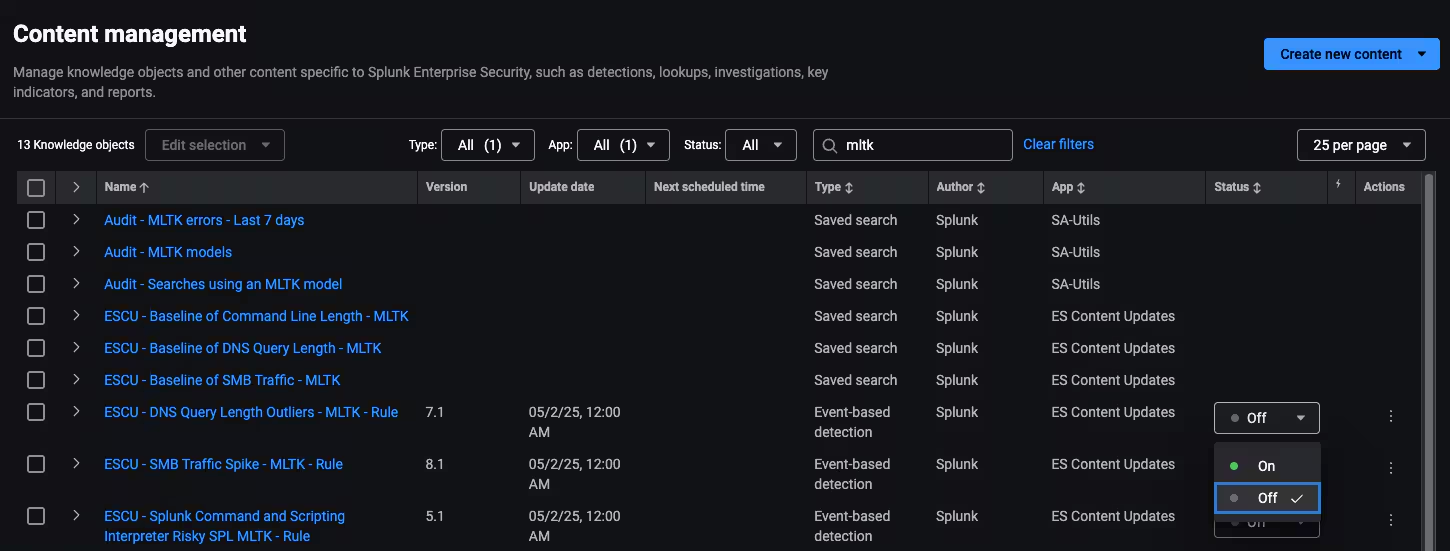
- Give models enough (relevant) history: Models are only as good as the baseline data they train on. By default, many Splunk Enterprise Security models use around 30 days of history. Ensure you have that much data in Splunk for the relevant fields, or consider extending the training window if your environment has longer cycles (e.g., if some activity is monthly or seasonal). Conversely, very old data might not reflect recent changes – the MLTK approach of retraining on a rolling window helps here. The takeaway is: feed the model a representative sample of “normal” for your environment. If your baseline changes (new servers, policy changes, etc.), allow the model a bit of time to retrain on the new normal.
- Tune sensitivity as needed: The default thresholds (like the “high” 5% or “extreme” 1% rarity) can be adjusted per use case. If you find an anomaly rule is too noisy (perhaps flagging events that are unusual but not important), you can make it less sensitive by using a more extreme cutoff (e.g., only alert on the top 1% instead of 5%). Conversely, if you want earlier warning, you could use a “medium” threshold (~10%) to cast a wider net. Splunk Enterprise Security often provides macros or lookup files (such as
qualitative_thresholds_lookup) where these settings can be tweaked. Just remember, raising the threshold percentage will reduce alerts (only very rare events get through), lowering it will increase alerts (including somewhat less rare events). Find the balance that works for your operations. - Interpret anomalies in context: An anomaly alert is the start of an investigation, not a verdict. Train your analysts to treat them as leads. For each anomaly, ask “could there be a legitimate reason for this?” Check related data: if a user’s activity spiked, were they involved in a known project or outage? If a host’s traffic dropped to zero (a low anomaly), is the host down for maintenance? Many anomalies will warrant further triage or correlation with other signals (this is where Splunk Enterprise Security’s Risk-Based Alerting can complement by showing if an entity has multiple issues). Over time, you might even enrich anomaly events with additional info (like asset role or user department) to help decide if it’s expected or not. The good news is that by surfacing the unusual events, Splunk Enterprise Security significantly cuts down the time you’d otherwise spend searching for a needle in the haystack — you can focus on interpreting the needle now that it’s been found.
- Exclude known noise: If certain outliers are known and benign (for example, a vulnerability scanner that deliberately generates large volumes of traffic, or a service account that behaves oddly by design), you have options to prevent them from constantly alerting. You could filter them out of the training data (so the model doesn’t consider their crazy behavior as part of “normal” for others), or exclude them from the detection search results via a
whereclause or lookup of allowed values. The goal is to let the ML highlight meaningful anomalies. A bit of one-time tuning to handle known edge-cases can drastically improve the quality of alerts. Splunk Enterprise Security is flexible — you can clone the delivered searches and customize filters or groupings as needed.
Finally, keep your Splunk Enterprise Security content up to date. Splunk regularly releases content updates and improvements to these ML detections (for example, refining an algorithm or adding a new use case). Staying current ensures you benefit from the latest enhancements in the ML toolkit. In conclusion, machine learning in Splunk Enterprise Security acts like a smart safety net for your security monitoring. It’s powerful yet easy to use – working behind the scenes to adapt to your environment and spotlight the oddballs. By embracing these features and following best practices, you can substantially boost your ability to catch elusive threats, all while simplifying your detection setup. It’s advanced security analytics, made simple.
If you're curious about how you can leverage AI and ML today on your own security use cases and prevent downtime or attacks, we've got you covered. Check out our guide, Security Use Cases Enhanced by AI and ML, which offers actionable insights into real-world applications and helps you get started.

Happy anomaly hunting!
Related Articles

Predicting Cyber Fraud Through Real-World Events: Insights from Domain Registration Trends

When Your Fraud Detection Tool Doubles as a Wellness Check: The Unexpected Intersection of Security and HR

Splunk Security Content for Threat Detection & Response: November Recap

Security Staff Picks To Read This Month, Handpicked by Splunk Experts

Behind the Walls: Techniques and Tactics in Castle RAT Client Malware

AI for Humans: A Beginner’s Field Guide

Splunk Security Content for Threat Detection & Response: November 2025 Update

Operation Defend the North: What High-Pressure Cyber Exercises Teach Us About Resilience and How OneCisco Elevates It
