Send Your SOAR Events to Splunk
During a recent Proof of Concept (PoC) for Splunk SOAR with an existing customer of Splunk Enterprise Security (ES), I was asked if it was possible to send events/containers available in Splunk SOAR to Splunk ES as a Notable Event. While the reverse process of sending ES Notable Events to Splunk SOAR is highly documented, I was surprised to find hardly any documentation about the use case my customer brought up during the PoC. Hence, my cue to write my first ever Splunk blog!
Before we dive into how to configure Splunk SOAR to send events towards Splunk ES and Splunk ES to classify these events as Notable Events, let’s spend a few moments on why this use case came up. Among other requests during the PoC, my customer wanted to use Splunk SOAR for phishing triage and investigation by ingesting suspected phishing emails directly into Splunk SOAR. Every time one of their users received what they assumed to be a phishing attempt, they would forward this email to an inbox address directly monitored by Splunk SOAR. Splunk SOAR would then ingest these emails and automatically start triaging. This means that only analysts who had access to Splunk SOAR would ever have any knowledge of this event (although to be fair, a ServiceNow ticket was created for every such event). My customer wanted all their analysts to have this visibility from ES and, understandably so, for their SIEM to have full visibility into every security event. These SOAR events/containers must be routed towards ES as Notable Events.
As we will see shortly, this is a straightforward process, and maybe this intro is longer than necessary, but I think it’s important to understand why this was needed and why I’m here, writing this blog.
First things first, to achieve our goal, we need Splunk SOAR to be able to run a query, or rather a Saved Search, in Splunk ES. We will use the Splunk app for this (installed in SOAR). Installing the app is out of scope for this blog; however the flow is very intuitive, and you only need to point the app toward your Splunk instance and provide access details. Secondly, we need a Saved Search in Splunk, which a SOAR Playbook will execute to create the Notable Event using arguments we specify. Below a snapshot of the Saved Search I am using in this example, which during an excess of creativity, I named simply as notable_creation:
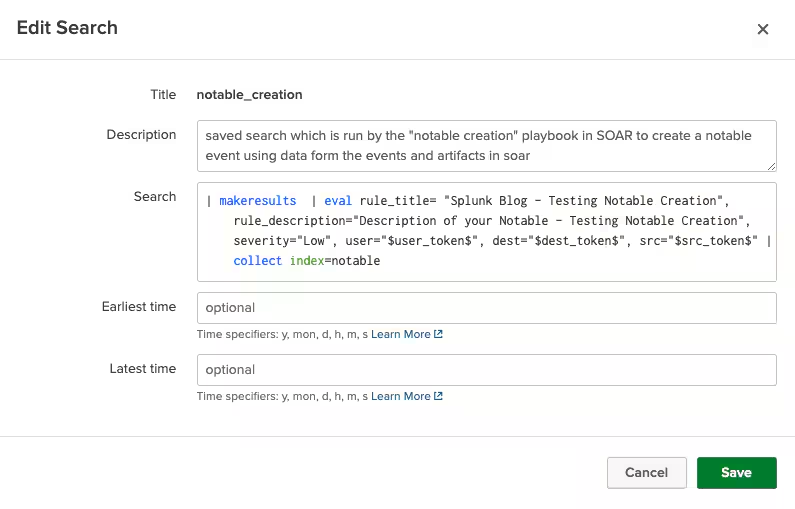
If you want to use my search during your tests, feel free to copy-paste from below:
| makeresults  | eval rule_title= "Splunk Blog - Testing Notable Creation",
rule_description="Description of your Notable - Testing Notable Creation", severity="Low",
user="$user_token$", dest="$dest_token$", src="$src_token$" | collect index=notable
Also, for those of you who read the description…yes, the Saved Search is titled notable_creation, and the SOAR Playbook is titled notable creation. As I mentioned, I was on a high creativity spell those days. Now on to more important things, like explaining my search.
Starting from the very last command (collect): as most of you know, Splunk ES stores all Notable Events in the index=notable, so it makes sense that we need to store our event there. We also need an event in the first place, which is taken care of by the makeresults command. The rest of the SPL is mainly there to define a title for our Notable Event and the different fields we need present. We are using tokens as “placeholders” for the values of the user, dest and scr fields, which will be replaced by the SOAR Playbook when launched. Note how all the fields we created with the eval command are represented in the Notable Event that was created (the severity field is needed for the calculation of Urgency by Splunk ES; not having this field present in your search will not stop you, but there will be no urgency attached to your Notable Event).
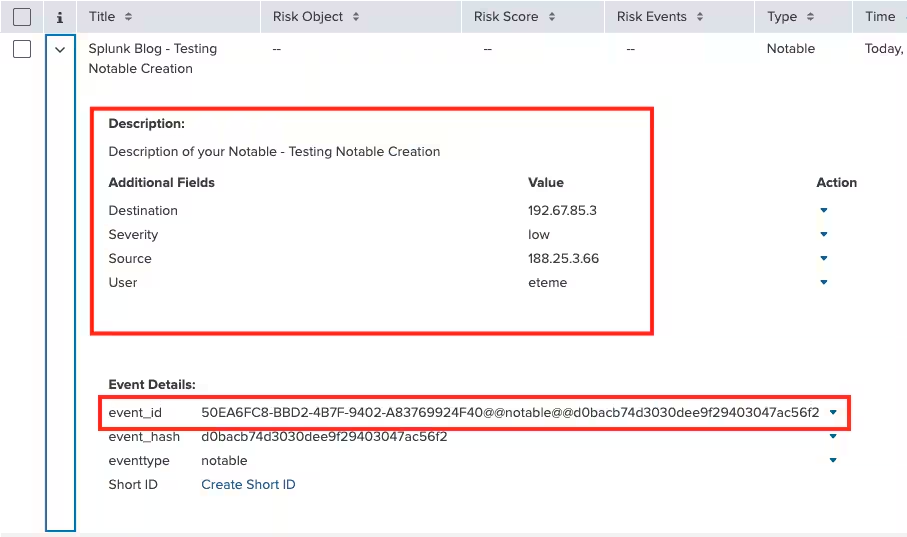
I would also like to point out that our Notable Event also has an event_id, which is assigned automatically by Splunk ES.
As you probably guessed, the values for the Destination, Source and User fields are coming from the event in Splunk SOAR. Here’s what some artifacts present in that event look like (note: IP addresses are generated randomly):
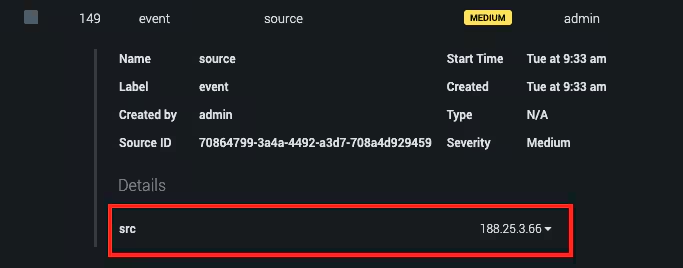
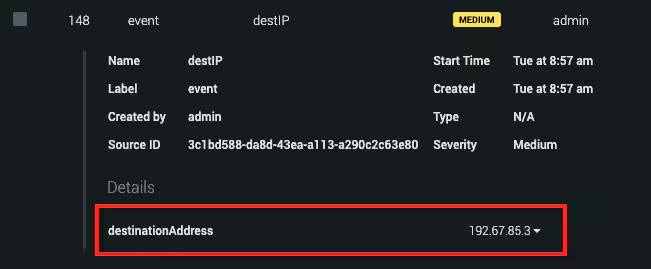
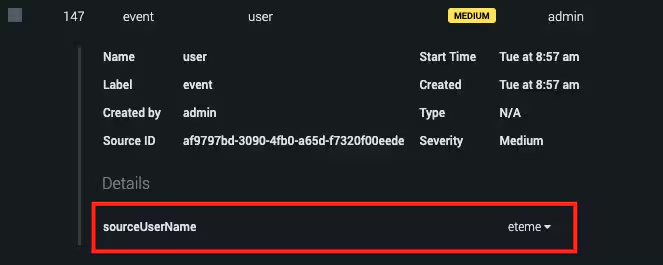
At this point, the last thing to check is the Splunk SOAR Playbook that I ran on this SOAR event to create the Notable Event and, I must admit, it may be a bit underwhelming; it’s a very, very simple playbook designed only for the sake of creating a Notable Event in Splunk ES.
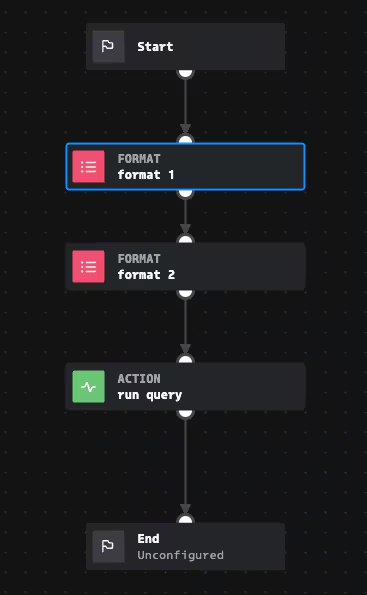
The main part here is the “run query” Action Block which runs the Splunk Saved Search we created earlier and passes our artifacts’ values as arguments. Here’s a snapshot of that block:
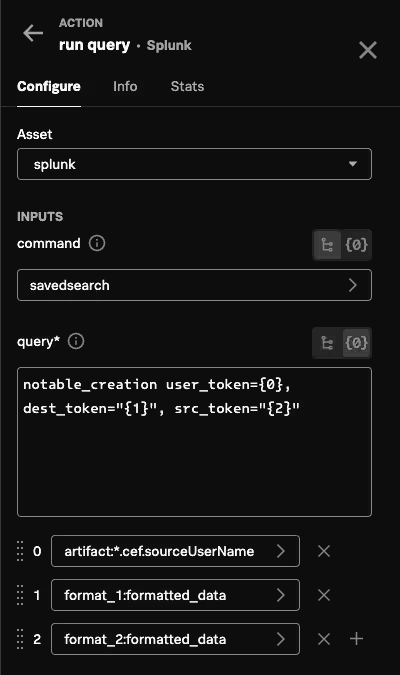
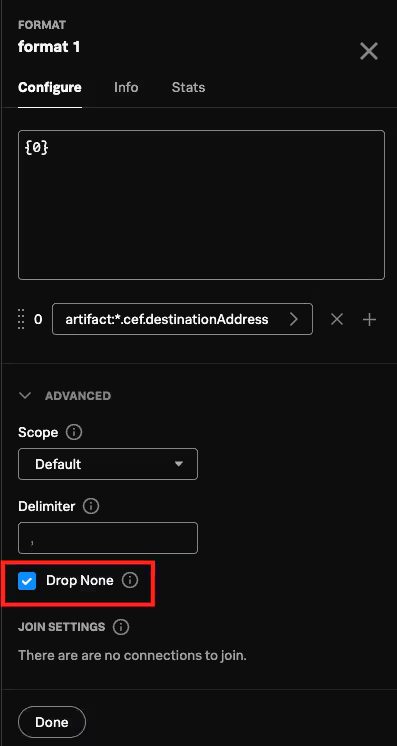
You can see we’re telling Splunk that we want to run a Saved Search, we’re providing the name of said search (notable_creation) and passing the arguments from our artifacts in SOAR. The two format blocks passing the values of src and dest are there simply to drop any “None” values that may come up. Here’s how they look like:
And that’s it! Running this Playbook on a Splunk SOAR event will create a corresponding Splunk ES Notable Event with all the fields you’d like the Notable Event to “inherit” from the Splunk SOAR event.
Related Articles

Predicting Cyber Fraud Through Real-World Events: Insights from Domain Registration Trends

When Your Fraud Detection Tool Doubles as a Wellness Check: The Unexpected Intersection of Security and HR

Splunk Security Content for Threat Detection & Response: November Recap

Security Staff Picks To Read This Month, Handpicked by Splunk Experts

Behind the Walls: Techniques and Tactics in Castle RAT Client Malware

AI for Humans: A Beginner’s Field Guide

Splunk Security Content for Threat Detection & Response: November 2025 Update

Operation Defend the North: What High-Pressure Cyber Exercises Teach Us About Resilience and How OneCisco Elevates It
