Phishing – What does it look like in machine data?
Hello Security Ninjas,
In this case for tracking the process and generating the activity events I used “Advanced Threat Protection” from Digital Guardian.
- Let’s see how a phishing attack exploits a machine
In the events below you can nicely see that it starts with Outlook.exe copying a word document which is executed. That’s generally fine and happens hundreds of times in an organization if someone sends an e-mail with an invoice attached that gets opened. But loading with a Macro malware from an external page – is not so common.
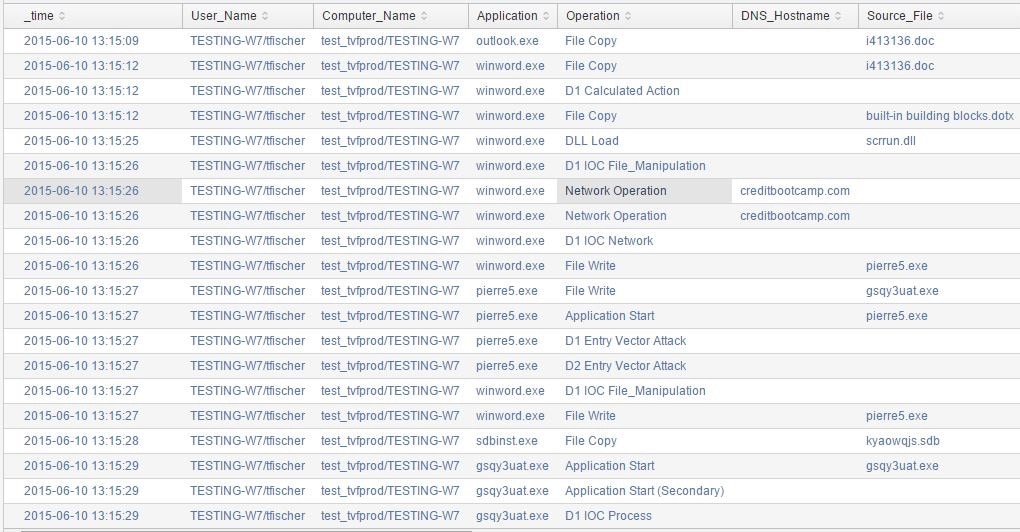
Translation of the events in words:
- 13:15:09 – Outlook opens a Word file (i413136.doc) from an email attachment
- 13:15:12 – Word opens the file
- 13:15:25 – Word loads the macro subsystem DLL scrrun.dll
- 13:15:26 – Word communicates over the network with suspicious domain creditbootcamp.com
- 13:15:26 – Word downloads the suspicious file pierre5.exe
- 13:15:27 – Word launches pierre5.exe
- 13:15:27 – pierre5.exe downloads the executable gsqy3uat.exe
- 13:15:28 – Application compatibility database is updated
- 13:15:29 – gsqy3uat.exe launches
If we correlate this with AV Scanner data we would see that no detection happened, which leads to the conclusion that even with an AntiVirus scanner the machine got infected. On 21 April the macro malware was detected on two of 57 AV engines and four weeks later (22 June) according to VirusTotal 32 of 57 AV engines detect it. You might also want to review and that stage if the IP of the domain was blocked from your firewalls or if the URL was blacklisted on your proxy server.
-
Communication to command and control center
Once the machine is infected you might see immediately or even with a time delay (more advanced, to bypass sandbox execution systems) some activities happening. Often one of these is that the malware tries to communicate outside.
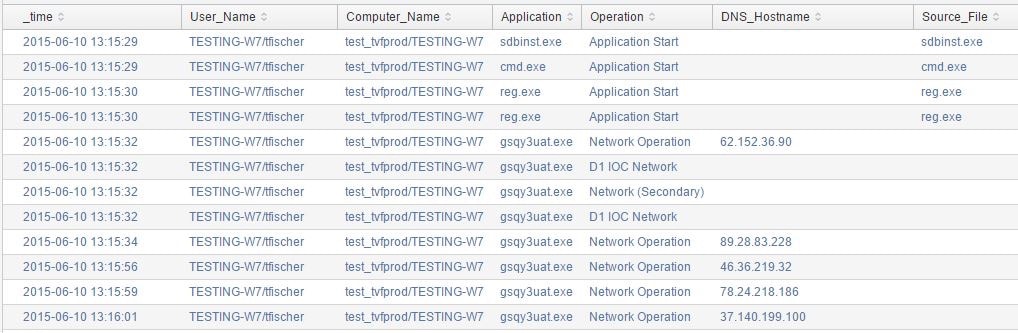
Translation of the events in words:
- 13:15:29 – command shell is started, the command line is captured as “cmd /c C:\Users\tfischer.testing-W7\AppData\LocalLow\KYaoWQJS.bat”
- 13:15:30 – 2 registry entries are deleted
- 13:15:32 – gsqy3uat.exe starts communicating out to command and control but receives no reply; keeps trying for next 30 minutes
-
Downloading additional payload
As last step in this sample you can see how the malware gains SYSTEM Access. At this point the malware now has administrative rights and can either fulfill its objective or just “wait and sleep” until it has a proper mission to accomplish.

Translation of the events in words:
13:46:18 – process reflectively injects itself into rundll32.exe process (based on instructions from command and control)
Further resources:
I’m sure as a real Splunker you know what to look for in your logs now 😉 You can find some search hints in our APT tech brief.
Happy phishing your phished users,
Matthias
Related Articles
Detecting CVE-2020-0601 Exploitation Attempts With Wire & Log Data

Hunting with SA-Investigator & Splunk Enterprise Security (SIEM)