New Keyword App

One of the most common requests I get from new customers is that they want to centrally collect all their machine generated time series data and search for a keyword like error or RuntimeException. Obviously Splunk can do this. Then, the next set of questions concern things like give me the top hosts or applications producing this keyword, show me a baseline of last week vs this week for this keyword, show me a slope line on the trend for this or any keyword(s), find outliers that go beyond the average occurrences for the keyword and then try to predict what may happen in the future.

To answer these questions and then some, I’ve created an app template that you can download from Splunkbase and simply install the Keyword App. The app has no inputs as it uses your own indexed data. You can modify the default indexes for the role that uses the app in Manager to include indexes beyond main. Usually, what I do next in these blog entries is describe how to use the app. However, in this case, a picture is worth a thousand words. Rather than continue to entertain you with my prose, I’ll simply embed the the self explanatory dashboards here.
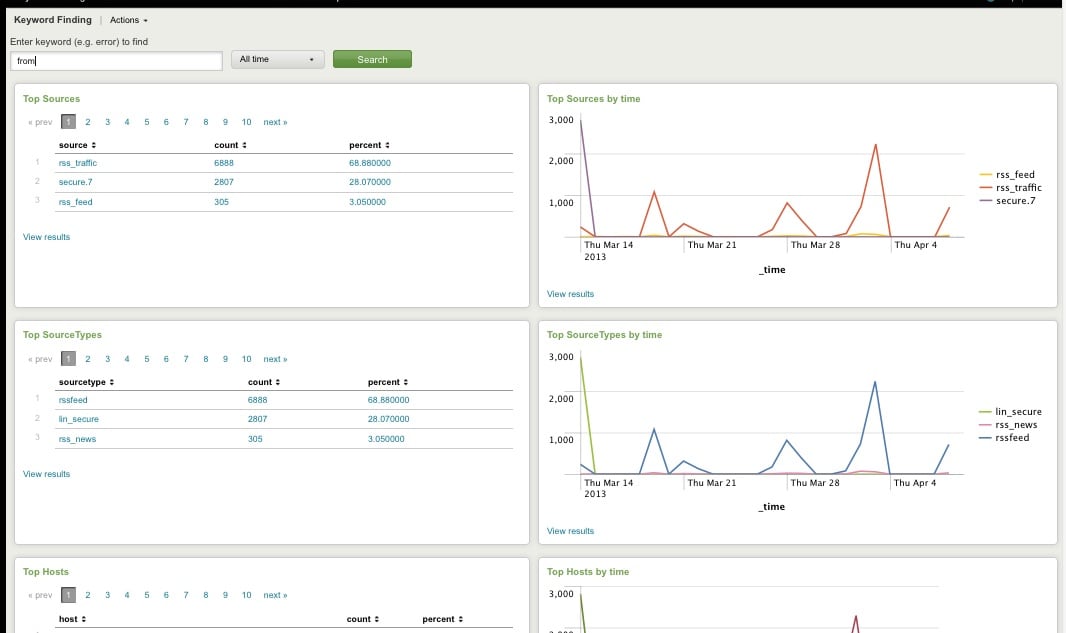
Top Host, Sourcetype, Source

Top Host, Sourcetype, and Source for Keyword
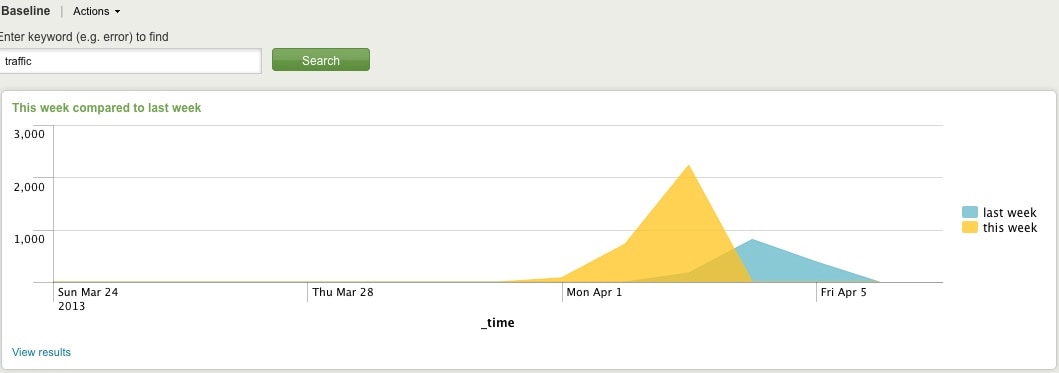
Comparing Present Count vs. Past Count
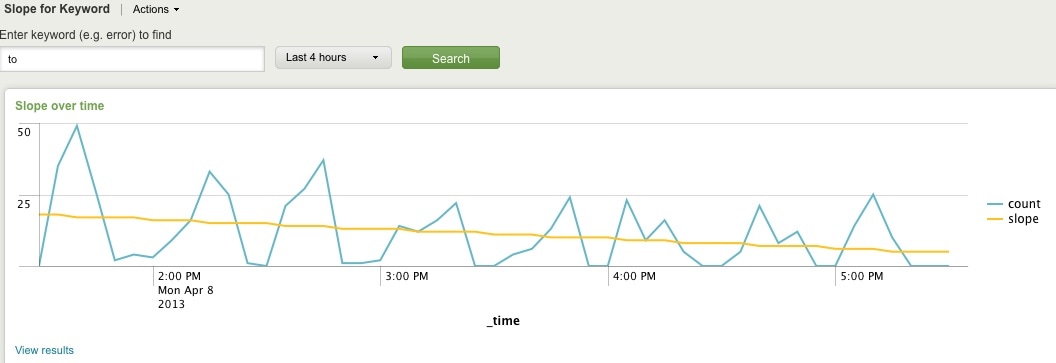
Slope for Trend
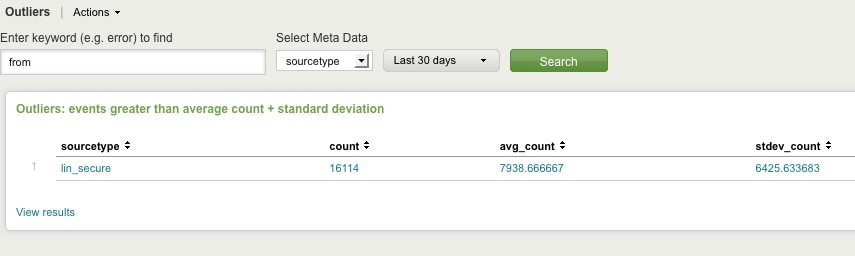
Find Outliers
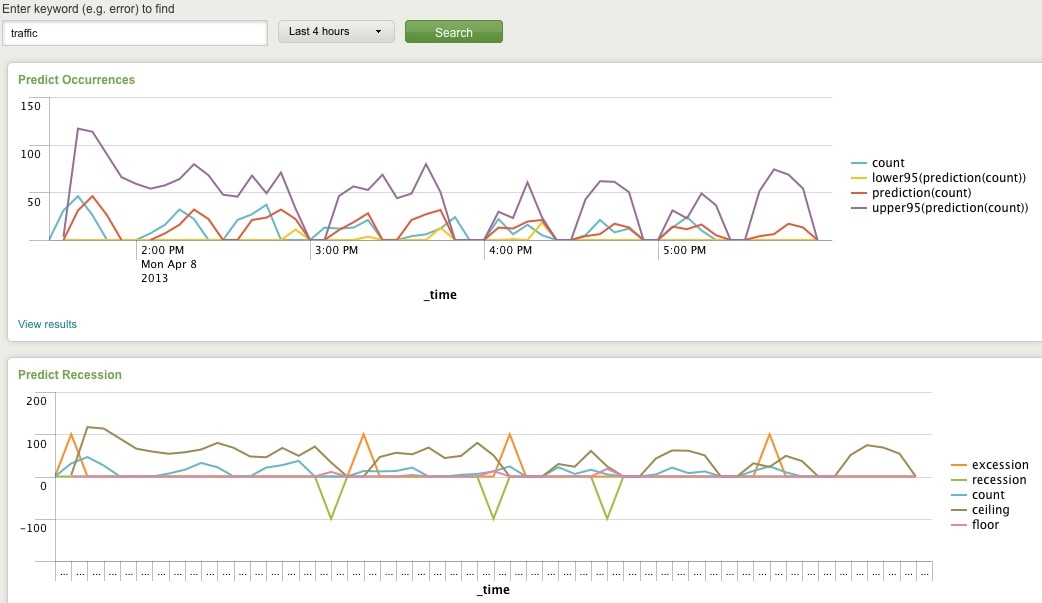
Predict Future Counts (Recession Predict is Jack Coate’s idea)

There’s a Donut Chart (Ron Naken’s Module) that allows you to split your list of keywords by top 10 host, source, or sourcetypes and see the distribution of events.
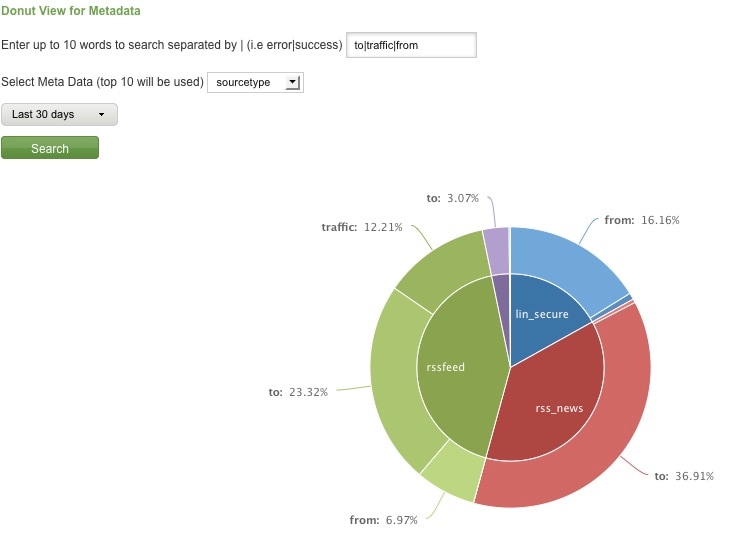
Split Keyword(s) Distribution by Top 10 Hosts, Source, or Sourcetype

Here are rare events based on your filter:
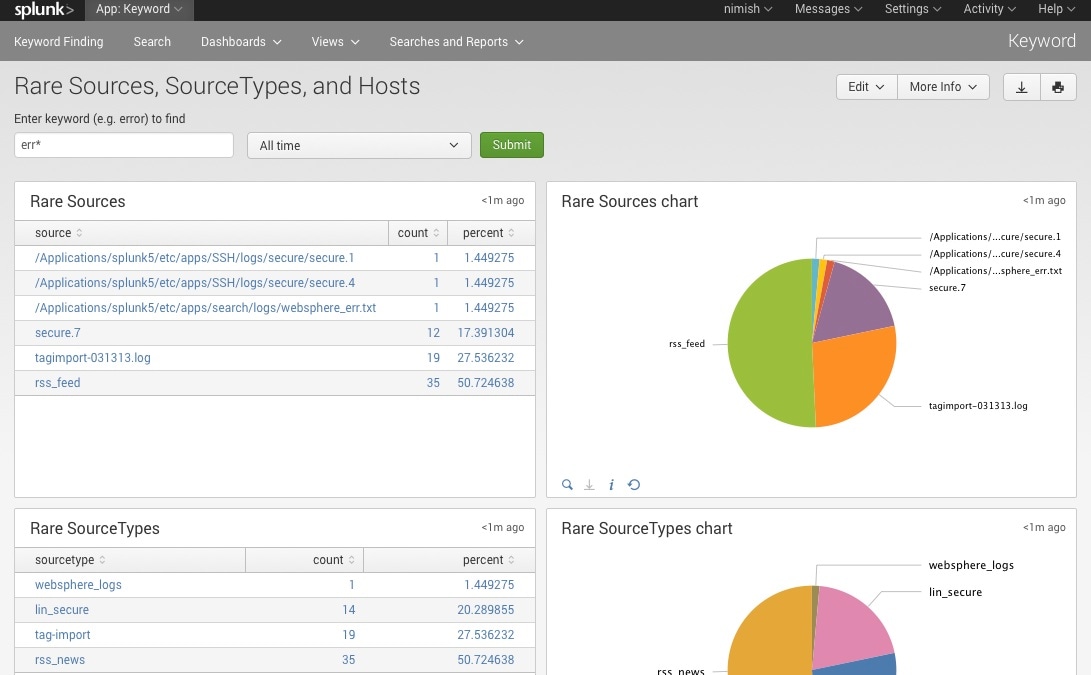
Rare

Finally, here are rare events based on punctuation.
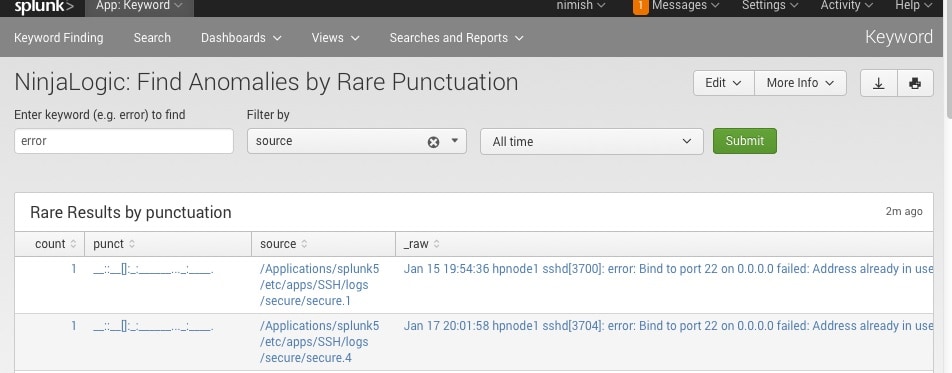
Punct

Conclusion

Hopefully, this template will satisfy all your needs out of the box. If you need to modify the searches, make a copy of the app’s default/data/ui/views/<dashboard>.xml file and put it into the app’s local/data/ui/views/<dashboard>.xml file and edit your local copy. I’m hoping this app will save you some time from configuring these common tasks.

Related Articles

Only the Paranoid Survive, Recast for Cybersecurity
Security
4 Minute Read

Only the Paranoid Survive, Recast for Cybersecurity

At TruSTAR, we want to highlight stories of success in defending cyberspace that can propagate as best practices. Read more about human dependencies, technical challenges and defining data to be shared.
Detecting Microsoft Exchange Vulnerabilities - 0 + 8 Days Later…

Security
13 Minute Read

Detecting Microsoft Exchange Vulnerabilities - 0 + 8 Days Later…

Even if you haven’t uncovered Microsoft Exchange Vulnerabilities and malicious behavior, it is important to continue monitoring, particularly as more actors look to leverage these vulnerabilities for their own purposes.
Visual Link Analysis with Splunk: Part 4 - How is this Pudding Connected?

Security
3 Minute Read

Visual Link Analysis with Splunk: Part 4 - How is this Pudding Connected?

Starting with a single piece of data, use Splunk link analysis functionality to find related links going multiple levels down.
Splunk for OT Security V2: SOAR and More

Security
3 Minute Read

Splunk for OT Security V2: SOAR and More

OT attacks are on the rise, as we've seen from the Oldsmar water facility attack. the Splunk IoT, Manufacturing and Energy team has been hard at work improving Splunk for OT Security to help secure your environment.
Cloud Federated Credential Abuse & Cobalt Strike: Threat Research February 2021

Security
4 Minute Read

Cloud Federated Credential Abuse & Cobalt Strike: Threat Research February 2021

Learn about the latest emerging threats, such as Cloud Federated Credential Abuse and Cobalt Strike, where bad actors are abusing credential privileges in cloud environments to gain unauthorized access.
Building a Superstar SOC with Automation and Standardization

Security
2 Minute Read

Building a Superstar SOC with Automation and Standardization

Splunker Kelly Huang explains the how and why of standardizing your team's security processes to build a superstar SOC.
Detecting HAFNIUM Exchange Server Zero-Day Activity in Splunk
Security
9 Minute Read

Detecting HAFNIUM Exchange Server Zero-Day Activity in Splunk

This blog discusses how to detect HAFNIUM activity around the recent CVEs released affecting Exchange Server using Splunk and Splunk Enterprise Security.
From the SecOps Kitchen: Why Operators of Essentials Services Need to Prepare Now
Security
2 Minute Read

From the SecOps Kitchen: Why Operators of Essentials Services Need to Prepare Now

How can you be agile and map technical security activities back to the overall goal to reduce the business risk and become cyber resilient while being sensitive to costs and FTE needs at the same time? Find out more in this article.
Stories of Cyber Defense Collaboration: Trustworthy Accountability Group (TAG)
Security
4 Minute Read

Stories of Cyber Defense Collaboration: Trustworthy Accountability Group (TAG)

Nicole Perloth’s new book, This is How They Tell Me the World Ends, details our past and troubling trajectory in cyberspace. It is a terrific and sobering read for both the initiated and uninitiated in information security. This doom and gloom title prompts the need for a blog series focusing on slivers of success in defending cyberspace that can propagate as best practices.