New Keyword App

One of the most common requests I get from new customers is that they want to centrally collect all their machine generated time series data and search for a keyword like error or RuntimeException. Obviously Splunk can do this. Then, the next set of questions concern things like give me the top hosts or applications producing this keyword, show me a baseline of last week vs this week for this keyword, show me a slope line on the trend for this or any keyword(s), find outliers that go beyond the average occurrences for the keyword and then try to predict what may happen in the future.

To answer these questions and then some, I’ve created an app template that you can download from Splunkbase and simply install the Keyword App. The app has no inputs as it uses your own indexed data. You can modify the default indexes for the role that uses the app in Manager to include indexes beyond main. Usually, what I do next in these blog entries is describe how to use the app. However, in this case, a picture is worth a thousand words. Rather than continue to entertain you with my prose, I’ll simply embed the the self explanatory dashboards here.
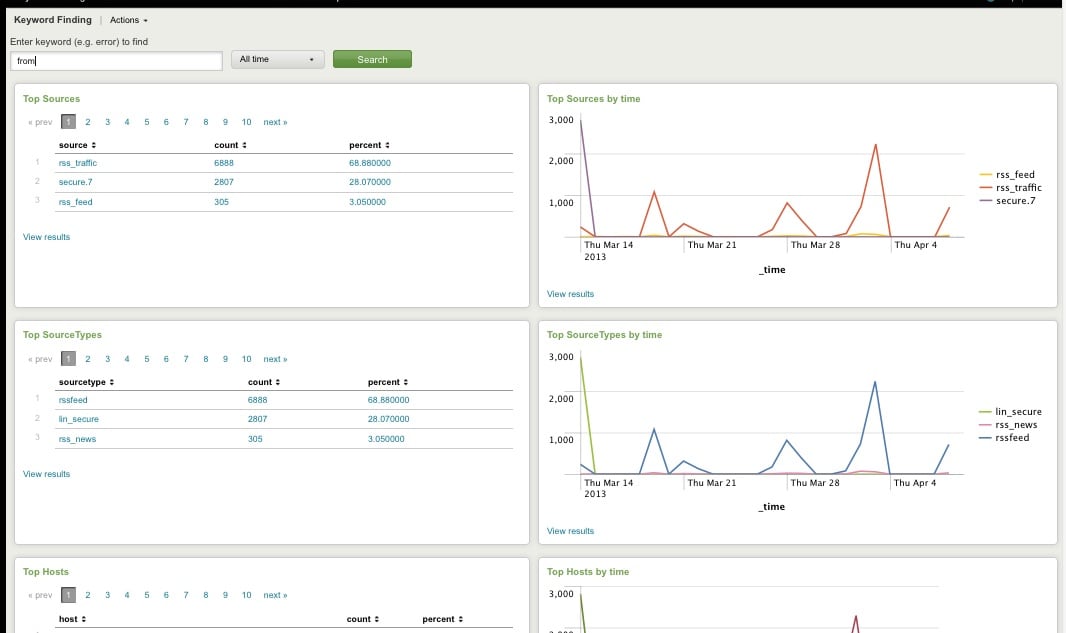
Top Host, Sourcetype, Source

Top Host, Sourcetype, and Source for Keyword
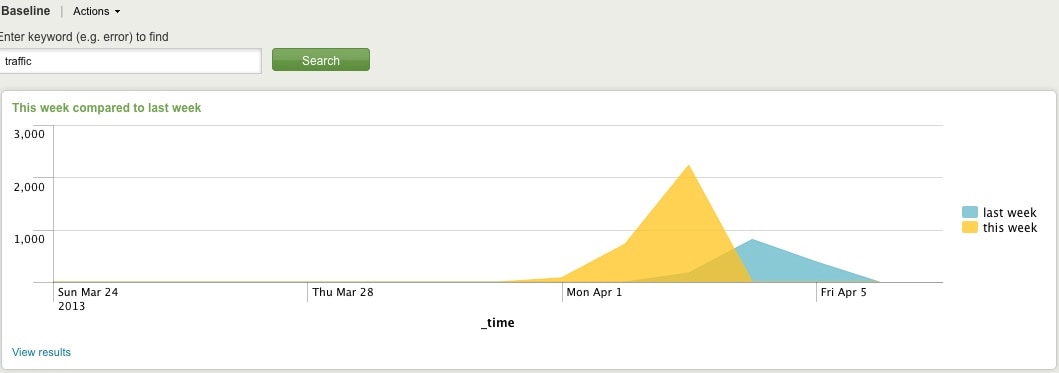
Comparing Present Count vs. Past Count
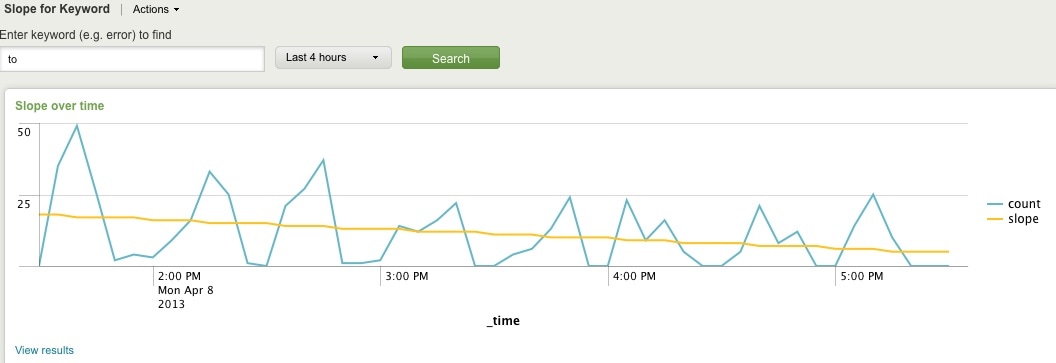
Slope for Trend
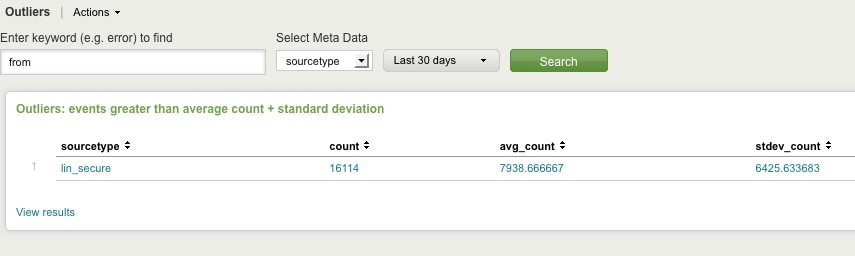
Find Outliers
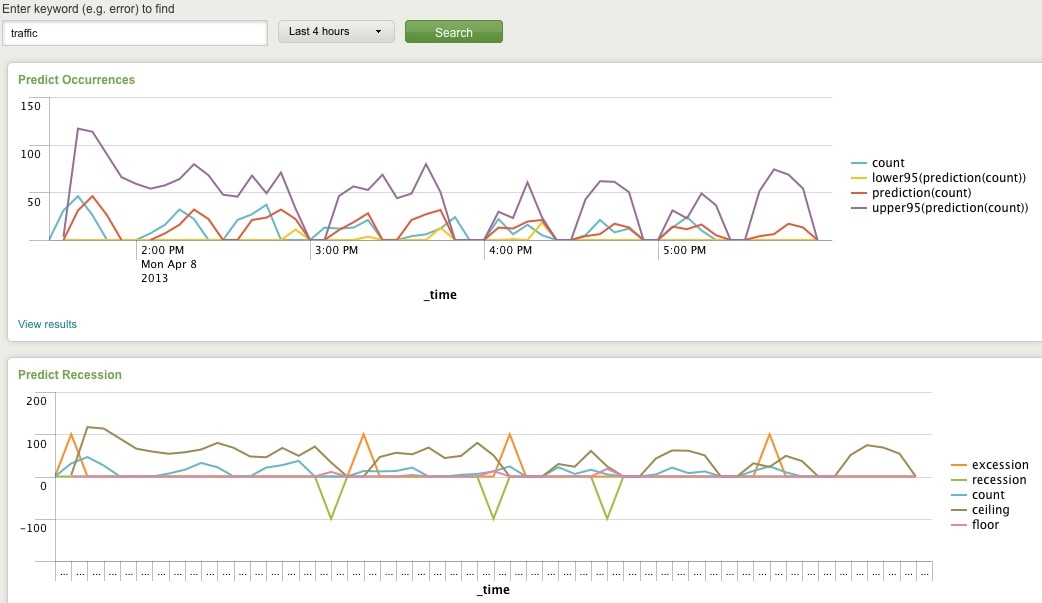
Predict Future Counts (Recession Predict is Jack Coate’s idea)

There’s a Donut Chart (Ron Naken’s Module) that allows you to split your list of keywords by top 10 host, source, or sourcetypes and see the distribution of events.
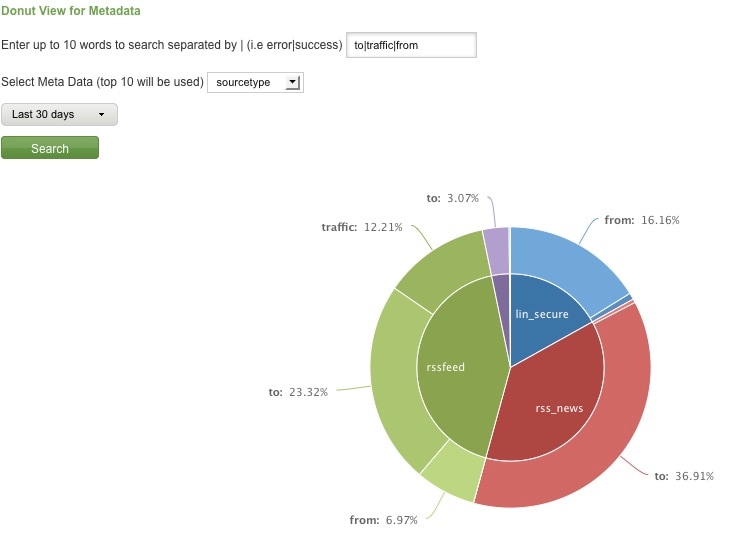
Split Keyword(s) Distribution by Top 10 Hosts, Source, or Sourcetype

Here are rare events based on your filter:
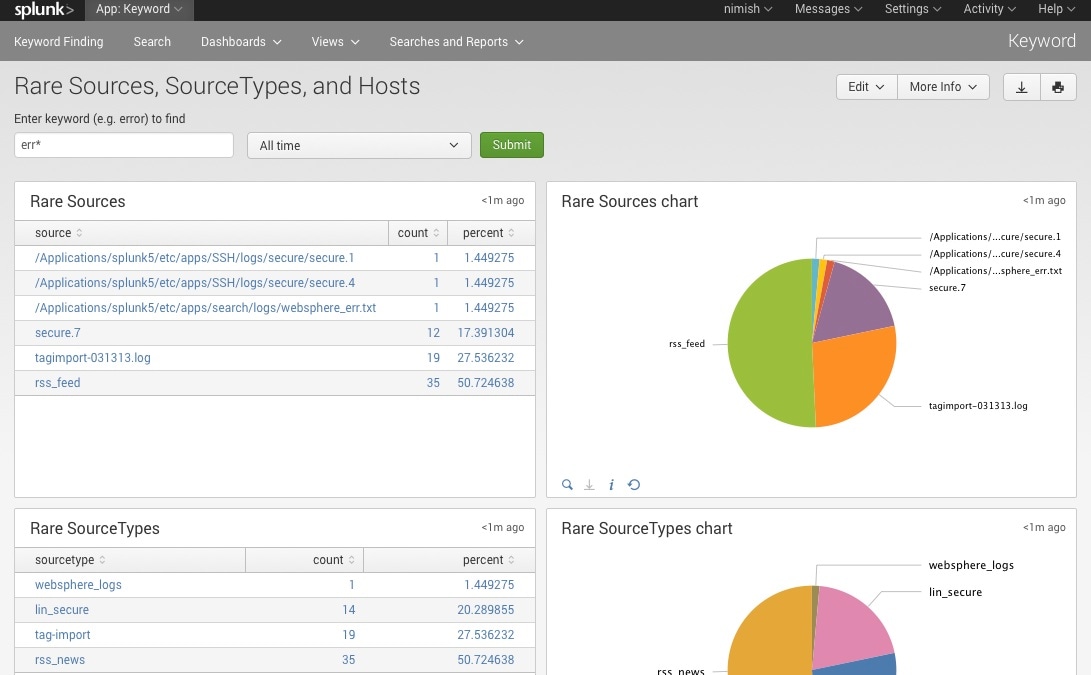
Rare

Finally, here are rare events based on punctuation.
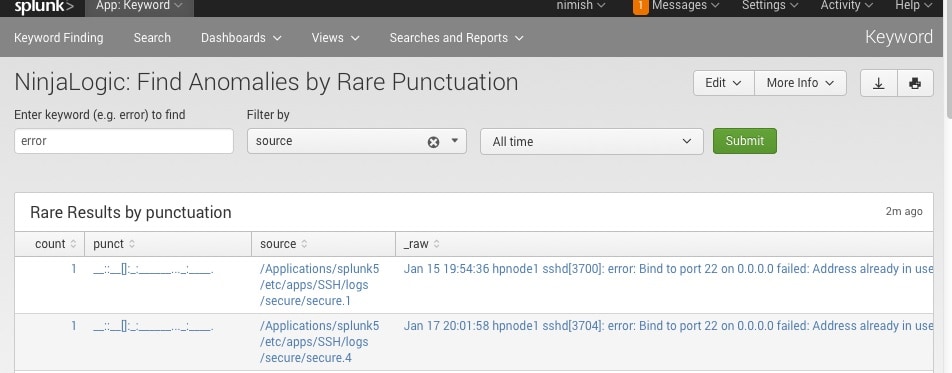
Punct

Conclusion

Hopefully, this template will satisfy all your needs out of the box. If you need to modify the searches, make a copy of the app’s default/data/ui/views/<dashboard>.xml file and put it into the app’s local/data/ui/views/<dashboard>.xml file and edit your local copy. I’m hoping this app will save you some time from configuring these common tasks.

Related Articles
Staff Picks for Splunk Security Reading May 2021
Security
2 Minute Read

Staff Picks for Splunk Security Reading May 2021

Check out the favorite security-centric presentations, white papers and customer case studies from various peeps in the Splunk (or not) security world that WE think everyone should read.
Advanced Link Analysis, Part 3 - Visualizing Trillion Events, One Insight at a Time

Security
8 Minute Read

Advanced Link Analysis, Part 3 - Visualizing Trillion Events, One Insight at a Time

Learn how to get actionable insights from large datasets using link analysis in the third installment of our Advanced Link Analysis series, showcasing the interactive visualization of advanced link analysis with Splunk partner, SigBay.
SOAR in Seconds with Splunk Feature Overviews

Security
2 Minute Read

SOAR in Seconds with Splunk Feature Overviews

Get a quick overview of Splunk's SOAR tool, Splunk Phantom, and the main features within.
TruSTAR Intel Workflows Series: 3 Stages of the Prioritized Indicator Intel Workflow
Security
4 Minute Read

TruSTAR Intel Workflows Series: 3 Stages of the Prioritized Indicator Intel Workflow

This blog series explains our motivations for building this feature, how it works, and how users can better inform security operations. In this section, we dive into the three stages of the Prioritized Indicator Intel Workflow.
Little Code, Big Impact: Easily Scale your Security Automation with Splunk SOAR

Security
1 Minute Read

Little Code, Big Impact: Easily Scale your Security Automation with Splunk SOAR

Discover how our latest revision of Splunk Phantom’s 'custom functions' make playbook creation and execution faster and easier than ever with the ability to create shareable custom code across playbooks while introducing complex data objects into the playbook execution path.
DarkSide Ransomware: Splunk Threat Update and Detections
Security
6 Minute Read

DarkSide Ransomware: Splunk Threat Update and Detections

Splunk Threat Research Team (STRT) replicated the DarkSide Ransomware Attack and has released an Analytic Story with several detection searches directed at community shared IOCs.
Presidential Executive Order: “Collect and Preserve” Incident Data. Is this the Catalyst for Cybersecurity’s Black Box?
Security
3 Minute Read

Presidential Executive Order: “Collect and Preserve” Incident Data. Is this the Catalyst for Cybersecurity’s Black Box?

President Biden’s Executive Order (EO) on Improving the Nation’s Cybersecurity defines a solid path forward for the Federal government and its suppliers to address systemic problems in defending cyberspace.
A Threat As Old As The Internet: Why We Still Care About Malware (And Why You Should Too)

Security
3 Minute Read

A Threat As Old As The Internet: Why We Still Care About Malware (And Why You Should Too)

Splunk's CISO Yassir Abousselham dives into why — as IT and security leaders — we need to come up with comprehensive strategies to specifically mitigate malware attacks.
Threat Hunter Intelligence Report
Security
1 Minute Read

Threat Hunter Intelligence Report

Welcome to Splunk’s Threat Hunter Intelligence Report, a monthly series brought to you by Splunk’s threat hunting and intelligence (THI) team sharing the latest cybersecurity threats and trends to help organizations stay one step ahead of adversaries, one report at a time.