The Lost Payload: MSIX Resurrection
“They thought it was just a package.”
A modern format. A signed file. A clean install.
MSIX was engineered as the future of Windows app deployment—a marvel of containerization, trust, and control. But in the shadows of convenience, something ancient stirred.
Now, deep within enterprise systems, new digital predators are emerging. They wear the skin of legitimacy. They pass validation. They thrive in the blind spots.
Capabilities twisted. Entitlements stretched. Manifests mutated.
Threat actors aren't just side-loading—they're evolving. And what was once secure is now weaponized. From Loader-as-a-Service operations to sophisticated malvertising campaigns, the MSIX ecosystem has become the perfect hunting ground.
But here's the problem: How do you test your defenses against creatures you can't safely contain? Traditional approaches required defenders to either risk deploying live malware samples or spend weeks manually assembling test scenarios using disparate tools and complex processes.
That's why we built MSIXBuilder—a comprehensive automated solution that lets security teams rapidly create, test, and validate detection coverage against MSIX-based attacks without the risk. Think of it as your own controlled laboratory environment where you can study these digital predators safely.
In this post, we step inside the containment zone to examine how attackers are weaponizing MSIX in the wild, demonstrate how MSIXBuilder enables safe testing of malicious behaviors, and arm you with the detection logic needed to spot these threats before they break loose.
Because in this threat landscape...
“It's just a package” is exactly what they want you to think.
Welcome to MSIX Resurrection.
What is MSIX and What Can It Do?
Overview<
MSIX is a Windows app package format that provides a modern packaging experience to all Windows apps. The MSIX package format preserves the functionality of existing app packages and/or install files in addition to enabling new, modern packaging and deployment features to Win32, WPF, and Windows Forms apps.
Key Technical Characteristics
- Container-based execution: Applications packaged using MSIX run inside a lightweight app container where they can access only the resources that are specifically granted to them. They're isolated using file systems and registry virtualization.
- ZIP-based structure: Structure-wise, an MSIX package is very similar to an AppX or App-V package. It is basically a zip package that contains your application files and some configuration XML files
- High install success rate: MSIX provides a reliable install boasting a 99.96% success rate over millions of installs with a guaranteed uninstall
MSIX Package Structure
MyApp.msix (ZIP container)
├── AppxManifest.xml          # Package manifest
├── AppxBlockMap.xml          # Block map for validation
├── AppxSignature.p7x         # Digital signature
├── [Content_Types].xml       # MIME types
├── Assets/                   # App assets (icons, etc.)
├── VFS/                      # Virtual File System
│   └── ProgramFilesX64/      # Virtualized Program Files
└── Registry.dat              # Virtualized registry
Capabilities
- Full Win32 support: Can package traditional desktop applications (EXE, MSI)
- Script execution: Can run PowerShell scripts via Package Support Framework (PSF)
- Registry virtualization: Isolates registry changes from the host system
- File system virtualization: Redirects file operations to container space
- Network access: Applications maintain full network connectivity
- System API access: With
runFullTrustcapability, apps have extensive system access
With its modern structure, containerization model, and powerful capabilities like runFullTrust and script execution, MSIX was designed to streamline app deployment and isolate risk. But these same features—when manipulated—can become the perfect vessel for stealthy loaders, persistence mechanisms, and malware delivery.
So how are adversaries turning MSIX into an initial access vector? Let’s take a look.
How Adversaries Are Using MSIX
The Business Model: Loader-as-a-Service (LaaS)
What started as a secure app deployment solution has evolved into a thriving criminal marketplace. Security research reveals sophisticated commercial malware services operating since late 2022, offering MSIX-packaged malware as a subscription service. For $1,500 per week or $4,000 monthly, cybercriminals can purchase MSIX-packaged malware that bypasses traditional security controls. Premium tiers costing $1,800 weekly provide properly code-signed packages that slip past Windows Defender SmartScreen undetected, complete with professional administration panels for tracking infection campaigns.
Distribution Methods
Malvertising campaigns have weaponized Google's advertising platform, with threat actors purchasing legitimate ad placements for popular software searches. Users seeking Chrome, Teams, or Zoom downloads encounter professionally designed landing pages that mirror official sites but distribute malicious MSIX packages instead of legitimate software.
Social engineering attacks exploit workplace collaboration platforms like Microsoft Teams, with attackers sending fabricated SharePoint and OneDrive sharing notifications. These campaigns capitalize on the trust users place in internal communication tools, transforming productivity platforms into delivery vectors for malicious packages.
SEO poisoning operations have compromised hundreds of websites, injecting malicious code that redirects visitors to fake download pages when searching for specific software, ensuring compromised sites appear prominently in search results for high-value software downloads.
This commercialization of MSIX malware delivery demonstrates how legitimate packaging technology has been systematically weaponized to bypass modern security controls while maintaining the appearance of trusted software installations.
Now that we better understand how adversaries deliver, let’s now check out a new streamlined utility to help defenders test and detect MSIX malicious software.
Streamlined MSIX Creation with MSIXBuilder
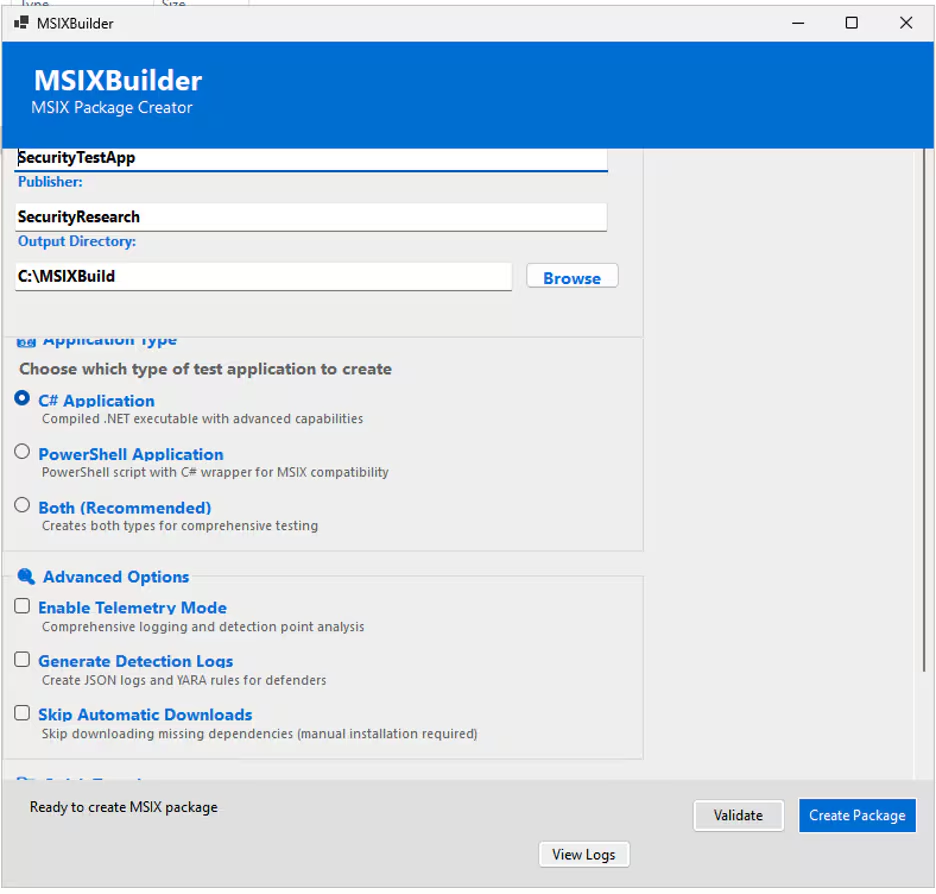
How do you test detection capabilities against malicious MSIX packages without deploying real malware? Traditional approaches required defenders to either risk using live samples or spend countless hours manually assembling test packages using disparate tools and complex certificate management. The Splunk Threat Research Team created MSIXBuilder specifically to solve this problem-enabling defenders to rapidly develop, test, and validate their analytic coverage against MSIX-based attacks in minutes rather than weeks.
MSIXBuilder transforms what was traditionally a complex, multi-tool process into a single automated workflow that mirrors actual attacker techniques. By automatically handling certificate lifecycle management, dependency resolution, and package signing, the tool removes the technical barriers that previously prevented security teams from creating realistic test scenarios. This means defenders can quickly generate both signed and unsigned MSIX packages to validate their AppXDeployment event log coverage, confirm detection rules, and build detection coverage that actually works against real-world threats.
Check out the demo video here:
Command Line Usage
MSIXBuilder supports both interactive and non-interactive modes through comprehensive command line parameters:
Basic Usage
MSIXBuilder supports both interactive and non-interactive modes through PowerShell:
# Interactive mode - prompts for all configuration
.\Create-MSIXPackage.ps1

# Non-interactive mode - all parameters specified
.\Create-MSIXPackage.ps1 -PackageName "SecurityTest" -Publisher "RedTeam" -OutputPath "C:\Output" -AppType "Both"
Parameter Reference
GUI Interface for Easy Configuration
For users who prefer a graphical interface, MSIXBuilder includes a modern Windows Forms GUI (MSIXBuilderGUI.exe) that provides an intuitive configuration panel, with all package configuration options presented in an easy-to-use form:
- Package settings with validation and helpful tooltips
- Application type selection with visual indicators
- Advanced options for telemetry and detection capabilities
- Real-time validation of input parameters
The GUI approach makes MSIXBuilder accessible to security professionals who need quick MSIX generation without deep PowerShell knowledge, while maintaining all the advanced capabilities of the command-line interface.
How to Detect MSIX Threats
Essential Logging Requirements
Recommended log sources to help detect MSIX threats include:
- PowerShell Script Block Logging (Event ID 4104)
- AppXDeploymentServer/Operational events
- AppXPackaging/Operational events
- Process Creation auditing (Sysmon Event ID 1)
- File creation in WindowsApps directory
To collect the APPXDeployment Operational logs with the Splunk Universal Forwarder, add the following to your Inputs.conf:
[WinEventLog://Microsoft-Windows-AppXDeploymentServer/Operational]
disabled = false
index = win
renderXml = true
To view all the EventCodes within AppXDeploymentServer:
(Get-WinEvent -ListProvider "Microsoft-Windows-AppXDeployment-Server").Events | Select-Object Id, Description | Out-GridView
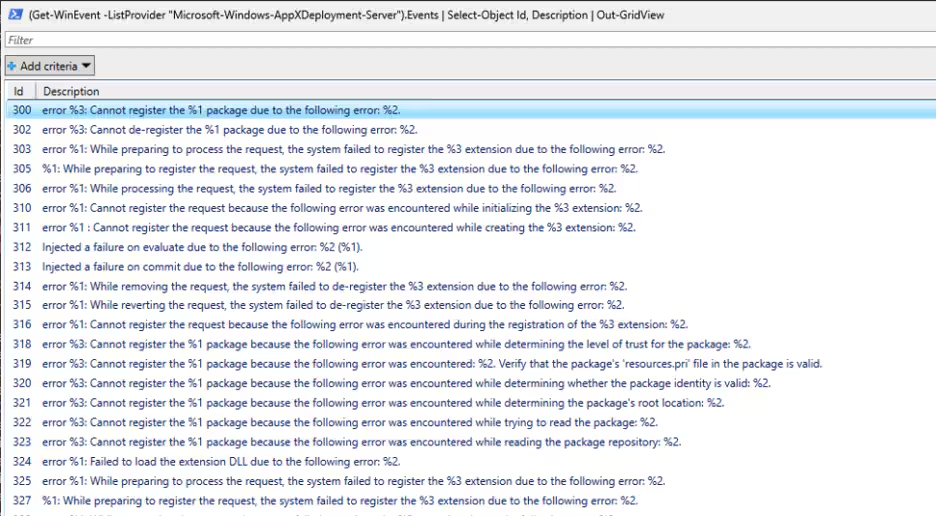
The events for an installation of a MSIX package in the AppXDeployment Server logs goes like this:
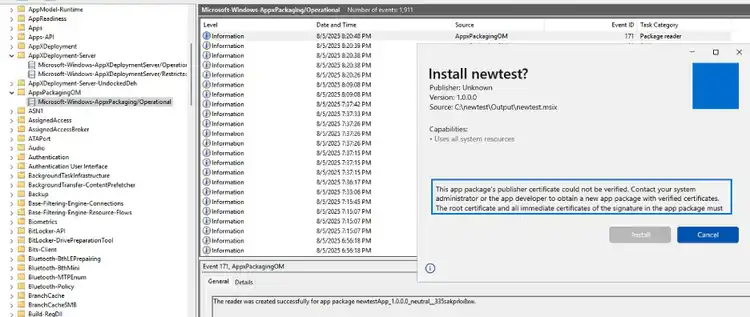
For the installation of our test MSIX instance, when the certificate is not installed, an event is generated in \Microsoft-Windows-AppxPackaging/Operational.evtx with EventCode 171. The MSIX did not install, but was just double clicked.
An example Inputs for this log file:
[WinEventLog://Microsoft-Windows-AppXPackaging/Operational]
disabled = false
index = win
renderXml = true
EventCode 171 states:
The reader was created successfully for app package TestFlowApp_1.0.0.0_neutral__cb5a5h139q78w.
Splunk Security Content
Windows AppX Deployment Unsigned Package Installation
The following analytic detects attempts to install unsigned MSIX/AppX packages using the -AllowUnsigned parameter. This detection leverages Windows event logs from the AppXDeployment-Server, specifically focusing on EventID 603 which indicates the start of a deployment operation with specific deployment flags. The flag value 8388608 corresponds to the -AllowUnsigned option in PowerShell's Add-AppxPackage cmdlet.
`wineventlog_appxdeploymentserver` EventCode=603 Flags="8388608"
  | stats count min(_time) as firstTime max(_time) as lastTime values(Path) as Path values(CallingProcess) as CallingProcess by host EventCode Flags user_id
  | `security_content_ctime(firstTime)`
  | `security_content_ctime(lastTime)`

Windows MSIX Package Interaction
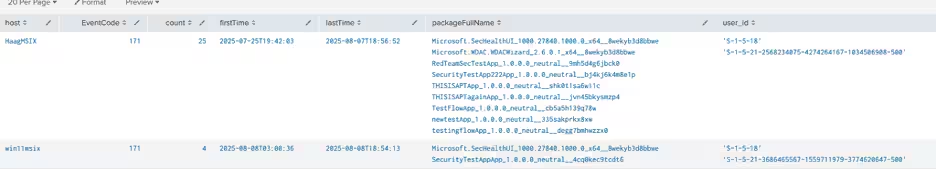
This hunting query detects user interactions with MSIX packages by monitoring EventCode 171 in the Microsoft-Windows-AppXPackaging/Operational logs. These events are generated when a user clicks on or attempts to interact with an MSIX package, even if the package is not fully installed. This information can be valuable for security teams to identify what MSIX packages users are attempting to open in their environment, which may help detect malicious MSIX packages before they're fully installed.
`wineventlog_appxpackaging` EventCode=171
  | stats count min(_time) as firstTime max(_time) as lastTime values(packageFullName) as packageFullName values(user_id) as user_id by host EventCode
  | `security_content_ctime(firstTime)`
  | `security_content_ctime(lastTime)`
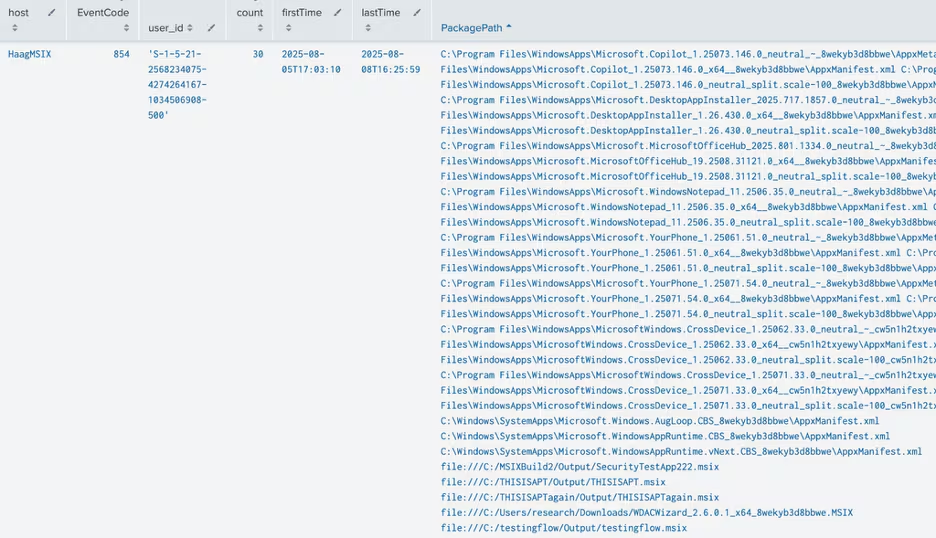
Windows AppX Deployment Package Installation Success
This analytic detects successful MSIX/AppX package installations on Windows systems by monitoring EventID 854 in the Microsoft-Windows-AppXDeployment-Server/Operational log. This event is generated when an MSIX/AppX package has been successfully installed on a system. While most package installations are legitimate, monitoring these events can help identify unauthorized or suspicious package installations, especially when correlated with other events such as unsigned package installations (EventID 603 with Flags=8388608) or full trust package installations (EventID 400 with HasFullTrust=true).
`wineventlog_appxdeploymentserver` EventCode=854
  | stats count min(_time) as firstTime max(_time) as lastTime values(Path) as PackagePath by host EventCode user_id
  | `security_content_ctime(firstTime)`
  | `security_content_ctime(lastTime)`
Windows AppX Deployment Full Trust Package Installation
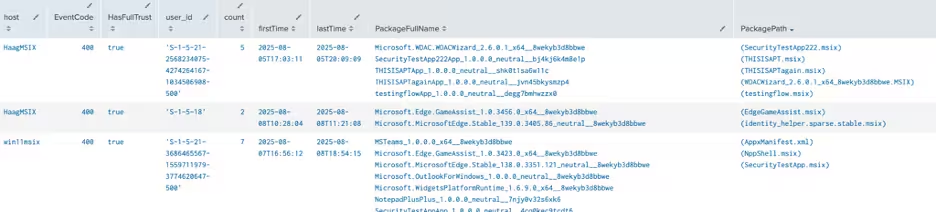
The following analytic detects the installation of MSIX/AppX packages with full trust privileges. This detection leverages Windows event logs from the AppXDeployment-Server, specifically focusing on EventCode 400 which indicates a package deployment operation. Full trust packages are significant as they run with elevated privileges outside the normal AppX container restrictions, allowing them to access system resources that regular AppX packages cannot.
`wineventlog_appxdeploymentserver` EventCode=400 HasFullTrust="true"
  | stats count min(_time) as firstTime max(_time) as lastTime values(PackageFullName) as PackageFullName values(Path) as PackagePath values(PackageSourceUri) as PackageSourceUri values(PackageDisplayName) as PackageDisplayName values(CallingProcess) as CallingProcess values(IsCentennial) as IsCentennial by host EventCode HasFullTrust user_id
  | `security_content_ctime(firstTime)`
  | `security_content_ctime(lastTime)`
Windows Developer-Signed MSIX Package Installation
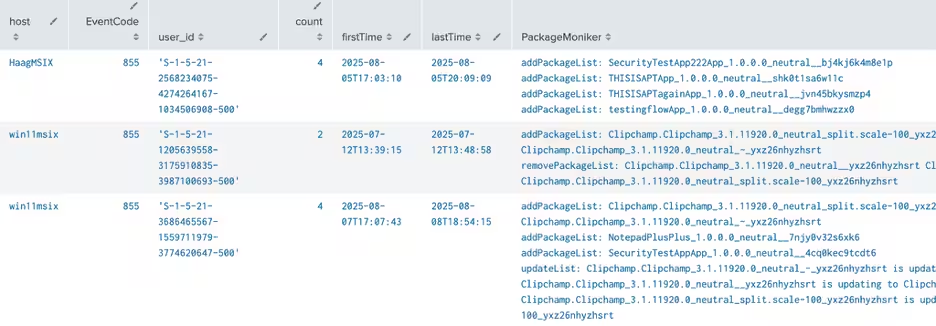
This detection identifies the installation of developer-signed MSIX packages that lack Microsoft Store signatures. All malicious MSIX packages observed in recent threat campaigns (including those from FIN7, Zloader/Storm-0569, and FakeBat/Storm-1113) were developer-signed rather than Microsoft Store-signed. Microsoft Store apps have specific publisher IDs containing '8wekyb3d8bbwe' or 'cw5n1h2txyewy', while developer-signed packages lack these identifiers. This detection focuses on EventID 855 from the Microsoft-Windows-AppXDeployment-Server/Operational logs, which indicates a completed package installation.
`wineventlog_appxdeploymentserver` EventCode=855
  NOT PackageMoniker IN ("*8wekyb3d8bbwe*","*cw5n1h2txyewy*")
  | stats count min(_time) as firstTime max(_time) as lastTime values(PackageMoniker) as PackageMoniker by host EventCode user_id
  | `security_content_ctime(firstTime)`
  | `security_content_ctime(lastTime)`
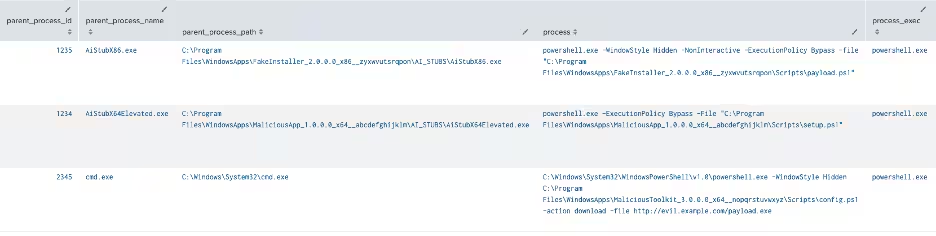
Windows Advanced Installer MSIX with AI_STUBS Execution
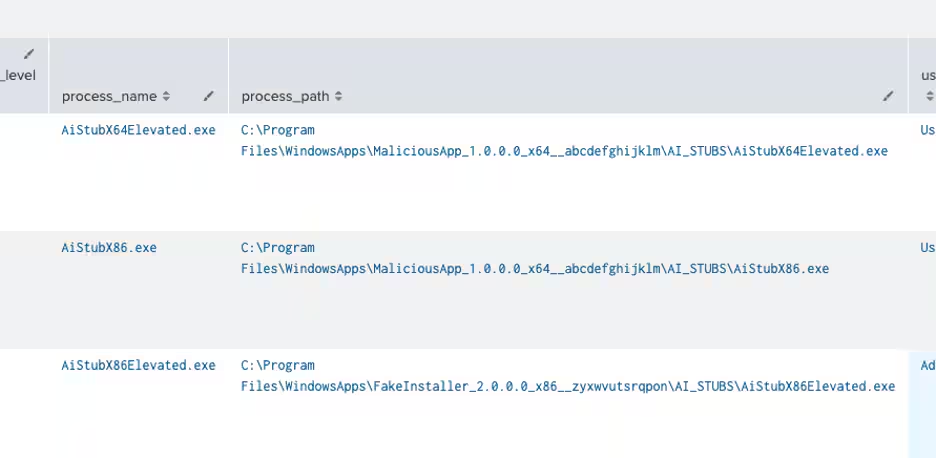
The following analytic identifies the execution of Advanced Installer MSIX Package Support Framework (PSF) components, specifically the AI_STUBS executables. This detection leverages data from Endpoint Detection and Response (EDR) agents, focusing on process paths and names. This activity is significant as adversaries have been observed packaging malicious content within MSIX files built with Advanced Installer to bypass security controls. These AI_STUBS executables (with original filename 'popupwrapper.exe') are hallmark artifacts of potentially malicious MSIX packages.
| tstats `security_content_summariesonly` count min(_time) as firstTime max(_time)
  as lastTime FROM datamodel=Endpoint.Processes where Processes.process_path IN ("*\\AI_STUBS\\AiStubX64Elevated.exe",
  "*\\AI_STUBS\\AiStubX86Elevated.exe", "*\\AI_STUBS\\AiStubX64.exe", "*\\AI_STUBS\\AiStubX86.exe") AND
  Processes.original_file_name="popupwrapper.exe" by Processes.action Processes.dest
  Processes.original_file_name Processes.parent_process Processes.parent_process_exec
  Processes.parent_process_guid Processes.parent_process_id Processes.parent_process_name
  Processes.parent_process_path Processes.process Processes.process_exec Processes.process_guid
  Processes.process_hash Processes.process_id Processes.process_integrity_level Processes.process_name
  Processes.process_path Processes.user Processes.user_id Processes.vendor_product
  | `drop_dm_object_name("Processes")`
  | `security_content_ctime(firstTime)`
  | `security_content_ctime(lastTime)`
Windows PowerShell Script From WindowsApps Directory
The following analytic identifies the execution of PowerShell scripts from the WindowsApps directory, which is a common technique used in malicious MSIX package execution. This detection leverages data from Endpoint Detection and Response (EDR) agents, focusing on process command lines and parent process paths.
| tstats `security_content_summariesonly` count min(_time) as firstTime max(_time)
  as lastTime FROM datamodel=Endpoint.Processes where Processes.process_name="powershell.exe" AND
  (Processes.parent_process_path="*\\WindowsApps\\*" OR Processes.process="*WindowsApps*-file *" OR
  Processes.process="*WindowsApps*.ps1*") by Processes.action Processes.dest
  Processes.original_file_name Processes.parent_process Processes.parent_process_exec
  Processes.parent_process_guid Processes.parent_process_id Processes.parent_process_name
  Processes.parent_process_path Processes.process Processes.process_exec Processes.process_guid
  Processes.process_hash Processes.process_id Processes.process_integrity_level Processes.process_name
  Processes.process_path Processes.user Processes.user_id Processes.vendor_product
  | `drop_dm_object_name("Processes")`
  | `security_content_ctime(firstTime)`
  | `security_content_ctime(lastTime)`
Hashes
MD5 Hashes (FakeBat MSIX)
Learn More
You can find the latest content about security analytic stories on research.splunk.com and in the Splunk ES Content Update app.
The Splunk Threat Research Team's MSIX Packing Abuse analytics story and blog provides comprehensive detection coverage for this activity and its attack patterns.
Feedback
Any feedback or requests? Feel free to put in an issue on GitHub and we'll follow up. Alternatively, join us on the Slack channel #security-research. Follow these instructions if you need an invitation to our Splunk user groups on Slack.
Contributors
We would like to thank Michael Haag for authoring this post, as well as the Splunk Threat Research Team (Lou Stella, Bhavin Patel, Rod Soto, Eric McGinnis, Raven Tait, Nasreddine Bencherchali, Teoderick Contreras, and Patrick Bareiss) for their contributions to the detection content and analysis.
Related Articles

Predicting Cyber Fraud Through Real-World Events: Insights from Domain Registration Trends

When Your Fraud Detection Tool Doubles as a Wellness Check: The Unexpected Intersection of Security and HR

Splunk Security Content for Threat Detection & Response: November Recap

Security Staff Picks To Read This Month, Handpicked by Splunk Experts

Behind the Walls: Techniques and Tactics in Castle RAT Client Malware

AI for Humans: A Beginner’s Field Guide

Splunk Security Content for Threat Detection & Response: November 2025 Update

Operation Defend the North: What High-Pressure Cyber Exercises Teach Us About Resilience and How OneCisco Elevates It
