Breaking Trust in MMC: XMLDriven Malicious Loader via .MSC Files
Security Splunk Threat Research Team , Teoderick ContrerasMalicious XML Runner Loaders are an increasingly common technique in modern attacks, leveraging trusted file formats to deliver and execute payloads dynamically. This method evolved from the abuse of .NET serialization mechanisms, particularly BinaryFormatter, which allows attackers to embed objects that execute when deserialized.
In the case of MMC (.msc) and XML-based configuration files, the XML Runner often has multiple stages, and BinaryFormatter represents one key stage where the payload is serialized before execution. Exploit/XML.CVE-2024-43572 is a prime example of this multi-stage approach, enabling remote code execution when the crafted file is opened.
The Splunk threat Research Team (STRT) examines XML Runner Loaders in this blog, mapping their MITRE ATT&CK tactics and techniques and offering practical detection strategies using Splunk.
MMC XML File:
Microsoft Management Console (.msc) files are legitimately used by administrators to manage and configure Windows systems through a unified interface. An .msc file defines which snap-ins are loaded, such as Event Viewer, Services, Task Scheduler, or Certificates and preserves console layout, permissions, and view settings.
This allows IT teams to create reusable, role-specific management consoles tailored for helpdesk staff, system administrators, or auditors. Organizations often deploy custom .msc files to standardize administrative workflows, reduce configuration errors, and limit access to only required management functions.
.msc files rely on trusted Microsoft components and COM-based snap-ins, they are widely used in enterprise environments for daily operations, troubleshooting, and system monitoring.
Windows Power users can generate an xml .mmc file via mmc.exe Windows application. By clicking File->Add/Remove Snap-In …

By saving a snap-in to a file, you generate an XML-based .msc file that can be used to deploy the intended Windows system configuration.

Interestingly, an .msc file can also embed binary resources such as images (e.g., icons or BMP files) encoded in Base64. For example, Figure 03 below shows a portion of a saved console2.msc file from this example, highlighting an embedded BMP file stored in Base64 encoding.

However, threat actors and malware authors can abuse .msc files to hide and execute malicious payloads on targeted hosts or systems.
Malicious XML Runner Analysis:
XML-based execution and weaponized MMC files are particularly attractive because they exploit built-in interpreters and administrative utilities that were never designed with hostile use in mind. Security controls often treat these files as configuration or management artifacts rather than active code, giving attackers a reliable way to bypass application whitelisting, email filtering, and endpoint defenses.
Spear phishing Attachment: T1566.001
This malicious .msc file is designed to trick users into opening it by presenting itself as a set of helpful instructions. The lure takes advantage of the current interest in AI-related topics, which are commonly associated with legitimate tools, guides, and configuration steps. Because AI content feels timely, useful, and often technical, users are more likely to trust it and interact with it without questioning its legitimacy.
To make the file appear even more convincing, it is disguised with a PDF icon, giving it the look of a harmless document. The package also includes an instructions.txt file that walks the user through specific steps intended to bypass security controls that would normally block the execution of .msc files. Together, these elements combine social engineering and visual deception to lower suspicion and increase the chances that the malicious payload is executed.

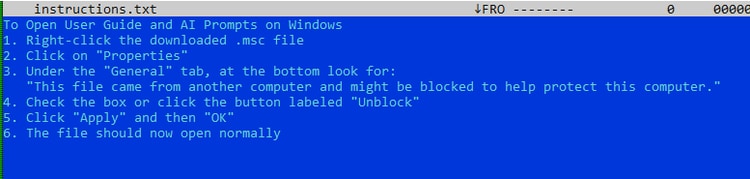
In the following sections, STRT will walk through how the XML content is decoded and decompressed to reveal the hidden payload embedded within the code that is ultimately executed.
Data Encoding: T1132
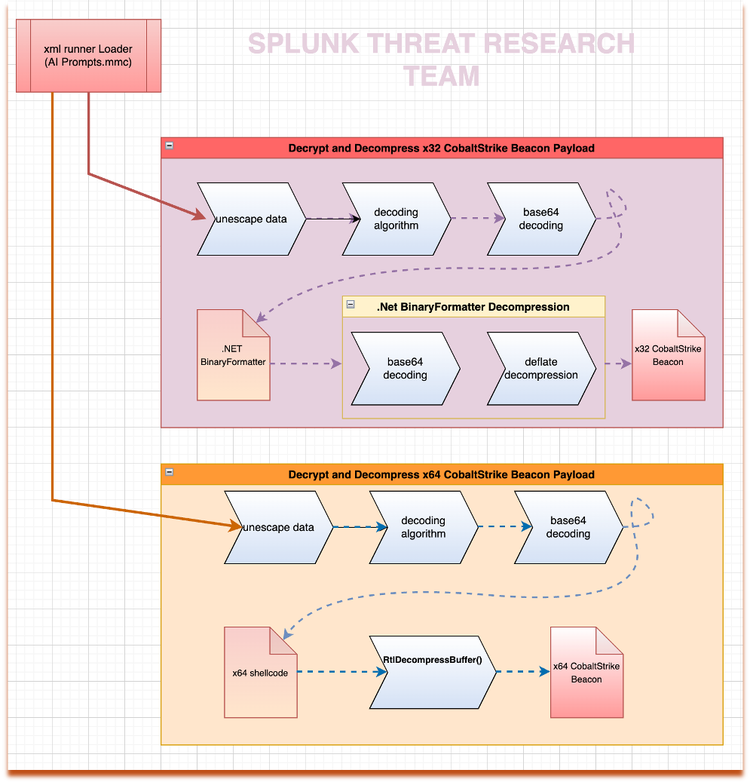
This malicious XML loader uses three distinct layers of data encoding to conceal a serialized payload embedded within its code. The first layer employs escape encoding, a technique used to safely represent special characters, so they are not misinterpreted by parsers, interpreters, or protocols when data is embedded in formats such as XML, JSON, HTML, or scripts.

JavaScript: T1059.007
After decoding the first layer, STRT uncovered the next stage of execution, which consists of a JavaScript component. This script is responsible for decoding a large block of encoded data stored in the “TVug” variable using a specific decoding function named “CsxNzKO()”.
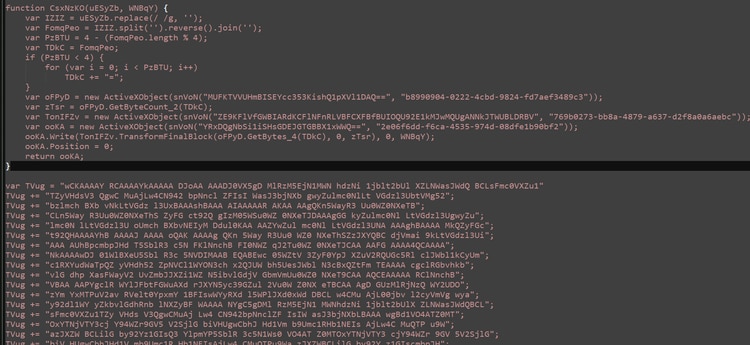
After decoding the data contained in the “TVug” variable, the resulting output is a Base64-encoded string. Decoding this string yields a .NET BinaryFormatter serialized object. BinaryFormatter serialization embeds detailed type of information, including fully qualified class names and assembly references, allowing the .NET runtime to reconstruct complex object graphs during deserialization. Because BinaryFormatter supports polymorphic object creation, this serialized payload may trigger the execution of embedded methods or gadget chains when deserialized, making it a commonly abused format in malicious .NET applications.

Analysis of the serialized .NET object revealed an embedded payload that is both Base64-encoded and compressed using the DEFLATE algorithm. By decoding the Base64 data contained within the serialized object and decompressing the resulting stream, we successfully extracted a 32-bit Cobalt Strike Beacon, as illustrated in Figure 10 (dec2.bin, the extracted payload).

In addition to the hidden 32-bit Cobalt Strike Beacon payload, STRT identified another encoded data blob stored in the “qqjdQL” variable. The first three decoding layers are identical to those described earlier and follow the same execution flow shown in Figure 06. Figure 11 shows a screenshot of this encoded data being initialized.

After the three-layer decoding process was executed, STRT successfully extracted a 64-bit shellcode, as shown in the screenshot in Figure 12. Further analysis revealed that this shellcode invokes the RtlDecompressBuffer() Windows API to decompress an additional block of code. The compressed data is visible in the “Dump 2” window tab in Figure 13, while the decompressed output appears in the “Dump 1” window tab. The resulting decompressed payload was identified as a 64-bit Cobalt Strike Beacon.

Figure 12: x64 Shellcode Loader

Process Injection: T1055
The DLLHOST.exe process spawned by mmc.exe was not part of normal system activity and is assessed to have been created because of shellcode execution. This shellcode was used to inject an x64 Cobalt Strike Beacon payload into the newly created process, establishing a post-exploitation foothold. The injected beacon was configured to communicate with the command-and-control (C2) server at solarixtechnology[.]com, as shown in Figure 13. At the time of analysis, the C2 infrastructure was no longer accessible, preventing further observation of live beaconing activity.

Figure 13: x64 Cobalt Strike Beacon Process Injection
In the next section, we present several Splunk detections designed to identify known techniques used by this malicious loader.
Detections:
Windows Execution of Microsoft MSC File In Suspicious Path
The following analytic detects when a Microsoft Management Console (MMC) process executes an .msc file on a Windows system. While .msc files are legitimate components used for system administration, unexpected execution of these files by non-administrative processes or in unusual contexts can indicate malicious activity, such as living-off-the-land attacks, persistence mechanisms, or automated administrative abuse.
| tstats `security_content_summariesonly` count min(_time) as firstTime max(_time)
as lastTime from datamodel=Endpoint.Processes
where (Processes.process_name=mmc.exe)
AND Processes.process = "*.msc*"
AND Processes.process IN (
"*\\PerfLogs\\*",
"*\\programdata\\*"
"*Recycle.bin*",
"*\\Download*",
"*\\temp\\*",
"*\\Users\\Administrator\\Music\\*",
"*\\Users\\Default\\*",
"*\\Users\\Public\\*",
"*\\Users\\Administrator\\Music\\*",
"*:\\Windows\\Prefetch\\*",
"*:\\Windows\\Cursors\\*",
"*:\\Windows\\INF\\*"
"*:\\Windows\\debug\\*",
"*:\\Windows\\fonts\\*",
"*:\\Windows\\Media\\*",
"*:\\Windows\\repair\\*",
"*:\\Windows\\servicing\\*",
)
AND NOT (Processes.process IN ("*C:\\Windows\\System32\\eventvwr.msc*", "*C:\\Windows\\System32\\certmgr.msc*"))
by Processes.action
Processes.dest Processes.original_file_name Processes.parent_process Processes.parent_process_exec
Processes.parent_process_guid Processes.parent_process_id Processes.parent_process_name
Processes.parent_process_path Processes.process Processes.process_exec Processes.process_guid
Processes.process_hash Processes.process_id Processes.process_integrity_level Processes.process_name
Processes.process_path Processes.user Processes.user_id Processes.vendor_product
| `drop_dm_object_name(Processes)`
| `security_content_ctime(firstTime)`
| `security_content_ctime(lastTime)`
| `windows_execution_of_microsoft_msc_file_in_suspicious_path_filter`

Figure 15: Windows Execution of Microsoft MSC File In Suspicious Path Detection
Windows MMC Loaded Script Engine DLL
The following analytic identifies when a Windows process loads scripting libraries like jscript.dll or vbscript.dll to execute script code on a target system. While these DLLs are legitimate parts of the operating system, their use by unexpected processes or in unusual contexts can indicate malicious activity, such as script-based malware, living-off-the-land techniques, or automated attacks.
`sysmon` EventCode=7 process_name = mmc.exe ImageLoaded IN ("*\\jscript.dll", "*\\vbscript.dll", "*\\jscript9.dll")
| fillnull
| stats count min(_time) as firstTime max(_time) as lastTime
by Image ImageLoaded dest loaded_file loaded_file_path original_file_name
process_exec process_guid process_hash process_id process_name process_path service_dll_signature_exists
service_dll_signature_verified signature signature_id user_id vendor_product
| `security_content_ctime(firstTime)`
| `security_content_ctime(lastTime)`
| `windows_mmc_loaded_script_engine_dll_filter`

Mmc LOLBAS Execution Process Spawn
The following analytic identifies `mmc.exe` spawning a LOLBAS execution process. It leverages data from Endpoint Detection and Response (EDR) agents, focusing on process creation events where `mmc.exe` is the parent process. This activity is significant because adversaries can abuse the DCOM protocol and MMC20 COM object to execute malicious code, using Windows native binaries documented by the LOLBAS project.
| tstats `security_content_summariesonly` count min(_time) as firstTime max(_time)
as lastTime from datamodel=Endpoint.Processes where (Processes.parent_process_name=mmc.exe)
(Processes.process_name IN ("Regsvcs.exe", "Ftp.exe", "OfflineScannerShell.exe",
"Rasautou.exe", "Schtasks.exe", "Xwizard.exe", "Dllhost.exe", "Pnputil.exe", "Atbroker.exe",
"Pcwrun.exe", "Ttdinject.exe","Mshta.exe", "Bitsadmin.exe", "Certoc.exe", "Ieexec.exe",
"Microsoft.Workflow.Compiler.exe", "Runscripthelper.exe", "Forfiles.exe", "Msbuild.exe",
"Register-cimprovider.exe", "Tttracer.exe", "Ie4uinit.exe", "Bash.exe", "Hh.exe",
"SettingSyncHost.exe", "Cmstp.exe", "Mmc.exe", "Stordiag.exe", "Scriptrunner.exe",
"Odbcconf.exe", "Extexport.exe", "Msdt.exe", "WorkFolders.exe", "Diskshadow.exe",
"Mavinject.exe", "Regasm.exe", "Gpscript.exe", "Rundll32.exe", "Regsvr32.exe", "Msiexec.exe",
"Wuauclt.exe", "Presentationhost.exe", "Wmic.exe", "Runonce.exe", "Syncappvpublishingserver.exe",
"Verclsid.exe", "Infdefaultinstall.exe", "Explorer.exe", "Installutil.exe", "Netsh.exe",
"Wab.exe", "Dnscmd.exe", "At.exe", "Pcalua.exe", "Msconfig.exe")) by Processes.action
Processes.dest Processes.original_file_name Processes.parent_process Processes.parent_process_exec
Processes.parent_process_guid Processes.parent_process_id Processes.parent_process_name
Processes.parent_process_path Processes.process Processes.process_exec Processes.process_guid
Processes.process_hash Processes.process_id Processes.process_integrity_level Processes.process_name
Processes.process_path Processes.user Processes.user_id Processes.vendor_product
| `drop_dm_object_name(Processes)` | `security_content_ctime(firstTime)` | `security_content_ctime(lastTime)`
| `mmc_lolbas_execution_process_spawn_filter`

IOCs:
Learn More
This blog aims to help security analysts, blue teamers, and Splunk users identify malicious XML Runner Loaders activity by providing insights into the tactics, techniques, and procedures (TTPs) employed by threat actors. You can implement the detections in this blog using the Enterprise Security Content Updates app or the Splunk Security Essentials app. To view the Splunk Threat Research Team's complete security content repository, visit research.splunk.com.
Feedback
Any feedback or requests? Feel free to put in an issue on Github and we’ll follow up. Alternatively, join us on the Slack channel #security-research. Follow these instructions If you need an invitation to our Splunk user groups on Slack.
Contributors
We would like to thank Teoderick Contreras for authoring this post and the entire Splunk Threat Research Team for their contributions: Michael Haag , Bhavin Patel, Rod Soto, Patrick Bareiss, Raven Tait, AJ King , Nasreddine Bencherchali, Jose Hernandez and Lou Stella.
Related Articles

Detecting HAFNIUM Exchange Server Zero-Day Activity in Splunk