That Was Easy! Manage Lookup Files and Backups With the Splunk App for Lookup File Editing
With the Splunk® App for Lookup File Editing, Splunk users can add and edit lookup files within Splunk Cloud or Splunk Enterprise. While adding and editing lookup files, users also need to manage the lookup files and their backups in an efficient way to help avoid hampering the health and performance of their technology stack. Lookup files and backups impact stack health by taking up significant disk space, and the 4.0.1 release of the Splunk App for Lookup File Editing helps users mitigate these issues with new features such as backup size limits and dashboards for tracking backup size.
Total Backup Size Limit and User-Selected Backup
With the Splunk App for Lookup File Editing 4.0.1, users can set a total backup size limit for each CSV file lookup. Users can now manage the size of backups for each lookup file so that they can organize backups and mitigate the potential issue of low disk space. When the backup reaches the limit set by a user, the user can either edit the total backup limit size or navigate to the backup manager page where they can delete unwanted backups and organize their existing backups. When the available disk space has less than 10% remaining, users may be prompted to manage and free up some of their disk space in the backup manager.
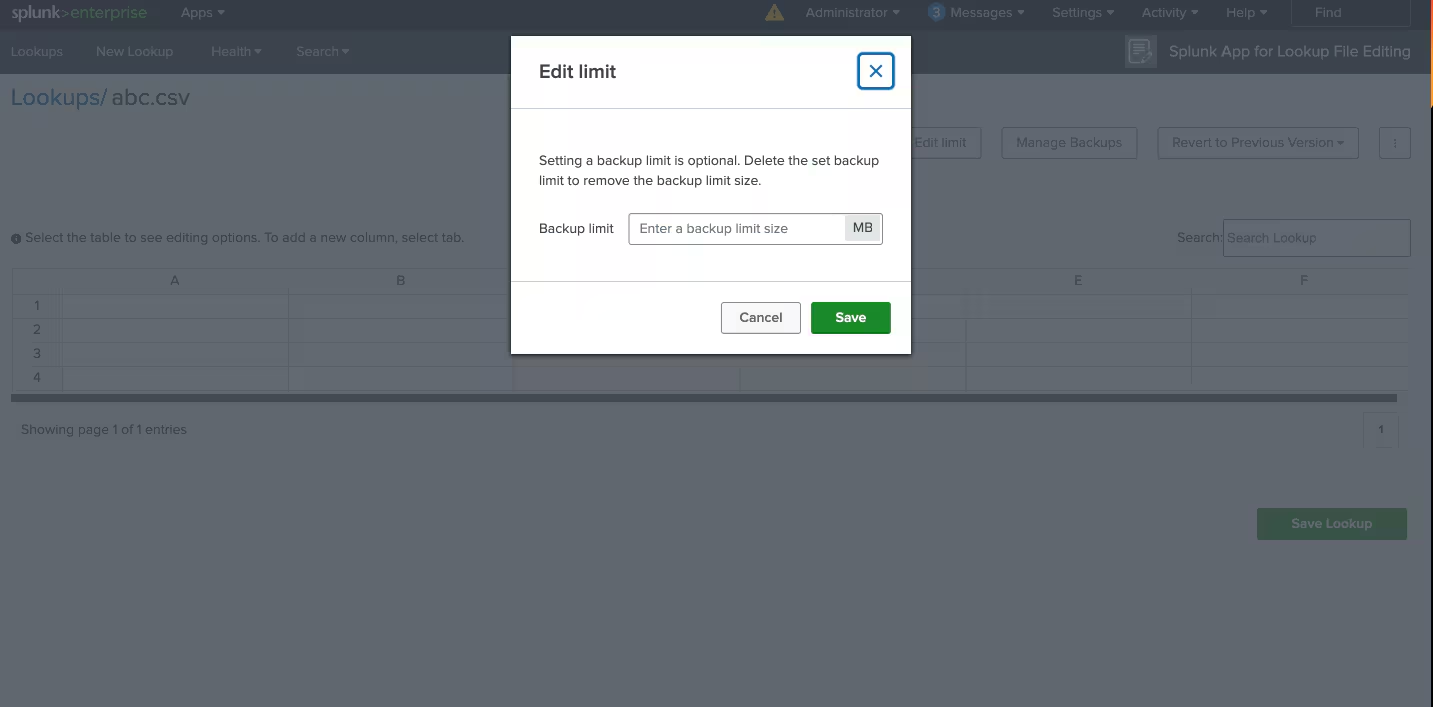
Another development since the earlier version of the app is the option to save a backup before saving changes to a lookup file. Before the 4.0.1 release, the app automatically saved a backup for every change made to a lookup file. While some users prefer this, others prefer to save backups as they deem necessary. They want to limit unwanted backups that could contribute to lower disk space. With the 4.0.1 release, users can now save backups at their own discretion when they save changes to a lookup file.
Manage Lookups and Backups from the Overview Dashboard

To free up disk space, users might want to see which lookup files and their respective backups take up the most space. The 4.0.1 release of the Splunk App for Lookup File Editing includes an overview dashboard with metrics and visualizations that can help users identify troublesome lookups such as ones that get filled faster, ones with multiple backups, and ones that need to be cleaned up. This dashboard view also shows trends that users can track on a monthly basis.
Updates to Lookup Page
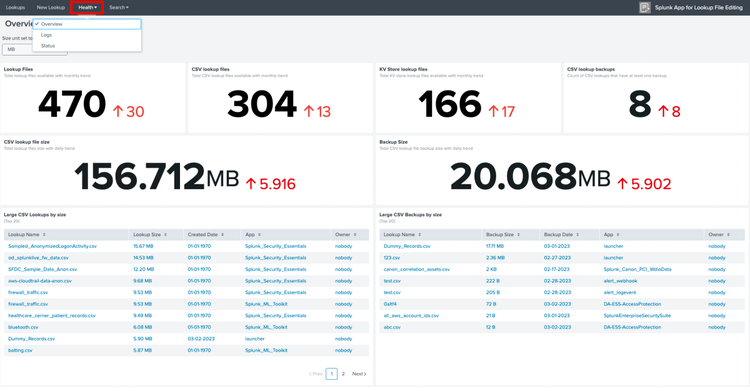
Before the 4.0.1 release, the Splunk App for Lookup File Editing automatically saved a backup for every change made to a lookup file, but users could not see the total number of backups per lookup file. With added tooltips on the lookup page in the 4.0.1 release, users can now see the number of backups and the total backup size for a lookup. Additionally, users can delete backups using the ‘Manage Backups’ feature and find the size of the lookup in the lookup tooltip.
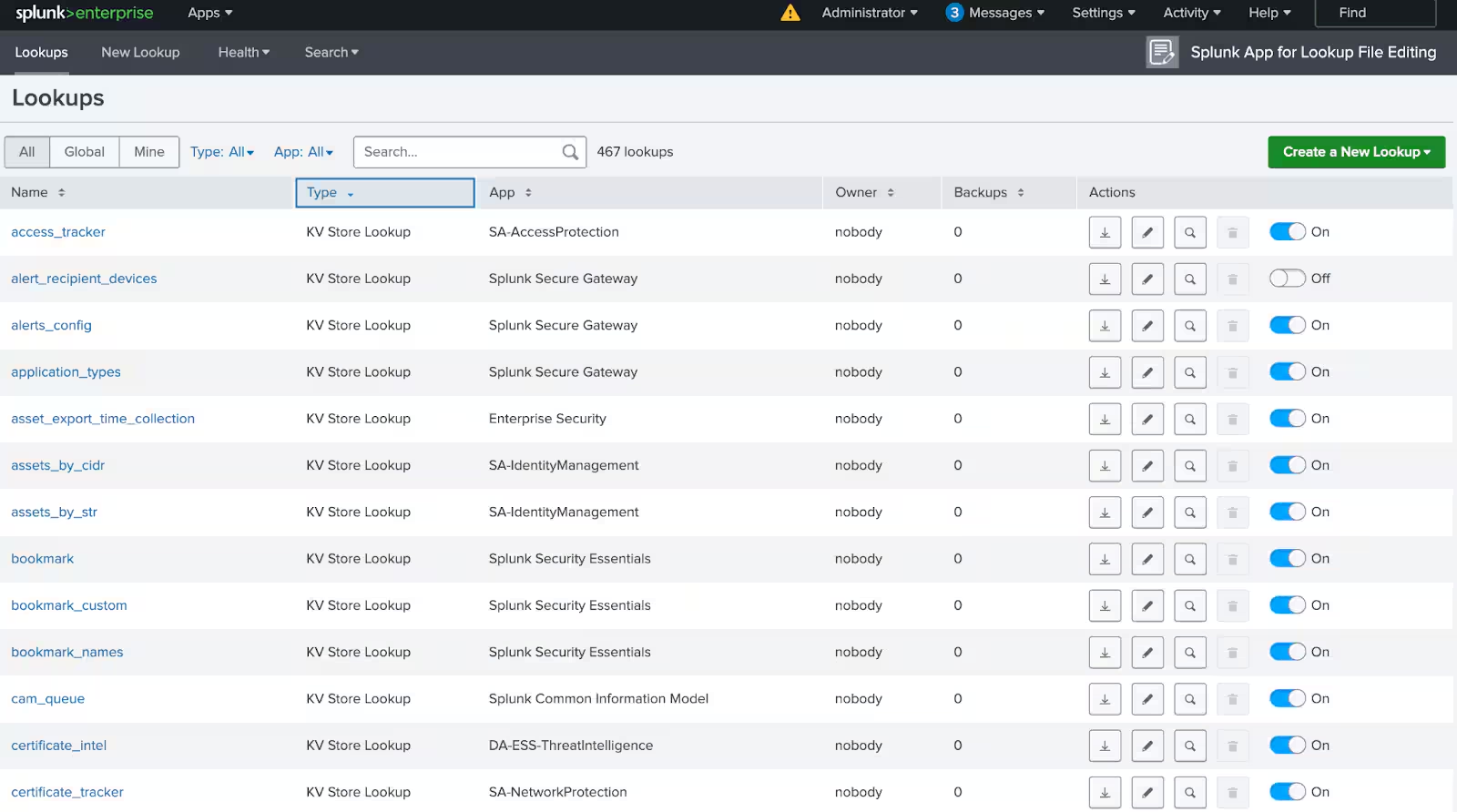
The actions column on the lookup page also has new icon buttons to create a more intuitive and cleaner user interface. Users can now turn off or turn on a KV store lookup with a toggle switch, a user interface change that is designed to help make the app capabilities as easy as possible for users.
More Updates and Reasons to Upgrade to the Latest Version
Finally, users can now create and modify dashboards from the search tab using the updated Splunk dashboard framework. Now, users can filter logs by severity and see increased detail on the logs page. Simply select a severity type for your logs and filter the information on the dashboard. The dashboard panels include Logs by Severity (over time), Log Severity, and Latest Log.
Splunk App for Lookup File Editing 4.0.1 is a free app available today in both Splunk Cloud and Splunk Enterprise (on-prem) environments. To learn more check out our What’s New documentation.
Happy Splunking!
Related Articles

Predicting Cyber Fraud Through Real-World Events: Insights from Domain Registration Trends

When Your Fraud Detection Tool Doubles as a Wellness Check: The Unexpected Intersection of Security and HR

Splunk Security Content for Threat Detection & Response: November Recap

Security Staff Picks To Read This Month, Handpicked by Splunk Experts

Behind the Walls: Techniques and Tactics in Castle RAT Client Malware

AI for Humans: A Beginner’s Field Guide

Splunk Security Content for Threat Detection & Response: November 2025 Update

Operation Defend the North: What High-Pressure Cyber Exercises Teach Us About Resilience and How OneCisco Elevates It
