Parsing Domains with URL Toolbox (Just Like House Slytherin)
One of the most popular Splunk security apps of all time, URL Toolbox’s URL parsing capabilities have been leveraged by thousands who want to separate subdomain, domain, and top level domain (TLD) from a URL. This tool is so powerful, we must break this blog into two separate posts! Enough with the intro though — let’s talk parsing.
(Part of our Threat Hunting with Splunk series, this article was originally written by Dave Veuve. We’ve updated it recently to maximize your value.)
How to split URLs and domains with URL toolbox
To be successful with URL-based or domain-based security analytics (we will have many examples in our next hunting blog post!), you need to be able to parse URLs and domains from your data. Many of us regex fiends think “Oh, that’s just field extraction, so what do I need an app for?”
Turns out that’s virtually impossible!
Accurately parsing international domains is particularly difficult because it requires knowledge of nearly all special TLDs in the world (e.g., .com, .co.uk). That may not seem too tough on the surface but did you know that k12.al.us is a TLD according to Mozilla? How about .இலங்கை? On top of the TLD issue, additional complexity is introduced with ports, usernames and passwords found in a URL.
Fortunately for us, that’s all built into the URL Toolbox! Here is a simple search to separate domains from TLDs located in PAN logs:
index=pan_logs
 | eval list="mozilla"
 | `ut_parse_extended(url,list)`
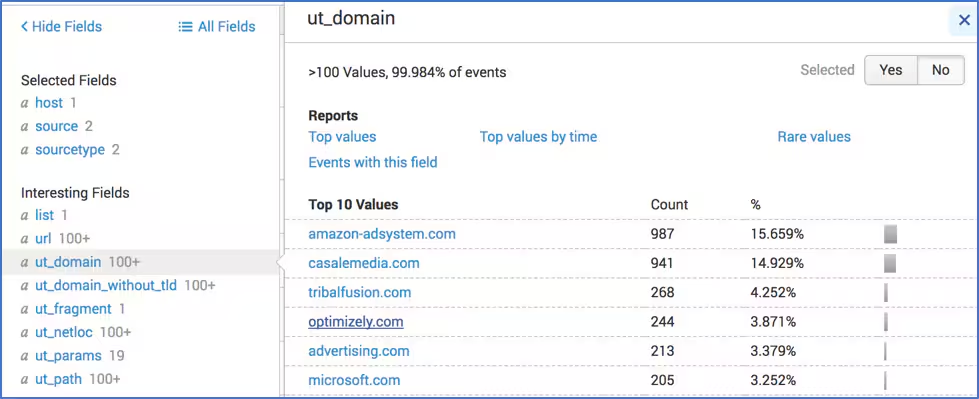
This is a good time to point out that because URL Toolbox isn’t a custom search command, you get access to all its power via macros (so remember your `ticks`)! One of the most commonly used macros in URL Toolbox is called `ut_parse_extended(2)`. It parses your URL and passes the data to multiple different fields prefaced with ut_.
How does ut_parse_extended look when you use it? Let’s take a look at some pseudo code:
| eval list="mozilla"
| ut_parse_extended(url,list)`
| <additional Splunk commands like stats, sort, table, etc>
You’ll notice that we're bringing two fields into the ut_parse_extended macro. The first is the URL, which is pretty straightforward, but the second is a field called “list.” That’s part of the magic of URL Toolbox—that “list” field is the catalog of different TLDs that we are looking for.
There are a couple of common lists that exist in the world (including an official one from IANA), but if we’re trying to differentiate the domain from the top level domain (TLD), the most popular source of truth is from Mozilla. Mozilla’s list of TLDs not only has “classic” TLDs like .com and .co.uk (which is bizarrely missing from IANA), but it will also include items like .edu.tj (because you never know when someone may attack you from university websites in Tajikistan).
The important takeaway is that you need to use eval to make a field called “list” with the value “mozilla” or “*” (which searches all of the TLD lists available) before you actually call ut_parse_extended.
Here’s another example:
index=pan_logs
| head 1
| eval list="mozilla"
| `ut_parse_extended(url,list)`
| table url ut*
| transpose
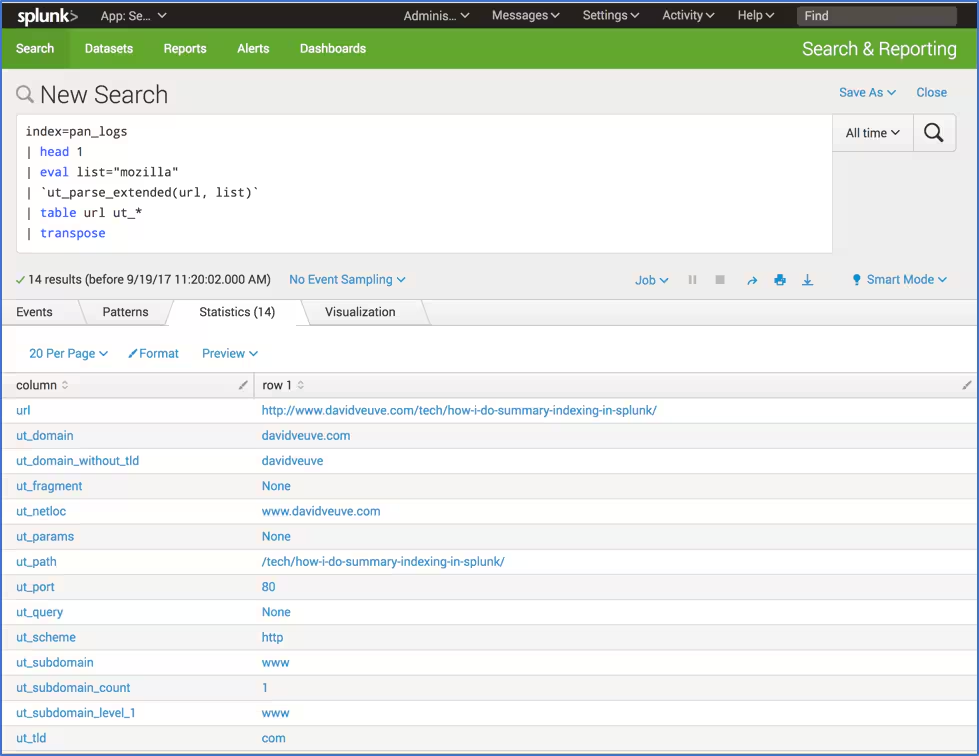
In this example, we use the head command to return a single record. We then use the `ut_parse_extended(url, list)` macro to parse the URL based on the Mozilla TLD list.
Notice how we then create a table and flip it with the transpose command? That allows us to see all of the values URL Toolbox creates from parsing. You don’t have to do this, but it makes it easier to understand the new fields that URL Toolbox is creating for you as you begin hunting through your data.
Many people don’t realize this, but you can use URL Toolbox macros on domains that aren’t in a URL. Here is an example from the Splunk Security Essentials app, where the domain is extracted via the rex command from an email:
index=email mail from
| stats count by Sender
| rex field=Sender "\@(?<domain_detected>.*)"
| stats sum(count) as count by domain_detected
| eval list="mozilla"
| `ut_parse_extended(domain_detected, list)`
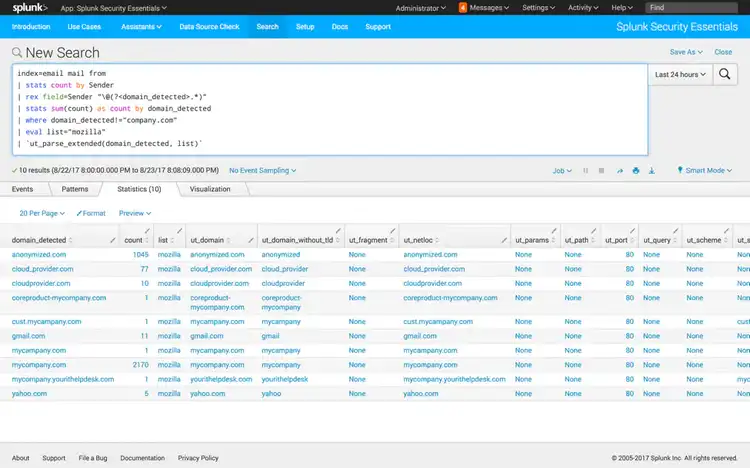
The world is your oyster with the URL Toolbox. If a field has a domain with a TLD in it — whether email, DNS, web, or others — you can use the URL Toolbox to extract goodness from it!
Analyzing parsed URLs
Parsing URLs is important and every analyst needs to start with that technique, but it’s not going to separate out the bad URLs from the good URLs, right? Well, fortunately we have a few additional tricks up our sleeve.
In the URL Toolbox, there is a suite of analysis tools that will help you find bad guys with mathematical accuracy. The most used analytic functions of URL Toolbox are Shannon Entropy and Levenshtein distance. Shannon Entropy allows you to calculate the randomness of a string so that you can find algorithmically-generated domain names, and the Levenshtein distance calculation shows bad guys phishing via typo-squatting (for example, campany.com vs company.com). You can read further about entropy in this blog from Ryan Kovar. For more details, stay tuned for our next post where we take a deeper dive into using these functions.
And as always: Happy Hunting :-)
Related Articles

SUPERNOVA Redux, with a Generous Portion of Masquerading

Monitoring Pulse Connect Secure With Splunk (CISA Emergency Directive 21-03)

Elevate Your Cloud Security Posture with Splunk and Google Cloud

The Data-Centric Revolution: Restoring Sanity to Enterprise Security Operations

Introducing Splunk Attack Range v1.0

Detecting Clop Ransomware

Endpoint Security Data Collection Strategy: Splunk UF, uberAgent, or Sysmon?

Taking Automation Beyond the SOC With Advanced Network Access Control
