Detecting IcedID... Could It Be A Trickbot Copycat?

IcedID targets financial institutions across different countries including banks, payment card providers, and e-commerce sites. IcedID has also been observed deployed in conjunction with other malware payloads such as Valak, Qakbot, Conti Ransomware. It is clear from studying past campaigns that the actors behind IcedID have expanded beyond banking information in order to extend similar features and coverage as other popular carriers such as Emotet or trickbot and by doing so current iterations of IcedID look more like a copycat or maybe even a successor.
Spear Phishing Documents
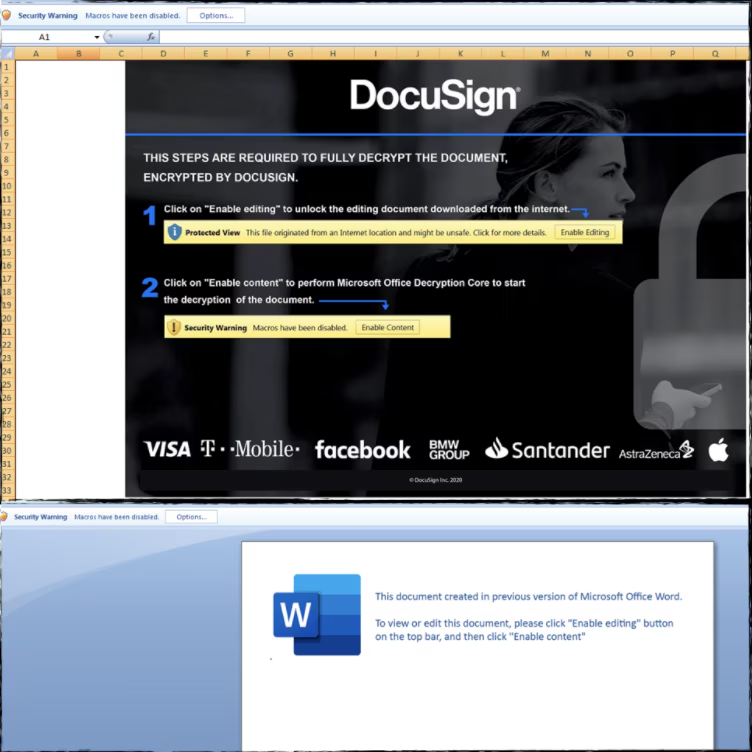
In a recent campaign, malicious actors were observed using a document builder to simulate legitimate DocuSign documents and embedding exploitation code for CVE-2017-8570 to trigger the installation of IcedID. These documents were delivered via spear-phishing technique.
Below is the screenshot of the phishing campaign (Word and Excel) that will download the IcedID downloader as soon as the user runs the malicious macro document in the targeted host.
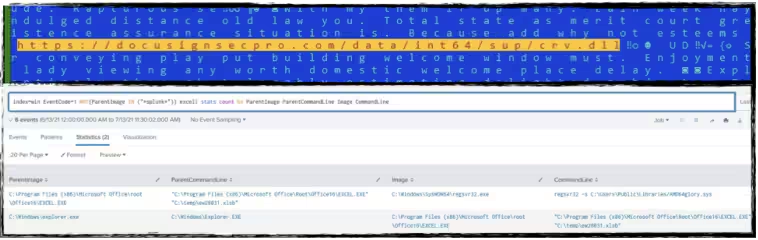
This malicious document will download the IcedID loader then drop it as a “.sys” or “.jpg” file and execute it using regsvr32.exe windows application with “-s” parameter like the screenshot below.
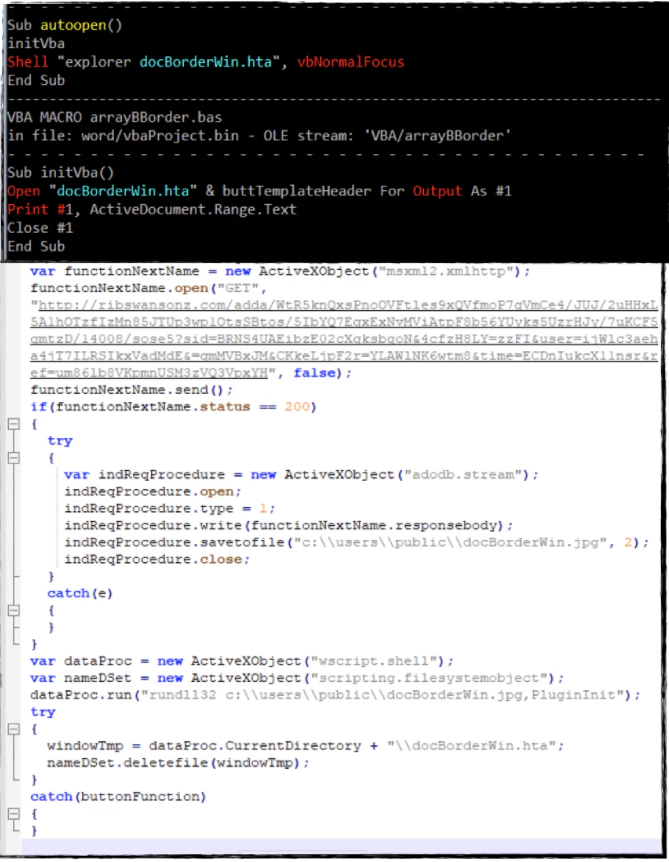
Other exploitation vectors include running an obfuscated HTML application (.hta) to download the DLL loader as a .jpg file then execute it with rundll32.exe windows application with the “PluginInit” parameter. Below is the screenshot of the macro code that executes the .hta file and the de-obfuscated .hta script shows how it downloads and executes the first payload.
IcedID Initial Downloader (Stage 1)
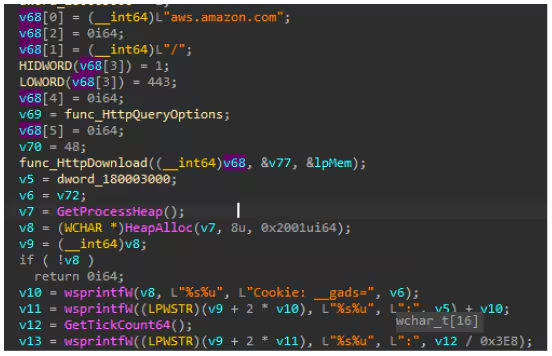
The initial IceID loader binary will decrypt another .dll file in memory to download the 2nd stage payload (png or .dat) files. This is done by initially connecting to aws.amazon.com to check the internet connection and to prepare its initial C2 communication.
IcedID Payload Loader - PhotoLoader and “License.dat” decrypter) (Stage 2)
Once the second stage payload is downloaded, It will load a shellcode or headless executable file which is the main IcedID bot. This shellcode can be extracted either in .png file format (payload obfuscated by steganography) or gzip payload format containing a “license.dat” file.
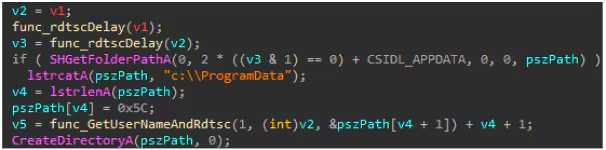
The next code snippet below shows the .dll in memory locating the .png payload in a randomly generated directory based on the user name of the compromised machine created in either %appdata% or “C:\Programdata”. If the .png file payload is found in either of those two folder paths, it will decrypt the shellcode from the image file if not it tries to download from the C&C server.
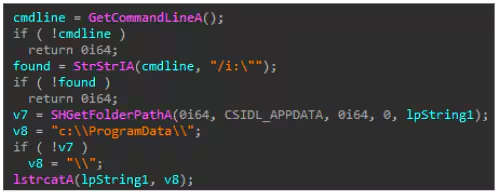
For the gzip file, It uses a similar code to locate the “license.dat” payload, aside from having an additional parameter check “/i” in the syntax line, as seen in the screenshot below.
IcedID .PNG Steganography and “License.dat” Payload
The PNG payload uses steganography to hide the shellcode inside the PNG. The encrypted shellcode and the 8 bytes rc4 decryption keys are placed in the IDAT chunk type structure of the PNG header file. A python script was developed (IceIdPNGShellcodeExtractor.py) to automatically extract the shellcode on the said payload.
For the “license.dat” IcedID payload, it will decrypt it using its customized decryption algorithm using its last 16 bytes as the decryption key. In this case, the IceIdDecrypt.py tool can be used to decrypt license.dat and do a static analysis of the file.
IcedID Core/Main Bot (Stage 3)
The shellcode or the core IcedID BOT will be injected in either spawned svchost.exe system processor in msiexec.exe or within the memory space of a rundll32 process that loads the .dll shellcode decryptor. After that, it will hook some native API, create a mutex as a mark of its infection, and make sure only one instance is running. Below are other notable behaviors seen in this main bot.
Hook Browser:
This shellcode will try to hook common browsers like firefox and chrome to steal credentials, cookies, and sessions saved. The screenshot below shows what it looks like in firefox and chrome browsers in the compromised machine.

Desktop Screenshots:
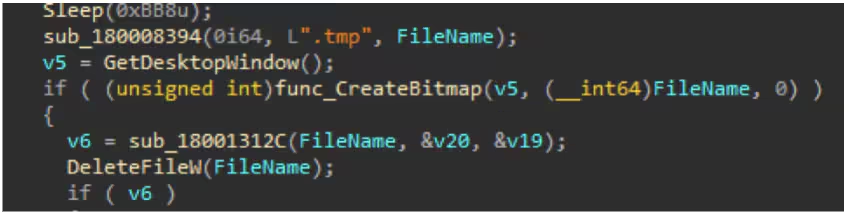
This code displays the ability to take screenshots of the desktop window of the compromised host. This bitmap image file format will be saved in the temp folder with a .tmp file extension to blend on normal .tmp files activities.
Passff.tar and cookie.tar
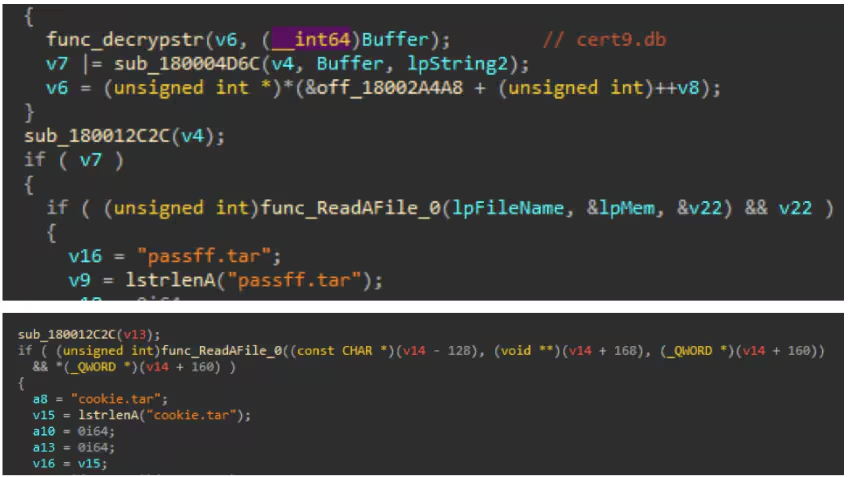
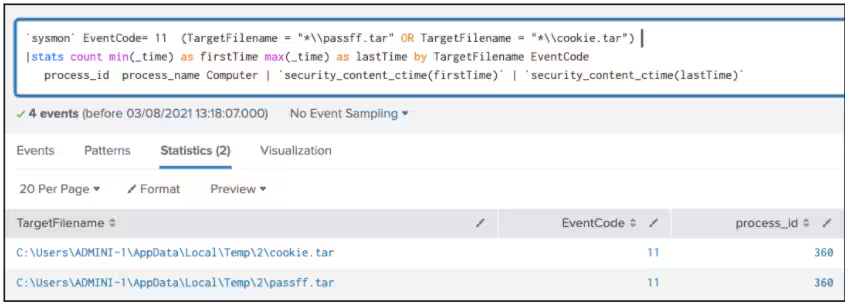
It will also create files named “passff.tar” for the browser history and “cookie.tar” for the browser cookies that may contain stolen browser information.
Stealing Browser Information
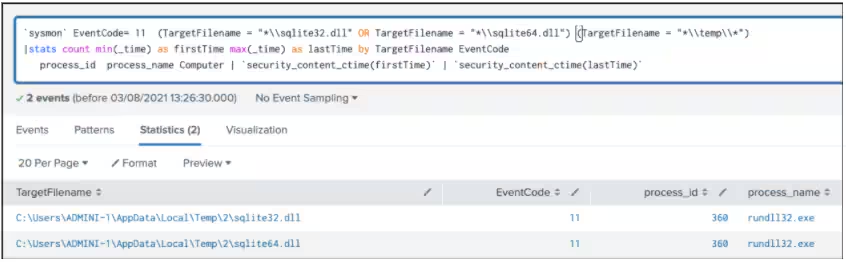
IcedID will also download and load a “sqlite64.dll” in the %temp% folder that will be needed for parsing firefox and chrome browser database to extract information. Below are SQLite commands decrypted in the shellcode to harvest autofill information from browser .db like cookies, password, company_name, street_address, city, state, zip code, country_code, phone number, user full name, and credit card information.
UAC Bypass
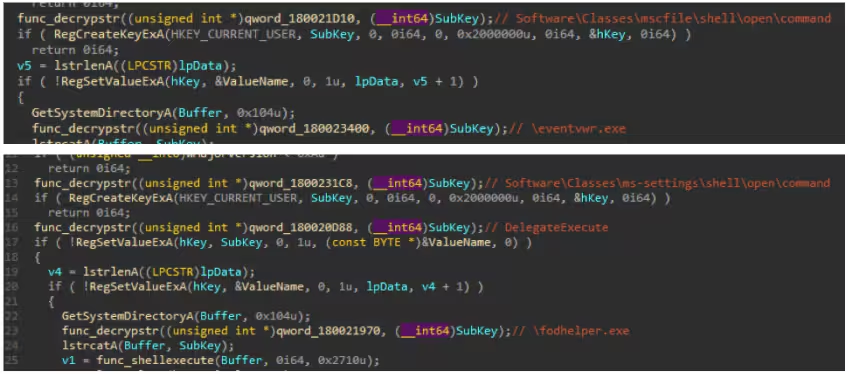
The following are two functions to Bypass UAC (User Account Control). The Eventvwr and the fodhelper UAC bypass technique.
Harvest Email/Outlook Information and Browser Password Storage
Exfiltration tasks also include querying several registry keys related to email client Microsoft Outlook to steal user profiles, email signatures, and stored password folders through registry and ActiveMail Partners. “%u” is the outlook version installed in the machine.
Recon AV Product
The following PowerShell commands detect Antivirus Product information.
Other Execution and RemoteThread Execution
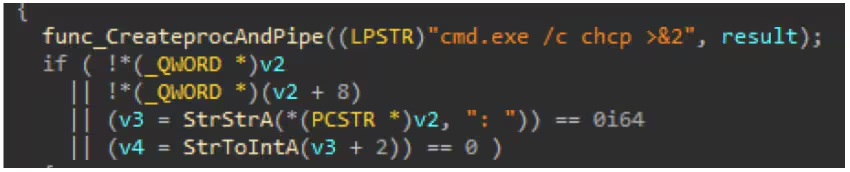
We also found chcp command execution and passage of the result to a created pipe. The result of this command line may give the locale country region of the compromised host base on its result. For example, the 437 result means “default code page in the US”.
Another regsvr32 execution with “/s” parameter to execute DLL payload downloaded from its C2 server, copy of itself or decrypted DLL that was dropped in the compromised host.

Code injection into a cmd.exe process.

Persistence
IcedID creates a scheduled task entry to download the file that will decrypt and load the license.dat file using a process spawned via the Rundll32 application, as seen in the screenshot below.
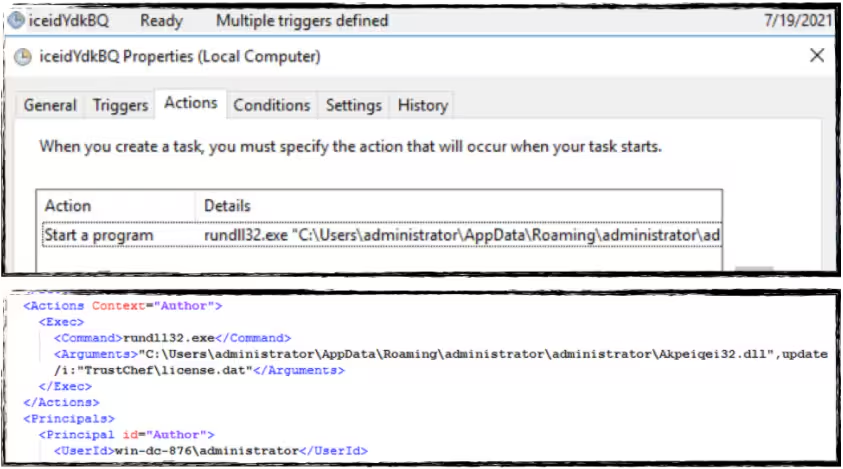
In addition to using scheduled tasks for spawning processes, the main bot is also capable of creating a regrun entry for its DLL payload using SHSetValueA API. This will ensure that the DLL will be loaded every time a user logs on.

Create Self Signed Certificate
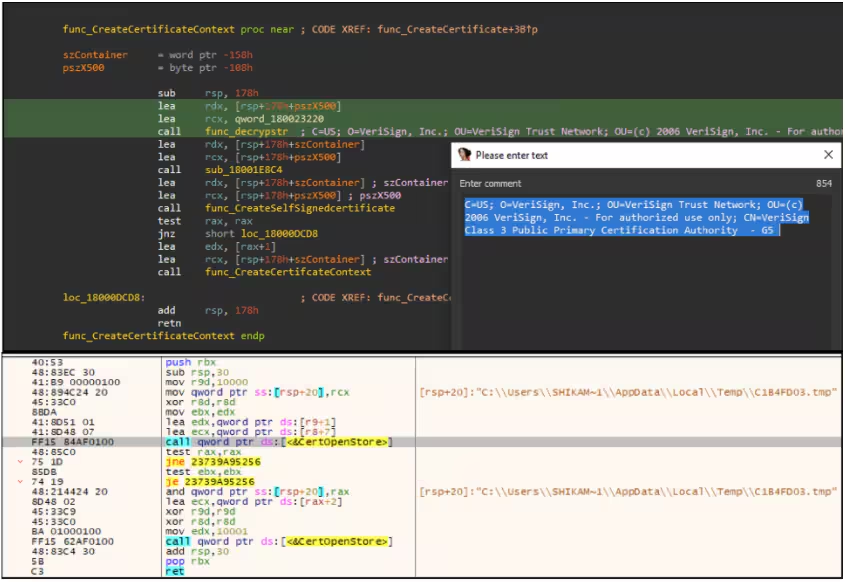
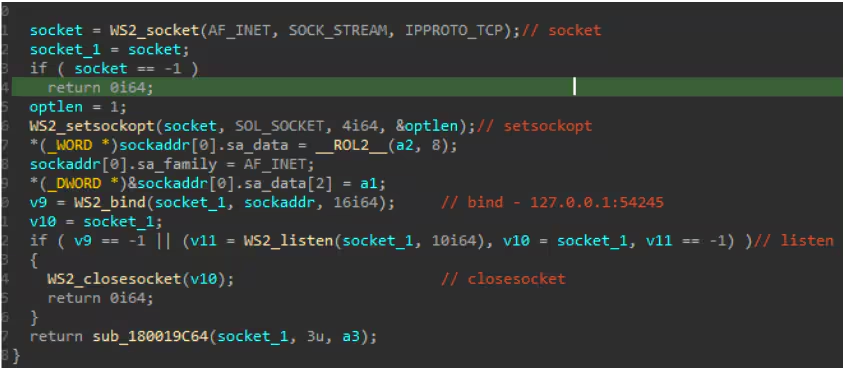
IcedID will also add certificates into the certificate store that will be saved in the %temp% folder as part of its possible proxy communication to its C2 server bound to IP 127.0.0.1 port 54245. The screenshot below shows the decrypted certificate format that IcedID will add to the certificate store in a .tmp file. This proxy function also compliments the web inject vector as an alternative way to capture traffic and credentials.
The screenshot below shows how IcedID setup proxy from IP 127.0.0.1 port 54245 by listening on the created socket relative to the IP and port mentioned above.
The following are several detection methods created by STRT to address IcedID. All these detections are encompassed in an Analytic story released in our content updates.
Detections
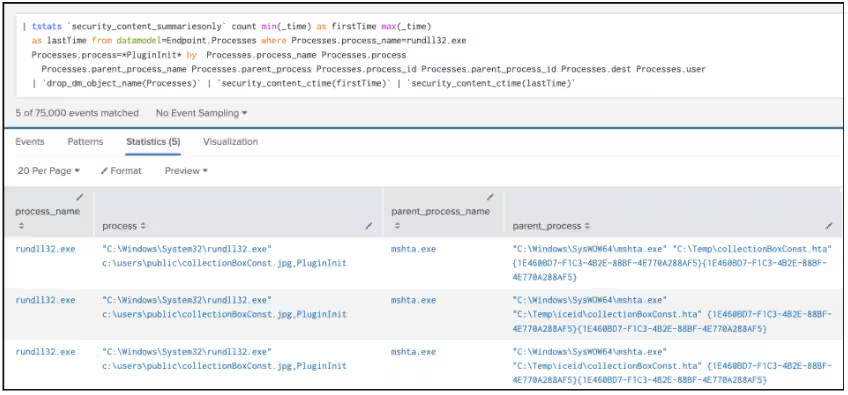
Suspicious Rundll32 Plugininit (New)
| tstats `security_content_summariesonly` count min(_time) as firstTime max(_time) as lastTime from datamodel=Endpoint.Processes where Processes.process_name=rundll32.exe Processes.process=*PluginInit* by Processes.process_name Processes.process Processes.parent_process_name Processes.parent_process Processes.process_id Processes.parent_process_id Processes.dest Processes.user
| `drop_dm_object_name(Processes)`
| `security_content_ctime(firstTime)`
| `security_content_ctime(lastTime)`
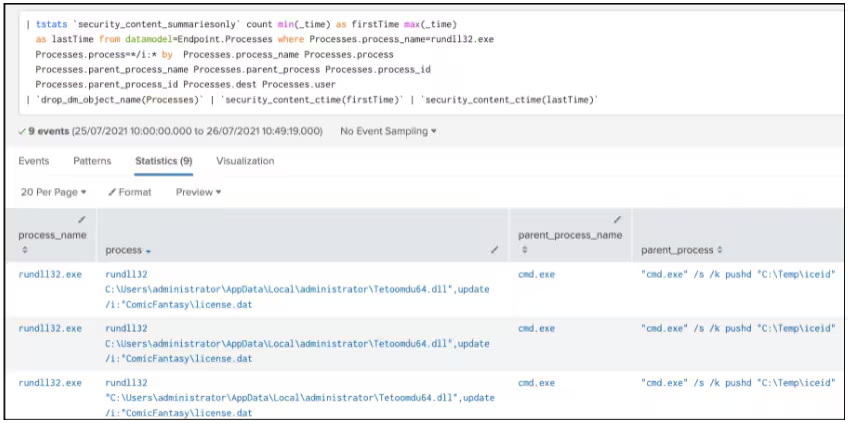
Suspicious IcedID Rundll32 Cmdline (New)
| tstats `security_content_summariesonly` count min(_time) as firstTime max(_time)
as lastTime from datamodel=Endpoint.Processes where Processes.process_name=rundll32.exe
Processes.process=*/i:* by Processes.process_name Processes.process
Processes.parent_process_name Processes.parent_process Processes.process_id
Processes.parent_process_id Processes.dest Processes.user
| `drop_dm_object_name(Processes)`
| `security_content_ctime(firstTime)`
| `security_content_ctime(lastTime)`
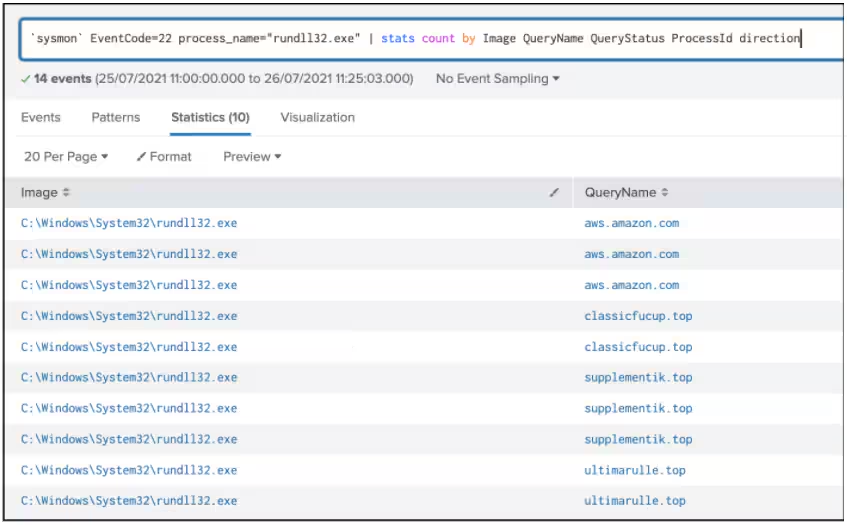
Rundll32 DNSQuery (New)
`sysmon` EventCode=22 process_name="rundll32.exe"
| stats count min(_time) as firstTime max(_time) as lastTime
by Image QueryName QueryStatus ProcessId direction Computer
| `security_content_ctime(firstTime)`
| `security_content_ctime(lastTime)`
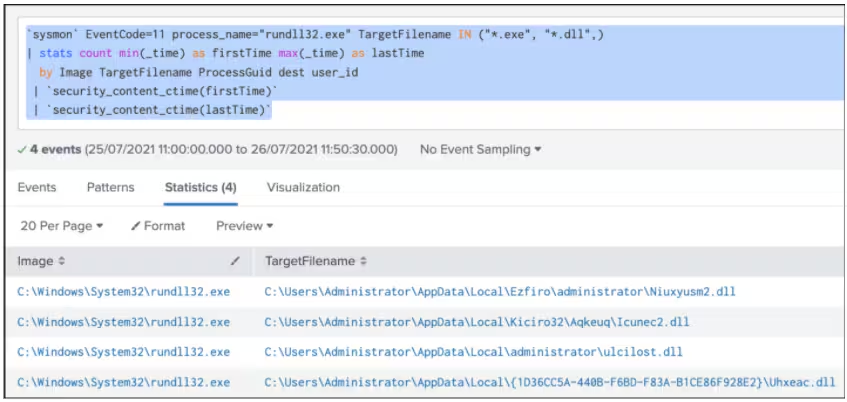
Rundll32 Process Creating Exe Dll Files (New)
`sysmon` EventCode=11 process_name="rundll32.exe" TargetFilename IN ("*.exe", "*.dll",)
| stats count min(_time) as firstTime max(_time) as lastTime
by Image TargetFilename ProcessGuid dest user_id
| `security_content_ctime(firstTime)`
| `security_content_ctime(lastTime)`
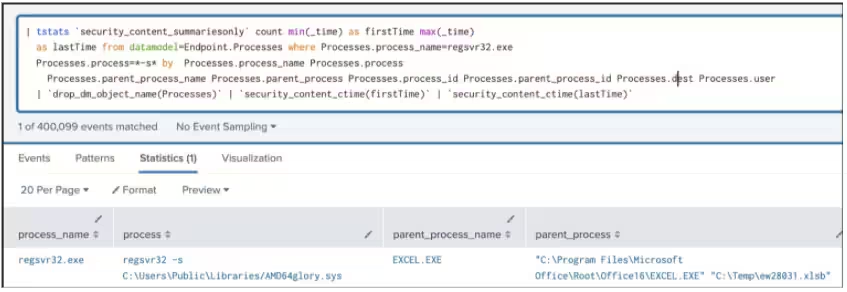
Suspicious IcedID Regsvr32 Cmdline (New)
| tstats `security_content_summariesonly` count min(_time) as firstTime max(_time)
as lastTime from datamodel=Endpoint.Processes where Processes.process_name=regsvr32.exe
Processes.process=*-s* by Processes.process_name Processes.process Processes.parent_process_name
Processes.parent_process Processes.process_id Processes.parent_process_id Processes.dest Processes.user
| `drop_dm_object_name(Processes)`
| `security_content_ctime(firstTime)`
| `security_content_ctime(lastTime)`
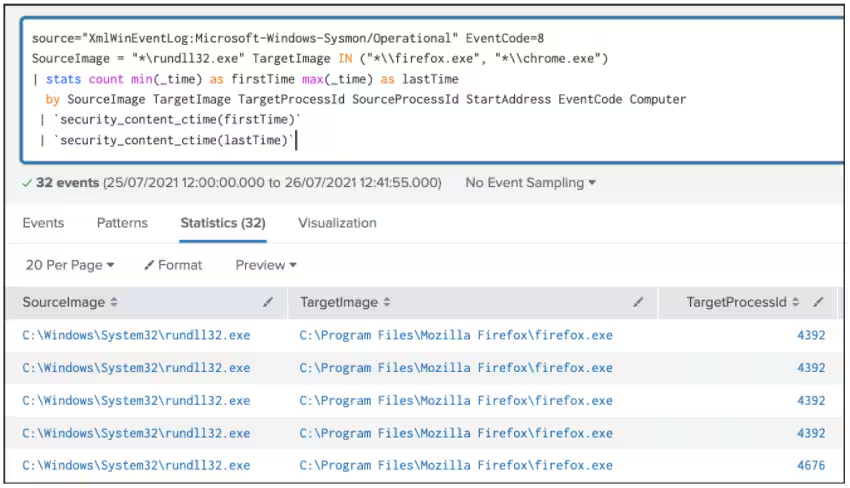
Rundll32 CreateRemoteThread In-Browser (New)
`sysmon` EventCode=8 SourceImage = "*\\rundll32.exe" TargetImage IN ("*\\firefox.exe", "*\\chrome.exe")
| stats count min(_time) as firstTime max(_time) as lastTime
by SourceImage TargetImage TargetProcessId SourceProcessId StartAddress EventCode Computer
| `security_content_ctime(firstTime)`
| `security_content_ctime(lastTime)`
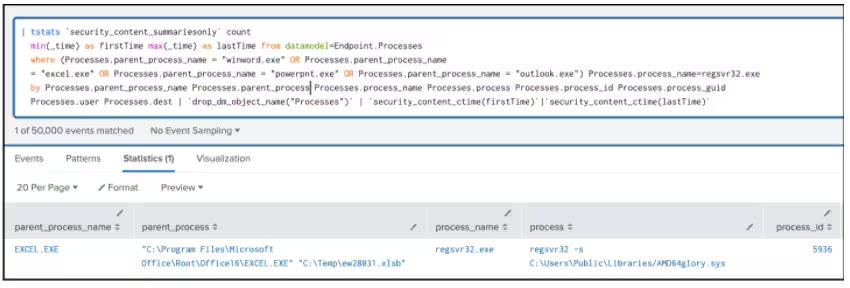
Office Application Spawn Regsvr32 process (new)
| tstats `security_content_summariesonly` count min(_time) as firstTime max(_time) as lastTime
from datamodel=Endpoint.Processes where (Processes.parent_process_name = "winword.exe" OR Processes.parent_process_name
= "excel.exe" OR Processes.parent_process_name = "powerpnt.exe" OR Processes.parent_process_name = "outlook.exe")
Processes.process_name=regsvr32.exe by Processes.parent_process_name Processes.parent_process Processes.process_name
Processes.process Processes.process_id Processes.process_guid Processes.user Processes.dest
| `drop_dm_object_name("Processes")`
| `security_content_ctime(firstTime)`
|`security_content_ctime(lastTime)`
Recon AVProduct Through Pwh or WMI (Modified)
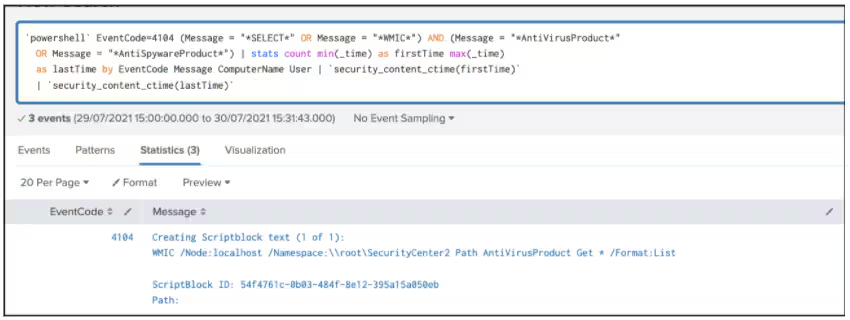
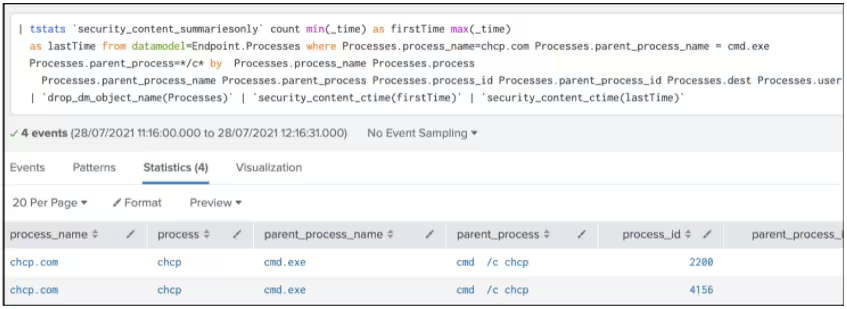
CHCP Command Execution (New)
| tstats `security_content_summariesonly` count min(_time) as firstTime max(_time)
as lastTime from datamodel=Endpoint.Processes
where Processes.process_name=chcp.com Processes.parent_process_name = cmd.exe
Processes.parent_process=*/c* by Processes.process_name Processes.process
Processes.parent_process_name Processes.parent_process Processes.process_id Processes.parent_process_id Processes.dest Processes.user
| `drop_dm_object_name(Processes)`
| `security_content_ctime(firstTime)`
| `security_content_ctime(lastTime)`
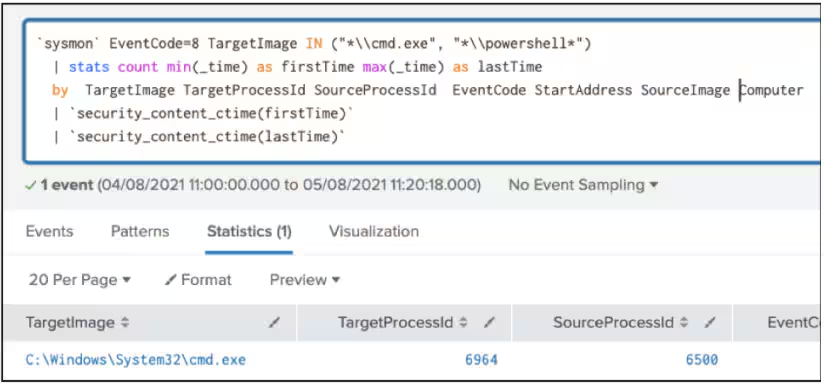
Create Remote Thread In Shell Application (New)
`sysmon` EventCode=8 TargetImage IN ("*\\cmd.exe", "*\\powershell*")
| stats count min(_time) as firstTime max(_time) as lastTime
by TargetImage TargetProcessId SourceProcessId EventCode StartAddress SourceImage Computer | `security_content_ctime(firstTime)` | `security_content_ctime(lastTime)`
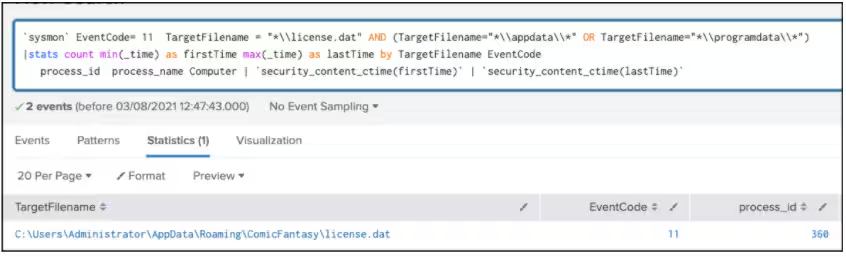
Drop IcedID License.dat (New)
`sysmon` EventCode= 11 TargetFilename = "*\\license.dat" AND (TargetFilename="*\\appdata\\*" OR TargetFilename="*\\programdata\\*")
|stats count min(_time) as firstTime max(_time) as lastTime by TargetFilename EventCode process_id process_name Computer | `security_content_ctime(firstTime)`
| `security_content_ctime(lastTime)`
IcedID Exfiltrated Archived File Creation (New)
`sysmon` EventCode= 11 (TargetFilename = "*\\passff.tar" OR TargetFilename = "*\\cookie.tar")
|stats count min(_time) as firstTime max(_time) as lastTime by TargetFilename EventCode process_id process_name Computer | `security_content_ctime(firstTime)` | `security_content_ctime(lastTime)`
SQLite Module In Temp Folder (New)
`sysmon` EventCode= 11 (TargetFilename = "*\\sqlite32.dll" OR TargetFilename = "*\\sqlite64.dll") (TargetFilename = "*\\temp\\*")
|stats count min(_time) as firstTime max(_time) as lastTime by process_name TargetFilename EventCode ProcessId Image process_id process_name Computer
| `security_content_ctime(firstTime)` | `security_content_ctime(lastTime)`
Detects for command line arguments where `cmd.exe /c` is used
to execute a program
Detects modifications to registry keys that can be used
to launch an application or service at system startup
Hashes
Contributors
We would like to thank the following for their contributions to this post: Teoderick Contreras and Rod Soto.
Related Articles

Predicting Cyber Fraud Through Real-World Events: Insights from Domain Registration Trends

When Your Fraud Detection Tool Doubles as a Wellness Check: The Unexpected Intersection of Security and HR

Splunk Security Content for Threat Detection & Response: November Recap

Security Staff Picks To Read This Month, Handpicked by Splunk Experts

Behind the Walls: Techniques and Tactics in Castle RAT Client Malware

AI for Humans: A Beginner’s Field Guide

Splunk Security Content for Threat Detection & Response: November 2025 Update

Operation Defend the North: What High-Pressure Cyber Exercises Teach Us About Resilience and How OneCisco Elevates It
