Deep Dive on Persistence, Privilege Escalation Technique and Detection in Linux Platform
The Splunk Threat Research Team added Linux Privilege Escalation and Linux Persistence Techniques analytic stories to help Security Operations Center (SOC) Analysts and Security Researchers detect adversaries or malware using these techniques within the Linux OS platform. In this blog article, we will do a deep dive on some popular techniques and detections for these two tactics. This article will be the deep dive part of our January 2022 release blog.
Analytic Story
Persistence consists of different techniques for adversaries or malware authors to maintain their foothold and access on the targeted or compromised system during boot-up, restart of machine or even during credential change. Privilege Escalation is the tactic where adversaries attempt to gain elevated or higher-level privileges for their malicious code to take advantage of root or admin privileges. These techniques commonly overlap or partner with persistence techniques in elevated context.
The following analytics are designed for the Linux OS platform. We used sysmon linux as the main event logs collection for our detection development. We recommend you to read, install this tool as well as the splunk sysmon TA’s for this analytics.
Analytic stories are full security use cases supported by our threat research team’s pre-built detections and responses. Let’s discuss a high-level overview of this analytic story that introduced 32 new detections.
CRON JOB and At Schedule
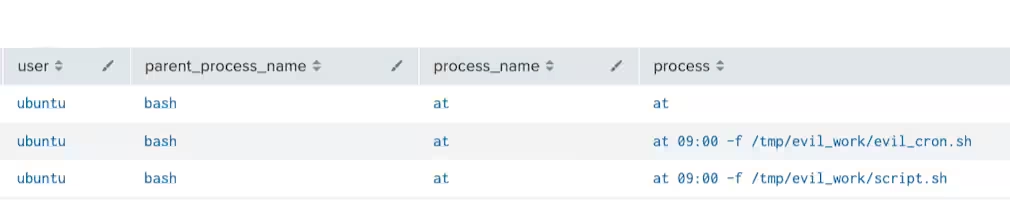
“At”, cron jobs also known as crontabs are a command-line utility on UNIX OS to schedule a job or task to run specific script or binary periodically, on fixed times or with intervals. This utility is commonly abused by adversaries to execute their malicious code periodically depending on its designed schedule.
Techniques:
If known cron jobs directories are writable, an attacker may drop a malicious script or binaries on those folders to automatically execute their code. This code will successfully execute with cron job privileges, allowing the attackers to escalate privileges.

echo "/tmp/evil_cron.sh" >> /etc/cron.daily/logrotate echo "/tmp/evil_cron.sh" >> /etc/cron.hourly/logrotate echo "/tmp/evil_cron.sh" >> /etc/cron.monthly/logrotate echo "/tmp/evil_cron.sh" >> /etc/cron.weekly/logrotate
If an attacker already has reverse shell access, it can also modify these normal tasks by using editor or by using “crontab -e” command to add crontab entry in existing scheduled tasks.
Same thing for “At” scheduler utility. Adversaries can add an entry in /etc/at.allow, which is a list of users allowed to execute the “at” command.Detections:
Known Startup Folders
Linux OS is known to have several directories designed to execute scripts, services or even binaries during boot or restart. And these directories are used by malicious actors to persist and to gain privileges to a target host.
Techniques:
One example is the /etc/init.d folder. This directory contains a bunch of start/stop scripts which are used to control the service daemon while the system is running or during boot. Malware or adversaries may drop malicious scripts in this folder for persistence.

Same thing in the /etc/profile.d folder that contains other scripts which are application-specific startup files, which are also executed at startup time by the shell.
Detections:

This analytic looks for suspicious file creation in /etc/profile.d directory
to automatically execute scripts by shell upon boot up of a linux machine
Linux Services
Services are applications that run in the background waiting to be used, or carrying out essential tasks. Some services daemon is placed in the /etc/init.d directory and some are in /etc/systemd folder. Like /etc/init.d and other start-up folders in linux OS this folder may give an opportunity for adversaries to gain privilege escalation or persistence.
Techniques:
For example, dropping a “.service” config file pointing to a malicious script or binary in “/etc/systemd” may create a service for its malicious code like the example below. This technique was also seen in a linux golang malware analyzed by intezer.
[Unit] Description=Hello World console application [Service] # systemd will run this executable to start the service ExecStart=/home/ubuntu/hello ExecReload=/home/ubuntu/hello ExecStop=/home/ubuntu/hello Restart=always RestartSec=5 [Install] WantedBy=multi-user.target
Screenshot below shows how the “.service” file was registered or activated as service after executing start service command.


Detections:

Add Users
Adversaries may also add users to the compromised host to persist and to gain more privileged access. Below are code examples of common commands for adding users like john, atomic_ser2, atomicTest.
sudo useradd -ou 0 -g 0 john
useradd atomic_ser2
sudo adduser atomicTest
Detections:
Common Privilege Escalation Techniques
Like what we mentioned earlier, privilege escalation tactics consist of different techniques to gain higher-level permissions on a system or network. Attackers may abuse existing utility, misconfiguration or even vulnerabilities to elevate their access. In this section we will not include the exploit part, but we will tackle other techniques to perform this task.
Techniques:
Adversary can execute commands with set suid or setgid bits to run its code in different user’s context. In linux when these bits are set, applications can run elevated privileges contexts. “setcap” utility can set this bit like in the example below.
/usr/bin/setcap cap_net_raw+p /bin/ping
Or using “chmod” utility to set this bit.
chmod u+s /tmp/evilbin
chmod g+s /tmp/evilbin
Adversaries can also change the ownership of the file using the “chown” utility or “sudo” or “sudo su” to gain escalated access.

permit nopass larry cmd reboot
And users can execute “doas” to run this configuration.
doas -C /etc/doas.conf
Detections:
This analytic looks for a command line that change the file owner to root
using chown utility tool
Kernel Module Loading
The same in Windows OS, Kernel module is a piece of compiled binary code that is inserted directly into the kernel or at ring 0. This ring is the lowest and has access to everything in the system. Sophisticated adversaries and malware use this technique to gain access to the whole system, to persist and to evade detections.
Techniques:
In Linux you can monitor suspicious kernel module file creation in a known driver folder (“*kernel/drivers/*”) like in the screenshot below.

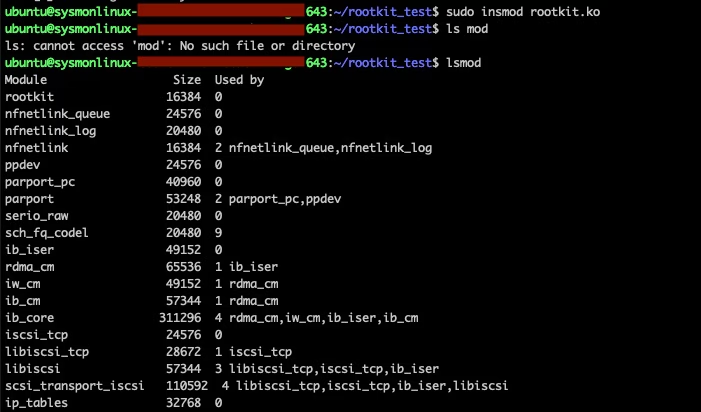
Another is using “modprobe” or “insmod” to load or insert malicious rootkit or kernel modules into the kernel space. The code block shows how to use this utility tool.
sudo modprobe rootkit.ko
sudo insmod rootkit.ko


Detections:
Hijacking Library Function
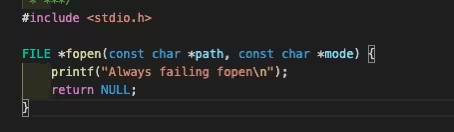
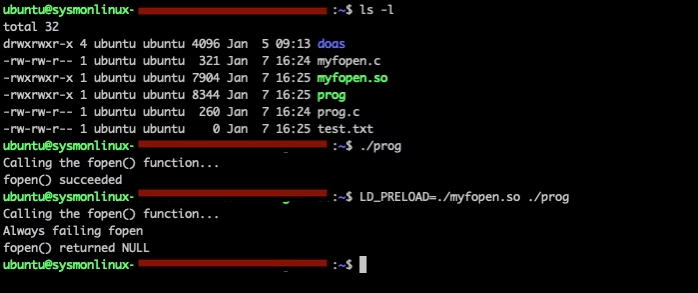
Linux has an environment variable that can be used to hijack or hook C standard library functions. This technique was seen in several adversaries or malwares to execute their code. Example, a simple C binary file that checks if “test.txt” exists and if it is, it will print “fopen() succeeded” like in the screenshot below. Complete source code is here.

myfopen.c module to always print fails during hook.
Result of LD_PRELOAD
Detections:
Linux startup Scripts and Credential files
Aside from known startup folders in the linux platform, there are also some known scripts that execute during the reboot of the linux machine. These scripts are also abused by adversaries or threat actors to gain persistence and/or privilege escalation to the targeted system.
Techniques:
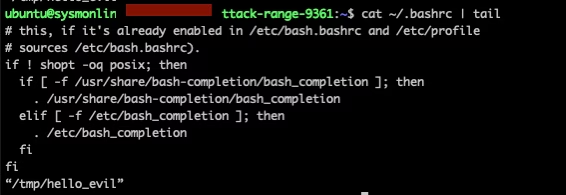
One Example is by appending a malicious code on one of the profile script files ("*~/.bashrc", "*~/.bash_profile", "*/etc/profile", "~/.bash_login", "*~/.profile", "~/.bash_logout") to automatically execute it by shell upon reboot of the machine. The code block shows how simply one can append a code using “echo” command” and stdout pipe.
echo “/tmp/hello_evil” >> ~/.bashrc
echo “/tmp/hello_evil” >> /etc/profile
echo “/tmp/hello_evil” >> ~/.bash_profile
Append result to ~/.bashrc:
To gain much control on the targeted host. Like by dumping “/etc/sudoers” file to another file that contains controls who can run a command, The “/etc/passwd” and “/etc/shadow” files that store user information and password hash. Code block below shows how an attacker with access to the file can dump it to another file for cracking.
sudo cat /etc/shadow > /tmp/shadow_copy
sudo cat /etc/passwd > /tmp/passwd_copy
sudo cat /etc/sudoers > /tmp/sudoers_copy
Or by modifying “/etc/sudoers” file using “visudo” or “echo” command to add a control entry to execute a command with root or no password instance. Below is an example code block for this attack.
Add entry to /etc/sudoers:
sudo echo "evil_user ALL=(ALL) NOPASSWD: ALL" >> /etc/sudoers
Detections:
This analytic is to looks for file creation of sudoers.tmp file cause
by editing /etc/sudoers using visudo or editor in linux platform.
This analytic is to looks for suspicious command-line that add entry to
/etc/sudoers by using visudo utility tool in linux platform.
SSH Authorized_keys
Adversaries may modify the SSH authorized_keys file to maintain persistence on a victim host. Threat Actor might also modify or access “/etc/ssh/sshd_config” file to edit the system’s SSH directives PubkeyAuthentication and RSAAuthentication to specific IP address or user.
Learn More
You can find the latest content about security analytic stories on GitHub and in Splunkbase. Splunk Security Essentials also has all these detections now available via push update. In the upcoming weeks, the Splunk Threat Research team will be releasing a more detailed blog post on this analytic story. Stay tuned!
For a full list of security content, check out the release notes on Splunk Docs.
Feedback
Any feedback or requests? Feel free to put in an issue on Github and we’ll follow up. Alternatively, join us on the Slack channel #security-research. Follow these instructions If you need an invitation to our Splunk user groups on Slack.
Contributors
Credit to author Teoderick Contreras and collaborators Bhavin Patel, Michael Haag, Jose Hernandez, Eric McGinnis, and Rod Soto.
Related Articles

Predicting Cyber Fraud Through Real-World Events: Insights from Domain Registration Trends

When Your Fraud Detection Tool Doubles as a Wellness Check: The Unexpected Intersection of Security and HR

Splunk Security Content for Threat Detection & Response: November Recap

Security Staff Picks To Read This Month, Handpicked by Splunk Experts

Behind the Walls: Techniques and Tactics in Castle RAT Client Malware

AI for Humans: A Beginner’s Field Guide

Splunk Security Content for Threat Detection & Response: November 2025 Update

Operation Defend the North: What High-Pressure Cyber Exercises Teach Us About Resilience and How OneCisco Elevates It
