Contextualize your data with threat intelligence information from Project Honey Pot
Greetings Splunk Ninjas,
this is my first blog post. I’m a Splunk EMEA specialist and work in the IT industry nearly 10 years. 7 of them with Software Vendors in the IT-Security space. I worked already with many large companies to improve their environments in many ways.
Some time ago I posted on Splunk Apps the IP Reputation App. I was inspired by the trend of various security vendors establishing reputation databases and including them in their products (next generation firewalls, AV’s etc). There is great value in having this information included in the Splunk platform to put machine data in context.
After two years on apps.splunk.com the app has had over 4,000 downloads so there is a lot of demand. The app performs lookups which help you to identify malicious activities across your IT systems. With this app you can look up the threat score of any IP address. The Splunk App for Enterprise Security has had several releases with these integrated threat lists. However using this capability effectively it comes down to use cases and background information. This is what we’ll discuss in this blog post .
About Project Honey Pot
The Project Honey Pot database is one of the largest IP reputation databases I know. A webmaster can add some tracking code to his website and from then on, the Project Honey Pot community can track spammers, spambots and other malicious activities that try to steal bandwidth, capacity, harvest e-mail addresses and spam. They have tracked down over 200 Million harvesters and 100 Million Spam Servers. Additionally they maintain information about bad web hosts, rule breakers, dictionary attackers, comment spammers and crawlers that hide themselves as a search engine. From my perspective, most systems communicating from those IP’s are somehow compromised. And if a server is sending spam emails because it is part of a BotNet, I wouldn’t trust any user or system activity from those environments. Learn more about honeypots.
Use Cases for the threat intelligence data
Wouldn’t it be great to use this available information and connect it with your machine data? I’ve seen several use cases where this has added a lot of value:
-
Detect internal infected hosts
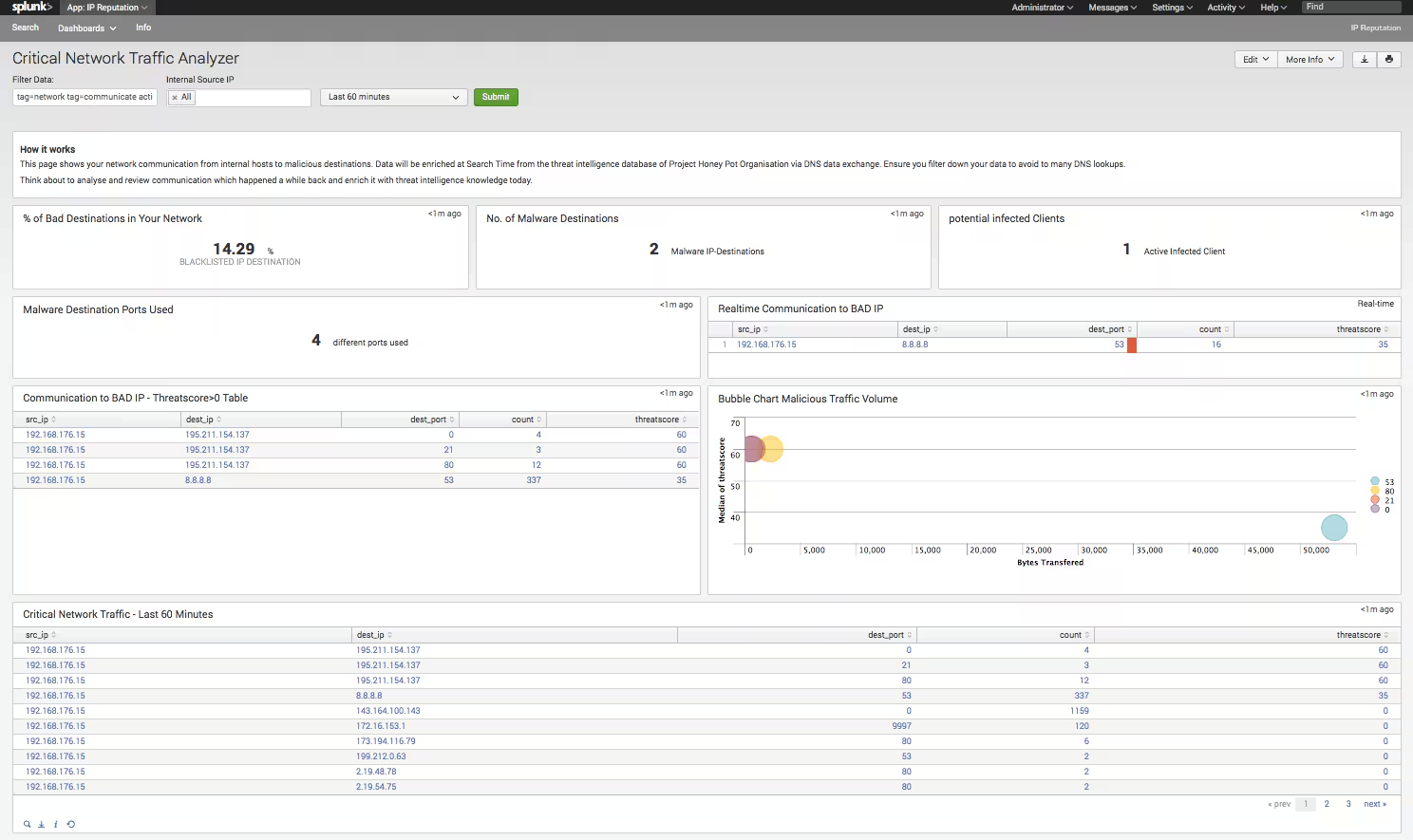
- First, take your firewall logs from your default gateways. This allows you to create a report of denied traffic, generated by your internal systems. In a large client network you’ll have a very long list. Take this report and enrich the destination address with the threat score and sort based on this, so you have an automatically prioritized set of targets which defines which clients you should investigate first. If you have something with a score higher then 0 you have found an infected client in your network, which is running active malware trying to communicate outside. Congratulations you just started Splunking!
-
Detect Fraud
- Think about which are your critical applications that you want to monitor for potentially fraudlent activity. Maybe it is a webshop where you could correlate orders with IP addresses and alert based on those who have a bad IP threat score. Or if you’re a bank, you could Splunk your online banking machine data to discover and inform your customers that they accessed their banking account via a blacklisted network. It might be that they are using a public hot spot, or their home machine is infected and they are unaware, or perhaps it was really fraudulent activity from a botnet?
-
Monitor your own environment so you do not get on a blacklist
- In the Mandiant M-Trends Report, it was noted that 69% of the victims of cybercrime have been notified by external entities. Based on this statistic, it is definitely worth regularly tracking all the public IP addresses that you own on these threat intelligence feeds. I’m sure you wouldn’t expect to see your IP’s carrying out dictionary attacks against other websites or sending spam. However if you’re infected, this does happen. If your users are complaining that their e-mails to customers and partners are mostly ending up in spam folders, it might be the case that your outgoing e-mail server has a bad IP reputation. So make sure you know that before your users let you know.
-
Apply today’s threat intelligence information to historical data
- Thanks to the power of Splunk, you can run regular reports across historical data. This can help you identify malicious activities from past time periods. Perhaps the IP classification was okay back some weeks ago, but has changed to malicious now. So you can put context around historical data and review transactions or orders or even potential risky clients who have been infected, communicated with malicious IP’s on the internet a long time ago and then the malware was deleted automatically after a given time period. The Duqu Virus, by the way, worked exactly like this. From ‘first seen’ to detection took over a year and the only chance of identifying if a company was infected was to review machine data for a given IP communication.
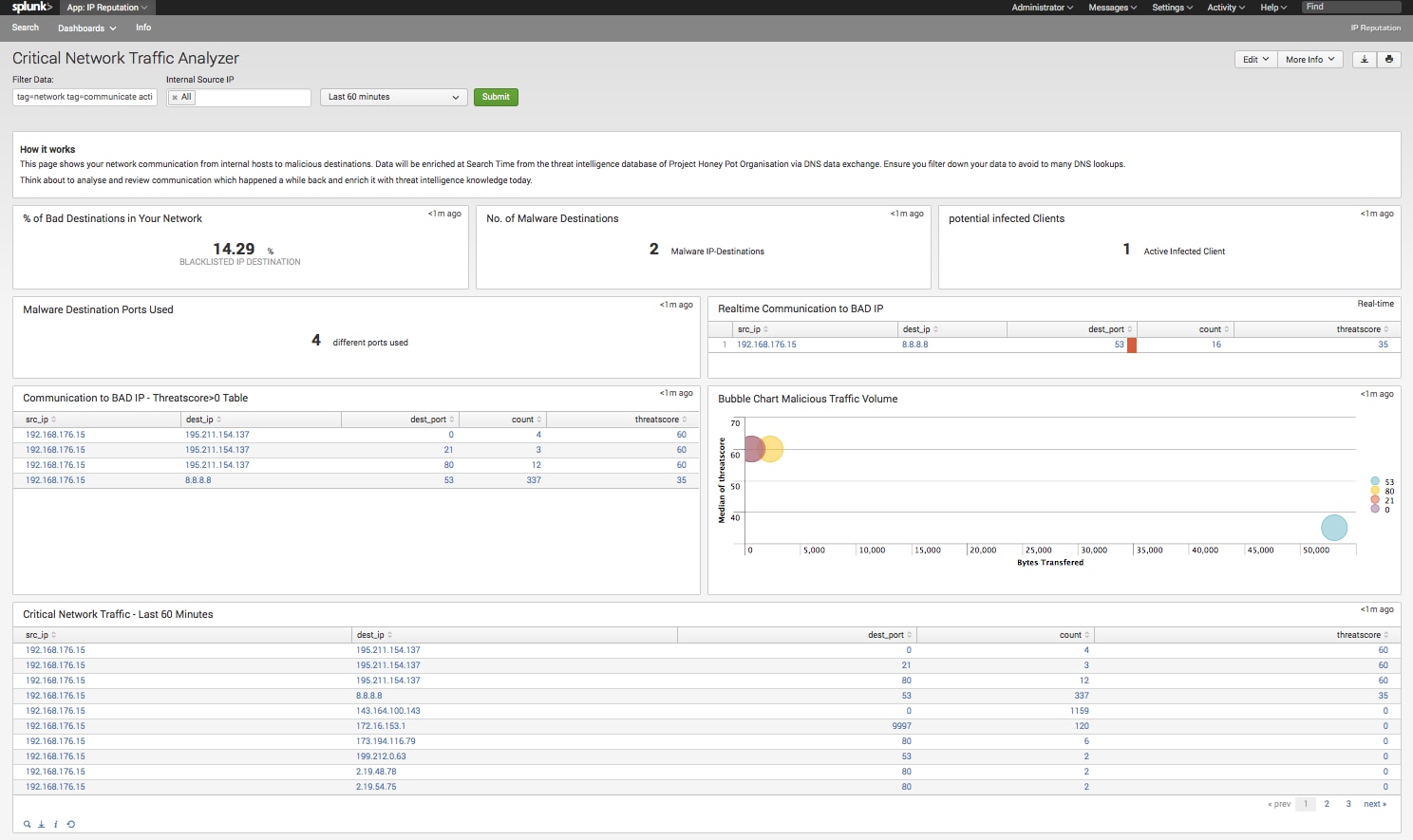
The IP Reputation app works with an external lookup, which is calling a python script. This script performs a lookup via DNS protocol on the Honey Pot database. They offer an API called Http:BL. This means you can enjoy the caching functionality on your DNS Server for lookups of the same IPs multiple times. But make sure you don’t overload your DNS Server with too many requests and always group per IP address to avoid multiple lookups. Intelligence scheduling on a per need basis is best practice too.
There are some great capabilities in the IP Reputation app so use them to make your environment more secure, mitigate risk for your company and make engaging with your customers more secure by identifying and prioritizing the most risky events first.
Happy Splunking,
Matthias
Related Articles

Predicting Cyber Fraud Through Real-World Events: Insights from Domain Registration Trends

When Your Fraud Detection Tool Doubles as a Wellness Check: The Unexpected Intersection of Security and HR

Splunk Security Content for Threat Detection & Response: November Recap

Security Staff Picks To Read This Month, Handpicked by Splunk Experts

Behind the Walls: Techniques and Tactics in Castle RAT Client Malware

AI for Humans: A Beginner’s Field Guide

Splunk Security Content for Threat Detection & Response: November 2025 Update

Operation Defend the North: What High-Pressure Cyber Exercises Teach Us About Resilience and How OneCisco Elevates It
