Obey My Logs! AI-Powered Compromised Credential Detection
What if I told you that compromised credentials still remain the number one avenue of initial access in all cyber security breaches? It’s no exaggeration — according to the Cisco Talos IR Trends report for Q1 2025, over half of all incidents reported involved the use of valid credentials. The 2025 Verizon Data Breach Investigations Report claims credential abuse accounted for 22% of all confirmed breaches. Meanwhile, Mandiant’s M-Trends 2025 report shows stolen credentials climbed to 16% of initial access vectors, surpassing phishing, along with our very own Macro-ATT&CK perspective showing that valid account use by adversaries shot up by 17% between 2023-2024.
Now, what if I told you that some of the world's most dangerous Advanced Persistent Threat (APT) groups use those same credentials to go undetected for months, sometimes even years, inside the most well-guarded networks on the planet? That’s true too, and it’s the exact problem that drove me to start this project.
I wanted to build a tool to help detect the use of compromised credentials as quickly as possible. I call it PLoB, for Post-Logon Behaviour Fingerprinting and Detection, and its mission is simple: to focus on the critical window of activity immediately after a user logs on.
The goal is to get as far to the left-of-boom as we can — "boom" being all the painful stuff adversaries do once they're comfortably inside your network.
And I wanted to do it all in a way that others can learn from and hopefully improve upon. I've never claimed to be an expert at this stuff, just someone passionate about finding new ways to solve old problems. So, let's dive into how it works.
How PLoB Hangs Together: A Quick Overview
We start with raw security logs — think Splunk or another SIEM — where events stream in as flat records. Collecting enough of the correct, clean data was a big challenge initially, but solved through the help of a great customer (you know who you are) and an awesome data sanitizer written by my colleague James Hodgkinson. Take a look at our recent report, The New Rules of Data Management, to understand how pervasive the challenges of wrangling data have become.
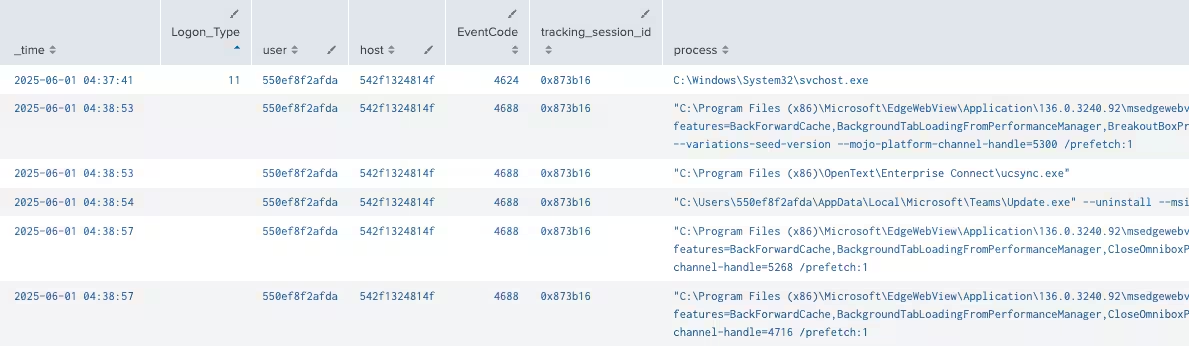
Splunk search results
PLoB transforms this data into a rich graph model using Neo4j, capturing relationships between users, hosts, sessions, and processes. This structure lets us explore complex interactions naturally, rather than wrestling with disconnected log lines.
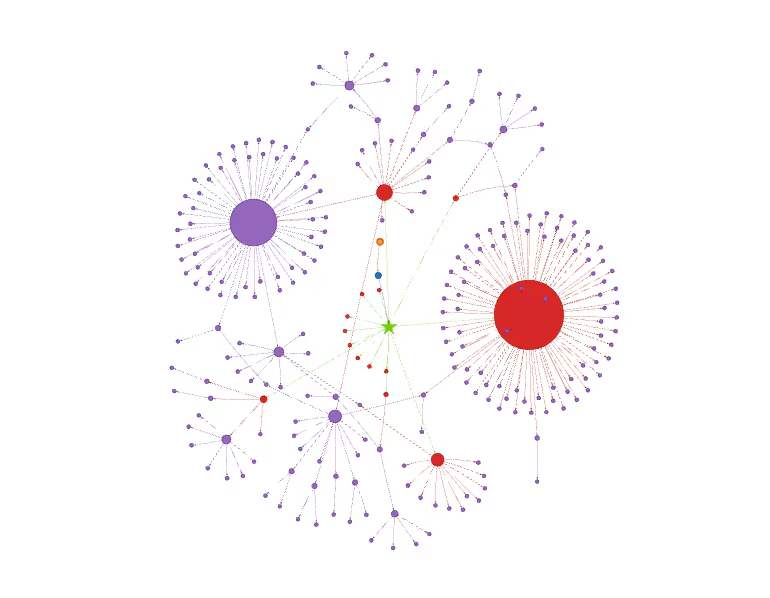
Neo4j graph session representation
Next, we engineer a detailed behavioral fingerprint from each post-logon session, summarizing key signals like novel tools, rapid command execution, and complex process trees. This fingerprint is a compact text summary designed to highlight what matters most.

Fingerprint image
The fingerprint text is then passed to a powerful AI embedding model (OpenAI’s text-embedding-3-large), which converts it into a 3072-dimensional vector—essentially a numeric representation capturing the behavioral nuances.

Embedding from text-embedding-3-large
These vectors are stored and indexed in Milvus, a high-performance vector database built for efficient similarity search at massive scale.
To find matches or anomalies, we use Cosine Similarity — a metric that measures the angle between vectors rather than their raw distance. This lets us focus on patterns of behavior (vector direction) rather than sheer volume or magnitude.
Similarity scores range from 0 to 1, where 1 means the sessions are behaviorally identical and 0 means they are completely unrelated. This scoring enables PLoB to pinpoint both novel outliers and suspiciously repetitive clusters.
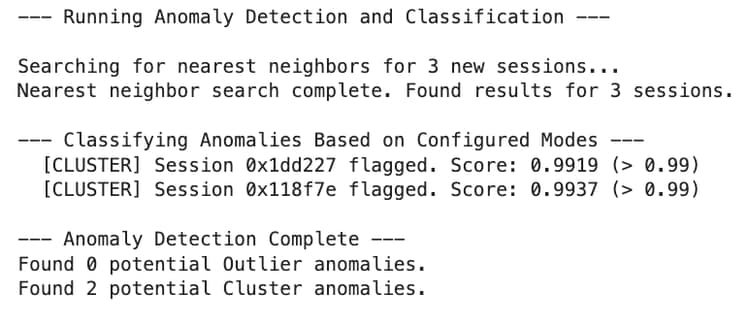
Anomaly detection image
Any anomalous sessions identified are then gathered from our graph database and sent to our AI agents to help provide further analysis. The screenshot shows an example response from our own Foundation AI Security model. The models come back with further session context and a risk assessment to help analysts make informed decisions.

Foundation AI analysis image
With this stack working together — from Splunk ingestion, Neo4j graph modeling, AI fingerprint embedding, Milvus similarity search, to AI analysis — we can hunt down subtle threats lurking in the critical moments right after login.
"But I've Already Got Detections," You Say?
I get it. Your security stack is probably brimming with detections. You've got your rule-based alerts, your fancy behavior-based analytics, and maybe even some of the new AI-powered tools.
And yet, we all know the frustrating reality: they don't catch everything. Not even close. Taking a multi-layered approach is the right idea, but each new tool adds cost, complexity, and its own set of blind spots.
This is where PLoB comes in. It isn't trying to replace these tools; it's designed to plug a very specific gap they often leave open:
- Rule-based detections are great for known-bad stuff, but they struggle with "Living off the Land" (LoL) attacks, in which adversaries use legitimate tools like PowerShell or cmd.exe for malicious ends.
- Behavior-based detections are powerful, but they often need a ton of pristine data to build a "normal" baseline over weeks or months. What about the brand-new attack that happens on day one?
- AI-based detections are incredible at finding patterns they've been trained on, but they can be surprisingly brittle when faced with something truly novel — an attack that looks nothing like the training data.
PLoB's goal is to be a faster, lighter-weight layer that focuses specifically on that initial flurry of post-logon activity, giving us another chance to catch the bad actors before they settle in.
Hackers Think in Graphs, Defenders Think in Lists
You've probably heard this saying before. I'm going to call it what it is: one of the biggest lies in our industry.
The problem isn't that defenders think in lists; it's that our tools have historically forced us to.
Think about your SIEM. When you investigate a user, what do you get? A long, flat list of events, sorted by timestamp. A logon event (4624), followed by a process execution (4688), followed by another, and another. It's on you, the analyst, to mentally stitch together that this specific process belongs to that logon session on that host. You're building the graph in your head, and it's slow and exhausting.
This is exactly why PLoB uses a graph database like Neo4j from the very beginning. Instead of a flat list, we model the reality of the situation: a User node connects to a Host, which has a Logon Session, which in turn spawns a tree of Process nodes. There are also other benefits to having a graph representation of our sessions, including proactive threat hunting, better visualizations, etc.
The relationships aren't something you have to guess at; they are a physical part of the data structure. Suddenly, you're not just scrolling through a list; you're exploring a narrative. You can see the fan-out from a single process or trace an entire attack chain visually. This doesn't just make analysis faster; it allows us to ask better, more complex questions of our data — and start thinking a little more like the adversary.
From Noise to Signal: Engineering a Smarter Fingerprint
The heart of this project is the "fingerprint" — a text summary of a user session that we can feed to an AI model. The idea is to convert each fingerprint into a vector embedding and then use a vector database to precisely measure the similarity between sessions. Simple enough, right?
The Challenge: When Malicious Looks Normal
Our first attempt at creating this fingerprint was a straightforward summary of the session's raw activity:
This approach had a critical, and humbling, flaw.
When we tested it with a synthetic attack that used legitimate tools like schtasks.exe and certutil.exe — classic "Living off the Land" techniques — our anomaly detection system completely missed it. Worse, the malicious session received a very high similarity score (~0.97) when compared to a real, benign administrative session from our baseline data.
Why It Failed: The "Signal vs. Noise" Problem
The system wasn't wrong; in a way, it was too right. It correctly identified that both sessions used a lot of the same common admin tools (cmd.exe, svchost.exe, etc.). Our fingerprint was full of this "noise." The crucial "signal" — the one or two malicious command lines — was buried at the end of a long, generic summary. The model, seeing all the thematic similarities first, concluded that the sessions were fundamentally the same.
We were telling it to watch for someone in a ski mask, but the attacker was also wearing a legitimate employee ID badge, and our system was only looking at the badge.
The Solution: Amplifying the Signal
We realized we couldn't just describe what happened; we had to tell the AI what was important. We re-engineered the fingerprint to act like an analyst's summary, creating a "Key Signals" section and "front-loading" it at the very beginning of the text.
The new logic first identifies the most suspicious characteristics of a session based on three pillars:
- Novelty: Has this user ever run this exact command line before?
- Pace: Is the activity happening at machine speed, suggesting automation?
- Structure: Is a single process spawning an unusually high number of children?
The new fingerprint for the same malicious session now looks completely different:
From Fingerprints to Searchable Vectors: The Magic of Embeddings
With our smarter fingerprint in hand, the next step is making it searchable. How does a computer actually reason about "similarity"? You can't just grep for "suspicious behavior."
This is where the magic of vector embeddings comes in. The goal is to take our unstructured text fingerprint and turn it into a structured mathematical object — a vector — that a computer can easily compare.
Think of it like this: an embedding model reads our fingerprint and places it as a single point in a massive, high-dimensional library. Every session gets its own unique spot on a shelf, and its location is determined entirely by the meaning of its behavior. Sessions with similar patterns get placed close together; sessions with wildly different behaviors end up on opposite sides of the room.
This turns a messy search problem into a straightforward geometry problem. Here's the embedding stack that makes it happen:
- The Model: (text-embedding-3-large) We use this powerful model from OpenAI to do the conversion. It creates a vector with 3072 dimensions, which gives it an incredible capacity to capture nuance. The tiny differences between a legitimate admin script and a malicious one are encoded in the subtle shifts across these thousands of dimensions.
- The Database: (Milvus) You wouldn't store your family photos in a spreadsheet, and you shouldn't store high-dimensional vectors in a traditional database. We use Milvus, a purpose-built vector database designed for one thing: storing and searching billions of vectors at incredible speed. It's the high-performance engine that makes our real-time similarity lookups possible.
- The Metric: (Cosine Similarity) When we ask Milvus to find a session's "nearest neighbor," we specifically use Cosine Similarity. Instead of measuring the straight-line distance between two points, this metric measures the angle between their vectors. This is perfect for our use case because we care more about the pattern of behavior (the direction the vector is pointing) than how "loud" or frequent that behavior is. Think of it like comparing two songs based on their melody, not just how loud the volume knob is turned.
The similarity scores range from 0 to 1, where 1 means the sessions are identical in behavior patterns, and 0 means they are completely different. This scale allows us to quantify how closely a new session matches past behavior.
With this engine in place — turning every new session fingerprint into a searchable point in our vector database — we're finally ready to hunt for anomalies.
The Impact: A Clearer Picture for the AI
This change had a dramatic effect. By front-loading the most critical signals, we forced the AI model to weigh these features more heavily when creating the vector embedding. The malicious session was no longer considered a "twin" of any benign session.
When we ran the anomaly detection again, its closest neighbor was now the other synthetic malicious session we had created, and their similarity score was 0.9151 — low enough to fall below our 0.92 threshold and be correctly flagged as an anomaly. We set this threshold through trial and error on our dataset, this may or may not be a good threshold value for you though.
At first glance, a threshold of 0.92 — or 92% similarity — might seem quite strict. You might wonder why we don’t set the bar lower to catch more anomalies.
The key is in what similarity means here: a similarity score close to 1 means the sessions are nearly identical in their behavior patterns. A score just below 0.92 indicates meaningful differences, even if the sessions superficially look alike.
In practice, setting the threshold at 0.92 helps us balance sensitivity and specificity:
- High sensitivity: We catch subtle differences in behavior that might indicate a new or sophisticated attack, especially those “living off the land” techniques where adversaries use legitimate tools but in novel ways.
- Controlled false positives: Because many sessions naturally share common admin tools and routine tasks, a threshold too low would flag too many benign variations as suspicious, overwhelming analysts with noise.
Our experiments showed that with this threshold, the system accurately separates truly novel malicious sessions from routine activity, even when adversaries mimic legitimate admin behaviors.
This high threshold reflects the challenge of distinguishing subtle malicious deviations in a sea of very similar legitimate behavior — and is a key part of why engineering the fingerprint to amplify critical signals is so crucial. But as with any threshold, these values most likely would need to be tuned to each organization’s requirements, or due to data drift over time.
The biggest lesson wasn’t about the AI model itself — it was about how we communicate with it. By designing the fingerprint to highlight suspicion instead of just describing behavior, we elevated the AI from passive summarizer to active threat hunter.
The Hunt: Finding Outliers and Clusters
Now we get to the core of our detection strategy. For every new session, we query Milvus and ask it a simple question: "Find the single most similar session to this one in our entire historical baseline." This gives us a single, powerful number: the Cosine Similarity score of its nearest neighbor.
Based on this score, we apply two completely different rules to hunt for two different kinds of threats:
The Outlier Hunt (Finding the Needle in a Haystack)
The Logic: if similarity_score < OUTLIER_THRESHOLD (e.g., < 0.92)
The Meaning: We're looking for sessions that are profoundly unique. If a new session's behavior is less than 92% similar to anything we've ever seen before, it's a true outlier. This could be a new administrative tool, a developer experimenting, or a novel attack pattern. It's an alert based on radical differences.
The Cluster Hunt (Finding the Army of Clones)
The Logic: if similarity_score > CLUSTER_THRESHOLD (e.g., > 0.99)
We're looking for behavior that is unnaturally repetitive. Humans are messy; they never perform a complex task exactly the same way twice. An extremely high similarity score is a massive red flag for automation—a bot, a script, or malware working through a list of targets with robotic precision. It's an alert based on a suspicious lack of difference.
By running both checks, we're not just looking for "anomalies"; we're specifically hunting for the tell-tale signs of both novel threats and automated attacks.
AI AI Captain
At this point, our system has successfully applied its rules and categorized each interesting alert as either an "Outlier" or a "Cluster."
But an alert isn't an answer; it's a question. A security analyst doesn't just want to know that session_id_123 had a similarity score of 0.45. They want to know: So what? Is this bad? What should I do about it?
This is where we bring in our AI Analyst(s) — an agent based on the Cisco Foundation Sec model and an OpenAI GPT-4o agent — to perform the initial deep-dive investigation.
The Problem: Context is Everything
Our first instinct might be to just dump the raw session data into the AI and ask, "Is this malicious?" But think about how a human analyst would approach it: they wouldn't treat every alert the same way. Their investigation would be guided by the reason for the alert.
For an Outlier, the question is: "What makes this session so unique?" Is it a developer testing a new tool? An admin performing a rare but legitimate task? Or is it a novel attack pattern we've never seen before?
For a Cluster, the question is: "What makes this session so unnaturally repetitive?" Is this a benign backup script? A CI/CD pipeline deploying code? Or is it a bot working through a list of stolen credentials?
If we ignore this context, we're asking our AI to work with one hand tied behind its back.
The Solution: Context-Aware Prompting
To solve this, we built a system that provides the AI agents with a tailored set of instructions based on the anomaly type. Before sending the session data (retrieved from our graph database), we prepend a specific context block to the prompt.
For an Outlier, the AI gets instructions like this:
For a Cluster, the instructions are completely different:
By providing this upfront context, we're not just asking the AI to analyze data; we're focusing its attention, telling it exactly what kind of threat to look for.
The AI then returns a structured JSON object containing a risk score, a summary of its findings, and a breakdown of its reasoning. This detailed report is the final piece of the puzzle, a high-quality briefing ready for a human analyst to review and make the final call. It's the crucial step that turns a simple anomaly score into actionable intelligence.
Conclusion: Where We Are and Where We're Going
We started this journey with a simple, frustrating problem: the bad guys are getting better at looking like us. They use legitimate credentials and legitimate tools to hide in plain sight, making detection a nightmare. PLoB was my answer to that challenge — an attempt to build a focused, lightweight system to catch these threats in the critical moments after they log on.
What We Built: A Recap
Over the course of this blog, we've walked through the entire pipeline:
We transformed flat Splunk events into a rich Neo4j graph, turning raw data into an interconnected story.
We learned the hard way that simply summarizing activity isn't enough. We had to engineer a smarter fingerprint, one that amplifies the subtle signals of novelty, pace, and structure.
We used powerful embedding models and a Milvus vector database to turn those fingerprints into a searchable library of behavior.
We then unleashed a dual-anomaly hunting strategy, using our similarity scores to find both the unique Outliers and the unnaturally repetitive Clusters.
Finally, we escalated these high-quality alerts to multiple context-aware AI Analysts, which perform the initial deep-dive investigation and provide a detailed briefing for a human to make the final call.
What's Next? The Road Ahead for PLoB
This project is far from finished; it's a foundation to build upon. Here are some of the exciting directions I'm thinking about for the future:
- Human-in-the-Loop Reinforcement: The ultimate feedback loop. When a human analyst confirms an AI-flagged session as "truly malicious" or "benign," that label should be fed back into the system. This would allow us to continuously retrain and fine-tune the models on confirmed data.
- Graph Neural Networks (GNNs): Right now, we use the graph to help create the fingerprint. The next evolution is to apply machine learning directly to the graph structure itself. GNNs could learn incredibly complex patterns about process trees and user relationships that are impossible to capture in text alone.
- Auto-Tuning Thresholds: The OUTLIER_THRESHOLD and CLUSTER_THRESHOLD are currently set manually. A more advanced system could dynamically adjust these thresholds based on the statistical distribution of scores in the environment, making the system more adaptive.
Beyond Windows: A Universal Framework
And while we've focused on Windows security logs, nothing about this framework is inherently Windows-specific. The core principle — Identity + Actions = Behavior — is universal. This same pipeline could be adapted to analyze:
- Cloud Environments: Ingesting AWS CloudTrail or Azure Activity Logs to fingerprint the behavior of IAM users and service principals, detecting unusual API calls or permission escalations.
- Linux Systems: Using auditd logs to model shell command history and system call patterns, identifying when a user or service account deviates from its typical activity.
- Network Infrastructure: Ingesting TACACS+ accounting logs or command-line syslog from routers, switches, and firewalls. This would allow us to fingerprint an administrator's CLI behavior to detect unusual configuration changes or reconnaissance commands (show run, show tech-support, etc.) that deviate from their normal duties.
- SaaS Applications: Analyzing audit logs from Office 365 or Salesforce to detect unusual data access, bulk downloads, or permission changes that could signal a compromised account.
This isn't just a Windows tool; it's a behavioral pattern analysis framework, ready to be pointed at any system where users take actions.
I hope this has been a useful look into the project. It's been a fascinating journey of trial, error, and discovery. The code is out there for you to explore, critique, and hopefully, improve upon.
Happy Hunting!
Related Articles

Predicting Cyber Fraud Through Real-World Events: Insights from Domain Registration Trends

When Your Fraud Detection Tool Doubles as a Wellness Check: The Unexpected Intersection of Security and HR

Splunk Security Content for Threat Detection & Response: November Recap

Security Staff Picks To Read This Month, Handpicked by Splunk Experts

Behind the Walls: Techniques and Tactics in Castle RAT Client Malware

AI for Humans: A Beginner’s Field Guide

Splunk Security Content for Threat Detection & Response: November 2025 Update

Operation Defend the North: What High-Pressure Cyber Exercises Teach Us About Resilience and How OneCisco Elevates It
