Advanced Phishing Response: An End-to-End, Automated Workflow
Security Abhey Kohli ,Key takeaways
- The volume of phishing emails can overwhelm even the most dedicated security teams. Automation is key to mitigating phishing-related risk and the heavy workloads associated with it.
- Splunk’s Global Security Organization published a full set of playbooks and custom functions that SOC teams can use uses the unified capabilities in Splunk Enterprise Security to enable an advanced, end-to-end analyst productivity and efficient responses to phishing threatsresponse workflow.
- You can get the playbooks that support this workflow from the Splunk SOAR community repository on GitHub, or pull them directly into your SOAR instance.
Unfortunately, defending against phishing threats often comes with a price; manually triaging each phishing submission is time-consuming, prone to human error, and contributes to significant delays in containment. These inefficiencies can lead to critical, exploitable security gaps, leaving organizations vulnerable—in fact, according to Splunk’s The Hidden Costs of Downtime, “phishing and malware attacks often serve as the most severe types of unplanned downtime.”
To help security teams scale their ability to respond to phishing threats, Splunk’s Global Security Organization has published the full set of SOAR playbooks, custom functions, and supporting configurations. By leveraging the unified power of SIEM, SOAR, and Automated Threat Analysis capabilities in Splunk Enterprise Security (ES), this workflow enables advanced, end-to-end phishing response.
In this blog, we’ll walk through how the playbooks work and how you can operationalize this automated workflow in your Splunk ES environment.
How the Playbooks Work Together
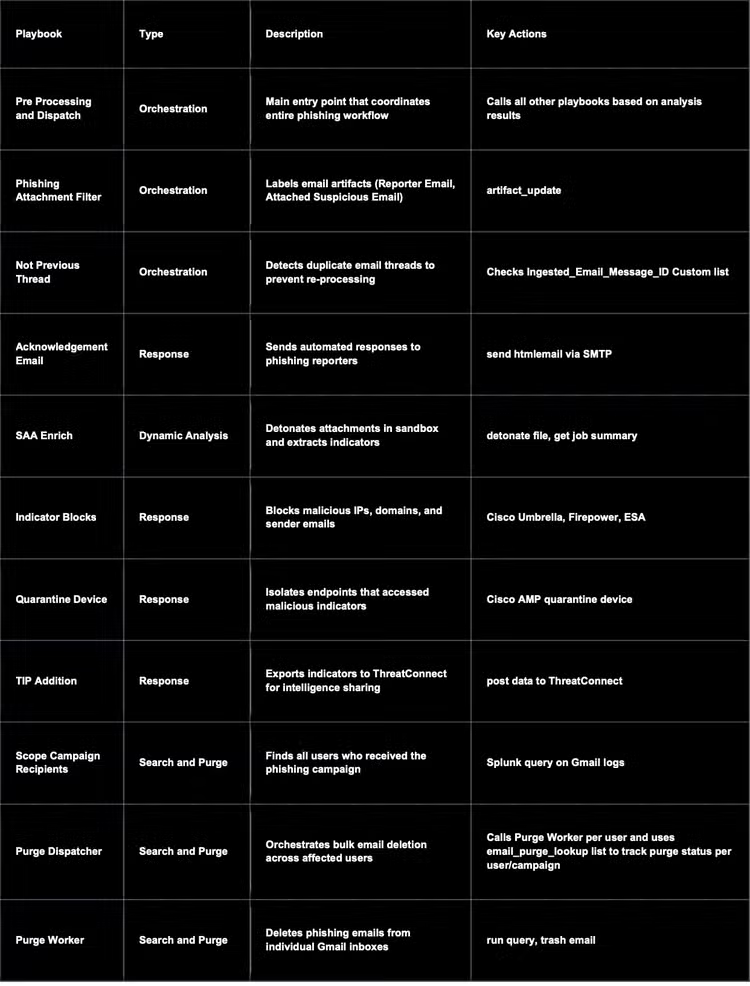
This workflow is orchestrated by a parent playbook, Pre Processing and Dispatch, that manages ten child playbooks:
- Phishing Attachment Filter
- Not Previous Threat
- Acknowledgement Email
- SAA Enrich
- Scope Campaign Recipients
- Indicator Blocks
- Quarantine Device
- Purge Dispatcher
- Purge Worker
- TIP Addition
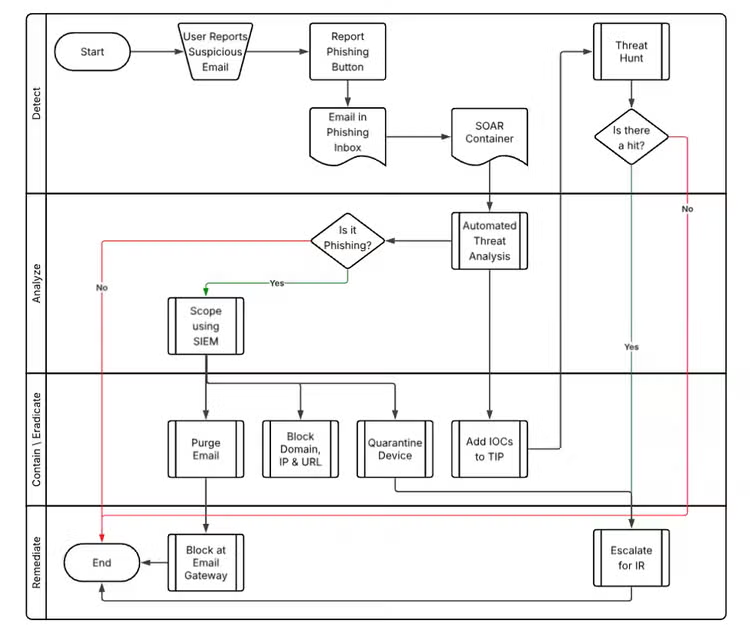
Together, they cover the full threat detection, investigations, and response lifecycle—from the initial user-submitted email to final containment. The suite of playbooks is modular, so you can use the whole workflow or just the pieces that fill gaps in your current process. Here’s how they work together within the full workflow:
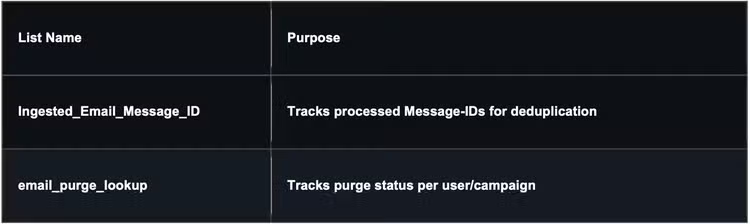
- Intake and deduplication: Users forward suspicious emails to a central reporting mailbox. SOAR polls that mailbox and creates an investigation container for each submission. The Pre Processing and Dispatch playbook is the entry point for the workflow. Phishing Attachment Filter separates the reporter's email from the attached suspicious email, and Not Previous Thread checks each Message-ID against a custom list so the same thread is never processed twice.
- Reporter acknowledgement: The Acknowledgement Email playbook tells the user their report was received and keeps them informed as the investigation moves forward. Users who get a response are more likely to report suspicious emails again.
- Detonation and enrichment: SAA Enrich submits attachments and URLs for sandboxed dynamic analysis, gets the results, and extracts indicators of compromise (IOCs). In ES, customers can run this step through Automated Threat Analysis, the built-in detonation capability, and enrich the results with external threat intelligence such as Cisco Talos.
- Campaign scoping: Scope Campaign Recipients uses SOAR's integration with Splunk ES to run SPL queries against email logs and other telemetry. It answers two questions: "Who else received this email?" and "Did anyone interact with its indicators?" SOAR makes the decisions, and ES supplies the data those decisions are based on.
- Containment: Indicator Blocks sends malicious IPs, domains, and sender addresses to Cisco Umbrella, Cisco Secure Firewall, and Cisco Secure Email. Quarantine Device isolates any endpoint that accessed a malicious indicator through Cisco Secure Endpoint.
- Search and purge: Purge Dispatcher starts a Purge Worker run for each affected user, and each worker removes the phishing email from that user's inbox. A custom list tracks purge status for each user and campaign, so bulk remediation can be audited and resumed if interrupted.
- Threat intelligence sharing: TIP Addition sends confirmed IOCs to a threat intelligence platform. Those IOCs improve upstream detections in ES and give threat hunters a starting point.
Pairing Playbooks With Response Plans
Although this workflow emphasizes automation, we know that not every phishing report can be closed without a person looking at it. Response plans in Splunk ES give analysts a consistent structure for the cases that need human judgment.
A phishing response plan might include phases for triage, scoping, containment, eradication, and user notification. You can attach the playbooks to the matching tasks in the response plan so analysts run them directly from the investigation. For example, an analyst reviewing a borderline detonation result can run Scope Campaign Recipients from the scoping phase. Once the threat is confirmed, they can move to containment and run Indicator Blocks and Quarantine Device.
This allows you to use the same workflow for both fully automated phishing responses as well as those that require a human in the loop: You can deploy the playbooks to automatically resolve high-volume, clear-cut submissions, or you can integrate them into response plans to ensure escalated cases follow the same steps, in the same order, with every action recorded in the investigation.
Adapting the Workflow to Your Environment
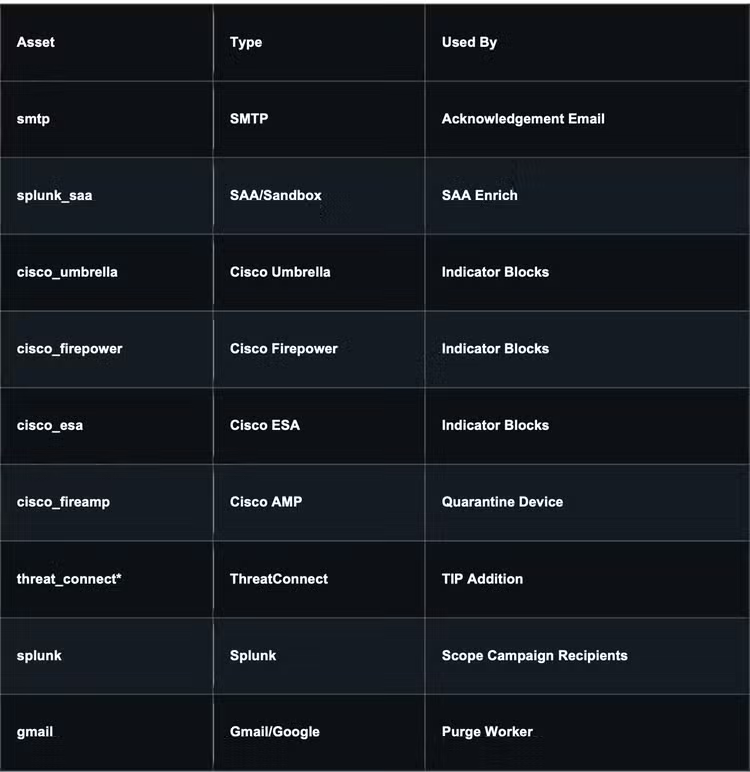
The playbooks already have integrations associated with them as an example, but each integration uses a named asset that you can swap for your own. For example, the sample purge playbooks target Gmail, but you can replace it with a Microsoft 365 or Exchange connector. The asset, custom list, and custom function tables at the end of this post list everything you need to configure.
Plus, because playbook outcomes and investigation data live in Splunk ES, you can build dashboards to track the workflow over time: how many reports are resolved automatically versus escalated, how long each stage takes, and where tuning would help most.
The Impact: Before and After Automation
Splunk’s Global Security Organization has used this workflow ourselves to streamline phishing response so we can spend less time on repetitive phishing investigation tasks and scale to support the volume of user-reported emails. With this, we've seen:
- Significant reduction in MTTR: Phishing emails are analyzed and contained within minutes, not hours. Previously, we were spending on average about 25 minutes on each email; now, it’s down to under 7 minutes—resulting in a 72% decrease in MTTR.
- Increased analyst efficiency: Our analysts are freed from the mundane, allowing them to focus on high-value activities like threat hunting, complex investigations, and strategic security initiatives.
- Improved accuracy: The consistent, automated analysis reduces human error and ensures every reported email receives the same rigorous scrutiny. We’ve had almost 0 false positives since implementing this workflow.
This approach has not only allowed us to enhance our security posture, but it also serves as a testament to the power of automation in modern cybersecurity.
Ready To Implement Advanced, Automated Phishing Response?
Building a world-class security program requires embracing automation and leveraging integrated solutions. With the right tools and a strategic approach, you can turn the tide against even the most pervasive threats, including phishing.
You can find the complete list of playbooks, connectors, and custom functions that power this workflow below. To access the content for implementation, go to either:
- GitHub: Browse or download them here.
- Your SOAR instance: On the Playbooks page (https://<instance_id>.soar.splunkcloud.com/playbooks), update the community repository from Source Control to pull in the latest playbooks.
List of Playbooks, Connectors, and Custom Functions
All content targets Python 3.13 and Splunk SOAR 8.4+.
Playbooks
Asset Requirements
Custom Lists Required
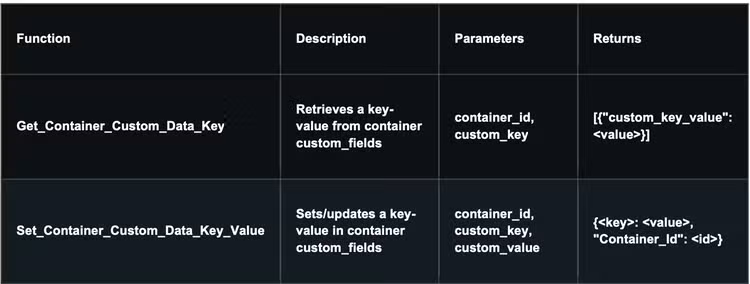
Custom Functions
Related Articles
Unlocking Endpoint Network Security Insights with Cisco Network Visibility Module (NVM) and Splunk
What We Learned Building Agentic SOCs at the Toughest Live Events