Plan Maintenance Your Way
Platform Aanchal WadhwaniKey takeaways
- Choose maintenance windows that fit your schedule, giving your team more control over when planned updates happen.
- Combine preferred maintenance windows with change freezes to better plan around business-critical events and reduce disruptions.
- Manage maintenance preferences through self-service tools, making planned updates more predictable while allowing for urgent security updates when needed.
Maintenance is an important part of keeping your Splunk Cloud Platform environment secure, reliable, and up to date. But we know timing matters. Your teams plan around business-critical events, peak usage periods, product launches, quarter-end activities, and other moments when predictability is essential.
Splunk Cloud Platform customers already have self-service change freeze capabilities in Cloud Monitoring Console (CMC) and Admin Config Service (ACS), making it easier to request periods when planned changes should be avoided during critical business moments.
Now, we’re expanding that self-service control with the launch of preferred maintenance windows, generally available for Splunk Cloud Platform customers, including FedRAMP Moderate customers in AWS GovCloud (US) regions. With self-service preferred maintenance windows, cloud admins can define and manage when planned maintenance works best for their organization. This gives teams more control over maintenance schedules and helps make maintenance a more predictable experience in Splunk Cloud Platform.
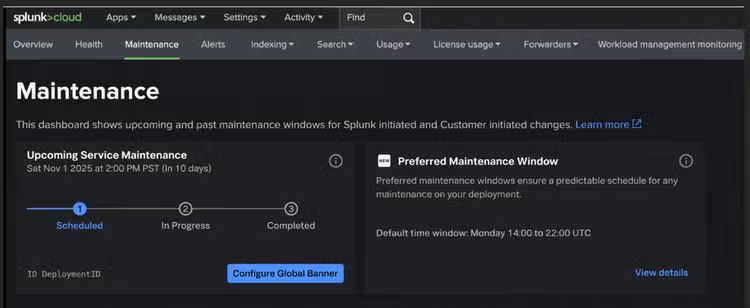
Preferred maintenance windows can be reviewed and managed from the Maintenance dashboard in Cloud Monitoring Console.
Each eligible stack will have a default 8-hour weekly preferred maintenance window, selected during regional off-peak hours. Admins can keep that default or choose another available day and time that better fits their organization’s needs. For most customers, this should be a near-one-time setup activity, after which Splunk will use them when scheduling planned maintenance whenever possible. And while the preferred window is 8 hours, the actual maintenance may often be shorter. Admins can also manage flexibility. By default, Splunk may use the same window on other days when needed. Customers can opt out of that flexibility or limit it to specific days. Provide additional preferred times for smaller-impact customer requested changes, so updates can be delivered sooner. There may still be cases where maintenance needs to occur outside a preferred window or during a requested freeze period, such as emergency maintenance or critical security updates. When those situations arise, Splunk will communicate as early as possible.
This launch is another step toward giving Splunk Cloud Platform customers more visibility, more control and a smoother cloud operations experience. Together, change freeze and preferred maintenance windows give Splunk Cloud Platform customers a stronger self-service toolkit for maintenance planning. Use change freeze to identify critical periods when planned changes should be avoided. Use preferred maintenance windows to define the times that work best for changes that require downtime.
Related Articles

Staff Picks for Splunk Security Reading May 2024
Detecting Typosquatting, Phishing, and Corporate Espionage with Enterprise Security Content Update