Meet Your New Agentic Teammate with Splunk AI Assistant 2.0
Platform Coty SuggKey takeaways
- Splunk AI Assistant 2.0 acts like a digital teammate, helping users analyze data, solve problems, and work more efficiently.
- New features like Agent Mode allow the AI to take actions on a user’s behalf, while still keeping humans in control with approvals and customization.
- Overall, the update makes it easier for teams to work faster, use their own knowledge, and improve how they manage and respond to issues.
The Splunk team is excited to announce the latest release for Splunk AI Assistant. Formerly known as the Splunk AI Assistant for SPL, our new and improved 2.0 release expands the capabilities and features introduced in previous versions and continues to bring further agentic enhancements to help your team work smarter and not harder.
Splunk AI Assistant is our agentic AI-powered user experience that is designed to enhance productivity, effectiveness, and overall digital resilience with the full power of the Splunk Platform. Think of Splunk AI Assistant as your digital teammate, designed to help you work through complex requests all while providing the relevant context, reasoning, and recommendations to help you reduce your mean time to resolution all within the AI Assistant app.
Let’s dive into some of the new features in Splunk AI Assistant 2.0.
Agent Mode
The marquee feature for our 2.0 release is the introduction of Agent Mode, which expands the capabilities of Splunk AI Assistant to take actions on behalf of the user with a wider set of tools and skills. With Agent Mode enabled, users will be able to enter a prompt, and Splunk AI assistant will then reason through it by decomposing it into a list of parallel tools and skill calls. This includes things like running event scans, discovering existing content like dashboards, and executing searches within the assistant with summarized findings. This list will keep growing as we need more capabilities, without our customers needing to update the app. In the event of something like a tool call to execute a search, before acting, Splunk AI Assistant will issue an approval message where the user will have to approve or deny the request. While we value the positive impact and efficiency that agentic features like this can offer our users, we also highly value the importance of the human-in-the-loop component and want our admins and users to still have a say in how actions are performed.
When booting up Splunk AI Assistant after the 2.0 update, administrators will see a prompt informing them about what Agent Mode is, requirements for enabling it, and giving them the option to enable or disable it. We do not turn on Agent Mode without explicit admin consent, and we provide administrators with the ability to enable or disable the mode in the future from the settings tab. With the release of Splunk AI Assistant 2.1, Cloud Connected users will be able to use Agent Mode in supported regions.
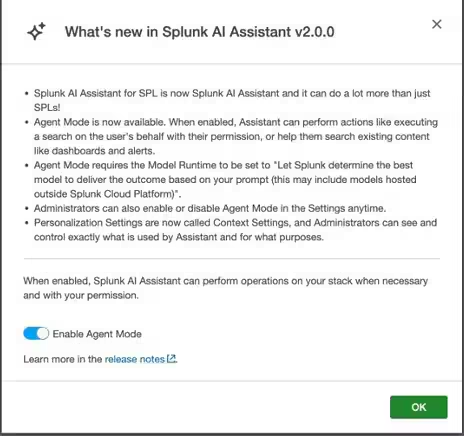
SAIA 2.0 Agent Mode Notice
Check out the investigative power Agent Mode in action:
Model Runtime Updates
This release also features a small adjustment to the Model Runtime choices. By default, the Model Runtime will be set to Allow Splunk to determine the best model to deliver the outcome based on the prompts provided, which would allow for the use of models hosted outside of Splunk Cloud Platform. Any AI inferencing done via this method is also still free. Users will also still have the option to limit the model to only use Splunk-hosted models; however, doing so will disable the ability to use Agent Mode.
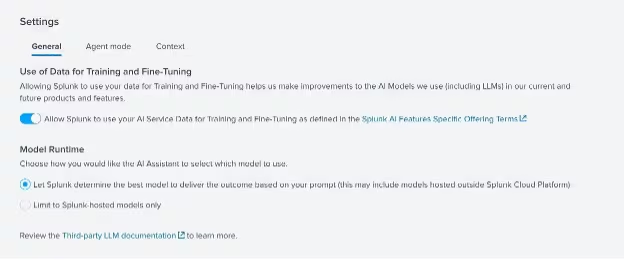
Model Runtime Default
Context Settings
Previously known as the Personalization tab in the Settings menu, Context Settings provides you with even more ways to customize your experience. Context Settings provides users with more control and visibility into the data that is collected from their deployment and allows them to toggle certain collection options for things like index and sourcetype metadata, user search logs, and knowledge objects. Data collected as part of this setting is not personal data and is purely contextual metadata from the user’s environment.
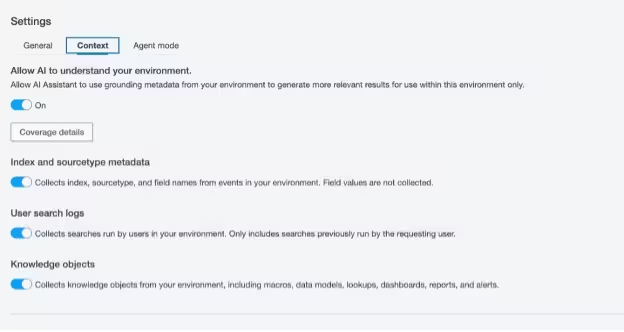
Context Settings
Teach AI Beta
In addition to Agent Mode, this release also introduces a new beta feature called Teach AI. When Agent Mode is enabled, administrators will be able to bring in their own custom organization know-how, best practices, and data catalog into AI Assistant to make it work better for their environment. Administrators will also have the ability to add guardrails for this feature, by highlighting specific values like data sources, indexes, sourcetypes, owners, tags, etc. that they want to include in markdown file. We would love to hear feedback from any administrators that try out this beta feature via over on the Voice of the Customer Portal.
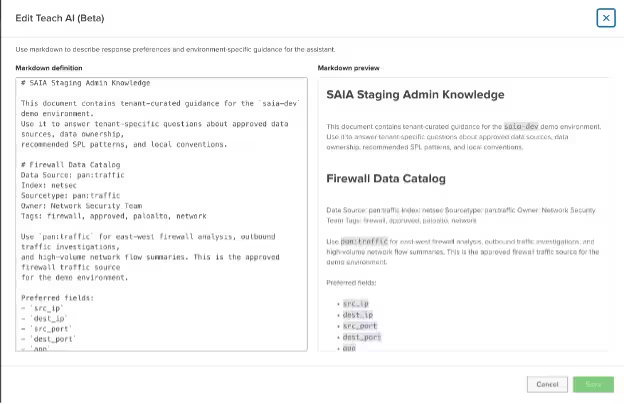
Teach AI Beta
FedRAMP Expansion
We’re very excited to announce that Splunk AI Assistant is now available in FedRAMP IL2. Users that have FedRAMP IL2 deployments will have the use of Data for Training and Fine-Tuning turned off. Additionally, Model Runtime will be fixed to Splunk-hosted models only, and Agent Mode will not be available.
Our team is excited for this next phase of Splunk AI Assistant’s development and growth, and we’re looking forward to hearing what our users think as well. If you haven’t tried using Splunk AI Assistant, then what are you waiting for? Go and give it a download and let us know about your experience. Be sure to also check out the full release notes for AI Assistant 2.0 for more information. We’ve got plenty of exciting developments and updates on the way for Splunk AI Assistant as well as our other AI experiences so be sure to tune into upcoming events like Cisco Live and keep your eyes peeled here on our blog for the latest and greatest from the Splunk AI team.
Related Articles

Atlassian Confluence Vulnerability CVE-2022-26134

Splunk Security Content for Threat Detection & Response: December Recap