Enhancements To Ingest Actions Improve Usability and Expand Searchability Wherever Your Data Lives
Splunk is happy to announce improvements to Ingest Actions in Splunk Enterprise 9.1 and the most recent Splunk Cloud Platform releases which enhance its performance and usability. We’ve seen amazing growth in the usage of Ingest Actions over the last 12 months and remain committed to prioritizing customer requests to better serve cost-saving, auditing, compliance, security and role-based access control (RBAC) use cases.
Usability Enhancements
As you may know, Ingest Actions is readily deployable to both the indexing and heavyweight forwarding (HWF) tiers in Splunk Enterprise and Splunk Cloud Platform. Because Ingest Actions rulesets are able to operate on parsed data, hybrid customers can deploy rulesets to a customer-managed HWF tier while also deploying a separate set of rulesets in their Splunk Cloud Platform environments to satisfy use cases that may involve different Splunk Admins. This greatly increases platform flexibility across an organization’s business units.
Previously, authoring rulesets on the deployment server (DS) to deploy to HWFs required working with static data. To help improve your efficiency, Ingest Actions now offers a ‘live capture’ capability so you can preview a snapshot of live data that’s flowing through deployment clients (i.e. HWFs), enabling a more seamless authoring experience. ‘Live capture’ also provides a more accurate indication of what your rulesets will actually do, especially when you have existing props and transforms. In these specific instances, this view is more intuitive than the existing ‘Indexed Data’ capability, which while performant, may be sometimes confusing if you’re unaware of your environment’s transformations (e.g. TAs).

Figure 1: On the deployment server, live capture can now be used to preview data streaming through your heavyweight forwarders. This can also be used on standalone Splunk Enterprise instances. Note that this feature is only available on Splunk Enterprise 9.1+ versions.
Ruleset Authoring
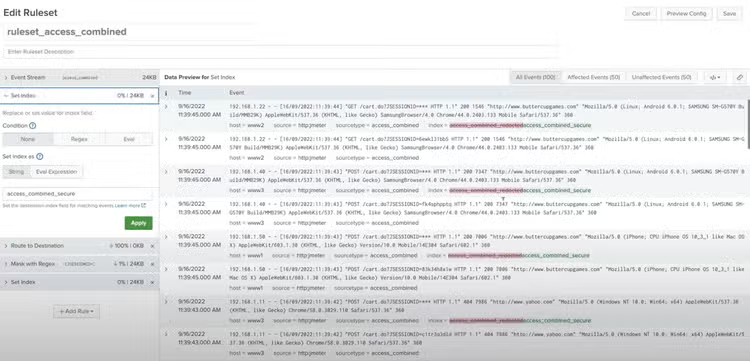
One of our release updates following last year’s general availability launch included the ‘set index’ capability which allows you to dynamically route data to different indexes. With that, you can set or replace the index field based on the data stream’s sourcetype by regex or eval statement. The index name itself can be a static string, or dynamically defined by another set of evals, so you’ve got tons of flexibility to write the rule(s) that you need. Check out this Tech Talk to view a full demo of this capability.
Expanded Access to Searchable Data
We’ve expanded options for routing to multiple S3 buckets, where previously, only one S3 bucket could be configured as your destination. Now you can route data to a maximum of eight (8) S3 buckets, giving you even more flexibility and choice in where you want to store your data.
Not only will it be easier to route select data to S3, but with the upcoming Q3 release of Splunk Federated Search for Amazon S3 , it'll be even easier to search that data without having to ingest it back into Splunk. In anticipation of that release, we’ve enabled several partitioning options to better organize your data and to optimize the performance of your federated searches. Additionally, we added more formatting options like new-line delimited json (the new default for new S3 destinations) and _raw output to give you more flexibility on how you want the exact output to look.
Important Note: When you upgrade to Splunk Enterprise 9.1 or Splunk Cloud 9.0.2303, it is recommended that you create new S3 destinations and configure Ingest Actions to write to that new location with the new default output format "New line delimited JSON”. This is an improvement over prior versions of platform settings where the output format of any existing S3 destinations was a single JSON array as a single file, with all JSON objects divided by commas. This previous legacy format requires manual workarounds for downstream consumption with Federated Search for Amazon S3, so save yourself some effort by upgrading today.
Finally in Splunk Cloud Platform 9.0.2305, to enable write-to-S3 while satisfying your internal security policies, we’re releasing KMS encryption for Splunk Cloud Platform customers via cross-account Identity Access Management (IAM.) This allows you to establish an explicit Trust Relationship between Splunk Cloud’s IAM and your customer-managed IAM. In this way, Splunk Cloud is granted permissions to write to your customer-managed S3 bucket and write encrypted objects to that bucket safely with your KMS Key. You’ll still have the flexibility to use resource-policy-based SSE-S3 encryption (existing functionality) if that’s all you require.
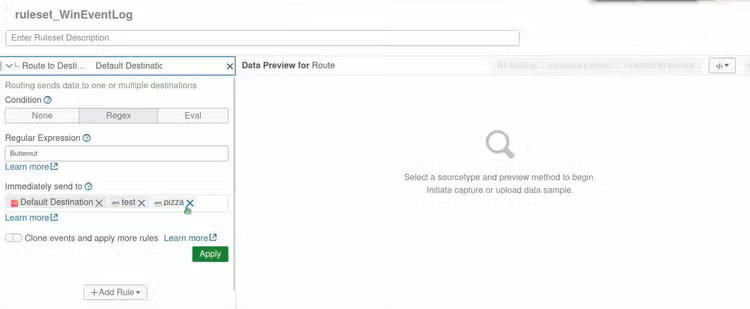
Figure 3: Select multiple S3 buckets in the “Route to Destination” rule after configuring multiple S3 destinations. Note that this feature is available on both Splunk Enterprise 9.1 and Splunk Cloud Platform 9.0.2303+ versions.
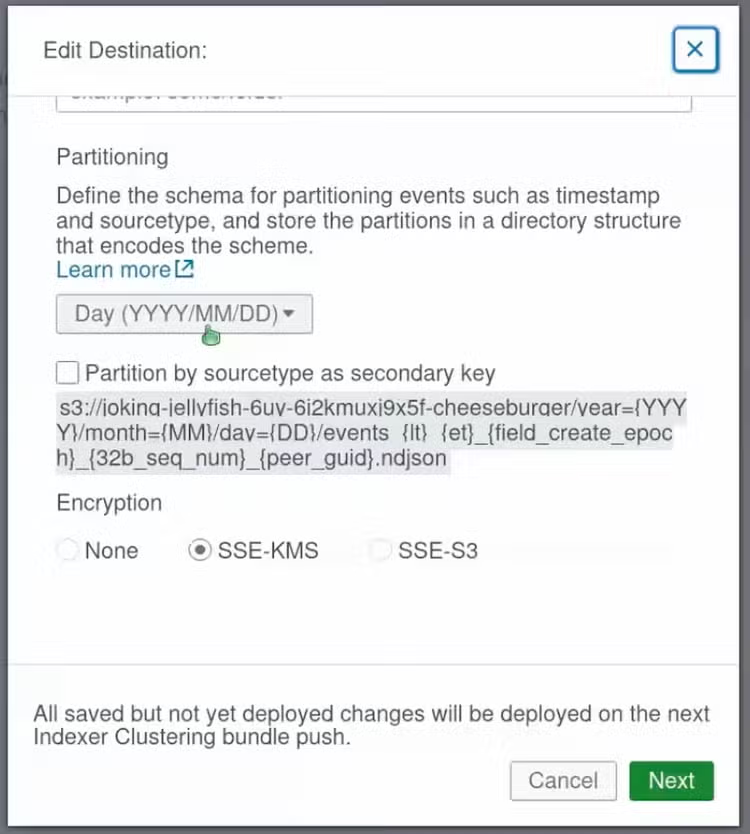
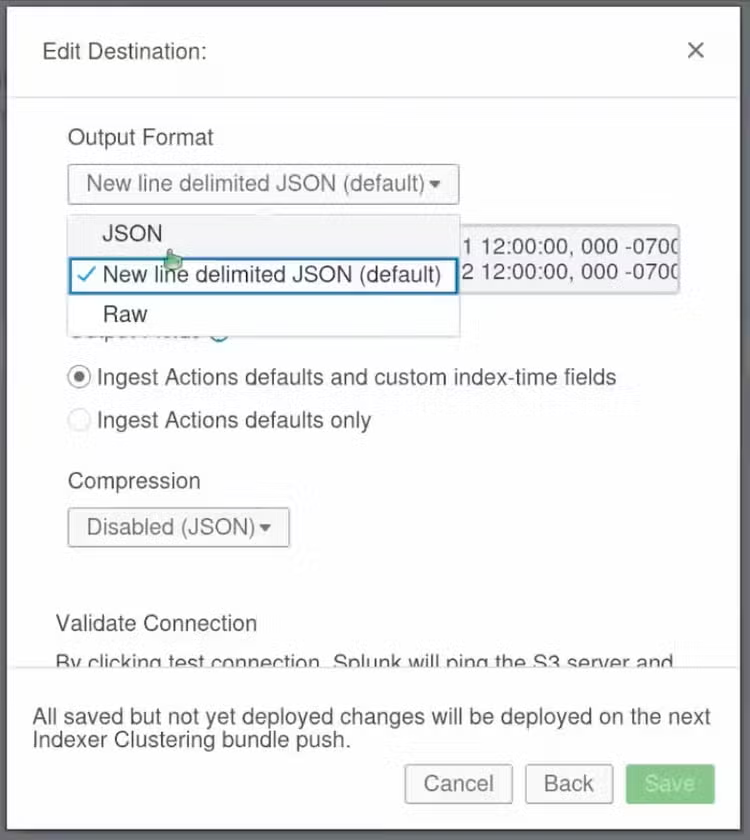
Figures 4 (L) and 5 (R): In the S3 Destination modal, select Year, Month, or Day as a primary and/or sourcetype as a secondary partition. Then, choose from a list of different output formats to suit your needs. Note that these features are available on both Splunk Enterprise 9.1 and Splunk Cloud Platform 9.0.2303+ versions.
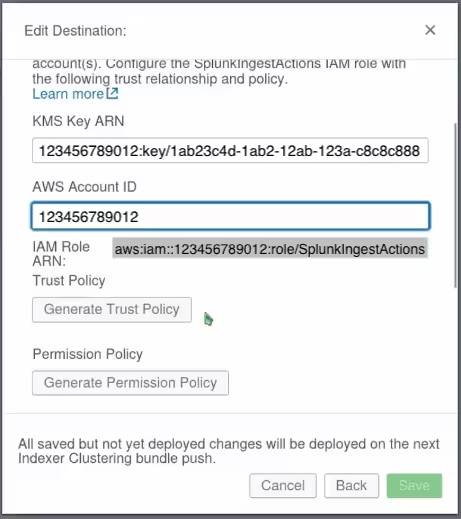
Figure 6: Configure KMS encryption directly in the Splunk Cloud S3 destination modal. Note that this KMS encryption feature is only available on Splunk Cloud Platform 9.0.2305+ versions.
Need a refresh on other Ingest Actions capabilities? Read about these amazing Ingest Actions features from our first release in Splunk Enterprise 9.0.
Here’s a list of other helpful resources to get you started today:
- Sampling data with Ingest Actions for data reduction
- Using ingest actions with source types that are renamed with props and transforms
- Throughput of Splunk Ingest Actions with Regular Expressions: Best Practices
I hope you try out all of these new Ingest Actions capabilities and let me know about your experience. As always, please submit any feedback or new requests. Thanks for reading!
Related Articles

Greater Self-Service Private Apps on Cloud with New AppInspect Tags
Splunking F1: Part Two