Dashboard Studio: What's New in Splunk 10.4
Platform Lizzy LiKey takeaways
- Splunk 10.4 adds smarter dashboards with customizable visualizations, faster charts, and easier tools to manage and debug data insights.
- New dashboard features like Network Graphs and cascading filters help teams better visualize connections and explore data more efficiently.
- Updated admin controls improve dashboard performance and security by giving organizations more control over resource-heavy dashboards.
In Splunk Cloud Platform 10.4.2604 and Splunk Enterprise 10.4, you have unlimited visualizations choices with the new custom visualizations framework. You can also view all your tokens in one place with the Token Manager and we have added new admin controls for dashboards resource management. Dive in to explore the latest innovations, exciting updates, and new ways to get even more value from your data.
Custom Visualizations Framework
In Splunk Cloud Platform 10.1.2507 and Splunk Enterprise 10.2, we introduced the ability to render your legacy Classic custom visualizations in Dashboard Studio. In this latest Splunk Cloud Platform 10.4.2604 and Splunk Enterprise 10.4 release, we are introducing a new custom visualizations framework which will be the standard going forward.
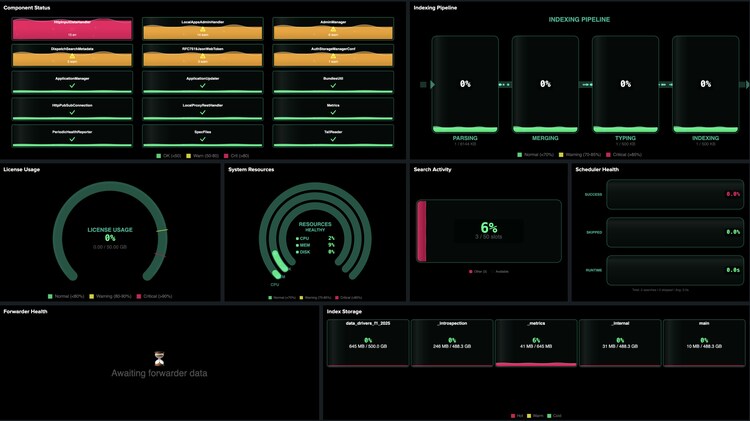
This new framework gives you flexibility to develop custom visualizations in any JavaScript library, not limiting you to Backbone. This new framework also runs custom visualizations in a sandbox, providing heightened security. To get started, check out our custom visualization developer documentation which will provide the steps you need to get started.
Network Graph Visualization
We’ve also added a Network Graph visualization which can help you represent relationships and connections between entities, such as network topologies, service dependencies, or communication flows.
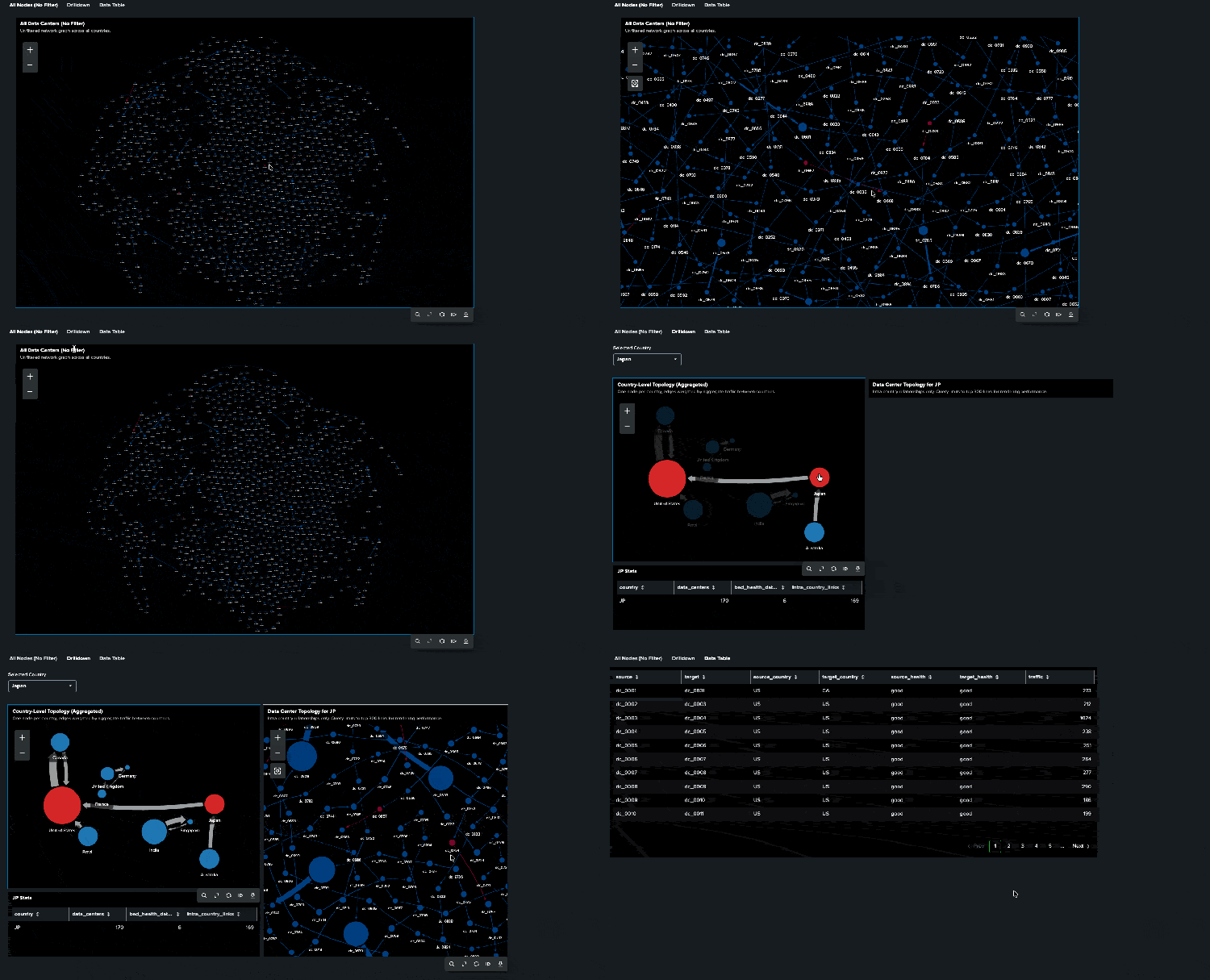
You can specify icons to use in each node, and dynamically change the colors and sizes of the nodes and links based on the data. The graph supports 4 layouts: grid, hierarchical, force-directed, and preset. Learn more about the data structure and options for Network Graph in our documentation.
Accelerated Render Mode for Line Charts
If you’re creating dashboards with 1000s of data points, you’ll like this one. We’re excited to share a new era of performance for Splunk visualizations! By enabling the line chart acceleratedRender option, the chart will optimize rendering for large time-series datasets. This means faster initial render time and interaction responsiveness.

Some features may behave differently in the accelerated render mode compared to the default mode. These differences are intentional and allow the chart to prioritize performance while maintaining functionality. Accelerated render will come next for area and column charts.
Token Manager
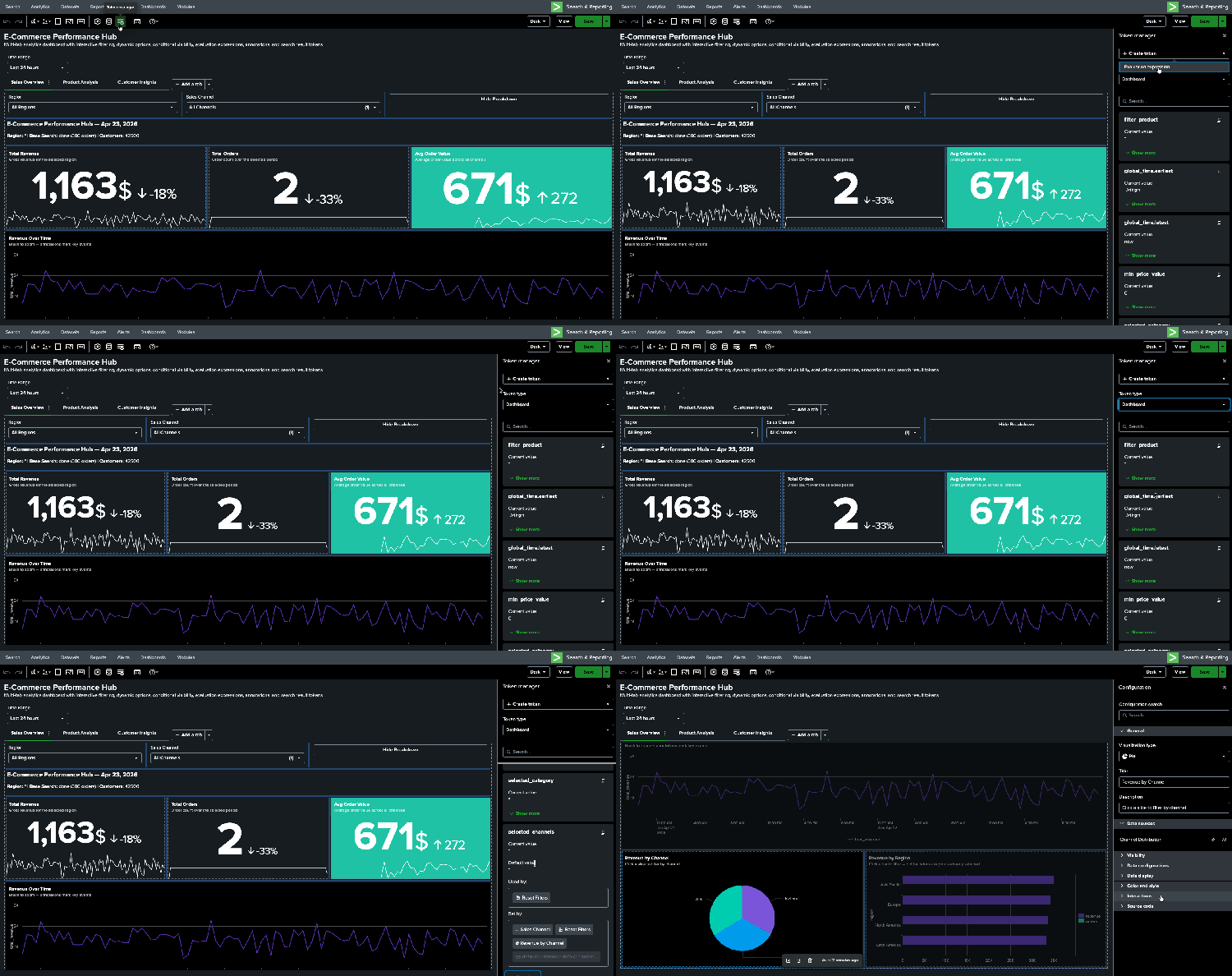
If you've spent time building complex dashboards with tokens, you know how tricky it can be to keep track of which tokens exist, what their current values are, and where they're being set or used. The new Token Manager gives you a centralized place to see and manage all of this.
In Token Manager, you can view all tokens in your dashboard along with their real-time values and defaults. Tokens are grouped by type (namespace)—dashboard, search, environment, and expression— so you can quickly find what you're looking for.
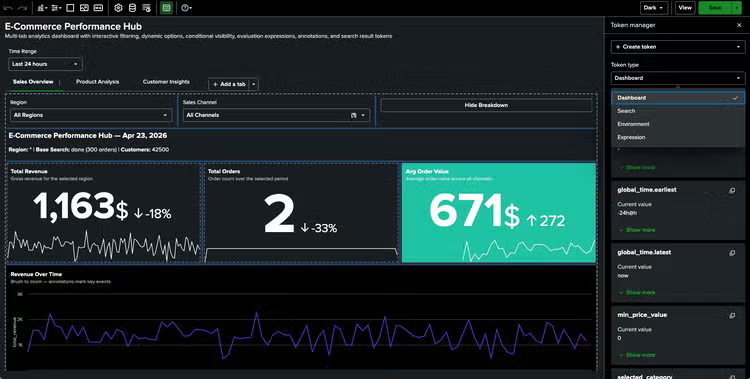
But we didn't stop at visibility. You can also trace where each token is set and used, making it much easier to debug unexpected behavior. Need to navigate to the specific menu where a token's event handler is configured? Token Manager takes you there directly. You can also reset all or selected tokens back to their default values and create token evaluation expressions in the UI.
Cascading Input Option for Dropdown and Multiselect Inputs
Make your dashboards more dynamic by leveraging cascading inputs! This feature automatically resets input values when token dependencies exist in menu values powered by a search. A common use case is filtering first for a continent, then for a country, and finally for a city.

When activating this option for a dropdown or multiselect input, its value resets back to the default selection when a token in its data source changes. For example, if the input data source is index=_internal user=$name$ | stats count by sourcetype and $name$ changes, the input selection reverts to the input default value. This feature helps avoid displaying stale token selections and "no results" errors.
Dashboard Resource Management
We've heard from many admins that managing dashboard resource consumption can be challenging, especially when resource-intensive dashboards are left open with frequent auto-refresh schedules. In Splunk Cloud Platform 10.4.2604 and Splunk Enterprise 10.4, we've introduced two new admin controls to help.
First, there's a new capability called `auto_refresh_dashboards` to gate auto-refresh on both Classic and Studio dashboards. If a user has the capability, dashboards will continue to refresh on schedule as expected. If they don't, the dashboard will load initially but won't auto-refresh. This gives admins a straightforward way to control who can run auto-refreshing dashboards, which is especially useful for managing resource consumption across large deployments.
Note that `auto_refresh_dashboards` capability is only given to admin and sc_admin roles by default, so admins will need to grant this capability to users who require auto refreshing dashboards.
Second, admins can now disable dashboards (both Classic and Dashboard Studio). Previously, if an admin needed to block access to a problematic dashboard, they had to go through a roundabout process of transferring ownership, restricting sharing, fixing the issue, and then restoring everything. Now, admins can simply disable a dashboard to block UI access for all users, then re-enable them once the issue is resolved.
Together, these controls give better control over resource-intensive dashboards.
Coming Soon
Check out Dashboard Studio and send in your feedback through Splunk Ideas, and you might see your feature request listed on a future blog's "coming soon" list! We are continuing to work on new capabilities, which are delivered incrementally with Splunk Cloud Platform and Splunk Enterprise releases.
Next Up….
- Conversion improvements
- Accelerated render mode for area and column charts
- Rich text editor
- Sort by for trellis
- Dynamic table height
Helpful Resources
- Dashboard Studio demo
- Dashboard Studio Blogs - Catch up on our other recent updates with Studio
- Dashboard Studio Tutorial
- Improving Dashboard Performance and Resource Usage Tech Talk
- Splunk Dashboard Studio Documentation
- Splunk Ideas - Dashboard Studio for feature or enhancement Requests
- Examples Hub - Find the Examples Hub from the Dashboards page in Search & Reporting
- Splunk Community - Dashboards & Visualizations for questions
This information is subject to change at any time, at the sole discretion of Splunk Inc. and without notice. This roadmap information shall not be incorporated into any contract or other commitment. Splunk undertakes no obligation to either develop or deliver any product, features, or functionality described here.
Related Articles
Deploy, Test, Monitor: Mastering Microsoft AppLocker, Part 1
Advanced Link Analysis, Part 3 - Visualizing Trillion Events, One Insight at a Time