Stop Guessing Your Kubernetes Resources: Why Workload Optimization Matters More Than Ever
Observability Hemant SethKey takeaways
- Many Kubernetes teams overuse or underuse CPU and memory because resource settings are rarely updated, leading to wasted money or performance issues.
- Splunk’s Kubernetes Workload Optimization helps SRE and DevOps teams spot inefficiencies, prioritize risks, and understand which workloads need attention first.
- With clear recommendations for CPU and memory settings, teams can improve reliability, reduce costs, and run clusters more efficiently.
Kubernetes makes it easy to scale applications, but it also makes resource management harder than most teams expect. For SREs and DevOps teams, one question keeps coming up:
Are we actually using the right amount of CPU and memory for our workloads?
In most environments, the honest answer is, “We’re not sure.”
Problem Statement
Resource requests and limits are usually defined once during deployment and then rarely revisited. Over time, workloads change, traffic patterns shift, and those original assumptions no longer hold true.
This leads to two common situations:
- Overprovisioning - Teams allocate more CPU and memory than needed just to be safe. This wastes capacity and reduces overall cluster efficiency.
- Underprovisioning - Resources are too tight, leading to CPU throttling, OOM kills, and performance issues.
Both create real problems. One wastes infrastructure resulting is wasted $$$. The other hurts performance and reliability. Neither is sustainable.
Different Personas, Different Decisions
SREs and DevOps engineers look at optimization through different lenses, even though they rely on the same data.
For SREs: Optimize the Overall Footprint
SREs are responsible for the health and efficiency of the entire platform.
With workload optimization, they can:
- Spot overprovisioning trends across teams
- Reclaim unused capacity
- Improve cluster density and scheduling efficiency
- Make informed decisions about scaling infrastructure
For SREs, this is about improving the overall footprint and efficiency of the environment.
For DevOps Teams: Optimize Service Performance
DevOps teams focus on the services they own.
With the same insights, they can:
- Identify incorrect resource requests and limits
- Prevent performance issues caused by constraints
- Validate changes before rolling them out
- Tune services for consistent performance
For DevOps, this is about making sure their services run reliably without over- or under-allocating resources.
Common Real-World Use Cases
“Why is this service slow under load?”
CPU limits are too low, causing throttling even when there is available capacity.
Insight: Increase CPU limits based on actual usage.
“Why are our nodes underutilized?”
Too many workloads are overprovisioned.
Insight: Reduce resource requests safely.
“Why did this pod get OOM killed?”
Memory limits are too aggressive.
Insight: Adjust memory based on historical usage patterns.
Introducing Kubernetes Workload Optimization in Splunk Observability
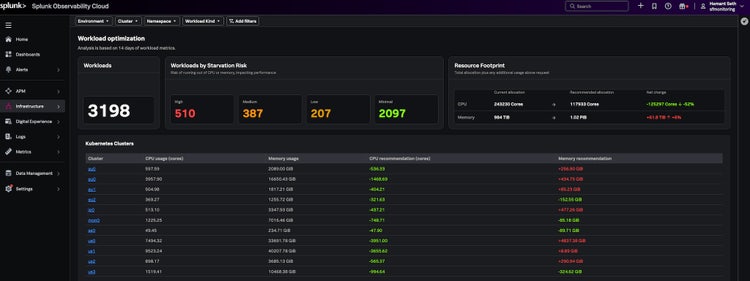
To help teams solve these problems, we’ve introduced Workload Optimization in our Kubernetes monitoring solution.
This feature goes beyond raw metrics and gives you clear, actionable insight into how your workloads use resources.
Focus on What Matters with Starvation Risk
Not all under provisioned workloads need immediate attention.
Workload Optimization introduces starvation risk categories so you can quickly see what matters most:
- High risk: Likely impacting performance right now
- Medium risk: Could cause issues under load
- Low risk: Safe for now but worth watching
This helps teams:
- Quickly identify critical workloads
- Prioritize work based on real impact
- Avoid getting distracted by low-value signals
Take Action with Precise Recommendations
It is not enough to know something is wrong. You need to know what to change.
Workload Optimization provides specific, data-driven recommendations, including:
- Suggested CPU and memory requests
- Suggested limits based on real usage
- Clear guidance on what to update in your deployment configuration
Instead of trial and error, teams can make targeted changes with confidence.
From Visibility to Action
Traditional monitoring shows you what is happening.
Workload optimization helps you decide what to do next.
By combining:
- Usage visibility
- Risk-based prioritization
- Clear recommendations
teams can move from simply observing problems to actually fixing them.
Why this Matters for your Team
Cost visibility is an important part of the bigger picture, but it starts with getting resource allocation right.
Workload Optimization gives SREs and DevOps teams:
- A clear view of inefficiencies
- A way to prioritize what matters
- Confidence to take action
If you are running Kubernetes at scale, resource optimization is no longer optional. It is essential.
Now you have the insight and guidance to do it right.
We’re excited for you to experience these updates and to hear your thoughts as we continue to evolve together. Starting April 2026, Kubernetes Workload Optimization was released as a Beta version in Splunk Observability. For more details or to sign up, visit VOC portal or contact your Splunk team.
Related Articles

The Agentic SOC Workforce: Defending at Machine Speed in the AI Era