Search Splunk, Collect Business Metrics, Export Telemetry Magic!
Observability Jeremy HicksKey takeaways
- Splunk's OpenTelemetry Collector now lets users run scheduled SPL searches to convert log data into shareable metrics, reducing search congestion and eliminating repetitive dashboard refreshes.
- This capability benefits a wide range of users, from admins managing multiple clusters to developers tracking business metrics, by consolidating data from legacy systems and modern apps into one unified view.
- Dynamic environment variable support lets teams customize searches per host or instance, making it easier to monitor specific infrastructure components without hardcoding values or rebuilding configurations.
Search Once, Share Observability
How are you generating and sharing complex business metrics today? Are users refreshing search-based event dashboards and causing search congestion? Are you writing glue code to scrape Splunk for the collected telemetry of disparate systems? What if you could output aggregated metrics from searches to a metric time series solution like Splunk Observability Cloud? Now you can with the Splunk Enterprise receiver in the OpenTelemetry Collector!
Splunk Enterprise users have from some time been able to leverage the OpenTelemetry Collector to monitor their Splunk deployment health with the receiver as detailed in our original announcement back in 2024. But now, the Splunk Enterprise receiver can run custom SPL searches directly from the collector!
Got a leading business indicator or aggregated business metric you want to track without multiple people running an expensive dashboard search? Run those searches on a schedule from the collector, and have users view the metrics in a real time chart within Splunk Observability Cloud! This clears up search head usage from concurrent searches but also provides quick historical viewing of values without having to crunch the data again.
Who Needs Aggregation Anyway?
You may be thinking: “But I’m an admin, I can make a data model and summary indexing!” which is great! But not all users have the keys to the kingdom and still want to aggregate metrics out of their logs. Some examples I’ve had the “pleasure” of experiencing include (oh no! A list! Start hunting for emdashes right?):
- Admins of multiple clusters needing a single pane of glass
- Application owners with dependencies consisting of primarily log based metric readings (mainframes, legacy services, etc)
- DevOps practitioners with little access to, or interest in learning, about data models or summary indexing
- Business value oriented developers who need aggregated metrics from sales, user interactions, inventory, or other disparate sources available along with more common APM and Infrastructure telemetry
Each of these types of users, and situations, are an example of aggregation from logs to metrics being useful as a scheduled occurrence. Boiling many logs and possible sources into a set of metric time series and dimensions means seeing just what you need to know, all in the same place.
Let’s take a look at a mainframe example that can impact application owners. In this case we are logging our data for our Customer Information Control System (CICS) and want to know the count of transactions, abnormal ends, and so on. This data will help us better understand the rest of our transaction flow and upstream impacts that application owners can’t control.
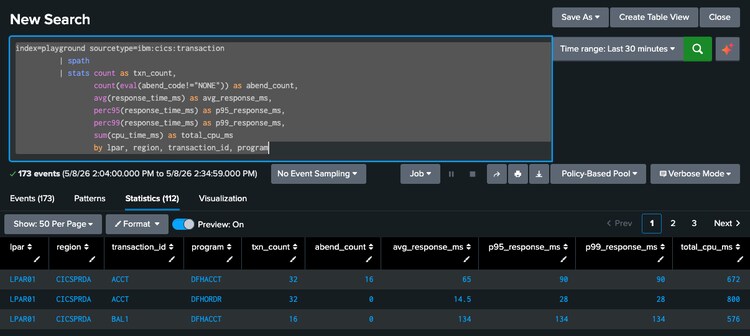
We then want to send these into metrics in Splunk Observability Cloud to understand abnormal end rates, SLIs, and so on based on the mainframe data along with our application data serving the rest of the user transaction flows. So let's see what a sample `splunkenterprise` receiver config could look like for this:
```

receivers:

  splunkenterprise:

    collection_interval: ${env:SPLUNK_COLLECTION_INTERVAL}

    search_head:

      auth:

        authenticator: basicauth/search_head

      endpoint: ${env:SPLUNK_ENDPOINT}

      timeout: 60s


    metrics:

      splunk.health:

        enabled: false


    searches:

      # CICS transaction throughput, abends, latency, CPU.

      - spl: |

          index=playground sourcetype=ibm:cics:transaction

          | spath

          | stats count as txn_count,

                  count(eval(abend_code!="NONE")) as abend_count,

                  avg(response_time_ms) as avg_response_ms,

                  perc95(response_time_ms) as p95_response_ms,

                  perc99(response_time_ms) as p99_response_ms,

                  sum(cpu_time_ms) as total_cpu_ms

                  by lpar, region, transaction_id, program

        target: search_head

        metrics:

          - metric_name: mainframe.cics.transactions.count

            value_column: txn_count

            attribute_columns: [lpar, region, transaction_id, program]

            unit: "{transactions}"

            description: "CICS transaction throughput"

          - metric_name: mainframe.cics.transactions.abends

            value_column: abend_count

            attribute_columns: [lpar, region, transaction_id, program]

            description: "CICS abnormally-ended transactions (user-impacting)"

          - metric_name: mainframe.cics.transactions.response_time.p99

            value_column: p99_response_ms

            value_type: double

            unit: "ms"

            attribute_columns: [lpar, region, transaction_id]

          - metric_name: mainframe.cics.transactions.cpu_time.total

            value_column: total_cpu_ms

            value_type: double

            unit: "ms"

            attribute_columns: [lpar, region, transaction_id]

            description: "CPU time consumed (drives MIPS billing)"


```
Here we’ve created metrics for transaction count, transaction abnormal ends, transaction response time (p99), and CPU time. And with that data in Splunk Observability Cloud we can easily do things like create an abnormal ends rate % as seen here:
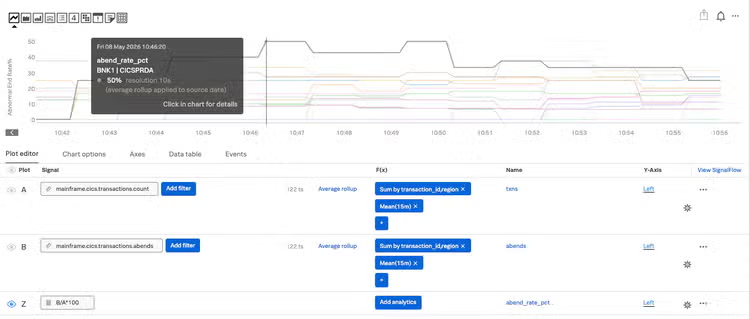
From here we can more easily correlate this information with issues we see in our microservices and other components of the transaction flow outside of the mainframe. This can save enormous amounts of developer / SRE time, when previously they may not have known about or had context of issues in the mainframe.
There is incredible value in bringing sources together into a single view. Regardless of if those sources cut across boundaries like mainframe/legacy software or combine different types of sources together into a single higher-level metric. The name of the game is consolidation!
Consolidation is how we reduce mental load. Trying to align behavior of multiple clusters, instances, or apps? You need to see all that data in one place! Using a complex set of telemetry and stats to create something like a “risk score” or “customer engagement metric?” Do it at the collector and send just the time series and attributes you need as metrics!
Interested in aggregation yet? You could be getting started right now with the splunkenterprise receiver in the OpenTelemetry Collector Contrib repo on Github!
Configuration Capabilities Continue!
But that’s not even all! This release includes a bonus!
When you’re monitoring Splunk Enterprise clusters on your own hardware you may need to gather metrics specific to your environment. Monitoring Console doesn’t know your usage patterns, so you’ve developed your own metrics. That’s incredible! But when you want to get that metric from a specific indexer, search head, or other Splunk instance today what do you have to do?
Create a search from the UI selecting by that specific host field right?
But a saved search may have a hard time knowing what host name is available in advance (should a new host appear or old one disappear for example). By templating the host into the SPL run by the Splunk Enterprise receiver, you’re effectively able to include the host specifics at search time. In our case we want to know the volume of data a specific indexer is seeing from various forwarders. Let's take a look at what a chunk of that `splunkenterprise` receiver config might look like:
      - spl: |

          index=_internal source=*metrics.log group=tcpin_connections host="${env:SPLUNK_INDEXER_HOSTNAME}"

          | stats sum(kb) as kb_in by sourceHost

        target: indexer

        metrics:

          - metric_name: splunk.self.forwarder.kb_in

            value_column: kb_in

            value_type: double

            unit: "KBy"

            attribute_columns: [sourceHost]

            description: "KB received by THIS indexer from each upstream forwarder"
With a config like this you can pass in any env var you like using the splunk-otel-collector and include it in your scheduled SPL search. That could mean search head, indexer, or other Splunk specific information, or even app identifiers or other useful fields that may be specific to a given set of data.
“So Now What? What’s the Score Here?”
Are you ready to get started operationalizing all that data you’ve been storing away for a rainy day without breaking the bank on repeated dashboard refreshes and wildly inefficient repeated user searches? The power is yours!
Start with the easy stuff. What are you always having to review with SPL? Could that be a metric? With the splunkenterprise receiver in the Splunk OpenTelemetry Collector you can start turning aggregation into action!
You can sign up to start a free trial of the Splunk Observability Cloud suite of products today!”
This blog post was authored by Jeremy Hicks, Staff Software Doing Stuff Person at Splunk with special thanks to: Sam Halpern, Antoine Toulme, Sean Marciniak.
Related Articles

Enter the SOC of the Future in Splunk’s State of Security 2025

Hunting for Detections in Attack Data with Machine Learning